Fraud detection with Sift
Sift is a fraud detection platform that leverages machine learning to detect suspicious patterns and prevent account-related fraud, such as account takeovers and fake account creation. By analyzing real-time data across its global network, Sift enhances security and helps businesses protect user trust while reducing fraud risks.
This guide explains how you can integrate Sift fraud detection to prevent fraudulent logins to your applications in Asgardeo.
Prerequisites
You need to have an already configured Sift environment and have access to the Sift console. Reach out to Sift to get started.
Configure Fraud Detection with Sift in Asgardeo
Fraud detection and Sift integration related configurations can be accessed by navigating as follows.
- On the Asgardeo Console, go to Login and Registration.
- Under Login Security, select Fraud Detection.
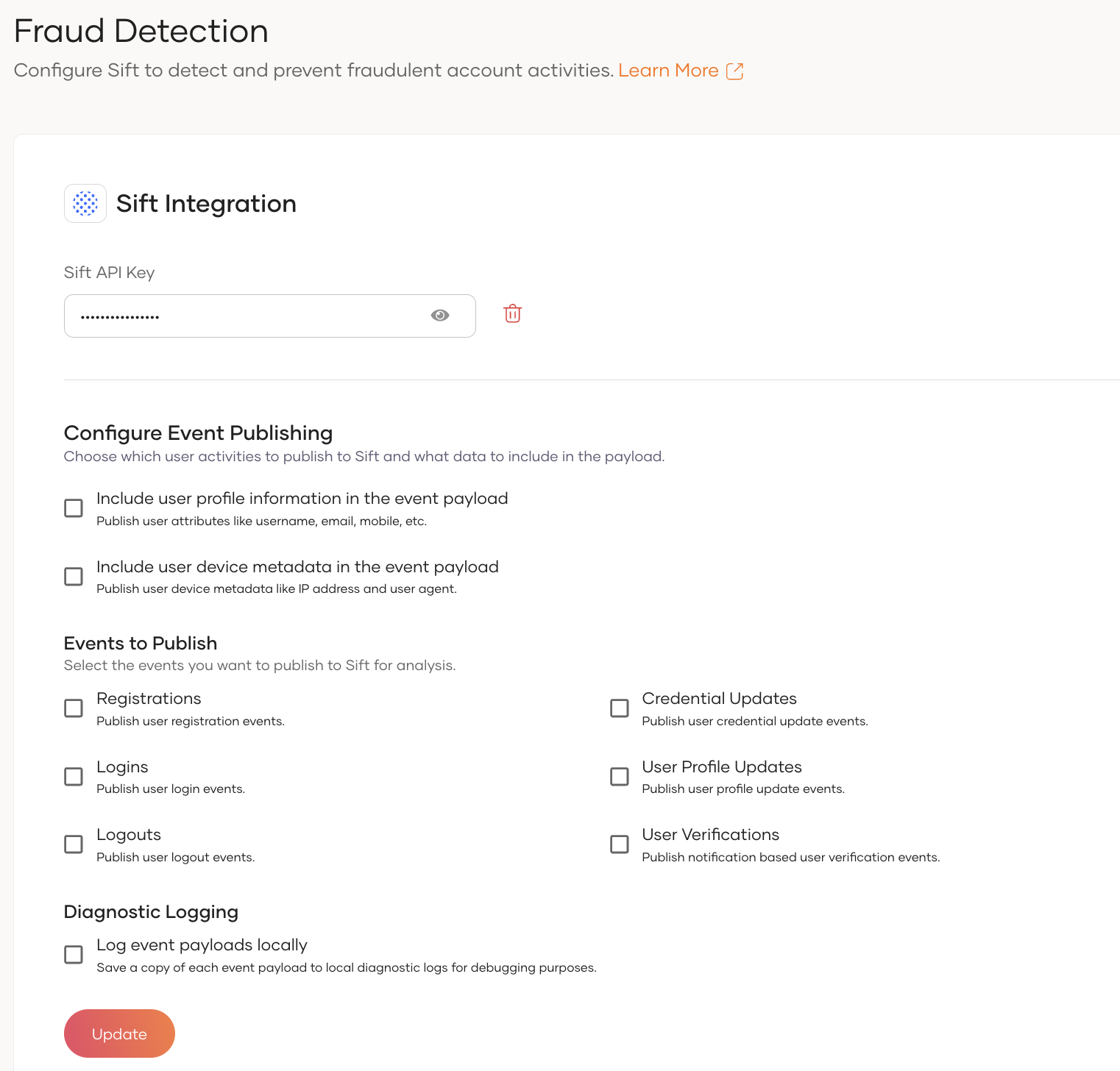
Configure Sift API key
After navigating to Fraud Detection section, provide the Sift API key retrived from your Sift platform and click Update.
Configure Fraud Detection related configurations
Asgardeo provides options to modify the event payloads sent to the Fraud Detection integration based on the requirements.
Information to be included in the event payload
- Enable the
Include user profile information in the event payloadoption to include user profile information such asemail,mobile, andnamein the event payload sent to Sift. - Enable the
Include user device metadata in the event payloadoption to include user device metadata such asIP addressandUser Agentin the event payload sent to Sift.
Events to Publish
Following are the events that can be published to Sift for fraud detection.
- Registrations - Enable this option to publish user registration events to Sift.
- Credential Updates - Enable this option to publish user credential update events to Sift.
- User Profile Updates - Enable this option to publish user profile update events to Sift.
- Logins - Enable this option to publish user login events to Sift.
- Logouts - Enable this option to publish user logout events to Sift.
- User Verifications - Enable this option to publish notification based user verification events to Sift.
Note
User Self Registration and Password Reset related Sift events are only publishing with legacy self registration and password recovery flows.
Diagnostic Logging
Enable the Log event payloads locally option to log the event payloads sent to the Sift as diagnostic logs in Asgardeo.
Fraud Detection invoking mechanisms
Asgardeo allows you to invoke Sift fraud detection through the following mechanisms.
- Event Publishing - Event Publishing approach allows to publish other user events such as registration, credential update, profile update, logout, and user verification events to Sift for fraud detection.
- Conditional Authentication - You can use Sift fraud detection in your conditional authentication scripts to make authentication decisions based on the risk score or workflow decision returned by Sift.
Sift Fraud Detection through Event Publishing
Asgardeo allows you to publish various user events to Sift for fraud detection using its Event Publishing mechanism. Once the fraud detection configurations are set up, the relevant events will be automatically published to Sift — no additional configuration steps are required.
User Data Published to Sift
Sift requires specific user information to perform fraud analysis. The following user attributes are included in the event payload. These fields can be selectively enabled or disabled through the Fraud Detection configuration.
User Information
| User Information | Description |
|---|---|
| The user's registered email address. | |
| Mobile | The user's mobile phone number. (Mobile numbers will be published only if they are in E.164 format.) |
| Name | The user's full name. If the full name is not available, the first or last name will be used. |
Important
The value published for the $user_id property is not the actual user UUID stored in the system.
By default, the event payload includes a hashed value of the username as the $user_id.
To uniquely identify users, the actual user UUID is published separately in the event payload under the
user_uuid field. Therefore, you should use the user_uuid field in Sift to reliably and uniquely identify users
in your system.
User Browser and Device Metadata
| Metadata | Description |
|---|---|
| IP Address | The user's IP address at the time of the event. |
| User Agent | The browser or device user agent string associated with the user's session. |
Sift Fraud Detection through Conditional Authentication
Before you begin
You need to register an application with Asgardeo. You can register your own application or use one of the sample applications provided.
To enable Sift fraud detection:
- On the Asgardeo Console, go to Applciations.
- Go to the Login Flow tab of the application and enable Conditional Authentication.
-
Add a conditional authentication script. Refer to the sample conditional authentication scripts.
Note
- Find the list of Sift-related functions in Conditional authentication functions.
- Find all standard conditional authentication functions in the API reference.
-
Click update to save the changes.
Conditional Authentication Functions
Asgardeo offers the following Sift-related functions that can be utilized in your conditional authentication scripts, enabling seamless integration with user login flows.
getSiftRiskScoreForLogin()
- This function returns the Sift risk score for a given login event, which is a value between 0 and 1. Higher the score, greater the risk.
- If an error occurs due to an invalid API key, network issue or a Sift server issue, this function returns a value of -1.
- The function takes the following arguments.
AuthenticationContext- current authentication context.LoginStatus- Whether the user authentication was successful or not. Accepted valuesLOGIN_SUCCESS,LOGIN_FAILED.AdditionalParameters- Any additional parameters in the form of key-value pairs that need to be sent to Sift.
getSiftWorkflowDecision()
- This function returns the Sift decision ID for a given login event. The decision ID is a unique identifier for the decision selected for the login event during the workflow execution. Workflows and decisions can be configured through the Sift console.
- If an error occurs due to an invalid API key, network issue or a Sift server issue, this function returns a null value.
- The function takes the following arguments.
- AuthenticationContext - current authentication context.
- LoginStatus - Whether the user authentication was successful or not. Accepted values LOGIN_SUCCESS, LOGIN_FAILED.
- AdditionalParameters - Any additional parameters can be sent to Sift.
publishLoginEventInfoToSift
- This function publishes the successful or failed login events to Sift. This informs Sift that the current login attempt was successful/failed.
- The function takes the following arguments.
AuthenticationContext- current authentication context.LoginStatus- Whether the complete login flow was successful or not. Accepted values areLOGIN_SUCCESS,LOGIN_FAILED.AdditionalParameters- Any additional parameters in the form of key-value pairs that need to be sent to Sift.
Exclude metadata from events
By default, Asgardeo sends the user ID, session ID, IP address, and user agent to Sift. The user ID is a mandatory field and others are optional. All four parameters can be overridden by including them as additional parameters in the functions. To prevent Asgardeo from sending the optional parameters to Sift, set empty strings to their values.
Enable Logging
Including "loggingEnabled": true as an additional parameter in the functions activates logging for Sift fraud detection. When used with getSiftRiskScoreForLogin, it logs the payload sent to Sift and the risk score returned by Sift, and when applied to publishLoginEventToSift, it logs the payload sent to Sift.
Sample Conditional Authentication Scripts
The following are sample conditional authentication scripts for common Sift fraud detection scenarios.
Workflow Based
Workflows can be configured in the Sift console to define the decisions to be made based on various parameters, including the risk score. The getSiftWorkflowDecision function returns the decision ID configured in the Sift console.
The following example conditional authentication script is for a scenario where,
- The authentication fails if the decision id is "session_looks_bad_account_takeover".
- Prompts for additional authentication if the decision id is "mfa_account_takeover".
- Publishes a login fail event to Sift, if authentication fails.
var additionalParams = {
    "loggingEnabled": true,
    "$user_agent": "",
}
var errorPage = '';
var suspiciousLoginError = {
    'status': 'Login Restricted',
    'statusMsg': 'You login attempt was identified as suspicious.'
};

var onLoginRequest = function (context) {
    executeStep(1, {
        onSuccess: function (context) {
            var workflowDecision = getSiftWorkflowDecision(context, "LOGIN_SUCCESS", additionalParams);
            if (workflowDecision == null) {
                Log.info("Error occured while obtaining Sift score.");
            }
            if (workflowDecision == "session_looks_bad_account_takeover") {
                sendError(errorPage, suspiciousLoginError);
            } else if (workflowDecision == "mfa_account_takeover") {
                executeStep(2);
            }
        },
        onFail: function (context) {
            publishLoginEventToSift(context, 'LOGIN_FAILED', additionalParams);
        }
    });
};
Risk Score Based
The following example conditional authentication script is for a scenario where,
- The authentication fails if the risk score exceeds 0.7.
- Prompts for additional authentication if the risk score is between 0.5 and 0.7.
- Publishes a login fail event to Sift, if authentication fails.
var additionalParams = {
    "loggingEnabled": true,
    "$user_agent": "",
}
var errorPage = '';
var suspiciousLoginError = {
    'status': 'Login Restricted',
    'statusMsg': 'You login attempt was identified as suspicious.'
};

var onLoginRequest = function (context) {
    executeStep(1, {
        onSuccess: function (context) {
            var riskScore = getSiftRiskScoreForLogin(context, "LOGIN_SUCCESS", additionalParams);
            if (riskScore == -1) {
                Log.info("Error occured while obtaining Sift score.");
            }
            if (riskScore > 0.7) {
                sendError(errorPage, suspiciousLoginError);
            } else if (riskScore > 0.5) {
                executeStep(2);
            }
        },
        onFail: function (context) {
            publishLoginEventToSift(context, 'LOGIN_FAILED', additionalParams);
        }
    });
};