Validate JWT with JSON Web Key Set (JWKS)
This guide explains JSON Web Key Set (JWKS) and how to use it to validate JSON Web Tokens (JWT) with Asgardeo.
Overview
A JWKS end-point exposes an authorization server’s public keys in the JWKS format. Clients can use these keys to verify the signatures of JWTs issued by the server. A JWKS endpoint comes with the following advantages.
-
Programmatic key discovery by client applications - Clients can automatically fetch the Identity Provider (IdP)’s public keys without manual configuration.
-
Simpler integration with multiple relying parties - Multiple apps can use the same IdP keys without individual updates.
-
Seamless key rollover without service disruption - When the IdP changes keys, clients can verify tokens without breaking existing sessions.
Asgardeo exposes its own JWKS endpoint when acting as an IdP. When acting as a service provider (SP), it can validate JWTs issued by external IdPs by calling the corresponding JWKS endpoints. The following sections explore how to configure and implement these two scenarios.
Asgardeo acting as the IdP
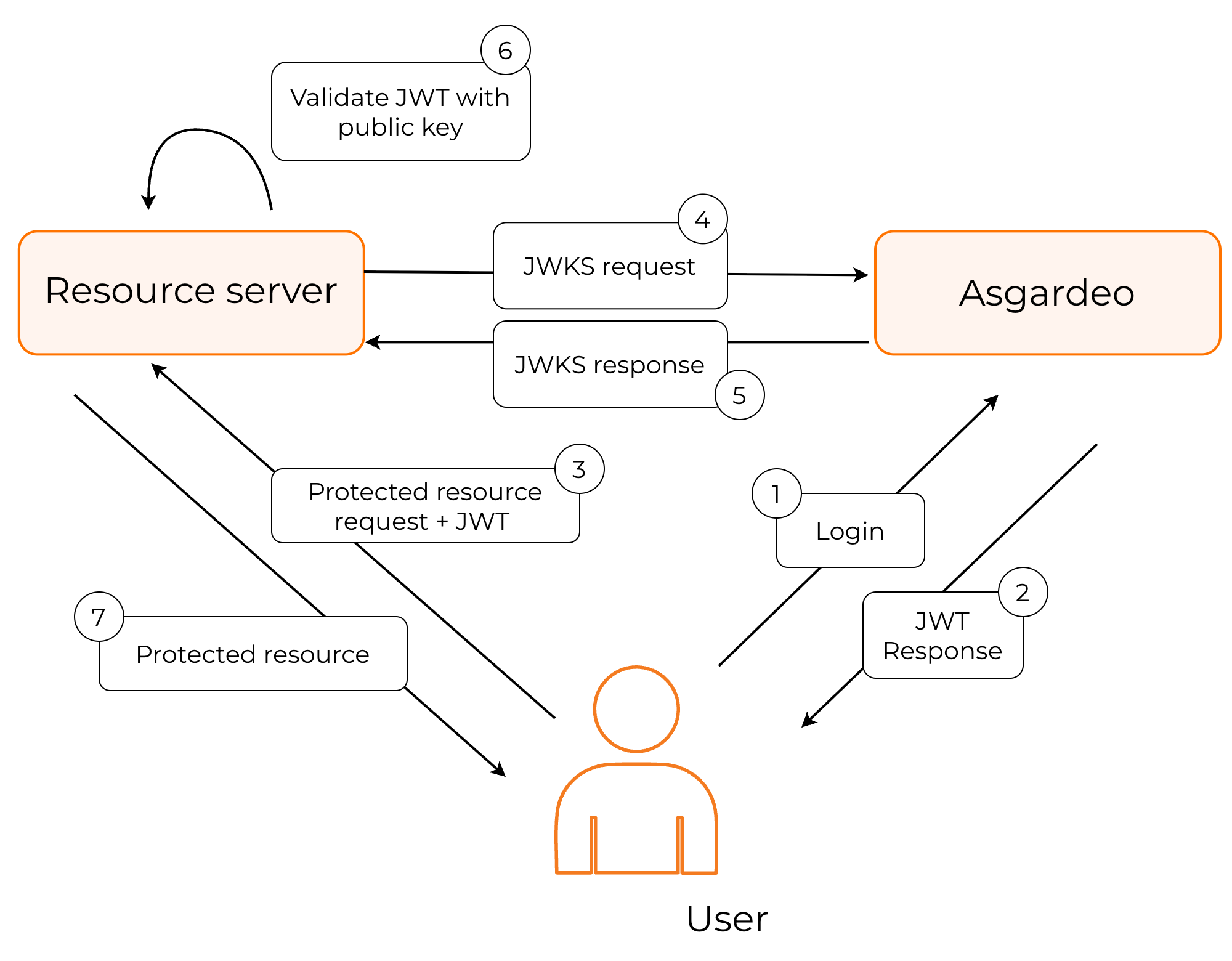
In this instance, Asgardeo works as the JWT issuer. The following diagram explains this process.
-
The user authenticates with Asgardeo to access the protected resource.
-
Asgardeo authenticates the user, and returns a signed JWT.
-
The application calls the JWKS endpoint of Asgardeo to get the public keys.
-
The application should then find the correct key based on the kid (key ID), validate the JWT response and grant access to the protected resource.
Asgardeo exposes its public keys from the following URL:
The contents of the Asgardeo JWKS endpoint take the following form:
{
  "keys": [
    {
      "kty": "RSA",
      "x5t#S256": "m_eCU6DLMVTX9h5TomL64Swtp-AMsmA-6xvWCTr5gf4",
      "e": "AQAB",
      "use": "sig",
      "kid": "OWJmNzgyNTNhMGNiMzE1NGQ3ZjYxZTUzYTI2MmZhZTEyYzJkYTdlMDBjYjI2MDNlZWIxYmQ2MDkzYWY5ODFmZQ_RS256",
      "x5c": [
        "MIIDtTCCAp2gAwIBAgIUdYqOmjbFWs31cUW2cjkBlEUK3tQwDQYJKoZIhvcNAQELBQAwYjELMAkGA1UEBhMCVVMxCzAJBgNVBAgMAkNBMRQwEgYDVQQHDAtTYW50YSBDbGFyYTENMAsGA1UECgwEV1NPMjENMAsGA1UECwwEV1NPMjESMBAGA1UEAwwJbG9jYWxob3N0MB4XDTI1MDEwODA4MzIwN1oXDTI2MDEwODA4MzIwN1owYjELMAkGA1UEBhMCVVMxCzAJBgNVBAgMAkNBMRQwEgYDVQQHDAtTYW50YSBDbGFyYTENMAsGA1UECgwEV1NPMjENMAsGA1UECwwEV1NPMjESMBAGA1UEAwwJbG9jYWxob3N0MIIBIjANBgkqhkiG9w0BAQEFAAOCAQ8AMIIBCgKCAQEApKrcXnoAU82tf7lfrK7nXly0NXGuooK5976cApos9eKFd3I2ln7PEZEkeW5U+bsx/fSYBnSlf4rCD3xGI79H86dfJm6xewMeYkGW+gq/qyBJWR+qB4MSbh0LRci3swpVMfV4C+4jOJ0QmSjpr04toXz+yRO1YQIfZnO8ESlSby2gxnaimAkgjdv4pZJv4SK2YEQiOsUkYklRckMxVO3g/l4RIP83yBRLJaU5IiY/0YyKeR3XIM1QDv+0ZzI13MSPhb2TYzHevwgZ9cPnADMBT/RtRg9y5jscA+A/FdDcZ/QLsrWMYNqp9AlNBvKssrqZQ6PrfA+YngYu9rXIG3BuUw"
      ],
      "alg": "RS256",
      "n": "pKrcXnoAU82tf7lfrK7nXly0NXGuooK5976cApos9eKFd3I2ln7PEZEkeW5U-bsx_fSYBnSlf4rCD3xGI79H86dfJm6xewMeYkGW-gq_qyBJWR-qB4MSbh0LRci3swpVMfV4C-4jOJ0QmSjpr04toXz-yRO1YQIfZnO8ESlSby2gxnaimAkgjdv4pZJv4SK2YEQiOsUkYklRckMxVO3g_l4RIP83yBRLJaU5IiY_0YyKeR3XIM1QDv-0ZzI13MSPhb2TYzHevwgZ9cPnADMBT_RtRg9y5jscA-A_FdDcZ_QLsrWMYNqp9AlNBvKssrqZQ6PrfA-YngYu9rXIG3BuUw"
    },
    {
      "kty": "RSA",
      "x5t#S256": "m_eCU6DLMVTX9h5TomL64Swtp-AMsmA-6xvWCTr5gf4",
      "e": "AQAB",
      "use": "sig",
      "kid": "OWJmNzgyNTNhMGNiMzE1NGQ3ZjYxZTUzYTI2MmZhZTEyYzJkYTdlMDBjYjI2MDNlZWIxYmQ2MDkzYWY5ODFmZQ_PS256",
      "x5c": [
        "MIIDtTCCAp2gAwIBAgIUdYqOmjbFWs31cUW2cjkBlEUK3tQwDQYJKoZIhvcNAQELBQAwYjELMAkGA1UEBhMCVVMxCzAJBgNVBAgMAkNBMRQwEgYDVQQHDAtTYW50YSBDbGFyYTENMAsGA1UECgwEV1NPMjENMAsGA1UECwwEV1NPMjESMBAGA1UEAwwJbG9jYWxob3N0MB4XDTI1MDEwODA4MzIwN1oXDTI2MDEwODA4MzIwN1owYjELMAkGA1UEBhMCVVMxCzAJBgNVBAgMAkNBMRQwEgYDVQQHDAtTYW50YSBDbGFyYTENMAsGA1UECgwEV1NPMjENMAsGA1UECwwEV1NPMjESMBAGA1UEAwwJbG9jYWxob3N0MIIBIjANBgkqhkiG9w0BAQEFAAOCAQ8AMIIBCgKCAQEApKrcXnoAU82tf7lfrK7nXly0NXGuooK5976cApos9eKFd3I2ln7PEZEkeW5U+bsx/fSYBnSlf4rCD3xGI79H86dfJm6xewMeYkGW+gq/qyBJWR+qB4MSbh0LRci3swpVMfV4C+4jOJ0QmSjpr04toXz+yRO1YQIfZnO8ESlSby2gxnaimAkgjdv4pZJv4SK2YEQiOsUkYklRckMxVO3g/l4RIP83yBRLJaU5IiY/0YyKeR3XIM1QDv+0ZzI13MSPhb2TYzHevwgZ9cPnADMBT/RtRg9y5jscA+A/FdDcZ/QLsrWMYNqp9AlNBvKssrqZQ6PrfA+YngYu9rXIG3BuUw"
      ],
      "alg": "PS256",
      "n": "pKrcXnoAU82tf7lfrK7nXly0NXGuooK5976cApos9eKFd3I2ln7PEZEkeW5U-bsx_fSYBnSlf4rCD3xGI79H86dfJm6xewMeYkGW-gq_qyBJWR-qB4MSbh0LRci3swpVMfV4C-4jOJ0QmSjpr04toXz-yRO1YQIfZnO8ESlSby2gxnaimAkgjdv4pZJv4SK2YEQiOsUkYklRckMxVO3g_l4RIP83yBRLJaU5IiY_0YyKeR3XIM1QDv-0ZzI13MSPhb2TYzHevwgZ9cPnADMBT_RtRg9y5jscA-A_FdDcZ_QLsrWMYNqp9AlNBvKssrqZQ6PrfA-YngYu9rXIG3BuUw"
    }
  ]
}
| kty | The public key type. e.g., RSA |
| x5t#S256 | A SHA-256 hash of the X.509 certificate in the JWKS. Used to quickly identify which certificate was used to sign the JWT. |
| e | Exponent used in the RSA algorithm. |
| use | Indicates the intended use of the key.
|
| kid | The key ID. Helps to identify which key signed the JWT. |
| x5c | The X.509 certificate chain. The chain can include intermediate certificates up to a trusted root. Useful for clients that validate signatures against trusted Certificate Authorities (CA). |
| n | Modulus value used in the RSA algorithm. |
Asgardeo acting as the SP
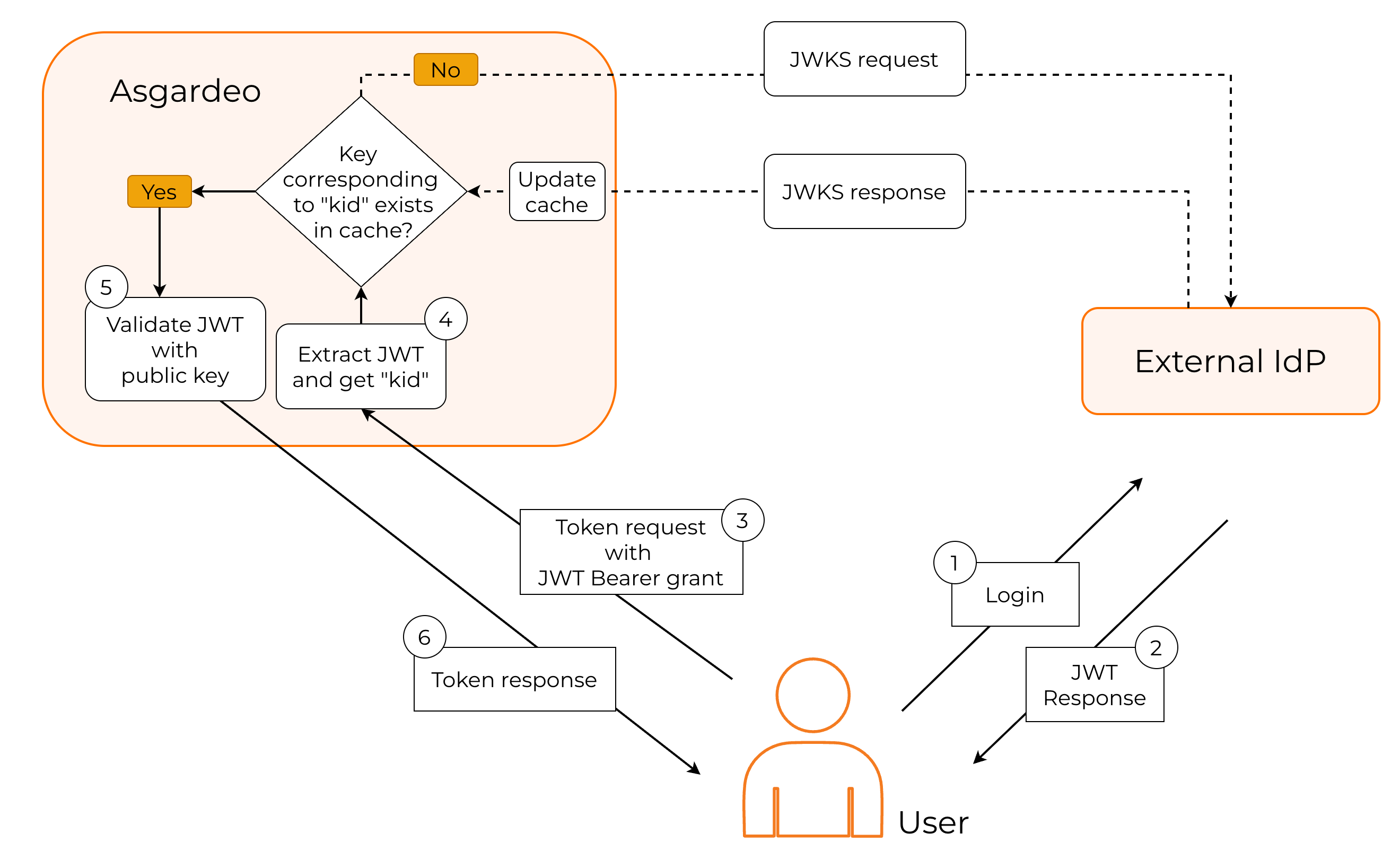
In this instance, Asgardeo works as the JWT validator. The following diagram explains this process.
-
The user first authenticates with the external IdP to access the protected resource.
-
The external IdP issues a signed JWT and returns it to the user.
-
Because the resource server trusts Asgardeo, not the external IdP, the user must exchange this JWT for an access token in Asgardeo.
-
Asgardeo reads the kid (key ID) from the JWT header to determine which key was used to sign it.
-
If the corresponding key is already available in the cached JWKS content from the external IdP, Asgardeo uses it to validate the JWT.
-
If the key is not cached, Asgardeo retrieves the JWKS from the external IdP and updates the cache.
-
After successfully validating the JWT, Asgardeo issues an access token to the user.
You can see JWT validation in action by following the guide and implementing the JWT Bearer Grant type for your application.