Pre-issue ID token action
The pre-issue ID token action in Asgardeo lets you execute custom logic before issuing an ID token.
Asgardeo triggers this action during the OAuth2/OIDC token issuance process. You can change the ID token claims or add checks before issuing the ID token using the action.
You can use this functionality to:
- Add, change, or remove audience values.
- Change or remove user attributes incorporated into the ID token.
- Add custom claims. You can use string, number, boolean, string type array, and custom object.
- Update the validity period of the ID token.
When your external service modifies the ID token, Asgardeo applies the changes before issuing the token to the client.
Note
Currently, this action applies only at the root organization level.
In the token flow, it supports the grant types of authorization code, password, refresh token, organization switch, and device code.
In the OIDC hybrid flow, it supports the response types of code id_token token, and code id_token.
How pre-issue id token action works
Configure a pre-issue ID token action with your external service endpoint. Asgardeo calls your service and waits for a response before the system issues an ID token. Upon receiving the response, Asgardeo applies any modifications to the ID token as specified in the response and then continues with the flow.
The following API contract defines the request and response structures that your service must adhere to.
Request from Asgardeo
| Property | Description |
|---|---|
| flowId | A unique identifier that associates with the token issuing flow in Asgardeo. |
| requestId | A unique correlation identifier that associates with the token request received by Asgardeo. |
| actionType | Specifies the action. In this case, |
| event | Contains context information relevant to the ID token issuance flow. Refer event section for details. |
| allowedOperations | Specifies the operations your external service can perform on the ID token claims. Refer allowedOperations section for details. |
event
| Property | Description | ||||||||||||||||||||||||||||||||||||||||
|---|---|---|---|---|---|---|---|---|---|---|---|---|---|---|---|---|---|---|---|---|---|---|---|---|---|---|---|---|---|---|---|---|---|---|---|---|---|---|---|---|---|
| event.request |
This property encapsulates the details of the ID token request, including parameters and headers. It provides the following specific properties.
|
||||||||||||||||||||||||||||||||||||||||
| event.tenant | This property represents the tenant that processes the token request. |
||||||||||||||||||||||||||||||||||||||||
| event.user | This property contains information about the authenticated user associated with the token request.
|
||||||||||||||||||||||||||||||||||||||||
| event.organization | This property refers to the organization context which issues the id token. |
||||||||||||||||||||||||||||||||||||||||
| event.userStore | This property indicates the user store that manages the user's data. |
||||||||||||||||||||||||||||||||||||||||
| event.idToken | This property shows the ID token that Asgardeo will issue. It contains claims that your external service can add, replace, or remove within the limits defined by
|
allowedOperations
The allowedOperations property in the context of the pre-issue id token action defines the set of operations that your external service can perform on the ID token's claims. This property specifically relates to the event.idToken property and outlines which attributes let your external service add extra properties, replace values, or remove attributes. The allowedOperations use JSON Patch modification semantics.
Your external service can change claims related to authorization decisions, such as audience (aud), ID token validity (expires_in). These claims typically associate with the resource server and influence how access gets granted.
But other standard ID token claims, such as the issuer (iss), represent the authorization server and play a critical role in token validation. The action doesn't allow modification of these properties. Use application and organization-level configurations to change these properties and their behaviors.
Additionally, your external service can change any OIDC claims incorporated into the ID token.
The following example shows an allowedOperations object in a request formatted as a JSON payload:
{
  "allowedOperations": [
    {
      "op": "add",
      "paths": [
        "/idToken/claims/",
        "/idToken/claims/aud/"
      ]
    },
    {
      "op": "replace",
      "paths": [
        "/idToken/claims/updated_at",
        "/idToken/claims/given_name",
        "/idToken/claims/family_name",
        "/idToken/claims/username",
        "/idToken/claims/aud/",
        "/idToken/claims/expires_in"
      ]
    },
    {
      "op": "remove",
      "paths": [
        "/idToken/claims/updated_at",
        "/idToken/claims/given_name",
        "/idToken/claims/family_name",
        "/idToken/claims/username",
        "/idToken/claims/aud/"
      ]
    }
  ]
}
Example request from Asgardeo
The following shows a sample request payload for a pre-issue ID token action. This example uses placeholder values instead of personal and sensitive data.
POST / HTTP/1.1
Host: your-service.example.com
Content-Type: application/json

{
  "flowId": "Ec1wMjmiG8",
  "requestId": "20260216T154100Z-r1cd497db865scbfhC1SG17gy000000010zg000000009hap",
  "actionType": "PRE_ISSUE_ID_TOKEN",
  "event": {
    "request": {
      "additionalHeaders": [
        { "name": "Host", "value": ["api.asgardeo.io"] }
      ],
      "clientId": "1u31N7of6gCNR9FqkG1neSlsF_Qa",
      "grantType": "password",
      "scopes": ["address", "openid", "profile"]
    },
    "tenant": {
      "id": "15913",
      "name": "example.com"
    },
    "organization": {
      "id": "24a3cfbc-25bf-4e11-9c0e-4122605a9541",
      "name": "example.com",
      "orgHandle": "example.com",
      "depth": 0
    },
    "user": {
      "id": "e204849c-4ec2-41f1-8ff7-ec1ebff02821",
      "organization": {
        "id": "24a3cfbc-25bf-4e11-9c0e-4122605a9541",
        "name": "example.com",
        "orgHandle": "example.com",
        "depth": 0
      },
      "userType": "LOCAL"
    },
    "userStore": {
      "id": "REVGQVVMVA==",
      "name": "DEFAULT"
    },
    "idToken": {
      "claims": [
        {
          "name": "iss",
          "value": "https://api.asgardeo.io/t/example.com/oauth2/token"
        },
        {
          "name": "sub",
          "value": "e204849c-4ec2-41f1-8ff7-ec1ebff02821"
        },
        {
          "name": "azp",
          "value": "1u31N7of6gCNR9FqkG1neSlsF_Qa"
        },
        {
          "name": "aud",
          "value": ["1u31N7of6gCNR9FqkG1neSlsF_Qa"]
        },
        {
          "name": "auth_time",
          "value": 1769344213
        },
        {
          "name": "amr",
          "value": ["BasicAuthenticator"]
        },
        {
          "name": "expires_in",
          "value": 3600
        },
        {
          "name": "given_name",
          "value": "Alex"
        },
        {
          "name": "family_name",
          "value": "Smith"
        },
        {
          "name": "email",
          "value": "[email protected]"
        }
      ]
    }
  },
  "allowedOperations": [
    {
      "op": "add",
      "paths": [
        "/idToken/claims/",
        "/idToken/claims/aud/"
      ]
    },
    {
      "op": "replace",
      "paths": [
        "/idToken/claims/aud/",
        "/idToken/claims/expires_in",
        "/idToken/claims/given_name",
        "/idToken/claims/family_name",
        "/idToken/claims/email"
      ]
    },
    {
      "op": "remove",
      "paths": [
        "/idToken/claims/aud/",
        "/idToken/claims/given_name",
        "/idToken/claims/family_name",
        "/idToken/claims/email"
      ]
    }
  ]
}
Expected response from external service
When Asgardeo invokes your external service as part of the pre-issue ID token action, it expects a response that adheres to the defined API contract.
The response can have three possible states: SUCCESS, FAILED, and ERROR.
- SUCCESS: Your external service processed the request successfully and requested modifications to the ID token. Asgardeo applies the operations and continues the flow.
- FAILED: Your service intentionally prevents ID token issuance (e.g., validation or business rules). Asgardeo returns a
400 (Bad Request)to the client with the failure details you provide. - ERROR: A processing or server error in your service. Asgardeo returns a
500 (Server Error)response to the client.
Response for SUCCESS state
HTTP status code: 200
| Property | Description |
|---|---|
| actionStatus | Indicates the outcome of the request. Set this value to |
| operations | Array of operations to apply to the ID token claims. These operations must follow the JSON Patch modification format. Each operation must use |
Example success response with an added custom claim:
{
  "actionStatus": "SUCCESS",
  "operations": [
    {
      "op": "add",
      "path": "/idToken/claims/-",
      "value": {
        "name": "customSID",
        "value": "12345"
      }
    }
  ]
}
Tip
See sample success responses for pre-issue id token action for more examples, including adding or replacing audience, replacing expires_in, and removing claims.
Response for FAILED state
HTTP status code: 200
| Property | Description |
|---|---|
| actionStatus | Indicates the outcome of the request. For a failed operation, set this value to FAILED. |
| failureReason | Reason for failing to issue the ID token (e.g., OAuth2 error code). Asgardeo maps this value to the |
| failureDescription | Offers a detailed explanation of the failure. Asgardeo maps this value to the error_description field in the /oauth2/token endpoint response. |
When the external service returns a 200 OK status code with a FAILED state, Asgardeo maps the failure to an error response and returns it to the application that initiated the token request.
Example response from the external service:
HTTP/1.1 200 OK
Content-Type: application/json

{
  "actionStatus": "FAILED",
  "failureReason": "invalid_scope",
  "failureDescription": "Scope platinum_state is invalid"
}
The application that initiated the token request receives the following error response:
HTTP/1.1 400
Content-Type: application/json

{
  "error": "invalid_scope",
  "error_description": "Scope platinum_state is invalid"
}
Response for ERROR state
When the external service returns an ERROR state (with HTTP status 400, 401, or 500) or fails to respond entirely, Asgardeo treats it as an error in executing the action. The application that initiated the token request receives an error response (for example, 500 Internal Server Error).
HTTP status code from external service: 400, 401, or 500
| Property | Description |
|---|---|
| actionStatus | Indicates the outcome of the request. Set this value to ERROR for an error operation. |
| errorMessage | The cause of the error. |
| errorDescription | A detailed description of the error. |
Example response from the external service:
HTTP/1.1 500
Content-Type: application/json

{
  "actionStatus": "ERROR",
  "errorMessage": "server_error",
  "errorDescription": "Failed to process the response"
}
Error response to the application:
HTTP/1.1 500
Content-Type: application/json

{
  "error": "server_error",
  "error_description": "Internal Server Error."
}
Note
The errorMessage and errorDescription from the external service's ERROR response doesn't directly include in the error response sent back to the application.
Note
In the OIDC hybrid flow, both FAILED and ERROR responses from your external service treated as server errors.
Authentication
Configure the authentication scheme when registering the action in Asgardeo. The following screenshot shows the Authentication configuration panel where you can select the authentication scheme and provide credentials (for example, username and password for Basic authentication).
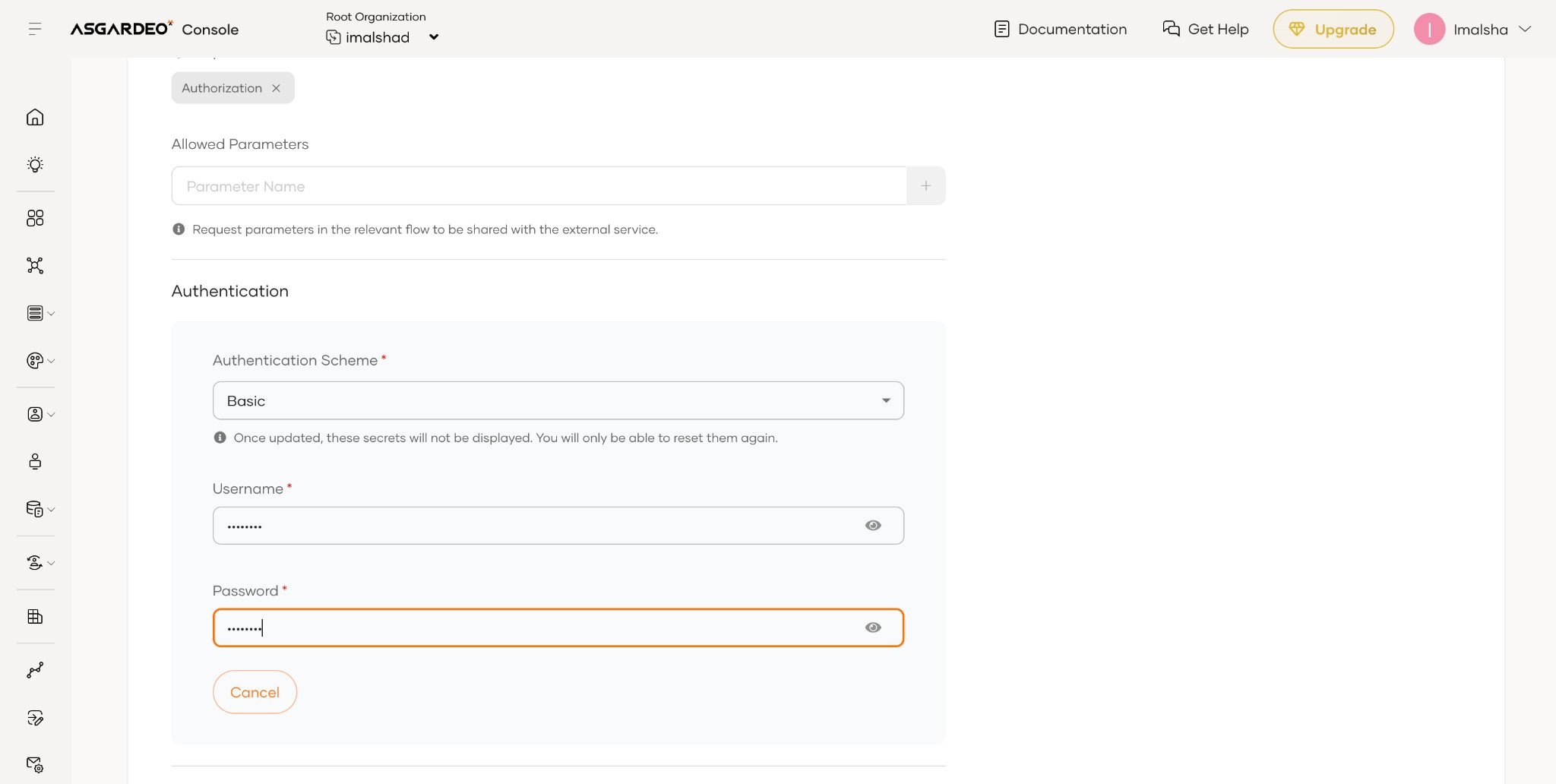
- Basic: HTTP Basic authentication.
- Bearer: OAuth 2.0 Bearer token in the
Authorizationheader. - API Key: API key in a header; you can define the header name (for example,
X-API-Key).
Conditional invocation of pre-issue id token action
Pre-issue ID token actions can trigger conditionally based on configurable execution rules. You can define when the action should run by building conditions in the Execution Rule configuration.
The rule configuration supports the following fields:
- Application: The specific application that requests the ID token.
- Grant Type: The grant type used during the token issuance process (for example, authorization code, password, refresh token).
Each rule field supports the following operators:
- equals
- not equals
You can combine conditions using logical AND and OR operators. The system uses AND to combine conditions in the same group and uses OR to combine separate groups. This approach gives you precise control over when to invoke the pre-issue id token action.
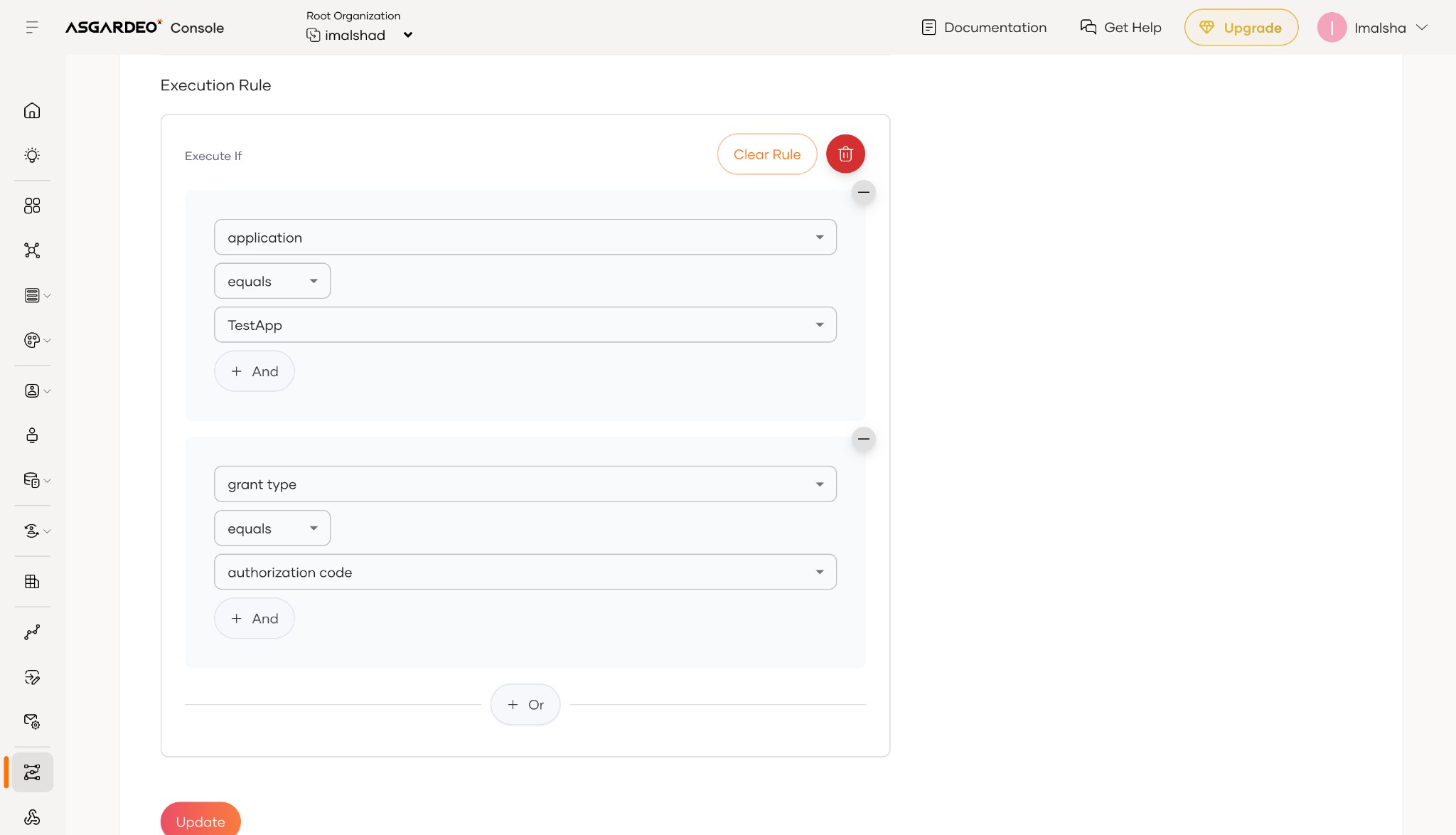
The example above shows an execution rule with two groups: one where the application equals TestApp, and another where the grant type equals authorization code. The action runs when the runtime meets either condition. You can add more conditions within a group using + And, or add another group using + Or.