Pre-update profile action
The pre-update profile action in Asgardeo lets you verify user attributes during profile update processes. This action helps you automate verification of updated data, save changes, or send notifications to updated contact details.
How pre-update profile action works
Configure a pre-update profile action with your external service endpoint. Asgardeo calls your service and waits for a response whenever a profile update action starts. Upon receiving the response, Asgardeo returns a client error, server error, or executes based on the response.
The following profile update flows trigger the pre-update profile action version v1.x:
- Self-Service Profile Update: When an end-user modifies their profile through a self-service portal like the My Account application.
- Administrator-Initiated Profile Update: When an administrator updates a user's profile through a user management portal, such as the Console application.
The following API contracts defines the request and response structures that your service must adhere to, based on the action version.
Request from Asgardeo
The request from Asgardeo includes following in the JSON request payload:
| Property | Description |
|---|---|
| requestId |
A unique correlation identifier that associates with the profile update request received by Asgardeo. |
| actionType | Triggers the action, which in this case is |
| event | Contains context information relevant to profile update flow. Refer event section for details. |
event
| Property | Description | ||||||||
|---|---|---|---|---|---|---|---|---|---|
| event.request | This property contains the details of the profile update request. Currently, it includes the list of attributes that the user is updating. | ||||||||
| event.tenant | This property shows the tenant (root organization) where Asgardeo processes the profile update request. | ||||||||
| event.organization | This property represents the organization handling the profile update request. | ||||||||
| event.user | This property contains information about the user whose profile gets update.
|
||||||||
| event.userStore | This property indicates the user store that manages the user's data. |
||||||||
| event.initiatorType | This property shows who initiates the profile update: administrator, user, or application. |
||||||||
| event.action | This property shows if the profile update starts through an update flow. Right now, it only has the value |
Example request from Asgardeo
This example illustrates a request sent to an external service configured as a pre-update profile action, triggered when an administrator updates the user's profile.
POST /profile-update-action HTTP/1.1
Host: localhost
Authorization: Basic czZCaGRSa3F0MzpnWDFmQmF0M2JW
Content-Type: application/json

{
  "actionType": "PRE_UPDATE_PROFILE",
  "event": {
    "request": {
      "claims": [
       {
          "uri": "http://wso2.org/claims/emailAddresses",
          "value": [
            "[email protected]",
            "[email protected]"
          ]
        },
        {
          "uri": "http://wso2.org/claims/mobileNumbers",
          "value": [
            "1234566234",
            "1234566235",
            "1234566236"
          ]
        },
        {
          "uri": "http://wso2.org/claims/emailaddress",
          "value": "[email protected]"
        }
      ]
    },
    "tenant": {
      "id": "12402",
      "name": "bar.com"
    },
    "organization": {
      "id": "eb1115f6-274f-4bb7-9b6d-d31f678e81f7",
      "name": "Bar",
      "orgHandle": "bar.com",
      "depth": 0
    },
    "user": {
      "id": "ab49e1b8-2d1b-424d-b136-debdca67bfcc",
      "organization": {
        "id": "eb1115f6-274f-4bb7-9b6d-d31f678e81f7",
        "name": "Bar",
        "orgHandle": "bar.com",
        "depth": 0
      },
      "claims": [
        {
          "uri": "http://wso2.org/claims/emailAddresses",
          "value": [
            "[email protected]"
          ],
          "updatingValue": [
            "[email protected]",
            "[email protected]"
          ]
        },
        {
          "uri": "http://wso2.org/claims/mobileNumbers",
          "value": [
            "1234566234",
            "1234566235"
          ],
          "updatingValue": [
            "1234566234",
            "1234566235",
            "1234566236"
          ]
        },
        {
          "uri": "http://wso2.org/claims/identity/accountState",
          "value": "UNLOCKED"
        },
        {
          "uri": "http://wso2.org/claims/emailaddress",
          "value": "[email protected]",
          "updatingValue": "[email protected]"
        }
      ],
      "groups": [
        "gold-tier"
      ]
    },
    "userStore": {
      "id": "REVGQVVMVA==",
      "name": "DEFAULT"
    },
    "initiatorType": "ADMIN",
    "action": "UPDATE"
  }
}
Expected response from external service
When Asgardeo invokes your external service as part of the pre-update profile action, it expects a response that adheres to the defined API contract. This response lets Asgardeo decide whether to allow the profile update. Here's a breakdown of the expected response:
The response can have three possible states: SUCCESS, FAILEDand ERROR.
SUCCESS: The service processes the request and allows the profile update.
FAILED: Represents a selective failure within the profile update flow due to attribute validation logic or business rules enforced by your external service. The application receives a 400 (Client Error) response, which includes the failure message provided by your external service. You must provide a SCIM API compliant failure message when extending the flow if you expect SCIM compliance.
ERROR: Indicates a processing failure in your external service, typically caused by server-side issues. The application receives a 500 (Server Error) response.
Response for SUCCESS state
When the external service responds with a 200 status code and a SUCCESS state, it means the service processed the request and allowed the profile update.
Http Status Code: 200
| Property | Description |
|---|---|
| actionStatus | Indicates the outcome of the request. Set this to |
Below is an example of a success response at a profile update request.
Response from external service:
Response for FAILED state
When the external service returns a 200 OK status code with a FAILED state, it means the service has intentionally opted to reject the profile update. Your external service makes this decision using specific validation logic or business rules.
The response body must be a JSON object containing the following properties:
Http Status Code: 200
| Property | Description |
|---|---|
| actionStatus | Indicates the outcome of the request. Set this to |
| failureReason | Provides the reason for failing to update the profile. Asgardeo maps this value to the |
| failureDescription | Offers a detailed explanation of the failure. Asgardeo maps this value to the |
Below is an example of a failed response due to a validation of invalid attributes.
Response from external service:
HTTP/1.1 200 OK
Content-Type: application/json

{
  "actionStatus": "FAILED",
  "failureReason": "invalid_input",
  "failureDescription": "Provided user attributes are invalid."
}
The application that initiates the profile update request over SCIM API receives the following error response.
Error response to the application:
HTTP/1.1 400
Content-Type: application/json

{
    "schemas": [
        "urn:ietf:params:scim:api:messages:2.0:Error"
    ],
    "scimType": "invalid_input",
    "detail": "Provided user attributes are invalid.",
    "status": "400"
}
Response for ERROR state
When the external service responds with an ERROR state, it can return an HTTP status code of 400, 401, or 500, indicating either a validation failure or an issue processing the request.
Http Status Code: 400, 401 or 500
| Property | Description |
|---|---|
| actionStatus | Indicates the outcome of the request. Set this to |
| errorMessage | Describes the cause of the error. |
| errorDescription | A detailed description of the error. |
If the external service returns an error response (either defined or undefined) or fails to respond entirely, Asgardeo marks the action as an error. In any of these cases, the application that initiated the profile update request receives a 500 Internal Server Error.
Below is an example of an error response returned by the service implementing the pre-update profile action.
Response from external service:
HTTP/1.1 500
Content-Type: application/json

{
  "actionStatus": "ERROR",
  "errorMessage": "Server error",
  "errorDescription": "Error while processing request."
}
The application that initiates the profile update request over SCIM API receives the following error response.
Error response to the application:
HTTP/1.1 500
Content-Type: application/json

{
    "schemas": [
        "urn:ietf:params:scim:api:messages:2.0:Error"
    ],
    "detail": "Error while updating attributes of user: A***n",
    "status": "500"
}
Note
Currently, the errorMessage or errorDescription from the external service's ERROR response isn't directly included in the error response sent back to the application.
Conditional invocation of pre-update profile action
Pre-update profile actions can be conditionally triggered based on configurable rule criteria. The rule configuration currently supports the following fields:
-
Flow: The specific product flow where a user updates their profile. The following list shows applicable flows.
- Admin initiated profile update
- User initiated profile update
- Application initiated profile update
-
Claim: The specific user claim that's getting updated.
The rule field supports the following operators:
- equals
- not equals
You can specify exact values for each field, such as an Admin initiated profile update or particular user claim that's getting updated.
Combine rules using logical AND/OR operators. This approach gives you flexible and precise control over when a pre-update profile action triggers.
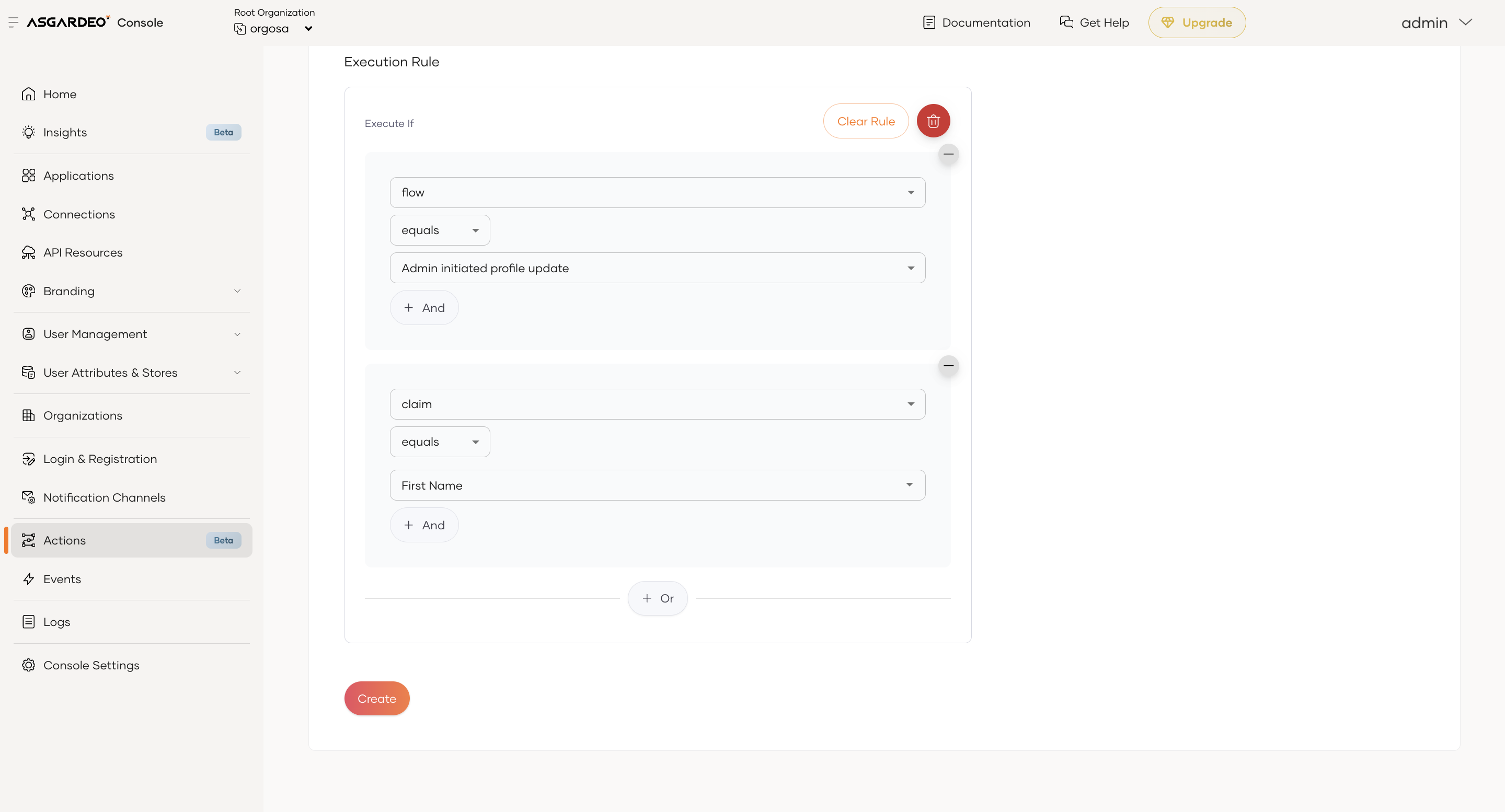
The above rule configuration translates logically to:
- The flow is Admin initiated profile update and the claim is Country, or
- The claim is First Name