Implement End-to-End Authorization for MCP servers
As the Model Context Protocol (MCP) emerges as a standard for large language models (LLMs) to interact with external tools, security becomes not just a feature but a necessity. The ability to verify who is accessing an MCP server, and under what conditions, is vital to ensuring trust, accountability, and operational safety. It’s not enough to simply expose tools and resources; developers must enforce strict controls to guarantee that only registered users, and only those with the appropriate privileges, can access specific resources or invoke specific tools. Without robust authorization, an MCP server becomes a potential vulnerability rather than an enabler.
In this guide, we explore how Asgardeo can help you implement comprehensive, fine-grained authorization for your remote MCP server. From authenticating users to enforcing tool-level access policies, this guide walks you through the practical and strategic steps needed to build secure, scalable MCP integrations.
About Model Context Protocol
The Model Context Protocol (MCP) is an emerging open standard designed to define how language models (LLMs) securely and predictably interact with external tools and services. As LLMs become increasingly capable of orchestrating complex workflows, such as editing code, querying databases, invoking APIs, or executing domain-specific actions, there is a growing need for a structured, secure, and extensible protocol that governs these interactions.
MCP formalizes this model-tool interaction by introducing a well-defined architecture that separates responsibilities across three core components:
- MCP Hosts
MCP Hosts are user-facing applications that facilitate interactions between users (resource owners) and LLMs. These can include - Developer environments (e.g., Visual Studio Code with an MCP plugin) - LLM tools (e.g., Claude Desktop) - Custom business applications that leverage AI capabilities.
An MCP Host integrates one or more MCP Clients, each configured to connect to a different backend server depending on the task or data source required. The Host is responsible for mediating the user experience, orchestrating tool usage, and delegating secure requests via the appropriate Client.
- MCP Clients
An MCP Client is a protocol-aware component embedded in the host application that handles secure communication with an MCP Server. It establishes a trust relationship with a specific server and ensures that all requests are properly authenticated and authorized. This design enables the host to connect to multiple MCP Servers, with each client managing a distinct trusted connection, keeping credentials and access privileges isolated across different domains.
- MCP Servers
MCP Servers are backend services that expose capabilities and tool interfaces that LLMs (via Hosts and Clients) can invoke. These may include: Running inference on models, Executing shell commands or scripts, Querying internal APIs or databases, Performing CRUD operations on user data. Servers are expected to implement standardized endpoints and behavior as defined by the MCP specification. Crucially, they must enforce fine-grained access control, ensuring only properly authenticated and authorized Clients, and by extension, users, can invoke specific tools or access resources.
The Model Context Protocol specification describes the interaction between these components and standardizes the request and response formats. You can learn more about MCP protocol by visiting their documentation.
Asgardeo for MCP Authorization
As we discussed above, it's critical to verify and control access to tools and resources on an MCP server. To support this, the MCP specification defines an authentication and authorization framework built on OAuth 2.0 and 2.1 standards. This makes it easy to integrate MCP servers with any compliant OAuth provider and ensure secure access to MCP servers.
Asgardeo acts as an OAuth 2.0 / 2.1 Authorization Server, bringing robust identity, consent, and access management to your MCP environment. It handles identity management, enforces role-based access control (RBAC), captures explicit user consent, and issues tokens that MCP clients can use to securely access protected tools and resources on an MCP server.
By adopting Asgardeo, you gain,
- Standards-based security: Fully compliant with OAuth 2.0 / 2.1 and the MCP authorization specification.
- Role-aligned, user-approved access: Enforces secure user login and consent flows, ensuring that users can only delegate actions aligned with their roles.
- Centralized Identity Management: Seamlessly manages users, applications (clients), and servers (resources) in one place.
- Clear Authorization Boundaries: Allows fine-grained scoping of permissions per MCP server, ensuring least-privilege access.
- Developer-Friendly: Simplifies secure implementation for developers of both MCP clients and MCP servers.
MCP Authorization using Asgardeo
Now that we have a fair understanding of the MCP protocol and why its essential to enforce authorization to MCP server interactions, let’s see how to implement proper authorization for MCP servers using Asgardeo.
Use Case
Vet Assist AI is an AI Assistant for a veterinary hospital. It is implemented as an intelligent digital companion for pet owners, offering personalized and timely health and well-being information that enhances routine care and prepares owners for vet visits. The key capabilities include customer support, a knowledge base about pet health, and a reminder system for medication and appointments.
Bob, a pet owner, uses the Vet Assist AI app (MCP Host) on Bob’s web browser. Bob wants to check the next vaccination date and book an appointment at the clinic for his dog. To respond to Bob, the AI Assistant needs to fetch this information by communicating with the VetAssist MCP Server (a remote MCP Server hosted by the Vet clinic). We need to ensure that the assistant can only access Bob’s pet's data after Bob logs in and grants explicit consent.
The following sequence diagram demonstrates the interactions between the end user, LLM application and the MCP server in this scenario.
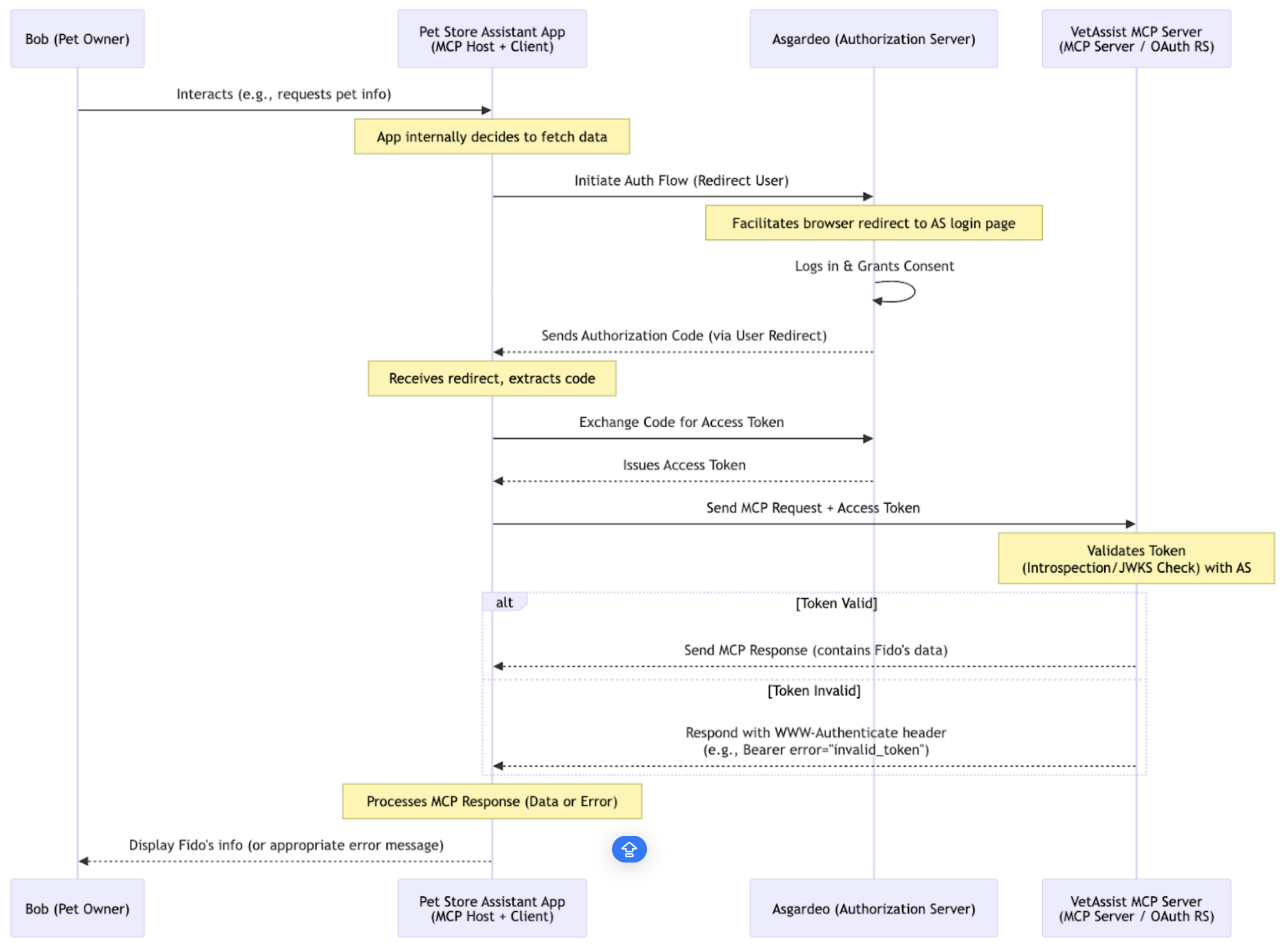
Bob starts chatting with the Vet Assist AI app and asks it to check the next vaccination date for his dog, Fido. The Vet Assist AI App (MCP Client/OAuth Client) needs to access data made available over the Vet Assist MCP Server (OAuth Resource Server). To gain access, the Assistant starts an OAuth flow with Asgardeo, which acts as the Authorization Server, specifying the necessary scopes. Asgardeo then requests Bob (the User) to log in and verifies if Bob's account has the required Roles/Permissions (RBAC) for the Assistant's intended action.
Importantly, Asgardeo asks Bob for consent to grant Vet Assist AI app permission to access Fido’s profile (defined by the scopes) on Bob's behalf to view vaccination due dates. Once Bob confirms the request, Asgardeo issues an Access Token to the Assistant. This token confirms that the Assistant has Bob's permission for particular actions.
Subsequently, the Assistant sends requests to the MCP Server, including Bob's Access Token. The MCP Server then validates this token and responds to the request with return information if the token is valid, otherwise the request will be rejected.
Asgardeo configuration
Now let’s see how to configure Asgardeo to enable secure access to the MCP server in the above use case.
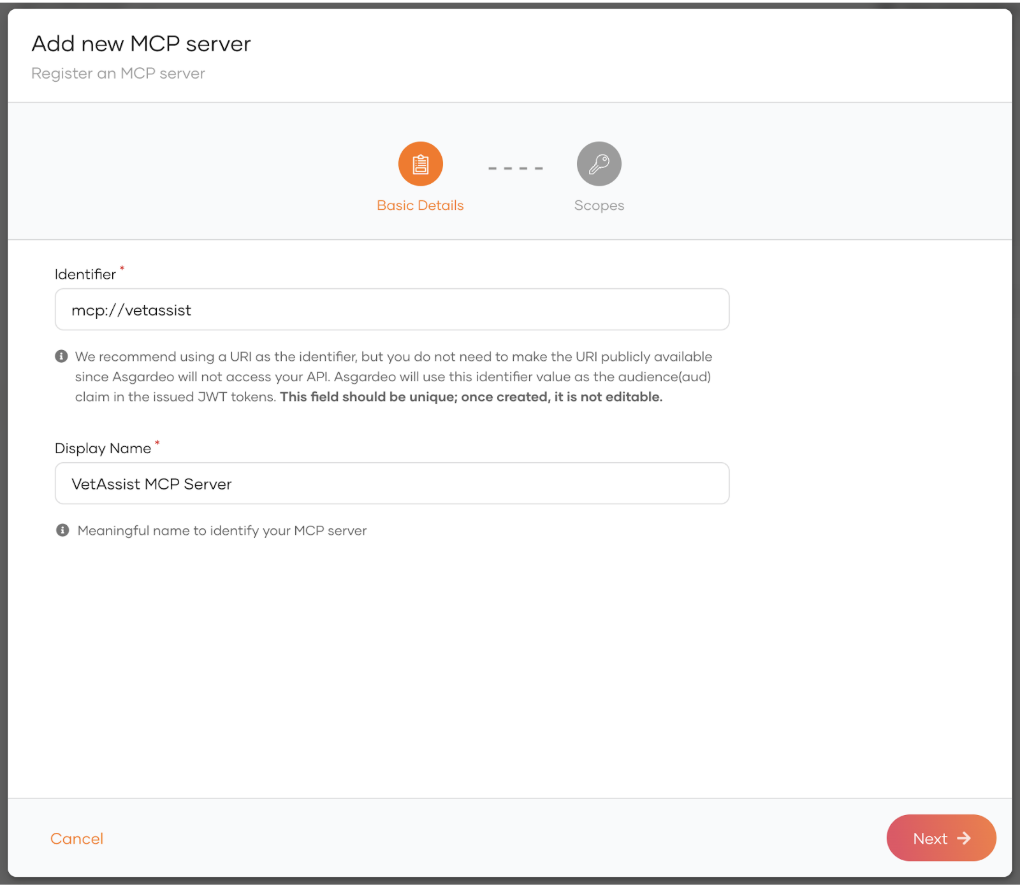
Register VetAssist MCP server
Register the VetAssist MCP Server in Asgardeo as an MCP server (identifier: mcp://vetassist).
Define scopes for the MCP server tools
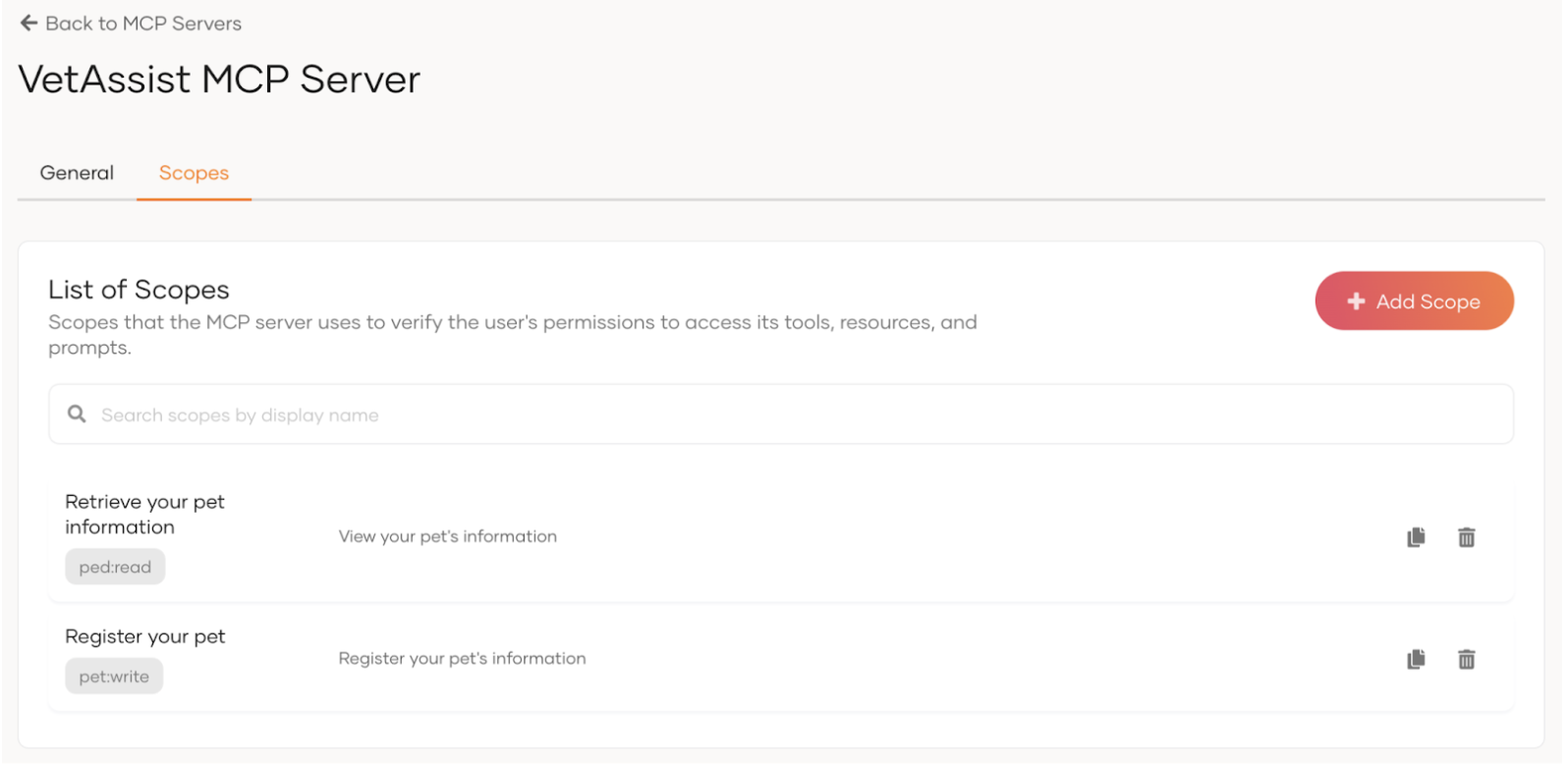
Define the scopes that the MCP server will use to ensure the correct access to its tools and resources. For our example use case, let’s define the following scopes.
- pet-profile:read Permission to get the authorized user’s Pet information
-
pet-profile:write Permission to add new pet information or update existing pet information
Configure Role Based Access Control
Now that we have registered the MCP server, we need to configure role based access control so that users are assigned to roles with necessary permissions.
Define roles
Navigate to User Management > Roles and define the following roles.
- Pet Owner: Standard Consumer role. Assigned to all customers of the vet clinic
- Vet Staff: Internal staff role. Assigned to staff members of the clinic.
Assign scopes to roles
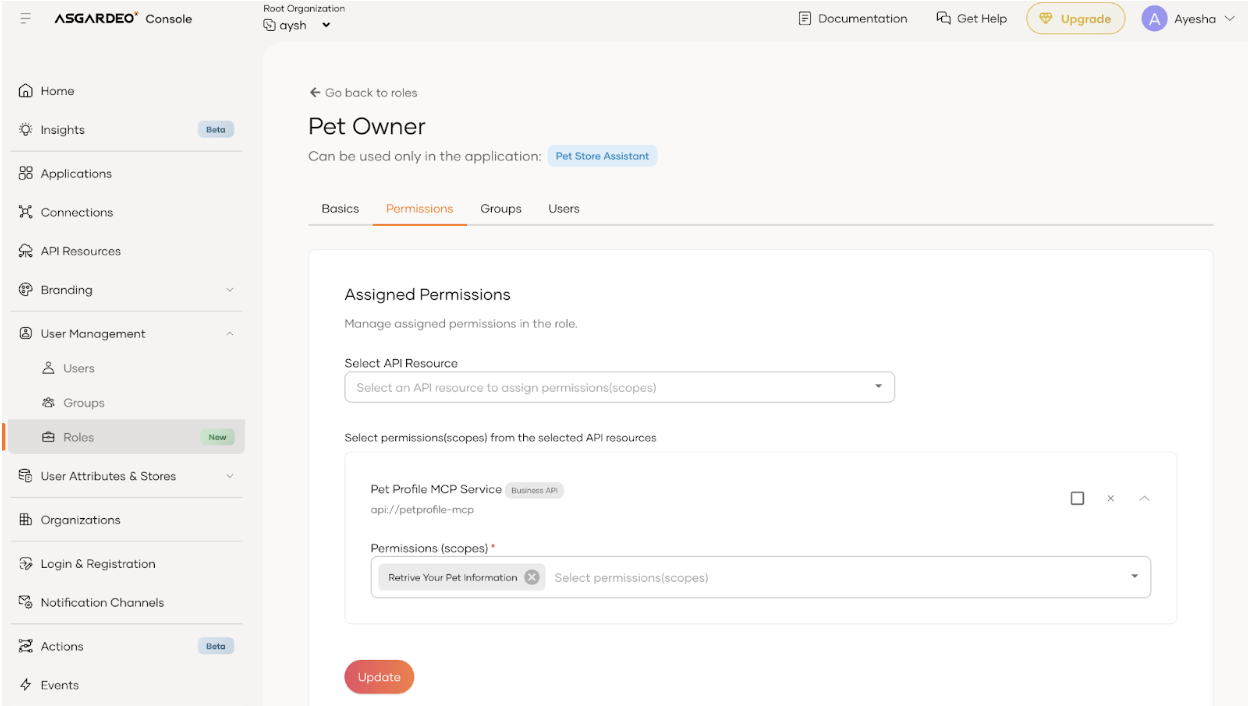
Navigate to the Pet Owner role’s edit view, switch to Permissions tab and add pet-profile:read scope. This will allow anyone with a "pet_owner" role to view their pet’s information. Similarly, navigate to the Vet Staff role’s edit view and add pet-profile:read (view information about all pets), and pet-profile:write (update any pet’s information) scopes.
Assign roles to users
Navigate to the Pet Owner role’s edit view, go to the Users tab and assign Bob to the role. This will enable Bob to receive permission to view his pet’s information.
Configure the MCP client
Register a new MCP client application
We need to have the Vet Assist AI application registered in Asgardeo, so that the registered MCP server can be authorized to the AI application and the application can securely access the MCP server on behalf of the authenticated user.
To register the MCP client,
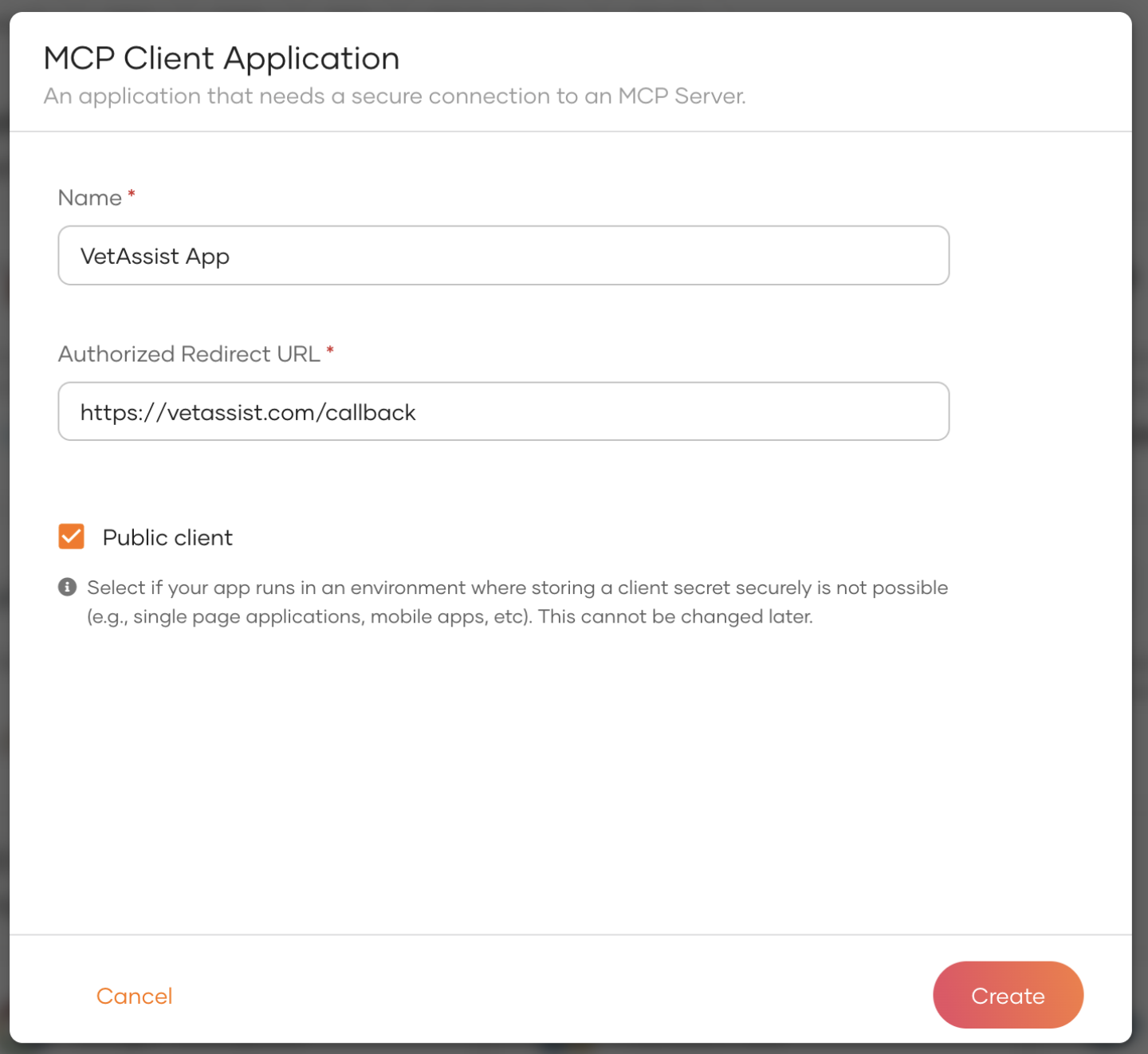
- On Asgardeo, navigate to Applications > New Application
- Select the MCP client application template.
- Provide the necessary details and click create.
- Name - provide a meaningful name
- Redirect URL - provide an endpoint in the VetAssist AI app that can receive and process the authorization code.
Record the Client ID of the created application. We will need this when configuring Asgardeo in the Vet Assist application.
Authorize MCP server to the client
The registered MCP client needs to be authorized to access the MCP server. To do that,
- Navigate to Applications.
- Click on the MCP client application you created in the above step.
- Navigate to the Authorization tab.
- Click on Authorize an API Resource.
- Select MCP server from the Resource dropdown.
- Select
pet-profile:readandpet-profile:writescopes. - Click Finish.
In Your App
Implement OAuth/OIDC authorization grant code flow with PKCE in Vet Assist AI app to integrate with Asgardeo for user authentication and obtaining tokens on behalf of the user.