Consuming API Workflows
API Workflows are published in the developer portal as structured, reusable sequences of API calls. Once an admin publishes a workflow, it becomes available to both human developers browsing the portal and AI agents that consume the portal's machine readable surfaces.
How Human Users Discover Workflows
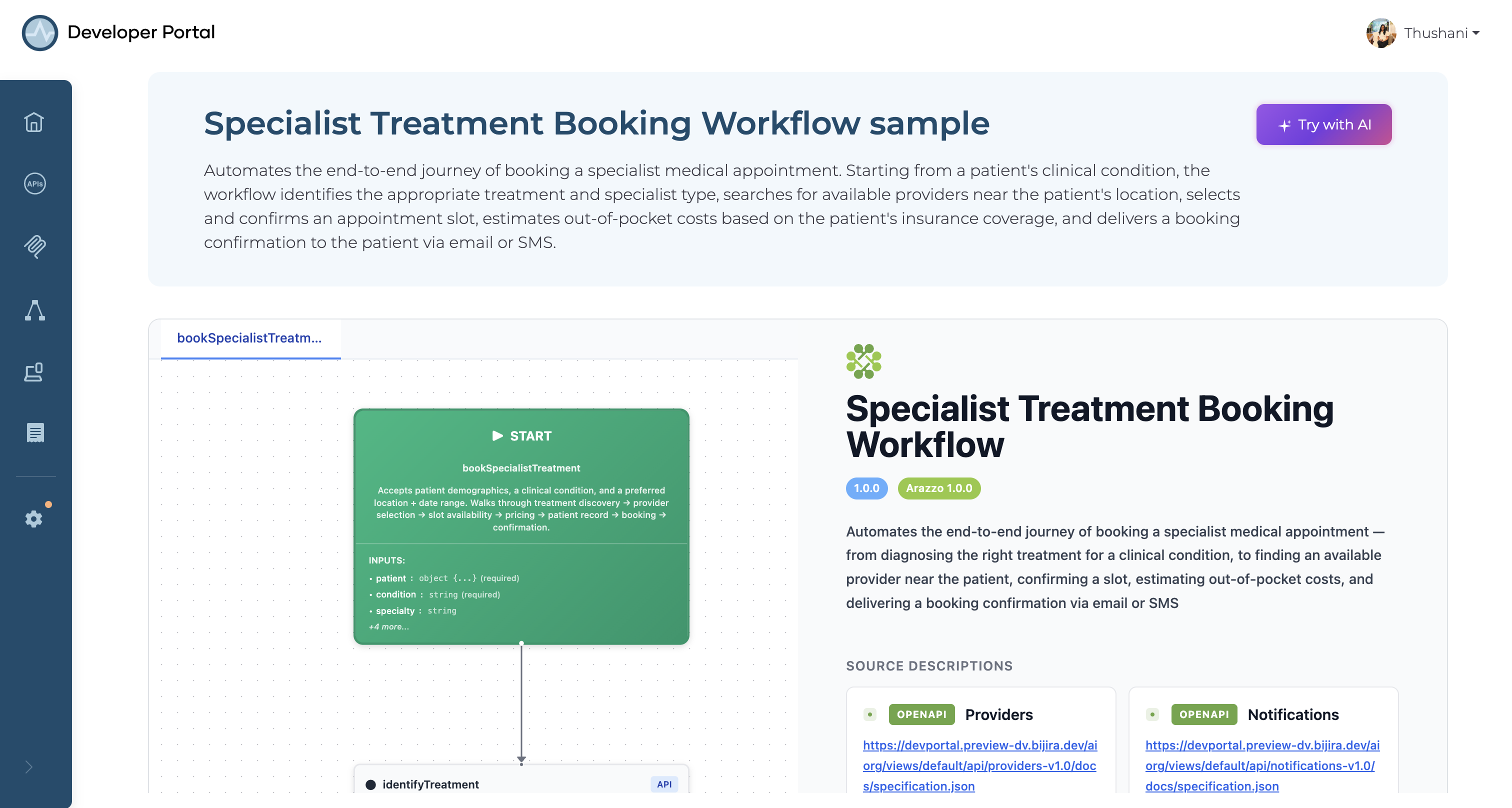
Workflows are surfaced in the API Workflows section of the developer portal, accessible from the main navigation.
Each workflow is listed with its name and a short description that explains the goal it achieves. Clicking a workflow opens a detail view that includes:
- Description — what the workflow does and when to use it
- Step-by-step instructions — the ordered sequence of API calls, inputs, and expected outputs
- Arazzo specification — the machine readable workflow definition, available to download or copy
How AI Agents Discover Workflows
Agents that interact with the developer portal can discover workflows through two machine readable endpoints:
llms.txt
The portal's llms.txt file provides a structured index of everything the portal exposes to AI agents, including a list of all published workflows with agent visibility set to Visible. Each workflow entry includes its name, description, and a link to its agent prompt and Arazzo specification.
api-workflows.md
A dedicated Markdown document lists all agent-visible workflows in a format optimized for LLM consumption. Each entry includes:
- Workflow name and handle
- Agent prompt — natural language guidance on when and how to invoke the workflow
- Link to the Arazzo specification
Fetching a Specific Workflow
Once an agent identifies a relevant workflow, it can fetch the full Arazzo specification and agent prompt directly:
| Resource | Endpoint |
|---|---|
| Arazzo specification | /{orgName}/views/{viewName}/api-workflows/{handle}/arazzo.json |
Workflow Visibility
Not all published workflows are visible to all consumers. Admins control visibility independently for human users and AI agents.
| Workflow setting | Visible in portal UI | Appears in llms.txt / api-workflows.md |
|---|---|---|
| Fully visible | Yes | Yes |
| Agent visibility hidden | Yes | No |
| Portal UI hidden | No | Yes |
This allows workflows to be tailored for specific audiences — for example, exposing a workflow to agents before it is ready for the developer-facing portal, or vice versa.
Using a Workflow as a Developer
To follow a workflow:
- Navigate to API Workflows in the developer portal.
- Select the workflow that matches your goal.
- Follow the steps in order, using the inputs and outputs described at each step.
- If the workflow includes an Arazzo specification, download it to use with tools that support the Arazzo format.
Using a Workflow as an Agent
To invoke a workflow programmatically:
- Fetch
llms.txtorapi-workflows.mdto identify available workflows. - Read the agent prompt to determine whether the workflow matches the current task.
- Retrieve the Arazzo specification for the selected workflow.
- Execute the steps in the defined order, passing outputs between steps as specified.