Enable mobile number verification on update
Mobile number verification ensures that when a user updates their primary mobile number, an SMS OTP is sent to the new number for verification. The primary mobile number remains unchanged until the new one is successfully verified. If you have enabled multiple mobile numbers per user, users can maintain several verified mobile numbers and designate one as the primary mobile number.
Note
- This feature can be invoked via a PUT/PATCH request to the SCIM 2.0 /Users endpoint or /Me endpoint.
- The verification on update capability is only supported for the
Mobile(http://wso2.org/claims/mobile) andVerified Mobile Numbers(http://wso2.org/claims/verifiedMobileNumbers) claims. - An SMS OTP verification is not triggered if the mobile number to be updated is the same as a previously verified mobile number of the user.
Prerequisites
-
Configure your preferred SMS provider in Asgardeo. For detailed instructions, see Configure SMS providers.
-
If required, enable support for multiple mobile numbers for users.
Try it out
Follow the guides below to try out different mobile number update scenarios.
Update the primary mobile number
If you only support a single mobile number and wish to update the mobile number of a user,
-
On the Asgardeo Console, go to User Management > Users.
-
Select a user account and go to its Profile tab.
-
Under Mobile, update the user's mobile number.
-
Click Update to save the changes. An SMS OTP will be sent to the specified mobile number for verification. The user needs to enter the SMS OTP to verify the mobile number.
Alternatively, you may update the mobile number via a PATCH operation to the SCIM 2.0 Me endpoint as shown below.
curl -X PATCH
https://api.asgardeo.io/t/{organization_name}/scim2/Me \
-d '{
    "schemas":["urn:ietf:params:scim:api:messages:2.0:PatchOp"],
    "Operations":[{
        "op":<operation>,
        "value":
            { "mobileNumbers":[{"type":"mobile", "value":<new_mobile>}]}
        }]
    }' \
--header "Content-Type:application/json"
--header "Authorization: Bearer <access_token>"
curl -X PATCH
https://api.asgardeo.io/t/bifrost/scim2/Me \
-d '{
    "schemas":["urn:ietf:params:scim:api:messages:2.0:PatchOp"],
    "Operations":[{
        "op":"replace",
        "value":
            { "phoneNumbers":[{"type": "mobile", "value":"0123456789"}]}
        }]
    }' \
--header "Content-Type:application/json"
--header "Authorization: Bearer <access_token>"
Sample Response
{
    "emails": [
        "[email protected]"
    ],
    "meta": {
        "location": "https://api.asgardeo.io/t/bifrost/scim2/Users/6d433ee7-7cd4-47a3-810b-bc09023bc2ce",
        "lastModified": "2020-10-12T13:35:24.579Z",
        "resourceType": "User"
    },
    "schemas": [
        "urn:ietf:params:scim:schemas:core:2.0:User",
        "urn:ietf:params:scim:schemas:extension:enterprise:2.0:User",
        "urn:scim:wso2:schema"
    ],
    "roles": [
        {
            "type": "default",
            "value": "Internal/everyone"
        }
    ],
    "name": {
        "givenName": "Bob",
        "familyName": "Smith"
    },
    "id": "6d433ee7-7cd4-47a3-810b-bc09023bc2ce",
    "userName": "bob123",
    "phoneNumbers": [
        {
            "type": "mobile",
            "value": "0111111111"
        }
    ],
    "urn:ietf:params:scim:schemas:extension:enterprise:2.0:User": {
        "pendingMobileNumber": "0123456789"
    }
}
Upon receiving the response outlined above, the user will receive an SMS notification prompting them to verify their
updated mobile number. Once verified, the Mobile claim (http://wso2.org/claims/mobile)
will be updated to reflect the new mobile number.
Note
If you directly update the primary Mobile claim directly, the change will not be reflected in the
Verified Mobile Numbers (http://wso2.org/claims/verifiedMobileNumbers) claim after verification.
Update the verified mobile numbers list
If you have enabled support for multiple mobile numbers, a user can have several verified mobile numbers and a single primary mobile number.
To verify a mobile number,
-
On the Asgardeo My Account, go to Personal Info tab.
-
Under Mobile Numbers, click the verify icon on an unverified mobile number of the user.
A verification code will be sent to your mobile number.
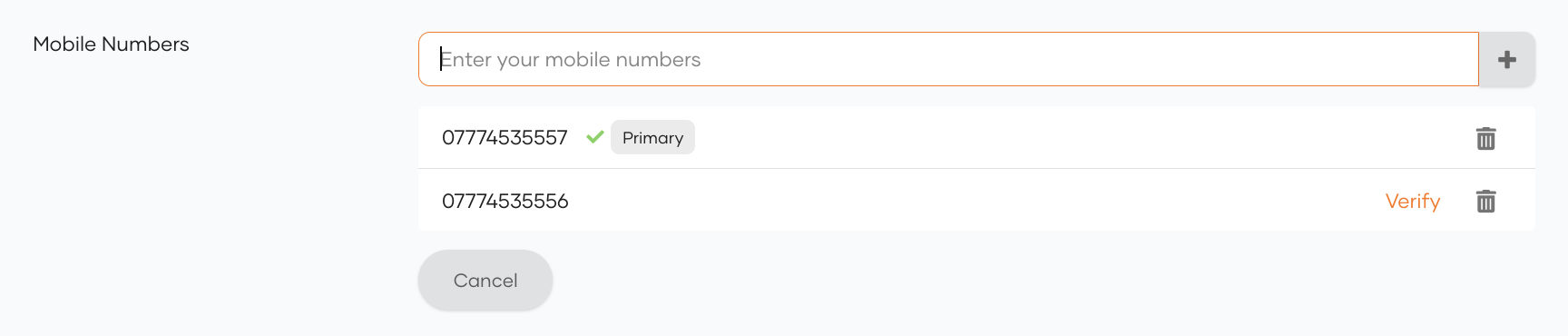
An SMS OTP will be sent to the specified mobile number for verification. The user needs to provide the OTP to verify the mobile number.
Alternatively, you may update the mobile numbers via a PATCH operation to the SCIM 2.0 Me endpoint as shown below.
curl -X PATCH
https://api.asgardeo.io/t/{organization_name}/scim2/Me \
-d '{
    "schemas":["urn:ietf:params:scim:api:messages:2.0:PatchOp"],
    "Operations":[{
        "op":<operation>,
        "value":{"urn:scim:wso2:schema": {"verifiedMobileNumbers": <list_of_mobile_numbers>}}
        }]
    }'
--header "Content-Type:application/json"
--header "Authorization: Bearer <access_token>"
curl -X PATCH
https://api.asgardeo.io/t/bifrost/scim2/Me \
-d '{
    "schemas":["urn:ietf:params:scim:api:messages:2.0:PatchOp"],
    "Operations":[{
        "op":"replace",
        "value":{"urn:scim:wso2:schema": {"verifiedMobileNumbers": "0111111111,0123456789"}}
        }]
    }'
--header "Content-Type:application/json"
--header "Authorization: Bearer <access_token>"
Sample Response
{
    "emails": [
        "[email protected]"
    ],
    "meta": {
        "location": "https://api.asgardeo.io/t/bifrost/scim2/Users/6d433ee7-7cd4-47a3-810b-bc09023bc2ce",
        "lastModified": "2020-10-12T13:35:24.579Z",
        "resourceType": "User"
    },
    "schemas": [
        "urn:ietf:params:scim:schemas:core:2.0:User",
        "urn:ietf:params:scim:schemas:extension:enterprise:2.0:User",
        "urn:scim:wso2:schema"
    ],
    "roles": [
        {
            "type": "default",
            "value": "Internal/everyone"
        }
    ],
    "name": {
        "givenName": "Bob",
        "familyName": "Smith"
    },
    "id": "6d433ee7-7cd4-47a3-810b-bc09023bc2ce",
    "userName": "bob123",
    "phoneNumbers": [
        {
            "type": "mobile",
            "value": "0111111111"
        }
    ],
    "urn:scim:wso2:schema": {
        "mobileNumbers": "0111111111",
        "verifiedMobileNumbers": "0111111111",
    },
    "urn:ietf:params:scim:schemas:extension:enterprise:2.0:User": {
        "pendingMobileNumber": "0123456789"
    }
}
Upon receiving the response outlined above, the user will receive an SMS notification prompting them to verify their
updated mobile number. Once verified, the Verified Mobile Numbers claim (http://wso2.org/claims/verifiedMobileNumbers)
will be updated to reflect the new mobile number. If a primary mobile number has not been configured,
the verified mobile number will also be set as the primary mobile number.
Validate the verification code
When going through the mobile number verification process, users can enter the SMS OTP in the provided prompt and click Verify to verify the mobile number.
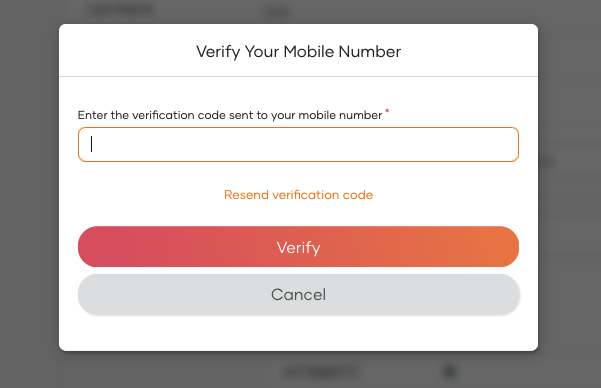
Alternatively, the validation-code API can be used to submit the SMS OTP as shown below.
Response
Resend the verification code
Users can request for a new SMS OTP code by simply clicking the Resend verification code button in the shown prompt
Alternatively, the resend-code API can be used to resend the SMS OTP as shown below.
The verification scenario should be specified in the properties parameter of the request body as follows:
MOBILE_VERIFICATION_ON_UPDATE: Used when verifying a newly updated mobile number for a user.MOBILE_VERIFICATION_ON_VERIFIED_LIST_UPDATE: Used when updating the list of verified mobile numbers for a user.
Response