AI Data Mapping
The AI Data Mapper uses AI to generate mappings between data structures, without manual field-by-field matching. It is especially useful for large or complex schemas with hundreds of fields, deeply nested records, or domain-specific formats.
For the Data Mapper editor and manual mapping, see Data Mapper editor.
How to use
- Visual designer
- Ballerina code
-
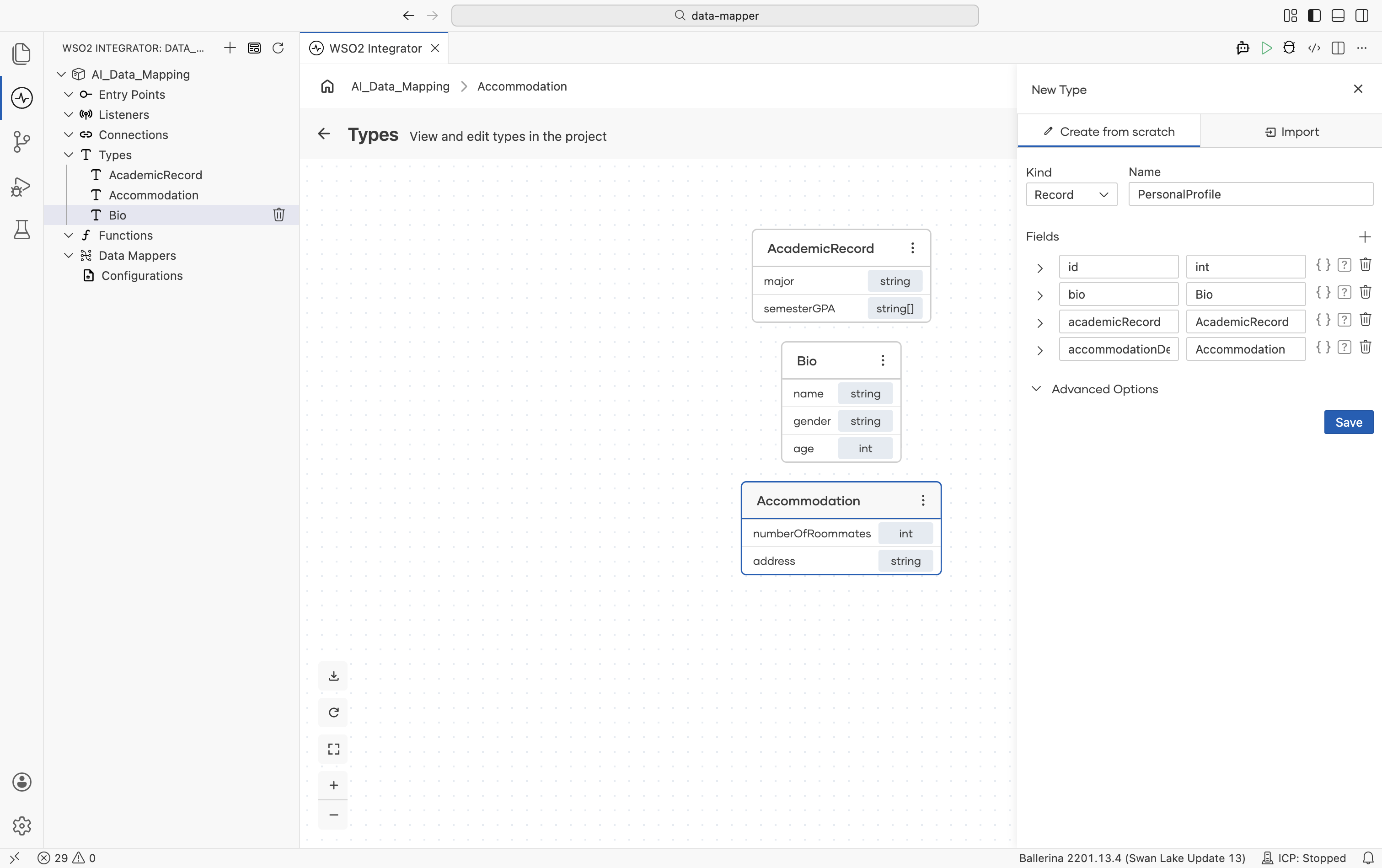
Define the input and output record types in the Types panel. Define inner records first, then compose them into the parent input and output records. For details on creating records, see Type editor.
-
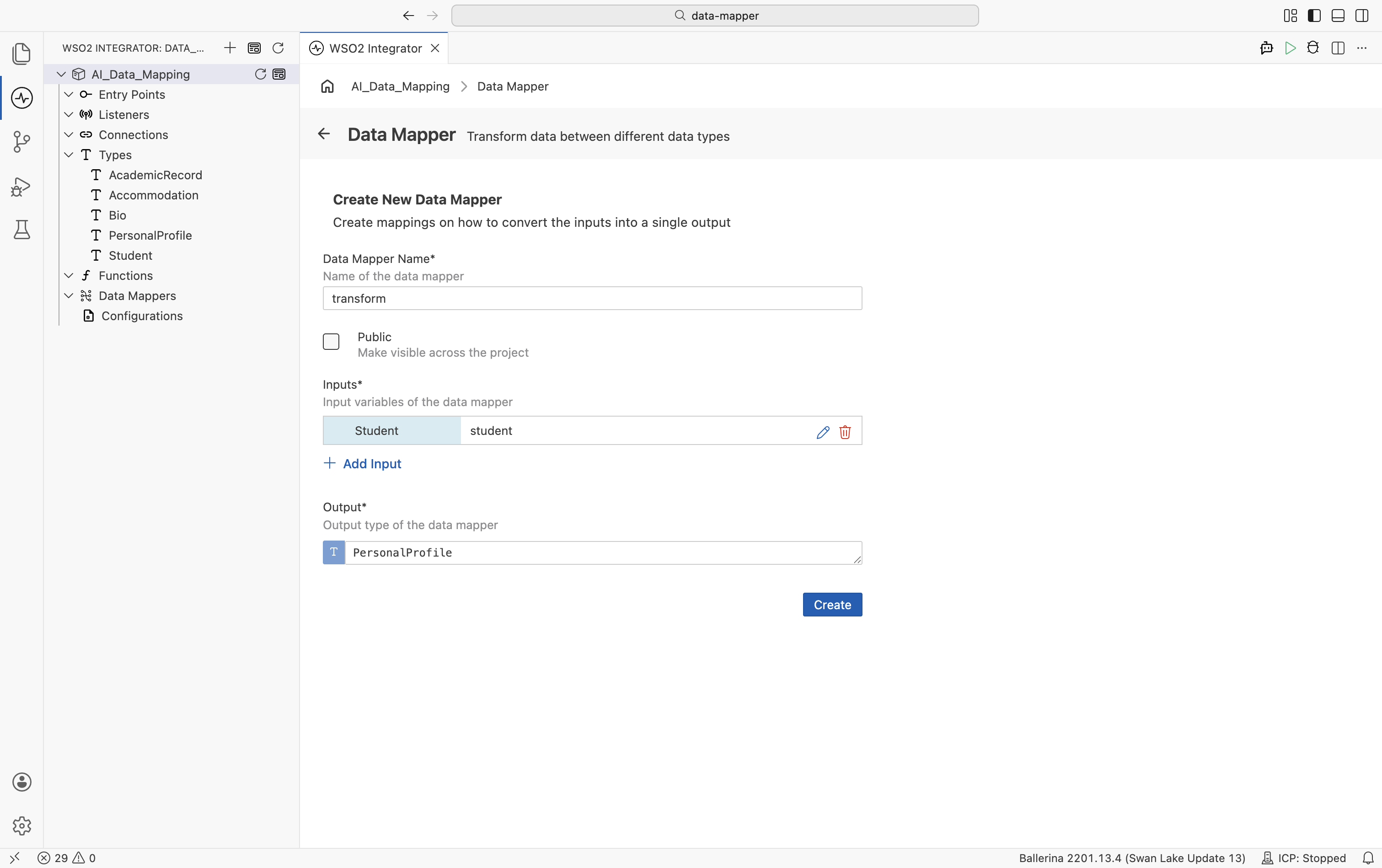
Create the data mapper. Under Data Mappers in the project explorer, select +. Set a name, add the input type with a parameter name, set the output type, and select Create.
-
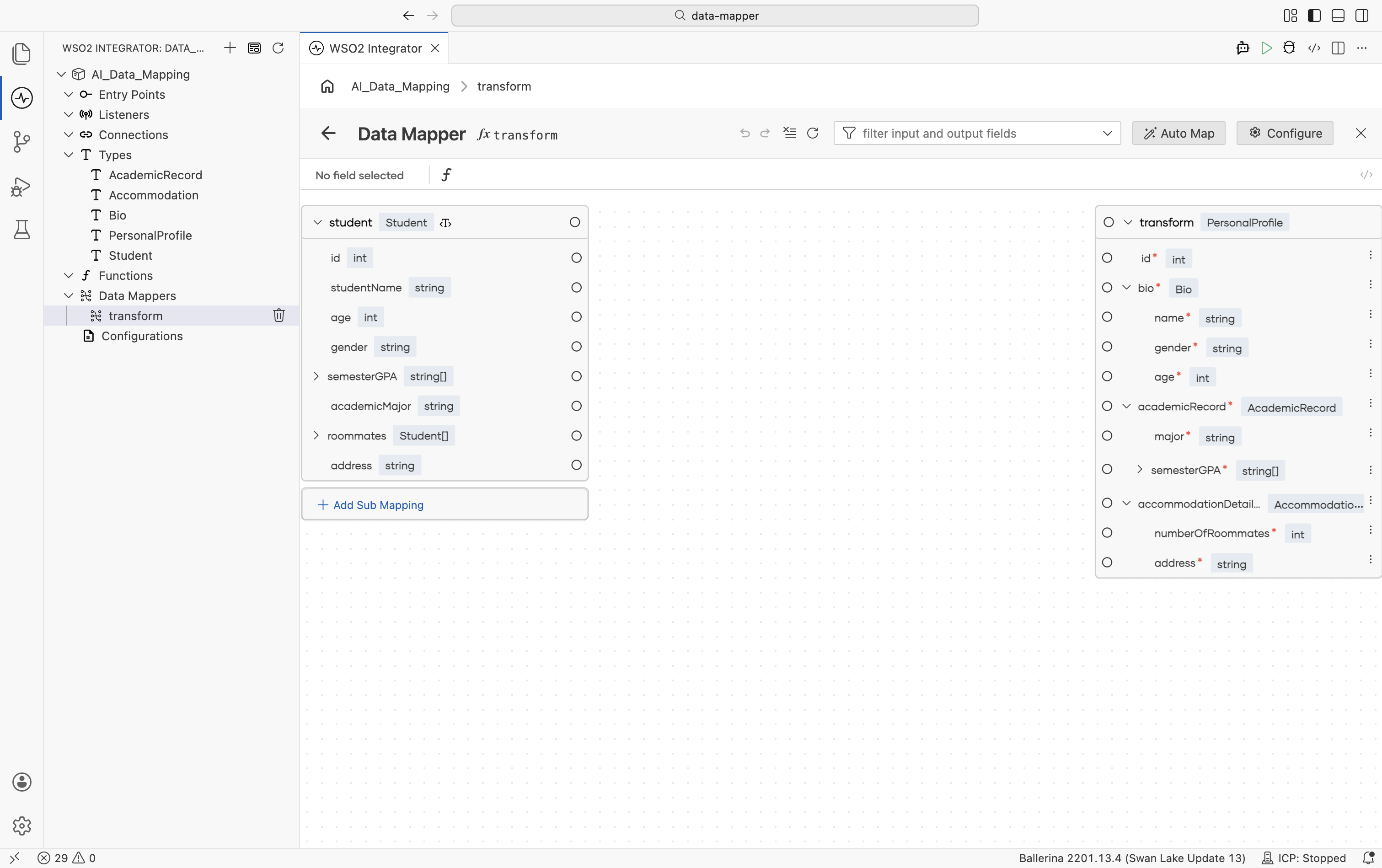
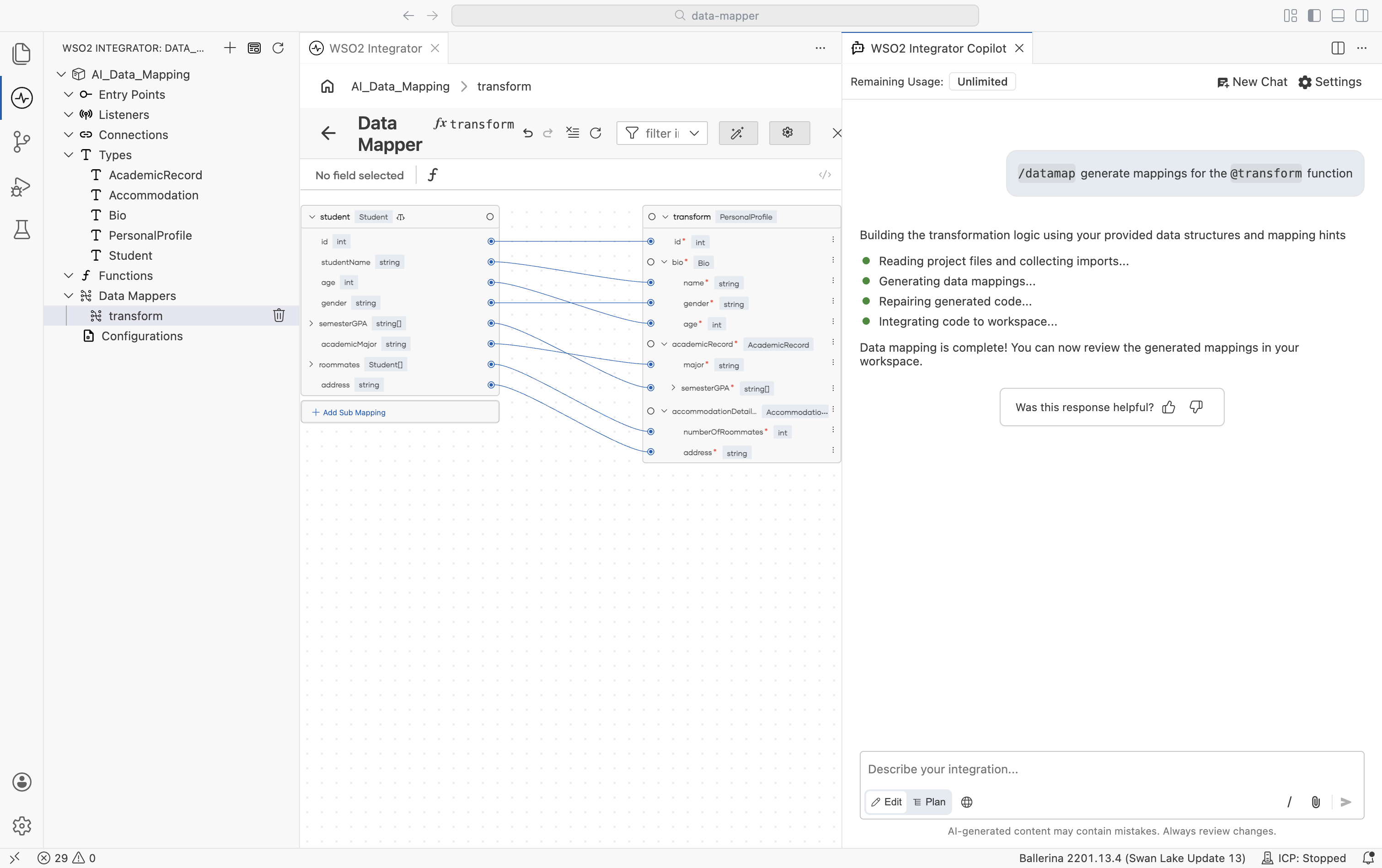
The Data Mapper editor opens with the input schema on the left and the output schema on the right.
-
In the top-right corner of the canvas, select Auto Map. The WSO2 Integrator Copilot panel opens alongside the canvas with the
/data-mapskill preloaded.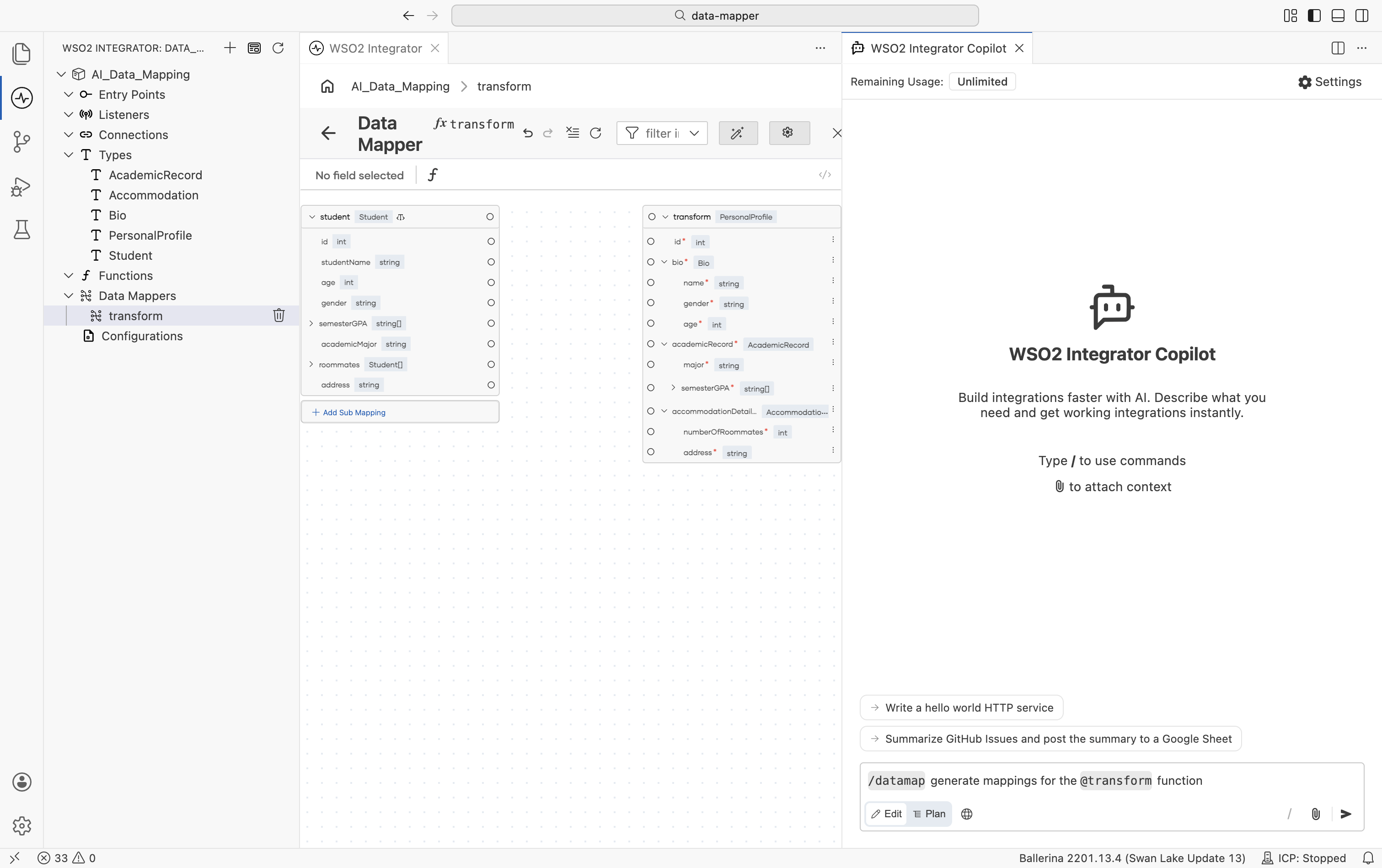
-
Submit it. The Copilot reads the project files, generates field mappings based on the input and output types, and integrates them into your workspace. When complete, mapping lines appear between the matched fields on the canvas.
Define data types
Define the input and output record types in types.bal:
type Student record {
    int id;
    string studentName;
    int age;
    string gender;
    string[] semesterGPA;
    string academicMajor;
    Student[] roommates;
    string address;
};

type PersonalProfile record {
    int id;
    Bio bio;
    AcademicRecord academicRecord;
    Accommodation accommodationDetails;
};

type Bio record {
    string name;
    string gender;
    int age;
};

type AcademicRecord record {
    string major;
    string[] semesterGPA;
};

type Accommodation record {
    int numberOfRoommates;
    string address;
};
Define the data mapper function
Define the transform function stub in data_mappings.bal:
function transform(Student student) returns PersonalProfile => {};
Select Visualize above the transform function to open it in the Data Mapper editor. In the editor, select Auto Map to generate the field mappings. The function is updated with the generated implementation:
function transform(Student student) returns PersonalProfile => {
    id: student.id,
    bio: {name: student.studentName, gender: student.gender, age: student.age},
    academicRecord: {major: student.academicMajor, semesterGPA: student.semesterGPA},
    accommodationDetails: {numberOfRoommates: student.roommates.length(), address: student.address}
};
Features
Automated mapping generation
Mapping generation takes into account:
- Field names and naming conventions
- Semantic relationships between fields
- Nested data structures
- Array types and cardinality
- Optional and nullable fields
- Domain-specific patterns such as those common in healthcare contexts
Advanced expression generation
The AI Data Mapper handles complex transformation scenarios:
- Parsing and conversion: Parsing such as parsing a string as an integer, and converting a value of one type to another.
- Optional field handling: Handling fields that may or may not be present.
- Nested record transformation: Deep structure mapping with proper path navigation.
- Array-to-array mappings: Member-wise transformations with appropriate iteration logic.
Supporting documentation to improve accuracy
Upload reference materials to improve mapping accuracy. While schema-only analysis is supported, providing additional documentation helps the system understand field relationships and business rules.
Supported formats:
- PDF documents
- Images (JPEG, JPG, PNG)
- CSV files
- Text files
For complex mapping scenarios involving large schemas or domain-specific requirements captured in multiple documents, upload all of them. The system analyzes all the documentation to generate accurate, context-aware transformations.
Sub-mapping reuse
The AI Data Mapper detects existing data mappers in your codebase and reuses them where applicable. This reduces code duplication, ensures consistent transformation logic, and keeps the codebase compact.
Function extraction for large schemas
For mappings with a large number of fields (hundreds to thousands of fields), Copilot extracts helper functions to maintain code readability and comply with language server constraints. Complex transformations involving union types, deeply nested structures, and array-to-array operations are automatically decomposed into reusable functions.
Responsible use
Large language models can produce unexpected results when processing highly domain-specific or atypical schema patterns. Follow these practices to ensure accuracy:
- Review all generated mappings before deploying to production.
- Test with representative data samples that reflect actual use cases.
- Verify that the generated transformation logic aligns with your business requirements.
- Provide feedback on incorrect or incomplete mappings to support continuous improvement.
What's next
- Data Mapper editor — Open, configure, and work with the visual mapping canvas.
- Data mapper — End-to-end guide to creating and using data mappers.
- Expression editor — Write custom expressions for individual field mappings.