Introduction
The WSO2 Integration Platform is a 100% open-source integration solution for connecting AI agents, APIs, data, and events across cloud, on-prem, and hybrid environments. It lets you build any type of integration from a single API to a distributed AI-driven workflow and run it wherever your business needs it.
The platform pairs the rapid development of low-code with the full control of pro-code, with AI assistance available across both, taking you from your first local integration to a managed, observable deployment at scale.
Design and run
Working with the WSO2 Integration Platform involves two activities: you design integrations in the IDE, and you deploy them to the runtime of your choice. WSO2 Cloud, your own Kubernetes cluster, or on-premises infrastructure.
Design: WSO2 Integrator IDE
The WSO2 Integrator IDE is where you design, build, and test integrations. It offers:
- The visual designer and code editor stay in sync. Every change in one appears instantly in the other, no export step required.
- AI-assisted development across both views, so you can move from intent to working integration quickly.
Deploy and manage
Integrations built in the IDE can run in two ways. Pick the one that fits your operational model.
WSO2 Cloud: A fully managed cloud platform operated by WSO2. WSO2 Integration Cloud handles build pipelines, environments, deployment tracks, observability, and zero-downtime promotion across development, staging, and production.
Self-hosted (open source). Run the platform on your own infrastructure Kubernetes, Docker, VMs, or bare metal. You retain full control over data sovereignty, infrastructure choices, and CI/CD and observability stack. Your integrations never leave your perimeter, and the platform runs in air-gapped environments.
Architecture
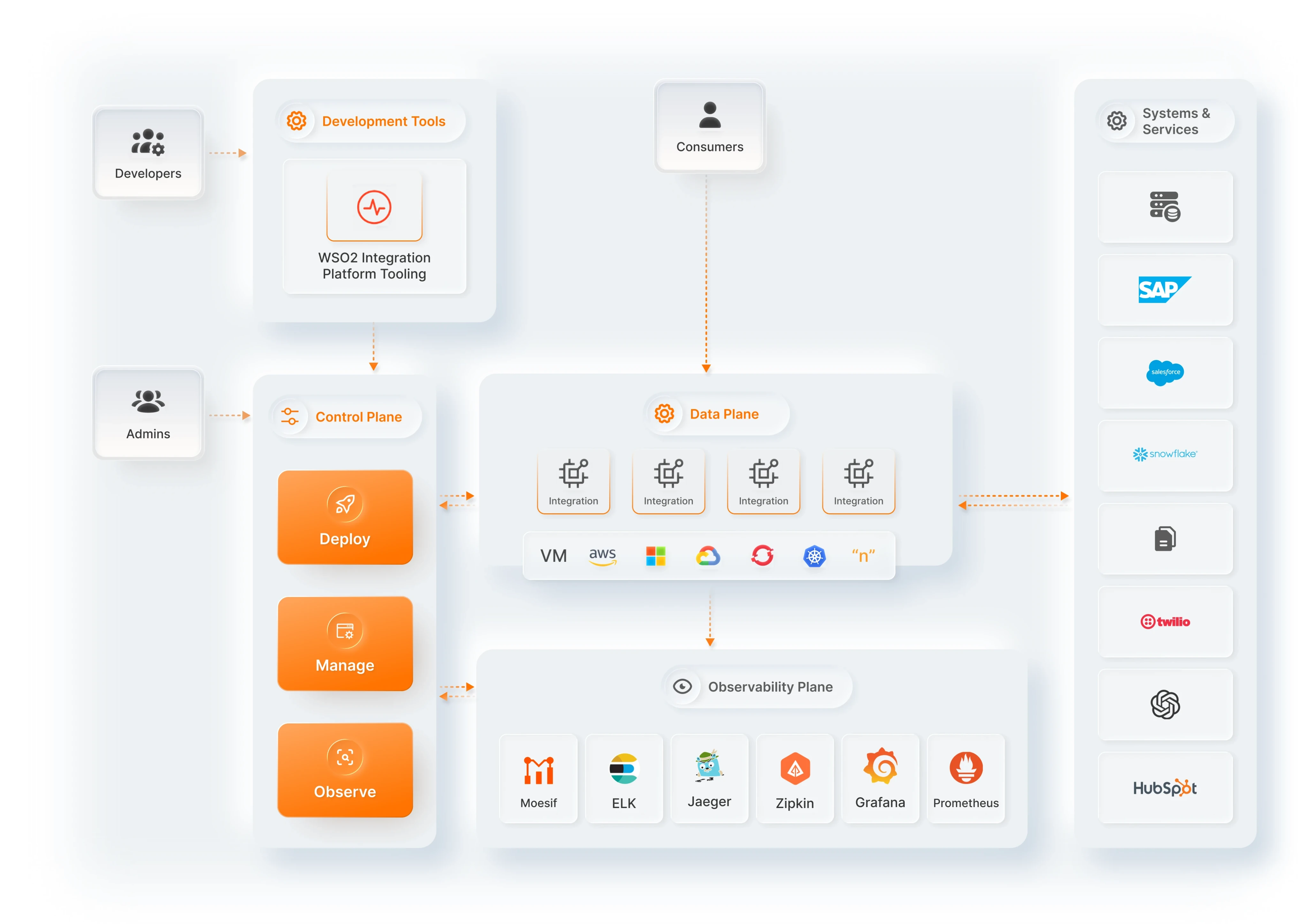
The platform is organized into a small number of clearly separated planes, each with a focused responsibility. The diagram above shows the architecture as it appears in WSO2 Integration Cloud. Self-hosted deployments use a simpler topology that maps to the same essential planes.
WSO2 Integrator IDE
The WSO2 Integrator IDE is the entry point for developers. It produces the source artifacts that the rest of the platform deploys, runs, and observes.
Control plane
The control plane is the operations brain of the platform. It is where admins and DevOps users perform the three core lifecycle actions: deploy, manage, and observe.
The control plane doesn't run your integrations. Its job is to orchestrate the data plane and interpret the observability plane. The control plane shown in the diagram is the one provided by WSO2 Integration Cloud. In self-hosted deployments, you can manage these actions through the Integration Control Plane or through your own tooling and pipelines.
Data plane
The data plane is the infrastructure on which your integrations actually run.
The data plane can be:
- WSO2-managed: Provisioned and operated by WSO2 as part of WSO2 Integration Cloud.
- Private (cloud): Running in your own AWS, Azure, GCP, OpenShift, or Kubernetes environment, but still managed through WSO2 Integration Cloud's control plane.
- Self-hosted: Running entirely on your own infrastructure, managed end-to-end by you.
Observability plane
The observability plane works with common tools like ELK, Grafana, Zipkin, Prometheus, and Jenkins, and fits into your operational dashboards, alerting, and incident workflows.
External systems
Integrations connect to external systems and services like SAP, Salesforce, Snowflake, Twilio, OpenAI, and HubSpot through typed connectors and connections defined at design time.
What makes it different
100% low-code and pro-code parity
Every integration can be built in two ways, and both stay in sync. Add components through a graphical interface, configure properties visually, and see the flow as a diagram. Or write code directly with full IDE support, auto-complete, and type checking.
Powered by Ballerina
Under the hood, every integration is a Ballerina program. The language has cloud-native services and protocols (HTTP, gRPC, GraphQL, WebSocket, Kafka, and more) built in, type-safe data handling that catches errors at compile time, and a rich standard library for data formats (JSON, XML, CSV, and more) and connectors (SAP, Salesforce, Twilio, and more).
AI-assisted, AI-ready
AI shows up on the platform in two ways. WSO2 Integrator Copilot helps you build integrations by generating flows, scaffolding connectors, and writing logic from natural-language prompts. And AI is a first-class part of what you build: AI agents, MCP servers, and RAG workflows are native integration types alongside APIs, automations, and event handlers.
What's next
- Concepts — learn the vocabulary used across the platform
- Set up WSO2 Integrator — set up the IDE and create your first integration
- Build an automation — schedule tasks and run background jobs
- Integration Control Plane — monitor and manage running integrations centrally
- WSO2 Cloud — deploy integrations to the fully managed cloud platform
- Ballerina by Example — explore working code samples for common patterns