CSV & Flat File Processing
CSV and flat files are commonly used data exchange formats for spreadsheets, reports, batch-processing systems, legacy applications, and data integration workflows. Formats such as CSV, TSV, and fixed-width files are widely used to store and transfer structured tabular data between systems.
WSO2 Integrator provides built-in support for CSV and flat-file processing, enabling developers to read, parse, validate, transform, and generate delimited or fixed-width data without relying on external libraries. The ballerina/data.csv module offers type-safe APIs for handling tabular data and converting rows into structured records.
With native CSV and flat-file support, developers can efficiently process large datasets, transform file content, map records between formats, and integrate file-based systems with APIs, databases, and enterprise applications.
Mapping CSV columns to records
Declare a record type with the fields you want to extract. The csv:parseString() function matches CSV column headers to record field names, builds one record per row, and ignores any columns not declared in the record. The record drives what gets read, so you don't need to mirror the CSV file column-for-column. Whether the source has 5 columns or 50, only the fields you declare are populated.
This flexibility is the foundation for everything that follows: full row mapping, file and stream reading, custom delimiters, and transformations all build on the same column-to-field matching rule.
- Visual Designer
- Ballerina Code
-
Define a record with only the columns you need. Navigate to Types and click +. Select Create from scratch, set Kind to Record, and name it
EmployeeSummary. Add only the fields you care about (for example,name(string) andsalary(decimal)). For details on creating types, see Types. -
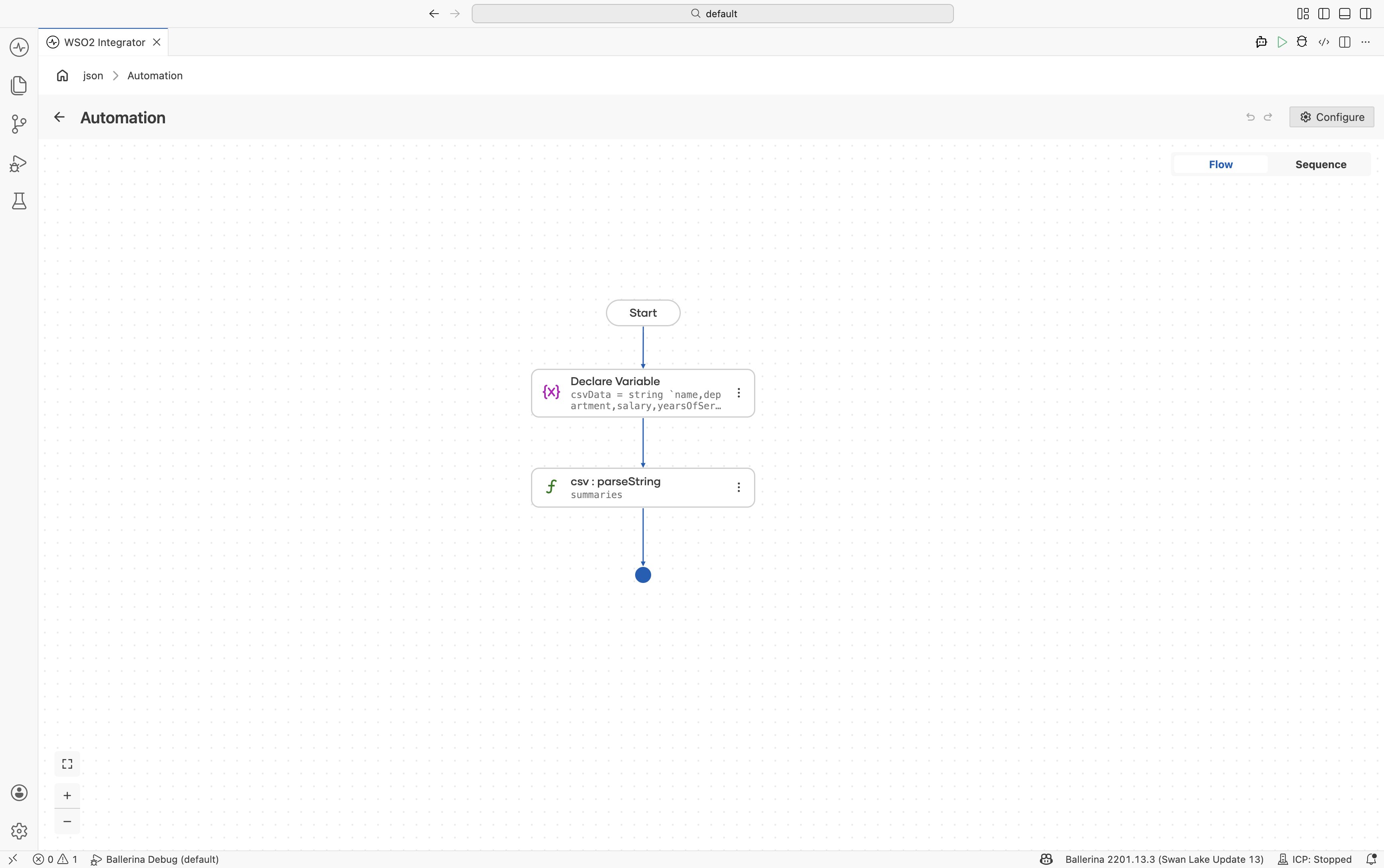
Add a Variable step. Add a Declare Variable step with the CSV string assigned to
csvData. -
Parse the CSV string. Use
csv:parseStringwith:- Csv String*:
csvData - Result*:
summaries - T*:
EmployeeSummary[]
- Csv String*:
import ballerina/data.csv;

// The CSV source has five columns; the record declares only the two we use.
// `department`, `yearsOfService`, and `location` are silently ignored.
type EmployeeSummary record {|
    string name;
    decimal salary;
|};

public function main() returns error? {
    string csvData = string `name,department,salary,yearsOfService,location
Alice,Engineering,95000.00,5,Seattle
Bob,Sales,72000.00,3,New York`;

    EmployeeSummary[] summaries = check csv:parseString(csvData);
}
Reading CSV into records
When you do need every column, declare a record that includes all of them and iterate over the parsed array. The mapping rule is the same as in Mapping CSV columns to records: this is just the case where the record happens to cover the full row.
- Visual Designer
- Ballerina Code
-
Define the record type. Navigate to Types in the sidebar and click + to add a new type. Select Create from scratch, set Kind to Record, and name it
Employee. Add fields using the + button:Field Type namestringdepartmentstringsalarydecimalyearsOfServiceintFor details on creating types, see Types.
-
Add a Variable step. In the flow designer, click + and select Statement → Declare Variable. Set the type to
stringand the name tocsvData. Switch the toggle from Record to Expression, then enter the CSV string value. -
Parse the CSV string. Click + and select Call Function. Search for
parseStringand select it under data.csv. Configure:- Csv String*:
csvData - Result*:
employees - T*:
Employee[]
- Csv String*:
-
Add a Foreach step. Click + and select Foreach under Control. Set:
- Collection:
employees - Variable Name*:
emp - Variable Type*:
Employee
- Collection:
-
Add println inside the loop. Inside the Foreach body, click + and select Call Function. Search under standard library → io → select
println. Use Add Item to add three items. For each, search variables, expandemp, and selectname,department, andsalaryrespectively.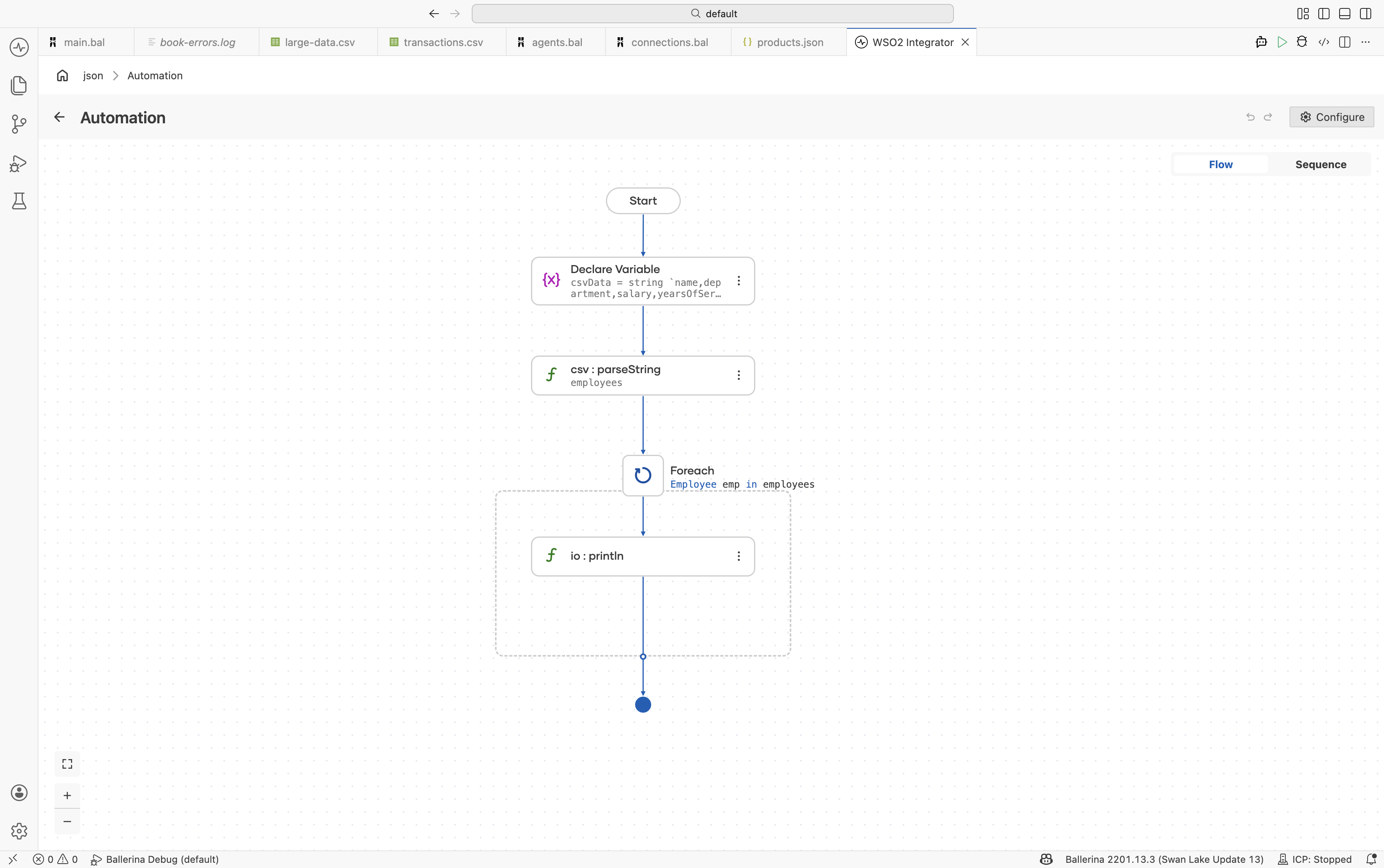
import ballerina/data.csv;
import ballerina/io;

type Employee record {|
    string name;
    string department;
    decimal salary;
    int yearsOfService;
|};

public function main() returns error? {
    string csvData = string `name,department,salary,yearsOfService
Alice,Engineering,95000.00,5
Bob,Sales,72000.00,3
Carol,Engineering,110000.00,8`;

    Employee[] employees = check csv:parseString(csvData);

    foreach Employee emp in employees {
        io:println(string `${emp.name} (${emp.department}): $${emp.salary}`);
    }
}
Reading CSV from files and streams
Use csv:parseBytes() for byte arrays or csv:parseStream() for streaming large CSV files without loading them entirely into memory. Both APIs accept the same record target type as csv:parseString(), so the column-to-field mapping behavior from Mapping CSV columns to records applies unchanged.
- Visual Designer
- Ballerina Code
-
Define the record type. Navigate to Types and click +. Select Create from scratch, set Kind to Record, and name it
Transaction. Add fields:date(string),description(string),amount(decimal), andcategory(string). For details on creating types, see Types. -
Read the file as bytes. In the flow designer, click + and select Call Function. Search under io and select
fileReadBytes. Configure:- Path*:
./resources/transactions-2025-q1.csv - Result*:
content
- Path*:
-
Parse the bytes as CSV. Click + and select Call Function. Search for
parseBytesand select it under data.csv. Configure:- Csv Bytes*:
content - Result*:
transactions - T*:
Transaction[]
- Csv Bytes*:
-
(Optional) Use a byte block stream as input. For files larger than the available byte-array buffer, swap
io:fileReadBytesforio:fileReadBlocksAsStreamandcsv:parseBytesforcsv:parseStream. The result is still a fully-materialized array. To process records one at a time without holding the whole file in memory, see Processing large files.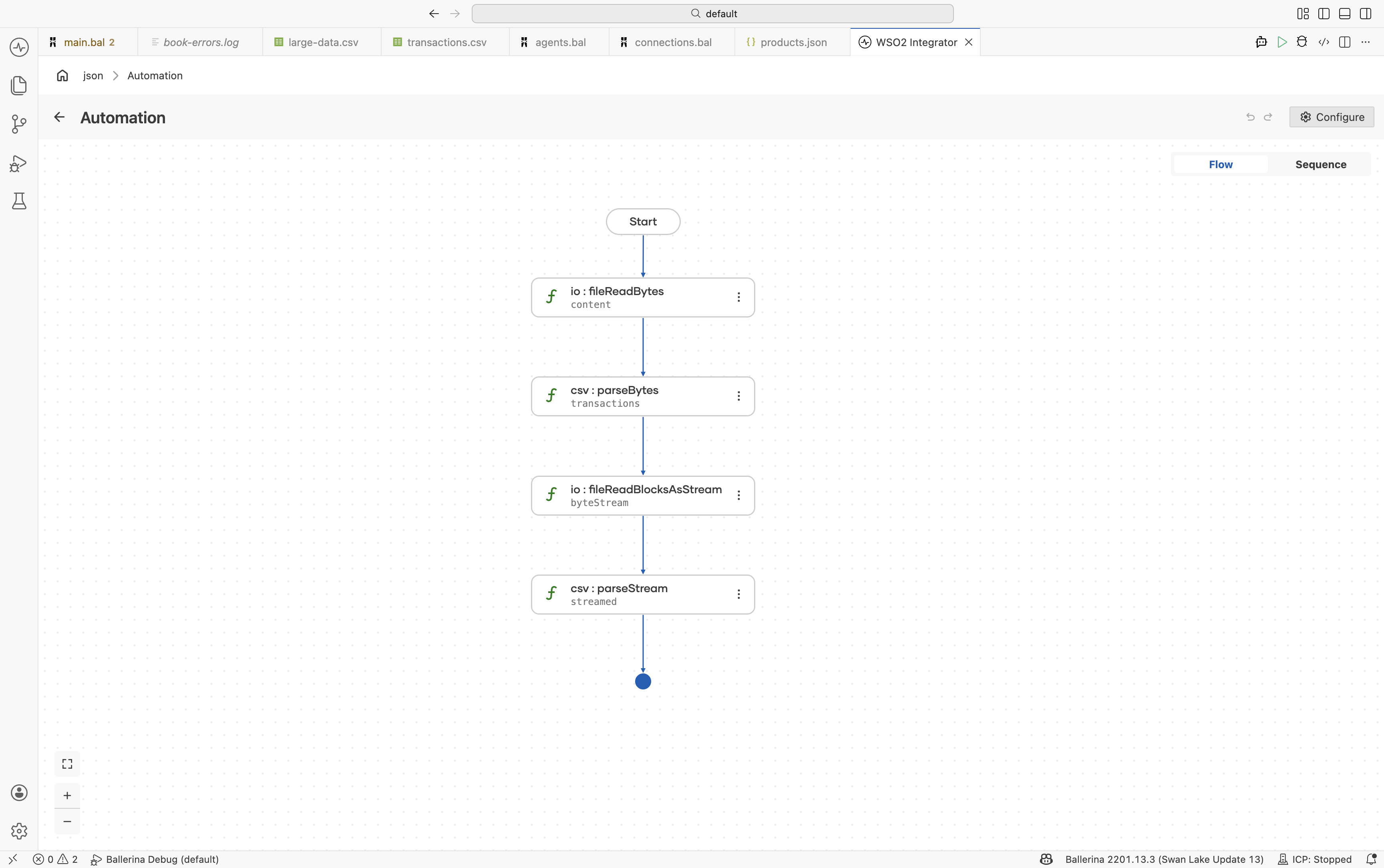
import ballerina/data.csv;
import ballerina/io;

type Transaction record {|
    string date;
    string description;
    decimal amount;
    string category;
|};

public function main() returns error? {
    byte[] content = check io:fileReadBytes("./resources/transactions-2025-q1.csv");
    Transaction[] transactions = check csv:parseBytes(content);

    stream<byte[], io:Error?> byteStream =
        check io:fileReadBlocksAsStream("./resources/transactions-archive.csv");

    Transaction[] streamed = check csv:parseStream(byteStream);
}
Processing large files
csv:parseString(), csv:parseBytes(), and csv:parseStream() all materialize the full result as an array (T[]) before returning. The byte source can be streamed (as with parseStream), but the parsed records are still held in memory all at once. For files in the tens or hundreds of megabytes that is usually fine. For multi-gigabyte files, or in memory-constrained runtimes, the array doesn't fit.
csv:parseToStream() solves this. It reads from a byte-block stream and returns a stream<T, csv:Error?> of records that are parsed lazily, one at a time. Each record is read, parsed, handed to your code, and released before the next record is pulled. Memory usage stays flat regardless of file size.
- Visual Designer
- Ballerina Code
-
Define the record type. Define a record matching the columns you want to extract. For details, see Mapping CSV columns to records.
-
Open the file as a byte block stream. In the flow designer, click + and select Call Function. Search under io and select
fileReadBlocksAsStream. Configure:- Path*:
./resources/transactions-archive.csv - Result*:
byteStream
- Path*:
-
Parse to a record stream. Click + and select Call Function. Search for
parseToStreamunder data.csv. Configure:- Csv Byte Stream*:
byteStream - Result*:
transactionStream - T*:
Transaction
- Csv Byte Stream*:
-
Process records one at a time. Add a Foreach step over
transactionStream. Inside the loop, add the per-row logic (write to a database, call an API, aggregate counters). Only one record sits in memory at a time.
import ballerina/data.csv;
import ballerina/io;

type Transaction record {|
    string date;
    string description;
    decimal amount;
    string category;
|};

public function main() returns error? {
    // Open the file as a byte block stream; the file is never read into memory all at once.
    stream<byte[], io:Error?> byteStream =
        check io:fileReadBlocksAsStream("./resources/transactions-archive.csv");

    // parseToStream returns a record stream. Each record is parsed on demand.
    stream<Transaction, csv:Error?> transactions =
        check csv:parseToStream(byteStream);

    // forEach pulls one record at a time, so memory usage stays flat for any file size.
    check transactions.forEach(function(Transaction txn) {
        io:println(string `${txn.date}: ${txn.description} - $${txn.amount}`);
    });
}
Use parseToStream when:
- The input file is too large to fit in memory as a parsed array.
- You only need to scan or aggregate rows, not hold them all at once.
- You want to start producing output before parsing finishes (for example, writing each transformed record straight to a downstream API).
parseToStream accepts the same options as parseStream, so custom delimiters, headerless input, column projection, and fail-safe mode all work the same way.
Parser options
All of the CSV parser functions (csv:parseString, csv:parseBytes, csv:parseStream, csv:parseToStream) accept the same set of options that control how the input is read. Use these options to switch delimiters, skip header banners, treat specific tokens as nil, validate values against record constraints, or enable fail-safe mode.
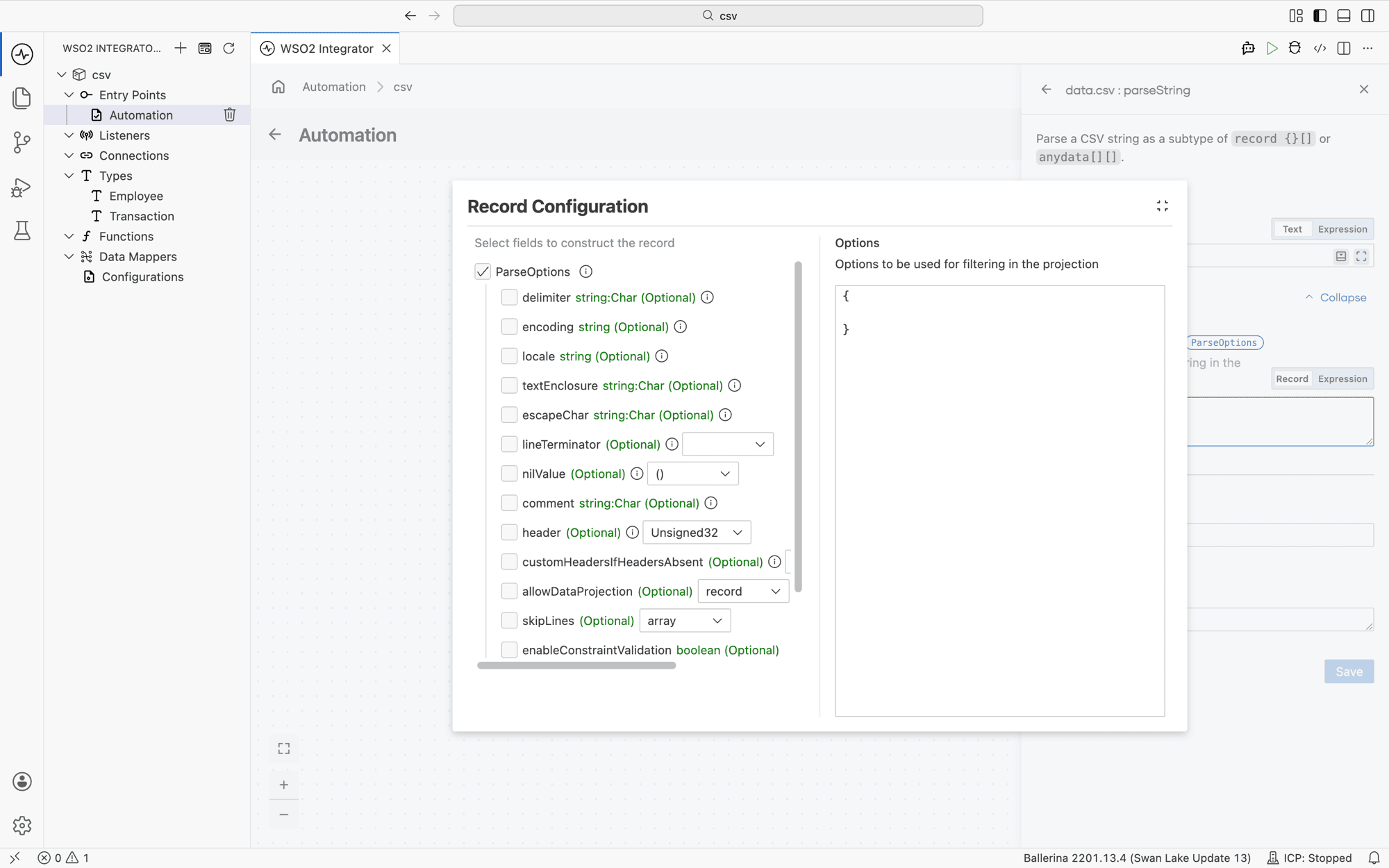
In the visual designer, parser options live under Advanced Configurations → Options on the parse step. The field is empty by default ({}), meaning all defaults apply.
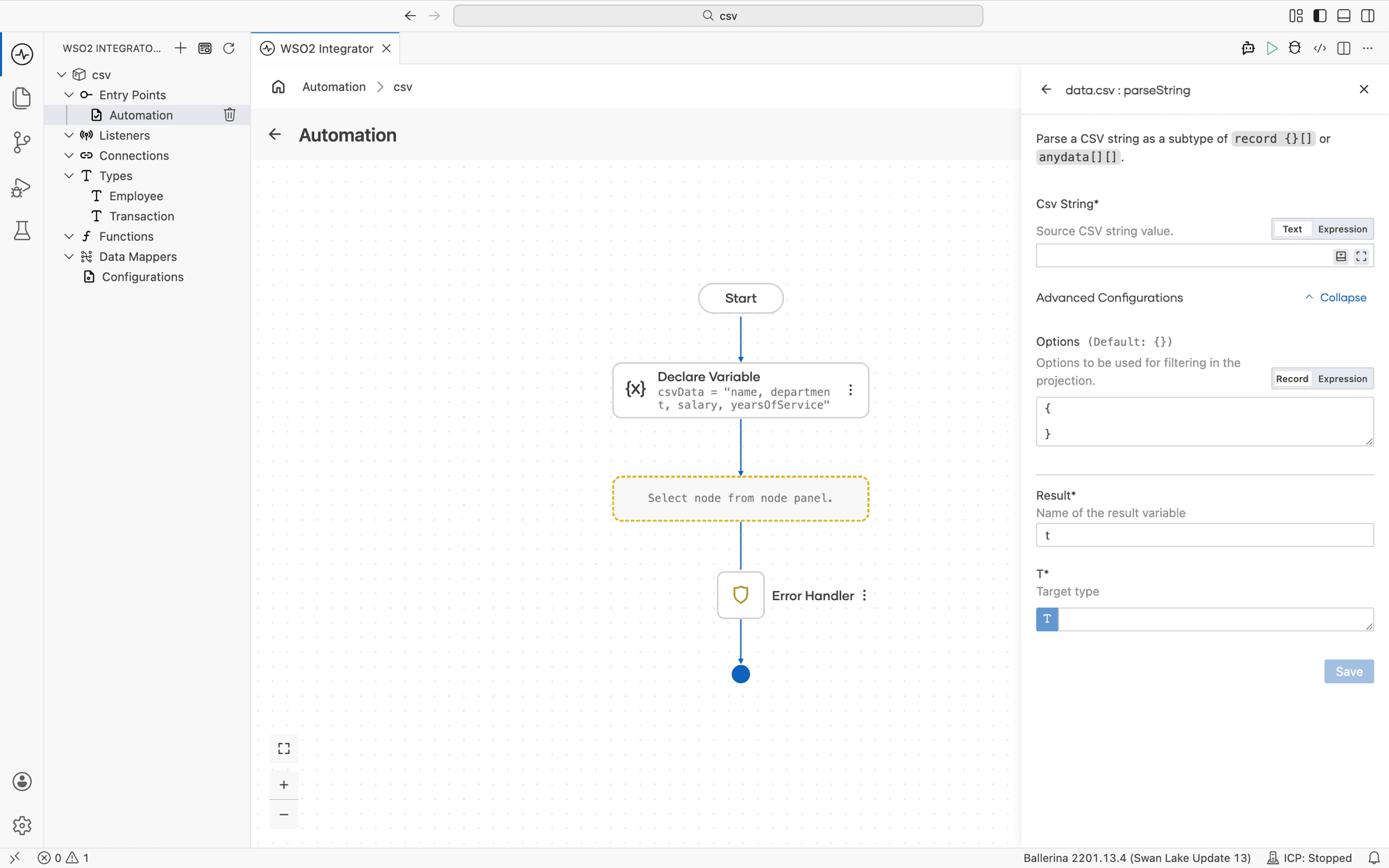
Click the Options field to open the Record Configuration helper. Tick the checkbox next to any option you want to set, fill in the value, and click Save. The helper writes the equivalent record literal into the Options field.
Available options
The fields below match the ParseOptions record in the ballerina/data.csv module. ParseOptions includes (*Options;) the shared Options record, so the table also covers allowDataProjection, skipLines, enableConstraintValidation, outputWithHeaders, and failSafe.
| Option | Type | Description |
|---|---|---|
delimiter | string:Char | Character that separates columns. Default ",". For example, set to "\t" for TSV. See Custom delimiters and options for pipe-delimited and other non-standard formats. |
encoding | string | Character encoding of the input data. Default "UTF-8". |
locale | string | Locale used to parse locale-sensitive values such as numbers and dates. Default "en_US". |
textEnclosure | string:Char | Character used to enclose quoted fields. Default "\"". |
escapeChar | string:Char | Character that escapes special characters inside enclosed text. Default "\\". |
lineTerminator | LineTerminator|LineTerminator[] | Row terminator, or set of terminators to accept. LineTerminator is an enum with members LF ("\n") and CRLF ("\r\n"). Default [LF, CRLF]. |
nilValue | NilValue? | Token treated as nil during parsing. NilValue is an enum with members NULL ("null"), NOT_APPLICABLE ("N/A"), EMPTY_STRING (""), and NIL ("()"). Default (). |
comment | string:Char | Lines beginning with this character are skipped. Default "#". |
header | int:Unsigned32? | Row index of the header row. Default 0. Set to () for input with no header row. See Headerless CSV. |
customHeadersIfHeadersAbsent | string[]? | Header names to use when the input has no header row. Default (). |
allowDataProjection | record|false | Controls projection when the target record covers only a subset of CSV columns. Set to false to require an exact match. The record form has nilAsOptionalField and absentAsNilableType boolean fields, both defaulting to false. Default {}. |
skipLines | int[]|string | Lines to skip, given as an integer array (for example, [1, 3]) or as a range expression string (for example, "2-4,7"). Default []. |
enableConstraintValidation | boolean | When true, parsed values are validated against any constraints declared on the record type. Default true. |
outputWithHeaders | boolean | When the parsed result is a list (anydata[][]), include the header row as the first inner array. Default false. |
failSafe | FailSafeOptions? | Skips and logs invalid rows instead of aborting the parse. See Fail-safe processing. |
In Ballerina code, options are passed as the second argument to the parser function:
T[] result = check csv:parseString(csvData, {
    delimiter: "\t",
    skipLines: [0, 1],
    nilValue: csv:NULL
});
Custom delimiters and options
Configure parsing behavior for TSV (tab-separated values, a CSV-like format that uses tab characters as the column separator instead of commas), pipe-delimited, or other non-standard file formats. Set the delimiter option to the separator character your input uses, for example "\t" for TSV or "|" for pipe-delimited. Column-to-field matching still follows the rule from Mapping CSV columns to records; only the delimiter changes.
- Visual Designer
- Ballerina Code
-
Define the record type. Create a record named
LogEntrywith fields:timestamp(string)level(string)message(string)
-
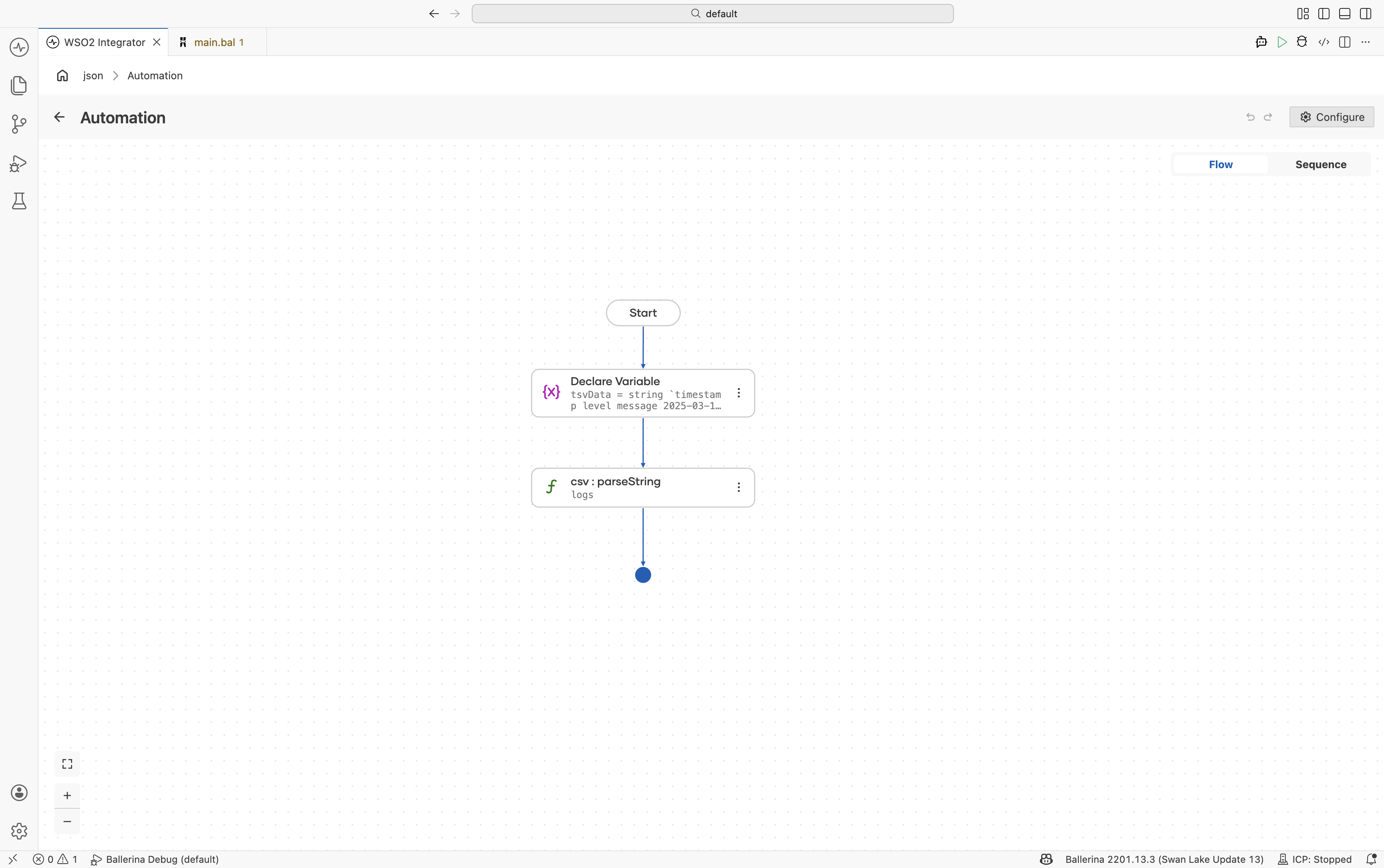
Add a Variable step. Add a Declare Variable step for
tsvDataand provide the tab-separated content. -
Parse with custom delimiter. Use
csv:parseStringand configure:- Csv String*:
tsvData - Result*:
logs - T*:
LogEntry[]
Under Advanced Configurations → Options (see Parser options), set:
delimiter:"\t"
- Csv String*:
import ballerina/data.csv;

type LogEntry record {|
    string timestamp;
    string level;
    string message;
|};

public function main() returns error? {
    string tsvData = string `timestamp	level	message
2025-03-15T10:00:00Z	INFO	Service started
2025-03-15T10:01:23Z	ERROR	Connection refused`;

    LogEntry[] logs = check csv:parseString(tsvData, {
        delimiter: "\t"
    });
}
Headerless CSV
At its most general, a CSV file is just a grid of strings, and the universal representation of that grid is a 2D string array (string[][]): one inner array per row, one string per cell. WSO2 Integrator supports this raw form directly, but the preferred Ballerina representation is record[], which gives you typed fields and named columns instead of positional indexing.
When a file has no header row, you have two options:
- Parse into
string[][]by setting theheaderoption to()(Ballerina's nil literal) and access cells by index. Use this when you don't have a fixed schema or the column order is unreliable. - Parse into a typed
record[]by combiningheader: ()withcustomHeadersIfHeadersAbsent, which supplies the column names the parser would otherwise read from the first row. Use this when you know the column layout and want the same typed-field ergonomics as a CSV with headers.
- Visual Designer
- Ballerina Code
-
Declare the CSV data variable. Add a Declare Variable step with the headerless CSV content.
-
Parse as headerless CSV. Configure
csv:parseStringwith:- Csv String*:
csvData - Result*:
rows - T*:
string[][]
Under Advanced Configurations → Options (see Parser options), set:
header:()
To parse into a typed
record[]instead, set the target type (T) to your record array (for example,Employee[]) and also setcustomHeadersIfHeadersAbsentto the list of column names in the order they appear in the file.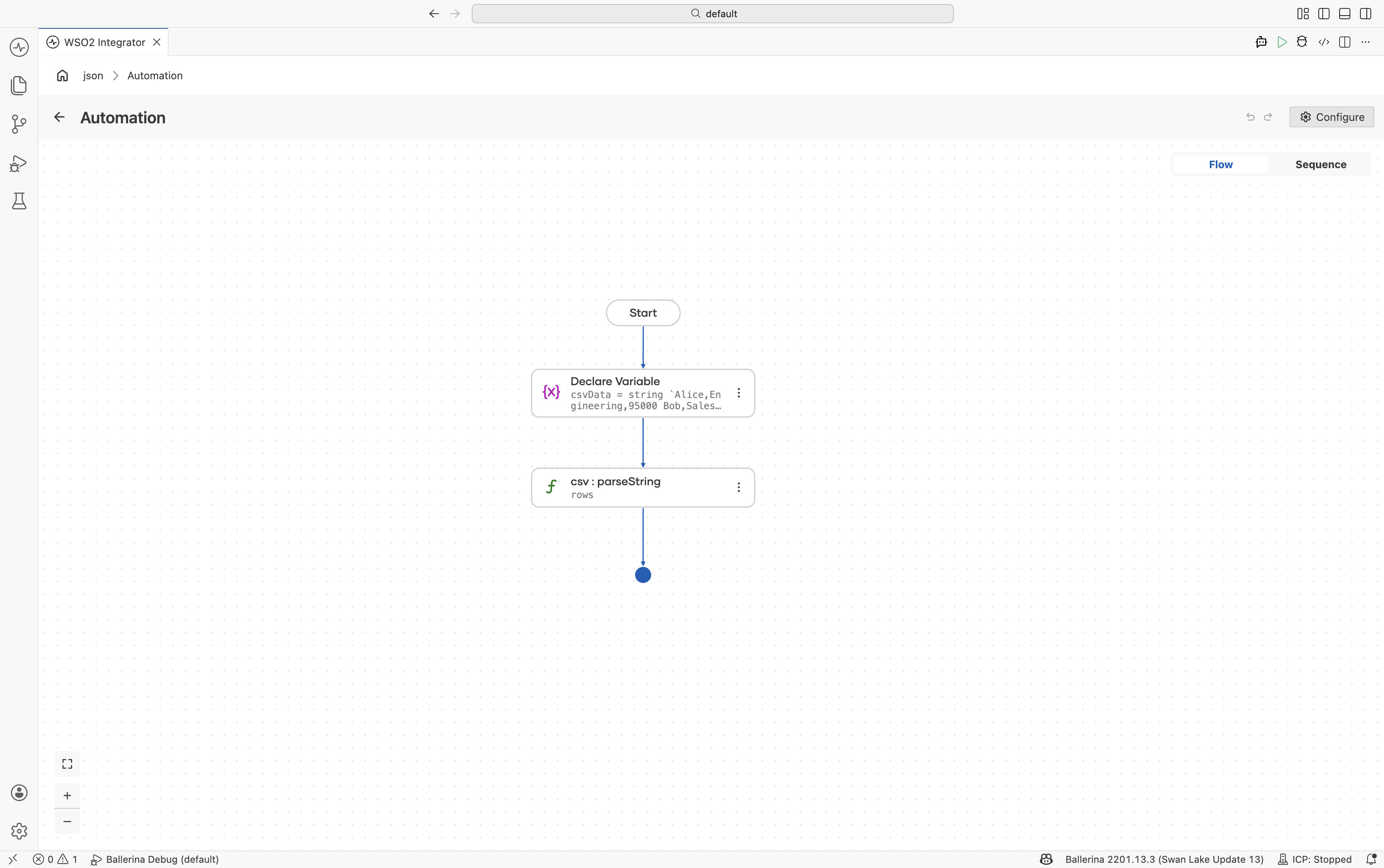
- Csv String*:
import ballerina/data.csv;

type Employee record {|
    string name;
    string department;
    int salary;
|};

public function main() returns error? {
    string csvData = string `Alice,Engineering,95000
Bob,Sales,72000`;

    // Option 1: parse as a raw grid of strings, accessed by index.
    string[][] rows = check csv:parseString(csvData, {
        header: ()
    });

    // Option 2: supply column names so the parser can build typed records.
    Employee[] employees = check csv:parseString(csvData, {
        header: (),
        customHeadersIfHeadersAbsent: ["name", "department", "salary"]
    });
}
Writing CSV output
Write arrays of records directly to CSV files using io:fileWriteCsv().
- Visual Designer
- Ballerina Code
-
Define the record type. Create a record named
Productwith fields:id(string)name(string)price(decimal)stock(int)
-
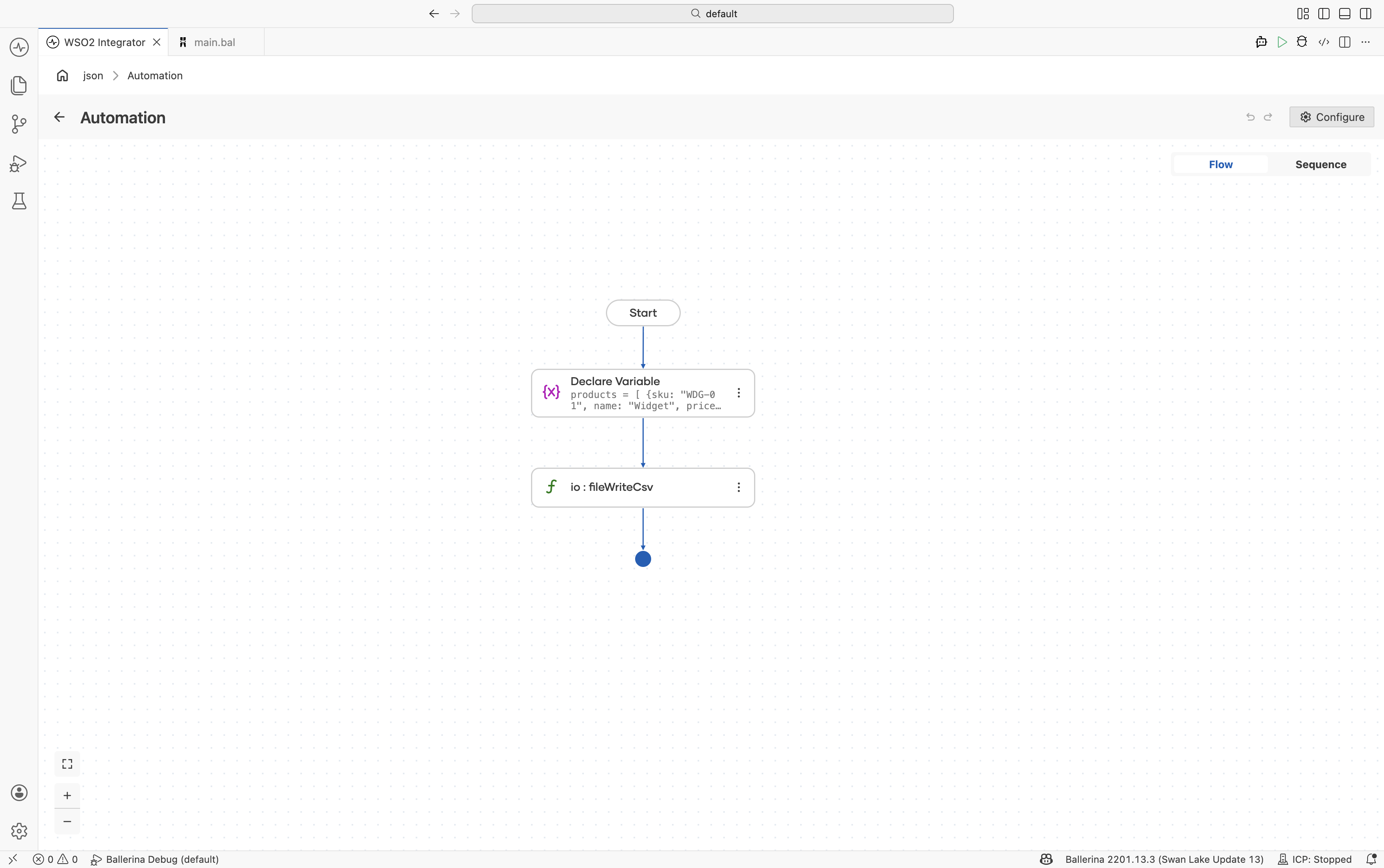
Add a Variable step. Create a variable named
productsof typeProduct[]. -
Write the CSV file. Use
io:fileWriteCsvwith:- Path*:
./output/product-catalog.csv - Content*:
products
- Path*:
import ballerina/io;

type Product record {|
    string id;
    string name;
    decimal price;
    int stock;
|};

public function main() returns error? {
    Product[] products = [
        {id: "WDG-01", name: "Widget", price: 29.99, stock: 150},
        {id: "GDG-02", name: "Gadget", price: 49.99, stock: 42},
        {id: "GZM-03", name: "Gizmo", price: 19.99, stock: 0}
    ];

    check io:fileWriteCsv(
        path = "./output/product-catalog.csv",
        content = products
    );
}
Fail-safe processing
By default, csv:parseString() is strict. The parser stops at the first row that doesn't match the target record type (for example, a value that can't be coerced to the declared type, or a row with the wrong number of columns) and returns an error. The whole batch is rejected, even if every other row would have parsed cleanly.
Fail-safe parsing inverts that behavior. Bad rows are skipped, the offending row data and error are captured, and the function returns only the rows that parsed successfully. Use it for batch jobs and data integration pipelines where partial data is more useful than no data, and where you want to triage bad rows after the fact rather than have a single malformed line abort the whole run.
Enable fail-safe by setting the failSafe option on the parser. The simplest form logs errors to the console while parsing continues:
- Visual Designer
- Ballerina Code
-
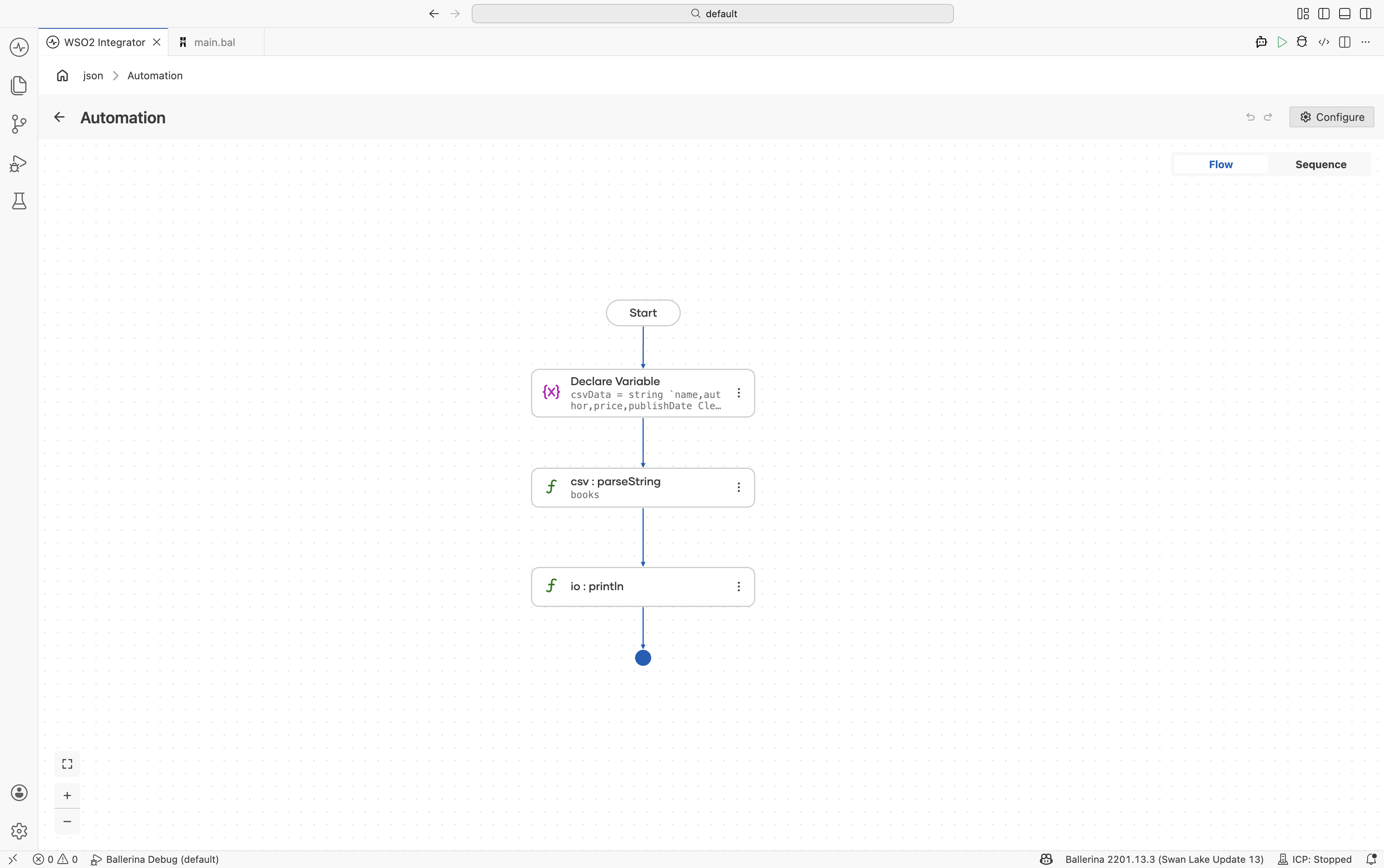
Define the record type. Create a
Bookrecord with fields:nameauthorpricepublishDate
-
Add CSV input data. Include at least one invalid row to test fail-safe behavior.
-
Enable fail-safe options. Under Advanced Configurations → Options (see Parser options), set:
{
    "failSafe": {
        "enableConsoleLogs": true
    }
}
import ballerina/data.csv;
import ballerina/io;

type Book record {|
    string name;
    string author;
    decimal price;
    string publishDate;
|};

public function main() returns error? {
    string csvData = string `name,author,price,publishDate
Clean Code,Robert Martin,25.50,2008-08-01
Design Patterns,Gang of Four,INVALID,1994-10-31`;

    Book[] books = check csv:parseString(csvData, {
        failSafe: {
            enableConsoleLogs: true
        }
    });

    io:println(books);
}
The invalid row is skipped, the error is logged, and only valid rows are returned.
Beyond console logging, failSafe can also write errors to a log file, with options for what to record (parser metadata, the raw row, or both) and how to write (append or overwrite).
Edge cases
Quoted fields and special characters
The ballerina/data.csv module supports RFC 4180 compliant CSV, including quoted fields containing commas, newlines, and escaped quotes.
Encoding
Use byte arrays and proper encoding conversion when processing non-UTF-8 CSV files.
What's next
- EDI Processing — Process enterprise data interchange formats