EDI Processing
Work with Electronic Data Interchange (EDI) formats used in supply chain, healthcare, retail, and financial integrations. Ballerina provides the ballerina/edi module for parsing and serializing EDI data, and the bal edi CLI tool for generating type-safe code from any supported EDI specification.
The bal edi tool covers all the standards commonly seen in B2B integration:
- EDIFACT: the international UN/EDIFACT standard (
ORDERS,INVOIC,DESADV, and many more). - X12: the ANSI ASC X12 standard widely used in North America for transactions such as
850(purchase orders),810(invoices), and856(advance ship notices). - ESL: the Electronic Shelf Labeling format used in retail pricing and product information feeds.
- Custom EDI: any proprietary or non-standard delimited format, described in the tool's own JSON schema.
The workflow is the same for every standard: convert the source spec into the Ballerina EDI JSON schema, then generate typed records and parser functions from it. After that, the integration code is identical regardless of which standard the data originally came from.
For the complete CLI command and flag reference, see the EDI tool page.
Setting up the EDI tool
Pull the bal edi tool from Ballerina Central. This is a one-time setup per developer machine.
bal tool pull edi
Verify the installation:
bal edi --help
Generating code from an X12 transaction set
X12 is the ANSI ASC X12 EDI standard widely used in North America for purchase orders, invoices, advance ship notices, and many other transaction sets. The bal edi convertX12Schema command converts an X12 schema file into the Ballerina EDI JSON schema format.
bal edi convertX12Schema -i path/to/x12-schema.json -o schema
The command supports three optional flags for tuning how the schema is interpreted:
-H, --headers: turn on headers mode when the source schema separates interchange/group headers from the transaction set body.-c, --collection: treat the input as a collection of related schemas rather than a single transaction set.-d, --segdet: point to an external segment-details file when the X12 schema references segment definitions stored separately.
See the EDI tool page for full flag details.
Once the schema is converted, run codegen to produce typed records and parser functions:
bal edi codegen -i schema/schema.json -o x12.bal
Generating code from an ESL schema
ESL (Electronic Shelf Labeling) schemas describe retail pricing and product information formats. They reference a base definitions file that lists the shared segment definitions; both inputs are required when converting.
bal edi convertESL -b path/to/base-definitions -i path/to/esl-schema -o schema
After conversion, run codegen the same way as for X12 to generate the records and functions.
Generating code from a custom EDI schema
If you work with a non-standard or proprietary EDI format, you can define your own schema as a JSON file and generate Ballerina code from it. This is the same format that convertEdifactSchema, convertX12Schema, and convertESL all produce internally; skipping conversion lets you describe the format directly.
Define your schema:
{
  "name": "Document",
  "delimiters": {
    "segment": "~",
    "field": "*",
    "component": ":",
    "repetition": "^"
  },
  "segments": [
    {
      "code": "BEG",
      "tag": "BEG",
      "minOccurances": 1,
      "maxOccurances": 1,
      "fields": [
        {"tag": "purposeCode"},
        {"tag": "typeCode"},
        {"tag": "poNumber"},
        {"tag": "releaseNumber"},
        {"tag": "date"}
      ]
    },
    {
      "code": "SE",
      "tag": "SE",
      "minOccurances": 1,
      "maxOccurances": 1,
      "fields": [
        {"tag": "code"},
        {"tag": "segmentCount"},
        {"tag": "controlNumber"}
      ]
    }
  ]
}
Then generate Ballerina code from it:
bal edi codegen -i schema.json -o document.bal
Generating code from an EDIFACT spec
For standard EDI formats like EDIFACT, you don't need to write a schema by hand. The bal edi tool has built-in knowledge of EDIFACT message types. Run the following command to generate a JSON schema for the EDIFACT ORDERS message (version D03A):
bal edi convertEdifactSchema -v d03a -t ORDERS -o schema
This writes a ready-to-use JSON schema to schema/ORDERS.json. Then generate Ballerina record types and parser/serializer functions from it. Let's add the generated code into a separate library.
- Visual Designer
-
After creating a new integration, click the + Add icon.
-
Select Library as the type, enter
ordersas the library name, and click Add Library.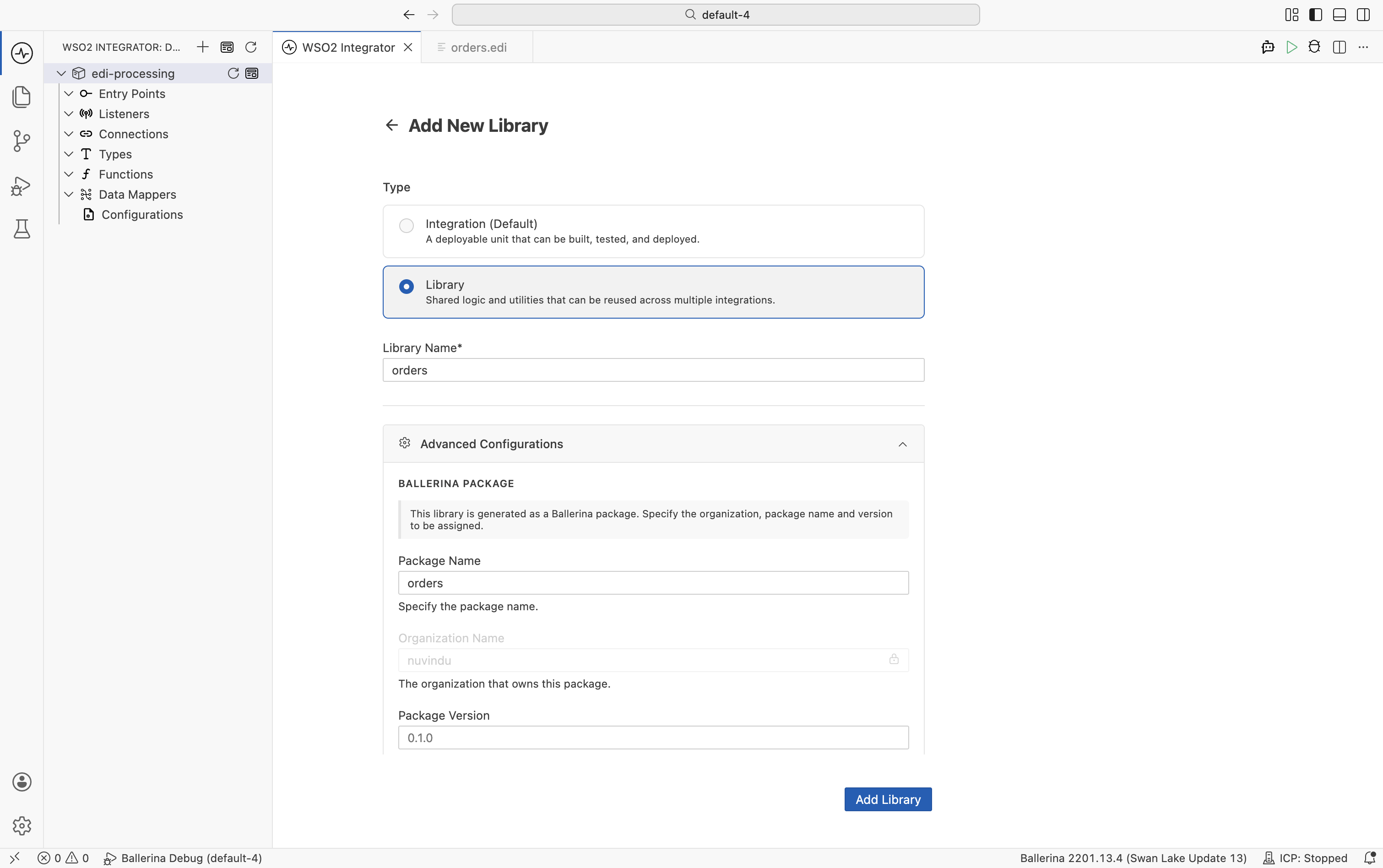
-
Open the terminal and navigate to the
ordersdirectory.cd orders -
Execute the following command to generate the necessary records and functions for the ORDERS schema.
bal edi codegen -i ../schema/ORDERS.json -o orders.bal
The generated file contains:
- Record types: one per segment in the ORDERS message (BGM, DTM, NAD, LIN, and so on).
fromEdiString: converts an EDI string to a typed Ballerina record.toEdiString: converts a Ballerina record to an EDI string.getSchema: returns the EDI schema as anEdiSchemaobject.fromEdiStringWithSchema/toEdiStringWithSchema: variants that accept a pre-loadedEdiSchema, useful when the same code must handle multiple schemas selected at runtime.
The same generated artifacts are produced whether the source standard is EDIFACT, X12, ESL, or a custom schema. Once you have a generated module, the rest of this page applies unchanged.
If you need to handle several EDI schemas at once, you can bundle them into a single reusable package instead of generating each module by hand. See Building a reusable library package.
Parsing EDI documents
Once you have the generated library, parse an EDIFACT ORDERS message into typed Ballerina records.
The following EDIFACT ORDERS message will be used as the input. Save this content into a orders.edi file.
UNB+UNOA:1+SENDER+RECEIVER+260511:1000+1'
UNH+1+ORDERS:D:03A:UN'
BGM+220+PO-001+9'
DTM+137:20260511:102'
NAD+BY+123456789::9++ACME Corp'
LIN+1++PROD-001:SA'
QTY+21:10'
PRI+AAA:25'
UNS+S'
UNT+8+1'
- Visual Designer
- Ballerina Code
-
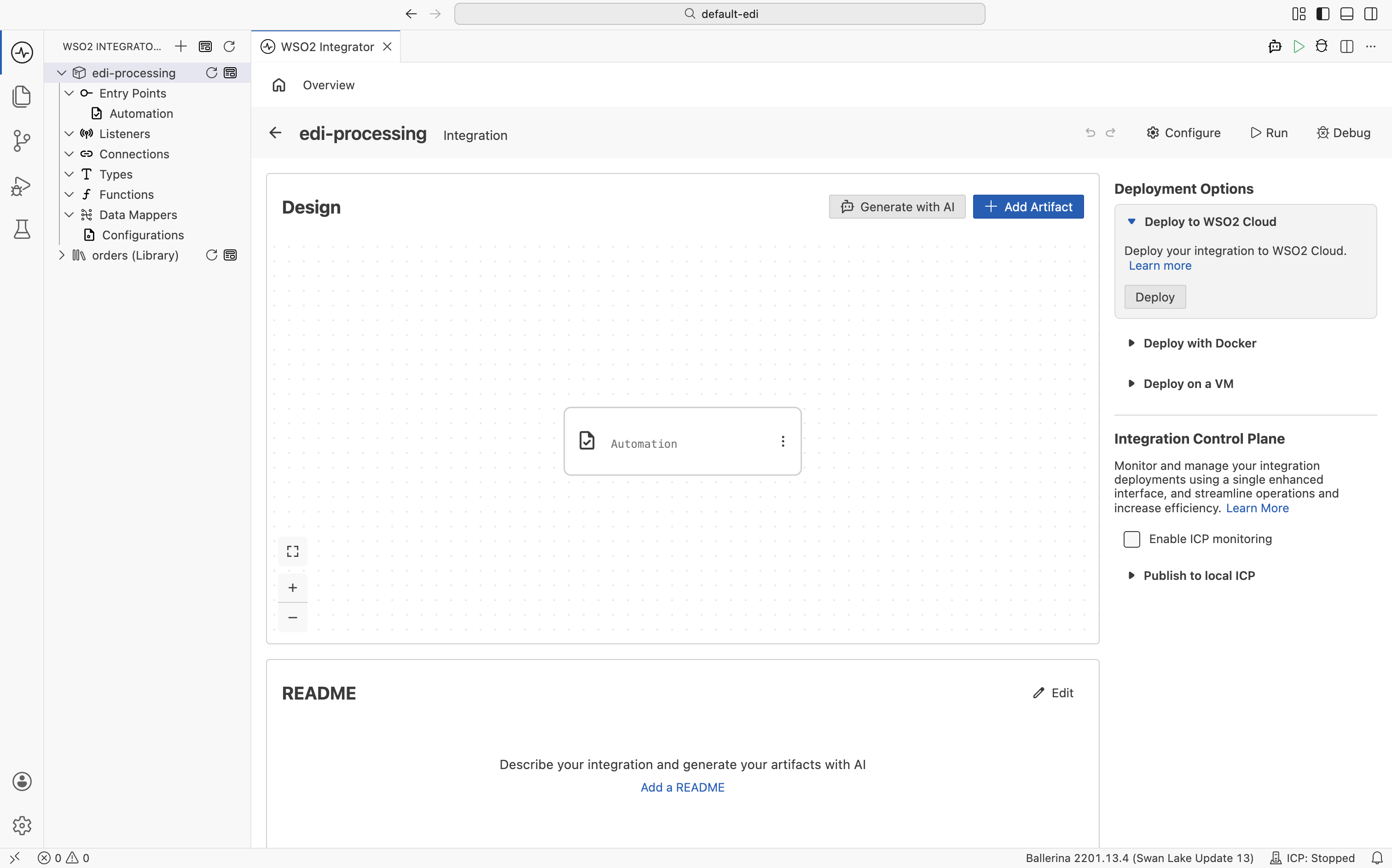
Open your main integration and click + Add Artifact on the canvas.
-
Select Automation from the artifacts panel.
-
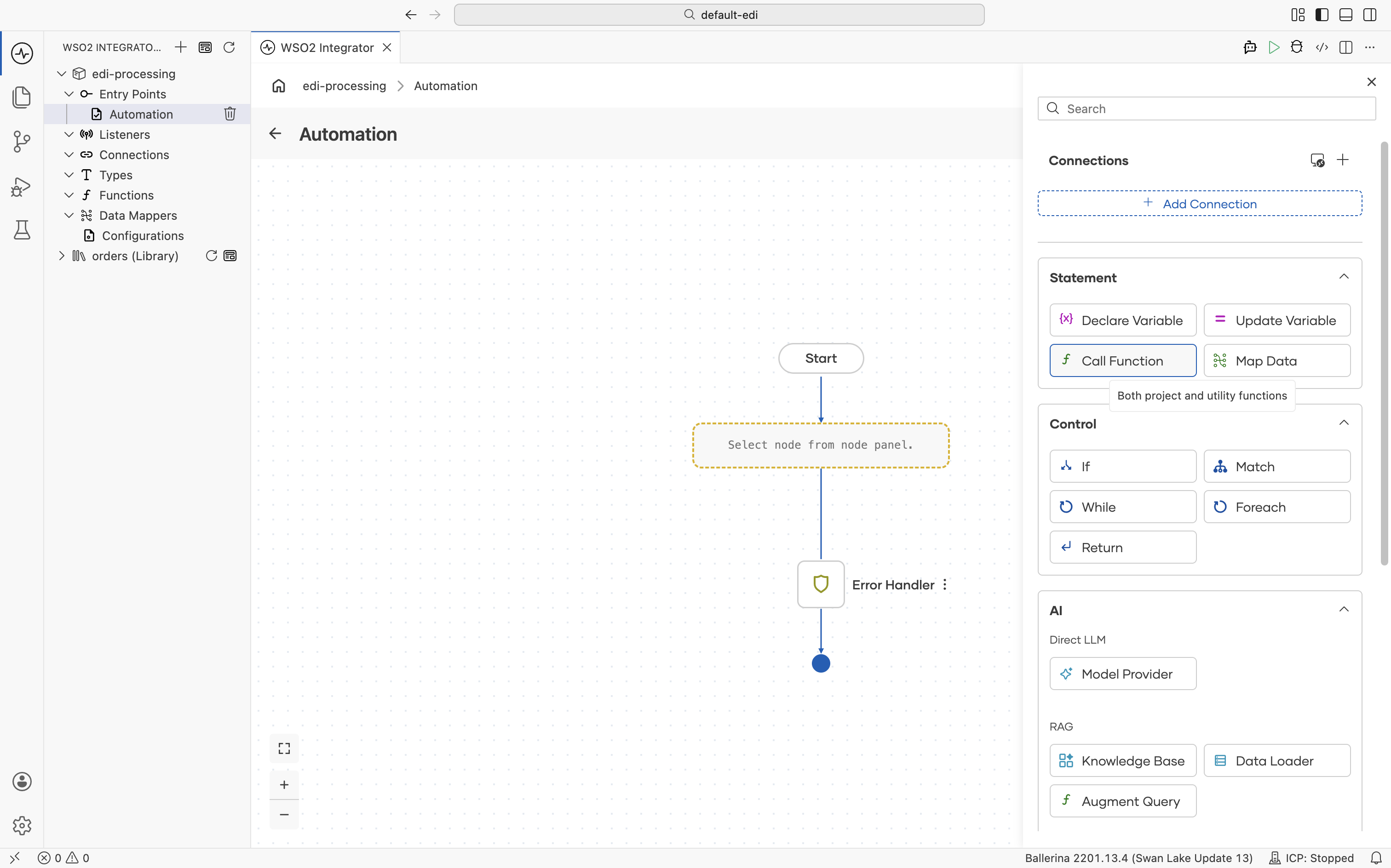
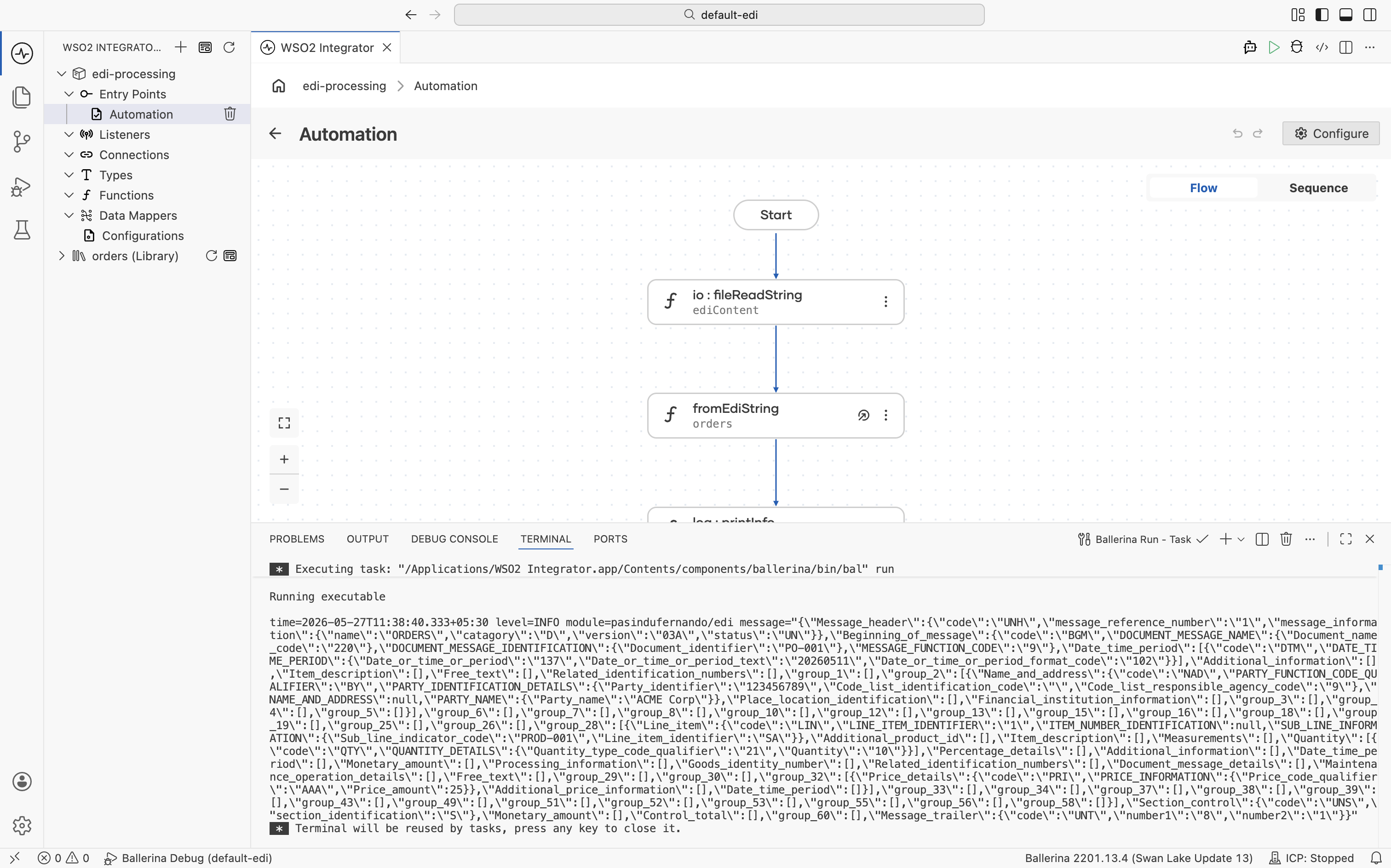
Click + and select Call Function.
-
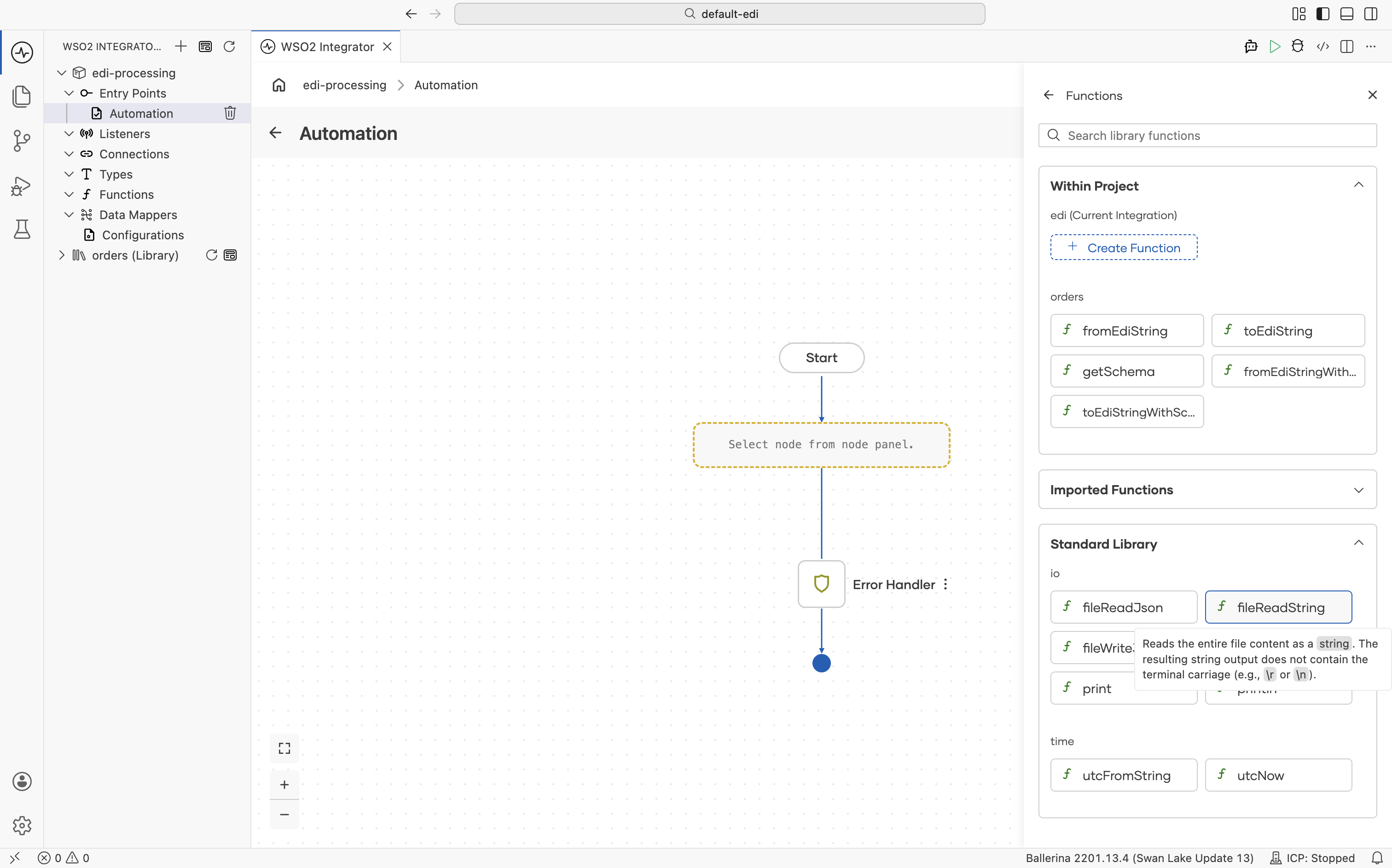
In the Functions panel, scroll down to the io section and select fileReadString.
-
Set Path to the path of your EDI file (e.g.,
orders.edi) and Result toediContent, then click Save.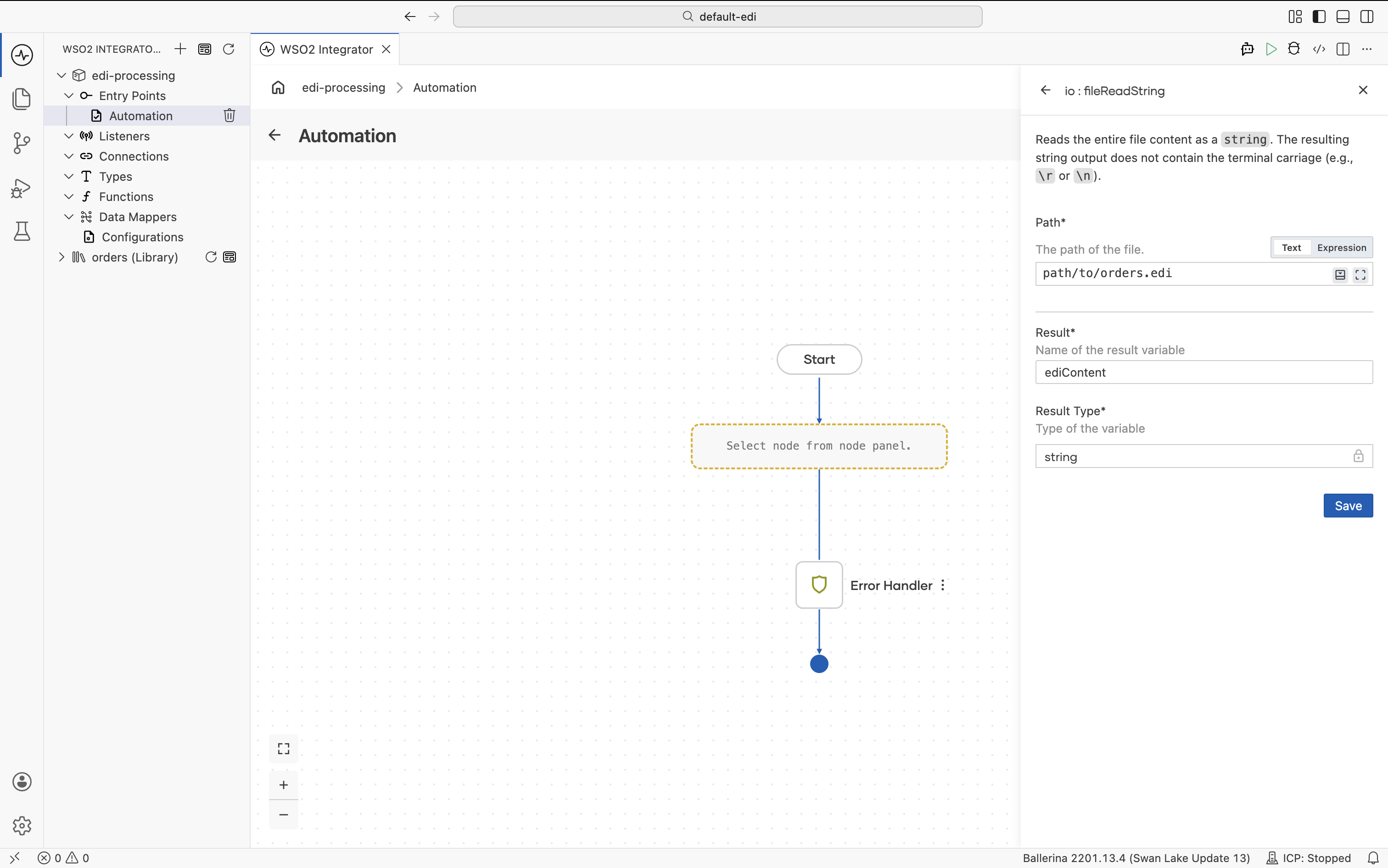
-
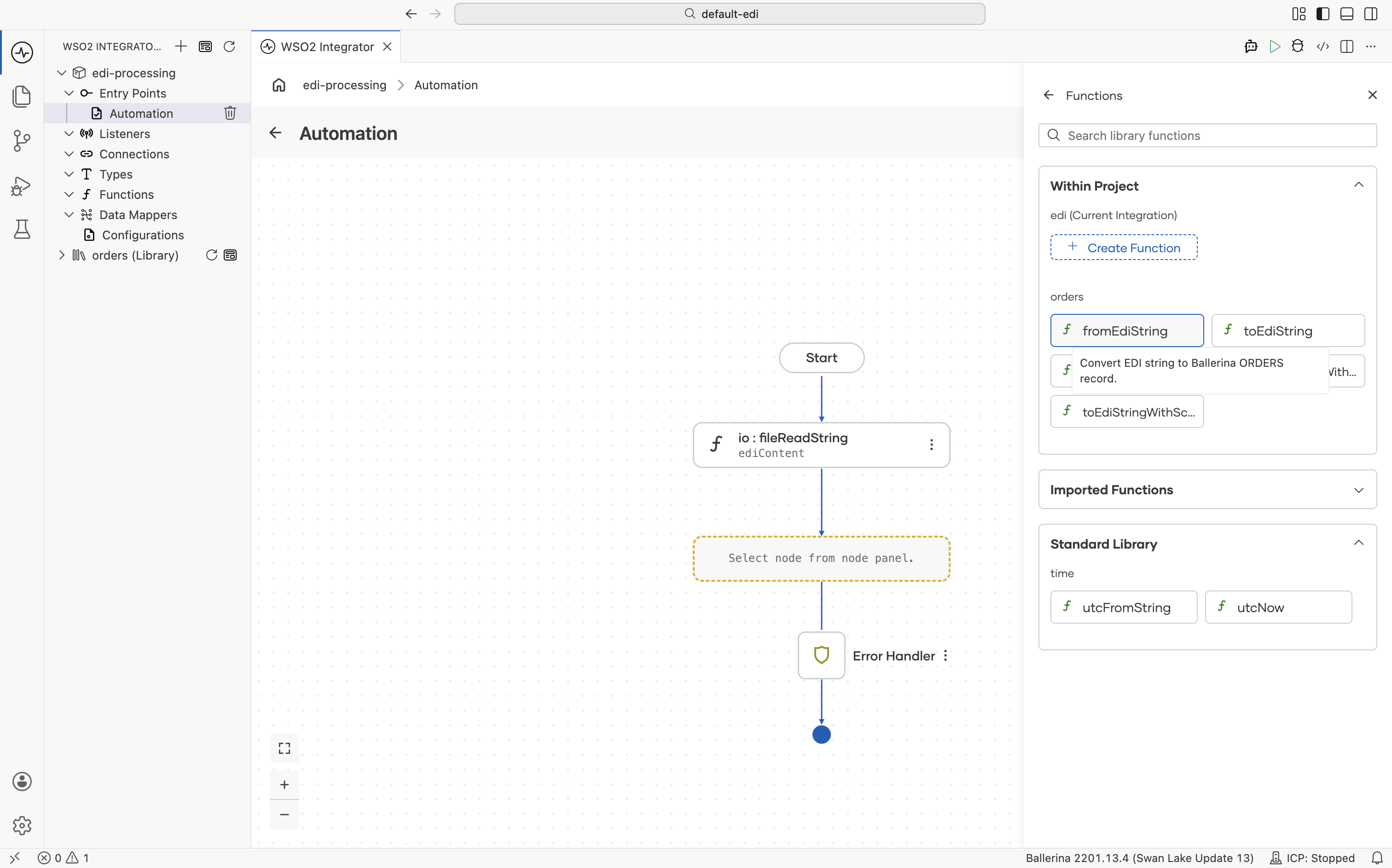
Click + again and select Call Function. In the Functions panel under Within Project, select fromEdiString.
-
Set Edi Text to
ediContentand Result toorders, then click Save.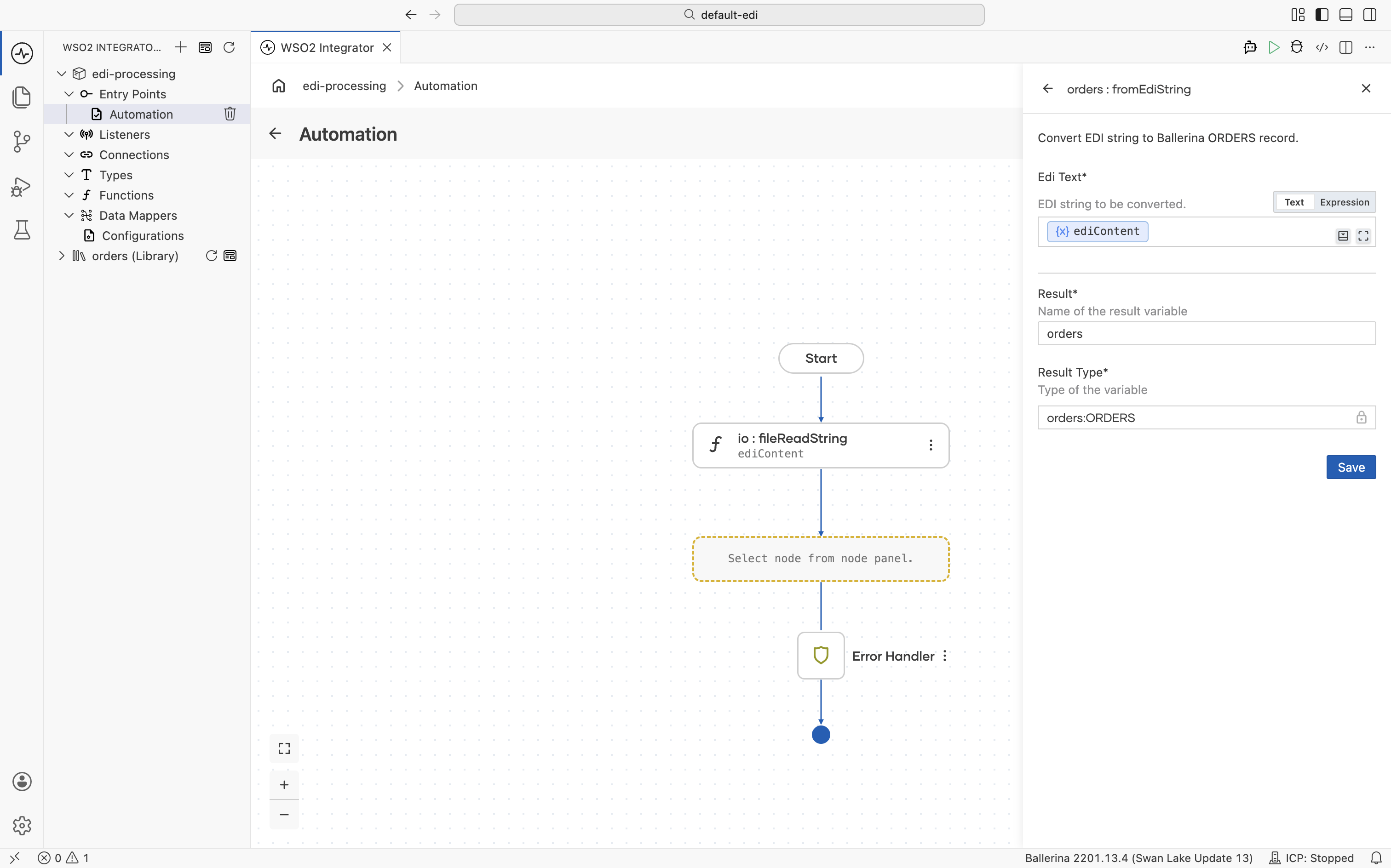
-
Click + again. In the right panel, expand the Logging section and select Log Info.
-
In the Msg field, select Expression, enter
orders.toString(), and click Save.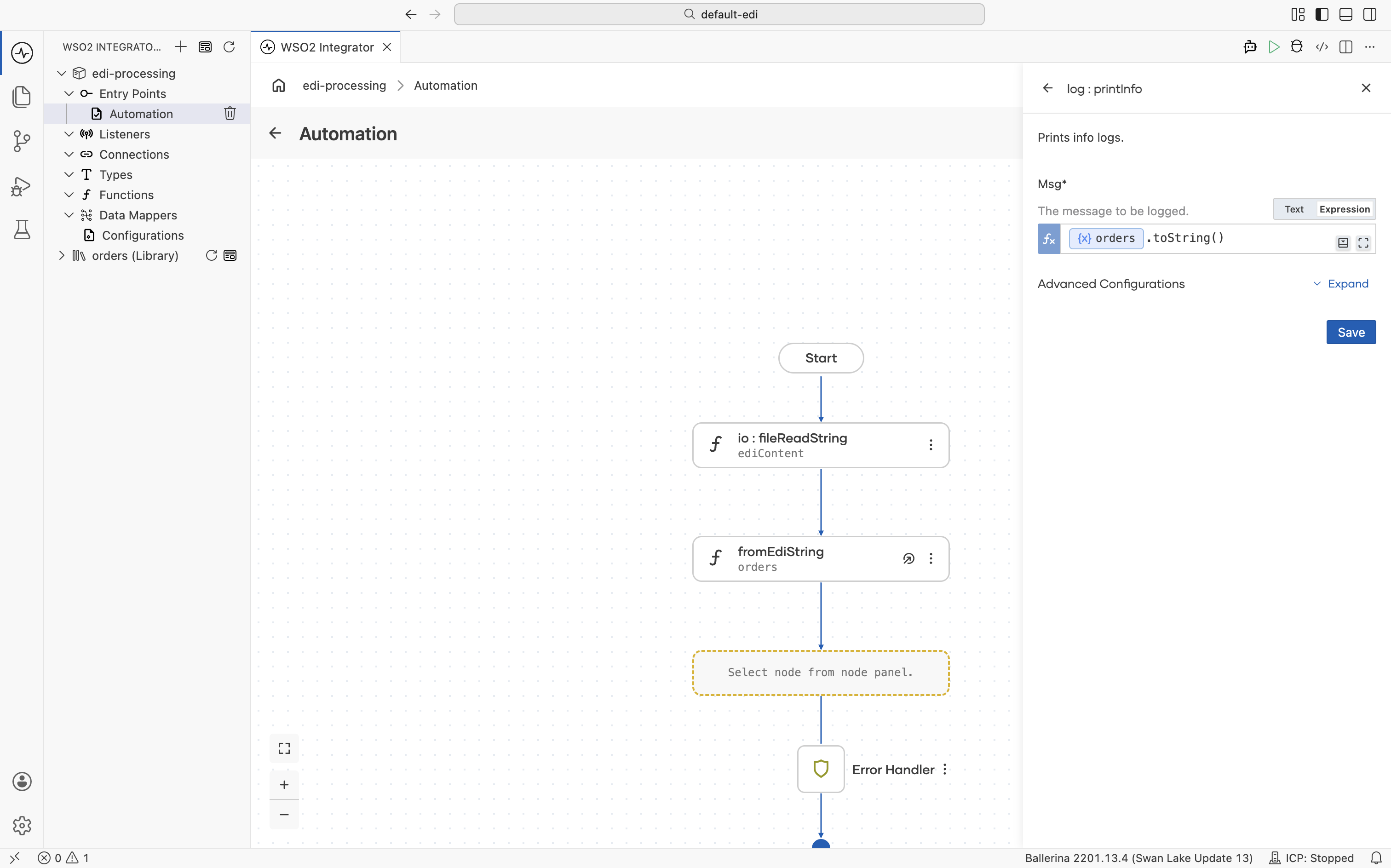
-
Run the integration and observe the logs.
import ballerina/io;
import ballerina/log;

// Generated library from the EDIFACT ORDERS schema.
import <add-org-name>/orders;

public function main() returns error? {
    do {
        string ediContent = check io:fileReadString("path/to/orders.edi");
        orders:ORDERS document = check orders:fromEdiString(ediContent);

        log:printInfo(document.toString());
    } on fail error e {
        log:printError("Error occurred", 'error = e);
        return e;
    }
}
Generating EDI output
Build an EDIFACT ORDERS message from Ballerina records and serialize it to EDI text.
- Visual Designer
- Ballerina Code
-
In a new integration, click + Add Artifact and select Automation.
-
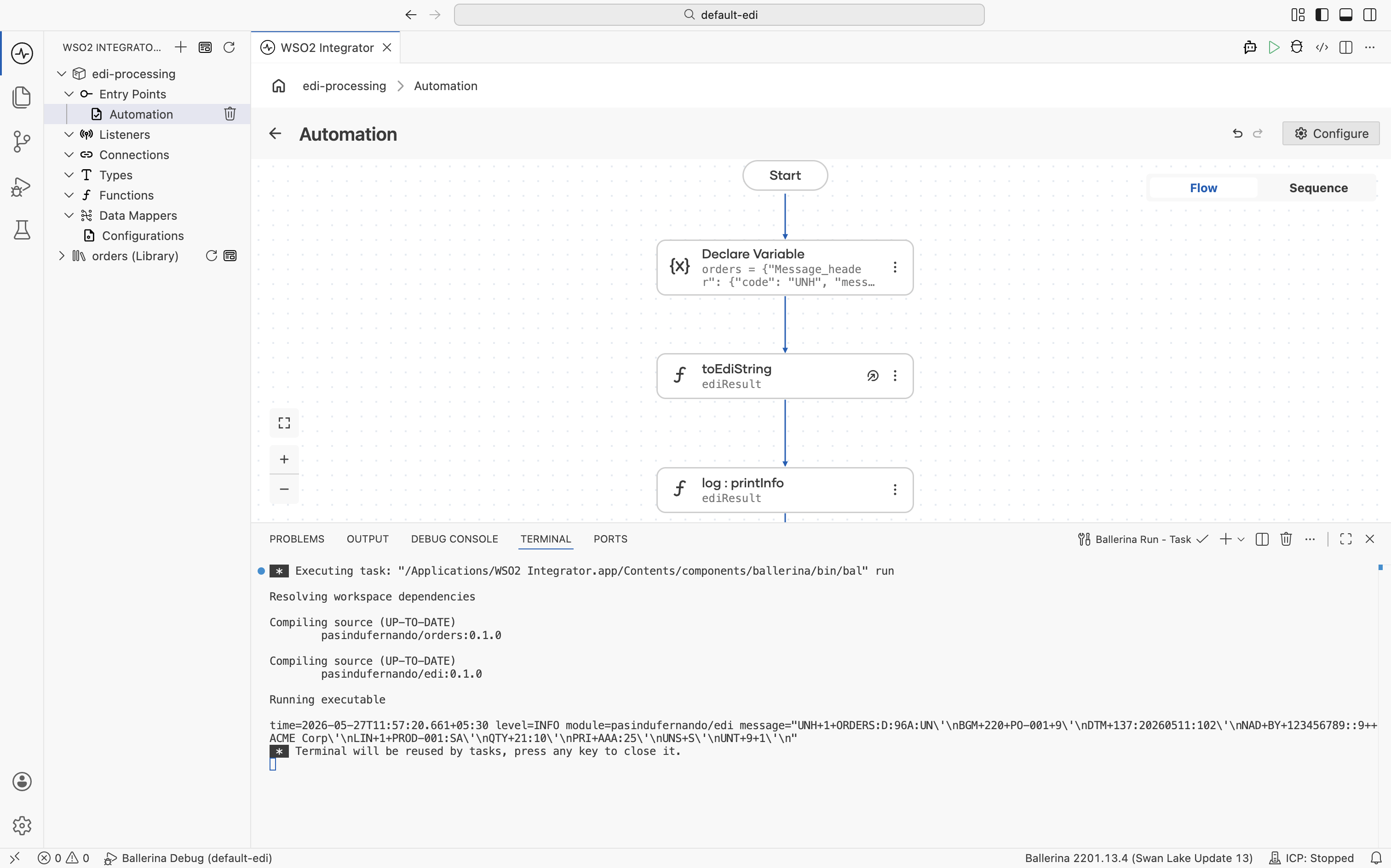
Inside the Automation, click + and select Declare Variable. Set Name to
orders, Type toorders:ORDERS, and enter the following json as the Expression, then click Save.
{"Message_header":{"code":"UNH","message_reference_number":"1","message_information":{"name":"ORDERS","catagory":"D","version":"96A","status":"UN"}},"Beginning_of_message":{"code":"BGM","DOCUMENT_MESSAGE_NAME":{"Document_name_code":"220"},"DOCUMENT_MESSAGE_IDENTIFICATION":{"Document_identifier":"PO-001"},"MESSAGE_FUNCTION_CODE":"9"},"Date_time_period":[{"code":"DTM","DATE_TIME_PERIOD":{"Date_or_time_or_period":"137","Date_or_time_or_period_text":"20260511","Date_or_time_or_period_format_code":"102"}}],"Additional_information":[],"Item_description":[],"Free_text":[],"Related_identification_numbers":[],"group_1":[],"group_2":[{"Name_and_address":{"code":"NAD","PARTY_FUNCTION_CODE_QUALIFIER":"BY","PARTY_IDENTIFICATION_DETAILS":{"Party_identifier":"123456789","Code_list_identification_code":"","Code_list_responsible_agency_code":"9"},"NAME_AND_ADDRESS":null,"PARTY_NAME":{"Party_name":"ACME Corp"}},"Place_location_identification":[],"Financial_institution_information":[],"group_3":[],"group_4":[],"group_5":[]}],"group_6":[],"group_7":[],"group_8":[],"group_10":[],"group_12":[],"group_13":[],"group_15":[],"group_16":[],"group_18":[],"group_19":[],"group_25":[],"group_26":[],"group_28":[{"Line_item":{"code":"LIN","LINE_ITEM_IDENTIFIER":"1","ITEM_NUMBER_IDENTIFICATION":{"Item_identifier":"PROD-001","Item_type_identification_code":"SA"}},"Additional_product_id":[],"Item_description":[],"Measurements":[],"Quantity":[{"code":"QTY","QUANTITY_DETAILS":{"Quantity_type_code_qualifier":"21","Quantity":"10"}}],"Percentage_details":[],"Additional_information":[],"Date_time_period":[],"Monetary_amount":[],"Processing_information":[],"Goods_identity_number":[],"Related_identification_numbers":[],"Document_message_details":[],"Maintenance_operation_details":[],"Free_text":[],"group_29":[],"group_30":[],"group_32":[{"Price_details":{"code":"PRI","PRICE_INFORMATION":{"Price_code_qualifier":"AAA","Price_amount":25}},"Additional_price_information":[],"Date_time_period":[]}],"group_33":[],"group_34":[],"group_37":[],"group_38":[],"group_39":[],"group_43":[],"group_49":[],"group_51":[],"group_52":[],"group_53":[],"group_55":[],"group_56":[],"group_58":[]}],"Section_control":{"code":"UNS","section_identification":"S"},"Monetary_amount":[],"Control_total":[],"group_60":[],"Message_trailer":{"code":"UNT","number1":"9","number2":"1"}}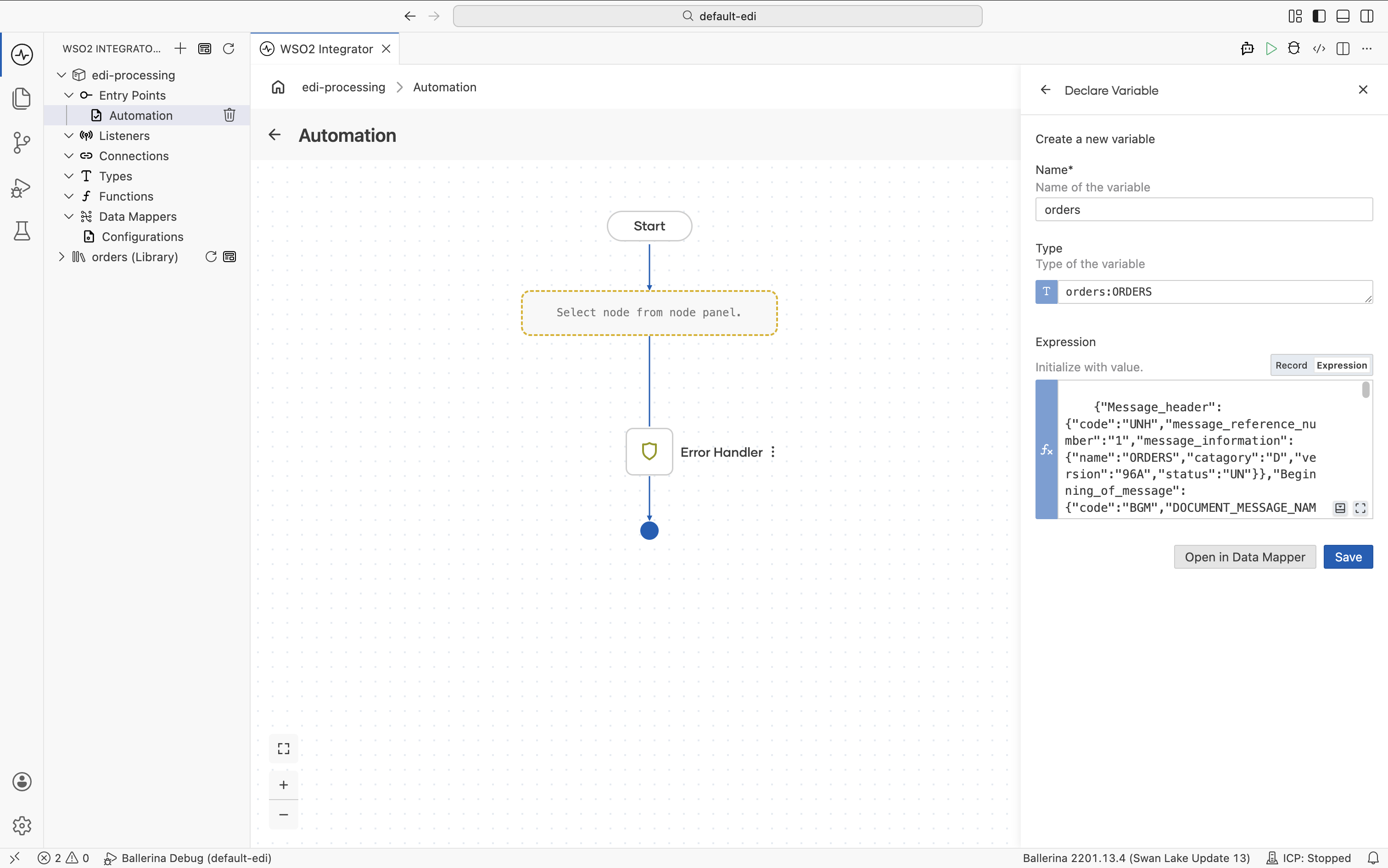
-
Click + and select Call Function. Under the orders section, select toEdiString. Set Data to
ordersand Result toediResult, then click Save.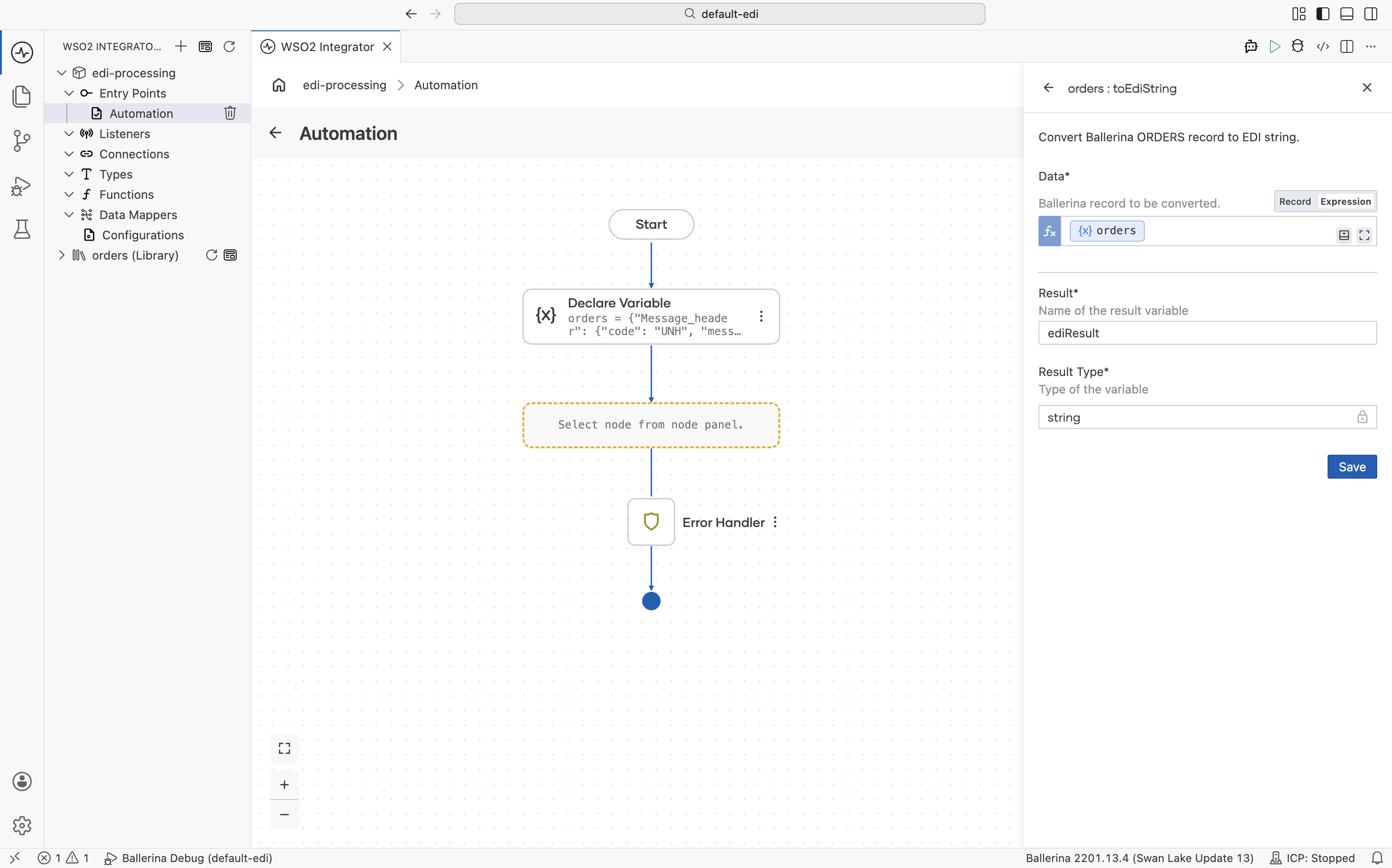
-
Click + and select Log Info. Set Msg to
ediResult, then click Save.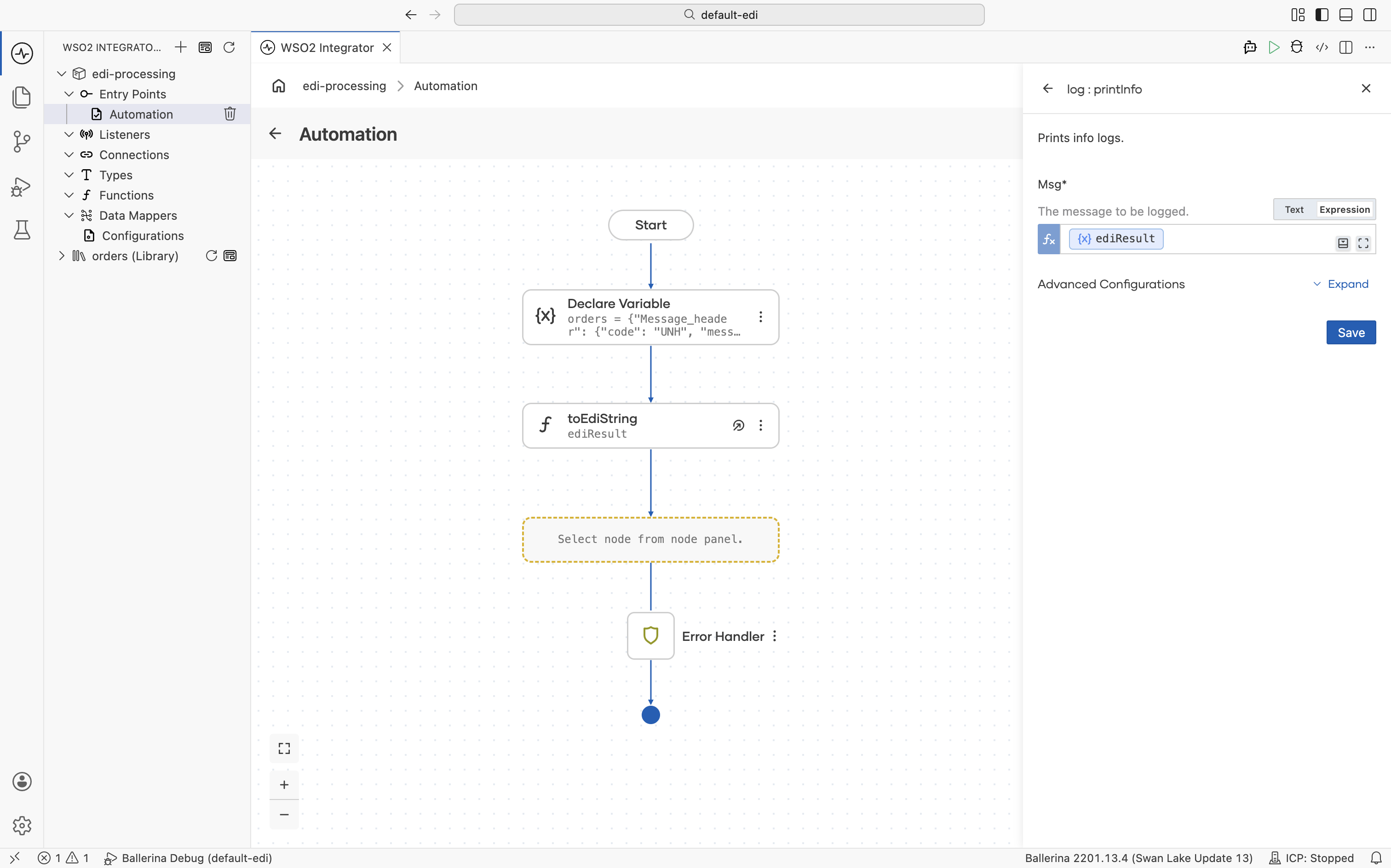
-
Run the integration and observe the logs.
import ballerina/log;

// Generated library from the EDIFACT ORDERS schema.
import <add-org-name>/orders;

public function main() returns error? {
   do {
      // Build the ORDERS document as a typed record.
      orders:ORDERS orders =  {"Message_header":{"code":"UNH","message_reference_number":"1","message_information":{"name":"ORDERS","catagory":"D","version":"96A","status":"UN"}},"Beginning_of_message":{"code":"BGM","DOCUMENT_MESSAGE_NAME":{"Document_name_code":"220"},"DOCUMENT_MESSAGE_IDENTIFICATION":{"Document_identifier":"PO-001"},"MESSAGE_FUNCTION_CODE":"9"},"Date_time_period":[{"code":"DTM","DATE_TIME_PERIOD":{"Date_or_time_or_period":"137","Date_or_time_or_period_text":"20260511","Date_or_time_or_period_format_code":"102"}}],"Additional_information":[],"Item_description":[],"Free_text":[],"Related_identification_numbers":[],"group_1":[],"group_2":[{"Name_and_address":{"code":"NAD","PARTY_FUNCTION_CODE_QUALIFIER":"BY","PARTY_IDENTIFICATION_DETAILS":{"Party_identifier":"123456789","Code_list_identification_code":"","Code_list_responsible_agency_code":"9"},"NAME_AND_ADDRESS":null,"PARTY_NAME":{"Party_name":"ACME Corp"}},"Place_location_identification":[],"Financial_institution_information":[],"group_3":[],"group_4":[],"group_5":[]}],"group_6":[],"group_7":[],"group_8":[],"group_10":[],"group_12":[],"group_13":[],"group_15":[],"group_16":[],"group_18":[],"group_19":[],"group_25":[],"group_26":[],"group_28":[{"Line_item":{"code":"LIN","LINE_ITEM_IDENTIFIER":"1","ITEM_NUMBER_IDENTIFICATION":{"Item_identifier":"PROD-001","Item_type_identification_code":"SA"}},"Additional_product_id":[],"Item_description":[],"Measurements":[],"Quantity":[{"code":"QTY","QUANTITY_DETAILS":{"Quantity_type_code_qualifier":"21","Quantity":"10"}}],"Percentage_details":[],"Additional_information":[],"Date_time_period":[],"Monetary_amount":[],"Processing_information":[],"Goods_identity_number":[],"Related_identification_numbers":[],"Document_message_details":[],"Maintenance_operation_details":[],"Free_text":[],"group_29":[],"group_30":[],"group_32":[{"Price_details":{"code":"PRI","PRICE_INFORMATION":{"Price_code_qualifier":"AAA","Price_amount":25}},"Additional_price_information":[],"Date_time_period":[]}],"group_33":[],"group_34":[],"group_37":[],"group_38":[],"group_39":[],"group_43":[],"group_49":[],"group_51":[],"group_52":[],"group_53":[],"group_55":[],"group_56":[],"group_58":[]}],"Section_control":{"code":"UNS","section_identification":"S"},"Monetary_amount":[],"Control_total":[],"group_60":[],"Message_trailer":{"code":"UNT","number1":"9","number2":"1"}};

      // Serialize the record back into an EDI string.
      string ediResult = check orders:toEdiString(orders);
      log:printInfo(string `${ediResult}`);

   } on fail error e {
      log:printError("Error occurred", 'error = e);
      return e;
   }
}
EDI to JSON conversion
A common integration pattern is converting EDI documents to JSON for downstream systems. The walkthrough below uses the in-process generated functions. If you instead want to expose EDI-to-JSON (and JSON-to-EDI) as an HTTP service that any downstream system can call, use libgen to generate a package with built-in REST endpoints.
- Visual Designer
- Ballerina Code
-
In a new integration create an Automation.
-
Click + and select Call Function and select fromEdiString.
-
Add the EDI content into Edi Text and
ordersas Result and Save.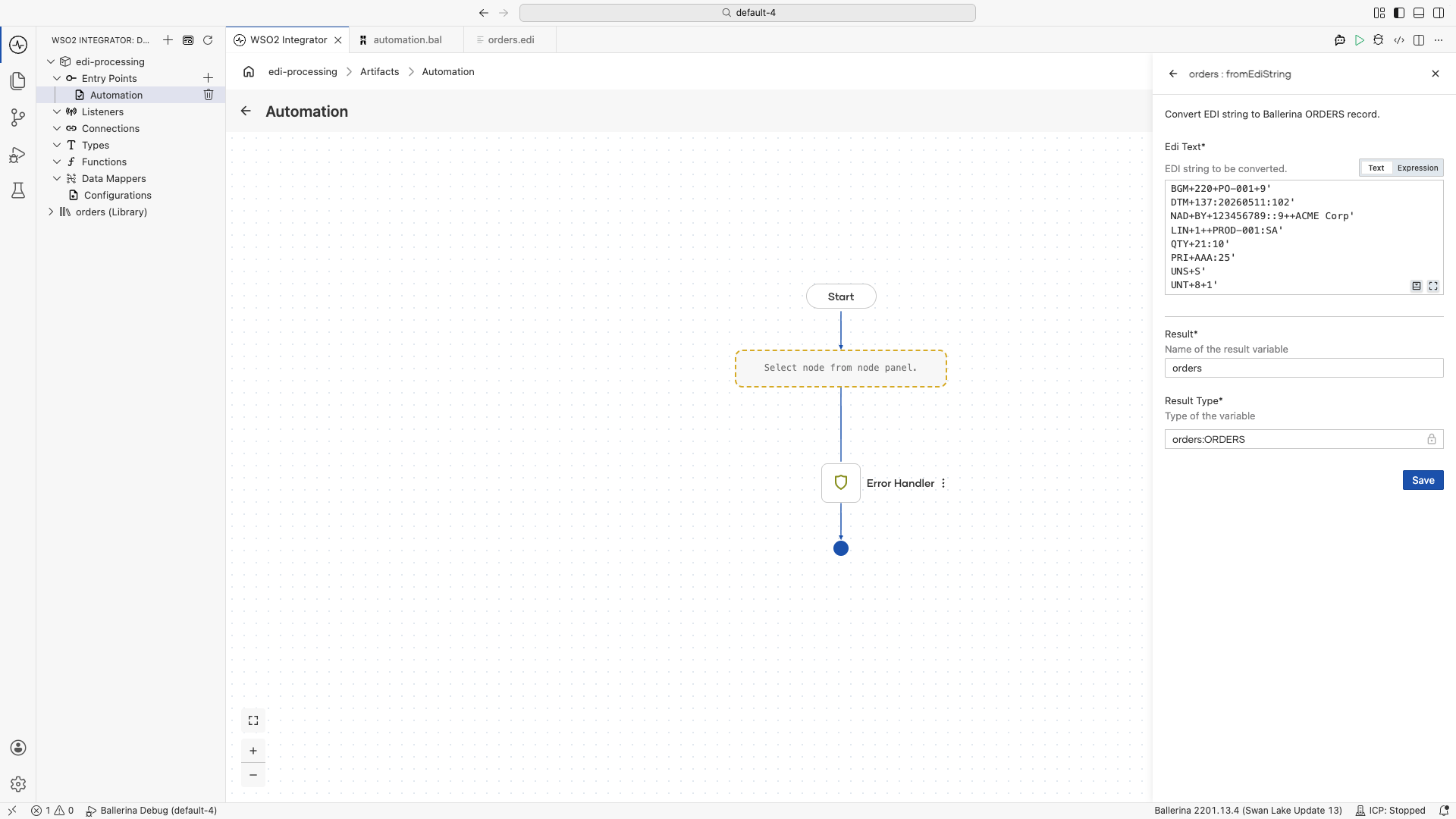
-
In the Automation, click + and select Declare Variable.
-
Set Name to
jsonOrder, Type tojson, and Expression toorders.toJson(), then click Save.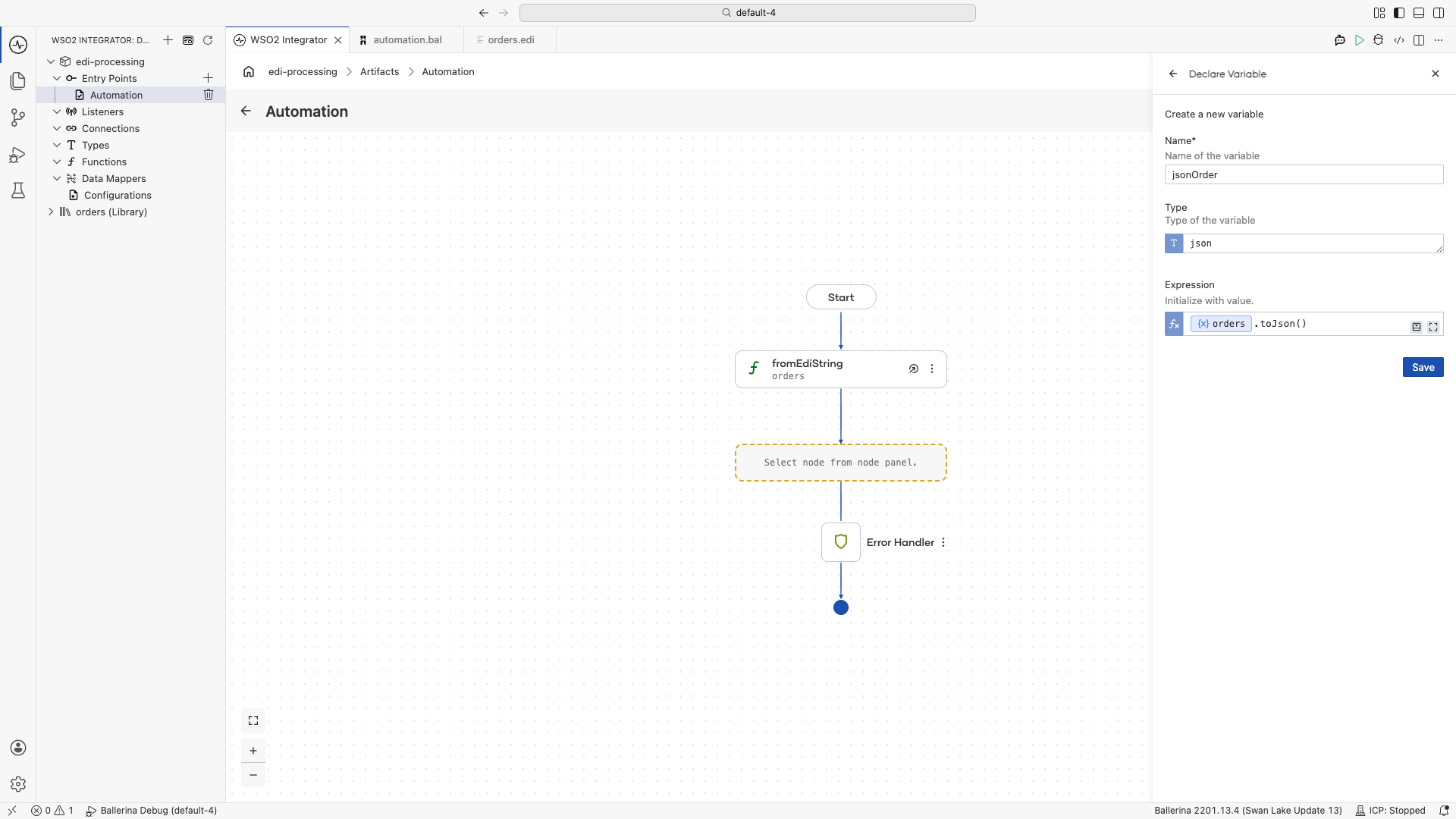
-
Click + and select Call Function. Under the
iosection, select fileWriteJson.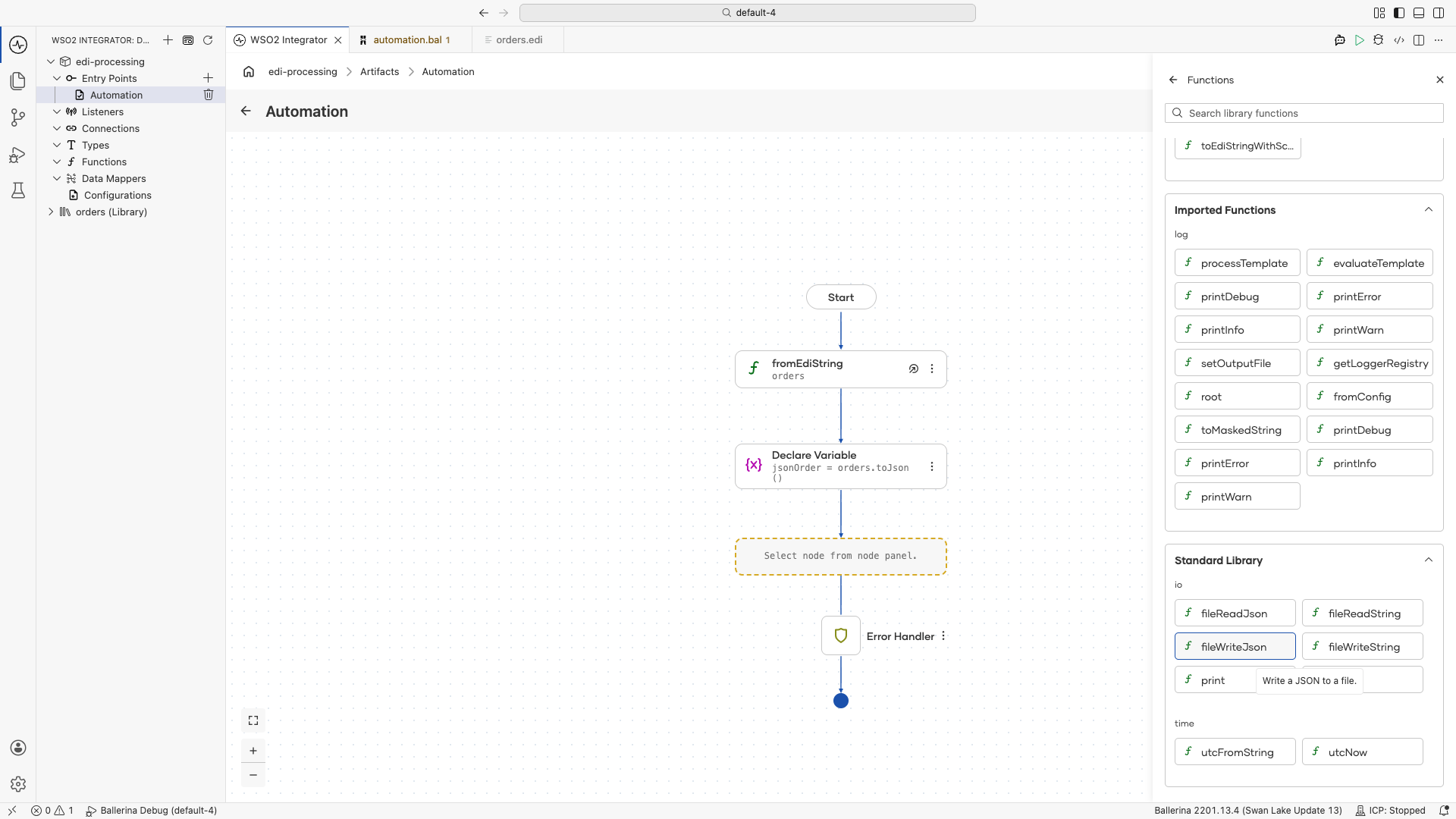
-
Set Path to
order.jsonand Content tojsonOrder, then click Save.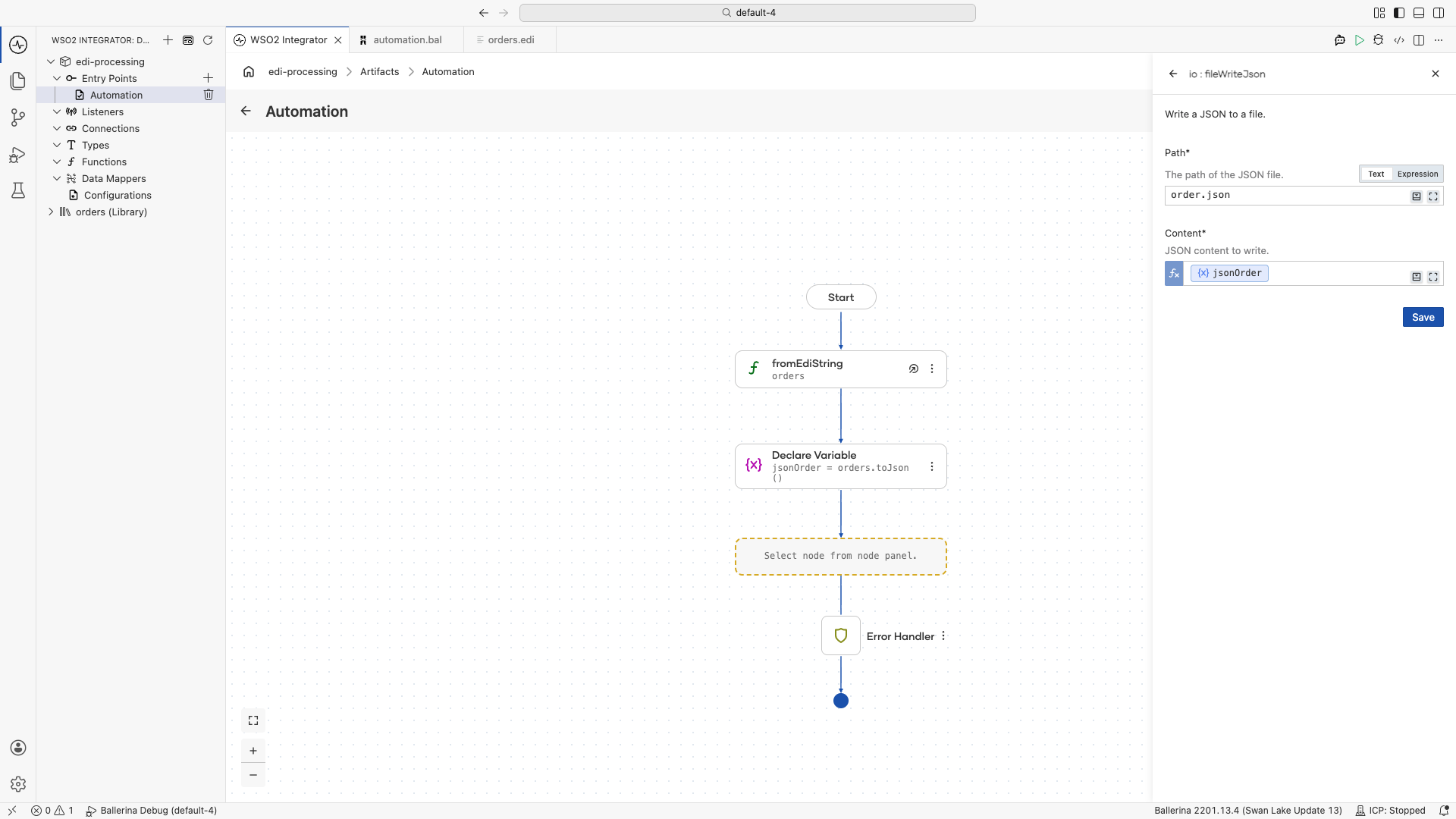
-
Run the integration and check the created
order.jsonfile.
import ballerina/io;
import ballerina/log;

import <add-org-name>/orders;

public function main() returns error? {
    do {
        // Parse the EDI string into a typed record.
        orders:ORDERS orders = check orders:fromEdiString(
            string `UNB+UNOA:1+SENDER+RECEIVER+260511:1000+1'
                    UNH+1+ORDERS:D:03A:UN'
                    BGM+220+PO-001+9'
                    DTM+137:20260511:102'
                    NAD+BY+123456789::9++ACME Corp'
                    LIN+1++PROD-001:SA'
                    QTY+21:10'
                    PRI+AAA:25'
                    UNS+S'
                    UNT+8+1'`
        );

        // Convert the record to JSON.
        json jsonOrder = orders.toJson();

        check io:fileWriteJson("order.json", jsonOrder);
    } on fail error e {
        log:printError("Error occurred", 'error = e);
        return e;
    }
}
Building a reusable library package
A real integration usually needs to handle several EDI schemas at once: a purchase order, an invoice, a shipping notice, and often multiple versions of each. Running codegen per schema and tracking the outputs by hand becomes tedious. The bal edi libgen command bundles a directory of schemas into a complete Ballerina package.
bal edi libgen -p <org-name>/<package-name> -i path/to/schemas/ -o path/to/output/
The generated package contains:
- One Ballerina module per schema: each with its own record types and
fromEdiString/toEdiStringfunctions, named after the source schema file. - Utility methods: shared helpers for working with the EDI schemas in the package.
- A REST connector: a generated service that exposes EDI-to-JSON and JSON-to-EDI conversion endpoints for every schema in the package. Downstream services can call these endpoints over HTTP without taking a Ballerina dependency.
Publish the generated package to Ballerina Central and import it into any integration the same way you import any other Ballerina library. Alternatively, build and run it directly with bal build and bal run to deploy it as a standalone EDI conversion microservice.
For the libgen flag reference, see the EDI tool page.
Best practices
- Generate code from schemas rather than parsing EDI manually. The generated records and functions handle segment delimiters, escape characters, and validation.
- Use packages for reuse. Bundle frequently used EDI schemas into shared Ballerina packages with
libgen. - Validate early. Parse EDI at the integration boundary to catch format errors before business logic executes.
- Convert to records immediately. Work with typed records throughout your integration and serialize back to EDI only at the output boundary.
What's next
- EDI tool reference — Full CLI command and flag reference for
bal edi - Type System Reference — Define EDI record types