Setup Guide
This guide walks you through getting necessary details from the SAP Business One so that the connector can authenticate and communicate with the SAP Business One.
Prerequisites
- An SAP Business One installation (version 10.0 or later) with the Service Layer component enabled
- A valid SAP Business One user account with permissions for the CRM objects you intend to use
Enable the Service Layer
The connector requires an SAP Business One installation with the Service Layer component enabled. The Service Layer is an OData-based interface that is installed and configured through the SAP Business One server setup.
The Service Layer endpoint follows the pattern https://<host>:50000/b1s/v1.
The Service Layer is typically installed alongside the SAP Business One server. If it is not available, contact your system administrator to enable it.
Collect your connection credentials
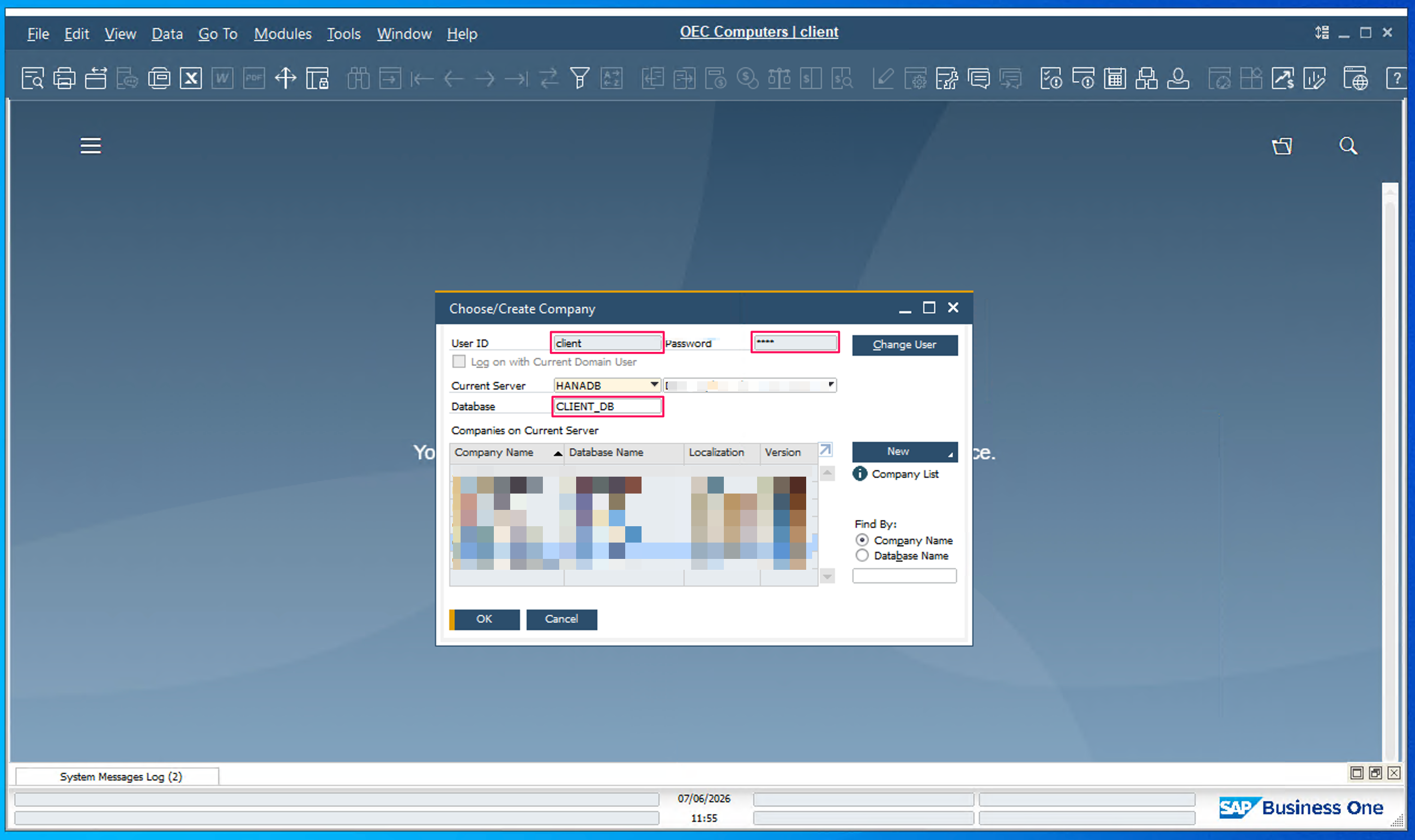
To connect, you need three values from the SAP Business One desktop client's login screen: the company database, your user name, and your password.
Click the company name at the top of the SAP Business One desktop application, or contact your administrator.
Never commit your SAP Business One credentials to source control. Store them securely (for example, in a configuration file that is excluded from version control).
Next steps
- Action Reference - Available operations