CDC for PostgreSQL
PostgreSQL CDC integrations capture row-level changes from PostgreSQL tables in real time using Debezium-based Change Data Capture. Use them for data synchronization, audit logging, and event-driven workflows that must react to database inserts, updates, deletes, and truncates without polling. This page covers creating the integration, configuring the service and listener, and adding event handlers for insert, update, delete, truncate and read events.
Logical replication must be enabled on the PostgreSQL database and on each table you want to track before creating this integration. See the CDC connector setup guide for step-by-step instructions.
Create a CDC service for PostgreSQL
- Visual Designer
- Ballerina Code
-
Click + Add Artifact in the canvas or click + next to Entry Points in the sidebar.
-
In the Artifacts panel, select CDC for PostgreSQL under Event Integration.
-
In the creation form, select Create new to configure a new listener.
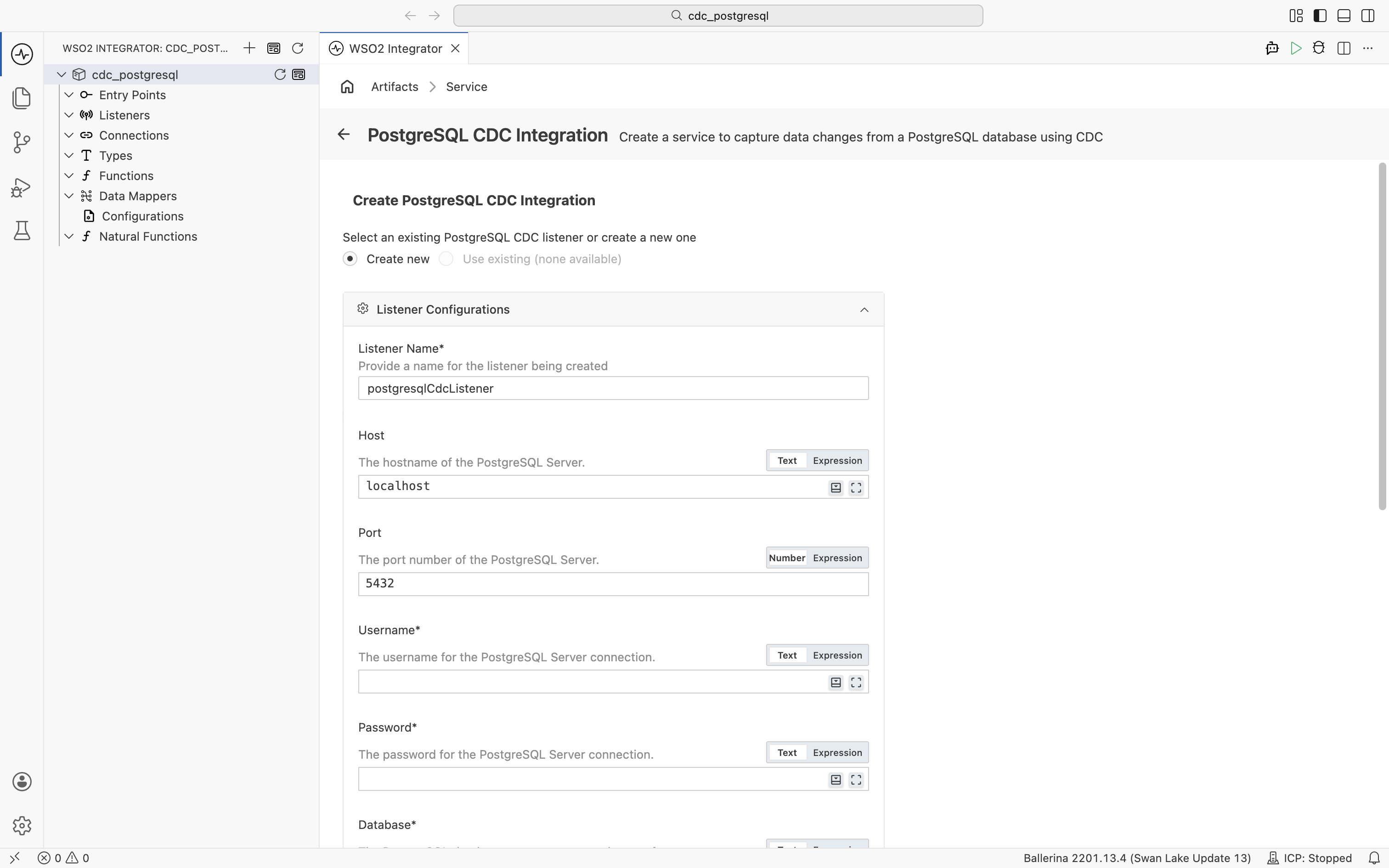
Under Listener Configurations, fill in the following fields:
Field Description Default Host Hostname of the PostgreSQL server. localhostPort Port number of the PostgreSQL server. 5432Username Username for the PostgreSQL connection. Required Password Password for the PostgreSQL connection. Required Database Name of the database to capture changes from. Required Schemas Regular expressions matching schema names to capture changes from. Click + Add Item to add each pattern. — Expand Advanced Configurations for additional settings:
Field Description Default Listener Name Identifier for the listener created with this service. postgresqlCdcListenerSecure Socket SSL/TLS configuration for a secure connection. — Options Additional options for the CDC engine as a record expression. Common keys include snapshotMode(for example,cdc:NO_DATAto skip the initial snapshot) andskippedOperations(for example,[cdc:TRUNCATE, cdc:UPDATE, cdc:DELETE]to skip truncate, update, and delete events; note that snapshot reads still triggeronReadunlesssnapshotModeis also set tocdc:NO_DATA).— Under Table, enter the fully qualified table name to capture events from in the format
<database>.<schema>.<table>(for example,mydb.public.customers). -
Click Create.
-
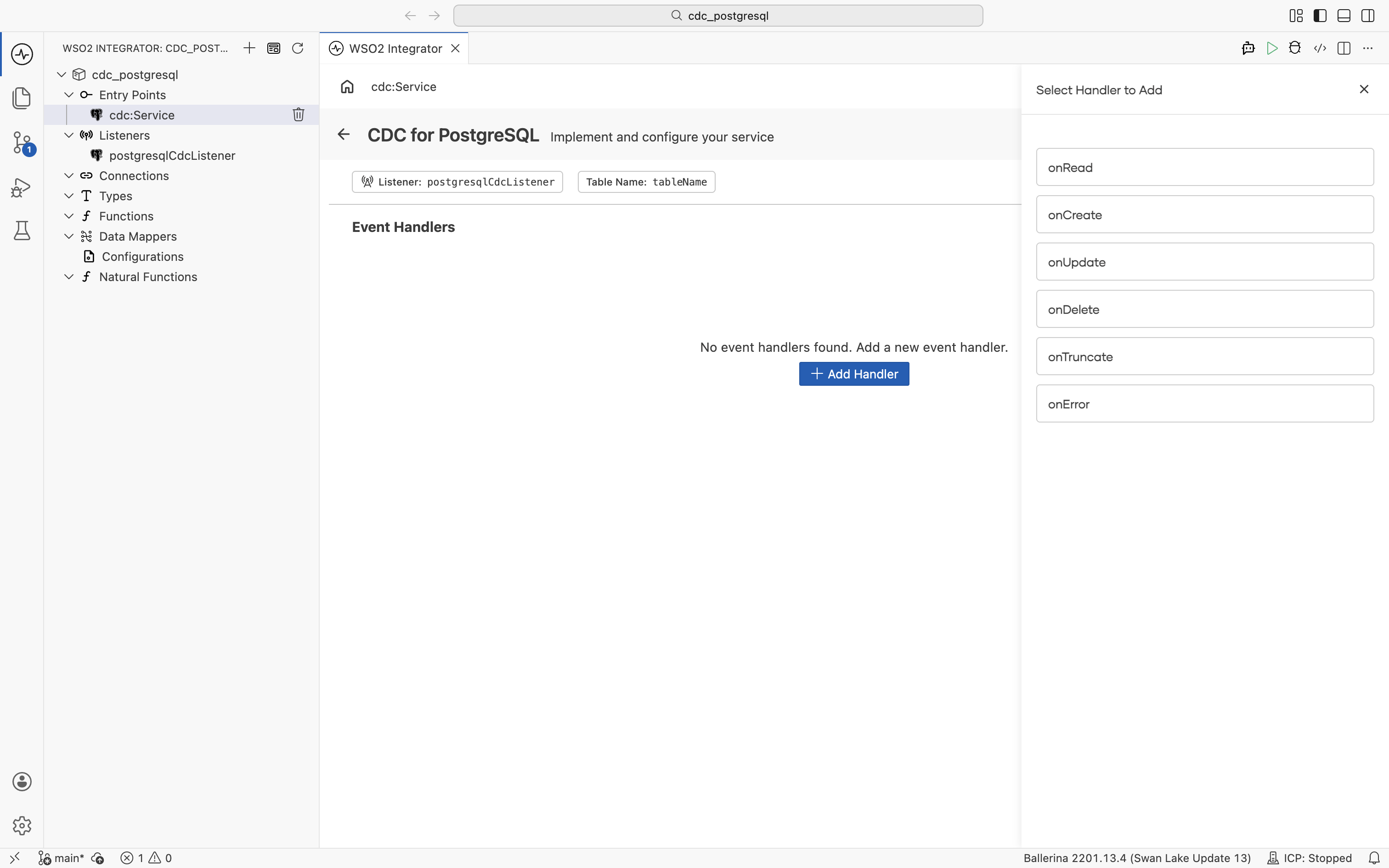
WSO2 Integrator creates the empty service and opens it in the Service Designer. The canvas shows the attached listener pill and the table name pill. The service has no handlers yet.
import ballerina/log;
import ballerinax/cdc;
import ballerinax/postgresql;
// Loads the PostgreSQL JDBC driver at runtime; required for CDC to work.
import ballerinax/postgresql.cdc.driver as _;

// Credentials and target table loaded from Config.toml at startup.
configurable string username = ?;
configurable string password = ?;
configurable string database = ?;
configurable string tableName = ?;

// CDC listener that connects to PostgreSQL and streams row-level changes.
listener postgresql:CdcListener postgresqlCdcListener = new (database = {
    hostname: "localhost",
    port: 5432,
    username,
    password,
    databaseName: database,
    includedSchemas: ["public"]
});

// Typed record that mirrors the columns of the tracked table.
// Declare a matching record so handlers receive a typed value and can
// access fields directly (for example, `after.id`) instead of working
// with an untyped `record {}`.
type Customer record {|
    int id;
    string name;
    string email;
|};

// Scopes the service to a specific fully qualified table.
@cdc:ServiceConfig {
    tables: tableName
}
service cdc:Service on postgresqlCdcListener {

    // Fires when a new row is inserted. The inserted row is bound to `after` as a `Customer`.
    remote function onCreate(Customer after) returns error? {
        log:printInfo("Row inserted", id = after.id, name = after.name);
    }

    // Fires when a row is updated. Both states are bound to `Customer` records,
    // so you can compare fields directly (for example, `before.email != after.email`).
    remote function onUpdate(Customer before, Customer after) returns error? {
        log:printInfo("Row updated",
                id = after.id,
                oldEmail = before.email,
                newEmail = after.email);
    }

    // Fires when a row is deleted. The deleted row is bound to `before`.
    remote function onDelete(Customer before) returns error? {
        log:printInfo("Row deleted", id = before.id);
    }

    // Fires when the listener encounters a processing error.
    remote function onError(error err) returns error? {
        log:printError("CDC error", 'error = err);
    }
}
To accept any row shape without defining a record type, declare handler parameters as record {}. With a typed record like Customer, the runtime binds the change-event payload to your record fields automatically.
Service configuration
In the Service Designer, click the Configure icon in the header to open the CDC for PostgreSQL Configuration panel. Select CDC for PostgreSQL in the left panel.
- Visual Designer
- Ballerina Code
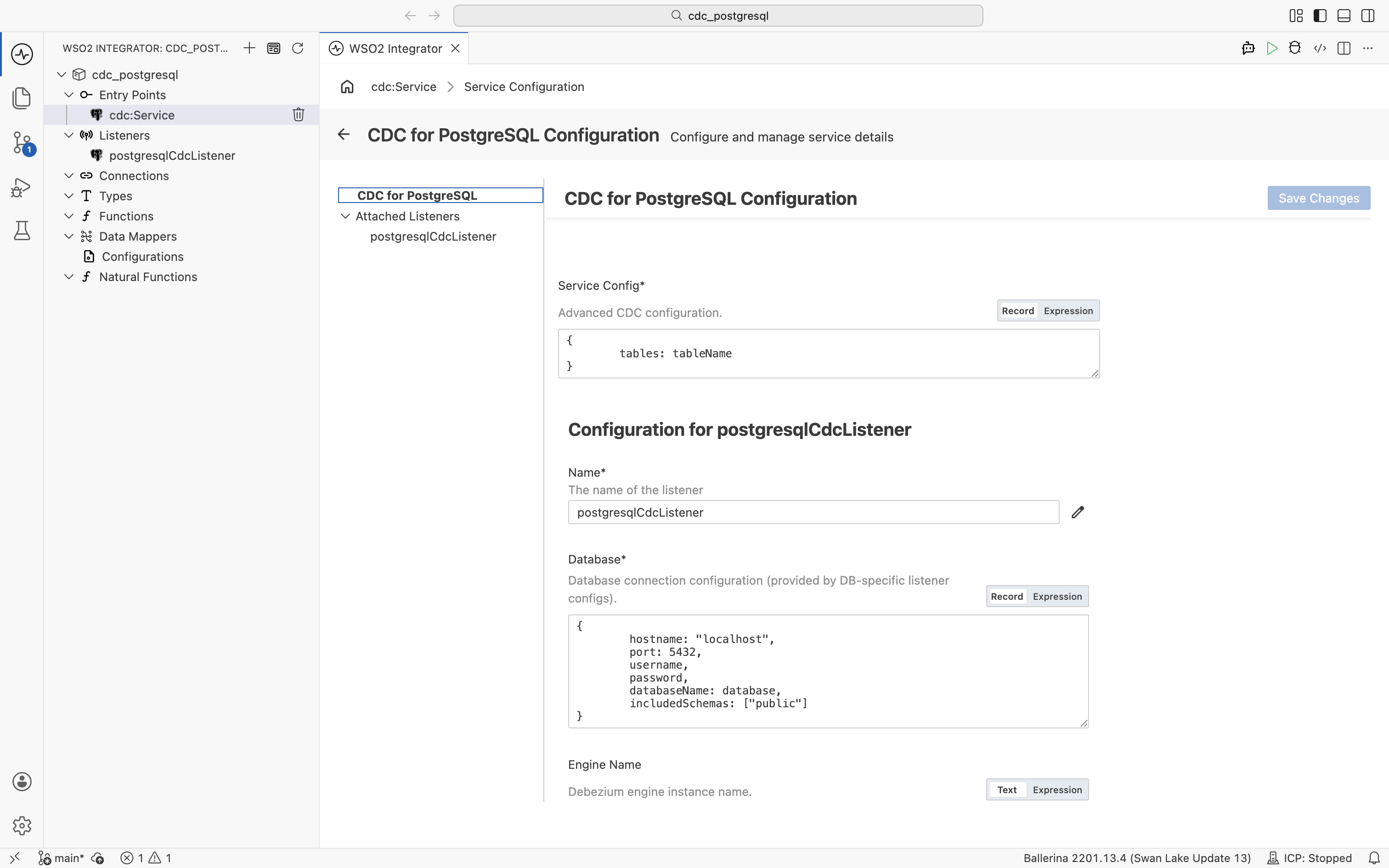
| Field | Description |
|---|---|
| Service Config | Advanced CDC configuration as a record expression. The tables field sets the table(s) to capture changes from, using the fully qualified format <database>.<schema>.<table>. Provide a single table as a string (for example, "mydb.public.customers"), or multiple tables as a string array (for example, ["mydb.public.customers", "mydb.public.orders"]). |
The tables field accepts either a single table name as a string or multiple tables as a string array.
// Single table: the service receives change events only for `customers`.
@cdc:ServiceConfig {
    tables: "mydb.public.customers"
}
service cdc:Service on postgresqlCdcListener { }

// Multiple tables: the service receives events for both `customers` and `orders`,
// and the same handlers run for each.
@cdc:ServiceConfig {
    tables: ["mydb.public.customers", "mydb.public.orders"]
}
service cdc:Service on postgresqlCdcListener { }
Listener configuration
In the CDC for PostgreSQL Configuration panel, select postgresqlCdcListener under Attached Listeners to configure the listener.
A single service can be attached to more than one listener. Attach multiple listeners when one service needs to process change events from more than one PostgreSQL source. For example, you can capture changes from two separate PostgreSQL instances, or from two databases with different connection settings, and route every event through the same handler logic.
- Visual Designer
- Ballerina Code
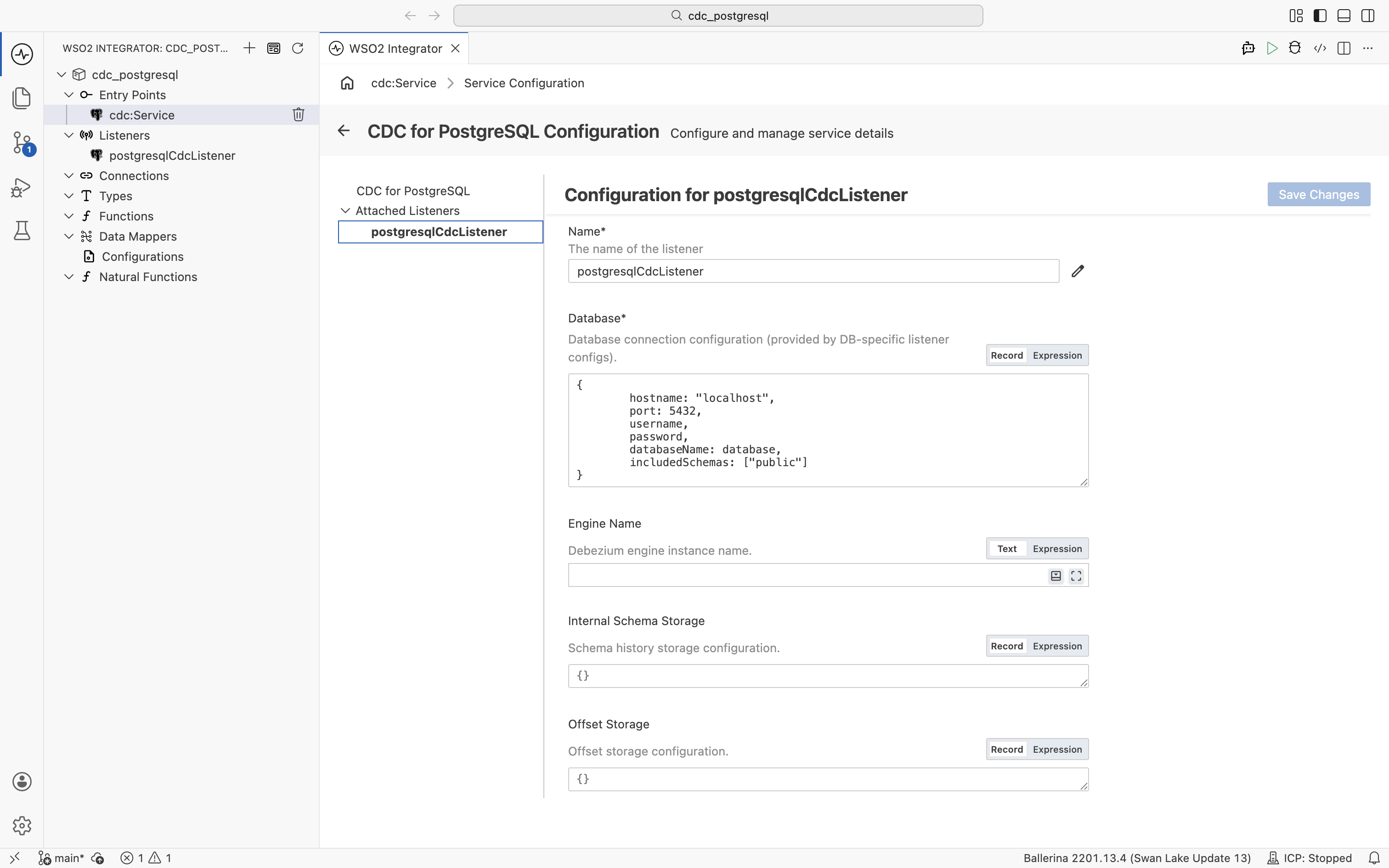
| Field | Description | Default |
|---|---|---|
| Name | Identifier for the listener. | postgresqlCdcListener |
| Database | Database connection configuration as a record expression with hostname, port, username, password, and databaseName fields. | Required |
| Engine Name | Debezium engine instance name. | ballerina-cdc-connector |
| Internal Schema Storage | Schema history storage configuration. | {fileName: "tmp/dbhistory.dat"} |
| Offset Storage | Offset storage configuration for tracking CDC progress. | {fileName: "tmp/debezium-offsets.dat"} |
| Liveness Interval | Interval in seconds for checking CDC listener liveness. | 60.0 |
| Options | Additional connector options as a record expression. | {} |
Click + Attach Listener to attach an additional listener to the same service.
Click Save Changes to apply updates.
The connector uses a logical replication slot and a publication on the source database. The defaults (debezium and dbz_publication) work for most cases. To change them or to control auto-creation, set replicationConfig and publicationConfig inside the Database field.
// Listener configuration: connection details for the PostgreSQL instance
// and the database and schemas to track.
listener postgresql:CdcListener postgresqlCdcListener = new (database = {
    hostname: "localhost",
    port: 5432,
    username,
    password,
    databaseName: "mydb",        // Database to capture changes from.
    includedSchemas: ["public"]  // Restrict CDC to the `public` schema.
});
postgresql:PostgresListenerConfiguration accepts the following top-level fields:
| Field | Type | Default | Description |
|---|---|---|---|
database | postgresql:PostgresDatabaseConnection | Required | Database connection (see fields below) |
engineName | string | "ballerina-cdc-connector" | Debezium engine instance name |
internalSchemaStorage | cdc:InternalSchemaStorage | {fileName: "tmp/dbhistory.dat"} | Schema history storage configuration |
offsetStorage | cdc:OffsetStorage | {fileName: "tmp/debezium-offsets.dat"} | Offset storage configuration |
livenessInterval | decimal | 60.0 | Liveness check interval in seconds |
options | postgresql:PostgreSqlOptions | {} | PostgreSQL-specific CDC options |
The database value (postgresql:PostgresDatabaseConnection) has these fields:
| Field | Type | Default | Description |
|---|---|---|---|
hostname | string | "localhost" | PostgreSQL hostname |
port | int | 5432 | PostgreSQL port |
username | string | Required | Database username |
password | string | Required | Database password |
databaseName | string | Required | Database to capture changes from |
includedSchemas | string|string[]? | — | Regex patterns for schemas to capture |
excludedSchemas | string|string[]? | — | Regex patterns for schemas to exclude |
includedTables | string|string[]? | — | Regex patterns for tables to capture |
excludedTables | string|string[]? | — | Regex patterns for tables to exclude |
secure | cdc:SecureDatabaseConnection? | — | SSL/TLS connection configuration |
replicationConfig | postgresql:ReplicationConfiguration? | — | Logical decoding plugin and slot configuration |
publicationConfig | postgresql:PublicationConfiguration? | — | Publication name and autocreate mode |
tasksMax | int | 1 | Maximum connector tasks. The PostgreSQL connector always uses a single task, so this value is ignored |
connectTimeout | decimal? | — | Connection timeout in seconds |
For the full set of fields (including messageKeyColumns, includedColumns, excludedColumns, and streamingConfig), see the ballerinax/postgresql package on Ballerina Central.
Event handlers
Adding an event handler
- Visual Designer
- Ballerina Code
In the Service Designer, click + Add Handler. The Select Handler to Add panel lists onRead, onCreate, onUpdate, onDelete, onTruncate, and onError.
onRead, onCreate, onUpdate, and onDelete each open a Message Handler Configuration panel for the row payload. onTruncate and onError are added directly without additional configuration.
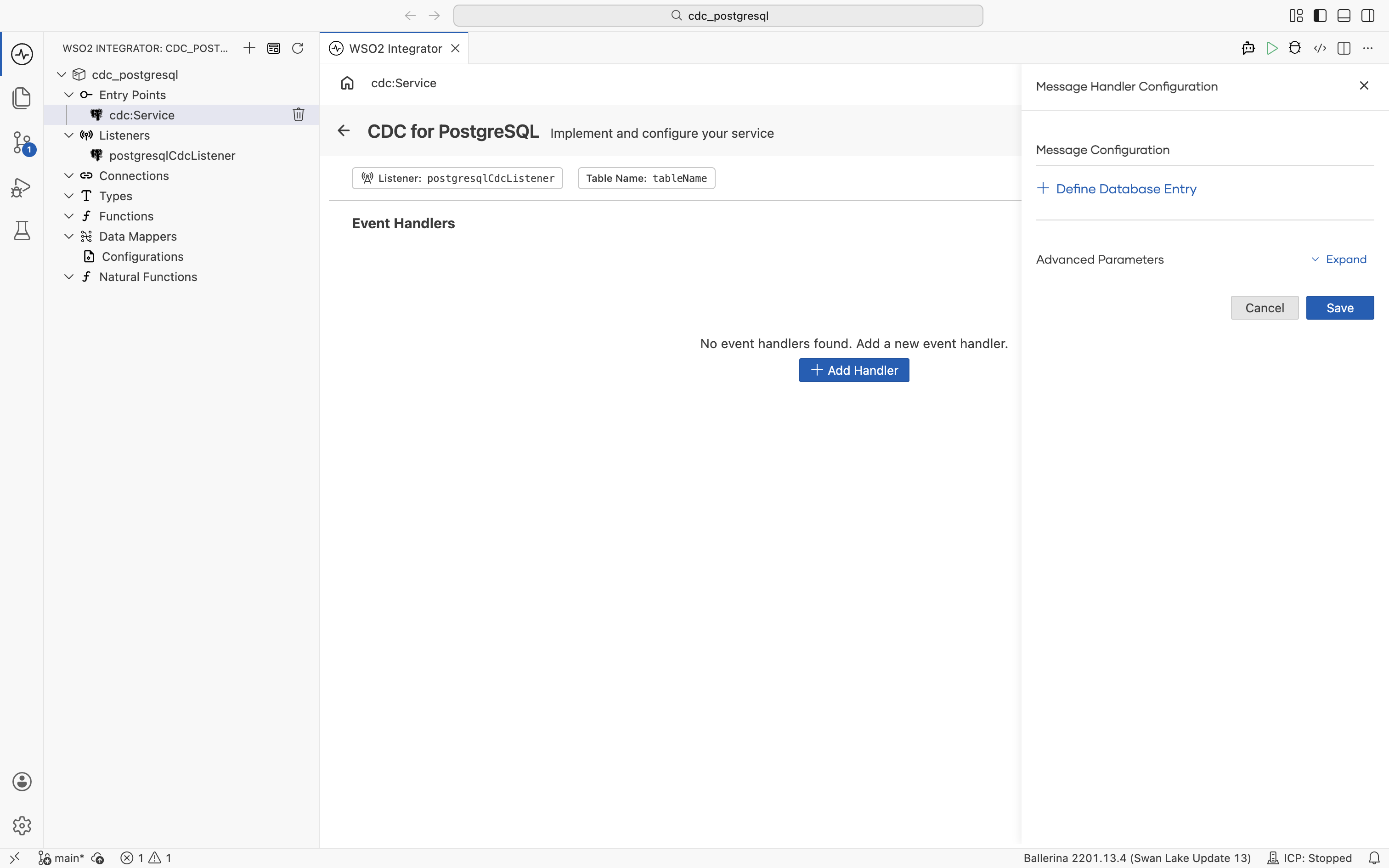
The configuration panel exposes the following fields:
| Field | Description |
|---|---|
| + Define Database Entry | Defines the record type representing one row of the tracked table. The handler receives this record at runtime with values from the change event. |
| Advanced Parameters > TableName | Scopes the handler to a specific table. This is selected by default so that the handler only runs for changes on the table it was added for. Clear the checkbox if you want the handler to run for changes on every table the service is attached to. |
Click Save to add the handler.
By default, TRUNCATE operations are in the skippedOperations list, so onTruncate is not invoked. To receive truncate events, remove cdc:TRUNCATE from skippedOperations (for example, set it to []) in Options.
// Typed record that mirrors the columns of the `customers` table.
// Declaring the type lets handlers work with fields like `after.id`
// instead of a raw `record {}` value.
type Customer record {|
    int id;
    string name;
    string email;
|};

@cdc:ServiceConfig {
    tables: "mydb.public.customers"
}
service cdc:Service on postgresqlCdcListener {

    // Snapshot read handler: fires once per row during the initial snapshot.
    remote function onRead(Customer after) returns error? {
        log:printInfo("Initial snapshot row", data = after.toString());
    }

    // Insert handler: the newly inserted row arrives as `after`.
    remote function onCreate(Customer after) returns error? {
        log:printInfo("Row inserted", data = after.toString());
        check syncToDownstream("INSERT", after);
    }

    // Update handler: receives both the previous (`before`) and new (`after`) row state.
    remote function onUpdate(Customer before, Customer after) returns error? {
        log:printInfo("Row updated",
                before = before.toString(),
                after = after.toString());
        check syncToDownstream("UPDATE", after);
    }

    // Delete handler: only `before` is available, since the row no longer exists.
    remote function onDelete(Customer before) returns error? {
        log:printInfo("Row deleted", data = before.toString());
        check syncToDownstream("DELETE", before);
    }

    // Truncate handler: fires when the tracked table is truncated. Receives the table name.
    remote function onTruncate(string tableName) returns error? {
        log:printInfo("Table truncated", tableName = tableName);
    }

    // Error handler: invoked when the listener fails to process a change event.
    remote function onError(error err) returns error? {
        log:printError("CDC processing error", 'error = err);
    }
}
The onCreate, onUpdate, onDelete, and onRead handlers receive the row data as record {} (or a typed record matching your table columns, as shown by Customer above). onTruncate accepts no parameters, or a single string tableName parameter that holds the name of the truncated table.
Handler types
| Handler | Triggered when | Use when |
|---|---|---|
onRead | A row is read during the initial snapshot of the table | Bootstrapping downstream systems with existing data |
onCreate | A row is inserted into the tracked table | Syncing new records to downstream systems |
onUpdate | A row is updated in the tracked table | Propagating field changes |
onDelete | A row is deleted from the tracked table | Removing records from downstream systems |
onTruncate | The tracked table is truncated (PostgreSQL only; skipped by default) | Clearing or resetting downstream data |
onError | A CDC processing error occurs | Logging failures and sending alerts |
What's next
- CDC Connector Overview — full CDC connector reference covering listeners, configuration, and supported databases
- Data Mapper — transform change events into the shape your downstream systems expect
- CDC for Microsoft SQL Server — capture changes from Microsoft SQL Server tables