WSO2 Cloud Concepts
WSO2 Cloud Integration Platform is the managed runtime side of the platform. It handles everything that happens after your integration leaves the IDE: building, deploying, promoting, and observing integrations across environments. This page covers the key concepts you need to understand before deploying your first integration.
Resource hierarchy
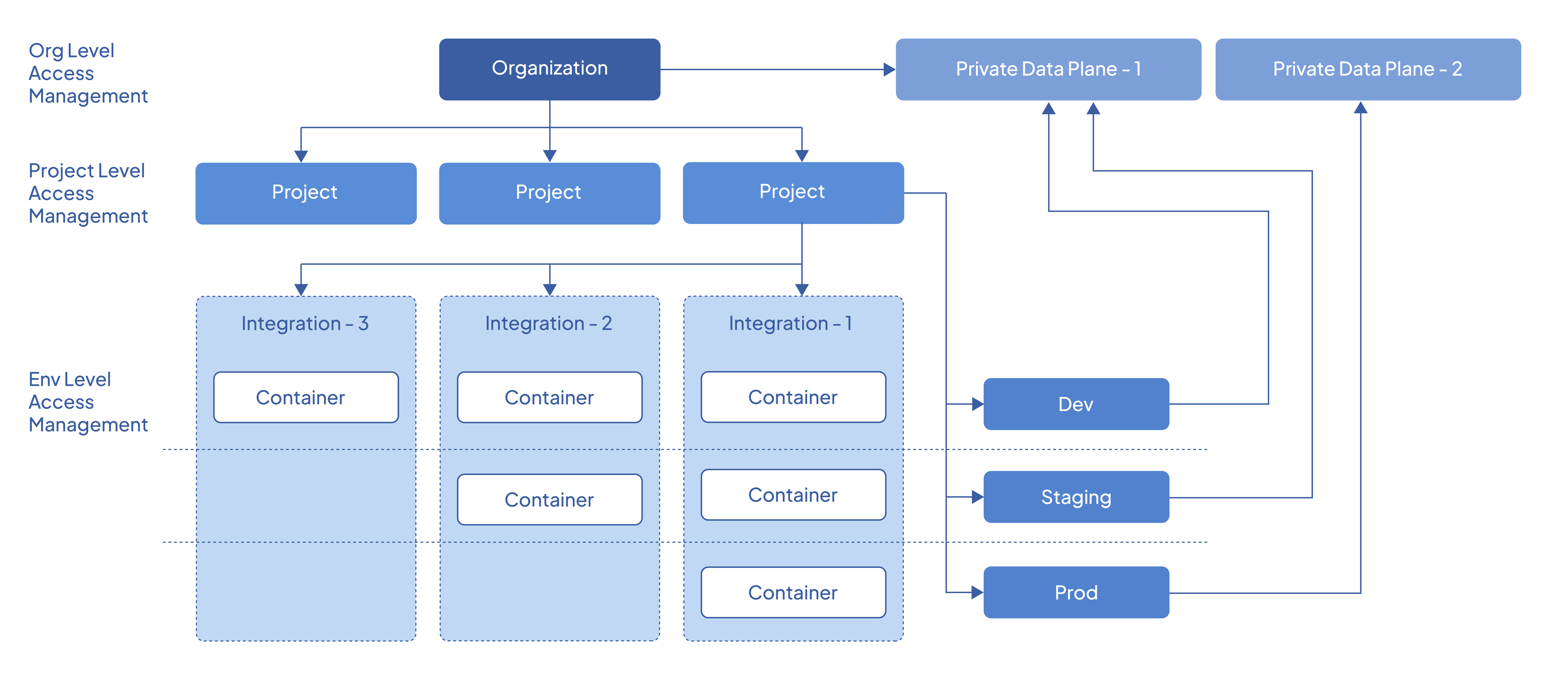
The following diagram depicts the high-level resources and their relationships in WSO2 Cloud Integration Platform.
Organizations and data planes
Data planes are connected to the organization and are available for all projects within the organization. When you create an environment in a project, the data plane connected to the organization is linked with an automatically generated Kubernetes namespace.
Environments and clusters
WSO2 Cloud Integration Platform allows multiple Kubernetes clusters to be associated with an environment. This enables you to build highly resilient and resource-efficient solutions that utilize multiple clusters. WSO2 Cloud Integration Platform synchronizes your integrations and workloads between associated clusters in an environment, allowing you to perform multi-cluster deployment with a single click.
The following diagram illustrates how multiple clusters associate with different environments:
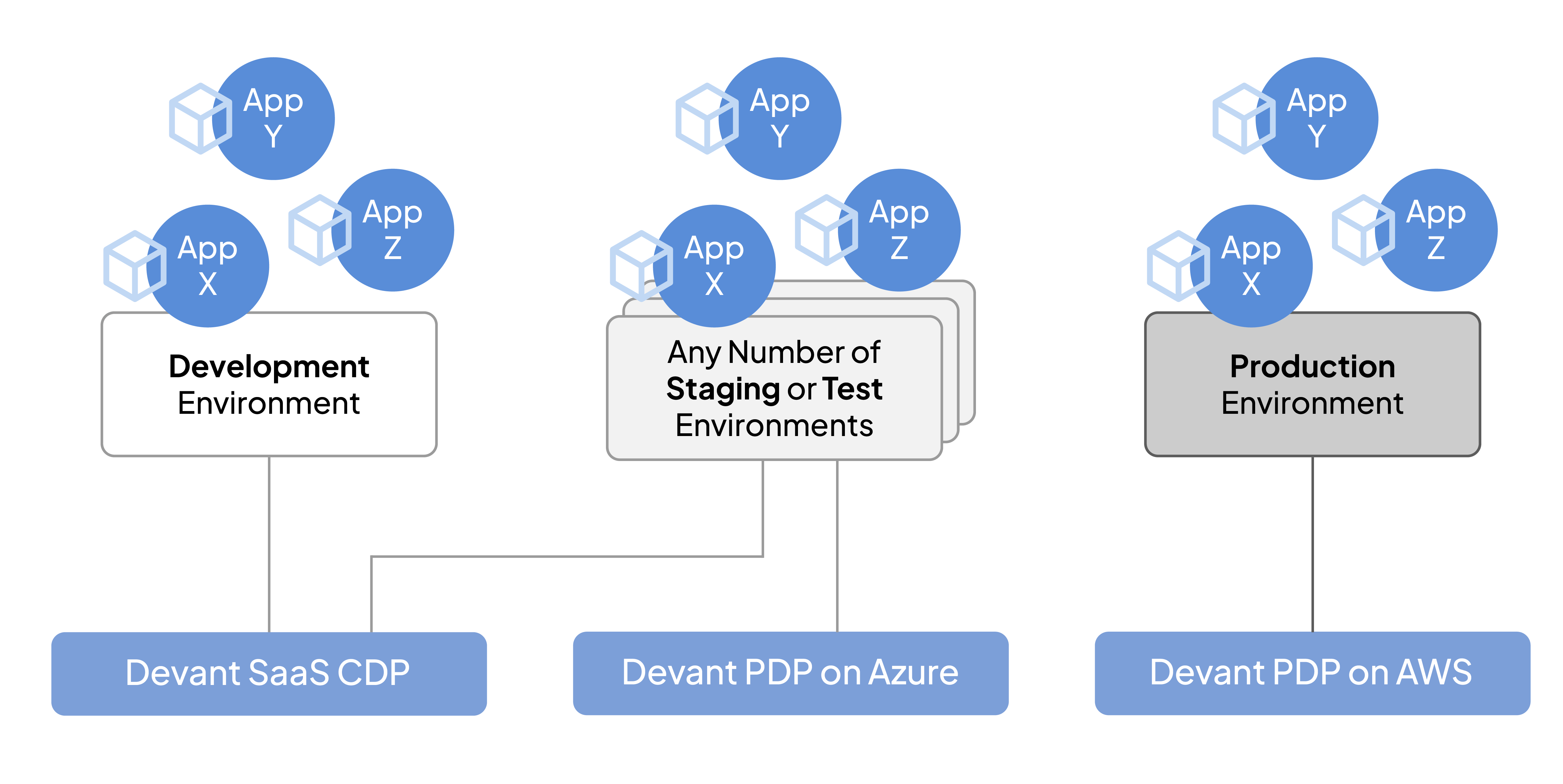
It is not necessary to use a different cluster per environment. You can create multiple environments on the same cluster. The above diagram is an example of a specific solution. Your integration architecture may require a different configuration than what is depicted.
Integrations and environments
Integration belongs to a project in WSO2 Cloud Integration Platform, and environments are provisioned per project. When an integration is deployed, it is deployed as a container to the specified environment. Once deployed, you can promote the container image across the environments available in the project.
Data planes
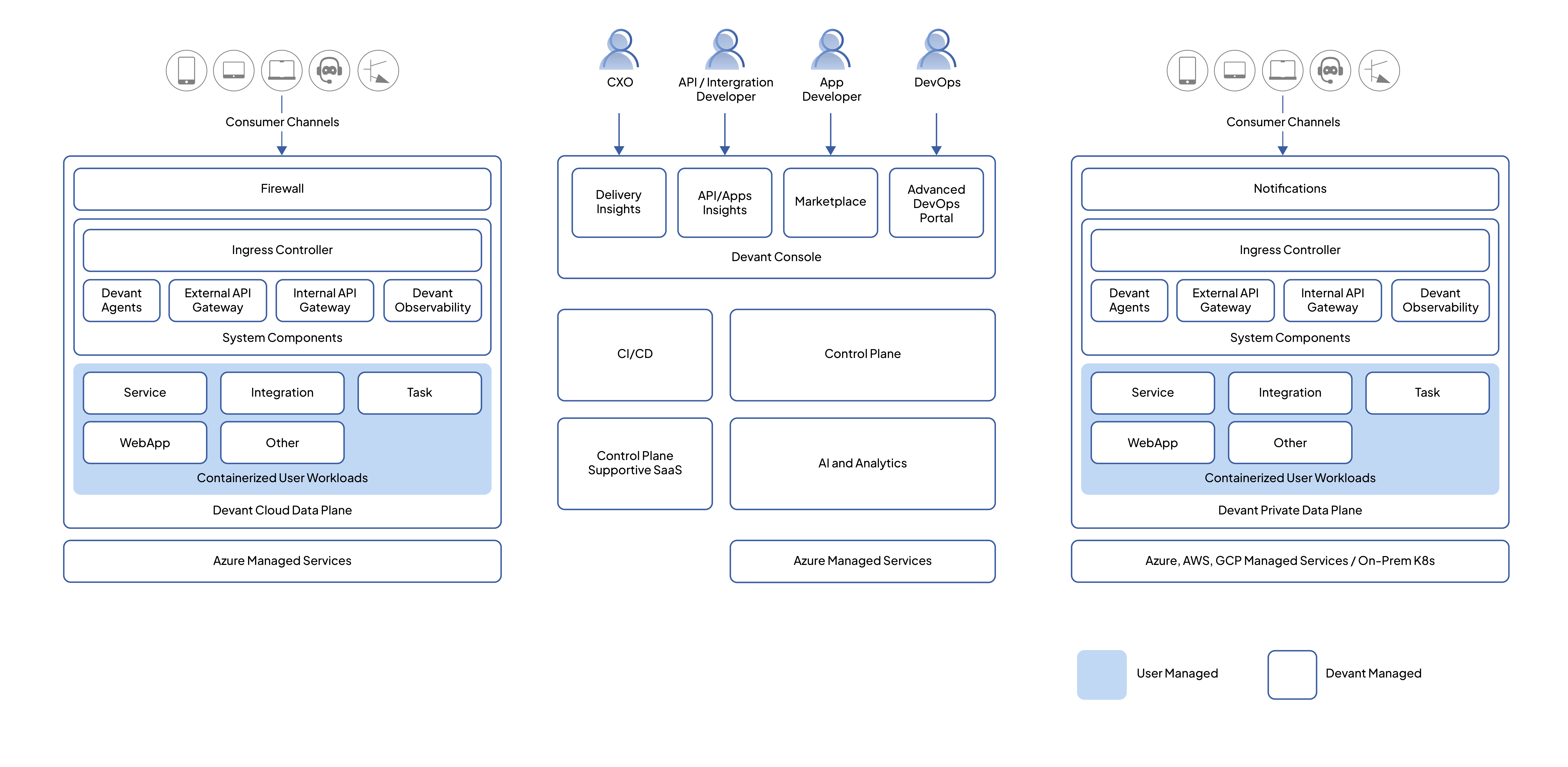
WSO2 Cloud Integration Platform's architecture comprises two key components: the control plane and the data plane. The control plane handles administering organizations, users, and projects, and governs the entire integration lifecycle from creation through deployment, governance, and observability. The control plane is a SaaS that manages all cloud data planes and private data planes.
The data plane is where user integrations are deployed and run. All traffic related to the runtime of user integrations is restricted to the data plane, ensuring strict containment of user data within its boundaries.
WSO2 Cloud Integration Platform features two distinct data plane types. A cloud data plane uses a multi-tenanted infrastructure model for deploying user integrations, creating a shared yet secure environment for integration runtime. A private data plane (PDP) provides dedicated infrastructure for a single organization to run its user integrations, ensuring an added layer of privacy and control.
Private data planes
WSO2 Cloud Integration Platform private data planes can be deployed with almost all major cloud providers, such as Azure, AWS, and GCP, and are also compatible with on-premises infrastructure.
Infrastructure
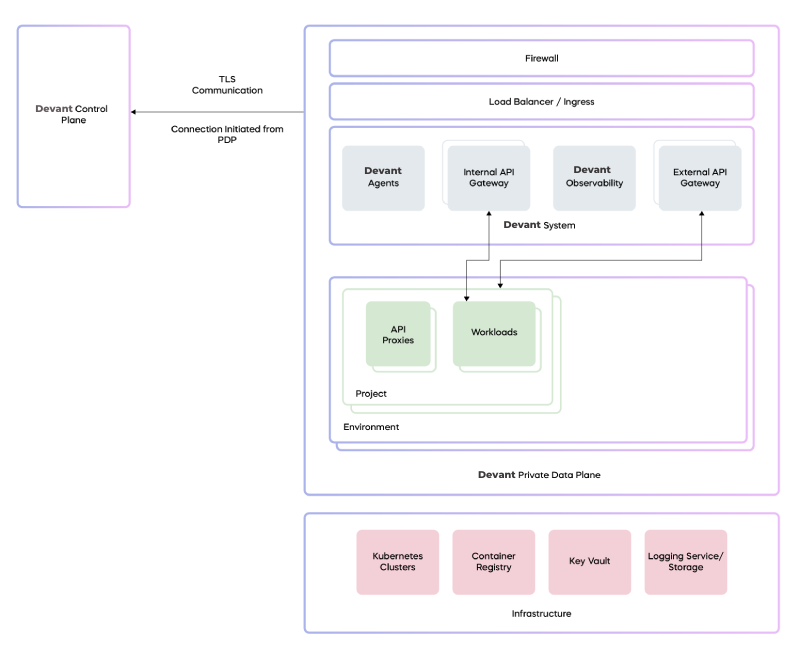
The essential requirements for a private data plane include upstream-compatible Kubernetes clusters, a container registry, a key vault (secret store), and a logging service or log storage.
System components
Setting up the WSO2 Cloud Integration Platform PDP system involves using a Helm installation on the Kubernetes infrastructure. The following software components are installed during the Helm execution:
- Cilium CNI and service mesh.
- WSO2 Cloud Integration Platform API Gateways and related components.
- WSO2 Cloud Integration Platform PDP agent.
- Observability and logging APIs, along with observability agents.
- Flux controller.
All of these software components receive automatic updates, including security patches and bug fixes through the flux controller connected to the WSO2 Cloud Integration Platform Update Management System.
Connectivity with the control plane
The private data plane requires communication with the WSO2 Cloud Integration Platform control plane to manage various activities. All these communications are outbound from the private data plane, ensuring that there is no need to open any specific IP:Port from its perspective for these interactions. However, if an organization's network restricts all outbound traffic, it is necessary to permit outbound traffic to the public IP range of the WSO2 Cloud Integration Platform control plane.
The following table outlines the inbound and outbound connections from a private data plane:
| Data plane component | Endpoint | Direction | Protocol |
|---|---|---|---|
| WSO2 Cloud Integration Platform PDP agent | WSO2 Cloud Integration Platform control plane (CP) (mizzen server) | Outbound | WSS |
| Kubernetes API server | Outbound (cluster internal) | HTTPS, WS | |
| APIM/local adaptor | Global adaptor | Outbound | HTTPS |
| Azure Service Bus (CP) | Outbound | AMQP | |
| APIM/Enforcer | Event hub (CP) | Outbound | AMQP |
| WSO2 Cloud Integration Platform secret resolver | Cloud secret store | Outbound (VPC internal) | HTTPS |
| Container registry | Container registry (public) | Inbound | HTTPS |
| Container registry | Outbound (VPC internal) | HTTPS | |
| Certificate manager | Azure DNS service | Outbound | HTTPS |
| LetsEncrypt | Outbound | HTTPS | |
| Flux source controller | GitHub | Outbound | HTTPS |
| Flux Helm controller | WSO2 Cloud Integration Platform container registry | Outbound | HTTPS |
All communication between the control plane and the private data plane is secured using TLS.
Observability architecture
The following diagram depicts the architecture overview of WSO2 Cloud Integration Platform's in-data-plane log and observability in Azure PDP:
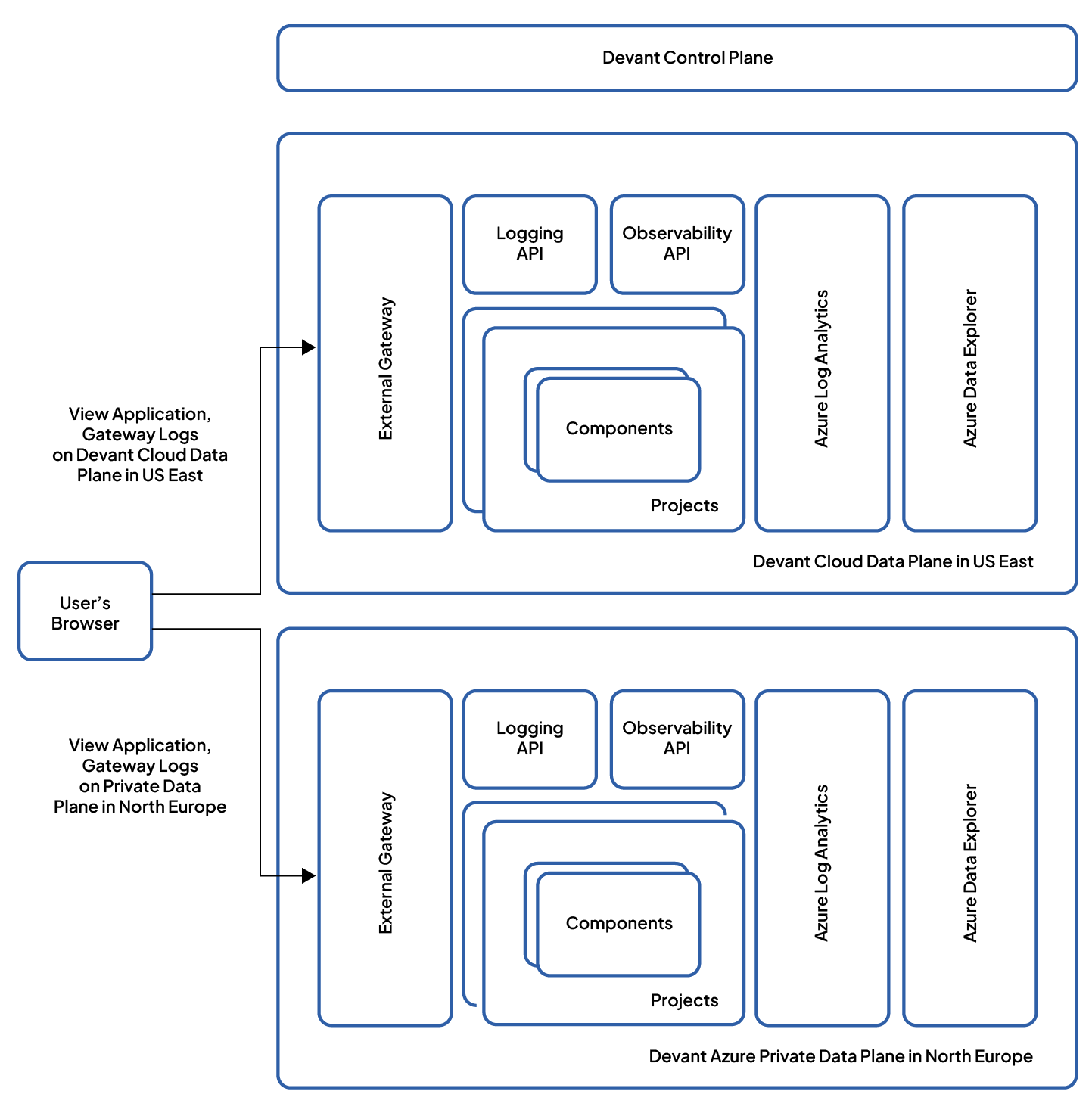
The private data plane observability architecture is centered around a strong commitment to data privacy and compliance. This is achieved through a strategic decision to retain logs and observability data within the data plane itself. Key aspects of this architecture include:
- Data storage at source: Logs and observability data are stored within the data plane itself, enhancing security, simplifying access, and ensuring compliance.
- Direct browser-to-data-plane interaction: The WSO2 Cloud Integration Platform Console in the user's browser directly interacts with APIs in the data plane, reducing potential data routing complexities and ensuring a more secure, direct flow of information.
- Reduced data exposure points: Fetching data directly from the data plane's APIs minimizes the number of data transfer points, effectively decreasing the chances of data exposure or interception.
- Compliance with regulatory standards: The architecture supports data locality, aligning with global regulatory standards like GDPR and CCPA by keeping data in its original environment.
- Improved performance and real-time insights: Direct interaction between the browser and data plane results in faster data retrieval, providing users with immediate insights.
- User transparency and control: Users have a clear view of their data's location and access methods, alongside granular control over data access.
Security
The WSO2 Cloud Integration Platform private data plane ensures extensive, production-grade security, ranging from infrastructure and architecture to zero-trust network security. All incoming traffic is protected by a firewall and must undergo authentication and authorization via the API Gateway. It also provides end-to-end network traffic encryption using Cilium transparent encryption, ensuring efficient data path encryption.
Management models
WSO2 Cloud Integration Platform supports the following management models for private data planes (PDPs), fostering collaboration between WSO2 and customers across diverse scenarios:
- WSO2 fully managed (infrastructure and PDP in WSO2 subscription) model
- WSO2 fully managed (infrastructure and PDP in customer subscription) model
- Customer self-managed (WSO2 provides installation script and updates) model
Environments
WSO2 Cloud Integration Platform offers developers one or more environments to run their integrations within a given data plane. By default, the WSO2 Cloud Integration Platform cloud data plane provides two environments (i.e., development and production). Each project in WSO2 Cloud Integration Platform is associated with one or more environments available in the organization. For example, project A may choose to utilize dev, staging, and production environments, while project B may only use development and production environments.
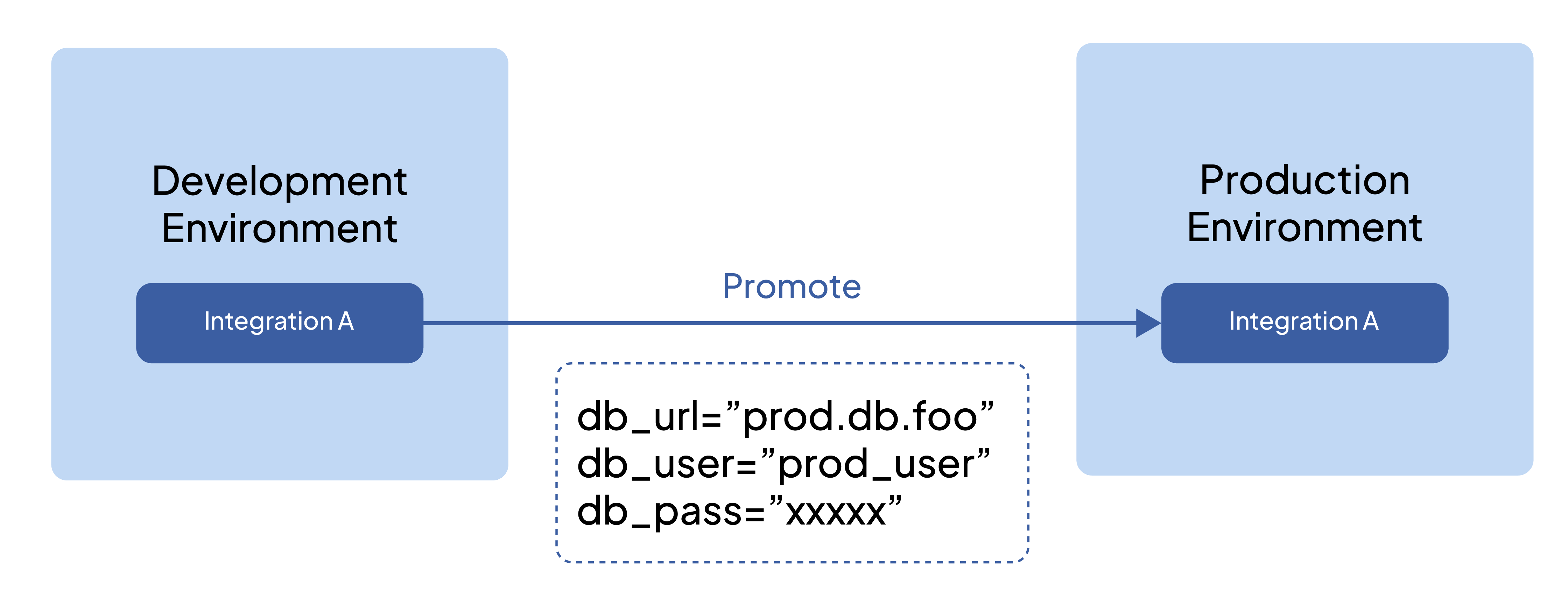
You can promote integrations within a project across available environments. When you promote an integration, its configuration values can be overridden with environment-specific values.
The following diagram illustrates how an integration is promoted across environments.
Deployment tracks
Deployment Tracks in WSO2 Cloud Integration Platform are structured pathways for simplified integration deployment. They act like advanced CI/CD pipelines, ensuring your integrations reach their destinations seamlessly. They establish an organized and structured approach that minimizes the chances of errors and challenges that are typically associated with deployment workflows.
The significance of deployment tracks
Deployment Tracks offer practical solutions to enhance the API consumer experience by addressing two critical challenges:
- Streamlined deployment: Deployment Tracks serve as well-designed routes for your integrations, enhancing the organization and reliability of the deployment process, similar to a well-structured express route.
- Efficient API versioning: Especially beneficial for managed APIs, Deployment Tracks provide a straightforward method for creating API versions that seamlessly interact with previous iterations. This simplified version management benefits both API creators and consumers alike.
Streamlined deployments
For streamlined deployments, WSO2 Cloud Integration Platform dissects two integral approaches that leverage Deployment Tracks: the comprehensive CI/CD integration and the focused CD-Only strategy.
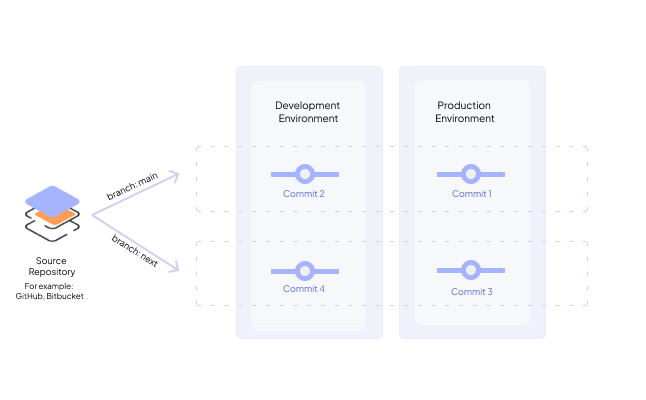
A deployment track is linked to a particular branch within a GitHub repository. This connection is useful for handling deployments to various environments. On the Deploy page, you can easily visualize the deployments to specific environments associated with your selected deployment track. Merging a pull request (PR) automatically triggers a deployment to the development environment.
Efficient API versioning
This section applies only to Integration as APIs. When working with Integration as APIs in WSO2 Cloud Integration Platform, it is important to have an effective API versioning mechanism. WSO2 Cloud Integration Platform follows a versioning mechanism based on Semantic Versioning (SemVer) but only includes the major version and minor version with the prefix v.
For example, v1.2.
You can follow the approach given below when you version APIs in WSO2 Cloud Integration Platform:
- Increment the major version when you make incompatible API changes.
- Increment the minor version when you add functionality in a backward-compatible manner.
Semantic Versioning (SemVer) is a specification that defines how to assign and increment version numbers for software products, including APIs. For more information, see Semantic Versioning specification.
One of the primary concerns when dealing with SaaS APIs is to minimize disruption for API consumers while continuously developing and deploying updates.
In compliance with SemVer, changes that don't introduce breaking or additive modifications to the API are categorized as patch updates. However, from the perspective of API consumers, these changes should ideally not disrupt their API clients. Typically, API consumers are most concerned with major API version alterations, but there might be instances where minor version changes are communicated to them.
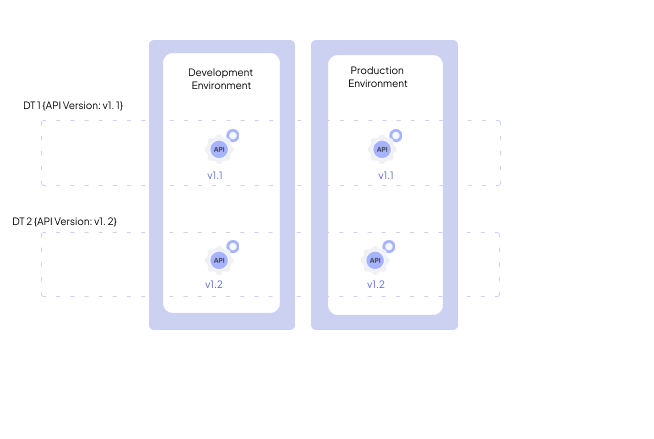
Therefore, in the context of deployment tracks, API developers only need to specify the major and minor versions being delivered from a particular deployment track. This information is treated as the API version attribute of a deployment track. If the publisher requires versioning for internal tracking purposes, this can be accomplished in Git through the use of Git tags, GitHub with GitHub releases, and so forth.
CI/CD
WSO2 Cloud Integration Platform provides a streamlined continuous integration and continuous deployment (CI/CD) experience to deploy integrations and services efficiently across multiple environments.
WSO2 Cloud Integration Platform creates environments for each project, where all integrations within the project share the environments. An environment is an isolated deployment area with restricted network and resource access. Services deployed in one environment cannot communicate with services deployed in another.
The WSO2 Cloud Integration Platform cloud data plane provides two default environments (i.e., development and production). However, if you are in a private data plane organization, you can customize and create multiple environments based on your requirements.
WSO2 Cloud Integration Platform adopts a build once, deploy many strategy to manage integrations across multiple environments. It automatically builds an integration for each commit, which is then promoted to subsequent environments. This allows testing changes in lower, non-production environments like development before promoting the build to production.
WSO2 Cloud Integration Platform injects configurations and secrets you maintain at the environment level into integrations at runtime. This ensures a strict separation of environment-specific configurations from source code. Although configurations can vary across environments, the build artifacts remain unchanged. Configurations and secrets include:
- Resource credentials to a database, cache, or other backing services.
- Credentials to external cloud services such as Amazon S3 or external APIs.
All configurations and secrets are encrypted at rest and in transit and stored in a secure vault. In a private data plane organization, you can store configurations and secrets in your infrastructure.
Build
WSO2 Cloud Integration Platform automated build pipelines work as follows:
- Automatically builds a container image from the provided source code for the new commit.
- Runs security and vulnerability scans, if applicable, depending on the integration type.
- Pushes the container image to a container registry. WSO2 Cloud Integration Platform pushes the image to a WSO2 Cloud Integration Platform-managed registry in the cloud data plane. If it is a private data plane organization, WSO2 Cloud Integration Platform pushes the image to your own registry.
- Updates service endpoints and API specifications from the provided repository if applicable.
WSO2 Cloud Integration Platform can replicate builds from an identical code version (Git commit). This means that multiple builds initiated from the same Git commit will generate Docker images with the same behavior.
In the event of multiple builds from the same code version, WSO2 Cloud Integration Platform preserves only the most recent version of the Docker image created from the particular code version.
On the Build page, click Build Latest to build the latest commit. If necessary, you have the option to build earlier commits. Change the button to Show commits from the dropdown and click Show commits. Select the commit from the commits pane and click Build. To view details of a specific build, click View Details corresponding to the build.
Deployment
Once WSO2 Cloud Integration Platform builds the latest commit it automatically deploys to the Development environment. You can track the deployments on the Deploy page.
Once WSO2 Cloud Integration Platform deploys an integration with configurations, the configurations become immutable. Any subsequent change results in a new deployment.
WSO2 Cloud Integration Platform builds artifacts once per GitHub commit and then promotes it to subsequent higher environments. In the overview page, click Promote to promote it manually across environments. This can be also done in the Deploy page.
Configurations
WSO2 Cloud Integration Platform allows you to define both environment-independent configurations and environment-specific configurations.
Environment-independent configurations apply to all environments. To change them, go to the Deploy page of the integration, make the necessary configuration changes via the Set Up card, and then trigger a new deployment to the initial environment. From there, you can proceed to promote the integration to higher environments.
Environment-specific configurations apply to a particular environment. To change them, go to the Deploy page of the integration, make the necessary configuration changes via the specific environment card, and trigger a new deployment.
Test
The information on the Test page is only applicable to automation and API.
For the automation, click Test to run the automation once. Select Test with Arguments to test your automation with arguments. You can view current and historic execution details along with a quick snapshot of recent activity via the total count of executions within the last 30 days. For each execution, you can view vital information such as the unique execution ID, the time it was triggered, and relevant revision information. Furthermore, you can dive deeper into the details by clicking on a specific execution to access its associated logs. This information enhances transparency, troubleshooting capabilities, and overall execution management, allowing you to easily monitor and analyze workflows.
For API, click Console in the Test dropdown to list all the resources in the API. Click Get Test Key to get a test key. Click a resource to expand it. Click Try it out and fill in the parameters (if any). Click Execute to invoke the resource. This will show the resource response and the execution details. You can also select the API Chat in the Test dropdown to test the API using an Intelligent Agent.
Zero-downtime deployments
WSO2 Cloud Integration Platform performs rolling updates to ensure zero downtime between deployments and promotions.
A new build undergoes a health check before switching traffic from the current build. Configuring the necessary health checks for an integration can prevent the deployment and promotion of unhealthy versions of the integration.
What's next
- Sign up for WSO2 Cloud — create an account and access the WSO2 Cloud Integration Platform
- Deploy — deployment options for self-hosted and cloud environments
- Build an automation — schedule tasks and run background jobs