Configuration Management
Integration projects typically run across multiple environments — development, staging, and production — each with different endpoints, credentials, and feature flags. WSO2 Integrator uses Ballerina's built-in configuration system to keep these settings out of source code and supply them at runtime.
This guide is the deeper reference for the configuration model. For the fundamentals of using configurable variables, see Configurations.
Configurable variables
A configurable variable is a module-level binding declared with Ballerina's configurable keyword. The runtime resolves its value at startup from one of the configuration value sources, and the resolved value is accessible across all flows and nodes in your integration project.
- Visual Designer
- Ballerina Code
- Config.toml File
In the Visual Designer, configurable variables appear under Configurations in the project sidebar. Use the Add Configurable Variable panel to declare a new variable — set the name and type, and either provide a default value (optional) or leave it empty (required).
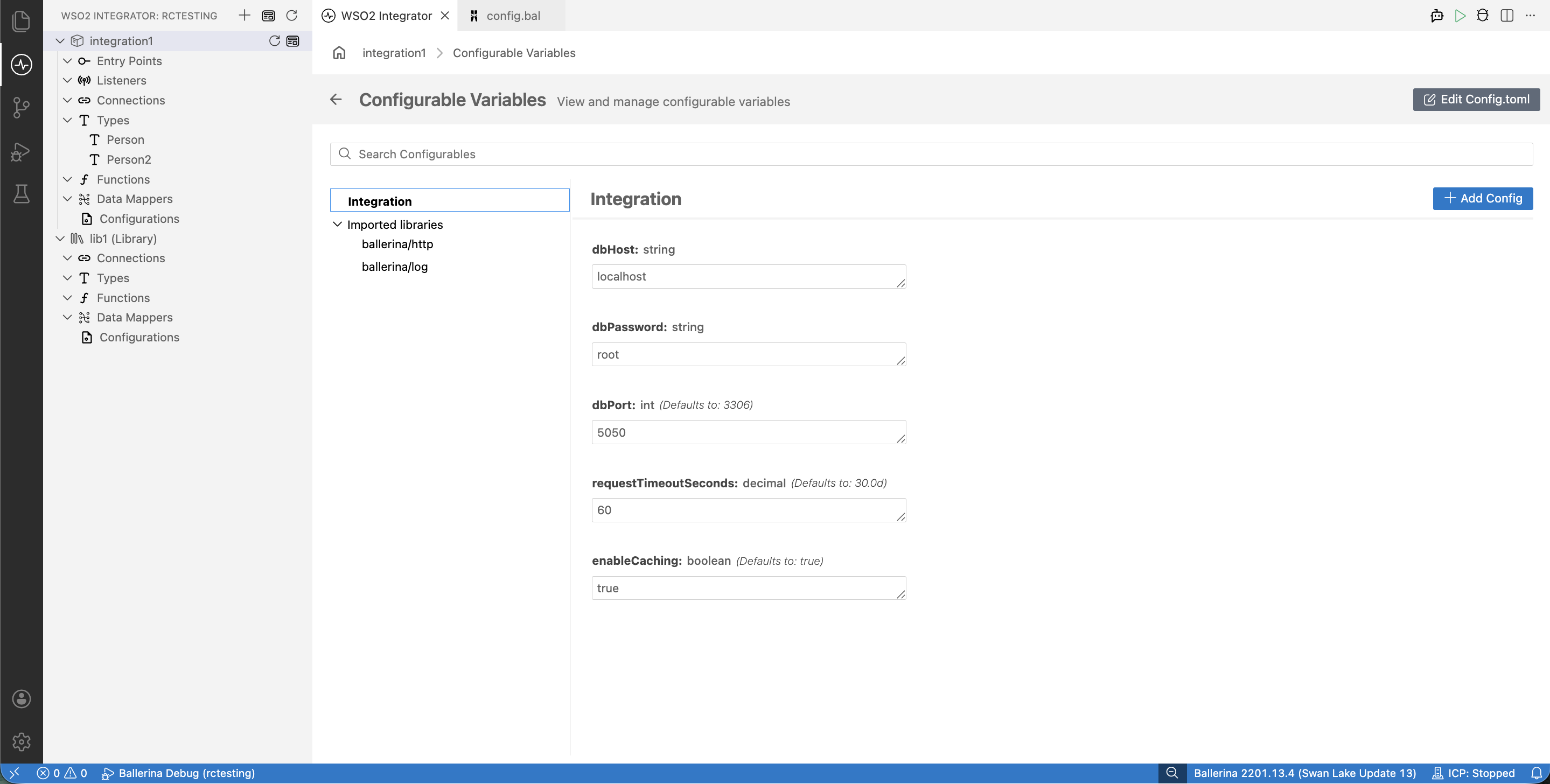
Declare configurables at the module level using the configurable keyword. The ? placeholder marks a variable as required; provide a literal default to make it optional.
// Required -- must be supplied at runtime
configurable string dbHost = ?;
configurable string dbPassword = ?;

// Optional -- uses the declared default if no value is supplied
configurable int dbPort = 3306;
configurable decimal requestTimeoutSeconds = 30.0d;
configurable boolean enableCaching = true;
Supply values in Config.toml at the project root. Required variables must be set; optional variables may be omitted to use their declared defaults.
# Required
dbHost = "db.example.com"
dbPassword = "secret"

# Optional — override the declared defaults if needed
dbPort = 5432
requestTimeoutSeconds = 60.0
enableCaching = false
Supported types
A configurable variable's type must describe plain-data values that the runtime can parse from a configuration source and hold safely for the lifetime of the program.
This covers Ballerina's basic types (nil, boolean, int, byte, float, decimal, string, xml) and structured types built from them (arrays, maps, records, tables). Common examples are shown below.
| Type | Example |
|---|---|
int | configurable int port = 8080; |
byte | configurable byte maxRetries = 3; |
float | configurable float threshold = 0.75; |
decimal | configurable decimal taxRate = 0.08d; |
string | configurable string apiKey = ?; |
boolean | configurable boolean debug = false; |
| Arrays | configurable string[] allowedOrigins = ["*"]; |
| Maps | configurable map<string> headers = {}; |
| Records | configurable DatabaseConfig dbConfig = ?; |
| Tables | configurable table<Employee> key(id) employees = table []; |
Structured configuration
When you have many related settings — for example, the host, port, credentials, and pool size for a single database — declaring each one as a separate configurable variable becomes hard to read and easy to mis-wire. Group them into a record type instead, and declare a single configurable variable of that type.
- Visual Designer
- Ballerina Code
- Config.toml File
Use the Visual Designer's type creator to define a new record type (or the type picker to select an existing one), then add a configurable variable of that record type the same way as any primitive.
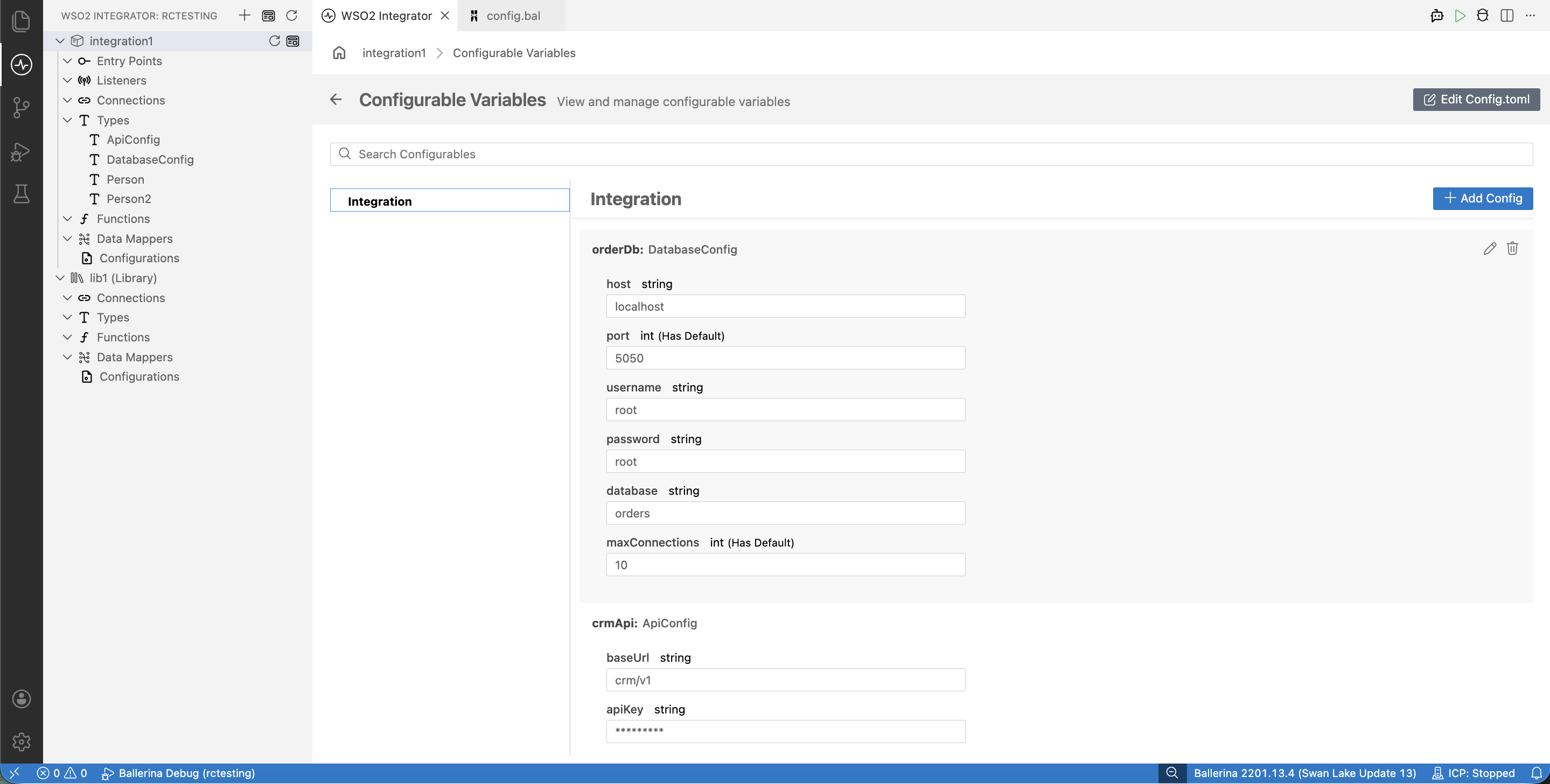
Define the record type at the module level, then declare a configurable of that type:
type DatabaseConfig record {|
    string host;
    int port = 3306;
    string username;
    string password;
    string database;
    int maxConnections = 10;
|};

type ApiConfig record {|
    string baseUrl;
    string apiKey;
    decimal timeoutSeconds = 30.0d;
    int maxRetries = 3;
|};

configurable DatabaseConfig orderDb = ?;
configurable ApiConfig crmApi = ?;
Supply values for each record-typed configurable as a TOML table. Fields with declared defaults may be omitted.
[orderDb]
host = "db.example.com"
username = "app_user"
password = "secure_password"
database = "orders"

[crmApi]
baseUrl = "https://api.crm.example.com"
apiKey = "secret_api_key"
Configuration value sources
Configurable values can be supplied from several sources. When the same variable is set in more than one place, the runtime resolves it using the first source from the table below (top → bottom, highest to lowest precedence):
| Source | Example | Typical use |
|---|---|---|
| Command-line arguments | bal run -- -CdbHost=localhost | One-off overrides, local testing |
Individual env vars (BAL_CONFIG_VAR_*) | BAL_CONFIG_VAR_DBHOST=localhost | CI/CD pipelines, containers, secrets |
Inline TOML (BAL_CONFIG_DATA) | BAL_CONFIG_DATA='dbHost="localhost"' | Containerized runs without a config file |
TOML files (Config.toml / BAL_CONFIG_FILES) | dbHost = "localhost" | Per-environment configuration |
| Code defaults | configurable string dbHost = "localhost"; | Development fallback |
Command-line arguments support only basic primitive types (boolean, int, float, decimal, string, xml). For arrays, maps, records, and tables, supply values via TOML files or BAL_CONFIG_VAR_* instead.
Config.toml
Config.toml is the primary configuration file. Place it in the project root directory (alongside Ballerina.toml). The runtime reads it automatically at startup. Values you enter through the Visual Designer's Config Editor are written to this same file.
For TOML syntax, type-by-type encoding, and module-qualified key conventions, see the Config.toml reference.
Environment variables
Three environment variables shape how the runtime reads configuration: BAL_CONFIG_VAR_* sets individual values, BAL_CONFIG_FILES selects which TOML files to load, and BAL_CONFIG_DATA passes TOML content inline.
BAL_CONFIG_VAR_*
Override individual configurable variables via specially named environment variables. The name pattern is:
- Start with
BAL_CONFIG_VAR_. - For root-module variables, append the variable name in uppercase.
- For non-root modules or external packages, include the module path with dots replaced by underscores, all uppercase.
# Root module: configurable int port = 8080;
export BAL_CONFIG_VAR_PORT=9090

# Non-root module myapp.db: configurable string host = ?;
export BAL_CONFIG_VAR_MYAPP_DB_HOST="db.example.com"

# External package org=ballerinax, package=mysql: configurable int port = 3306;
export BAL_CONFIG_VAR_BALLERINAX_MYSQL_PORT=5432
The env-var value is parsed as the declared Ballerina type:
| Ballerina type | Env-var value |
|---|---|
int | Integer literal: 9090 |
float | Decimal literal: 30.5 |
boolean | true or false |
string | Plain text: api.example.com |
decimal | Decimal literal: 0.08 |
BAL_CONFIG_FILES
Specifies one or more TOML files to load as configuration sources. Files listed earlier take precedence over later ones. The list separator is : on Linux/macOS and ; on Windows.
- Linux / macOS
- Windows
# Single file
export BAL_CONFIG_FILES="/app/Config.toml"

# Multiple files — secret.toml takes precedence
export BAL_CONFIG_FILES="/run/secrets/secret.toml:/app/Config.toml"
# Single file
set BAL_CONFIG_FILES="C:\app\Config.toml"

# Multiple files — secret.toml takes precedence
set BAL_CONFIG_FILES="C:\secrets\secret.toml;C:\app\Config.toml"
When BAL_CONFIG_FILES is set, the default Config.toml in the working directory is not loaded automatically. Include it explicitly in the list if you still need it.
BAL_CONFIG_DATA
Passes TOML configuration content directly as an environment-variable value. Useful in container environments and CI/CD pipelines where creating a file is inconvenient.
export BAL_CONFIG_DATA='port=9090
hostname="api.example.com"
enableSSL=true'
When both BAL_CONFIG_FILES and BAL_CONFIG_DATA are set, values from BAL_CONFIG_DATA take precedence.
Per-environment configuration
Most integration projects need different values for development, staging, and production — different hosts, credentials, and feature flags. The recommended pattern is to keep a separate TOML file per environment and select the right one at runtime with BAL_CONFIG_FILES. A common layout keeps a default Config.toml at the project root for local work, with environment-specific files under a config/ subdirectory.
my-integration/
├── Ballerina.toml
├── Config.toml              # Default / development
├── config/
│   ├── dev.toml
│   ├── staging.toml
│   └── prod.toml
└── main.bal
# config/dev.toml
dbHost = "localhost"
dbPort = 3306
dbUser = "root"
dbPassword = "dev-password"
dbName = "orders_dev"
crmBaseUrl = "https://sandbox.crm.example.com"
enableCaching = false
logLevel = "DEBUG"
# config/prod.toml
dbHost = "db.prod.internal"
dbPort = 3306
dbUser = "app_user"
dbPassword = "prod-encrypted-password"
dbName = "orders"
crmBaseUrl = "https://api.crm.example.com"
enableCaching = true
logLevel = "WARN"
BAL_CONFIG_FILES=config/dev.toml bal run
BAL_CONFIG_FILES=config/prod.toml bal run
Never commit secret-bearing configuration files to version control. For production credential handling, secret managers, and TLS configuration, see Secrets and encryption.
What's next
- Configurations — Declare configurable variables and supply values through the visual designer.
- Secrets and encryption — Securely supply credentials and protect data in transit and at rest.
- Connections — Use configurable variables to parameterize connections.