AI Usage and Data Handling Guidelines
WSO2 Integrator provides an AI-powered Copilot to enhance developer productivity. This page explains how WSO2 Integrator Copilot works, how user data is handled, and what best practices organizations should follow when using AI features.
These guidelines are designed to ensure transparency, security, and compliance when using AI-powered assistance in enterprise environments.
Macro architecture
WSO2 Integrator Copilot is integrated into the WSO2 Integrator developer experience. It works as follows:
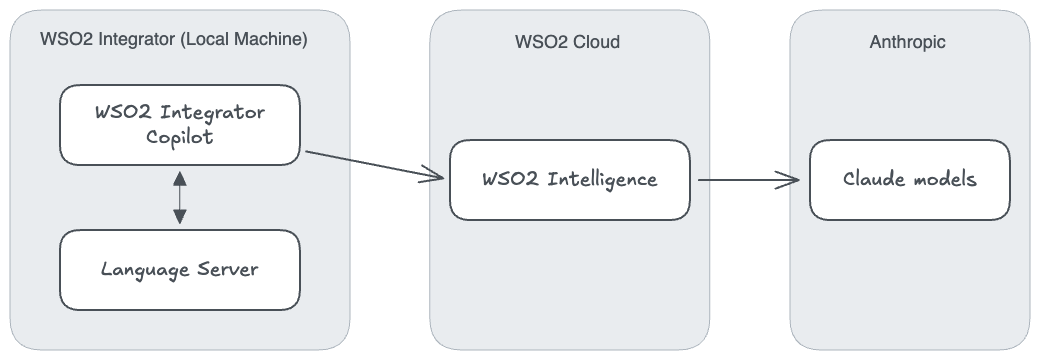
- WSO2 Integrator Copilot: Provides in-editor assistance such as code completion, explanations, and suggestions.
- Language Server: Powers intelligent features inside the IDE, including syntax awareness and integration with Copilot services.
- WSO2 Intelligence endpoint: A lightweight intermediary service that connects the IDE to Anthropic or Amazon Bedrock models. This service does not retain data.
- Anthropic or Amazon Bedrock integration: The endpoint forwards user prompts and context to the selected large language model (LLM) provider for processing.
Authentication
To maintain security, all WSO2 Integrator Copilot features require authentication:
- Users must sign in to enable Copilot functionality.
- Social sign-in options are supported for ease of use.
- Authentication and session management are handled by Asgardeo, the WSO2 identity provider.
This ensures that only authorized users in your organization can access Copilot features.
Access through the WSO2 Cloud sign-in is subject to a fair usage policy.
Data flow
The movement of data through Copilot is designed for zero retention at the intermediary layer:
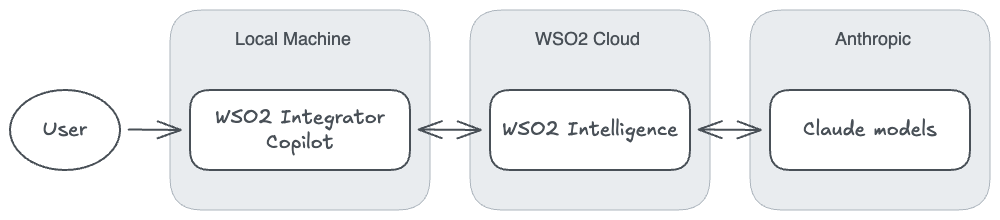
- Direct forwarding: WSO2 Intelligence forwards user data directly to Anthropic for processing.
- No local storage: WSO2 Intelligence does not store any user data locally.
- Real-time processing: All data handling occurs in real time, without persistent storage at the WSO2 Intelligence layer.
Bring your own key (BYOK)
Organizations can configure Copilot to run using their own model provider accounts. This ensures enterprise-level control over data governance and billing. See Getting started for the available sign-in options.
Anthropic deployment
- Copilot can connect directly to Anthropic's public deployments.
- Requires an Anthropic API key that you provide.
- This setup ensures that data flows directly between your environment and Anthropic without WSO2 retaining it.
Amazon Bedrock
- Copilot can also run using Claude models deployed on Amazon Bedrock.
- Requires an active Claude deployment in your Amazon Bedrock environment.
- Users must provide their own access keys for connectivity.
Open source
WSO2 Integrator Copilot is open source, enabling transparency and community contribution:
- The full source code is available for inspection, download, and modification.
- This allows organizations to validate the behavior of Copilot.
- Enterprises can also extend the code to adapt to custom compliance needs.
This openness ensures that security-conscious users can audit how prompts and data are handled.
Feedback data
To improve the Copilot experience, user feedback may be collected.
Retention period
- Feedback data (such as thumbs-up or thumbs-down ratings) is retained for one week only.
- After one week, feedback records are permanently deleted.
Collection scope
- Feedback is collected only when a user explicitly provides it.
- No hidden or passive data collection is performed.
Transparency
- The feedback interface clearly explains what is being collected and why.
- Users always have control over whether to provide feedback.
Guidelines
When using AI features, organizations must apply standard security and compliance practices.
Data usage policies
- All operations are subject to the Anthropic Data Usage Policy or the chosen model provider's terms.
- WSO2 ensures that Copilot does not bypass these policies.
Organizational data storage
How long do we store your organization's data?
WSO2 follows a zero-retention policy at the WSO2 Intelligence level. Your organizational data is not stored by the intermediary service.
Best practices
To ensure maximum security and privacy, avoid sending organization-specific details such as:
- Customer personal information
- Passwords or authentication credentials
- Proprietary business data
- Sensitive internal communications
General Copilot best practices:
- Review all AI-generated code before implementation.
- Be mindful of what information you include in prompts.
- Use generic examples rather than real data when possible.
- Follow your organization's data governance policies.
Data retention summary
| Data type | Retention period | Notes |
|---|---|---|
| Code prompts and responses | Not stored by WSO2 Intelligence | Forwarded directly to Anthropic or Amazon Bedrock. |
| User feedback | One week | Retained only when explicitly provided by the user. |
| Authentication tokens | Session-based | Managed securely by Asgardeo. |
| Organizational data | Not stored | Zero-retention policy at WSO2 Intelligence. |
See also
- Copilot capabilities — What Copilot can do.
- Getting started — Sign in to Copilot.