Strand Dump Analysis
A strand dump is a point-in-time snapshot of every strand and strand group running in a Ballerina process. It tells you what each unit of execution is doing (running, waiting on a lock, blocked on an external call, queued on a worker channel) and where in the source code that work is happening. Use it to diagnose deadlocks, data races, livelocks, and integrations that have gone unresponsive.
Strand dumps use the SIGTRAP POSIX signal, so the feature is not available on Windows.
Strands and strand groups
A strand is Ballerina's lightweight unit of execution, similar to a green thread or coroutine. The Ballerina runtime schedules strands rather than the OS. Strands are multiplexed onto a smaller pool of OS threads and organized into strand groups for scheduling purposes. A single integration typically has many more strands than the host has CPU cores.
Capture a strand dump
Find the process ID
Use jps to list running Java processes. Look for one of:
$_init. A running Ballerina service or program.BTestMain. Abal testrun.
Send SIGTRAP
Send the signal to the process:
kill -SIGTRAP <pid>
# or, equivalently
kill -5 <pid>
The dump is written to the process's standard output. If you started the integration with bal run, capture it by redirecting stdout and stderr:
bal run . > output.log 2>&1
Read a strand dump
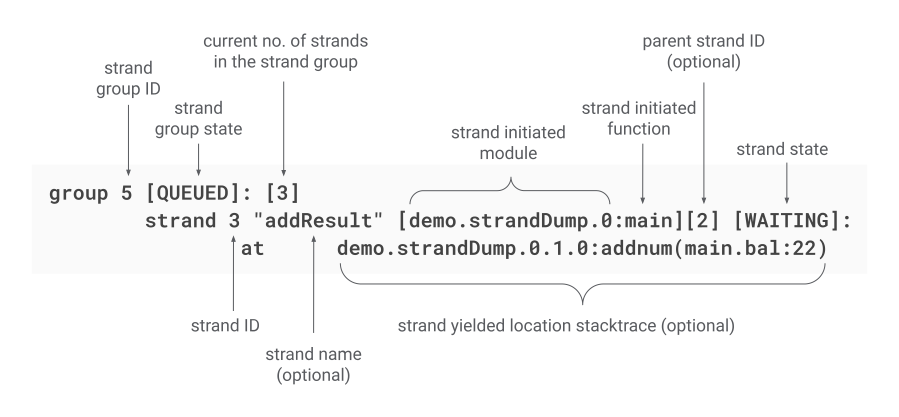
Header
The dump opens with a timestamp and totals: number of strand groups, active strand groups, total strands, and active strands. Compare these across consecutive dumps to spot strands that aren't making progress.
Strand group states
| State | Meaning |
|---|---|
RUNNABLE | Ready to run or currently executing. |
QUEUED | Blocked, completed, or freshly created. |
Strand states
| State | Meaning |
|---|---|
RUNNABLE | Ready or executing. |
WAITING | Blocked by a wait action. |
WAITING FOR LOCK | Trying to acquire a lock. |
BLOCKED | Sleeping, calling out to an external system, or otherwise blocked. |
BLOCKED ON WORKER MESSAGE SEND | Synchronous worker send is blocked. |
BLOCKED ON WORKER MESSAGE RECEIVE | Waiting for a message from another worker. |
BLOCKED ON WORKER MESSAGE FLUSH | A flush operation is blocked. |
DONE | Execution complete. |
Entry fields
Each strand entry shows a unique ID, an optional name, the current state, the originating module, the parent strand ID, the source location (file, line, function), and, when blocked, the blocking context.
Common patterns
Deadlocks
Two or more strands sit in WAITING FOR LOCK and depend on locks the others are holding. Resolve it by acquiring locks in a consistent global order across the codebase.
Worker channel deadlocks
Worker sends (->) and receives (<-) are unbalanced. A worker sends with no matching receiver, or receives without a sender. Audit each channel so every send has a partnered receive on the other side.
Connection pool exhaustion
Many strands are BLOCKED waiting on the same database or HTTP client pool. Either raise maxOpenConnections (or the equivalent for the client) or shorten the work each pooled connection does. See Tune connection pools in Profiling.
Stuck on external calls
Several strands are BLOCKED at the same external call site. The upstream is slow or unreachable. Add a timeout on the client and check upstream availability and latency.
Hangs without a deadlock
No lock cycles, but progress has stopped. Check the file and line on each BLOCKED strand. The same external call site usually appears in multiple entries, pointing at the slow upstream.
Best practices
- Capture multiple dumps a few seconds apart. Transient blocks disappear; real problems persist across snapshots.
- Look for patterns, not single strands. One blocked strand is normal; many blocked on the same resource is a bottleneck.
- Put a timeout on every external call.
- Size connection pools to match expected concurrency, not peak burst.
- Track strand counts in production with observability metrics.
- Acquire locks in a consistent order throughout the codebase.
Related
- Profiling - identify the hot path before adjusting concurrency.
- Logging - capture context around the dump.
- Errors and stack traces - trace failures back to source.