ICP Console Overview
The ICP console is the web interface for monitoring and managing your integrations across environments. It organizes resources into three nested scope levels, each with its own sidebar and access-control scope. This page explains the console layout and navigation so you can get oriented quickly.
Scope levels
ICP organizes all resources in three nested levels:
Organization > Project > Integration
| Level | What it contains |
|---|---|
| Organization | All projects, environments, roles, groups, and users |
| Project | A collection of related integrations |
| Integration | A single deployable Ballerina or MI application |
Environments and roles are defined at the organization level and apply across all projects and integrations.
Console layout
The ICP console has two main navigation elements: the breadcrumb bar at the top and the sidebar on the left.
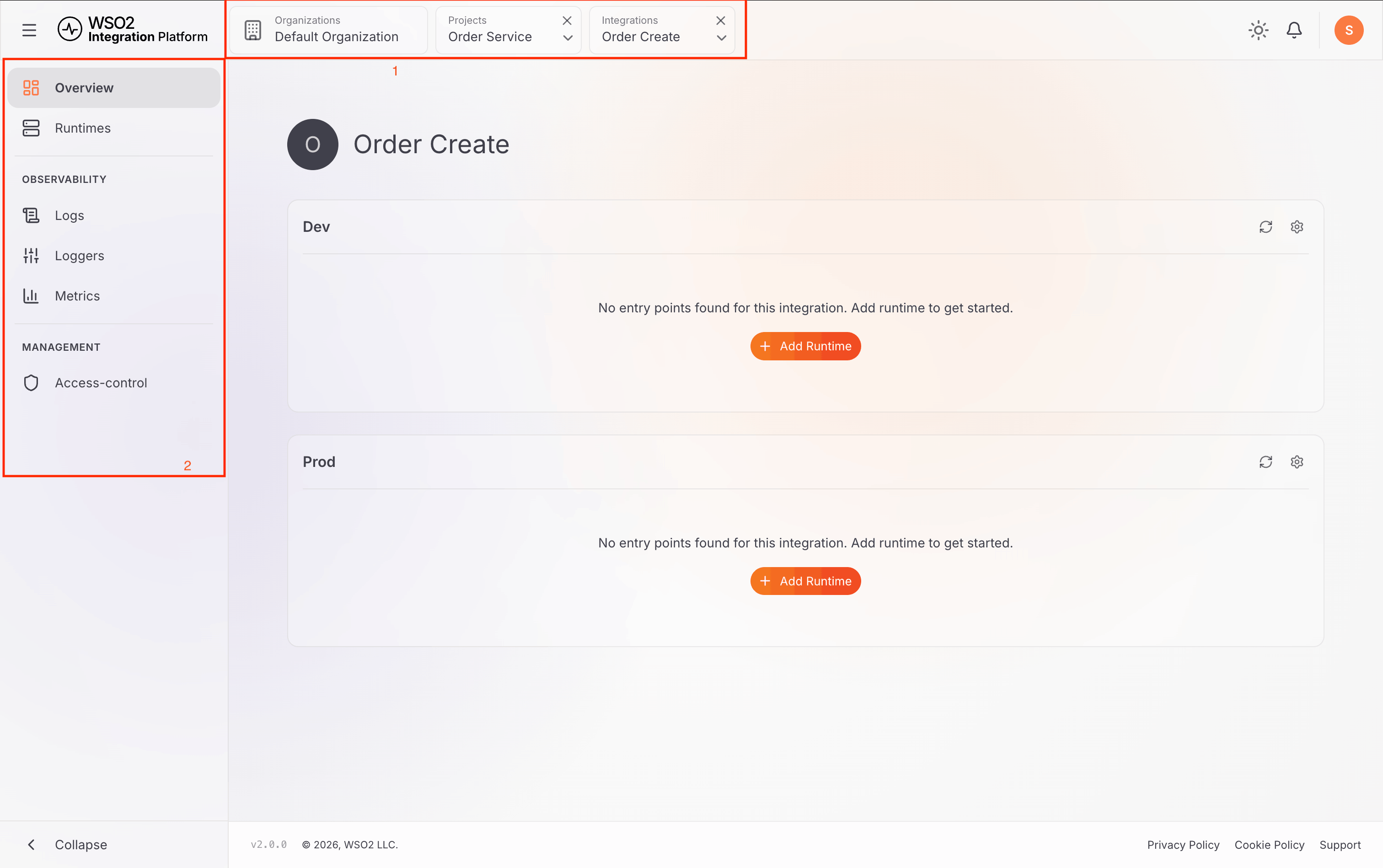
Breadcrumb bar
The breadcrumb bar tracks your current scope. Use it to move between levels without using the browser back button.
| Action | Result |
|---|---|
| Click any segment | Navigate directly to that scope level |
| Click × on a segment | Clear that scope and return to the parent |
| Click ∨ on a segment | Switch between items at the same level |
Sidebar
The sidebar changes its items based on the active scope level.
Organization sidebar
| Item | Description |
|---|---|
| Projects | View and manage all projects in the organization |
| Runtimes | View all runtimes across every project |
| Environments | Create and manage deployment environments |
| Access control | Manage users, roles, and groups |
Project sidebar
| Item | Description |
|---|---|
| Overview | Integrations list and integration type breakdown |
| Runtimes | Runtimes across all integrations in the project |
| Logs | Aggregated logs for all runtimes in the project |
| Metrics | Project-level performance metrics |
| Environments | Read-only view of environments for this project |
| Access control | Role assignments scoped to this project |
Integration sidebar
| Item | Description |
|---|---|
| Overview | Integration details and runtime status by environment |
| Runtimes | Runtimes connected to this integration |
| Logs | Centralized logs from connected runtimes |
| Loggers | Configure log levels per runtime |
| Metrics | Runtime metrics and performance data |
| Access control | Role assignments scoped to this integration |
What's next
- Get started with ICP — connect a runtime and enable observability end to end
- Manage projects — create and organize projects in the console
- Manage integrations — create integrations and select a profile
- Access control — set up roles, groups, and permissions