<?xml version="1.0" encoding="utf-8"?><?xml-stylesheet type="text/xsl" href="atom.xsl"?>
<feed xmlns="http://www.w3.org/2005/Atom">
    <id>https://wso2.com/integration-platform/learn/</id>
    <title>WSO2 Integration Content Hub Blog</title>
    <updated>2026-09-10T00:00:00.000Z</updated>
    <generator>https://github.com/jpmonette/feed</generator>
    <link rel="alternate" href="https://wso2.com/integration-platform/learn/"/>
    <subtitle>WSO2 Integration Content Hub Blog</subtitle>
    <icon>https://wso2.com/integration-platform/learn/img/favicon.ico</icon>
    <entry>
        <title type="html"><![CDATA[Agent Orchestration Patterns for Reliable Multi-Agent Workflows]]></title>
        <id>https://wso2.com/integration-platform/learn/agent-orchestration-patterns</id>
        <link href="https://wso2.com/integration-platform/learn/agent-orchestration-patterns"/>
        <updated>2026-09-10T00:00:00.000Z</updated>
        <summary type="html"><![CDATA[Learn the 3 core agent orchestration patterns — sequential, Orchestrator and collaborative — plus how to build reliable multi-agent workflows.]]></summary>
        <content type="html"><![CDATA[<p>A single AI agent with a big prompt and a number of tools works fine in a demo. Then it hits production, the task gets longer, the tool list grows, and the agent starts forgetting steps, calling the wrong function, or looping on itself. That failure mode is why teams reach for orchestration: instead of one overloaded agent, you coordinate several focused ones. This guide walks through the three orchestration patterns that show up in almost every production multi-agent system, the trade-offs that decide which one fits, and the engineering work that separates a reliable multi-agent workflow from a flaky one.</p>
<h2 class="anchor anchorTargetStickyNavbar_Vzrq" id="what-are-agent-orchestration-patterns">What Are Agent Orchestration Patterns?<a href="https://wso2.com/integration-platform/learn/agent-orchestration-patterns#what-are-agent-orchestration-patterns" class="hash-link" aria-label="Direct link to What Are Agent Orchestration Patterns?" title="Direct link to What Are Agent Orchestration Patterns?" translate="no">​</a></h2>
<p>Agent orchestration patterns are the repeatable structures that define how multiple AI agents coordinate, share context, and hand work to each other while executing a multi-step task. Each pattern answers three questions: who decides what happens next, how state moves between agents, and what happens when a step fails. Pick the wrong structure and you get either a rigid pipeline that can't adapt or a web of complexities that's impossible to debug.</p>
<p>A quick example makes the idea concrete. Consider an agent tasked with resolving a customer support ticket: it must classify the issue, retrieve order history from a CRM, verify stock in an inventory system, draft a response, and finally log the resolution. Assigning all five steps to a single agent is risky. If the initial classification is incorrect, every subsequent action inherits that error—and because there are no built-in validation gates, there's no opportunity to catch it. By decomposing these tasks and distributing them across specialized, coordinated agents, you gain the ability to enforce validation at each step, significantly improving both control and fault recovery.</p>
<h2 class="anchor anchorTargetStickyNavbar_Vzrq" id="why-orchestration-matters-for-reliable-multi-agent-workflows">Why Orchestration Matters for Reliable Multi-Agent Workflows<a href="https://wso2.com/integration-platform/learn/agent-orchestration-patterns#why-orchestration-matters-for-reliable-multi-agent-workflows" class="hash-link" aria-label="Direct link to Why Orchestration Matters for Reliable Multi-Agent Workflows" title="Direct link to Why Orchestration Matters for Reliable Multi-Agent Workflows" translate="no">​</a></h2>
<p>The reason orchestration matters isn't elegance. It's that long tasks fail in compounding ways, and structure is what contains the damage. A single agent handling a ten-step process has ten chances to drift off course, and no natural checkpoint where you can validate progress before continuing. When one agent owns everything, a hallucinated field in step three silently corrupts steps four through ten.</p>
<p>Orchestration buys you three things that map directly to reliability. First, isolation: a focused agent with three tools makes better tool-calling decisions than one agent with thirty, because the model isn't choosing from an overwhelming menu on every turn. Second, checkpoints: boundaries between agents are natural places to validate output, retry, or escalate to a human before a bad result propagates. Third, observability: when each step is a discrete unit, you can trace exactly where a workflow went wrong instead of reading one giant transcript and guessing.</p>
<p>Before exploring the individual patterns, it is worth highlighting a central trade-off that resurfaces throughout these discussions. Every layer of coordination you add spends more model calls, more latency, and more tokens. A supervisor that delegates to three workers and then synthesizes their output has made at least five LLM calls where a single agent made one. Reliability and cost pull in opposite directions, and choosing a pattern is really choosing where you want to sit on that curve. Integration also becomes the quiet bottleneck: an agent is only as reliable as its access to the systems it needs to act on, which is why teams increasingly treat integration as the foundation of the agentic enterprise rather than an afterthought.</p>
<h2 class="anchor anchorTargetStickyNavbar_Vzrq" id="the-3-core-agent-orchestration-patterns">The 3 Core Agent Orchestration Patterns<a href="https://wso2.com/integration-platform/learn/agent-orchestration-patterns#the-3-core-agent-orchestration-patterns" class="hash-link" aria-label="Direct link to The 3 Core Agent Orchestration Patterns" title="Direct link to The 3 Core Agent Orchestration Patterns" translate="no">​</a></h2>
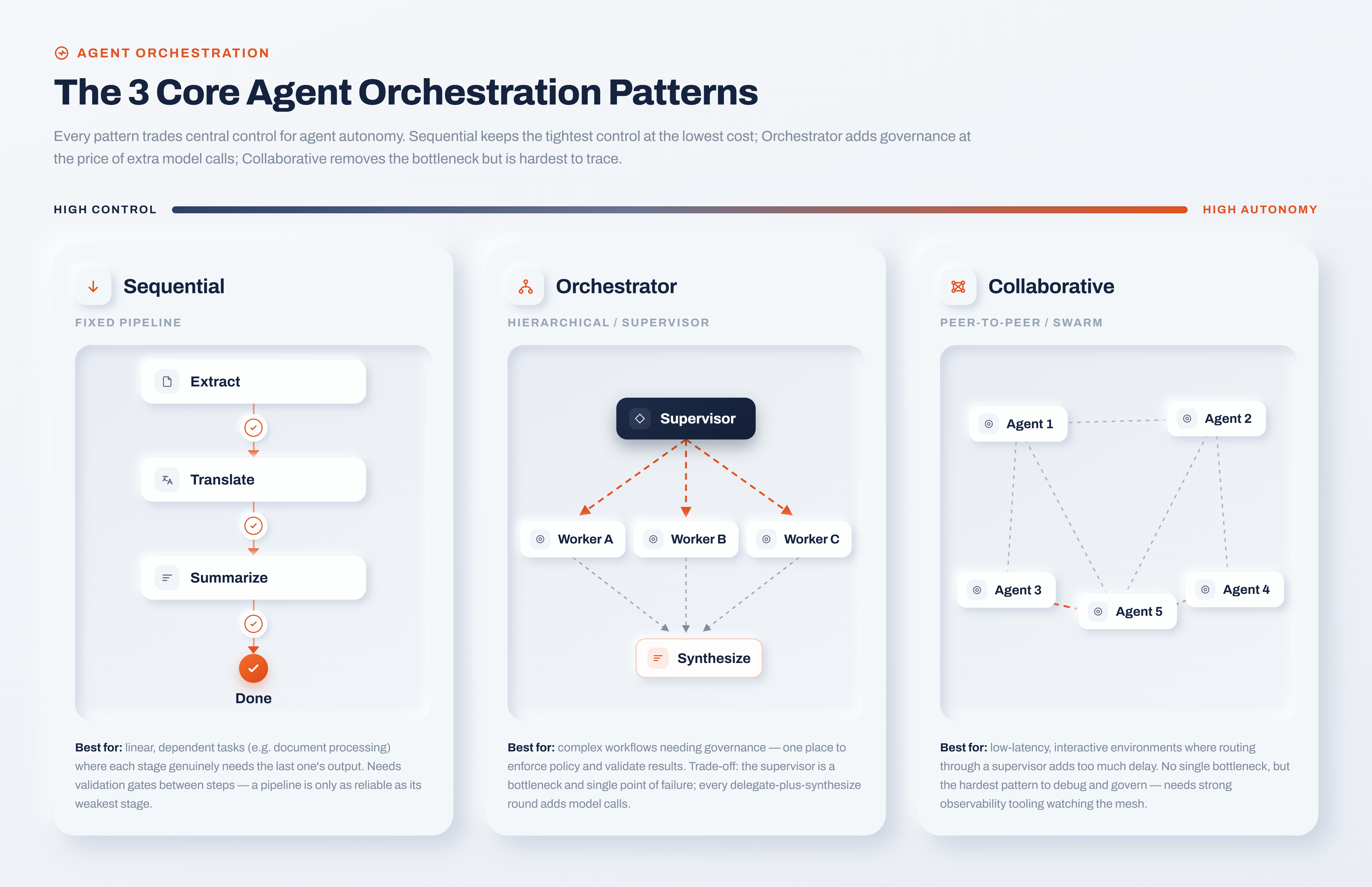
<p>Almost every production multi-agent system maps to one of three patterns. The core distinction among these patterns lies in the balance between central control and agent autonomy: specifically, how much authority resides in a centralized coordinator versus how freely individual agents can manage their own routing. The following breakdown explores these patterns, ordered from those with the highest degree of central coordination to the most autonomous.</p>
<p><img decoding="async" loading="lazy" alt="Three Core Agent Ochestration Patterns" src="https://wso2.com/integration-platform/learn/assets/images/three-core-orchestration-patterns-e6fe37ab4a428b8c819a3ab577243953.png" width="5120" height="3310" class="img_ev3q"></p>
<h3 class="anchor anchorTargetStickyNavbar_Vzrq" id="sequential">Sequential<a href="https://wso2.com/integration-platform/learn/agent-orchestration-patterns#sequential" class="hash-link" aria-label="Direct link to Sequential" title="Direct link to Sequential" translate="no">​</a></h3>
<p>In a sequential pattern, agents run in a fixed order and the output of one becomes the input of the next. It's the assembly line of orchestration. A document-processing flow that extracts text, then summarizes it, then translates the summary is a natural fit, because each stage genuinely depends on the one before it.</p>
<p>The strength is predictability. You know exactly what runs and in what order, which makes the flow easy to reason about and easy to test. The weakness is fragility: a pipeline is only as reliable as its weakest stage, and without explicit checkpoints between steps, one bad output flows straight downstream. Sequential flows want validation gates between stages, so a malformed hand-off gets caught at the boundary rather than three agents later.</p>
<h3 class="anchor anchorTargetStickyNavbar_Vzrq" id="orchestrator-hierarchical">Orchestrator (Hierarchical)<a href="https://wso2.com/integration-platform/learn/agent-orchestration-patterns#orchestrator-hierarchical" class="hash-link" aria-label="Direct link to Orchestrator (Hierarchical)" title="Direct link to Orchestrator (Hierarchical)" translate="no">​</a></h3>
<p>Here a supervisor agent breaks a request into subtasks, delegates each to a specialized worker, tracks progress, and synthesizes the final answer. The supervisor never does the detailed work itself; it manages. This is the pattern most people picture when they hear "multi-agent system," and it's the workhorse for complex workflows that need coordination and validation.</p>
<p>The upside is strong governance. A single agent owns the plan, which gives you one place to enforce policy, validate intermediate results, and decide when a task is actually done. The downside is that the supervisor is both a bottleneck and a single point of failure, and every delegation-plus-synthesis round adds model calls. If the supervisor's plan is wrong, the whole workflow inherits that error, so the planning step deserves the most scrutiny and the tightest validation.</p>
<h3 class="anchor anchorTargetStickyNavbar_Vzrq" id="collaborative">Collaborative<a href="https://wso2.com/integration-platform/learn/agent-orchestration-patterns#collaborative" class="hash-link" aria-label="Direct link to Collaborative" title="Direct link to Collaborative" translate="no">​</a></h3>
<p>The collaborative pattern drops the central coordinator entirely. Agents pass messages or tasks directly to each other based on local context, peer to peer. This suits low-latency, highly interactive environments where routing everything through a supervisor would add too much delay.</p>
<p>The benefit is flexibility and no single bottleneck. The cost is that decentralized systems are the hardest to debug and govern, precisely because no one component has the full picture. Emergent behavior is a feature when it solves problems you didn't script, and a liability when it produces outcomes you can't explain to a compliance team. Most enterprises reach for a swarm only after they've outgrown the more governable patterns, and even then they usually keep observability tooling watching the mesh.</p>
<h2 class="anchor anchorTargetStickyNavbar_Vzrq" id="choosing-the-right-orchestration-pattern">Choosing the Right Orchestration Pattern<a href="https://wso2.com/integration-platform/learn/agent-orchestration-patterns#choosing-the-right-orchestration-pattern" class="hash-link" aria-label="Direct link to Choosing the Right Orchestration Pattern" title="Direct link to Choosing the Right Orchestration Pattern" translate="no">​</a></h2>
<p>There's no universally best pattern, and any vendor who tells you otherwise is selling something. The right choice falls out of your constraints: how much you value predictability over adaptability, how tight your latency and token budgets are, and how strict your governance requirements need to be. The table below summarizes the trade-offs that matter most in production.</p>
<table><thead><tr><th>Pattern</th><th>Control vs. autonomy</th><th>Token cost &amp; latency</th><th>Failure handling</th><th>Best for</th></tr></thead><tbody><tr><td>Sequential</td><td>High control</td><td>Low (one pass)</td><td>Needs validation gates between steps</td><td>Linear, dependent tasks like document processing</td></tr><tr><td>Orchestrator</td><td>Highest control</td><td>High (delegate + synthesize)</td><td>Central checkpoints, plan validation</td><td>Complex workflows needing governance</td></tr><tr><td>Collaborative</td><td>High autonomy</td><td>Variable</td><td>Hardest to trace; needs strong observability</td><td>Low-latency, interactive, adaptive systems</td></tr></tbody></table>
<p>A useful default: start with the lowest level of complexity that reliably meets your requirements, and only add coordination when a simpler structure demonstrably fails. A well-scoped single agent beats a five-agent swarm that nobody can debug. If a sequential pipeline handles the job, you don't need a supervisor. Complexity is a cost you pay on every request, so make the system earn it.</p>
<h2 class="anchor anchorTargetStickyNavbar_Vzrq" id="building-for-reliability-failure-handling-state-and-observability">Building for Reliability: Failure Handling, State, and Observability<a href="https://wso2.com/integration-platform/learn/agent-orchestration-patterns#building-for-reliability-failure-handling-state-and-observability" class="hash-link" aria-label="Direct link to Building for Reliability: Failure Handling, State, and Observability" title="Direct link to Building for Reliability: Failure Handling, State, and Observability" translate="no">​</a></h2>
<p>Choosing a pattern is the easy part. Making it reliable in production is where most of the engineering goes, and it comes down to three concerns that cut across every pattern above.</p>
<p><strong>Failure handling.</strong> Multi-step workflows need a plan for partial failure, because a five-step task that dies on step four shouldn't leave your systems half-updated. Drawing inspiration from distributed systems, a popular technique uses the saga pattern: every step pairs its primary execution with a compensating action designed to undo it, ensuring any downstream failure allows earlier side effects to be safely rolled back. Sequential and hierarchical flows especially need explicit checkpoints and rollback logic, or one failure cascades into an inconsistent state that's painful to unwind.</p>
<p><strong>State and memory.</strong> Agents that lose track of what they've done repeat work or contradict themselves. Reliable orchestration means agents maintain conversation state across turns and carry that context through hand-offs. WSO2 Integrator treats AI agents as modular components capable of reasoning against a system prompt, triggering tools, and preserving conversation state over multiple interactions. Additionally, its guides on developing agents with persistent memory show how to keep extended workflows from resetting state with every iteration. Persistent memory is what turns a stateless prompt-response loop into something that can actually complete a multi-step job.</p>
<p><strong>Governed access and observability.</strong> An agent that can't reach your CRM, order system, or inventory database reliably can't complete a real workflow, no matter how clever its reasoning. This is where the integration layer earns its keep. Putting a governed integration layer in front of enterprise systems lets agents reach what they need safely and in real time, with authentication, rate limiting, and audit logging handled outside the agent's reasoning loop.</p>
<p>Try it hands-on: WSO2's Build a Hotel Finder Agent quickstart walks through an agent with two custom tools and session-scoped memory, which is a small but honest example of the state-and-tools plumbing every pattern above depends on.</p>
<h2 class="anchor anchorTargetStickyNavbar_Vzrq" id="agent-orchestration-frameworks-and-implementation-considerations">Agent Orchestration Frameworks and Implementation Considerations<a href="https://wso2.com/integration-platform/learn/agent-orchestration-patterns#agent-orchestration-frameworks-and-implementation-considerations" class="hash-link" aria-label="Direct link to Agent Orchestration Frameworks and Implementation Considerations" title="Direct link to Agent Orchestration Frameworks and Implementation Considerations" translate="no">​</a></h2>
<p>When you move from whiteboard to code, the pattern is only half the decision. The other half is how agents connect to tools and to each other. A few implementation realities are worth flagging before you commit.</p>
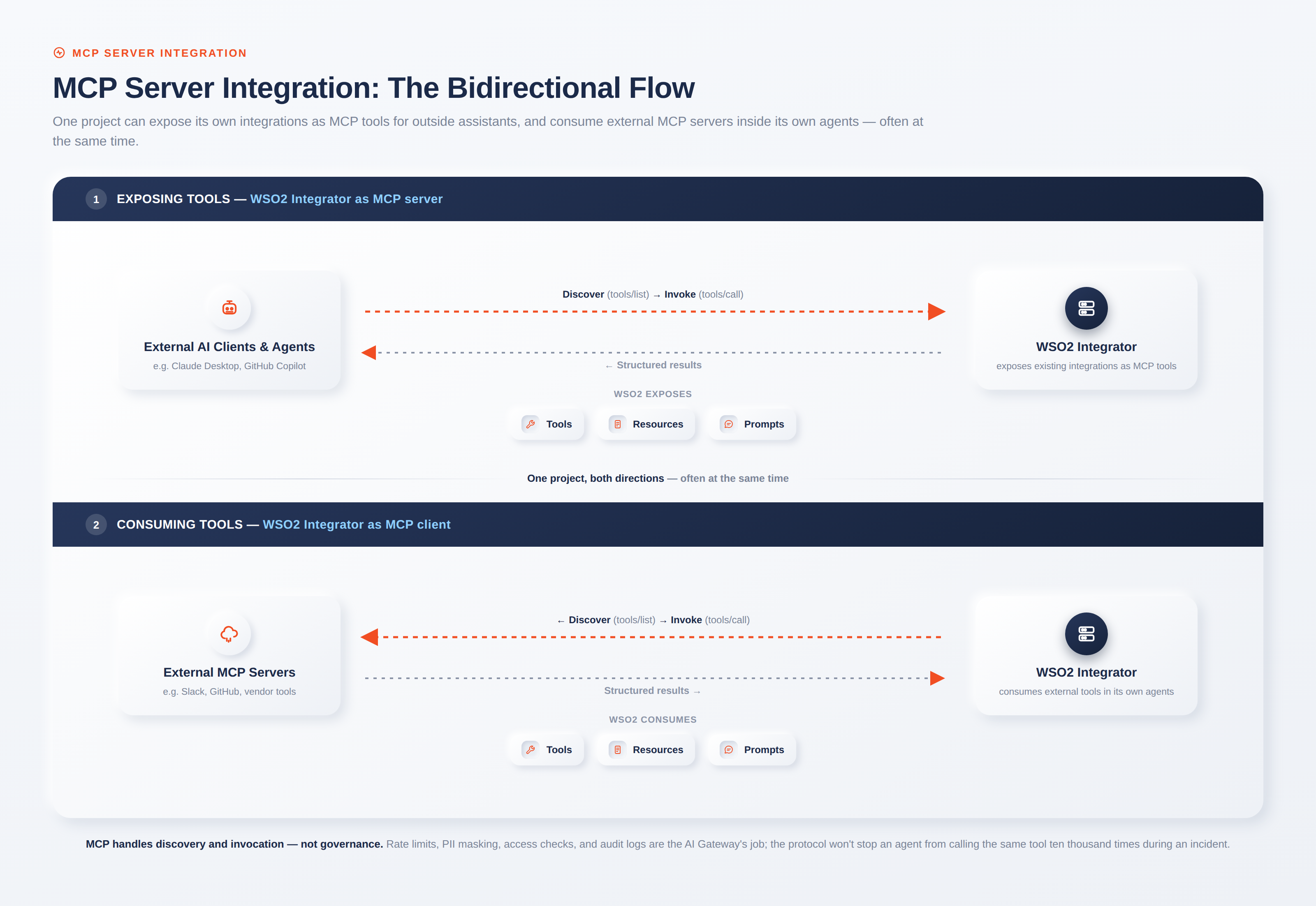
<p>Tool access is usually where reliability breaks first. The Model Context Protocol (MCP) has emerged as an open standard for connecting agents to tools and data sources through a consistent interface, which reduces the custom glue you'd otherwise write for every integration. You can find the specification at modelcontextprotocol.io. WSO2 Integrator, for instance, can expose existing integrations as MCP tools for AI assistants or let agents consume external MCP tools, so the same governed connectors that power traditional integrations become available to agents without a rewrite.</p>
<p>Model choice matters too, and locking your orchestration to a single provider is a risk. Workflows that route different subtasks to different models, a cheaper model for classification and a stronger one for synthesis, need a consistent interface across providers like OpenAI, Anthropic, Azure OpenAI, Google Vertex, and Mistral rather than provider-specific code paths. And retrieval-heavy steps often pair orchestration with RAG, where grounding an agent's answer in your own enterprise knowledge at query time cuts hallucination on the steps that touch factual data. The point isn't to adopt every capability at once. It's to pick a foundation that won't force a rewrite when your workflow grows from one agent to five.</p>
<h2 class="anchor anchorTargetStickyNavbar_Vzrq" id="conclusion">Conclusion<a href="https://wso2.com/integration-platform/learn/agent-orchestration-patterns#conclusion" class="hash-link" aria-label="Direct link to Conclusion" title="Direct link to Conclusion" translate="no">​</a></h2>
<p>Agent orchestration patterns give you a vocabulary for a decision you're making whether you name it or not: how much control to centralize, and how much autonomy to grant. Sequential and concurrent flows keep things predictable, hierarchical and handoff patterns balance control with adaptability, and decentralized swarms trade governance for flexibility. But the pattern is the starting line, not the finish. Reliable multi-step workflows come from disciplined failure handling, persistent state, and a governed integration layer that lets agents reach real systems safely and observably.</p>
<p>If you're moving agents from demo to production, the practical next step is to get the plumbing right before you scale the topology. WSO2 Integrator's AI agent documentation is a concrete place to see how agents, tools, memory, and MCP fit together in a governed integration platform, so the pattern you choose has a reliable foundation underneath it.</p>
<h2 class="anchor anchorTargetStickyNavbar_Vzrq" id="frequently-asked-questions">Frequently Asked Questions<a href="https://wso2.com/integration-platform/learn/agent-orchestration-patterns#frequently-asked-questions" class="hash-link" aria-label="Direct link to Frequently Asked Questions" title="Direct link to Frequently Asked Questions" translate="no">​</a></h2>
<h3 class="anchor anchorTargetStickyNavbar_Vzrq" id="what-is-an-orchestration-pattern">What is an orchestration pattern?<a href="https://wso2.com/integration-platform/learn/agent-orchestration-patterns#what-is-an-orchestration-pattern" class="hash-link" aria-label="Direct link to What is an orchestration pattern?" title="Direct link to What is an orchestration pattern?" translate="no">​</a></h3>
<p>An orchestration pattern is a repeatable structure for coordinating multiple AI agents on a shared task, defining who decides what runs next, how context passes between agents, and how the system recovers from failure. The three core patterns are sequential, concurrent, hierarchical, handoff, and decentralized.</p>
<h3 class="anchor anchorTargetStickyNavbar_Vzrq" id="what-are-agent-patterns">What are agent patterns?<a href="https://wso2.com/integration-platform/learn/agent-orchestration-patterns#what-are-agent-patterns" class="hash-link" aria-label="Direct link to What are agent patterns?" title="Direct link to What are agent patterns?" translate="no">​</a></h3>
<p>"Agent patterns" usually refers to the reusable designs for how agents are structured and how they collaborate, from single-agent tool use up to multi-agent orchestration structures like supervisor-worker and swarm. Orchestration patterns are the subset concerned specifically with coordinating multiple agents.</p>
<h3 class="anchor anchorTargetStickyNavbar_Vzrq" id="what-are-agent-orchestration-frameworks">What are agent orchestration frameworks?<a href="https://wso2.com/integration-platform/learn/agent-orchestration-patterns#what-are-agent-orchestration-frameworks" class="hash-link" aria-label="Direct link to What are agent orchestration frameworks?" title="Direct link to What are agent orchestration frameworks?" translate="no">​</a></h3>
<p>Agent orchestration frameworks are the libraries and platforms that implement these coordination patterns so you don't build them from scratch, handling tool calling, state, and message passing between agents. Standards like the Model Context Protocol (MCP) complement them by standardizing how agents connect to external tools.</p>
<h3 class="anchor anchorTargetStickyNavbar_Vzrq" id="which-orchestration-pattern-is-best-for-reliability">Which orchestration pattern is best for reliability?<a href="https://wso2.com/integration-platform/learn/agent-orchestration-patterns#which-orchestration-pattern-is-best-for-reliability" class="hash-link" aria-label="Direct link to Which orchestration pattern is best for reliability?" title="Direct link to Which orchestration pattern is best for reliability?" translate="no">​</a></h3>
<p>No single pattern is most reliable in the abstract. Hierarchical orchestration offers the strongest central governance and checkpointing, which suits high-stakes workflows, but reliability depends far more on failure handling, state management, and governed tool access than on the pattern label itself.</p>]]></content>
        <author>
            <name>WSO2 Integration Team</name>
            <uri>https://wso2.com</uri>
        </author>
        <category label="AI Agents" term="AI Agents"/>
    </entry>
    <entry>
        <title type="html"><![CDATA[AI Orchestration: How to Coordinate Agents, Models, and Tools]]></title>
        <id>https://wso2.com/integration-platform/learn/ai-orchestration</id>
        <link href="https://wso2.com/integration-platform/learn/ai-orchestration"/>
        <updated>2026-09-10T00:00:00.000Z</updated>
        <summary type="html"><![CDATA[Learn how AI orchestration coordinates agents, models, and tools into one governed system. Explore the architecture, frameworks, and how to implement it.]]></summary>
        <content type="html"><![CDATA[<p>Most teams no longer struggle with AI adoption; the real issue they face today is AI coordination. A support team might run a sentiment model, a summarization model, three LLM-backed chatbots, and a retrieval pipeline, yet none of them share context, memory, or a single point of control. Each piece works on its own, behaving like a room full of specialists who do not communicate with one another.</p>
<p>AI orchestration is the solution to this isolation. This guide breaks down what orchestration actually is, how it coordinates agents, models, and tools at the architectural level, how it differs from adjacent concepts people confuse it with, and how to implement it without ending up with a fragile collection of glue code. To keep things practical, we will ground these ideas in concrete integration patterns rather than abstract theory.</p>
<p><img decoding="async" loading="lazy" alt="AI Orchestration" src="https://wso2.com/integration-platform/learn/assets/images/ai-orchestration-architecture-ebf7c62a27beba2a1d85744068969c66.png" width="2560" height="1866" class="img_ev3q"></p>
<h2 class="anchor anchorTargetStickyNavbar_Vzrq" id="what-is-ai-orchestration">What is AI orchestration?<a href="https://wso2.com/integration-platform/learn/ai-orchestration#what-is-ai-orchestration" class="hash-link" aria-label="Direct link to What is AI orchestration?" title="Direct link to What is AI orchestration?" translate="no">​</a></h2>
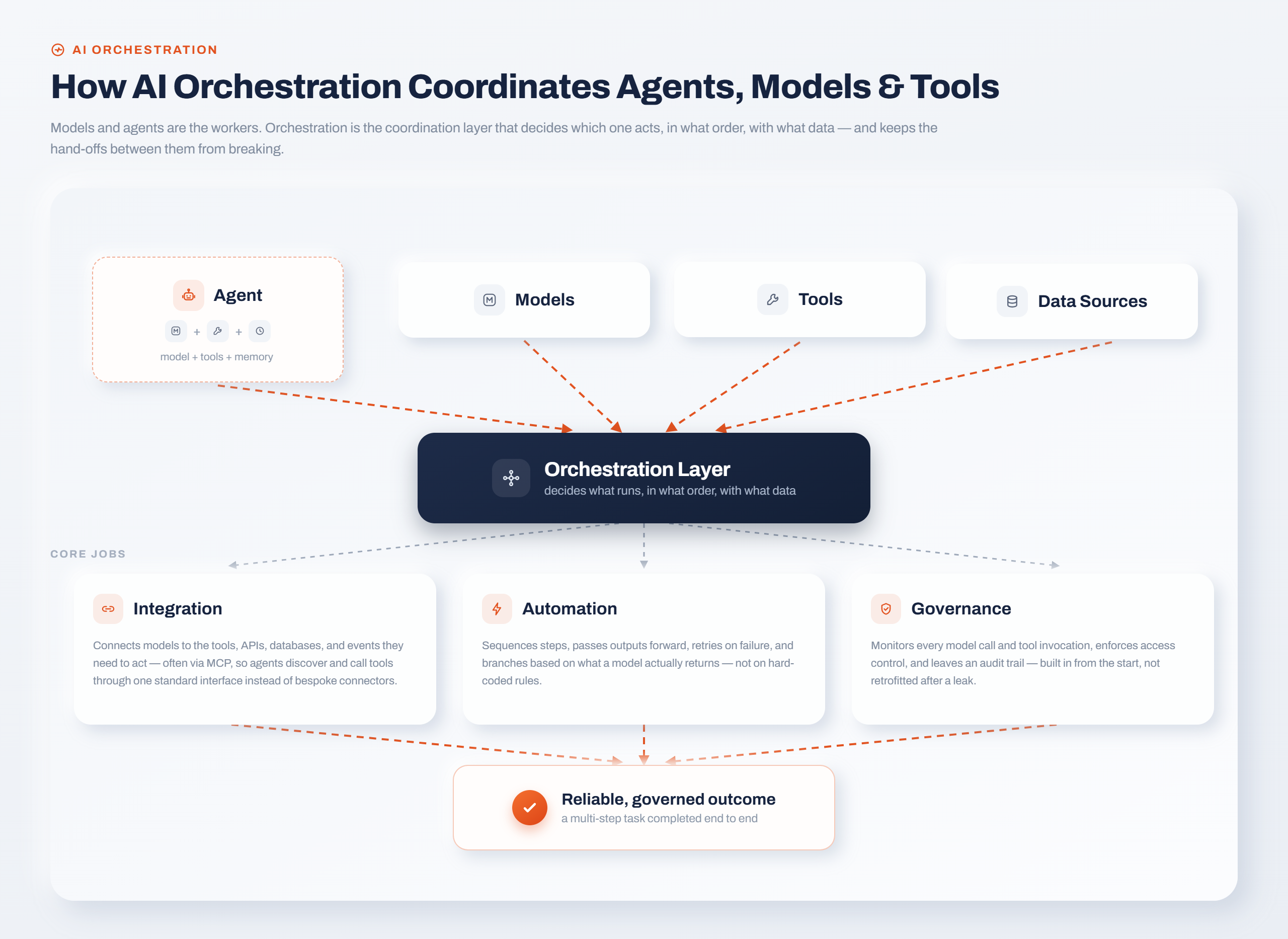
<p>AI orchestration is the coordination and management layer that makes multiple AI components (models, agents, tools, and data sources) work together as a single system. It decides which component acts, in what order, with what data, and under what controls, so a multi-step task completes reliably instead of falling apart between the pieces.</p>
<p>That's the textbook part. Here's what it looks like in practice. Say a customer emails a refund request. An orchestrated flow might route the message to a classification model to detect intent, pull the customer's order history from an ERP through an API, ask an LLM to draft a context-aware reply, and then either resolve the case automatically or hand it to a human with the draft attached. No single model does all of that. The orchestration layer is what strings them together and keeps the handoffs from breaking.</p>
<p>The distinction worth holding onto: individual models and agents are the workers, and orchestration is the coordination. You can have excellent workers and still ship a system that fails, because the failures usually happen in the gaps between components, not inside them.</p>
<h2 class="anchor anchorTargetStickyNavbar_Vzrq" id="why-ai-orchestration-matters">Why AI orchestration matters<a href="https://wso2.com/integration-platform/learn/ai-orchestration#why-ai-orchestration-matters" class="hash-link" aria-label="Direct link to Why AI orchestration matters" title="Direct link to Why AI orchestration matters" translate="no">​</a></h2>
<p>The reason orchestration has become urgent is that enterprises stopped running one model and started running dozens. It's now common for a single organization to run several AI vendors at once to spread risk and match each model to the job it's best at, which means the average enterprise AI footprint is no longer one system but many. When every team wires up its own model against its own data with its own ad hoc scripts, you get silos that duplicate work and can't be governed centrally.</p>
<p>Consider a mid-sized company that added AI piecemeal over a year. Marketing built a content generator, support stood up a chatbot, and the data team shipped a churn-prediction model. Three wins in isolation. But the chatbot can't see what the churn model knows, the content generator has no access to product data, and nobody can answer a basic governance question like "which of our AI systems touched this customer's data last week?" That last question is where the absence of orchestration starts to cost real money, in audit risk and rework.</p>
<p>Orchestration matters because it turns those isolated wins into a system you can actually scale, secure, and reason about. It is the distinction between managing a collection of individual systems, and handling a unified controller that manages the entire system.</p>
<h2 class="anchor anchorTargetStickyNavbar_Vzrq" id="how-ai-orchestration-works-coordinating-agents-models-and-tools">How AI orchestration works: coordinating agents, models, and tools<a href="https://wso2.com/integration-platform/learn/ai-orchestration#how-ai-orchestration-works-coordinating-agents-models-and-tools" class="hash-link" aria-label="Direct link to How AI orchestration works: coordinating agents, models, and tools" title="Direct link to How AI orchestration works: coordinating agents, models, and tools" translate="no">​</a></h2>
<p>Under the hood, orchestration breaks into three jobs that run continuously: integration, automation, and governance. Miss any one of them and the system either can't connect to anything useful, can't run without a human overseeing it, or can't be trusted in production.</p>
<h3 class="anchor anchorTargetStickyNavbar_Vzrq" id="integration-connecting-models-to-tools-and-data">Integration: connecting models to tools and data<a href="https://wso2.com/integration-platform/learn/ai-orchestration#integration-connecting-models-to-tools-and-data" class="hash-link" aria-label="Direct link to Integration: connecting models to tools and data" title="Direct link to Integration: connecting models to tools and data" translate="no">​</a></h3>
<p>Integration is the plumbing. It's how models reach the tools, APIs, databases, and events they need to do anything beyond generating text. This is where most orchestration effort actually goes, because an agent that can't act on your systems is just a chatbot with extra steps.</p>
<p>The emerging standard for this connective tissue is the Model Context Protocol (MCP), an open-source standard for connecting AI applications to external systems like data sources, tools, and workflows. Think of it as a common port: instead of hand-coding a bespoke connector for every model-to-tool pairing, MCP gives agents a standardized way to discover and call tools. This is exactly the layer where an integration platform earns its keep. With WSO2 Integrator's MCP support, you can expose your existing integrations as MCP tools that AI assistants call, or let your own agents consume external MCP tools, without rewriting the underlying services.</p>
<p>Integration also covers the model side. A practical orchestration layer lets you connect to OpenAI, Anthropic, Azure OpenAI, Google Vertex, and Mistral through one consistent interface, so swapping a model provider doesn't mean rebuilding the workflow around it.</p>
<h3 class="anchor anchorTargetStickyNavbar_Vzrq" id="automation-running-multi-step-tasks-without-a-babysitter">Automation: running multi-step tasks without a babysitter<a href="https://wso2.com/integration-platform/learn/ai-orchestration#automation-running-multi-step-tasks-without-a-babysitter" class="hash-link" aria-label="Direct link to Automation: running multi-step tasks without a babysitter" title="Direct link to Automation: running multi-step tasks without a babysitter" translate="no">​</a></h3>
<p>Automation is the execution engine. Once components are connected, something has to sequence them, pass outputs from one step into the next, retry on failure, and make branching decisions when the data calls for it. Unlike rigid "if-this-then-that" rules, orchestrated automation adapts based on what a model returns at each step. If a sentiment model scores an incoming message as angry and high-value, the flow can escalate it straight to a senior rep; if it's a routine question, the same flow lets an agent resolve it and never touches a human. The branch isn't hard-coded to a keyword. It reacts to what the model actually inferred.</p>
<p>This is also where agents come in. An AI agent reasons over a system prompt, calls tools, and maintains conversation state across turns, which makes it the natural unit of autonomous work inside an orchestrated flow. For example, a customer care agent running on WSO2 Integrator can hold session-scoped memory across a multi-turn conversation, calling out to order-lookup and refund tools exactly as the dialogue demands.</p>
<h3 class="anchor anchorTargetStickyNavbar_Vzrq" id="governance-monitoring-security-and-control">Governance: monitoring, security, and control<a href="https://wso2.com/integration-platform/learn/ai-orchestration#governance-monitoring-security-and-control" class="hash-link" aria-label="Direct link to Governance: monitoring, security, and control" title="Direct link to Governance: monitoring, security, and control" translate="no">​</a></h3>
<p>Governance is the part teams skip until it is too late. It covers real-time monitoring of what each component is doing, version control for models and workflows, access controls, audit logging, and the observability you need to debug a flow that spans five services. Retrofitting this after a system leaks data is far more painful than building it in from the start.</p>
<p>The strongest orchestration setups treat governance as a first-class layer, not an afterthought bolted on at the end. That means every model call is observable, every tool invocation is authorized, and every decision leaves a trace you can audit later. Go back to that earlier governance question, "which of our AI systems touched this customer's data last week?" With a proper control layer, that's a query against an audit log rather than a week-long scramble across five teams. When a regulator or a security review asks, you have an answer instead of an apology.</p>
<h2 class="anchor anchorTargetStickyNavbar_Vzrq" id="ai-orchestration-vs-related-concepts">AI orchestration vs. related concepts<a href="https://wso2.com/integration-platform/learn/ai-orchestration#ai-orchestration-vs-related-concepts" class="hash-link" aria-label="Direct link to AI orchestration vs. related concepts" title="Direct link to AI orchestration vs. related concepts" translate="no">​</a></h2>
<p>It is easy to confuse AI orchestration with other popular AI buzzwords, as the concepts frequently overlap. Questions like, "How is this different from an AI agent?" or "Isn't this just a data pipeline?" come up constantly. The differences between these terms are very real, however, and they are worth pinning down before you start selecting your tools.</p>
<table><thead><tr><th>Concept</th><th>Scope</th><th>Primary goal</th><th>Example</th></tr></thead><tbody><tr><td>AI orchestration</td><td>Broad: coordinates entire AI systems</td><td>Automate complex, multi-system workflows</td><td>Route a support ticket through classification, retrieval, and drafting models</td></tr><tr><td>Single AI agent</td><td>Narrow: one autonomous unit</td><td>Complete a specific task</td><td>A chatbot that answers billing questions</td></tr><tr><td>Multi-agent orchestration</td><td>Coordinating several agents</td><td>Decompose and delegate work across specialized agents</td><td>A "researcher" agent handing findings to a "writer" agent</td></tr><tr><td>Workflow orchestration</td><td>Business processes, often no AI</td><td>Run tasks in the right order across systems</td><td>Route an approval through finance, then legal</td></tr><tr><td>MLOps</td><td>ML model lifecycle</td><td>Train, deploy, and monitor individual models</td><td>Retrain a fraud model on fresh data</td></tr></tbody></table>
<p>The clearest way to explain it: While a single AI agent operates autonomously, multi-agent orchestration coordinates several of them. Workflow orchestration has existed for years and may involve no AI at all, and MLOps manages the inner life of a single model. Tying it all together is AI orchestration, the broader layer that coordinates these models, agents, and non-AI systems.</p>
<h2 class="anchor anchorTargetStickyNavbar_Vzrq" id="benefits-of-ai-orchestration">Benefits of AI orchestration<a href="https://wso2.com/integration-platform/learn/ai-orchestration#benefits-of-ai-orchestration" class="hash-link" aria-label="Direct link to Benefits of AI orchestration" title="Direct link to Benefits of AI orchestration" translate="no">​</a></h2>
<p>Wiring your AI components together with an orchestration layer pays off in a few concrete ways:</p>
<ul>
<li class=""><strong>Scalability.</strong> When the coordination framework already exists, adding a new model or handling a traffic spike becomes a configuration change rather than a rebuild.</li>
<li class=""><strong>Efficiency.</strong> Orchestration removes the repetitive glue work of manually shuttling data between systems, which is where a lot of engineering time quietly disappears.</li>
<li class=""><strong>Better decisions.</strong> Because multiple models can share context and hand off to each other, you get analysis that no single model could produce alone.</li>
<li class=""><strong>Governance and compliance.</strong> A single point of control makes it far easier to prove that every AI system meets your regulatory and internal-policy requirements.</li>
<li class=""><strong>Reliability.</strong> Built-in retries, error handling, and observability keep a multi-step flow from silently failing halfway through.</li>
</ul>
<p>Asymmetric weight belongs on governance and reliability here, because those are the two benefits that decide whether a proof of concept ever becomes something you'll run in production. A demo that impresses in a sandbox but can't be audited or debugged never ships.</p>
<h2 class="anchor anchorTargetStickyNavbar_Vzrq" id="ai-orchestration-tools-and-frameworks">AI orchestration tools and frameworks<a href="https://wso2.com/integration-platform/learn/ai-orchestration#ai-orchestration-tools-and-frameworks" class="hash-link" aria-label="Direct link to AI orchestration tools and frameworks" title="Direct link to AI orchestration tools and frameworks" translate="no">​</a></h2>
<p>The tooling landscape splits roughly into two groups: agent frameworks that help you build the reasoning units, and integration platforms that connect and govern them across your enterprise systems. Most real deployments use both.</p>
<p>On the framework side, the common options each take a different angle. LangChain focuses on chaining LLM calls, data sources, and tools into workflows. LangGraph models those workflows as graphs to manage branching and state. CrewAI structures teams of specialized agents that delegate tasks to each other. Microsoft AutoGen orchestrates multi-agent conversations. These are developer-facing building blocks, and they're where the agent logic tends to live.</p>
<p>While these frameworks are excellent for building agent logic, they stop short of the enterprise integration and governance layer. Building an AI that can reason is a fundamentally different problem than giving that AI governed, observable access to your CRM, ERP, and internal APIs. That gap is exactly what integration platforms fill.</p>
<p>WSO2 Integrator sits in the middle. It not only provides a framework for writing agent logic, but also lets you build AI-powered integrations that include direct LLM calls, RAG pipelines, AI agents, and MCP servers on top of an integration runtime with decades of API and connector heritage behind it. Practically, this means your agents can use pre-built connectors to talk to your existing business software, entirely replacing the need to hand-code custom API clients. Adding further value, every one of those interactions runs through an infrastructure designed for enterprise-grade security and observability.</p>
<p>For grounding responses in your own data, retrieval-augmented generation is usually the first pattern teams reach for. A RAG pipeline retrieves relevant content from a knowledge base at query time and injects it into the prompt, which keeps answers tied to your documents instead of the model's training data.</p>
<h2 class="anchor anchorTargetStickyNavbar_Vzrq" id="how-to-implement-ai-orchestration-best-practices">How to implement AI orchestration: best practices<a href="https://wso2.com/integration-platform/learn/ai-orchestration#how-to-implement-ai-orchestration-best-practices" class="hash-link" aria-label="Direct link to How to implement AI orchestration: best practices" title="Direct link to How to implement AI orchestration: best practices" translate="no">​</a></h2>
<p>The teams that succeed with orchestration tend to follow the same handful of principles. The ones that fail usually violate the first and last.</p>
<ul>
<li class=""><strong>Start with one well-scoped workflow.</strong> Resist the urge to orchestrate everything at once. Pick a single flow with clear boundaries and a measurable outcome, like lead qualification or first-line ticket triage, and ensure it is reliable before you expand. A working proof of concept with two integrated systems and reliable logging beats a complex design you can't debug.</li>
<li class=""><strong>Fix your data before you add intelligence.</strong> Bad data makes bad AI, and no orchestration layer rescues you from inconsistent records or inaccessible sources. Clean and standardize the data your models will read before you wire them together.</li>
<li class=""><strong>Go modular.</strong> Build self-contained components with clear interfaces so you can swap or update one without disturbing the rest. A connector, an agent, and a retrieval step should each be replaceable in isolation.</li>
<li class=""><strong>Invest in observability early.</strong> Track both system metrics (latency, error rates, resource use) and functional metrics (accuracy, business outcomes). You want to catch a misbehaving flow before your users do. Using a platform where every model call, tool invocation, and integration step is observable out of the box saves you from stitching together telemetry by hand after the fact.</li>
<li class=""><strong>Govern from day one.</strong> Access controls, audit logging, encryption, and cost controls on model APIs are far cheaper to design in than to retrofit. This is doubly true once agents can take actions on your systems, because an ungoverned agent with tool access is a liability, not a feature.</li>
<li class=""><strong>Iterate toward autonomy.</strong> Establish stable, rule-based flows first, then layer agentic decision-making on top once the foundation is trustworthy. Handing full autonomy to a flow built on a shaky base is how you end up retraining on corrupted data.</li>
</ul>
<h2 class="anchor anchorTargetStickyNavbar_Vzrq" id="ai-orchestration-use-cases">AI orchestration use cases<a href="https://wso2.com/integration-platform/learn/ai-orchestration#ai-orchestration-use-cases" class="hash-link" aria-label="Direct link to AI orchestration use cases" title="Direct link to AI orchestration use cases" translate="no">​</a></h2>
<p>The pattern shows up anywhere a task spans multiple systems and multiple decisions:</p>
<ul>
<li class=""><strong>Customer support.</strong> Classify an incoming ticket, retrieve the customer's history, draft a context-aware response, and escalate only the cases that genuinely need a human.</li>
<li class=""><strong>IT help desk.</strong> Let an agent with persistent memory resolve common requests like password resets while routing complex tickets to staff and learning from each interaction.</li>
<li class=""><strong>Sales enablement.</strong> Pull contact data, account history, and recent activity from several tools, then have a model assemble a briefing before each call.</li>
<li class=""><strong>Knowledge access.</strong> Use a RAG pipeline over internal documents so employees can ask questions in plain language and get answers grounded in company data rather than guesses.</li>
</ul>
<p>What these share is that the value comes from coordination, not from any single model. The classification model alone doesn't resolve the ticket. The orchestration around it does.</p>
<h2 class="anchor anchorTargetStickyNavbar_Vzrq" id="coordinating-agents-models-and-tools-reliably">Coordinating agents, models, and tools, reliably<a href="https://wso2.com/integration-platform/learn/ai-orchestration#coordinating-agents-models-and-tools-reliably" class="hash-link" aria-label="Direct link to Coordinating agents, models, and tools, reliably" title="Direct link to Coordinating agents, models, and tools, reliably" translate="no">​</a></h2>
<p>AI orchestration is what separates a collection of impressive demos from a system you can run, scale, and defend in an audit. The models and agents are the workers; orchestration is the coordination that keeps their handoffs from breaking, and getting the integration and governance layer right is what makes the difference in production.</p>
<p>If you're moving from isolated AI experiments toward a coordinated system, the fastest way to see the pattern in action is to build one small, governed flow end to end. WSO2 Integrator's AI integrations documentation walks through building your first agent, RAG pipeline, and MCP integration, so you can wire agents, models, and tools together on infrastructure designed for production from the start.</p>
<h2 class="anchor anchorTargetStickyNavbar_Vzrq" id="frequently-asked-questions">Frequently asked questions<a href="https://wso2.com/integration-platform/learn/ai-orchestration#frequently-asked-questions" class="hash-link" aria-label="Direct link to Frequently asked questions" title="Direct link to Frequently asked questions" translate="no">​</a></h2>
<h3 class="anchor anchorTargetStickyNavbar_Vzrq" id="what-is-orchestration-in-ai">What is orchestration in AI?<a href="https://wso2.com/integration-platform/learn/ai-orchestration#what-is-orchestration-in-ai" class="hash-link" aria-label="Direct link to What is orchestration in AI?" title="Direct link to What is orchestration in AI?" translate="no">​</a></h3>
<p>Orchestration in AI is the practice of coordinating multiple AI components, such as models, agents, tools, and data sources, so they operate as one connected system. It manages the sequence of tasks, the flow of data between components, and the controls that keep the whole thing reliable and governable.</p>
<h3 class="anchor anchorTargetStickyNavbar_Vzrq" id="what-is-an-example-of-ai-orchestration">What is an example of AI orchestration?<a href="https://wso2.com/integration-platform/learn/ai-orchestration#what-is-an-example-of-ai-orchestration" class="hash-link" aria-label="Direct link to What is an example of AI orchestration?" title="Direct link to What is an example of AI orchestration?" translate="no">​</a></h3>
<p>A support workflow is a classic example: an incoming ticket is classified by one model, enriched with order data pulled from an API, drafted into a reply by an LLM, and then either resolved automatically or routed to a human. Each step uses a different component, and the orchestration layer connects them end to end.</p>
<h3 class="anchor anchorTargetStickyNavbar_Vzrq" id="what-is-the-best-ai-orchestration-tool">What is the best AI orchestration tool?<a href="https://wso2.com/integration-platform/learn/ai-orchestration#what-is-the-best-ai-orchestration-tool" class="hash-link" aria-label="Direct link to What is the best AI orchestration tool?" title="Direct link to What is the best AI orchestration tool?" translate="no">​</a></h3>
<p>There's no single best tool, because the right choice depends on the job. Agent frameworks like LangChain, LangGraph, CrewAI, and Microsoft AutoGen are strong for building agent reasoning, while integration platforms like WSO2 Integrator provide an agent framework as well as support to connect and govern AI across enterprise systems. Most production systems require a framework for agent logic along with governed access to data and tools.</p>
<h3 class="anchor anchorTargetStickyNavbar_Vzrq" id="how-is-ai-orchestration-different-from-a-single-ai-agent">How is AI orchestration different from a single AI agent?<a href="https://wso2.com/integration-platform/learn/ai-orchestration#how-is-ai-orchestration-different-from-a-single-ai-agent" class="hash-link" aria-label="Direct link to How is AI orchestration different from a single AI agent?" title="Direct link to How is AI orchestration different from a single AI agent?" translate="no">​</a></h3>
<p>A single AI agent is one autonomous unit that completes a specific task. AI orchestration is the broader layer that coordinates many components, which may include several agents, models, and non-AI systems, toward a larger goal.</p>]]></content>
        <author>
            <name>WSO2 Integration Team</name>
            <uri>https://wso2.com</uri>
        </author>
        <category label="AI Agents" term="AI Agents"/>
    </entry>
    <entry>
        <title type="html"><![CDATA[Enterprise AI Platforms Compared: What to Look For in 2026]]></title>
        <id>https://wso2.com/integration-platform/learn/enterprise-ai-platform</id>
        <link href="https://wso2.com/integration-platform/learn/enterprise-ai-platform"/>
        <updated>2026-09-10T00:00:00.000Z</updated>
        <summary type="html"><![CDATA[Compare the top enterprise AI platforms of 2026 and learn what to look for — governance, integration, orchestration, and security — before you choose.]]></summary>
        <content type="html"><![CDATA[<p>Creating an initial AI agent prototype is rarely the primary hurdle, the real difficulty arises when expanding to dozens or hundreds of agents that require strict governance, complete observability, and seamless integration with enterprise infrastructure. Proofs of concept often perform impressively in isolated demos, but implementations frequently stall when attempting to run governed, observable agents against live CRM, ERP, and ticketing environments. Bridging this operational gap is the core mandate of an enterprise AI platform. The market in 2026 has grown sufficiently crowded that distinguishing true platform capabilities demands careful evaluation.</p>
<p>This guide does two things. First, it lays out the criteria that actually separate an enterprise-grade platform from a clever demo. Then it applies those criteria to the current landscape so you can match a platform to the way your organization plans to use AI over the next two to three years, not just this quarter.</p>
<h2 class="anchor anchorTargetStickyNavbar_Vzrq" id="what-is-an-enterprise-ai-platform">What is an enterprise AI platform?<a href="https://wso2.com/integration-platform/learn/enterprise-ai-platform#what-is-an-enterprise-ai-platform" class="hash-link" aria-label="Direct link to What is an enterprise AI platform?" title="Direct link to What is an enterprise AI platform?" translate="no">​</a></h2>
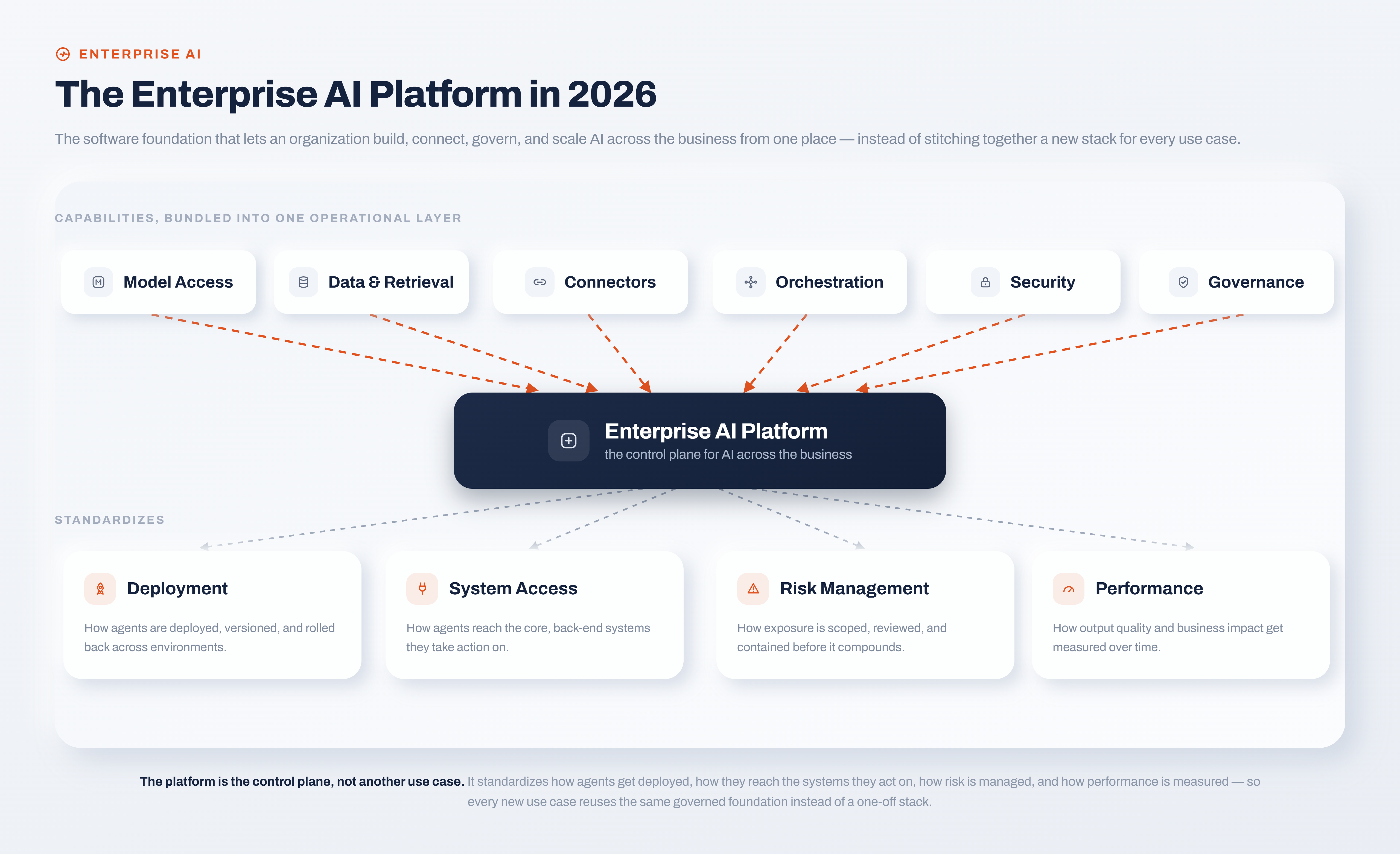
<p>An enterprise AI platform is the software foundation that lets an organization build, connect, govern, and scale AI across the business from one place, instead of stitching together a new stack for every use case. It typically bundles model access, data and knowledge retrieval, connectors to core systems, workflow orchestration, security controls, and governance into a single operational layer.</p>
<p>Think of it as the control plane for enterprise AI. It standardizes how agents are deployed, how they reach the systems they act on, how risk is managed, and how performance is measured. The reason this matters more in 2026 than it did two years ago is that AI stopped being a chatbot bolted onto a website and became something that reads a policy, validates a case, and then triggers a workflow across three back-end systems. The moment AI takes actions rather than just answering questions, the platform underneath it has to behave like enterprise software: audited, permissioned, and observable.</p>
<p><img decoding="async" loading="lazy" alt="Enterprise AI Platform in 2026" src="https://wso2.com/integration-platform/learn/assets/images/enterprise-ai-platform-2bed2526dfba6a3a2d8441367f1a388f.png" width="5120" height="3124" class="img_ev3q"></p>
<p>A concrete example makes the distinction clear. Using an enterprise integration platform such as WSO2 Integration Platform, an agent reaches your systems through the same connectors and governed interfaces as every other integration, so what an agent is allowed to interact with stays inside the access controls you already run. That is the difference between a platform and a point tool: the platform treats an autonomous agent as one more governed workload, not an exception that lives outside your existing policies.</p>
<h2 class="anchor anchorTargetStickyNavbar_Vzrq" id="why-enterprises-need-a-platform-not-point-tools">Why enterprises need a platform, not point tools<a href="https://wso2.com/integration-platform/learn/enterprise-ai-platform#why-enterprises-need-a-platform-not-point-tools" class="hash-link" aria-label="Direct link to Why enterprises need a platform, not point tools" title="Direct link to Why enterprises need a platform, not point tools" translate="no">​</a></h2>
<p>Buying a standalone AI assistant for IT tickets and a separate one for customer chat feels efficient until you count the cost. Each tool brings its own connectors, its own audit trail, its own security posture, and its own place to break. Six months in, you have a wide collection of AI tools that can't share context, can't be governed centrally, and can't be reasoned about as a system.</p>
<p>The pilot-to-production ceiling is real and predictable. Building one solution can be a weekend hackathon, but supporting many solutions at high volume, across regions and regulatory regimes, is an engineering program. Platforms exist to absorb that weight through shared infrastructure for integration, governance, scaling, and operations.</p>
<p>There's also a data problem that point tools quietly ignore. An AI agent is only as useful as the systems it can safely act on, and most of an enterprise's value is locked inside applications that were never designed to talk to an autonomous agent. This is why integration keeps surfacing as the deciding factor: the role of integration in the agentic enterprise is to give agents structured, governed access to APIs, data, and events so they can do real work without becoming a new class of security incident. A platform that treats integration as an afterthought gives you agents that can communicate, but can't act.</p>
<h2 class="anchor anchorTargetStickyNavbar_Vzrq" id="what-to-look-for-in-an-enterprise-ai-platform">What to look for in an enterprise AI platform<a href="https://wso2.com/integration-platform/learn/enterprise-ai-platform#what-to-look-for-in-an-enterprise-ai-platform" class="hash-link" aria-label="Direct link to What to look for in an enterprise AI platform" title="Direct link to What to look for in an enterprise AI platform" translate="no">​</a></h2>
<p>All vendors will claim every capability below, but the useful question to ask is how deeply each one is actually implemented. Here are the eight criteria that separate platforms built for scale from platforms built for demos.</p>
<h3 class="anchor anchorTargetStickyNavbar_Vzrq" id="1-integration-depth-with-your-real-systems">1. Integration depth with your real systems<a href="https://wso2.com/integration-platform/learn/enterprise-ai-platform#1-integration-depth-with-your-real-systems" class="hash-link" aria-label="Direct link to 1. Integration depth with your real systems" title="Direct link to 1. Integration depth with your real systems" translate="no">​</a></h3>
<p>An agent that can't reach Salesforce, SAP, ServiceNow, or your data warehouse is not going to be successful in production. Look for a broad library of pre-built connectors plus a clean path to build custom ones against your own APIs. The depth of this layer, rather than an elegant chat interface, usually decides whether a project reaches production.</p>
<p><strong>Why it matters:</strong> An agent is only as strong as the systems it can act on.</p>
<h3 class="anchor anchorTargetStickyNavbar_Vzrq" id="2-governance-observability-and-auditability">2. Governance, observability, and auditability<a href="https://wso2.com/integration-platform/learn/enterprise-ai-platform#2-governance-observability-and-auditability" class="hash-link" aria-label="Direct link to 2. Governance, observability, and auditability" title="Direct link to 2. Governance, observability, and auditability" translate="no">​</a></h3>
<p>Enterprise-grade governance is non-negotiable once agents start taking actions. You want role-based access control, audit logs, policy enforcement on every call, and the ability to trace exactly why an agent did what it did. The strongest platforms enforce these controls at the interface level. By transforming an API into a Model Context Protocol (MCP) server for agents to consume, the platform ensures every request passes through existing policy and access controls, exposing only the specific tools an agent needs without providing direct exposure to the underlying system.</p>
<p><strong>Why it matters:</strong> Governance is what makes AI safe to run in a regulated environment, not just safe to demo.</p>
<h3 class="anchor anchorTargetStickyNavbar_Vzrq" id="3-security-and-compliance">3. Security and compliance<a href="https://wso2.com/integration-platform/learn/enterprise-ai-platform#3-security-and-compliance" class="hash-link" aria-label="Direct link to 3. Security and compliance" title="Direct link to 3. Security and compliance" translate="no">​</a></h3>
<p>Agents routinely handle customer records, financial data, and internal documents, making encryption, data isolation, and compliance certifications important aspects to consider. Pay particular attention to where your data lives. A platform you can self-host on Kubernetes, Docker, VMs, or bare metal, keeps sensitive data inside your perimeter in a way a cloud-only service cannot match.</p>
<p><strong>Why it matters:</strong> Data residency and isolation requirements remain with AI.</p>
<h3 class="anchor anchorTargetStickyNavbar_Vzrq" id="4-multi-agent-orchestration">4. Multi-agent orchestration<a href="https://wso2.com/integration-platform/learn/enterprise-ai-platform#4-multi-agent-orchestration" class="hash-link" aria-label="Direct link to 4. Multi-agent orchestration" title="Direct link to 4. Multi-agent orchestration" translate="no">​</a></h3>
<p>The interesting enterprise use cases involve several agents and several systems cooperating: one retrieves, one validates, one executes, with hand-offs and context passed between them. A platform should let you compose these flows and run them under a single operational view rather than as disconnected scripts. A robust platform handles a scheduled job, an event stream, a file drop, an API, and an AI-driven flow in one runtime, so an agent embedded in a workflow is orchestrated with the same tooling as everything else around it.</p>
<p><strong>Why it matters:</strong> Real business value comes from completing multi-step work, not from generating a single good response.</p>
<h3 class="anchor anchorTargetStickyNavbar_Vzrq" id="5-model-flexibility-and-open-standards">5. Model flexibility and open standards<a href="https://wso2.com/integration-platform/learn/enterprise-ai-platform#5-model-flexibility-and-open-standards" class="hash-link" aria-label="Direct link to 5. Model flexibility and open standards" title="Direct link to 5. Model flexibility and open standards" translate="no">​</a></h3>
<p>Model quality and pricing shift every few months, so hard-wiring your platform to one provider can become a liability. Favor platforms that let you connect the models, knowledge bases, and tools of your choice, and that support open standards like MCP so your agents aren't locked to a single vendor's ecosystem. A 100% open source platform like WSO2 Integration Platform adds a further guarantee that your integrations keep running with or without a commercial subscription.</p>
<p><strong>Why it matters:</strong> Single-model, single-vendor architectures lock you in, and put business continuity at risk.</p>
<h3 class="anchor anchorTargetStickyNavbar_Vzrq" id="6-deployment-flexibility">6. Deployment flexibility<a href="https://wso2.com/integration-platform/learn/enterprise-ai-platform#6-deployment-flexibility" class="hash-link" aria-label="Direct link to 6. Deployment flexibility" title="Direct link to 6. Deployment flexibility" translate="no">​</a></h3>
<p>Your compliance team, not your AI vendor, should decide where workloads run. The best platforms give you the same product as self-hosted software or as a managed service, letting you keep both the control plane and the data plane on your own infrastructure when regulation demands it, or offload operations to a SaaS when it doesn't. That "run it your way" flexibility is a genuine differentiator against platforms whose strengths are welded to their own cloud.</p>
<p><strong>Why it matters:</strong> Strict deployment limitations frequently disqualify platforms that are otherwise well-suited.</p>
<h3 class="anchor anchorTargetStickyNavbar_Vzrq" id="7-developer-experience-across-skill-levels">7. Developer experience across skill levels<a href="https://wso2.com/integration-platform/learn/enterprise-ai-platform#7-developer-experience-across-skill-levels" class="hash-link" aria-label="Direct link to 7. Developer experience across skill levels" title="Direct link to 7. Developer experience across skill levels" translate="no">​</a></h3>
<p>Adoption stalls when only a handful of specialists can build. Look for a platform where a low-code canvas and full pro-code share the same project, so integration specialists and application developers aren't working in separate tools that drift out of sync. The shift toward AI-assisted development, where natural-language prompts are converted into functional and verifiable integration logic, is rapidly transitioning from a competitive edge to a baseline expectation for modern platforms.</p>
<p><strong>Why it matters:</strong> A platform achieves enterprise-wide scalability only when development capabilities extend beyond the dedicated platform team.</p>
<h3 class="anchor anchorTargetStickyNavbar_Vzrq" id="8-scalable-observable-architecture">8. Scalable, observable architecture<a href="https://wso2.com/integration-platform/learn/enterprise-ai-platform#8-scalable-observable-architecture" class="hash-link" aria-label="Direct link to 8. Scalable, observable architecture" title="Direct link to 8. Scalable, observable architecture" translate="no">​</a></h3>
<p>A pilot today should ideally be a global rollout in the near future, and the platform has to survive the transition without a re-platforming project. Check for centralized monitoring across every environment and support for the observability tools you already run. A truly scalable platform plugs into any OpenTelemetry backend, so AI workloads show up in the same dashboards as the rest of your estate.</p>
<p><strong>Why it matters:</strong> Scalability and observability are how you avoid re-buying your platform in two years.</p>
<h2 class="anchor anchorTargetStickyNavbar_Vzrq" id="enterprise-ai-platforms-compared-the-2026-landscape">Enterprise AI platforms compared: the 2026 landscape<a href="https://wso2.com/integration-platform/learn/enterprise-ai-platform#enterprise-ai-platforms-compared-the-2026-landscape" class="hash-link" aria-label="Direct link to Enterprise AI platforms compared: the 2026 landscape" title="Direct link to Enterprise AI platforms compared: the 2026 landscape" translate="no">​</a></h2>
<p>No single platform wins every category, and the honest way to read the market is by archetype. Broad agentic and integration platforms aim to be the foundation everything else runs on. Ecosystem-native platforms are excellent inside their own cloud and narrower outside it. Function-specific platforms go deep on one job, such as customer service or IT support, and are a poor fit when your ambitions span departments.</p>
<p>The table below compares the main archetypes against the criteria that matter for enterprise-wide adoption. It's deliberately category-level: specific vendors move fast, and the archetype tells you more about long-term fit than this quarter's feature list.</p>
<table><thead><tr><th>Archetype</th><th>Best for</th><th>Integration &amp; orchestration</th><th>Deployment</th><th>Watch-outs</th></tr></thead><tbody><tr><td>Open integration + agent platform (e.g., WSO2 Integration Platform)</td><td>Enterprise-wide AI built on a governed integration foundation</td><td>Broad connectors, five integration styles in one runtime, MCP-based tool access</td><td>Self-hosted, hybrid or SaaS</td><td>Foundation layer, not a turnkey vertical bot</td></tr><tr><td>Cloud-native agent builders (e.g., Microsoft Copilot Studio, Google Vertex AI Agent Builder, AWS Bedrock Agents)</td><td>Teams standardized on one hyperscaler</td><td>Deep inside the home cloud, thinner outside it</td><td>Tied to the provider's cloud</td><td>Value narrows once you leave the ecosystem</td></tr><tr><td>CX / service-desk platforms</td><td>A single, deep use case (customer or employee support)</td><td>Strong for their domain, limited beyond it</td><td>Usually vendor-hosted</td><td>Rarely extend cleanly across departments</td></tr><tr><td>Knowledge / enterprise-search tools</td><td>Information discovery across scattered content</td><td>Read-oriented; lighter on action and orchestration</td><td>Usually SaaS</td><td>Search-first, not full workflow automation</td></tr></tbody></table>
<p>Think of this table as a starting point to help you filter your options, not as a final verdict. A hyperscaler-native builder can be the right call for a team that lives entirely in one cloud, and a service-desk platform can be perfect if support is your only target. The archetype simply tells you the limitations of each option.</p>
<h2 class="anchor anchorTargetStickyNavbar_Vzrq" id="how-to-match-a-platform-to-your-use-case">How to match a platform to your use case<a href="https://wso2.com/integration-platform/learn/enterprise-ai-platform#how-to-match-a-platform-to-your-use-case" class="hash-link" aria-label="Direct link to How to match a platform to your use case" title="Direct link to How to match a platform to your use case" translate="no">​</a></h2>
<p>Start with an honest answer to one question: are you solving a single, well-bounded problem, or laying a foundation for AI across the business? If it's genuinely one problem, say deflecting IT tickets, a focused, function-specific platform may get you to value fastest, and that's a legitimate choice.</p>
<p>But most enterprises discover a second and third use case within a year of the first, and that's where the foundation question decides everything. If you expect AI to spread across customer experience, employee experience, and operations, optimize for breadth of use cases, integration depth, and governance rather than for the slickest single-purpose experience. Choosing a narrow tool for a broad ambition is how organizations end up re-platforming eighteen months in.</p>
<p>Two practical tie-breakers tend to settle close calls:</p>
<ul>
<li class=""><strong>Deployment:</strong> if any workload has to run in a data-sovereign environment, that requirement alone eliminates most cloud-only options before you compare features.</li>
<li class=""><strong>Ownership:</strong> an open-source foundation means the platform keeps running on your terms, which matters more than any feature checklist when you're betting core operations on it.</li>
</ul>
<h2 class="anchor anchorTargetStickyNavbar_Vzrq" id="where-wso2-fits-an-open-governed-foundation-for-the-agentic-enterprise">Where WSO2 fits: an open, governed foundation for the agentic enterprise<a href="https://wso2.com/integration-platform/learn/enterprise-ai-platform#where-wso2-fits-an-open-governed-foundation-for-the-agentic-enterprise" class="hash-link" aria-label="Direct link to Where WSO2 fits: an open, governed foundation for the agentic enterprise" title="Direct link to Where WSO2 fits: an open, governed foundation for the agentic enterprise" translate="no">​</a></h2>
<p>WSO2 sits in the first archetype, and it's worth being precise about what that means. It isn't a pre-packaged customer-service bot, and it doesn't pretend to be. It's the open, integration-first foundation the other pieces run on, which is a different and, for many enterprises, more durable bet.</p>
<p>The WSO2 Integration Platform serves as the unifying layer for AI agents, APIs, data, and events across hybrid, on-prem, and cloud architectures. By consolidating five distinct integration styles including event-driven, file-driven, task automation, integration-as-APIs, and AI-driven flows into a single runtime, it eliminates the need for a fragmented stack. This architectural convergence ensures that autonomous agents are governed and observed using the same enterprise-grade tooling as a standard scheduled data sync. This robust foundation is validated by a global user base, including over 100 financial institutions and 75 government entities, collectively managing more than 60 trillion annual transactions.</p>
<p>Three core characteristics establish WSO2 as a uniquely durable foundation for the agentic enterprise:</p>
<ul>
<li class=""><strong>Open standards and continuity:</strong> A 100% open source architecture prevents vendor lock-in and ensures your operations remain independent of a commercial subscription.</li>
<li class=""><strong>Total deployment freedom:</strong> Whether running on a managed iPaaS or self-hosted environment, the platform keeps the control and data planes within your perimeter to satisfy strict data sovereignty requirements.</li>
<li class=""><strong>Governed agentic access:</strong> By utilizing MCP servers and over 600 connectors, autonomous agents are treated as governed workloads that interact only with the systems your existing policies permit.</li>
</ul>
<p>If you want to see the mechanics, the WSO2 Integration Platform documentation walks through building your first integration in under ten minutes. The honest caveat: if you need a turnkey vertical assistant with zero assembly, a function-specific vendor will feel faster out of the gate. If you're building a foundation meant to carry many use cases safely, that's where an open integration platform earns its place.</p>
<h2 class="anchor anchorTargetStickyNavbar_Vzrq" id="choosing-a-platform-that-scales-with-you">Choosing a platform that scales with you<a href="https://wso2.com/integration-platform/learn/enterprise-ai-platform#choosing-a-platform-that-scales-with-you" class="hash-link" aria-label="Direct link to Choosing a platform that scales with you" title="Direct link to Choosing a platform that scales with you" translate="no">​</a></h2>
<p>The right enterprise AI platform is the one you won't have to replace when your ambitions grow. Run every option through the same checklist: integration depth, governance and observability, security, orchestration, model flexibility, deployment freedom, developer experience, and scalability, and weigh those criteria by how far you actually plan to take AI over the next two to three years.</p>
<p>For a single narrow use case, a focused tool can be the pragmatic answer. For a foundation meant to carry many use cases across the business without a re-platforming project down the line, an open, integration-first platform is the more defensible bet. If that's the direction you're heading, exploring the WSO2 Integration Platform is a concrete next step toward building an agentic enterprise on infrastructure you own and govern.</p>
<h2 class="anchor anchorTargetStickyNavbar_Vzrq" id="frequently-asked-questions">Frequently asked questions<a href="https://wso2.com/integration-platform/learn/enterprise-ai-platform#frequently-asked-questions" class="hash-link" aria-label="Direct link to Frequently asked questions" title="Direct link to Frequently asked questions" translate="no">​</a></h2>
<h3 class="anchor anchorTargetStickyNavbar_Vzrq" id="what-is-an-enterprise-ai-platform-1">What is an enterprise AI platform?<a href="https://wso2.com/integration-platform/learn/enterprise-ai-platform#what-is-an-enterprise-ai-platform-1" class="hash-link" aria-label="Direct link to What is an enterprise AI platform?" title="Direct link to What is an enterprise AI platform?" translate="no">​</a></h3>
<p>It's the software foundation for building, deploying, securing, and scaling AI across an organization. It combines integrations, orchestration, governance, observability, and model access so teams can move AI from isolated pilots to production across customer, employee, and operational use cases.</p>
<h3 class="anchor anchorTargetStickyNavbar_Vzrq" id="how-do-i-choose-the-right-enterprise-ai-platform">How do I choose the right enterprise AI platform?<a href="https://wso2.com/integration-platform/learn/enterprise-ai-platform#how-do-i-choose-the-right-enterprise-ai-platform" class="hash-link" aria-label="Direct link to How do I choose the right enterprise AI platform?" title="Direct link to How do I choose the right enterprise AI platform?" translate="no">​</a></h3>
<p>Decide first whether your need is function-specific or enterprise-wide. Then weigh integration depth, governance and observability, security and compliance, model flexibility, deployment options, developer experience, and scalability. Whichever way costs and control tilt as usage grows should tilt your decision too.</p>
<h3 class="anchor anchorTargetStickyNavbar_Vzrq" id="whats-the-difference-between-an-enterprise-ai-platform-and-a-single-ai-tool">What's the difference between an enterprise AI platform and a single AI tool?<a href="https://wso2.com/integration-platform/learn/enterprise-ai-platform#whats-the-difference-between-an-enterprise-ai-platform-and-a-single-ai-tool" class="hash-link" aria-label="Direct link to What's the difference between an enterprise AI platform and a single AI tool?" title="Direct link to What's the difference between an enterprise AI platform and a single AI tool?" translate="no">​</a></h3>
<p>A single tool solves one use case with its own connectors, governance, and security. A platform provides shared infrastructure so every AI workload is built, governed, and observed the same way, which is what makes scaling across departments manageable rather than chaotic.</p>
<h3 class="anchor anchorTargetStickyNavbar_Vzrq" id="why-is-integration-so-important-for-enterprise-ai">Why is integration so important for enterprise AI?<a href="https://wso2.com/integration-platform/learn/enterprise-ai-platform#why-is-integration-so-important-for-enterprise-ai" class="hash-link" aria-label="Direct link to Why is integration so important for enterprise AI?" title="Direct link to Why is integration so important for enterprise AI?" translate="no">​</a></h3>
<p>Agents create value by acting on real systems, and they can only do that through governed access to APIs, data, and events. Without a strong integration layer, agents can converse but can't complete work, and every new connection becomes a fresh security and maintenance burden.</p>
<h3 class="anchor anchorTargetStickyNavbar_Vzrq" id="can-an-enterprise-ai-platform-run-on-premises">Can an enterprise AI platform run on-premises?<a href="https://wso2.com/integration-platform/learn/enterprise-ai-platform#can-an-enterprise-ai-platform-run-on-premises" class="hash-link" aria-label="Direct link to Can an enterprise AI platform run on-premises?" title="Direct link to Can an enterprise AI platform run on-premises?" translate="no">​</a></h3>
<p>Some can, many can't. Platforms available as self-hostable open-source software, such as WSO2 Integration Platform, can be deployed locally on Kubernetes, Docker, VMs, or bare metal, ensuring data remains entirely within your own perimeter. Cloud-only platforms generally cannot meet these strict data-sovereignty requirements.</p>]]></content>
        <author>
            <name>WSO2 Integration Team</name>
            <uri>https://wso2.com</uri>
        </author>
        <category label="AI Agents" term="AI Agents"/>
    </entry>
    <entry>
        <title type="html"><![CDATA[How to Build AI Agents: A Step-by-Step Guide]]></title>
        <id>https://wso2.com/integration-platform/learn/how-to-build-ai-agents</id>
        <link href="https://wso2.com/integration-platform/learn/how-to-build-ai-agents"/>
        <updated>2026-09-10T00:00:00.000Z</updated>
        <summary type="html"><![CDATA[Learn how to build AI agents step by step: from core components and frameworks to orchestration, guardrails, and deploying agents securely in production.]]></summary>
        <content type="html"><![CDATA[<p>Most teams can get an AI agent working within a few hours. Building one that survives contact with real users, real data, and the systems your business actually runs on is the hard part, and it's where most projects hit a wall.</p>
<p>The gap is rarely the model. It's everything around it: the tools the agent can call, the data it can reach, and the plumbing that connects it to your CRM, your databases, and your APIs. This guide walks through how to build AI agents end to end, from core components and a repeatable six-step process to the integration layer that decides whether an agent stays a demo or becomes something you can ship.</p>
<h2 class="anchor anchorTargetStickyNavbar_Vzrq" id="what-is-an-ai-agent">What Is an AI Agent?<a href="https://wso2.com/integration-platform/learn/how-to-build-ai-agents#what-is-an-ai-agent" class="hash-link" aria-label="Direct link to What Is an AI Agent?" title="Direct link to What Is an AI Agent?" translate="no">​</a></h2>
<p>An AI agent is a system that uses a large language model to reason and act on its own, rather than just responding to a single prompt. The model doesn't only generate text. It chooses what to do next, calls tools to get information or take action, evaluates the result, and repeats until the task is done.</p>
<p>That autonomy is the dividing line. A chatbot answers the question in front of it and stops. A workflow runs a fixed sequence of steps that a developer wired together in advance. An agent decides the sequence itself at runtime. Ask an agent to "resolve this support ticket" and it might look up the customer's order, check the refund policy, issue a refund, and send a confirmation, choosing each step based on what it found in the last one.</p>
<p>Agentic AI is the broader category these systems belong to. It's worth being precise about the spectrum, because "agent" gets stretched to cover everything from a scripted chatbot to a fully autonomous system:</p>
<ul>
<li class=""><strong>Single LLM call:</strong> one prompt, one response. Not an agent.</li>
<li class=""><strong>Workflow:</strong> an LLM orchestrated through predefined code paths. Predictable, but the human designed the path.</li>
<li class=""><strong>Agent:</strong> the LLM directs its own process and tool use, maintaining control over how it reaches the goal.</li>
</ul>
<p>The practical takeaway: don't build an agent when a workflow will do. Agents trade predictability, latency, and cost for flexibility, and that trade only pays off when the task genuinely can't be scripted in advance.</p>
<h2 class="anchor anchorTargetStickyNavbar_Vzrq" id="when-should-you-build-an-ai-agent">When Should You Build an AI Agent?<a href="https://wso2.com/integration-platform/learn/how-to-build-ai-agents#when-should-you-build-an-ai-agent" class="hash-link" aria-label="Direct link to When Should You Build an AI Agent?" title="Direct link to When Should You Build an AI Agent?" translate="no">​</a></h2>
<p>Agents earn their complexity on problems that have resisted traditional automation. If you can capture the logic in a clean set of if-then rules, a rules engine will be cheaper, faster, and easier to debug than any LLM. Reach for an agent when the work has one or more of these traits:</p>
<ul>
<li class=""><strong>Nuanced, context-dependent decisions.</strong> Refund approvals, fraud review, or triage, where the right call depends on subtle signals a fixed ruleset can't capture.</li>
<li class=""><strong>Rules that have become unmaintainable.</strong> Systems buried under years of exceptions and special cases, where every update risks breaking three others.</li>
<li class=""><strong>Heavy reliance on unstructured data.</strong> Work that means reading documents, interpreting natural language, or holding a real conversation.</li>
</ul>
<p>A useful gut check before you commit: if a competent new hire could do the task by following a written checklist, automate it with a workflow. If the task needs judgment the checklist can't fully capture, an agent is worth considering. Start with the narrowest version of the problem that delivers value, then expand once you trust the agent's behavior.</p>
<h2 class="anchor anchorTargetStickyNavbar_Vzrq" id="core-components-of-an-ai-agent">Core Components of an AI Agent<a href="https://wso2.com/integration-platform/learn/how-to-build-ai-agents#core-components-of-an-ai-agent" class="hash-link" aria-label="Direct link to Core Components of an AI Agent" title="Direct link to Core Components of an AI Agent" translate="no">​</a></h2>
<p>Every AI agent relies on three essential building blocks that drive its iterative reasoning process. Grasping these essentials provides a clear foundation for the implementation steps that follow.</p>
<p><img decoding="async" loading="lazy" alt="Core Components of an AI Agent" src="https://wso2.com/integration-platform/learn/assets/images/ai-agent-building-blocks-9eac1d42135ea7aad9bc86a2d3798691.png" width="3200" height="1968" class="img_ev3q"></p>
<p><strong>The model</strong> is the reasoning engine. It interprets the task, decides what to do next, and knows when the job is finished. You don't need the largest model for every step; a fast, cheap model can handle intent classification while a stronger one handles the calls that actually require heavy judgment.</p>
<p><strong>Tools</strong> are how the agent reaches outside itself, and in practice they're the hardest part to get right. They fall into three rough categories: data tools that retrieve context (query a database, read a document, search the web), action tools that change something (send an email, update a record, issue a refund), and orchestration tools, where one agent calls another as if it were a function. Every one of those tools is really an integration with some external system, which is why the tooling layer, not the model, is usually where agent projects get stuck.</p>
<p><strong>Instructions</strong> define how the agent behaves: its goals, its boundaries, and the guardrails it operates within. Vague instructions are the fastest route to an unreliable agent. Break tasks into explicit steps, spell out what to do at decision points, and anticipate the edge cases where a user gives incomplete information or asks something unexpected.</p>
<p>Two components sit alongside these three often enough to be worth naming. <strong>Memory</strong> lets the agent carry context across steps or sessions, and <strong>retrieval</strong> (usually called RAG, for retrieval-augmented generation) pulls relevant information from your own knowledge base so the agent works from your facts rather than the model's training data.</p>
<h2 class="anchor anchorTargetStickyNavbar_Vzrq" id="how-to-build-an-ai-agent-step-by-step">How to Build an AI Agent: Step by Step<a href="https://wso2.com/integration-platform/learn/how-to-build-ai-agents#how-to-build-an-ai-agent-step-by-step" class="hash-link" aria-label="Direct link to How to Build an AI Agent: Step by Step" title="Direct link to How to Build an AI Agent: Step by Step" translate="no">​</a></h2>
<p>Below is a framework-agnostic, step-by-step workflow for building AI agents. It applies regardless of whether you rely on a model provider's SDK, an integration platform, or direct LLM API calls.</p>
<ol>
<li class=""><strong>Define the problem and success criteria.</strong> Clearly articulate the specific objective and the metrics for quality. Aim for precision: "Address billing inquiries with accurate responses while preventing improper refunds" provides a baseline for evaluation, whereas a vague goal like "manage support" leaves the agent without direction.</li>
<li class=""><strong>Choose your model.</strong> Prototype with the most capable model available to set a quality baseline, then test whether smaller, cheaper models hold that quality on individual steps. This keeps cost and latency down without capping the agent's ceiling.</li>
<li class=""><strong>Define tools and integrations.</strong> Give the agent the data and action tools the task requires, and nothing it doesn't. Each tool needs a clear definition, a descriptive name, and well-specified inputs. This is where connectors to your real systems come in, and it's covered in depth in the next section.</li>
<li class=""><strong>Write clear instructions and guardrails.</strong> Turn your existing procedures, policies, and support scripts into explicit, numbered instructions. Define what the agent must never do, and require human sign-off for high-risk actions like large refunds or irreversible changes.</li>
<li class=""><strong>Add memory and context.</strong> Wire in short-term memory so the agent tracks the current task, and retrieval so it can pull from your own knowledge base. This is what moves an agent from generic to genuinely useful for your domain.</li>
<li class=""><strong>Test, evaluate, and iterate.</strong> Run the agent against a fixed set of real scenarios, measure it against your success criteria, and fix the failures. Evaluation isn't a launch gate you pass once; it's a continuous loop that catches regressions as prompts, tools, and models change.</li>
</ol>
<p><img decoding="async" loading="lazy" alt="Steps to Build an AI Agent" src="https://wso2.com/integration-platform/learn/assets/images/ai-agent-build-steps-b375422798cf5cb73ab851baa8f7b1f8.png" width="3200" height="2232" class="img_ev3q"></p>
<p>The order matters. Teams that skip straight to step three and start wiring tools before they've defined success in step one tend to build capable agents that solve the wrong problem well.</p>
<h2 class="anchor anchorTargetStickyNavbar_Vzrq" id="connecting-your-agent-to-real-systems">Connecting Your Agent to Real Systems<a href="https://wso2.com/integration-platform/learn/how-to-build-ai-agents#connecting-your-agent-to-real-systems" class="hash-link" aria-label="Direct link to Connecting Your Agent to Real Systems" title="Direct link to Connecting Your Agent to Real Systems" translate="no">​</a></h2>
<p>An agent that can only talk is a chatbot. An agent that can act needs to reach the systems where your business actually runs: the CRM that holds customer records, the database behind your orders, the messaging platform your team lives in. This integration layer is the part most tutorials on building agents ignore, but it's exactly where the difficulty concentrates. Hand-wiring each connection with bespoke HTTP calls is how you end up with the brittle, point-to-point tangle that fails the moment an API changes.</p>
<p>This is the problem an integration platform solves, and it's the reason WSO2 Integrator is a natural foundation for production agents. Instead of writing low-level protocol code for every system, you give the agent tools backed by pre-built connectors for the services you already use. A connector exposes an external service's API as ready-to-use operations, and the model that separates a reliable integration from a script is worth understanding:</p>
<ul>
<li class=""><strong>Connections</strong> hold the credentials and endpoint settings for a service, such as API keys, OAuth tokens, and hostnames. You define a connection once and reuse it by name, so secrets live in one managed place rather than being scattered through the code.</li>
<li class=""><strong>Actions</strong> are outbound operations your agent invokes, such as "send SMS," "create contact," or "execute query." This is how an agent takes action in the world.</li>
<li class=""><strong>Triggers</strong> are inbound events a service pushes to your integration, like a new database row or an incoming webhook. Trigger support covers databases such as MySQL, PostgreSQL, and MSSQL, messaging systems such as Kafka and RabbitMQ, and file storage.</li>
</ul>
<p>The AI integrations in WSO2 Integrator go a step further and let you build the agent itself alongside its connections. The same environment gives you direct LLM calls, RAG pipelines, autonomous agents that reason over a system prompt and call tools while maintaining conversation state, as well as Model Context Protocol (MCP) support. MCP is an open protocol for connecting agents to tools and data through a consistent interface, and WSO2 Integrator works both directions: you can expose your existing integrations as MCP tools for an agent to consume, or connect your agent to external MCP tools that they can consume.</p>
<p>A few capabilities matter specifically for grounding agents in your own data and models:</p>
<table><thead><tr><th>Capability</th><th>What it does</th></tr></thead><tbody><tr><td>Model providers</td><td>Connect to providers including OpenAI, Anthropic, Azure OpenAI, Google Vertex, and Mistral through one consistent interface.</td></tr><tr><td>Vector stores</td><td>Persist embeddings and run similarity search across in-memory, Pinecone, pgvector, Weaviate, or Milvus.</td></tr><tr><td>Knowledge bases</td><td>Combine a vector store, embedding provider, and chunker into the document store RAG reads from.</td></tr><tr><td>Connectors</td><td>Reach SaaS apps, databases, and messaging systems without hand-written protocol code.</td></tr></tbody></table>
<p>The takeaway isn't that you need any single vendor. It's that the integration layer is a first-class part of building an agent, not an afterthought. Whether you adopt a platform or build it yourself, treat connectors, credentials, and data grounding as core architecture from day one.</p>
<h2 class="anchor anchorTargetStickyNavbar_Vzrq" id="single-agent-vs-multi-agent-systems">Single-Agent vs. Multi-Agent Systems<a href="https://wso2.com/integration-platform/learn/how-to-build-ai-agents#single-agent-vs-multi-agent-systems" class="hash-link" aria-label="Direct link to Single-Agent vs. Multi-Agent Systems" title="Direct link to Single-Agent vs. Multi-Agent Systems" translate="no">​</a></h2>
<p>Upon establishing the necessary components and integrations, the appropriate orchestration framework must be determined. Organizations are advised to deploy a single-agent architecture initially and introduce additional complexity only when operational constraints require it.</p>
<p>A single-agent system is one model equipped with tools and instructions, running in a loop until it hits an exit condition (a final answer, a tool result, an error, or a maximum number of turns). You extend its capabilities by adding tools, which keeps the architecture simple and evaluation manageable. Push a single agent as far as it will go before splitting it up.</p>
<p>Multi-agent systems distribute the work across several coordinated agents, and they generally take one of two shapes:</p>
<ul>
<li class=""><strong>Manager pattern:</strong> a central agent coordinates specialized sub-agents by calling them as tools, then synthesizes their outputs. Good when you want one agent in control of the overall flow.</li>
<li class=""><strong>Decentralized pattern:</strong> agents hand off control to one another as peers, transferring the conversation to whichever specialist fits the request. Good for triage, where a first agent routes to the right specialist and steps out.</li>
</ul>
<p>The signal that you've outgrown a single agent is usually tool confusion or instruction overload: the agent starts picking the wrong tool, or the prompt has grown so many conditional branches that it's impossible to maintain. Until then, more agents mostly means more coordination overhead and more places for things to go wrong.</p>
<h2 class="anchor anchorTargetStickyNavbar_Vzrq" id="taking-ai-agents-to-production">Taking AI Agents to Production<a href="https://wso2.com/integration-platform/learn/how-to-build-ai-agents#taking-ai-agents-to-production" class="hash-link" aria-label="Direct link to Taking AI Agents to Production" title="Direct link to Taking AI Agents to Production" translate="no">​</a></h2>
<p>Moving an agent from a working prototype to a production system requires additional considerations across observability, security, and governance. An agent that can read data and take actions is a new kind of actor on your network, and it needs the same operational rigor as any other production service, plus a few concerns unique to autonomy.</p>
<p><strong>Observability</strong> comes first. When an agent makes a wrong call, you need to see the chain of decisions and tool invocations that led there. Emitting traces in an open standard like OpenTelemetry lets agent activity show up in the same distributed tracing you already use for services, so you can debug an agent the way you debug anything else in production.</p>
<p><strong>Identity and access control</strong> come next. An agent acting on a human's borrowed credentials destroys attribution and widens the blast radius when something goes wrong. Giving each agent its own identity, with least-privilege access to the specific connectors and actions it needs, is what keeps an autonomous system accountable. Since connections centralize credential management, revoking or scoping an agent's permissions for a target system can be done seamlessly without touching its code.</p>
<p><strong>Guardrails and human-in-the-loop</strong> close the gap. Rule-based and model-based checks on inputs and outputs catch unsafe behavior, and high-risk actions such as large refunds or irreversible writes should require human approval until you trust the agent's track record. None of this is a feature you bolt on after launch. It's the architecture that separates an agent you can operate from a graveyard of stalled pilots.</p>
<h2 class="anchor anchorTargetStickyNavbar_Vzrq" id="real-world-ai-agent-examples">Real-World AI Agent Examples<a href="https://wso2.com/integration-platform/learn/how-to-build-ai-agents#real-world-ai-agent-examples" class="hash-link" aria-label="Direct link to Real-World AI Agent Examples" title="Direct link to Real-World AI Agent Examples" translate="no">​</a></h2>
<p>The patterns above show up across a handful of domains where agents have proven their worth, and the common thread is that each one depends on solid integration with back-end systems:</p>
<ul>
<li class=""><strong>Customer support.</strong> Support blends conversation with action, pulling order history, checking policy, issuing refunds, and updating tickets. A customer care agent is only as good as its connections to the systems holding that data, which is why the integration wiring matters as much as the model here.</li>
<li class=""><strong>IT help desk.</strong> An internal help desk agent answers employee questions, looks up account status, and resets access, drawing on persistent memory and a knowledge base built from your own documentation.</li>
<li class=""><strong>Research and analysis.</strong> Agents that gather information across many sources, synthesize it, and decide when they've searched enough suit open-ended questions where you can't predict the steps in advance.</li>
</ul>
<p>The pattern to notice: every strong use case has a clear success signal and a real feedback loop, and every one of them lives or dies on how well the agent connects to the data and systems behind it.</p>
<h2 class="anchor anchorTargetStickyNavbar_Vzrq" id="conclusion">Conclusion<a href="https://wso2.com/integration-platform/learn/how-to-build-ai-agents#conclusion" class="hash-link" aria-label="Direct link to Conclusion" title="Direct link to Conclusion" translate="no">​</a></h2>
<p>Building an AI agent follows a repeatable path: define the problem, choose a model, wire up tools, write clear instructions, add memory, and evaluate relentlessly. The mechanics are increasingly well understood, and a capable prototype is within reach for most teams in short order.</p>
<p>The gap between that prototype and a production system is mostly about the layer around the model, and above all the integration that connects the agent to the systems where your work actually happens. Get that right, with reliable connectors, centralized credentials, grounded data, and proper observability, and your agent becomes something you can trust with real actions on real systems. If you're ready to connect an agent to the tools and data your business runs on, WSO2 Integrator's AI integrations documentation is a practical place to start.</p>
<h2 class="anchor anchorTargetStickyNavbar_Vzrq" id="frequently-asked-questions">Frequently Asked Questions<a href="https://wso2.com/integration-platform/learn/how-to-build-ai-agents#frequently-asked-questions" class="hash-link" aria-label="Direct link to Frequently Asked Questions" title="Direct link to Frequently Asked Questions" translate="no">​</a></h2>
<h3 class="anchor anchorTargetStickyNavbar_Vzrq" id="what-are-the-main-types-of-ai-agents">What are the main types of AI agents?<a href="https://wso2.com/integration-platform/learn/how-to-build-ai-agents#what-are-the-main-types-of-ai-agents" class="hash-link" aria-label="Direct link to What are the main types of AI agents?" title="Direct link to What are the main types of AI agents?" translate="no">​</a></h3>
<p>Agents are often grouped by how they decide and act, from simple reflex agents that respond to immediate input, through model-based and goal-based agents that reason about state and objectives, to learning agents that improve over time. In practice, most LLM-based agents today combine goal-directed reasoning with tool use and memory rather than fitting neatly into one textbook category.</p>
<h3 class="anchor anchorTargetStickyNavbar_Vzrq" id="can-chatgpt-build-an-ai-agent">Can ChatGPT build an AI agent?<a href="https://wso2.com/integration-platform/learn/how-to-build-ai-agents#can-chatgpt-build-an-ai-agent" class="hash-link" aria-label="Direct link to Can ChatGPT build an AI agent?" title="Direct link to Can ChatGPT build an AI agent?" translate="no">​</a></h3>
<p>A general-purpose chatbot can help you write the code for an agent, but the agent itself needs more than a single model call. It needs tools, instructions, memory, and an orchestration loop. Vendor SDKs, frameworks, and integration platforms exist specifically to supply that structure around the model.</p>
<h3 class="anchor anchorTargetStickyNavbar_Vzrq" id="is-it-hard-to-build-an-ai-agent">Is it hard to build an AI agent?<a href="https://wso2.com/integration-platform/learn/how-to-build-ai-agents#is-it-hard-to-build-an-ai-agent" class="hash-link" aria-label="Direct link to Is it hard to build an AI agent?" title="Direct link to Is it hard to build an AI agent?" translate="no">​</a></h3>
<p>A basic prototype is straightforward and can be built quickly with today's frameworks. The difficulty is in production readiness: reliable tool use, integration with your systems, evaluation, security, and governance. That's where most of the real engineering effort goes, and where most projects run into trouble.</p>
<h3 class="anchor anchorTargetStickyNavbar_Vzrq" id="what-does-it-cost-to-build-an-ai-agent">What does it cost to build an AI agent?<a href="https://wso2.com/integration-platform/learn/how-to-build-ai-agents#what-does-it-cost-to-build-an-ai-agent" class="hash-link" aria-label="Direct link to What does it cost to build an AI agent?" title="Direct link to What does it cost to build an AI agent?" translate="no">​</a></h3>
<p>Costs come from model usage (which scales with how many steps and tokens each task consumes), engineering time, and the infrastructure to run, connect, and govern agents at scale. Agents that loop many times or call large models on every step cost more, which is why right-sizing models per step and setting usage limits matters for keeping spend under control.</p>]]></content>
        <author>
            <name>WSO2 Integration Team</name>
            <uri>https://wso2.com</uri>
        </author>
        <category label="AI Agents" term="AI Agents"/>
    </entry>
    <entry>
        <title type="html"><![CDATA[How to Build an MCP Server: A Step-by-Step Guide]]></title>
        <id>https://wso2.com/integration-platform/learn/how-to-build-an-mcp-server</id>
        <link href="https://wso2.com/integration-platform/learn/how-to-build-an-mcp-server"/>
        <updated>2026-09-10T00:00:00.000Z</updated>
        <summary type="html"><![CDATA[Learn how to build an MCP server step by step: tools, transports, session modes, testing with the MCP Inspector, and securing it for production use.]]></summary>
        <content type="html"><![CDATA[<p>Most teams meet the Model Context Protocol (MCP) from the client side. You add a connector to Claude Desktop or GitHub Copilot, and give your assistant the ability to query your issue tracker. The moment you want an assistant to reach your systems however, that order flips, and you now have to build an MCP server that allows the assistant to interact with your systems.</p>
<p>This complete guide explores that implementation process step by step: detailing the protocol-level mechanics of an MCP server, demonstrating how to set one up to launch your initial tool, and explaining how to validate its functionality before an agent ever touches it. The last two sections cover what changes when the server leaves your laptop. The examples use WSO2 Integrator, which can act as an MCP server and an MCP client, so the same project that already talks to your backends can publish those capabilities as tools.</p>
<style data-emotion="css ak2332">.css-ak2332{margin-top:var(--space-8);margin-bottom:var(--space-8);border-radius:var(--radius-box);border:1px solid var(--border-subtle);border-left:3px solid var(--brand-cta);background:var(--surface-subtle);}@media (min-width:0px){.css-ak2332{padding:var(--space-5);}}@media (min-width:900px){.css-ak2332{padding:var(--space-6);}}.css-ak2332 ul,.css-ak2332 ol{list-style:none;display:grid;gap:var(--space-4);margin:0px;padding:0px;}.css-ak2332 li{margin:0px;padding-left:var(--space-5);position:relative;font-size:var(--fs-body-sm);line-height:var(--lh-normal);color:var(--text-muted);}.css-ak2332 li>p{margin:0px;}.css-ak2332 li::before{content:"";position:absolute;left:0;top:0.55em;width:var(--space-2);height:var(--space-2);border-radius:var(--radius-circle);background:var(--brand-cta);}.css-ak2332 li strong{color:var(--text-strong);font-weight:var(--fw-semibold);}.css-ak2332 a{color:var(--text-link);}.css-ak2332 code{font-size:0.9em;}</style><div class="MuiBox-root css-ak2332"><style data-emotion="css b3he6l">.css-b3he6l{margin-bottom:var(--space-4);}</style><div class="MuiBox-root css-b3he6l"><style data-emotion="css 1axzums">.css-1axzums{margin:0;font-family:'Inter Variable',sans-serif;font-weight:400;font-size:0.875rem;line-height:1.5;color:var(--brand-cta);font-size:var(--fs-overline);font-weight:var(--fw-semibold);letter-spacing:var(--ls-overline);text-transform:uppercase;line-height:1;}</style><div class="MuiTypography-root MuiTypography-body1 css-1axzums">Before you start</div></div><ul>
<li class="">What you will build: an MCP server (a MathTutor example service) that exposes tools an AI assistant can discover and call</li>
<li class="">What you will learn: how MCP servers work, choosing a transport and session mode, writing tool descriptions models will use correctly, testing with the MCP Inspector, and securing a server for production</li>
<li class="">Prerequisites: WSO2 Integrator installed (native installers for Linux, macOS, and Windows), and a WSO2 Cloud account for centralized environment management and observability</li>
</ul></div>
<h2 class="anchor anchorTargetStickyNavbar_Vzrq" id="what-is-an-mcp-server">What is an MCP server?<a href="https://wso2.com/integration-platform/learn/how-to-build-an-mcp-server#what-is-an-mcp-server" class="hash-link" aria-label="Direct link to What is an MCP server?" title="Direct link to What is an MCP server?" translate="no">​</a></h2>
<p>An MCP server is a process that advertises a set of capabilities to an AI application over a standard protocol, then executes them on request. The Model Context Protocol defines a client-server architecture. A host application, such as an AI assistant or a coding agent, creates one MCP client for every server it connects to, and each client holds a dedicated connection to its server. Your server never talks to the model directly. It talks to a client, and the client is what the host wires into the model's tool-calling loop.</p>
<p>Underneath, the wire format is JSON-RPC 2.0. A client discovers what a server can do by calling <code>tools/list</code>, then invokes a specific capability with <code>tools/call</code>. That's genuinely most of the protocol. The interesting engineering is not in the message envelope, it's in deciding which operations to expose and describing them well enough that a model picks the right one.</p>
<p>The examples here target MCP protocol version 2026-07-28, which the runtime negotiates with the client during initialization rather than something you hardcode.</p>
<p><img decoding="async" loading="lazy" alt="MCP Server Architecture" src="https://wso2.com/integration-platform/learn/assets/images/mcp-server-architecture-78ba483915a48ab4585e69e8f34fb4f2.png" width="1600" height="711" class="img_ev3q"></p>
<p><em>Figure 1: MCP Server Architecture</em></p>
<p>The practical consequence of this is worth understanding before you write any code. An MCP server is a public API surface whose primary consumer is a language model rather than a developer reading your docs. Models don't read your source. They read the names, descriptions, and schemas you advertise, and they make routing decisions from that text alone.</p>
<h2 class="anchor anchorTargetStickyNavbar_Vzrq" id="what-an-mcp-server-exposes-tools-resources-and-prompts">What an MCP server exposes: tools, resources, and prompts<a href="https://wso2.com/integration-platform/learn/how-to-build-an-mcp-server#what-an-mcp-server-exposes-tools-resources-and-prompts" class="hash-link" aria-label="Direct link to What an MCP server exposes: tools, resources, and prompts" title="Direct link to What an MCP server exposes: tools, resources, and prompts" translate="no">​</a></h2>
<p>The protocol defines three primitives a server can expose. "Tools" are executable functions the AI application can invoke to perform actions, such as file operations, API calls, or database queries. "Resources" are data sources that supply contextual information, like file contents, database records, or API responses. "Prompts" are reusable templates that structure interactions with the model, including system prompts and few-shot examples.</p>
<p>Almost every server you build in practice will lead with tools. WSO2 Integrator's MCP service is built around exactly that primitive. Each tool has a name, a description, typed parameters, and a typed return value, and the framework derives the JSON Schema sent to clients from those types automatically.</p>
<p>That automatic derivation is worth understanding early, because it changes how you write the function:</p>
<table><thead><tr><th>What you write in code</th><th>What the MCP client receives</th></tr></thead><tbody><tr><td>Remote function name</td><td>Tool name</td></tr><tr><td>Function doc comment</td><td>Tool description</td></tr><tr><td>Parameter doc lines</td><td>Parameter descriptions</td></tr><tr><td>Return type</td><td>Output schema</td></tr></tbody></table>
<p>Your doc comment isn't documentation in the usual sense. It's the prompt that decides whether the model calls your tool at the right moment, and it ships to every client that connects.</p>
<h2 class="anchor anchorTargetStickyNavbar_Vzrq" id="before-you-build-prerequisites-and-design-decisions">Before you build: prerequisites and design decisions<a href="https://wso2.com/integration-platform/learn/how-to-build-an-mcp-server#before-you-build-prerequisites-and-design-decisions" class="hash-link" aria-label="Direct link to Before you build: prerequisites and design decisions" title="Direct link to Before you build: prerequisites and design decisions" translate="no">​</a></h2>
<h3 class="anchor anchorTargetStickyNavbar_Vzrq" id="prerequisites">Prerequisites<a href="https://wso2.com/integration-platform/learn/how-to-build-an-mcp-server#prerequisites" class="hash-link" aria-label="Direct link to Prerequisites" title="Direct link to Prerequisites" translate="no">​</a></h3>
<p>Download and set up WSO2 Integrator, which provides native installers for Linux, macOS, and Windows. Signing in with a WSO2 Cloud account is the prerequisite for unlocking centralized environment management, integrated observability, and the platform's AI-driven development capabilities.</p>
<h3 class="anchor anchorTargetStickyNavbar_Vzrq" id="design-decisions">Design decisions<a href="https://wso2.com/integration-platform/learn/how-to-build-an-mcp-server#design-decisions" class="hash-link" aria-label="Direct link to Design decisions" title="Direct link to Design decisions" translate="no">​</a></h3>
<p>The architecture of your server rests on two fundamental design decisions; prioritizing these before implementing any capabilities ensures a smoother path to production.</p>
<h4 class="anchor anchorTargetStickyNavbar_Vzrq" id="decide-on-your-transport">Decide on your transport<a href="https://wso2.com/integration-platform/learn/how-to-build-an-mcp-server#decide-on-your-transport" class="hash-link" aria-label="Direct link to Decide on your transport" title="Direct link to Decide on your transport" translate="no">​</a></h4>
<p>MCP defines two standard transports.</p>
<ul>
<li class="">The STDIO transport uses standard input and output streams for direct process communication between local processes on the same machine, with no network overhead.</li>
<li class="">The Streamable HTTP transport uses HTTP POST for client-to-server messages with optional Server-Sent Events for streaming, which is what enables remote servers. Streamable HTTP also supports standard HTTP authentication methods including bearer tokens, API keys, and custom headers, and the protocol's own guidance is to use OAuth to obtain those tokens.</li>
</ul>
<p>The choice drives your audience as much as your plumbing. A local STDIO server typically serves a single client, while a remote Streamable HTTP server typically serves many. MCP services built in WSO2 Integrator run on Streamable HTTP, so a server you build for one developer's laptop and a server you deploy for a team differ in configuration rather than in kind.</p>
<p><img decoding="async" loading="lazy" alt="Local vs Remote MCP Servers" src="https://wso2.com/integration-platform/learn/assets/images/mcp-local-vs-remote-ca2f5919c0cdffedee5c9c7c27382f41.png" width="1600" height="889" class="img_ev3q"></p>
<p><em>Figure 2: Local vs Remote MCP Servers</em></p>
<h4 class="anchor anchorTargetStickyNavbar_Vzrq" id="decide-how-tools-get-defined">Decide how tools get defined<a href="https://wso2.com/integration-platform/learn/how-to-build-an-mcp-server#decide-how-tools-get-defined" class="hash-link" aria-label="Direct link to Decide how tools get defined" title="Direct link to Decide how tools get defined" translate="no">​</a></h4>
<p>WSO2 Integrator offers two service types.</p>
<table><thead><tr><th>Use <code>mcp:Service</code> when</th><th>Use <code>mcp:AdvancedService</code> when</th></tr></thead><tbody><tr><td>Tools map cleanly to compile-time remote functions</td><td>Tools are dynamic, defined in configuration, a database, or another service</td></tr><tr><td>You want schemas derived automatically</td><td>You want hand-crafted JSON schemas or extra validation</td></tr><tr><td>You want the simplest possible MCP server</td><td>You want a dispatch-table architecture</td></tr></tbody></table>
<p>Use <code>mcp:Service</code> unless your tool list genuinely can't be known at compile time. <code>mcp:AdvancedService</code> exists for tool definitions that come from configuration, a database, or another runtime source, and it asks you to implement <code>onListTools()</code> and <code>onCallTool()</code> yourself. Currently, the WSO2 Integrator visual designer exclusively supports the creation of <code>mcp:Service</code>. To demonstrate how this works, we will walk through the step-by-step process using a straightforward example.</p>
<h2 class="anchor anchorTargetStickyNavbar_Vzrq" id="how-to-build-an-mcp-server-step-by-step">How to build an MCP server: step by step<a href="https://wso2.com/integration-platform/learn/how-to-build-an-mcp-server#how-to-build-an-mcp-server-step-by-step" class="hash-link" aria-label="Direct link to How to build an MCP server: step by step" title="Direct link to How to build an MCP server: step by step" translate="no">​</a></h2>
<p>The transition from a fresh project to a functional MCP server involves a specific six-step sequence. To illustrate this lifecycle, we will implement a MathTutor MCP service, providing a clear window into the fundamental build mechanics.</p>
<h3 class="anchor anchorTargetStickyNavbar_Vzrq" id="step-1-create-the-mcp-service">Step 1: Create the MCP service<a href="https://wso2.com/integration-platform/learn/how-to-build-an-mcp-server#step-1-create-the-mcp-service" class="hash-link" aria-label="Direct link to Step 1: Create the MCP service" title="Direct link to Step 1: Create the MCP service" translate="no">​</a></h3>
<p>In the WSO2 Integrator design view, select Add Artifact, choose MCP Service under the AI Integration category.</p>
<p><img decoding="async" loading="lazy" alt="Create MCP Server" src="https://wso2.com/integration-platform/learn/assets/images/create-mcp-service-e6b6b166e9630a555a82526eecd0ea8e.png" width="1586" height="904" class="img_ev3q"></p>
<p>Then fill in the creation form. You supply a service name (MathTutor) that clients will see, a version string, a listening port that defaults to 8080, and a base path such as <code>/mcp</code>.</p>
<p><img decoding="async" loading="lazy" alt="Create MCP Server Form" src="https://wso2.com/integration-platform/learn/assets/images/create-mcp-service-form-6fce5198c7b61c69066fb6b7b03c6194.png" width="1576" height="896" class="img_ev3q"></p>
<h3 class="anchor anchorTargetStickyNavbar_Vzrq" id="step-2-add-your-first-tool">Step 2: Add your first tool<a href="https://wso2.com/integration-platform/learn/how-to-build-an-mcp-server#step-2-add-your-first-tool" class="hash-link" aria-label="Direct link to Step 2: Add your first tool" title="Direct link to Step 2: Add your first tool" translate="no">​</a></h3>
<p>After clicking Create, WSO2 Integrator opens the service in the MCP Service Editor. In the visual designer click + Add Tool to add your first tool.</p>
<p><img decoding="async" loading="lazy" alt="Add your first tool" src="https://wso2.com/integration-platform/learn/assets/images/add-first-mcp-tool-683cd11fa2541a522ceabb551272f88b.png" width="1582" height="896" class="img_ev3q"></p>
<h3 class="anchor anchorTargetStickyNavbar_Vzrq" id="step-3-write-the-tool-description-properly">Step 3: Write the tool description properly<a href="https://wso2.com/integration-platform/learn/how-to-build-an-mcp-server#step-3-write-the-tool-description-properly" class="hash-link" aria-label="Direct link to Step 3: Write the tool description properly" title="Direct link to Step 3: Write the tool description properly" translate="no">​</a></h3>
<p>This is the step teams skip, and it's the one that determines whether the server works. Alongside the tool name and parameter schema, the description is the largest part of what the model reads when deciding which tool to call. WSO2's guidance is to be explicit about scope, so that two similar tools are unmistakably distinct:</p>
<blockquote>
<p>"Add two integers together and return their sum. Use this when the user asks to add, sum, or combine two integer values as part of a math problem. Use only when the user gives two whole numbers to add together. Not for decimals."</p>
</blockquote>
<p>You can also bake safety rules directly into the text for mission critical tools, as in,</p>
<blockquote>
<p>"Process a wire transfer between bank accounts. IMPORTANT: Confirm the recipient account number and exact amount with the user before calling this tool. This action cannot be reversed once submitted."</p>
</blockquote>
<p>The client will follow it most of the time, but the docs are blunt about the limits of that: for deterministic enforcement, keep server-side checks as well. Do not use a description like "Math endpoint." as a generic description leads to bad tool selection downstream.</p>
<p>Then fill in the tool creation form as below and click Save.</p>
<p><img decoding="async" loading="lazy" alt="Write Tool Description" src="https://wso2.com/integration-platform/learn/assets/images/write-tool-description-679bfb59fc3d667c023ee725840fc54b.png" width="1578" height="884" class="img_ev3q"></p>
<h3 class="anchor anchorTargetStickyNavbar_Vzrq" id="step-4-implement-tool-logic">Step 4: Implement tool logic<a href="https://wso2.com/integration-platform/learn/how-to-build-an-mcp-server#step-4-implement-tool-logic" class="hash-link" aria-label="Direct link to Step 4: Implement tool logic" title="Direct link to Step 4: Implement tool logic" translate="no">​</a></h3>
<p>Within the visual designer, wire up standard integration components to define the tool's underlying logic. For MathTutor's <code>add_two_integers</code> tool, the operation is simple: take the two integer parameters, a and b, and return their sum.</p>
<p><img decoding="async" loading="lazy" alt="Implement Tool Logic" src="https://wso2.com/integration-platform/learn/assets/images/implement-tool-logic-e12ca4157b135c7b8fd387e635811a07.png" width="1580" height="882" class="img_ev3q"></p>
<p>Addition rarely fails, but not every math operation is that forgiving, a tool like <code>divide_two_integers</code>, for instance, has an obvious failure mode: dividing by zero. This is where error handling stops being an afterthought and becomes part of the tool's design. The framework propagates a returned error message back to the client as a tool-call error, which means the message becomes input to the model's reasoning loop. A specific, actionable message lets the assistant correct itself and try again instead of getting stuck:</p>
<div class="language-text codeBlockContainer_Ckt0 theme-code-block" style="--prism-color:#d6deeb;--prism-background-color:#011627"><div class="codeBlockContent_QJqH"><pre tabindex="0" class="prism-code language-text codeBlock_bY9V thin-scrollbar" style="color:#d6deeb;background-color:#011627"><code class="codeBlockLines_e6Vv"><span class="token-line" style="color:#d6deeb"><span class="token plain">remote function divideTwoIntegers(int a, int b) returns int|error {</span><br></span><span class="token-line" style="color:#d6deeb"><span class="token plain">    if b == 0 {</span><br></span><span class="token-line" style="color:#d6deeb"><span class="token plain">        return error("Cannot divide by zero. Provide a non-zero value for b.");</span><br></span><span class="token-line" style="color:#d6deeb"><span class="token plain">    }</span><br></span><span class="token-line" style="color:#d6deeb"><span class="token plain">    return a / b;</span><br></span><span class="token-line" style="color:#d6deeb"><span class="token plain">}</span><br></span></code></pre></div></div>
<p>An error with no meaningful message gives the assistant nothing to reason about, so it either gives up or retries the exact same failing call. The message you write here is the only feedback loop the model has — treat it as part of the tool's interface, not just a failure path. Full configuration reference for all of the above lives in the Error handling section of the Exposing a Service as MCP documentation.</p>
<h3 class="anchor anchorTargetStickyNavbar_Vzrq" id="step-5-configure-the-service-identity">Step 5: Configure the service identity<a href="https://wso2.com/integration-platform/learn/how-to-build-an-mcp-server#step-5-configure-the-service-identity" class="hash-link" aria-label="Direct link to Step 5: Configure the service identity" title="Direct link to Step 5: Configure the service identity" translate="no">​</a></h3>
<p>Service configuration governs essential settings including the base path, advertised server identity, session management mode, and HTTP-level features like authentication and CORS. To access these settings in the MCP Service Editor, select Configure from the header menu to open the MCP Service Configuration form. This interface is split into two primary sections: a top field for defining the Base Path, and a Service Configuration record editor dedicated to advanced settings.</p>
<p><img decoding="async" loading="lazy" alt="Service Configuration" src="https://wso2.com/integration-platform/learn/assets/images/configure-service-identity-21dd522c49d86bd4ad5a4079114d7c96.png" width="1580" height="884" class="img_ev3q"></p>
<h3 class="anchor anchorTargetStickyNavbar_Vzrq" id="step-6-choose-a-session-mode">Step 6: Choose a session mode<a href="https://wso2.com/integration-platform/learn/how-to-build-an-mcp-server#step-6-choose-a-session-mode" class="hash-link" aria-label="Direct link to Step 6: Choose a session mode" title="Direct link to Step 6: Choose a session mode" translate="no">​</a></h3>
<p>Three modes are available, and the default is usually right.</p>
<table><thead><tr><th>Mode</th><th>Use when</th></tr></thead><tbody><tr><td><code>mcp:AUTO</code> (default)</td><td>The mode is decided automatically from how the client initializes. Recommended for most services.</td></tr><tr><td><code>mcp:STATEFUL</code></td><td>The transport tracks session IDs and your tools need per-session state, such as a shopping cart.</td></tr><tr><td><code>mcp:STATELESS</code></td><td>Each request is independent. Use for pure functions and read-only lookups.</td></tr></tbody></table>
<h3 class="anchor anchorTargetStickyNavbar_Vzrq" id="step-7-set-listener-configuration">Step 7: Set listener configuration<a href="https://wso2.com/integration-platform/learn/how-to-build-an-mcp-server#step-7-set-listener-configuration" class="hash-link" aria-label="Direct link to Step 7: Set listener configuration" title="Direct link to Step 7: Set listener configuration" translate="no">​</a></h3>
<p>The listener handles incoming MCP connections via Streamable HTTP by binding to a designated port. You can set this up in the MCP Service Configuration panel by choosing the listener listed under Attached Listeners. Standard HTTP configurations only need the port specified in Listen To, whereas HTTPS setups require configuring Secure Socket.</p>
<p><img decoding="async" loading="lazy" alt="Listener Configuration" src="https://wso2.com/integration-platform/learn/assets/images/set-listener-configuration-e1d57ca0fd8efe7ae2d9adf8ca359f19.png" width="1584" height="802" class="img_ev3q"></p>
<h2 class="anchor anchorTargetStickyNavbar_Vzrq" id="testing-your-mcp-server-with-the-mcp-inspector">Testing your MCP server with the MCP Inspector<a href="https://wso2.com/integration-platform/learn/how-to-build-an-mcp-server#testing-your-mcp-server-with-the-mcp-inspector" class="hash-link" aria-label="Direct link to Testing your MCP server with the MCP Inspector" title="Direct link to Testing your MCP server with the MCP Inspector" translate="no">​</a></h2>
<p>Wiring an untested server into an assistant is a bad debugging loop, because you end up guessing whether a failure came from your tool, the schema, or the model's choice of tool. Test the server directly first.</p>
<p>In the Service Designer, the button next to Configure in the service header opens Try It, which launches the MCP Inspector: an interactive interface for connecting to your server, listing its tools, and invoking them with input parameters. To verify the MathTutor MCP service, select Streamable HTTP as the transport method and specify <code>http://localhost:8080/mcp</code> as the target URL.</p>
<p><img decoding="async" loading="lazy" alt="Test with MCP Inspector" src="https://wso2.com/integration-platform/learn/assets/images/mcp-inspector-94632a60c4d3105d2e629e5604c083f2.png" width="1576" height="802" class="img_ev3q"></p>
<p>Three things in the Inspector repay attention on a first run:</p>
<ul>
<li class=""><strong>List Tools</strong> fetches the live tool list from the running server. If a tool you expected is missing, the problem is registration, not the model.</li>
<li class=""><strong>Annotation tags</strong> on each tool show behavioral hints such as Read-only, Destructive, Idempotent, and Open-world, which inform agents how to treat the tool safely. A destructive operation that isn't tagged as one is a finding, not a detail.</li>
<li class=""><strong>History</strong> records every protocol call made during the session in order, including <code>initialize</code>, <code>tools/list</code>, and <code>tools/call</code>, and a play icon replays any of them. Replaying a single <code>tools/call</code> is far faster than re-prompting an assistant to trigger it.</li>
</ul>
<p>Once the tools behave, point a real client at the server. Claude Desktop connects by URL:</p>
<div class="language-json codeBlockContainer_Ckt0 theme-code-block" style="--prism-color:#d6deeb;--prism-background-color:#011627"><div class="codeBlockContent_QJqH"><pre tabindex="0" class="prism-code language-json codeBlock_bY9V thin-scrollbar" style="color:#d6deeb;background-color:#011627"><code class="codeBlockLines_e6Vv"><span class="token-line" style="color:#d6deeb"><span class="token punctuation" style="color:rgb(199, 146, 234)">{</span><span class="token plain"></span><br></span><span class="token-line" style="color:#d6deeb"><span class="token plain">  </span><span class="token property" style="color:rgb(128, 203, 196)">"mcpServers"</span><span class="token operator" style="color:rgb(127, 219, 202)">:</span><span class="token plain"> </span><span class="token punctuation" style="color:rgb(199, 146, 234)">{</span><span class="token plain"></span><br></span><span class="token-line" style="color:#d6deeb"><span class="token plain">    </span><span class="token property" style="color:rgb(128, 203, 196)">"wso2-integrator"</span><span class="token operator" style="color:rgb(127, 219, 202)">:</span><span class="token plain"> </span><span class="token punctuation" style="color:rgb(199, 146, 234)">{</span><span class="token plain"></span><br></span><span class="token-line" style="color:#d6deeb"><span class="token plain">      </span><span class="token property" style="color:rgb(128, 203, 196)">"url"</span><span class="token operator" style="color:rgb(127, 219, 202)">:</span><span class="token plain"> </span><span class="token string" style="color:rgb(173, 219, 103)">"http://localhost:9090/mcp"</span><span class="token plain"></span><br></span><span class="token-line" style="color:#d6deeb"><span class="token plain">    </span><span class="token punctuation" style="color:rgb(199, 146, 234)">}</span><span class="token plain"></span><br></span><span class="token-line" style="color:#d6deeb"><span class="token plain">  </span><span class="token punctuation" style="color:rgb(199, 146, 234)">}</span><span class="token plain"></span><br></span><span class="token-line" style="color:#d6deeb"><span class="token plain"></span><span class="token punctuation" style="color:rgb(199, 146, 234)">}</span><br></span></code></pre></div></div>
<h2 class="anchor anchorTargetStickyNavbar_Vzrq" id="taking-it-to-production-auth-sessions-and-governance">Taking it to production: auth, sessions, and governance<a href="https://wso2.com/integration-platform/learn/how-to-build-an-mcp-server#taking-it-to-production-auth-sessions-and-governance" class="hash-link" aria-label="Direct link to Taking it to production: auth, sessions, and governance" title="Direct link to Taking it to production: auth, sessions, and governance" translate="no">​</a></h2>
<p>What you need to keep in mind when deciding on your deployment plan is "Anything you expose over MCP is, by default, accessible to whoever connects." A tool that reads customer records is an unauthenticated data export until you configure otherwise.</p>
<p><strong>Authenticate at the service level.</strong> Auth is declarative and lives on <code>httpConfig.auth</code>, supporting JWT, OAuth2, and basic auth. WSO2 Integrator applies the same authentication configuration you'd use on an HTTP service, so a JWT validator takes an issuer, an audience, a JWKS URL for signature verification, and a scope key, with required scopes declared alongside it:</p>
<p><img decoding="async" loading="lazy" alt="Configure MCP server for production" src="https://wso2.com/integration-platform/learn/assets/images/mcp-server-to-production-aec8a1cf14104f35c92610c17d2984cd.png" width="1576" height="808" class="img_ev3q"></p>
<p>You can stack several handlers on one service and they're tried in order, which is the usual path when you're migrating from one identity provider to another.</p>
<p><strong>Secure the listener.</strong> <code>mcp:ListenerConfiguration</code> is an alias for <code>http:ListenerConfiguration</code>, so every HTTP listener field applies, including <code>secureSocket</code> for TLS. A listener can also be initialized from an existing <code>http:Listener</code>, which lets an MCP service and an HTTP service share a port instead of you opening a second one.</p>
<p><strong>Govern above the server.</strong> Authentication answers who is calling. It doesn't answer what they're allowed to do once inside, how many calls they get, or what happened last Tuesday. Those questions sit at a layer above the server, which is the argument for putting an MCP gateway in front of a fleet of them once you have more than one.</p>
<p>Two operational habits are worth adopting from day one regardless:</p>
<ul>
<li class="">Log every tool call the way you'd log any other API surface. Knowing who called what is what makes an incident debuggable.</li>
<li class="">Version explicitly. Add a new tool rather than silently changing an existing one, because clients depend on stable schemas.</li>
</ul>
<h2 class="anchor anchorTargetStickyNavbar_Vzrq" id="turning-existing-apis-and-integrations-into-mcp-servers">Turning existing APIs and integrations into MCP servers<a href="https://wso2.com/integration-platform/learn/how-to-build-an-mcp-server#turning-existing-apis-and-integrations-into-mcp-servers" class="hash-link" aria-label="Direct link to Turning existing APIs and integrations into MCP servers" title="Direct link to Turning existing APIs and integrations into MCP servers" translate="no">​</a></h2>
<p>The build above starts from an empty service, which is the right shape when the capability is new. It's the wrong shape when the capability already exists as an integration you shipped two years ago.</p>
<p>This is where running the MCP server inside the same integration runtime pays off and it's most visible in the Visual Designer, because exposing an existing capability doesn't require writing anything MCP-specific. A tool's underlying logic is built from the same connectors, HTTP calls, and data-mapper steps you'd already use anywhere else in the platform. Open the MCP Service editor, click + Add Tool, and instead of designing new logic from scratch, point the operation flow at the backend you already call today the same connector, the same endpoint, the same transformation you shipped two years ago. Set a Return Type on the tool, and WSO2 Integrator derives the schema clients see from that type automatically, so there's no second schema to hand-write and keep in sync with the first.</p>
<p>In practice, that means turning an existing integration into an MCP tool is mostly a matter of exposing an existing call path through a new front door, point-and-click, rather than rewriting what the integration already does.</p>
<p>The distinction worth keeping in mind when deciding whether a capability belongs behind MCP at all: reach for it when you want that capability reusable by Claude Desktop, GitHub Copilot, or any other MCP client, or when you need a standard, governed boundary between the AI surface and your tools covering auth, rate limits, and audit, the way the next section covers. Skip it when only your own agents inside the same platform will ever call the tool; a local function tool works fine there, without the extra layer of a server and a client in between.</p>
<h2 class="anchor anchorTargetStickyNavbar_Vzrq" id="common-mistakes-when-building-mcp-servers">Common mistakes when building MCP servers<a href="https://wso2.com/integration-platform/learn/how-to-build-an-mcp-server#common-mistakes-when-building-mcp-servers" class="hash-link" aria-label="Direct link to Common mistakes when building MCP servers" title="Direct link to Common mistakes when building MCP servers" translate="no">​</a></h2>
<p>Most MCP server problems fall into a short list, and all of them are easier to avoid than to debug.</p>
<ul>
<li class=""><strong>Exposing too many tools.</strong> Keep the tool list small, because fewer, better-described tools beat dozens of overlapping ones. A model choosing between forty similarly-named tools chooses badly.</li>
<li class=""><strong>Writing to stdout on a STDIO server.</strong> If you build a local STDIO server, never write to stdout, because doing so corrupts the JSON-RPC messages and breaks the server outright. The MCP docs call out <code>print()</code> specifically, since it writes to stdout by default. Log to stderr instead. Streamable HTTP servers aren't affected by this.</li>
<li class=""><strong>Shipping vague descriptions.</strong> Covered above, but it's the single most common cause of "the agent has the tool and won't use it."</li>
<li class=""><strong>Returning raw upstream payloads.</strong> A tool that returns an entire API response burns context and buries the answer. Project the fields the assistant needs into a typed record.</li>
<li class=""><strong>Treating the server as internal.</strong> MCP endpoints are network endpoints, and the security considerations that apply to any exposed API apply here too, with the added wrinkle that the caller is a model that can be talked into things.</li>
<li class=""><strong>Mutating tool schemas in place.</strong> Renaming a parameter on a live tool breaks every client that cached the schema. Add a new tool and deprecate the old one.</li>
</ul>
<h2 class="anchor anchorTargetStickyNavbar_Vzrq" id="summary">Summary<a href="https://wso2.com/integration-platform/learn/how-to-build-an-mcp-server#summary" class="hash-link" aria-label="Direct link to Summary" title="Direct link to Summary" translate="no">​</a></h2>
<p>Building an MCP server is a small, well-defined job: declare a listener, expose functions as tools, describe them clearly, and return errors a model can act on. The work that decides whether the server survives contact with production sits on either side of that. Good tool descriptions determine whether an assistant ever calls the right thing, and authentication, logging, and stable schemas determine whether you can safely leave it running.</p>
<p>If your capabilities already exist as integrations, the shortest path is usually to expose what you have rather than build something new. WSO2 Integrator is where the full MCP service reference, the Inspector, and the deployment options live.</p>
<h2 class="anchor anchorTargetStickyNavbar_Vzrq" id="faq-building-mcp-servers">FAQ: Building MCP servers<a href="https://wso2.com/integration-platform/learn/how-to-build-an-mcp-server#faq-building-mcp-servers" class="hash-link" aria-label="Direct link to FAQ: Building MCP servers" title="Direct link to FAQ: Building MCP servers" translate="no">​</a></h2>
<h3 class="anchor anchorTargetStickyNavbar_Vzrq" id="can-i-build-my-own-mcp-server">Can I build my own MCP server?<a href="https://wso2.com/integration-platform/learn/how-to-build-an-mcp-server#can-i-build-my-own-mcp-server" class="hash-link" aria-label="Direct link to Can I build my own MCP server?" title="Direct link to Can I build my own MCP server?" translate="no">​</a></h3>
<p>Yes. MCP is an open protocol with SDKs across several languages, and a minimal server is a small amount of code. In WSO2 Integrator, a runnable MCP service with one tool is about a dozen lines of code, or a short form in the visual designer.</p>
<h3 class="anchor anchorTargetStickyNavbar_Vzrq" id="how-is-an-mcp-server-created">How is an MCP server created?<a href="https://wso2.com/integration-platform/learn/how-to-build-an-mcp-server#how-is-an-mcp-server-created" class="hash-link" aria-label="Direct link to How is an MCP server created?" title="Direct link to How is an MCP server created?" translate="no">​</a></h3>
<p>You declare a listener, declare a service on it, and add one function per capability you want to expose. The runtime handles protocol negotiation, tool discovery, and schema generation, so the code you write is the business logic plus a description of each tool.</p>
<h3 class="anchor anchorTargetStickyNavbar_Vzrq" id="how-do-i-set-up-an-mcp-server-for-an-existing-api">How do I set up an MCP server for an existing API?<a href="https://wso2.com/integration-platform/learn/how-to-build-an-mcp-server#how-do-i-set-up-an-mcp-server-for-an-existing-api" class="hash-link" aria-label="Direct link to How do I set up an MCP server for an existing API?" title="Direct link to How do I set up an MCP server for an existing API?" translate="no">​</a></h3>
<p>Write a tool whose body calls that API and returns a typed record. The output schema is derived from the return type, so no separate schema definition is needed, and the authentication, retry, and transformation logic for that backend already exists in your integration project.</p>
<h3 class="anchor anchorTargetStickyNavbar_Vzrq" id="what-is-the-difference-between-a-local-and-a-remote-mcp-server">What is the difference between a local and a remote MCP server?<a href="https://wso2.com/integration-platform/learn/how-to-build-an-mcp-server#what-is-the-difference-between-a-local-and-a-remote-mcp-server" class="hash-link" aria-label="Direct link to What is the difference between a local and a remote MCP server?" title="Direct link to What is the difference between a local and a remote MCP server?" translate="no">​</a></h3>
<p>Transport and audience. Local servers generally use STDIO and serve a single client on the same machine, while remote servers use Streamable HTTP and typically serve many clients. That's why authentication stops being optional in practice once a server goes remote.</p>
<h3 class="anchor anchorTargetStickyNavbar_Vzrq" id="how-do-i-test-an-mcp-server-before-connecting-an-agent">How do I test an MCP server before connecting an agent?<a href="https://wso2.com/integration-platform/learn/how-to-build-an-mcp-server#how-do-i-test-an-mcp-server-before-connecting-an-agent" class="hash-link" aria-label="Direct link to How do I test an MCP server before connecting an agent?" title="Direct link to How do I test an MCP server before connecting an agent?" translate="no">​</a></h3>
<p>Use the MCP Inspector. It lists the tools your running server advertises, invokes them with parameters you supply, and records the protocol calls so you can replay a specific <code>tools/call</code> without going through an assistant.</p>
<h3 class="anchor anchorTargetStickyNavbar_Vzrq" id="do-mcp-servers-need-authentication">Do MCP servers need authentication?<a href="https://wso2.com/integration-platform/learn/how-to-build-an-mcp-server#do-mcp-servers-need-authentication" class="hash-link" aria-label="Direct link to Do MCP servers need authentication?" title="Direct link to Do MCP servers need authentication?" translate="no">​</a></h3>
<p>Any server reachable over the network does. Anything exposed over MCP is accessible to whoever connects unless you configure otherwise. The Streamable HTTP transport supports standard HTTP authentication, and MCP recommends OAuth as the way to obtain tokens.</p>]]></content>
        <author>
            <name>Amila Wickramasinghe</name>
            <email>amilaw@wso2.com</email>
            <uri>https://wso2.com</uri>
        </author>
        <category label="AI Agents" term="AI Agents"/>
        <category label="Tutorials" term="Tutorials"/>
    </entry>
    <entry>
        <title type="html"><![CDATA[MCP Server Integration: A Practical Guide]]></title>
        <id>https://wso2.com/integration-platform/learn/mcp-server-integration</id>
        <link href="https://wso2.com/integration-platform/learn/mcp-server-integration"/>
        <updated>2026-09-10T00:00:00.000Z</updated>
        <summary type="html"><![CDATA[Learn how MCP server integration connects AI agents to your APIs, data, and tools, how it works, how to set one up, and how to govern it at enterprise scale.]]></summary>
        <content type="html"><![CDATA[<p>An AI agent is only as useful as the systems it can reach. A model can reason brilliantly about a refund policy, but it is not useful if it cannot look up the order, check the payment status, or file the ticket. MCP server integration is how you close that gap. It gives agents a standard, governed way to call your integrations, query your data, and act inside your systems, without a new custom connector for every model and every tool.</p>
<p>This guide covers what MCP server integration actually is, how the protocol works under the hood, how it differs from wiring up a REST API, and how to expose your own integrations as MCP servers. We will use WSO2 Integrator as a concrete example throughout as it offers comprehensive capabilities to build governed MCP servers.</p>
<h2 class="anchor anchorTargetStickyNavbar_Vzrq" id="what-is-mcp-server-integration">What Is MCP Server Integration?<a href="https://wso2.com/integration-platform/learn/mcp-server-integration#what-is-mcp-server-integration" class="hash-link" aria-label="Direct link to What Is MCP Server Integration?" title="Direct link to What Is MCP Server Integration?" translate="no">​</a></h2>
<p>MCP server integration is the practice of connecting AI assistants and agents to external tools and data through the Model Context Protocol (MCP), an open standard that defines how an AI application discovers and calls tools exposed by a server. Instead of hardcoding a bespoke bridge between each model and each backend, you expose your capabilities once as an MCP server, and any MCP-compatible client can use them.</p>
<p>It helps to separate two terms that get blurred constantly. MCP is the protocol, the shared contract for how an agent and a tool provider talk. An MCP server is a specific implementation of that contract: a program that exposes tools, resources, or prompts to an agent. When people say "MCP server integration," they usually mean one of two directions, and often both at once: exposing your own systems as an MCP server so assistants like Claude Desktop or GitHub Copilot can use them, or consuming someone else's MCP server from inside your own agent.</p>
<p>That bidirectional nature is the part most introductory explainers miss. In WSO2 Integrator, for example, a single project can expose your integrations as MCP tools for outside assistants while also consuming external MCP tools inside your own agents. One integration might publish your CRM lookups over MCP for Copilot to use, and at the same time pull in Slack and GitHub MCP servers as tools for its own customer-care agent.</p>
<p><img decoding="async" loading="lazy" alt="MCP Server Integration - Bidirectional Flow" src="https://wso2.com/integration-platform/learn/assets/images/mcp-server-integration-f2fd8892dd13192a2cc851fef9142b97.png" width="3200" height="2204" class="img_ev3q"></p>
<h2 class="anchor anchorTargetStickyNavbar_Vzrq" id="how-mcp-server-integration-works">How MCP Server Integration Works<a href="https://wso2.com/integration-platform/learn/mcp-server-integration#how-mcp-server-integration-works" class="hash-link" aria-label="Direct link to How MCP Server Integration Works" title="Direct link to How MCP Server Integration Works" translate="no">​</a></h2>
<p>MCP follows a host-client-server architecture under the hood. The MCP host is the AI application, such as Claude Desktop or an agent runtime. The host spins up a dedicated MCP client that maintains the connection for each server it connects to. The MCP server is the program that provides the tools and data. One host can hold many clients with one server associated with each client, which is how an assistant reaches your CRM, your ticketing system, and a vendor tool at the same time.</p>
<p>The protocol itself is split into two layers. The data layer defines a JSON-RPC 2.0 based exchange: the messages, the discovery handshake, and the core primitives. The transport layer defines how those messages travel. MCP supports two transports: Stdio and streamable HTTP. Stdio uses standard input and output for local processes on the same machine, with no network overhead. Streamable HTTP uses HTTP POST with optional Server-Sent Events for remote servers, and it supports standard HTTP authentication, with OAuth as the recommended way to obtain tokens.</p>
<p>Everything an agent can do with a server comes down to three server-side primitives:</p>
<ul>
<li class=""><strong>Tools:</strong> executable functions the agent can invoke to perform actions, such as <code>create_ticket</code>, <code>run_forecast</code>, or <code>validate_transaction</code>.</li>
<li class=""><strong>Resources:</strong> data sources the agent can read for context, such as a customer profile or a database schema.</li>
<li class=""><strong>Prompts:</strong> reusable templates that standardize how the agent interacts with a system.</li>
</ul>
<p>The flow is simple to follow. The client discovers what a server offers, then calls what it needs. A client sends a <code>tools/list</code> request to enumerate available tools, reads each tool's name, description, and input schema, and later sends <code>tools/call</code> with the chosen tool and its arguments. The server executes and returns structured content. Because discovery is a live request rather than a static config file, the available toolset can change at runtime, and servers can notify clients when it does.</p>
<h2 class="anchor anchorTargetStickyNavbar_Vzrq" id="mcp-server-integration-vs-traditional-api-integration">MCP Server Integration vs. Traditional API Integration<a href="https://wso2.com/integration-platform/learn/mcp-server-integration#mcp-server-integration-vs-traditional-api-integration" class="hash-link" aria-label="Direct link to MCP Server Integration vs. Traditional API Integration" title="Direct link to MCP Server Integration vs. Traditional API Integration" translate="no">​</a></h2>
<p>If you already run a mature API program, a fair question is why agents need MCP at all when everything is already a REST endpoint. The answer is that REST assumes a developer read the docs, wrote the client, and knows which endpoint to call. An agent has none of that. It arrives at runtime and has to discover what is available and how to call it, on its own.</p>
<table><thead><tr><th>Dimension</th><th>MCP server integration</th><th>Traditional REST/GraphQL API</th></tr></thead><tbody><tr><td>Consumer</td><td>AI agents and assistants at runtime</td><td>Developers who read docs ahead of time</td></tr><tr><td>Discovery</td><td>Dynamic, via <code>tools/list</code> at connection time</td><td>Manual; endpoints known in advance</td></tr><tr><td>Interface</td><td>Uniform across all tools and servers</td><td>Per-service contracts and conventions</td></tr><tr><td>Context</td><td>Session-aware, built for multi-step tasks</td><td>Mostly stateless request/response</td></tr><tr><td>Auth model</td><td>Standardized, OAuth-based per the spec</td><td>Per-service, varies by API</td></tr><tr><td>Tool semantics</td><td>Descriptions and schemas the model reads</td><td>Human-oriented documentation</td></tr></tbody></table>
<p>None of this makes REST obsolete. Your MCP tools almost always sit on top of the same APIs and business logic you already have. MCP adds a discovery-and-invocation layer designed for a non-human caller, so the model reads a tool description written for it, sends arguments that match a declared schema, and gets back structured content it can reason over. MCP does not define what your tools do, it defines how agents and tools talk to each other.</p>
<h2 class="anchor anchorTargetStickyNavbar_Vzrq" id="how-to-integrate-an-mcp-server-step-by-step">How to Integrate an MCP Server (Step by Step)<a href="https://wso2.com/integration-platform/learn/mcp-server-integration#how-to-integrate-an-mcp-server-step-by-step" class="hash-link" aria-label="Direct link to How to Integrate an MCP Server (Step by Step)" title="Direct link to How to Integrate an MCP Server (Step by Step)" translate="no">​</a></h2>
<p>The good news for teams with an existing integration layer is that you rarely start from a blank file. If your logic already lives in services and connectors, exposing it over MCP is mostly configuration. What follows is a reference implementation using WSO2 Integrator.</p>
<ol>
<li class=""><strong>Set up your environment and pick a direction.</strong> Decide whether you are exposing tools, consuming them, or both. Exposing makes sense when you want your integration reusable by Claude Desktop, Copilot, or any MCP client. Consuming makes sense when your own agent should use tools published by a community or vendor server.</li>
<li class=""><strong>Expose your integration as an MCP server.</strong> In WSO2 Integrator, you create an MCP Service artifact, pick a listener, and add tools. Each tool gets a name, a description, and typed parameters through the Tool Configuration panel. A basic <code>mcp:Service</code> derives its tools from remote functions in the service; an <code>mcp:AdvancedService</code> lets you implement <code>onListTools</code> and <code>onCallTool</code> for dynamic tool sets. Operating over Streamable HTTP, the service publishes a default endpoint at <code>http://localhost:8080/mcp</code>; for enterprise deployments, this requires a production-grade host secured with TLS.</li>
<li class=""><strong>Connect a client and authenticate.</strong> Point your MCP client at that endpoint. Because the transport is HTTP, the listener accepts any standard listener configuration, including TLS, request limits, and timeouts, so you can put real transport security in front of the tools rather than bolting it on later.</li>
<li class=""><strong>Consume external servers from your agent.</strong> To go the other way, open your agent canvas, choose Add Tool, and select Use MCP Server. WSO2 Integrator generates a toolkit that pulls tools from the remote server, and you can filter Tools to Include down to the specific ones you want so the agent's prompt does not balloon with dozens of unused tool definitions.</li>
<li class=""><strong>Test before you ship.</strong> Connect the server to a client and confirm the tools appear. A common early issue is a client that connects but sees no tools, which almost always means no tools have been added to the service yet. Another is a call rejected as invalid parameters, which usually means the arguments the model sent do not match the tool's declared types. The fix is often to sharpen the tool description so the model sends the right shape. WSO2's customer-care agent tutorial walks through a full build if you want a working example.</li>
</ol>
<h2 class="anchor anchorTargetStickyNavbar_Vzrq" id="enterprise-mcp-server-integration-challenges">Enterprise MCP Server Integration Challenges<a href="https://wso2.com/integration-platform/learn/mcp-server-integration#enterprise-mcp-server-integration-challenges" class="hash-link" aria-label="Direct link to Enterprise MCP Server Integration Challenges" title="Direct link to Enterprise MCP Server Integration Challenges" translate="no">​</a></h2>
<p>Getting a server running in development is the easy part. Running MCP integration safely across an organization is where teams hit real friction, and it is important to know what the protocol does and does not handle.</p>
<p>MCP defines communication and a formal authorization framework based on OAuth 2.1. What it does not define is governance. The protocol will not prevent an agent from calling <code>get_customer_details</code> ten thousand times during an incident. It does not throttle that surge, mask the PII in the response, check whether this particular agent should have access, or write an audit trail. Those controls are not the protocol's job.</p>
<p>That gap is exactly why an AI gateway matters. A gateway sits between clients and servers as a single controlled entry point, validating OAuth scopes, applying rate limits, masking sensitive fields before responses go back to the model, routing calls to the right backend, and logging every interaction for compliance. The WSO2 AI Gateway, part of WSO2 API Platform, plays this role so teams can onboard internal and external MCP servers without modifying backend services. There are also genuine attack surfaces specific to this space, including tool poisoning and prompt injection, which is why MCP security deserves dedicated attention rather than being treated as a solved problem.</p>
<h2 class="anchor anchorTargetStickyNavbar_Vzrq" id="mcp-server-integration-use-cases-and-examples">MCP Server Integration Use Cases and Examples<a href="https://wso2.com/integration-platform/learn/mcp-server-integration#mcp-server-integration-use-cases-and-examples" class="hash-link" aria-label="Direct link to MCP Server Integration Use Cases and Examples" title="Direct link to MCP Server Integration Use Cases and Examples" translate="no">​</a></h2>
<p>The clearest way to see the value is to look at the tools a real assistant would discover. A customer support agent connected through MCP might find <code>get_customer_profile</code>, <code>list_orders</code>, <code>check_refund_status</code>, and <code>create_ticket</code>. It looks up the customer, checks the order, confirms refund eligibility, and files the ticket, calling each tool through one uniform interface instead of four hand-written backend integrations.</p>
<p>The pattern generalizes across domains:</p>
<ul>
<li class=""><strong>Internal API access:</strong> wrap existing enterprise services so an agent can reach business data through a single governed boundary rather than direct, uncontrolled connections.</li>
<li class=""><strong>Third-party tool use:</strong> consume published MCP servers for tools like Slack, GitHub, or Jira so your agent can act across SaaS platforms without you writing each integration.</li>
<li class=""><strong>Cross-system workflows:</strong> a finance assistant discovering <code>fetch_revenue_data</code>, <code>run_forecast</code>, and <code>validate_transaction</code> can chain a multi-step task across a data service, a forecasting engine, and a transaction validator.</li>
</ul>
<p>Because WSO2 Integrator connects to multiple model providers through one interface, including OpenAI, Anthropic, Azure OpenAI, Google Vertex, and Mistral, the same MCP tools you expose work regardless of the model your agents run on. The tools are decoupled from the model choice, which matters when model preferences change faster than integration roadmaps.</p>
<h2 class="anchor anchorTargetStickyNavbar_Vzrq" id="simplifying-mcp-server-integration-with-wso2">Simplifying MCP Server Integration with WSO2<a href="https://wso2.com/integration-platform/learn/mcp-server-integration#simplifying-mcp-server-integration-with-wso2" class="hash-link" aria-label="Direct link to Simplifying MCP Server Integration with WSO2" title="Direct link to Simplifying MCP Server Integration with WSO2" translate="no">​</a></h2>
<p>Most of the effort in MCP server integration is not writing protocol code. It is reusing the integrations you already have, and governing how agents use them. That is the angle WSO2 takes. Rather than treating an MCP server as a from-scratch coding project, WSO2 Integrator turns existing services and connectors into MCP tools through configuration, and the WSO2 API Platform governs them the way it already governs APIs.</p>
<p>In practice, that means three things working together. WSO2 Integrator exposes integrations as MCP servers and consumes external ones inside agents, so one platform covers both directions. WSO2 AI Gateway adds the authentication, rate limiting, and observability that production agent workflows require. And because it is available open source, self-hosted, or as SaaS, teams can start small and scale without re-platforming. If you already manage APIs, MCP integration becomes an extension of a discipline you have, not a new one to invent.</p>
<p>To be clear about fit: if your only consumers are your own local agents and the tools are ephemeral, plain function tools are simpler and MCP adds overhead you do not need. MCP has an important role to play when you want to reuse capabilities across outside agents, or want a standard governed boundary between the AI surface and your systems. That is the enterprise case, and it is the one worth building for.</p>
<h2 class="anchor anchorTargetStickyNavbar_Vzrq" id="conclusion">Conclusion<a href="https://wso2.com/integration-platform/learn/mcp-server-integration#conclusion" class="hash-link" aria-label="Direct link to Conclusion" title="Direct link to Conclusion" translate="no">​</a></h2>
<p>MCP server integration is how AI agents move from talking about work to doing it, safely reaching the APIs, data, and tools that run your business. The protocol handles discovery and invocation through a clean host-client-server model over JSON-RPC. The harder, more valuable part is doing it at scale: reusing your existing integrations instead of rebuilding them, and putting auth, rate limits, and observability around every tool call.</p>
<p>The fastest way to try it hands-in is to expose one existing service as an MCP tool and connect it to a client you already use. WSO2 Integrator's AI integration documentation walks through both exposing and consuming MCP, and WSO2 API Platform adds the governance layer when you are ready to move past the prototype.</p>
<h2 class="anchor anchorTargetStickyNavbar_Vzrq" id="frequently-asked-questions">Frequently Asked Questions<a href="https://wso2.com/integration-platform/learn/mcp-server-integration#frequently-asked-questions" class="hash-link" aria-label="Direct link to Frequently Asked Questions" title="Direct link to Frequently Asked Questions" translate="no">​</a></h2>
<h3 class="anchor anchorTargetStickyNavbar_Vzrq" id="what-is-mcp-server-integration-1">What is MCP server integration?<a href="https://wso2.com/integration-platform/learn/mcp-server-integration#what-is-mcp-server-integration-1" class="hash-link" aria-label="Direct link to What is MCP server integration?" title="Direct link to What is MCP server integration?" translate="no">​</a></h3>
<p>It is connecting AI agents and assistants to external tools and data through the Model Context Protocol. You expose your systems as an MCP server, or consume an existing one from your agent, so models can discover and call real capabilities through one standard interface instead of custom, per-tool code.</p>
<h3 class="anchor anchorTargetStickyNavbar_Vzrq" id="what-is-the-difference-between-mcp-and-an-api">What is the difference between MCP and an API?<a href="https://wso2.com/integration-platform/learn/mcp-server-integration#what-is-the-difference-between-mcp-and-an-api" class="hash-link" aria-label="Direct link to What is the difference between MCP and an API?" title="Direct link to What is the difference between MCP and an API?" translate="no">​</a></h3>
<p>An API is a general-purpose way for software to access a service, usually called by a developer who reads the docs. MCP is a protocol designed for AI agents that arrive at runtime. It standardizes how tools are discovered, described, and invoked so a model can use them without prior knowledge. MCP tools typically sit on top of existing APIs.</p>
<h3 class="anchor anchorTargetStickyNavbar_Vzrq" id="what-transports-does-mcp-support">What transports does MCP support?<a href="https://wso2.com/integration-platform/learn/mcp-server-integration#what-transports-does-mcp-support" class="hash-link" aria-label="Direct link to What transports does MCP support?" title="Direct link to What transports does MCP support?" translate="no">​</a></h3>
<p>Two. Stdio, for local servers running on the same machine as the client, and Streamable HTTP, for remote servers communicating over a network. Streamable HTTP supports standard HTTP authentication, with OAuth recommended for obtaining tokens.</p>
<h3 class="anchor anchorTargetStickyNavbar_Vzrq" id="do-i-need-an-ai-gateway">Do I need an AI gateway?<a href="https://wso2.com/integration-platform/learn/mcp-server-integration#do-i-need-an-ai-gateway" class="hash-link" aria-label="Direct link to Do I need an AI gateway?" title="Direct link to Do I need an AI gateway?" translate="no">​</a></h3>
<p>Not to run a single server in development. You need one when you deploy agents against sensitive or multi-server environments, because MCP defines communication and authentication but not governance, rate limits, data masking, or audit logging. A gateway adds those controls without changing your backend services.</p>
<h3 class="anchor anchorTargetStickyNavbar_Vzrq" id="can-one-integration-expose-and-consume-mcp-at-the-same-time">Can one integration expose and consume MCP at the same time?<a href="https://wso2.com/integration-platform/learn/mcp-server-integration#can-one-integration-expose-and-consume-mcp-at-the-same-time" class="hash-link" aria-label="Direct link to Can one integration expose and consume MCP at the same time?" title="Direct link to Can one integration expose and consume MCP at the same time?" translate="no">​</a></h3>
<p>Yes. In WSO2 Integrator, a single project can publish its own tools over MCP for outside assistants while also consuming external MCP servers, such as Slack or GitHub, as tools inside its own agents.</p>]]></content>
        <author>
            <name>WSO2 Integration Team</name>
            <uri>https://wso2.com</uri>
        </author>
        <category label="AI Agents" term="AI Agents"/>
    </entry>
</feed>