MCP Server Integration: A Practical Guide
An AI agent is only as useful as the systems it can reach. A model can reason brilliantly about a refund policy, but it is not useful if it cannot look up the order, check the payment status, or file the ticket. MCP server integration is how you close that gap. It gives agents a standard, governed way to call your integrations, query your data, and act inside your systems, without a new custom connector for every model and every tool.
This guide covers what MCP server integration actually is, how the protocol works under the hood, how it differs from wiring up a REST API, and how to expose your own integrations as MCP servers. We will use WSO2 Integrator as a concrete example throughout as it offers comprehensive capabilities to build governed MCP servers.
What Is MCP Server Integration?
MCP server integration is the practice of connecting AI assistants and agents to external tools and data through the Model Context Protocol (MCP), an open standard that defines how an AI application discovers and calls tools exposed by a server. Instead of hardcoding a bespoke bridge between each model and each backend, you expose your capabilities once as an MCP server, and any MCP-compatible client can use them.
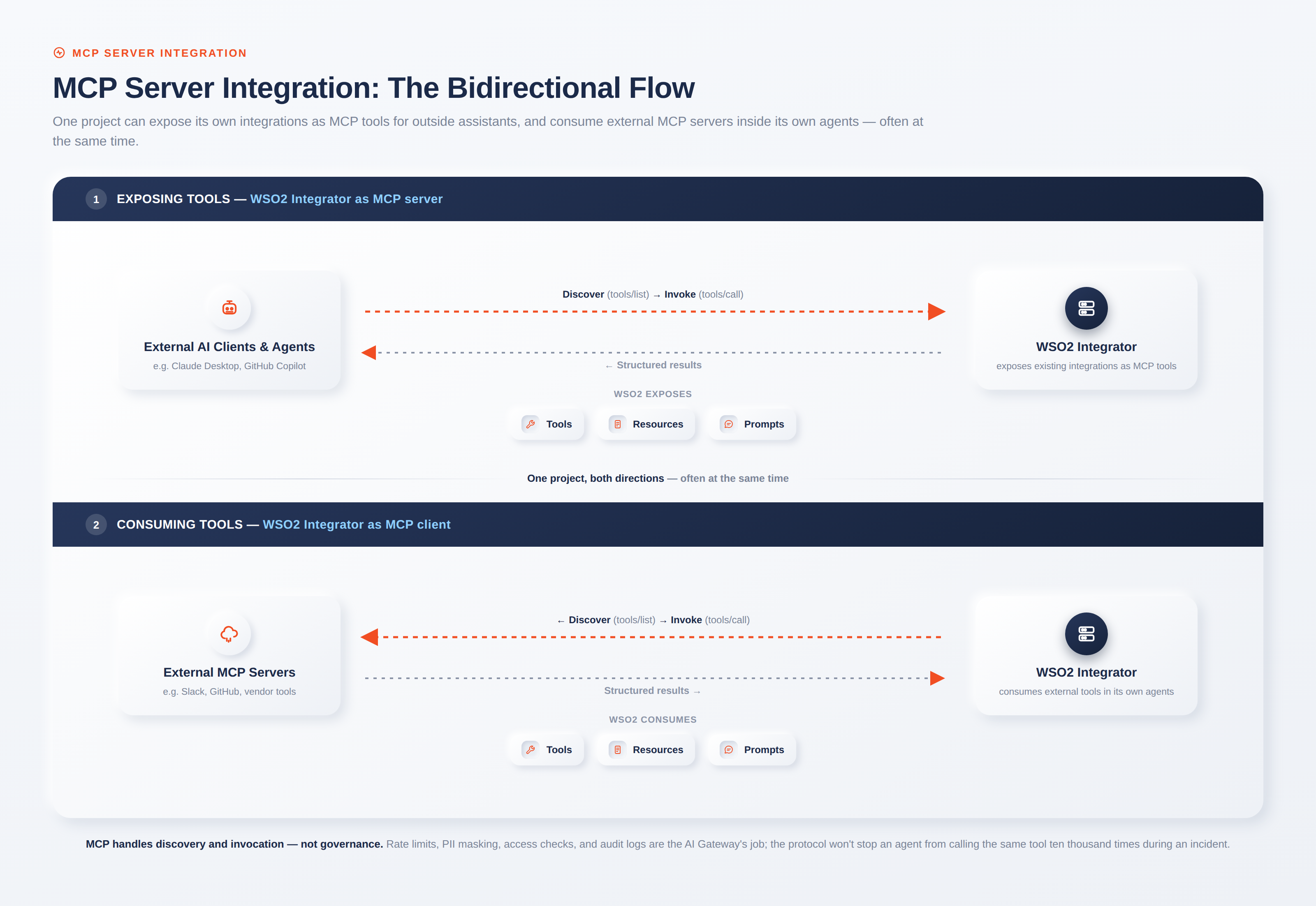
It helps to separate two terms that get blurred constantly. MCP is the protocol, the shared contract for how an agent and a tool provider talk. An MCP server is a specific implementation of that contract: a program that exposes tools, resources, or prompts to an agent. When people say "MCP server integration," they usually mean one of two directions, and often both at once: exposing your own systems as an MCP server so assistants like Claude Desktop or GitHub Copilot can use them, or consuming someone else's MCP server from inside your own agent.
That bidirectional nature is the part most introductory explainers miss. In WSO2 Integrator, for example, a single project can expose your integrations as MCP tools for outside assistants while also consuming external MCP tools inside your own agents. One integration might publish your CRM lookups over MCP for Copilot to use, and at the same time pull in Slack and GitHub MCP servers as tools for its own customer-care agent.
How MCP Server Integration Works
MCP follows a host-client-server architecture under the hood. The MCP host is the AI application, such as Claude Desktop or an agent runtime. The host spins up a dedicated MCP client that maintains the connection for each server it connects to. The MCP server is the program that provides the tools and data. One host can hold many clients with one server associated with each client, which is how an assistant reaches your CRM, your ticketing system, and a vendor tool at the same time.
The protocol itself is split into two layers. The data layer defines a JSON-RPC 2.0 based exchange: the messages, the discovery handshake, and the core primitives. The transport layer defines how those messages travel. MCP supports two transports: Stdio and streamable HTTP. Stdio uses standard input and output for local processes on the same machine, with no network overhead. Streamable HTTP uses HTTP POST with optional Server-Sent Events for remote servers, and it supports standard HTTP authentication, with OAuth as the recommended way to obtain tokens.
Everything an agent can do with a server comes down to three server-side primitives:
- Tools: executable functions the agent can invoke to perform actions, such as
create_ticket,run_forecast, orvalidate_transaction. - Resources: data sources the agent can read for context, such as a customer profile or a database schema.
- Prompts: reusable templates that standardize how the agent interacts with a system.
The flow is simple to follow. The client discovers what a server offers, then calls what it needs. A client sends a tools/list request to enumerate available tools, reads each tool's name, description, and input schema, and later sends tools/call with the chosen tool and its arguments. The server executes and returns structured content. Because discovery is a live request rather than a static config file, the available toolset can change at runtime, and servers can notify clients when it does.
MCP Server Integration vs. Traditional API Integration
If you already run a mature API program, a fair question is why agents need MCP at all when everything is already a REST endpoint. The answer is that REST assumes a developer read the docs, wrote the client, and knows which endpoint to call. An agent has none of that. It arrives at runtime and has to discover what is available and how to call it, on its own.
| Dimension | MCP server integration | Traditional REST/GraphQL API |
|---|---|---|
| Consumer | AI agents and assistants at runtime | Developers who read docs ahead of time |
| Discovery | Dynamic, via tools/list at connection time | Manual; endpoints known in advance |
| Interface | Uniform across all tools and servers | Per-service contracts and conventions |
| Context | Session-aware, built for multi-step tasks | Mostly stateless request/response |
| Auth model | Standardized, OAuth-based per the spec | Per-service, varies by API |
| Tool semantics | Descriptions and schemas the model reads | Human-oriented documentation |
None of this makes REST obsolete. Your MCP tools almost always sit on top of the same APIs and business logic you already have. MCP adds a discovery-and-invocation layer designed for a non-human caller, so the model reads a tool description written for it, sends arguments that match a declared schema, and gets back structured content it can reason over. MCP does not define what your tools do, it defines how agents and tools talk to each other.
How to Integrate an MCP Server (Step by Step)
The good news for teams with an existing integration layer is that you rarely start from a blank file. If your logic already lives in services and connectors, exposing it over MCP is mostly configuration. What follows is a reference implementation using WSO2 Integrator.
- Set up your environment and pick a direction. Decide whether you are exposing tools, consuming them, or both. Exposing makes sense when you want your integration reusable by Claude Desktop, Copilot, or any MCP client. Consuming makes sense when your own agent should use tools published by a community or vendor server.
- Expose your integration as an MCP server. In WSO2 Integrator, you create an MCP Service artifact, pick a listener, and add tools. Each tool gets a name, a description, and typed parameters through the Tool Configuration panel. A basic
mcp:Servicederives its tools from remote functions in the service; anmcp:AdvancedServicelets you implementonListToolsandonCallToolfor dynamic tool sets. Operating over Streamable HTTP, the service publishes a default endpoint athttp://localhost:8080/mcp; for enterprise deployments, this requires a production-grade host secured with TLS. - Connect a client and authenticate. Point your MCP client at that endpoint. Because the transport is HTTP, the listener accepts any standard listener configuration, including TLS, request limits, and timeouts, so you can put real transport security in front of the tools rather than bolting it on later.
- Consume external servers from your agent. To go the other way, open your agent canvas, choose Add Tool, and select Use MCP Server. WSO2 Integrator generates a toolkit that pulls tools from the remote server, and you can filter Tools to Include down to the specific ones you want so the agent's prompt does not balloon with dozens of unused tool definitions.
- Test before you ship. Connect the server to a client and confirm the tools appear. A common early issue is a client that connects but sees no tools, which almost always means no tools have been added to the service yet. Another is a call rejected as invalid parameters, which usually means the arguments the model sent do not match the tool's declared types. The fix is often to sharpen the tool description so the model sends the right shape. WSO2's customer-care agent tutorial walks through a full build if you want a working example.
Enterprise MCP Server Integration Challenges
Getting a server running in development is the easy part. Running MCP integration safely across an organization is where teams hit real friction, and it is important to know what the protocol does and does not handle.
MCP defines communication and a formal authorization framework based on OAuth 2.1. What it does not define is governance. The protocol will not prevent an agent from calling get_customer_details ten thousand times during an incident. It does not throttle that surge, mask the PII in the response, check whether this particular agent should have access, or write an audit trail. Those controls are not the protocol's job.
That gap is exactly why an AI gateway matters. A gateway sits between clients and servers as a single controlled entry point, validating OAuth scopes, applying rate limits, masking sensitive fields before responses go back to the model, routing calls to the right backend, and logging every interaction for compliance. The WSO2 AI Gateway, part of WSO2 API Platform, plays this role so teams can onboard internal and external MCP servers without modifying backend services. There are also genuine attack surfaces specific to this space, including tool poisoning and prompt injection, which is why MCP security deserves dedicated attention rather than being treated as a solved problem.
MCP Server Integration Use Cases and Examples
The clearest way to see the value is to look at the tools a real assistant would discover. A customer support agent connected through MCP might find get_customer_profile, list_orders, check_refund_status, and create_ticket. It looks up the customer, checks the order, confirms refund eligibility, and files the ticket, calling each tool through one uniform interface instead of four hand-written backend integrations.
The pattern generalizes across domains:
- Internal API access: wrap existing enterprise services so an agent can reach business data through a single governed boundary rather than direct, uncontrolled connections.
- Third-party tool use: consume published MCP servers for tools like Slack, GitHub, or Jira so your agent can act across SaaS platforms without you writing each integration.
- Cross-system workflows: a finance assistant discovering
fetch_revenue_data,run_forecast, andvalidate_transactioncan chain a multi-step task across a data service, a forecasting engine, and a transaction validator.
Because WSO2 Integrator connects to multiple model providers through one interface, including OpenAI, Anthropic, Azure OpenAI, Google Vertex, and Mistral, the same MCP tools you expose work regardless of the model your agents run on. The tools are decoupled from the model choice, which matters when model preferences change faster than integration roadmaps.
Simplifying MCP Server Integration with WSO2
Most of the effort in MCP server integration is not writing protocol code. It is reusing the integrations you already have, and governing how agents use them. That is the angle WSO2 takes. Rather than treating an MCP server as a from-scratch coding project, WSO2 Integrator turns existing services and connectors into MCP tools through configuration, and the WSO2 API Platform governs them the way it already governs APIs.
In practice, that means three things working together. WSO2 Integrator exposes integrations as MCP servers and consumes external ones inside agents, so one platform covers both directions. WSO2 AI Gateway adds the authentication, rate limiting, and observability that production agent workflows require. And because it is available open source, self-hosted, or as SaaS, teams can start small and scale without re-platforming. If you already manage APIs, MCP integration becomes an extension of a discipline you have, not a new one to invent.
To be clear about fit: if your only consumers are your own local agents and the tools are ephemeral, plain function tools are simpler and MCP adds overhead you do not need. MCP has an important role to play when you want to reuse capabilities across outside agents, or want a standard governed boundary between the AI surface and your systems. That is the enterprise case, and it is the one worth building for.
Conclusion
MCP server integration is how AI agents move from talking about work to doing it, safely reaching the APIs, data, and tools that run your business. The protocol handles discovery and invocation through a clean host-client-server model over JSON-RPC. The harder, more valuable part is doing it at scale: reusing your existing integrations instead of rebuilding them, and putting auth, rate limits, and observability around every tool call.
The fastest way to try it hands-in is to expose one existing service as an MCP tool and connect it to a client you already use. WSO2 Integrator's AI integration documentation walks through both exposing and consuming MCP, and WSO2 API Platform adds the governance layer when you are ready to move past the prototype.
Frequently Asked Questions
What is MCP server integration?
It is connecting AI agents and assistants to external tools and data through the Model Context Protocol. You expose your systems as an MCP server, or consume an existing one from your agent, so models can discover and call real capabilities through one standard interface instead of custom, per-tool code.
What is the difference between MCP and an API?
An API is a general-purpose way for software to access a service, usually called by a developer who reads the docs. MCP is a protocol designed for AI agents that arrive at runtime. It standardizes how tools are discovered, described, and invoked so a model can use them without prior knowledge. MCP tools typically sit on top of existing APIs.
What transports does MCP support?
Two. Stdio, for local servers running on the same machine as the client, and Streamable HTTP, for remote servers communicating over a network. Streamable HTTP supports standard HTTP authentication, with OAuth recommended for obtaining tokens.
Do I need an AI gateway?
Not to run a single server in development. You need one when you deploy agents against sensitive or multi-server environments, because MCP defines communication and authentication but not governance, rate limits, data masking, or audit logging. A gateway adds those controls without changing your backend services.
Can one integration expose and consume MCP at the same time?
Yes. In WSO2 Integrator, a single project can publish its own tools over MCP for outside assistants while also consuming external MCP servers, such as Slack or GitHub, as tools inside its own agents.

