How to Build AI Agents: A Step-by-Step Guide
Most teams can get an AI agent working within a few hours. Building one that survives contact with real users, real data, and the systems your business actually runs on is the hard part, and it's where most projects hit a wall.
The gap is rarely the model. It's everything around it: the tools the agent can call, the data it can reach, and the plumbing that connects it to your CRM, your databases, and your APIs. This guide walks through how to build AI agents end to end, from core components and a repeatable six-step process to the integration layer that decides whether an agent stays a demo or becomes something you can ship.
What Is an AI Agent?
An AI agent is a system that uses a large language model to reason and act on its own, rather than just responding to a single prompt. The model doesn't only generate text. It chooses what to do next, calls tools to get information or take action, evaluates the result, and repeats until the task is done.
That autonomy is the dividing line. A chatbot answers the question in front of it and stops. A workflow runs a fixed sequence of steps that a developer wired together in advance. An agent decides the sequence itself at runtime. Ask an agent to "resolve this support ticket" and it might look up the customer's order, check the refund policy, issue a refund, and send a confirmation, choosing each step based on what it found in the last one.
Agentic AI is the broader category these systems belong to. It's worth being precise about the spectrum, because "agent" gets stretched to cover everything from a scripted chatbot to a fully autonomous system:
- Single LLM call: one prompt, one response. Not an agent.
- Workflow: an LLM orchestrated through predefined code paths. Predictable, but the human designed the path.
- Agent: the LLM directs its own process and tool use, maintaining control over how it reaches the goal.
The practical takeaway: don't build an agent when a workflow will do. Agents trade predictability, latency, and cost for flexibility, and that trade only pays off when the task genuinely can't be scripted in advance.
When Should You Build an AI Agent?
Agents earn their complexity on problems that have resisted traditional automation. If you can capture the logic in a clean set of if-then rules, a rules engine will be cheaper, faster, and easier to debug than any LLM. Reach for an agent when the work has one or more of these traits:
- Nuanced, context-dependent decisions. Refund approvals, fraud review, or triage, where the right call depends on subtle signals a fixed ruleset can't capture.
- Rules that have become unmaintainable. Systems buried under years of exceptions and special cases, where every update risks breaking three others.
- Heavy reliance on unstructured data. Work that means reading documents, interpreting natural language, or holding a real conversation.
A useful gut check before you commit: if a competent new hire could do the task by following a written checklist, automate it with a workflow. If the task needs judgment the checklist can't fully capture, an agent is worth considering. Start with the narrowest version of the problem that delivers value, then expand once you trust the agent's behavior.
Core Components of an AI Agent
Every AI agent relies on three essential building blocks that drive its iterative reasoning process. Grasping these essentials provides a clear foundation for the implementation steps that follow.
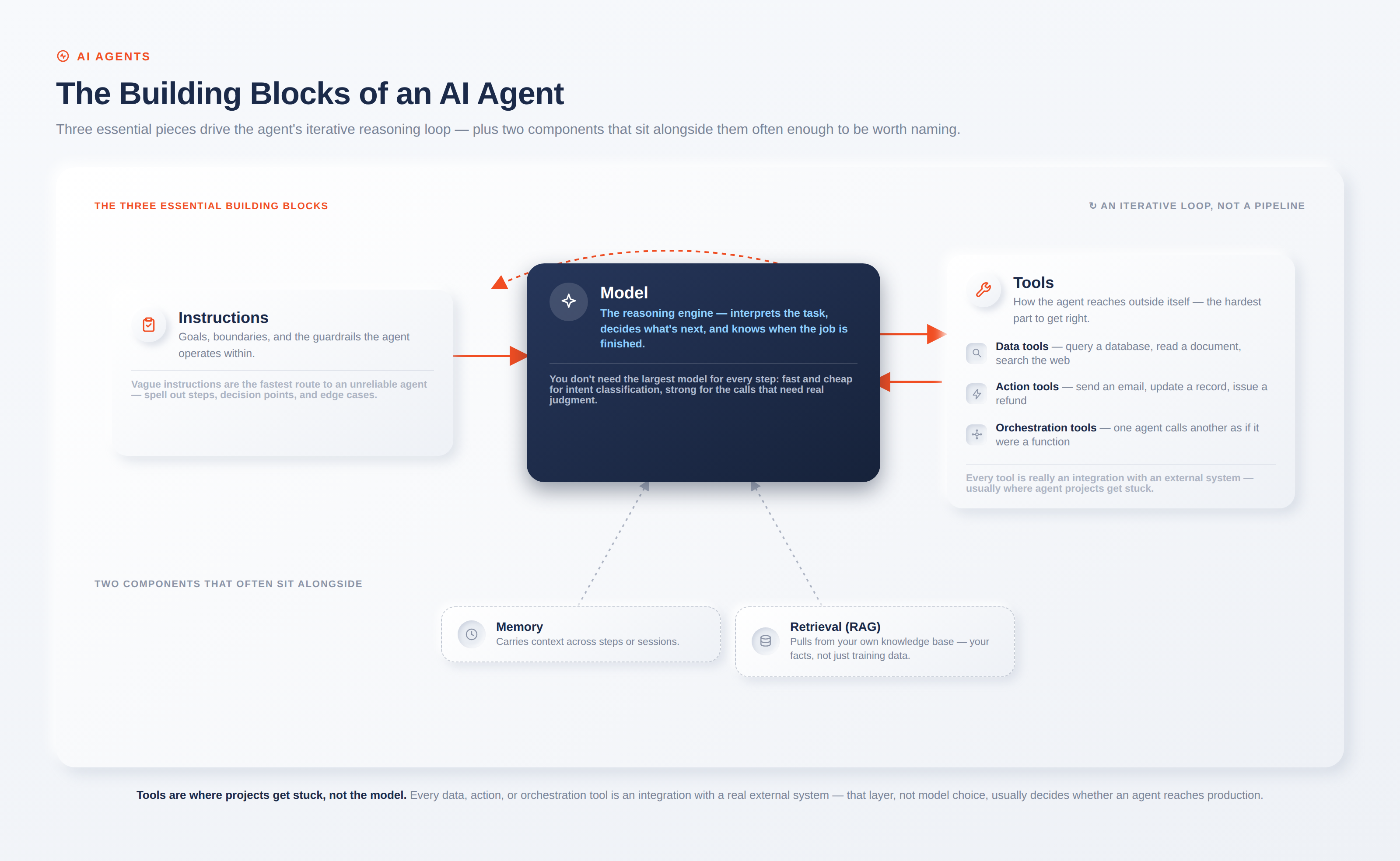
The model is the reasoning engine. It interprets the task, decides what to do next, and knows when the job is finished. You don't need the largest model for every step; a fast, cheap model can handle intent classification while a stronger one handles the calls that actually require heavy judgment.
Tools are how the agent reaches outside itself, and in practice they're the hardest part to get right. They fall into three rough categories: data tools that retrieve context (query a database, read a document, search the web), action tools that change something (send an email, update a record, issue a refund), and orchestration tools, where one agent calls another as if it were a function. Every one of those tools is really an integration with some external system, which is why the tooling layer, not the model, is usually where agent projects get stuck.
Instructions define how the agent behaves: its goals, its boundaries, and the guardrails it operates within. Vague instructions are the fastest route to an unreliable agent. Break tasks into explicit steps, spell out what to do at decision points, and anticipate the edge cases where a user gives incomplete information or asks something unexpected.
Two components sit alongside these three often enough to be worth naming. Memory lets the agent carry context across steps or sessions, and retrieval (usually called RAG, for retrieval-augmented generation) pulls relevant information from your own knowledge base so the agent works from your facts rather than the model's training data.
How to Build an AI Agent: Step by Step
Below is a framework-agnostic, step-by-step workflow for building AI agents. It applies regardless of whether you rely on a model provider's SDK, an integration platform, or direct LLM API calls.
- Define the problem and success criteria. Clearly articulate the specific objective and the metrics for quality. Aim for precision: "Address billing inquiries with accurate responses while preventing improper refunds" provides a baseline for evaluation, whereas a vague goal like "manage support" leaves the agent without direction.
- Choose your model. Prototype with the most capable model available to set a quality baseline, then test whether smaller, cheaper models hold that quality on individual steps. This keeps cost and latency down without capping the agent's ceiling.
- Define tools and integrations. Give the agent the data and action tools the task requires, and nothing it doesn't. Each tool needs a clear definition, a descriptive name, and well-specified inputs. This is where connectors to your real systems come in, and it's covered in depth in the next section.
- Write clear instructions and guardrails. Turn your existing procedures, policies, and support scripts into explicit, numbered instructions. Define what the agent must never do, and require human sign-off for high-risk actions like large refunds or irreversible changes.
- Add memory and context. Wire in short-term memory so the agent tracks the current task, and retrieval so it can pull from your own knowledge base. This is what moves an agent from generic to genuinely useful for your domain.
- Test, evaluate, and iterate. Run the agent against a fixed set of real scenarios, measure it against your success criteria, and fix the failures. Evaluation isn't a launch gate you pass once; it's a continuous loop that catches regressions as prompts, tools, and models change.
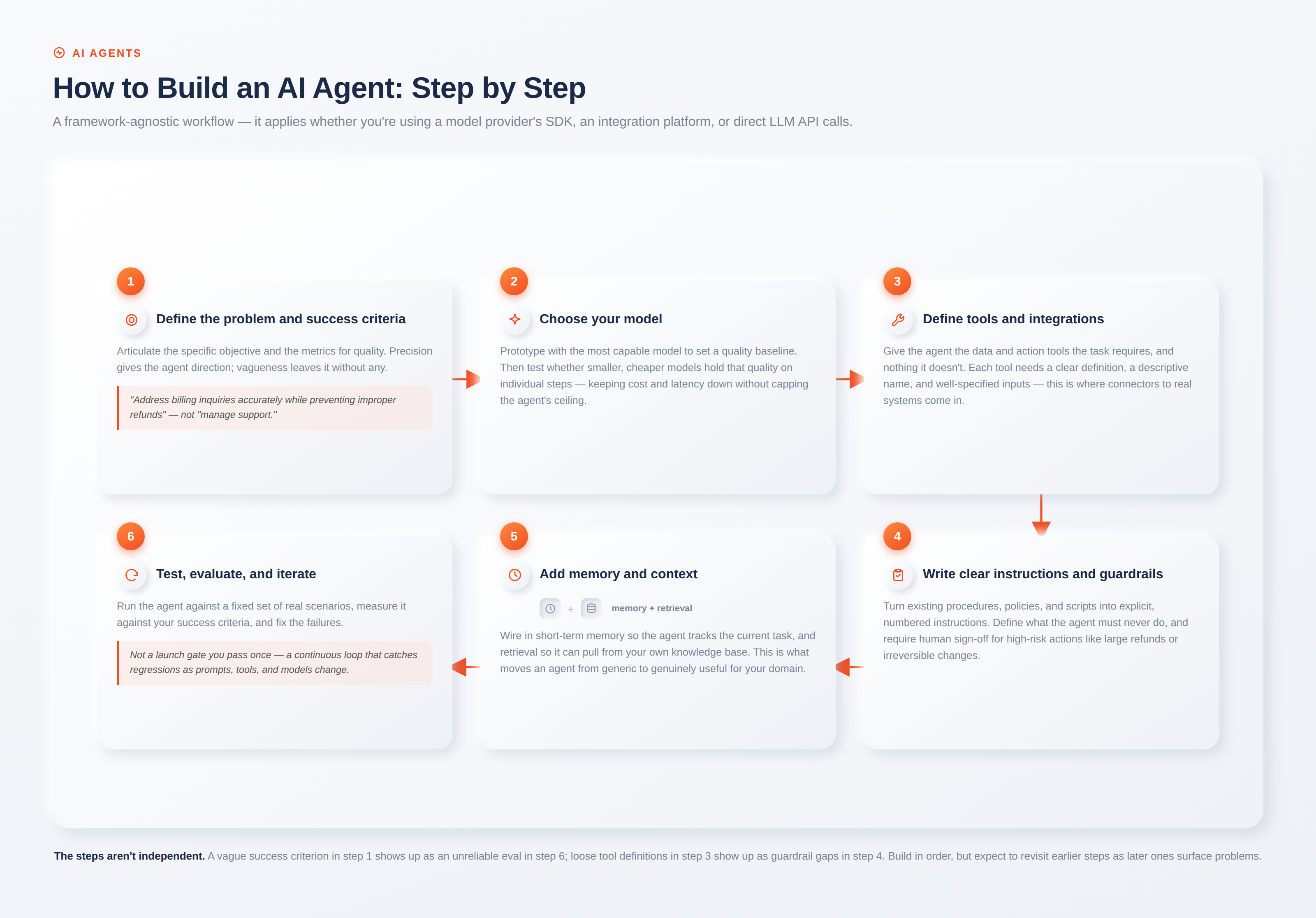
The order matters. Teams that skip straight to step three and start wiring tools before they've defined success in step one tend to build capable agents that solve the wrong problem well.
Connecting Your Agent to Real Systems
An agent that can only talk is a chatbot. An agent that can act needs to reach the systems where your business actually runs: the CRM that holds customer records, the database behind your orders, the messaging platform your team lives in. This integration layer is the part most tutorials on building agents ignore, but it's exactly where the difficulty concentrates. Hand-wiring each connection with bespoke HTTP calls is how you end up with the brittle, point-to-point tangle that fails the moment an API changes.
This is the problem an integration platform solves, and it's the reason WSO2 Integrator is a natural foundation for production agents. Instead of writing low-level protocol code for every system, you give the agent tools backed by pre-built connectors for the services you already use. A connector exposes an external service's API as ready-to-use operations, and the model that separates a reliable integration from a script is worth understanding:
- Connections hold the credentials and endpoint settings for a service, such as API keys, OAuth tokens, and hostnames. You define a connection once and reuse it by name, so secrets live in one managed place rather than being scattered through the code.
- Actions are outbound operations your agent invokes, such as "send SMS," "create contact," or "execute query." This is how an agent takes action in the world.
- Triggers are inbound events a service pushes to your integration, like a new database row or an incoming webhook. Trigger support covers databases such as MySQL, PostgreSQL, and MSSQL, messaging systems such as Kafka and RabbitMQ, and file storage.
The AI integrations in WSO2 Integrator go a step further and let you build the agent itself alongside its connections. The same environment gives you direct LLM calls, RAG pipelines, autonomous agents that reason over a system prompt and call tools while maintaining conversation state, as well as Model Context Protocol (MCP) support. MCP is an open protocol for connecting agents to tools and data through a consistent interface, and WSO2 Integrator works both directions: you can expose your existing integrations as MCP tools for an agent to consume, or connect your agent to external MCP tools that they can consume.
A few capabilities matter specifically for grounding agents in your own data and models:
| Capability | What it does |
|---|---|
| Model providers | Connect to providers including OpenAI, Anthropic, Azure OpenAI, Google Vertex, and Mistral through one consistent interface. |
| Vector stores | Persist embeddings and run similarity search across in-memory, Pinecone, pgvector, Weaviate, or Milvus. |
| Knowledge bases | Combine a vector store, embedding provider, and chunker into the document store RAG reads from. |
| Connectors | Reach SaaS apps, databases, and messaging systems without hand-written protocol code. |
The takeaway isn't that you need any single vendor. It's that the integration layer is a first-class part of building an agent, not an afterthought. Whether you adopt a platform or build it yourself, treat connectors, credentials, and data grounding as core architecture from day one.
Single-Agent vs. Multi-Agent Systems
Upon establishing the necessary components and integrations, the appropriate orchestration framework must be determined. Organizations are advised to deploy a single-agent architecture initially and introduce additional complexity only when operational constraints require it.
A single-agent system is one model equipped with tools and instructions, running in a loop until it hits an exit condition (a final answer, a tool result, an error, or a maximum number of turns). You extend its capabilities by adding tools, which keeps the architecture simple and evaluation manageable. Push a single agent as far as it will go before splitting it up.
Multi-agent systems distribute the work across several coordinated agents, and they generally take one of two shapes:
- Manager pattern: a central agent coordinates specialized sub-agents by calling them as tools, then synthesizes their outputs. Good when you want one agent in control of the overall flow.
- Decentralized pattern: agents hand off control to one another as peers, transferring the conversation to whichever specialist fits the request. Good for triage, where a first agent routes to the right specialist and steps out.
The signal that you've outgrown a single agent is usually tool confusion or instruction overload: the agent starts picking the wrong tool, or the prompt has grown so many conditional branches that it's impossible to maintain. Until then, more agents mostly means more coordination overhead and more places for things to go wrong.
Taking AI Agents to Production
Moving an agent from a working prototype to a production system requires additional considerations across observability, security, and governance. An agent that can read data and take actions is a new kind of actor on your network, and it needs the same operational rigor as any other production service, plus a few concerns unique to autonomy.
Observability comes first. When an agent makes a wrong call, you need to see the chain of decisions and tool invocations that led there. Emitting traces in an open standard like OpenTelemetry lets agent activity show up in the same distributed tracing you already use for services, so you can debug an agent the way you debug anything else in production.
Identity and access control come next. An agent acting on a human's borrowed credentials destroys attribution and widens the blast radius when something goes wrong. Giving each agent its own identity, with least-privilege access to the specific connectors and actions it needs, is what keeps an autonomous system accountable. Since connections centralize credential management, revoking or scoping an agent's permissions for a target system can be done seamlessly without touching its code.
Guardrails and human-in-the-loop close the gap. Rule-based and model-based checks on inputs and outputs catch unsafe behavior, and high-risk actions such as large refunds or irreversible writes should require human approval until you trust the agent's track record. None of this is a feature you bolt on after launch. It's the architecture that separates an agent you can operate from a graveyard of stalled pilots.
Real-World AI Agent Examples
The patterns above show up across a handful of domains where agents have proven their worth, and the common thread is that each one depends on solid integration with back-end systems:
- Customer support. Support blends conversation with action, pulling order history, checking policy, issuing refunds, and updating tickets. A customer care agent is only as good as its connections to the systems holding that data, which is why the integration wiring matters as much as the model here.
- IT help desk. An internal help desk agent answers employee questions, looks up account status, and resets access, drawing on persistent memory and a knowledge base built from your own documentation.
- Research and analysis. Agents that gather information across many sources, synthesize it, and decide when they've searched enough suit open-ended questions where you can't predict the steps in advance.
The pattern to notice: every strong use case has a clear success signal and a real feedback loop, and every one of them lives or dies on how well the agent connects to the data and systems behind it.
Conclusion
Building an AI agent follows a repeatable path: define the problem, choose a model, wire up tools, write clear instructions, add memory, and evaluate relentlessly. The mechanics are increasingly well understood, and a capable prototype is within reach for most teams in short order.
The gap between that prototype and a production system is mostly about the layer around the model, and above all the integration that connects the agent to the systems where your work actually happens. Get that right, with reliable connectors, centralized credentials, grounded data, and proper observability, and your agent becomes something you can trust with real actions on real systems. If you're ready to connect an agent to the tools and data your business runs on, WSO2 Integrator's AI integrations documentation is a practical place to start.
Frequently Asked Questions
What are the main types of AI agents?
Agents are often grouped by how they decide and act, from simple reflex agents that respond to immediate input, through model-based and goal-based agents that reason about state and objectives, to learning agents that improve over time. In practice, most LLM-based agents today combine goal-directed reasoning with tool use and memory rather than fitting neatly into one textbook category.
Can ChatGPT build an AI agent?
A general-purpose chatbot can help you write the code for an agent, but the agent itself needs more than a single model call. It needs tools, instructions, memory, and an orchestration loop. Vendor SDKs, frameworks, and integration platforms exist specifically to supply that structure around the model.
Is it hard to build an AI agent?
A basic prototype is straightforward and can be built quickly with today's frameworks. The difficulty is in production readiness: reliable tool use, integration with your systems, evaluation, security, and governance. That's where most of the real engineering effort goes, and where most projects run into trouble.
What does it cost to build an AI agent?
Costs come from model usage (which scales with how many steps and tokens each task consumes), engineering time, and the infrastructure to run, connect, and govern agents at scale. Agents that loop many times or call large models on every step cost more, which is why right-sizing models per step and setting usage limits matters for keeping spend under control.

