Configuration Reference
Everything you can configure in an integration project, in one place:
- Configuration management: configurable variables, value sources, and per-environment configuration
- Config.toml reference: the runtime configuration file, module-qualified names, and supported types
- Ballerina.toml reference: project metadata, build options, and dependencies
- Cloud.toml reference: container image and cloud deployment settings
Configuration management
Integration projects typically run across multiple environments — development, staging, and production — each with different endpoints, credentials, and feature flags. WSO2 Integrator uses Ballerina's built-in configuration system to keep these settings out of source code and supply them at runtime.
This guide is the deeper reference for the configuration model. For the fundamentals of using configurable variables, see Configurations.
Configurable variables
A configurable variable is a module-level binding declared with Ballerina's configurable keyword. The runtime resolves its value at startup from one of the configuration value sources, and the resolved value is accessible across all flows and nodes in your integration project.
- Visual Designer
- Ballerina Code
- Config.toml File
In the Visual Designer, configurable variables appear under Configurations in the project sidebar. Use the Add Configurable Variable panel to declare a new variable — set the name and type, and either provide a default value (optional) or leave it empty (required).
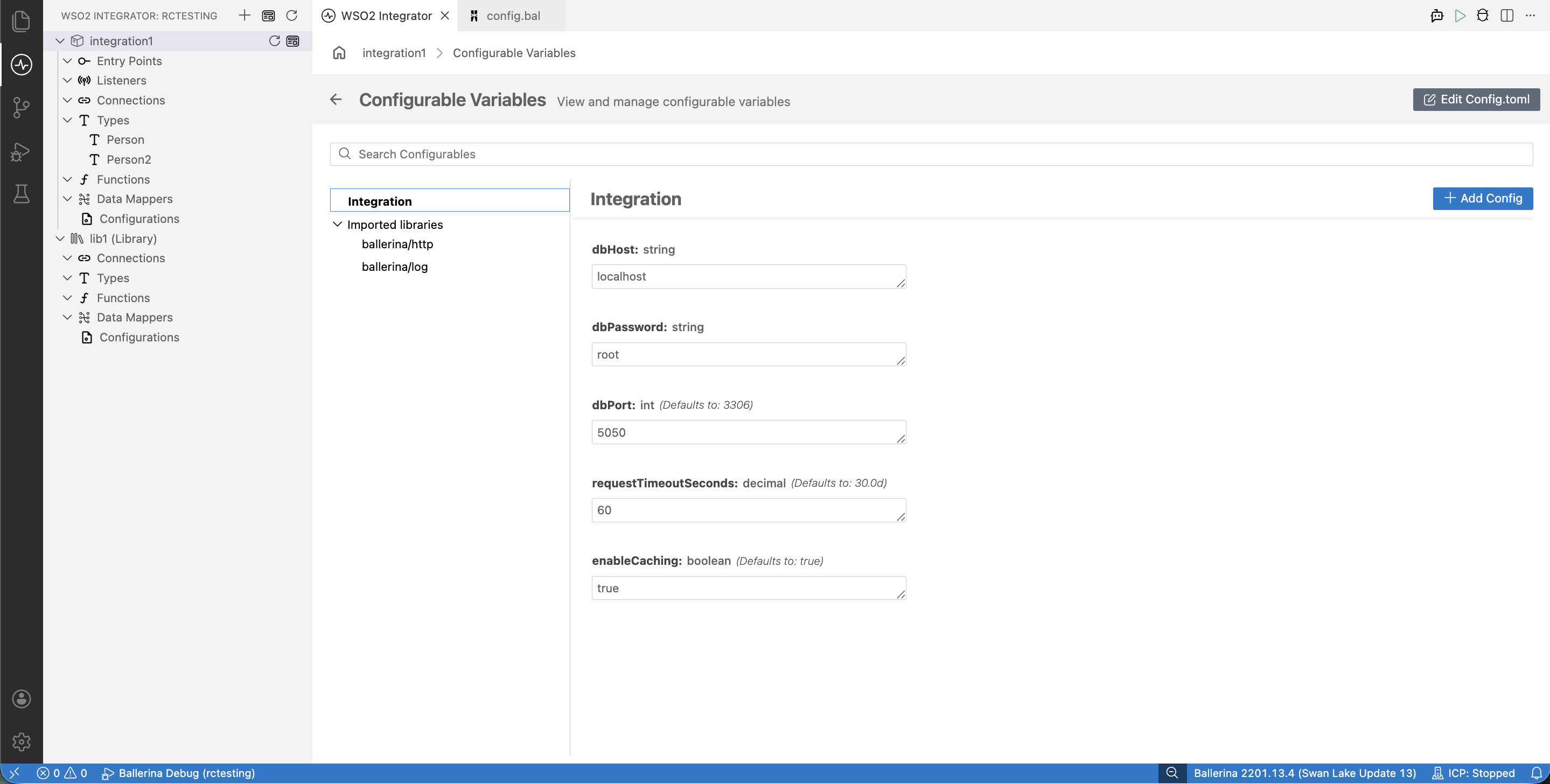
Declare configurables at the module level using the configurable keyword. The ? placeholder marks a variable as required; provide a literal default to make it optional.
// Required -- must be supplied at runtime
configurable string dbHost = ?;
configurable string dbPassword = ?;

// Optional -- uses the declared default if no value is supplied
configurable int dbPort = 3306;
configurable decimal requestTimeoutSeconds = 30.0d;
configurable boolean enableCaching = true;
Supply values in Config.toml at the project root. Required variables must be set; optional variables may be omitted to use their declared defaults.
# Required
dbHost = "db.example.com"
dbPassword = "secret"

# Optional — override the declared defaults if needed
dbPort = 5432
requestTimeoutSeconds = 60.0
enableCaching = false
Supported types
A configurable variable's type must describe plain-data values that the runtime can parse from a configuration source and hold safely for the lifetime of the program.
This covers Ballerina's basic types (nil, boolean, int, byte, float, decimal, string, xml) and structured types built from them (arrays, maps, records, tables). Common examples are shown below.
| Type | Example |
|---|---|
int | configurable int port = 8080; |
byte | configurable byte maxRetries = 3; |
float | configurable float threshold = 0.75; |
decimal | configurable decimal taxRate = 0.08d; |
string | configurable string apiKey = ?; |
boolean | configurable boolean debug = false; |
| Arrays | configurable string[] allowedOrigins = ["*"]; |
| Maps | configurable map<string> headers = {}; |
| Records | configurable DatabaseConfig dbConfig = ?; |
| Tables | configurable table<Employee> key(id) employees = table []; |
Structured configuration
When you have many related settings — for example, the host, port, credentials, and pool size for a single database — declaring each one as a separate configurable variable becomes hard to read and easy to mis-wire. Group them into a record type instead, and declare a single configurable variable of that type.
- Visual Designer
- Ballerina Code
- Config.toml File
Use the Visual Designer's type creator to define a new record type (or the type picker to select an existing one), then add a configurable variable of that record type the same way as any primitive.
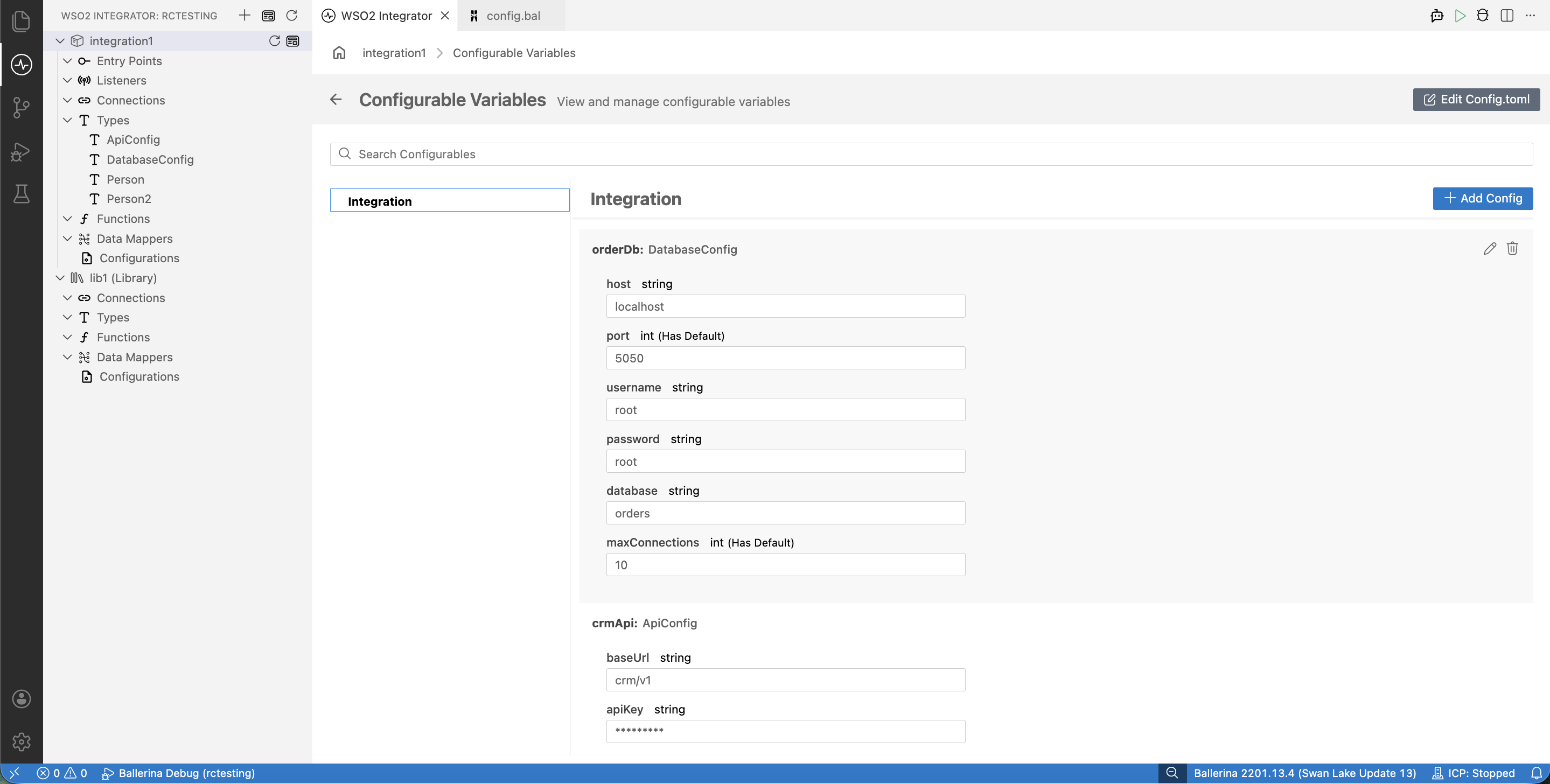
Define the record type at the module level, then declare a configurable of that type:
type DatabaseConfig record {|
    string host;
    int port = 3306;
    string username;
    string password;
    string database;
    int maxConnections = 10;
|};

type ApiConfig record {|
    string baseUrl;
    string apiKey;
    decimal timeoutSeconds = 30.0d;
    int maxRetries = 3;
|};

configurable DatabaseConfig orderDb = ?;
configurable ApiConfig crmApi = ?;
Supply values for each record-typed configurable as a TOML table. Fields with declared defaults may be omitted.
[orderDb]
host = "db.example.com"
username = "app_user"
password = "secure_password"
database = "orders"

[crmApi]
baseUrl = "https://api.crm.example.com"
apiKey = "secret_api_key"
Configuration value sources
Configurable values can be supplied from several sources. When the same variable is set in more than one place, the runtime resolves it using the first source from the table below (top → bottom, highest to lowest precedence):
| Source | Example | Typical use |
|---|---|---|
| Command-line arguments | bal run -- -CdbHost=localhost | One-off overrides, local testing |
Individual env vars (BAL_CONFIG_VAR_*) | BAL_CONFIG_VAR_DBHOST=localhost | CI/CD pipelines, containers, secrets |
Inline TOML (BAL_CONFIG_DATA) | BAL_CONFIG_DATA='dbHost="localhost"' | Containerized runs without a config file |
TOML files (Config.toml / BAL_CONFIG_FILES) | dbHost = "localhost" | Per-environment configuration |
| Code defaults | configurable string dbHost = "localhost"; | Development fallback |
Command-line arguments support only basic primitive types (boolean, int, float, decimal, string, xml). For arrays, maps, records, and tables, supply values via TOML files or BAL_CONFIG_VAR_* instead.
Config.toml
Config.toml is the primary configuration file. Place it in the project root directory (alongside Ballerina.toml). The runtime reads it automatically at startup. Values you enter through the Visual Designer's Config Editor are written to this same file.
For TOML syntax, type-by-type encoding, and module-qualified key conventions, see the Config.toml reference.
Environment variables
Three environment variables shape how the runtime reads configuration: BAL_CONFIG_VAR_* sets individual values, BAL_CONFIG_FILES selects which TOML files to load, and BAL_CONFIG_DATA passes TOML content inline.
BAL_CONFIG_VAR_*
Override individual configurable variables via specially named environment variables. The name pattern is:
- Start with
BAL_CONFIG_VAR_. - For root-module variables, append the variable name in uppercase.
- For non-root modules or external packages, include the module path with dots replaced by underscores, all uppercase.
# Root module: configurable int port = 8080;
export BAL_CONFIG_VAR_PORT=9090

# Non-root module myapp.db: configurable string host = ?;
export BAL_CONFIG_VAR_MYAPP_DB_HOST="db.example.com"

# External package org=ballerinax, package=mysql: configurable int port = 3306;
export BAL_CONFIG_VAR_BALLERINAX_MYSQL_PORT=5432
The env-var value is parsed as the declared Ballerina type:
| Ballerina type | Env-var value |
|---|---|
int | Integer literal: 9090 |
float | Decimal literal: 30.5 |
boolean | true or false |
string | Plain text: api.example.com |
decimal | Decimal literal: 0.08 |
BAL_CONFIG_FILES
Specifies one or more TOML files to load as configuration sources. Files listed earlier take precedence over later ones. The list separator is : on Linux/macOS and ; on Windows.
- Linux / macOS
- Windows
# Single file
export BAL_CONFIG_FILES="/app/Config.toml"

# Multiple files — secret.toml takes precedence
export BAL_CONFIG_FILES="/run/secrets/secret.toml:/app/Config.toml"
# Single file
set BAL_CONFIG_FILES="C:\app\Config.toml"

# Multiple files — secret.toml takes precedence
set BAL_CONFIG_FILES="C:\secrets\secret.toml;C:\app\Config.toml"
When BAL_CONFIG_FILES is set, the default Config.toml in the working directory is not loaded automatically. Include it explicitly in the list if you still need it.
BAL_CONFIG_DATA
Passes TOML configuration content directly as an environment-variable value. Useful in container environments and CI/CD pipelines where creating a file is inconvenient.
export BAL_CONFIG_DATA='port=9090
hostname="api.example.com"
enableSSL=true'
When both BAL_CONFIG_FILES and BAL_CONFIG_DATA are set, values from BAL_CONFIG_FILES take precedence.
Per-environment configuration
Most integration projects need different values for development, staging, and production — different hosts, credentials, and feature flags. The recommended pattern is to keep a separate TOML file per environment and select the right one at runtime with BAL_CONFIG_FILES. A common layout keeps a default Config.toml at the project root for local work, with environment-specific files under a config/ subdirectory.
my-integration/
├── Ballerina.toml
├── Config.toml              # Default / development
├── config/
│   ├── dev.toml
│   ├── staging.toml
│   └── prod.toml
└── main.bal
# config/dev.toml
dbHost = "localhost"
dbPort = 3306
dbUser = "root"
dbPassword = "dev-password"
dbName = "orders_dev"
crmBaseUrl = "https://sandbox.crm.example.com"
enableCaching = false
logLevel = "DEBUG"
# config/prod.toml
dbHost = "db.prod.internal"
dbPort = 3306
dbUser = "app_user"
dbPassword = "prod-encrypted-password"
dbName = "orders"
crmBaseUrl = "https://api.crm.example.com"
enableCaching = true
logLevel = "WARN"
BAL_CONFIG_FILES=config/dev.toml bal run
BAL_CONFIG_FILES=config/prod.toml bal run
Never commit secret-bearing configuration files to version control. For production credential handling, secret managers, and TLS configuration, see Secrets and encryption.
Config.toml reference
Config.toml provides runtime values for configurable variables declared in Ballerina source code. Place it in the project root (alongside Ballerina.toml), or specify one or more config files via the BAL_CONFIG_FILES environment variable. Ballerina uses TOML syntax with module-qualified keys to map configuration values to their corresponding configurable declarations.
This page is the TOML encoding reference for Config.toml. For the basics of using configurable variables, see Configurations. For the complete configuration reference, see Configuration management.
Module-qualified names
When configurable variables are in non-root modules or external packages, use TOML table headers to specify the module context.
Root module
Variables in the root module of the current package need no qualifier. They map directly to top-level TOML keys.
// main.bal — root module
configurable int port = 8080;
configurable string hostname = "localhost";
configurable boolean enableSSL = false;
port = 9090
hostname = "api.example.com"
enableSSL = true
Non-root module (same package)
Variables in a sub-module use the module name as the TOML table header.
// modules/db/db.bal — module mypackage.db
configurable string dbHost = ?;
configurable int dbPort = 3306;
[mypackage.db]
dbHost = "db.example.com"
dbPort = 5432
External package
Variables declared as configurable in a dependency use the org-name.package-name (or org-name.package-name.module-name) qualifier.
[ballerinax.mysql]
host = "db.example.com"
port = 3306
user = "admin"
For ICP runtime bridge configuration (the wso2/icp.runtime.bridge package used when connecting to ICP):
[wso2.icp.runtime.bridge]
environment = "dev"
project     = "my-project"
integration = "my-integration"
runtime     = "my-integration-1"
secret      = "<generated-secret>"
Supported types
Each subsection below shows the Ballerina configurable declaration followed by the corresponding Config.toml entry.
Primitive types
Ballerina primitive types map directly to TOML scalar values.
configurable boolean enableSSL = false;
configurable int port = 8080;
configurable byte maxRetries = 3;
configurable float timeout = 30.5;
configurable decimal taxRate = 0.08d;
configurable string hostname = "localhost";
configurable xml template = xml `<greeting>Hello</greeting>`;
enableSSL  = true
port       = 9090
maxRetries = 5
timeout    = 60.0
taxRate    = 0.15
hostname   = "api.example.com"
template   = "<greeting>Hello</greeting>"
Enum types
Constrain a string-typed configurable to a fixed set of values using a union of string literals. The TOML value must exactly match one of the members.
type LogLevel "DEBUG"|"INFO"|"WARN"|"ERROR";
type Environment "dev"|"staging"|"prod";

configurable LogLevel logLevel = "INFO";
configurable Environment environment = "dev";
logLevel    = "WARN"
environment = "prod"
Arrays
Configurable arrays of primitives use TOML inline arrays.
configurable string[] allowedOrigins = [];
configurable int[] retryIntervals = [];
configurable boolean[] featureFlags = [];
allowedOrigins = ["https://app.example.com", "https://admin.example.com"]
retryIntervals = [1, 2, 5, 10]
featureFlags   = [true, false, true]
Records
Configurable record types map to TOML tables.
type DatabaseConfig record {|
    string host;
    int port;
    string user;
    string password;
    string database;
|};

configurable DatabaseConfig dbConfig = ?;
[dbConfig]
host     = "db.example.com"
port     = 3306
user     = "admin"
password = "secret"
database = "orders"
Nested records
Nested records use dot-separated TOML table headers.
type SSLConfig record {|
    string certPath;
    string keyPath;
|};

type ServerConfig record {|
    int port;
    SSLConfig ssl;
|};

configurable ServerConfig server = ?;
[server]
port = 443

[server.ssl]
certPath = "/certs/server.crt"
keyPath  = "/certs/server.key"
Array of records
Configurable arrays of records use TOML array-of-tables syntax ([[...]]).
type Endpoint record {|
    string name;
    string url;
    int timeout;
|};

configurable Endpoint[] endpoints = ?;
[[endpoints]]
name    = "orders"
url     = "https://orders.example.com"
timeout = 30

[[endpoints]]
name    = "inventory"
url     = "https://inventory.example.com"
timeout = 15
Maps
Configurable map types use TOML tables where each key-value pair becomes a map entry.
configurable map<string> headers = ?;
[headers]
"Content-Type" = "application/json"
"X-API-Key"    = "abc123"
Authorization  = "Bearer token"
Tables
Configurable table types use TOML array-of-tables. Each [[...]] entry becomes one row, with the key field acting as the primary key.
type Employee record {|
    readonly int id;
    string name;
    string department;
|};

configurable table<Employee> key(id) employees = ?;
[[employees]]
id         = 1
name       = "Alice"
department = "Engineering"

[[employees]]
id         = 2
name       = "Bob"
department = "Marketing"
Ballerina.toml reference
The Ballerina.toml file is the project manifest for a Ballerina package. It defines package metadata, build options, dependencies, platform-specific libraries, and code generation tool configurations. This file must reside in the root directory of every Ballerina package.
[package]
Defines the core metadata for the package.
[package]
org = "wso2"
name = "healthcare_integration"
version = "1.2.0"
distribution = "2201.13.3"
visibility = "private"
readme = "README.md"
icon = "icon.png"
license = ["Apache-2.0"]
authors = ["WSO2 Inc."]
keywords = ["healthcare", "integration", "hl7"]
repository = "https://github.com/wso2/healthcare-integration"
include = ["resources/**", "data/*.json"]
| Field | Type | Required | Description |
|---|---|---|---|
org | string | Yes | Organization name registered on Ballerina Central. Must be lowercase alphanumeric with underscores. |
name | string | Yes | Package name. Defaults to the directory name if omitted. Must be lowercase alphanumeric with underscores. |
version | string | Yes | Semantic version of the package (e.g., "1.0.0"). Defaults to "0.1.0". |
distribution | string | No | Minimum Ballerina distribution version required to build the package. |
visibility | string | No | Set to "private" to restrict package access to organization members only on Ballerina Central. |
readme | string | No | Path to a custom README markdown file used in generated documentation. |
icon | string | No | Path to a PNG icon file (max 128x128 pixels) for package documentation. |
license | string[] | No | Array of SPDX license identifiers (e.g., ["Apache-2.0"]). |
authors | string[] | No | Array of author names. |
keywords | string[] | No | Array of searchable keywords describing the package. |
repository | string | No | URL of the source code repository. |
include | string[] | No | Glob patterns for additional files/directories to include in the .bala archive. |
[build-options]
Configures build-time behavior. These options can also be passed as CLI flags to bal build.
[build-options]
observabilityIncluded = true
offline = false
skipTests = false
testReport = true
codeCoverage = true
cloud = "k8s"
graalvm = false
graalvmBuildOptions = "--no-fallback -H:+ReportExceptionStackTraces"
| Field | Type | Default | Description |
|---|---|---|---|
observabilityIncluded | boolean | false | Include the observability module in the build to enable metrics and tracing. |
offline | boolean | false | Build without downloading dependencies from Ballerina Central. |
skipTests | boolean | false | Skip test execution during the build. |
testReport | boolean | false | Generate an HTML test report after running tests. |
codeCoverage | boolean | false | Enable code coverage analysis and generate a coverage report. |
cloud | string | "" | Cloud deployment target. Use "k8s" for Kubernetes, "docker" for Docker, or "choreo" for WSO2 Integration Platform. |
graalvm | boolean | false | Build a GraalVM native executable instead of a JAR file. |
graalvmBuildOptions | string | "" | Additional arguments passed to the GraalVM native-image tool. |
[[dependency]]
Declares explicit package dependencies. In most cases, dependencies are automatically resolved and recorded in Dependencies.toml. Use this section only when you need to pin a version or use a local repository.
[[dependency]]
org = "ballerinax"
name = "mysql"
version = "1.13.0"

[[dependency]]
org = "myorg"
name = "shared_utils"
version = "2.0.0"
repository = "local"
| Field | Type | Required | Description |
|---|---|---|---|
org | string | Yes | Organization name of the dependency package. |
name | string | Yes | Package name of the dependency. |
version | string | Yes | Minimum required semantic version. |
repository | string | No | Set to "local" to resolve from the local repository (~/.ballerina/repositories/local). |
[[platform.java21.dependency]]
Declares Java platform dependencies (JAR files) required by the package at compile time or runtime. Use Maven coordinates or a direct file path.
# Maven dependency
[[platform.java21.dependency]]
groupId = "com.mysql"
artifactId = "mysql-connector-j"
version = "8.3.0"

# Local JAR file
[[platform.java21.dependency]]
path = "./libs/custom-codec-1.0.jar"
modules = ["healthcare_integration"]
scope = "provided"
graalvmCompatible = true

# Test-only dependency
[[platform.java21.dependency]]
groupId = "org.mockito"
artifactId = "mockito-core"
version = "5.11.0"
scope = "testOnly"
| Field | Type | Required | Description |
|---|---|---|---|
groupId | string | Yes* | Maven group ID. Required when using Maven coordinates. |
artifactId | string | Yes* | Maven artifact ID. Required when using Maven coordinates. |
version | string | Yes* | Maven version. Required when using Maven coordinates. |
path | string | Yes* | Absolute or relative path to a JAR file. Required when not using Maven coordinates. |
modules | string[] | No | Restrict JAR visibility to specific modules within the package. |
scope | string | No | Dependency scope: "testOnly" (tests only) or "provided" (compile-time only, not packaged). |
graalvmCompatible | boolean | No | Mark this JAR as compatible with GraalVM native compilation. |
Use platform.java17.dependency or platform.java21.dependency depending on the target Java platform version.
[[platform.java21.repository]]
Configures custom Maven repositories for resolving platform dependencies.
[[platform.java21.repository]]
id = "wso2-nexus"
url = "https://maven.wso2.org/nexus/content/repositories/releases/"
username = "user"
password = "pass"
| Field | Type | Required | Description |
|---|---|---|---|
id | string | Yes | A unique identifier for the repository. |
url | string | Yes | The Maven repository URL. |
username | string | No | Authentication username. |
password | string | No | Authentication password. |
[platform.java21]
Package-level platform settings.
[platform.java21]
graalvmCompatible = true
| Field | Type | Default | Description |
|---|---|---|---|
graalvmCompatible | boolean | false | Indicates whether the entire package is compatible with GraalVM native compilation. |
[[tool.<command>]]
Configures code generation tools (such as the OpenAPI, GraphQL, or gRPC tools) that run automatically during the build.
[[tool.openapi]]
id = "petstore"
filePath = "./openapi/petstore.yaml"
targetModule = "petstore_client"
options.mode = "client"
options.nullable = true

[[tool.grpc]]
id = "order_service"
filePath = "./proto/order.proto"
targetModule = "order_grpc"
| Field | Type | Required | Description |
|---|---|---|---|
id | string | Yes | Unique identifier for the tool invocation. |
filePath | string | Yes | Path to the specification file (OpenAPI YAML, proto file, etc.). |
targetModule | string | No | Destination module for the generated code. |
options | table | No | Tool-specific configuration options. |
Complete example
[package]
org = "wso2"
name = "order_management"
version = "1.0.0"
distribution = "2201.12.0"
license = ["Apache-2.0"]
authors = ["WSO2 Inc."]
keywords = ["orders", "integration"]
repository = "https://github.com/wso2/order-management"

[build-options]
observabilityIncluded = true
cloud = "k8s"
testReport = true
codeCoverage = true

[[dependency]]
org = "ballerinax"
name = "mysql"
version = "1.13.0"

[[platform.java21.dependency]]
groupId = "com.mysql"
artifactId = "mysql-connector-j"
version = "8.3.0"

[[tool.openapi]]
id = "inventory_api"
filePath = "./openapi/inventory.yaml"
targetModule = "inventory_client"
options.mode = "client"
Cloud.toml reference
Cloud.toml configures cloud deployment settings for a Ballerina package, including Docker container images, Kubernetes resource limits, autoscaling, health probes, and configuration file mounting. Place this file in the package root alongside Ballerina.toml. All fields are optional; the compiler applies sensible defaults for any unspecified values.
Enable cloud artifact generation
Set the cloud build option in Ballerina.toml to activate Cloud.toml processing:
[build-options]
cloud = "k8s"     # Kubernetes + Docker artifacts
Alternatively, pass it as a CLI flag without modifying Ballerina.toml:
bal build --cloud=k8s     # Kubernetes + Docker
bal build --cloud=docker  # Docker only
[container.image]
Configures the Docker container image built during bal build.
[container.image]
repository = "wso2inc"
name       = "order-service"
tag        = "v1.2.0"
base       = "ballerina/jvm-runtime:2.0"
user       = { run_as = "ballerina" }
| Field | Type | Default | Description |
|---|---|---|---|
repository | string | "" | Docker registry or repository prefix (e.g., "docker.io/wso2inc", "ghcr.io/myorg"). |
name | string | Package name | Container image name. Defaults to the Ballerina package name. |
tag | string | "latest" | Image version tag. |
base | string | Ballerina default | Base image for the Dockerfile. Override to use a custom JVM runtime image. |
user.run_as | string | "ballerina" | Non-root user the container process runs as. |
[cloud.deployment]
Defines Kubernetes deployment resource requests and limits.
[cloud.deployment]
min_memory = "256Mi"
max_memory = "512Mi"
min_cpu    = "200m"
max_cpu    = "1000m"
| Field | Type | Default | Description |
|---|---|---|---|
min_memory | string | "100Mi" | Minimum memory allocation (Kubernetes resource request). |
max_memory | string | "256Mi" | Maximum memory limit (Kubernetes resource limit). |
min_cpu | string | "500m" | Minimum CPU allocation in millicores (Kubernetes resource request). |
max_cpu | string | "500m" | Maximum CPU limit in millicores (Kubernetes resource limit). |
[cloud.deployment.autoscaling]
Configures horizontal pod autoscaling.
[cloud.deployment.autoscaling]
min_replicas = 2
max_replicas = 5
cpu          = 60
memory       = 80
| Field | Type | Default | Description |
|---|---|---|---|
min_replicas | int | 1 | Minimum number of pod replicas. |
max_replicas | int | 2 | Maximum number of pod replicas. |
cpu | int | 50 | Target CPU utilization percentage that triggers scaling. |
memory | int | 80 | Target memory utilization percentage that triggers scaling. |
[cloud.deployment.probes.liveness]
Configures the Kubernetes liveness probe. The liveness probe restarts the container when it stops responding.
[cloud.deployment.probes.liveness]
port                = 9091
path                = "/probes/healthz"
initialDelaySeconds = 30
periodSeconds       = 10
| Field | Type | Default | Description |
|---|---|---|---|
port | int | Service port | Port the liveness probe hits. |
path | string | "/probes/healthz" | HTTP path for the liveness check endpoint. |
initialDelaySeconds | int | 10 | Seconds to wait before the first probe after container start. |
periodSeconds | int | 10 | How often in seconds the probe is performed. |
[cloud.deployment.probes.readiness]
Configures the Kubernetes readiness probe. The readiness probe gates traffic to the container until it is ready to serve requests.
[cloud.deployment.probes.readiness]
port                = 9091
path                = "/probes/readyz"
initialDelaySeconds = 15
periodSeconds       = 5
| Field | Type | Default | Description |
|---|---|---|---|
port | int | Service port | Port the readiness probe hits. |
path | string | "/probes/readyz" | HTTP path for the readiness check endpoint. |
initialDelaySeconds | int | 10 | Seconds to wait before the first probe after container start. |
periodSeconds | int | 10 | How often in seconds the probe is performed. |
[[cloud.deployment.storage.volumes]]
Declares persistent volume claims for stateful workloads.
[[cloud.deployment.storage.volumes]]
name      = "data-volume"
mountPath = "/data"
readOnly  = false
size      = "5Gi"
| Field | Type | Required | Description |
|---|---|---|---|
name | string | Yes | Name of the persistent volume claim. |
mountPath | string | Yes | Container path where the volume is mounted. |
readOnly | boolean | No | Whether the volume is mounted as read-only. Defaults to false. |
size | string | No | Requested storage size (e.g., "1Gi", "500Mi"). |
[cloud.config]
Controls how configuration files and secrets are injected into the container at runtime.
[[cloud.config.files]]
Mounts local configuration files into the container as Kubernetes ConfigMaps.
[[cloud.config.files]]
file = "./Config.toml"

[[cloud.config.files]]
file = "./resources/datasource.toml"
| Field | Type | Required | Description |
|---|---|---|---|
file | string | Yes | Path to the local configuration file to mount into the container. |
[[cloud.config.secrets]]
Mounts sensitive configuration as Kubernetes Secrets rather than ConfigMaps. Use this for files containing passwords, tokens, and API keys.
[[cloud.config.secrets]]
file = "./Secret.toml"
| Field | Type | Required | Description |
|---|---|---|---|
file | string | Yes | Path to the local secret configuration file. |
Complete example
[container.image]
repository = "ghcr.io/wso2"
name       = "order-service"
tag        = "v1.2.0"

[cloud.deployment]
min_memory = "256Mi"
max_memory = "512Mi"
min_cpu    = "200m"
max_cpu    = "1000m"

[cloud.deployment.autoscaling]
min_replicas = 2
max_replicas = 10
cpu          = 60

[cloud.deployment.probes.liveness]
port                = 9091
path                = "/probes/healthz"
initialDelaySeconds = 30
periodSeconds       = 10

[cloud.deployment.probes.readiness]
port                = 9091
path                = "/probes/readyz"
initialDelaySeconds = 15
periodSeconds       = 5

[[cloud.config.files]]
file = "./Config.toml"

[[cloud.config.secrets]]
file = "./Secret.toml"