WSO2 Integrator on AWS
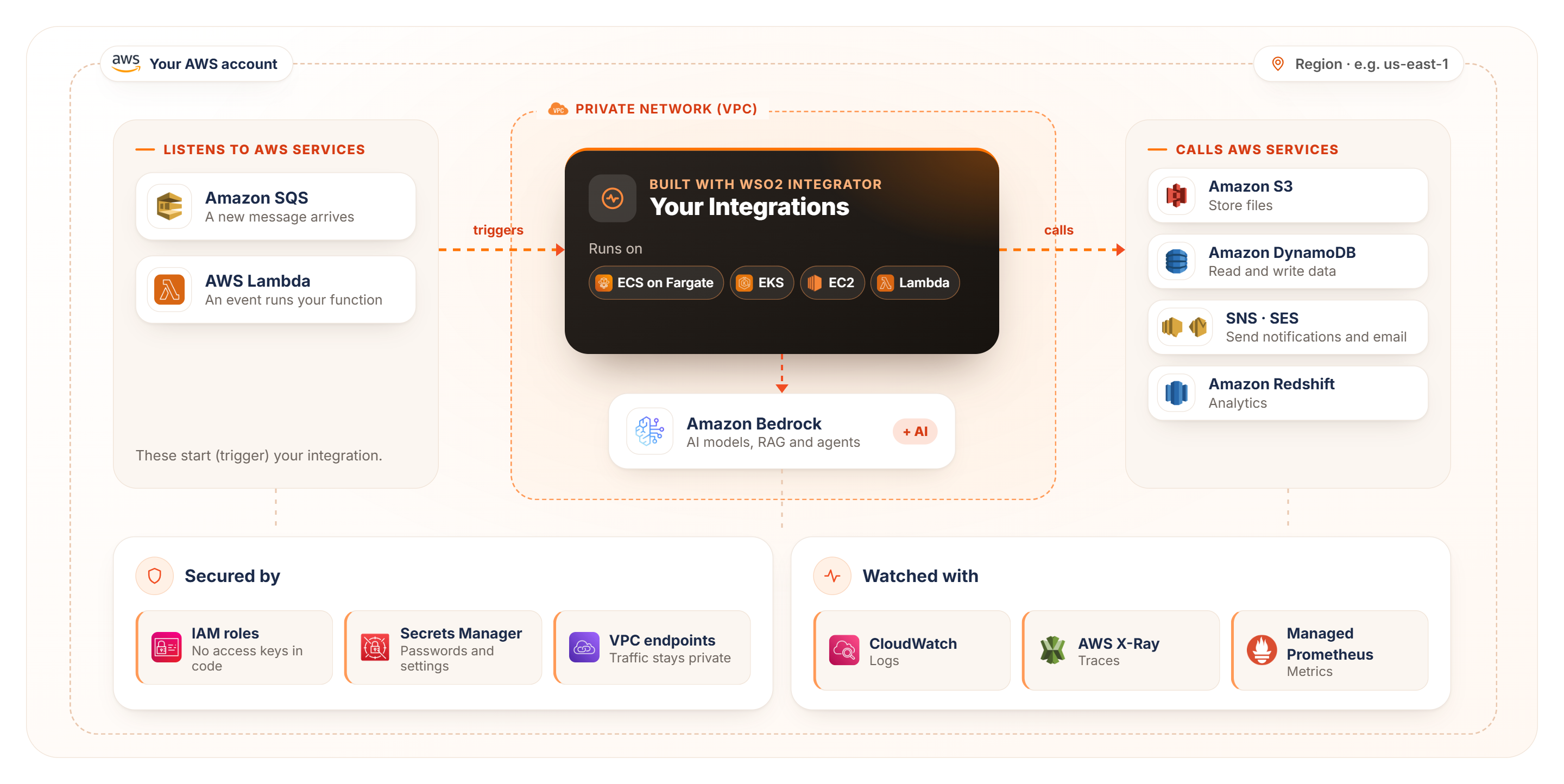
WSO2 Integrator provides support for building, deploying, securing, and observing integrations on Amazon Web Services (AWS). You can connect to AWS services, use Amazon Bedrock for AI capabilities, deploy integrations on AWS compute services, securely access AWS resources using IAM roles, and monitor integrations using AWS observability services. This page provides an overview of the capabilities and resources available for using WSO2 Integrator with AWS.
New to AWS?
Here are four AWS concepts you'll see throughout this guide
ECS
A fully managed container orchestration service for running your integration, used by the recommended deployment below.
IAM role
An identity AWS gives your integration, so it can use AWS without access keys in your code.
VPC
An isolated virtual network within AWS where you run and connect your resources.
Amazon Bedrock
The AWS service for using AI models from several providers through one API.
Start here
Four steps to unlock AWS Services with WSO2 Integrator
You need an AWS account and WSO2 Integrator installed.
Build for AWS
Decide how your integration interacts with AWS, add AI with Amazon Bedrock, and use Bedrock for AI assisted development.
Connect with AWS
Most teams start with a connector.
Connect to AWS services
Add a connector from the palette and sign in with the IAM role of wherever it runs.
React to AWS events
Start an integration when a message lands in an SQS queue, or when an event invokes an AWS Lambda function.
Call any AWS API
No connector for a service? Call its API directly - request signing (SigV4), Region and FIPS endpoints are handled for you.
Build AI applications with Amazon Bedrock
Use AI models hosted on AWS, so your data stays in your AWS account.
Use Bedrock models
Call chat models and create embeddings through Amazon Bedrock, configured as a model or embedding provider.
Answer from your own data (RAG)
Let AI answer from your documents using retrieval-augmented generation, with your source documents in S3.
Run agents on Bedrock AgentCore
Deploy AI agents to AgentCore and give them tools through AgentCore Gateway.
Give agents a memory
Store conversation memory in DynamoDB so agents remember earlier messages.
Use Amazon Bedrock for AI-assisted development
Bedrock also powers AI features built into WSO2 Integrator itself.
Copilot with Amazon Bedrock
Sign in to WSO2 Integrator Copilot with your own Amazon Bedrock credentials.
AI-assisted migration
Use Bedrock models to help migrate existing integrations onto WSO2 Integrator.
Deploy to AWS
Choose where your integration runs. Not sure? Start with ECS on Fargate.
Amazon EKS
Choose this if your team already runs Kubernetes.
Amazon EC2
Choose this if you want a virtual machine you fully control.
AWS Lambda
Choose this for short, event-driven jobs that run only when needed.
Secure on AWS
Follow these three practices from day one.
Use IAM roles, not keys
Your integration picks up the role of wherever it runs - nothing secret lives in code.
Keep secrets out of code
Load passwords and settings from AWS Secrets Manager or SSM Parameter Store.
Keep traffic private
Reach AWS services through VPC endpoints, with FIPS and dual-stack options.
Observe in AWS
Send logs, traces and metrics to the AWS tools you already use.
AWS connectors
Each AWS service has its own connector in the palette. On AWS, set auth: DEFAULT_CREDENTIALS on a connector so it uses the IAM role of wherever it
runs. See Access AWS services securely.
| Category | Connector | Use it for |
|---|---|---|
| Messaging | Amazon SQS | Queue messages |
| Amazon SNS | Publish to topics | |
| Amazon SES | Send email | |
| Storage | Amazon S3 | Bucket and object management |
| Database | Amazon DynamoDB | Read and write NoSQL data |
| DynamoDB Streams | Follow table changes | |
| Amazon Redshift | Query data warehouses | |
| Redshift Data API | Query data warehouses over an API | |
| Amazon SimpleDB | Legacy key-value data | |
| Security | AWS Secrets Manager | Read secrets at runtime |
| Marketplace | Metering | Meter usage for Marketplace products |
| Entitlement | Check entitlements for Marketplace products | |
| General-purpose | MySQL | For Amazon RDS and Aurora (MySQL-compatible) |
| PostgreSQL | For Amazon RDS and Aurora (PostgreSQL-compatible) | |
| Redis | For ElastiCache and MemoryDB | |
| Change data capture | CDC | Stream database changes, with schema history kept in S3 |