Concepts
This page defines the vocabulary used across WSO2 Integration Platform, grouped by the phase of the integration lifecycle where you first encounter each term. Each section links to the documentation that covers these topics in depth.
Foundations
Concepts that apply at every phase, independent of how or where an integration runs.
Develop and Test
What you compose an integration from in the WSO2 Integrator editor.
Deploy and Run
Getting an integration running, and moving it between environments.
Manage and Observe
Keeping an integration healthy and understandable once it is live.
Foundations
These concepts apply at every phase of the lifecycle, independent of how or where an integration runs.
Organization
An organization is the top-level boundary that owns all integration-related resources and the users who work with them. Every project, integration, and deployment belongs to exactly one organization.
In the WSO2 Integrator editor, the organization is declared as the org field in your project's package descriptor (Ballerina.toml). It identifies who owns the source code and forms part of the fully qualified name of every artifact you build, for example acme/payments:1.0.0, where acme is the organization, payments is the package, and 1.0.0 is the version. The organization name acts as a namespace, disambiguating packages, libraries, and integrations across the wider ecosystem.
When you push code to WSO2 Integration Cloud, the organization name in your Ballerina.toml must correspond to an organization you are a member of in the cloud.
Project
A project is a workspace that groups related integrations together. It is the unit of co-development: the integrations inside a project are versioned in Git and pushed to WSO2 Integration Cloud together, even though each one remains independently buildable and deployable.
A project is not itself a package. It is a container for packages: each integration inside a project has its own Ballerina.toml, its own version, and its own deployment lifecycle. The project provides the shared boundary; the integrations provide the deployable units.
A project typically contains:
- One or more integrations, each in its own directory with its own
Ballerina.toml - Shared configuration that applies across the integrations
- Any project-level metadata used by the editor and WSO2 Integration Cloud
Projects can be organized in two common ways. In a monorepo layout, a single Git repository holds one project with each integration under a different path. In a polyrepo layout, each integration lives in its own repository.
Package
A package is the unit of distribution and versioning in the platform, identified by the combination of its organization name, package name, and version, for example acme/payments:1.0.0. The package name is declared in Ballerina.toml and must be unique within the organization.
Library
A library is a reusable package consumed by other projects as a dependency. Connectors and shared utility functions are typically distributed as libraries. You add a library to your project by adding an import statement to the source code, after which its functions, types, and clients become available to your integration.
Develop and Test
The concepts you work with while building an integration in the WSO2 Integrator editor. These are covered in depth in Develop.
Integration
An integration is a single unit of work that connects systems, transforms data, or orchestrates a workflow. It is the core building block of the platform and, at the source level, the unit of distribution.
Each integration is its own package: a self-contained directory with its own Ballerina.toml, its own dependencies, and its own version. Every integration has a type, which determines how it is triggered and how it runs.
When you push an integration to WSO2 Integration Cloud, it becomes a unit of deployment: a single pod in the data plane that can be scaled and managed independently.
Integration types
Every integration you build is one of the following types:
- Automation: runs periodically on a schedule or is invoked manually. Use it for batch jobs, scheduled syncs, cleanup tasks, and any work not driven by an inbound request or event.
- Integration as API: exposes one or more endpoints that consumers invoke over the network. The protocol determines the sub-type: HTTP services for REST, GraphQL services with typed schemas, or raw TCP services.
- Event integration: triggered when an event arrives from an external system. Pre-built connectors are available for common sources including Kafka, RabbitMQ, MQTT, Azure Service Bus, Salesforce, Twilio, GitHub, Solace, Shopify, and Change Data Capture (CDC) for Microsoft SQL Server and PostgreSQL. Under the hood it uses a listener: a long-running component that listens for events and dispatches them to your handler logic.
- File integration: triggered when files appear, change, or are removed in a watched location, such as a remote FTP or SFTP server, or a local or mounted filesystem.
- AI integration: either an AI Agent, which exposes AI-powered functionality backed by an LLM including conversational agents with tools, memory, and prompts, RAG pipelines, and direct LLM calls; or an MCP Server, which exposes your integration as a tool that an external agent can invoke via the Model Context Protocol.
Endpoint
An endpoint is a network-exposed entry point within an integration. You declare endpoints in integrations of type Integration as API. Each endpoint defines a path, the HTTP verbs (or equivalent for GraphQL and TCP) it accepts, an optional service contract such as OpenAPI or GraphQL SDL, and the handler logic that runs when it is invoked.
A single integration can expose multiple endpoints. When deployed to WSO2 Integration Cloud, each endpoint is treated as an independently manageable API, so lifecycle, security, and exposure settings can differ from one endpoint to the next within the same integration.
Connection
A connection represents an integration's link to an external system: an HTTP client, database client, message broker subscription, or SaaS service client configured through a connector. The integration then uses that connection to make individual calls or exchange messages.
You declare connections in source code, specifying the target, the protocol, and any required configuration, usually through a connector or a typed client. By externalizing configuration values through configurables, a single connection definition at design time can resolve to different systems at runtime, depending on the environment.
At runtime, WSO2 Integration Cloud configures connections per environment, manages credentials centrally, and provides observability over outbound traffic.
Types
A type is a named data shape used in your integration: a record, a union, an enum, or an alias. Types let you describe the data flowing through your integration explicitly, which the editor uses to provide validation, autocomplete, and visual data mapping. You can declare types inline in an integration, or as a standalone Type artifact so they can be reused and edited across multiple integrations.
Configurables and Config.toml
A configurable is a variable in your integration code whose value is supplied at runtime rather than hardcoded. You declare it in source with a type and an optional default.
Config.toml holds those values for local development: credentials, URLs, feature flags, and any other value that varies between environments. When the integration is deployed, values come from environment configuration instead. Together, these keep secrets and environment-specific values out of source.
Data mapper
A data mapper defines a transformation between two data shapes. You declare input and output types, then specify how fields map and what transformations apply. Mappings can be authored visually in the editor, connecting fields through the mapping editor, or written directly in code; the editor generates the underlying mapping code as part of your integration.
Use data mappers wherever you need to translate data: mapping a request to a response, a source system's schema to a target system's, or an external schema to an internal model.
Function
A function is a named, reusable unit of logic. You define a function once and call it from any integration in the project. Functions are how you factor out shared logic such as validation, formatting, and computation so it is not duplicated across integrations.
Expressions
An expression is a snippet of logic that computes a value: a transformation, a conditional, a string interpolation, or a function call. The visual designer lets you build expressions through a guided UI, and the underlying language gives you the full power of typed expression syntax when you need it. Expressions appear wherever your integration needs to compute, decide, or transform.
Artifacts
Artifacts is the umbrella term for the things you add to an integration project: integrations themselves, plus supporting pieces such as functions, data mappers, types, connections, and configurations.
Deploy and Run
The concepts that apply once an integration leaves the editor. Deployment targets, pipelines, and the managed cloud runtime are covered in Deploy and Run.
Deployment models
An integration can run in one of three models, which differ in who operates the control plane and where the data plane lives:
- WSO2-managed: provisioned and operated by WSO2, as part of WSO2 Integration Cloud
- Private (cloud): runs in your own AWS, Azure, GCP, OpenShift, or Kubernetes environment, but is still managed through WSO2 Integration Cloud's control plane
- Self-hosted: runs entirely on your own infrastructure, with no dependency on WSO2 Integration Cloud
The development experience does not change based on which model you choose. Most of the concepts below, resource hierarchy, environments, promotion, deployment tracks, describe how the first two models work, since they're WSO2 Integration Cloud features. Self-hosted deployments use a simpler topology that maps to the same essential planes, managed through ICP or your own tooling and pipelines, rather than through these specific features.
Deployment targets
Available deployment targets include:
- WSO2 Integration Cloud: push directly from the editor to the managed platform, with no infrastructure setup required
- Virtual machines and bare metal: deploy as a standalone JAR file
- Containers: package as a container image and deploy to Docker, Kubernetes, or Red Hat OpenShift
- Serverless: run integrations as serverless functions
- GraalVM native images: compile to a native binary for faster startup and lower memory usage
Control plane and data plane
The control plane is the operations brain of the platform: the place where the deploy, manage, and observe actions happen. It doesn't run your integrations itself; it orchestrates the data plane and interprets the observability plane.
The data plane is the infrastructure your integrations actually run on. All runtime traffic is restricted to it, keeping user data contained within its boundary.
Which system plays the control plane role depends on the deployment model. For WSO2-managed and private (cloud) deployments, it's the SaaS control plane provided by WSO2 Integration Cloud, which also manages all cloud and private data planes. For self-hosted deployments, it's the Integration Control Plane (ICP), or your own tooling and pipelines if you choose not to use ICP.
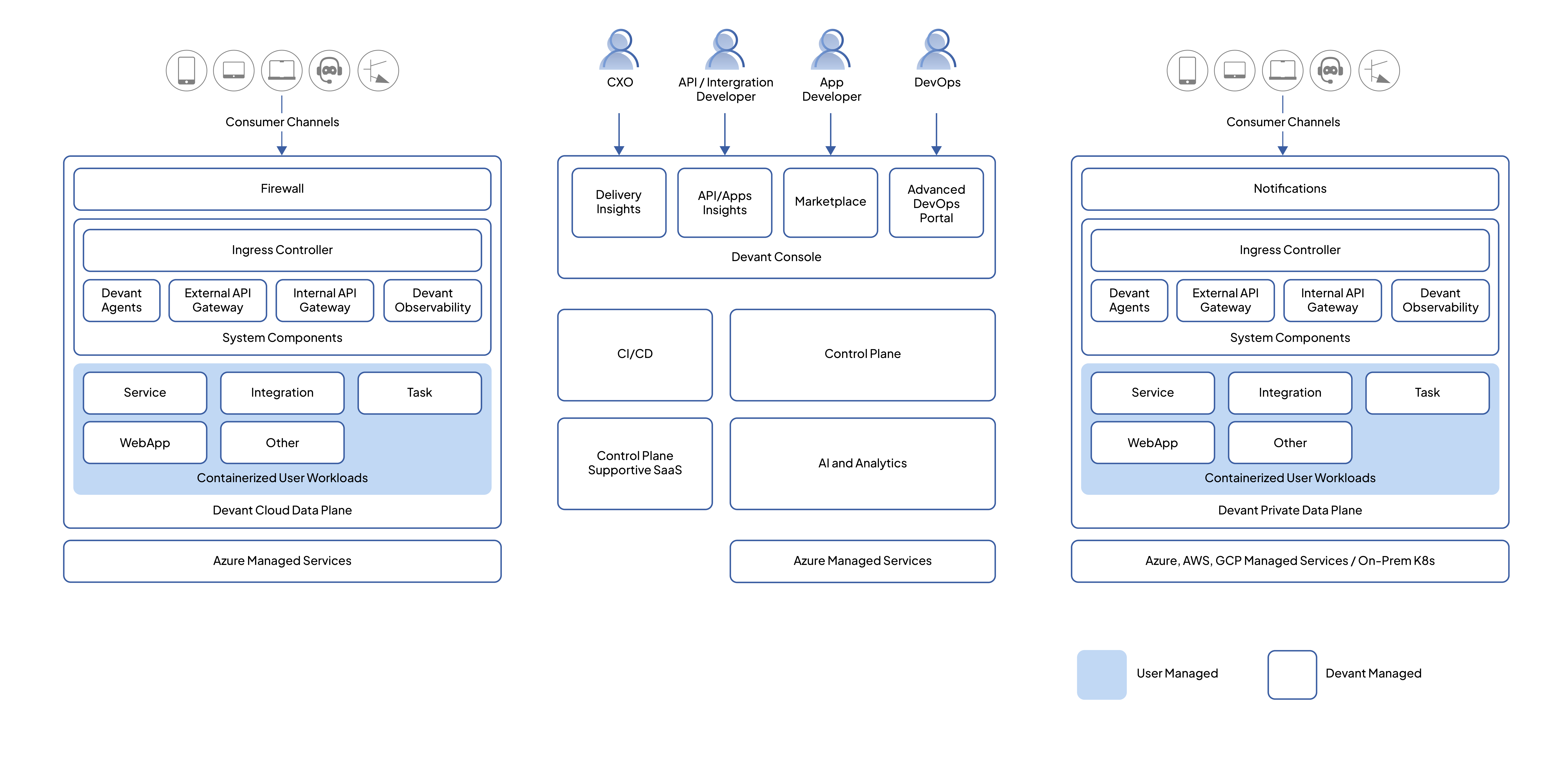
Resource hierarchy
Organizations, data planes, projects, environments, and integrations relate to each other in a fixed hierarchy. Understanding it explains where each resource lives and what it can reach.
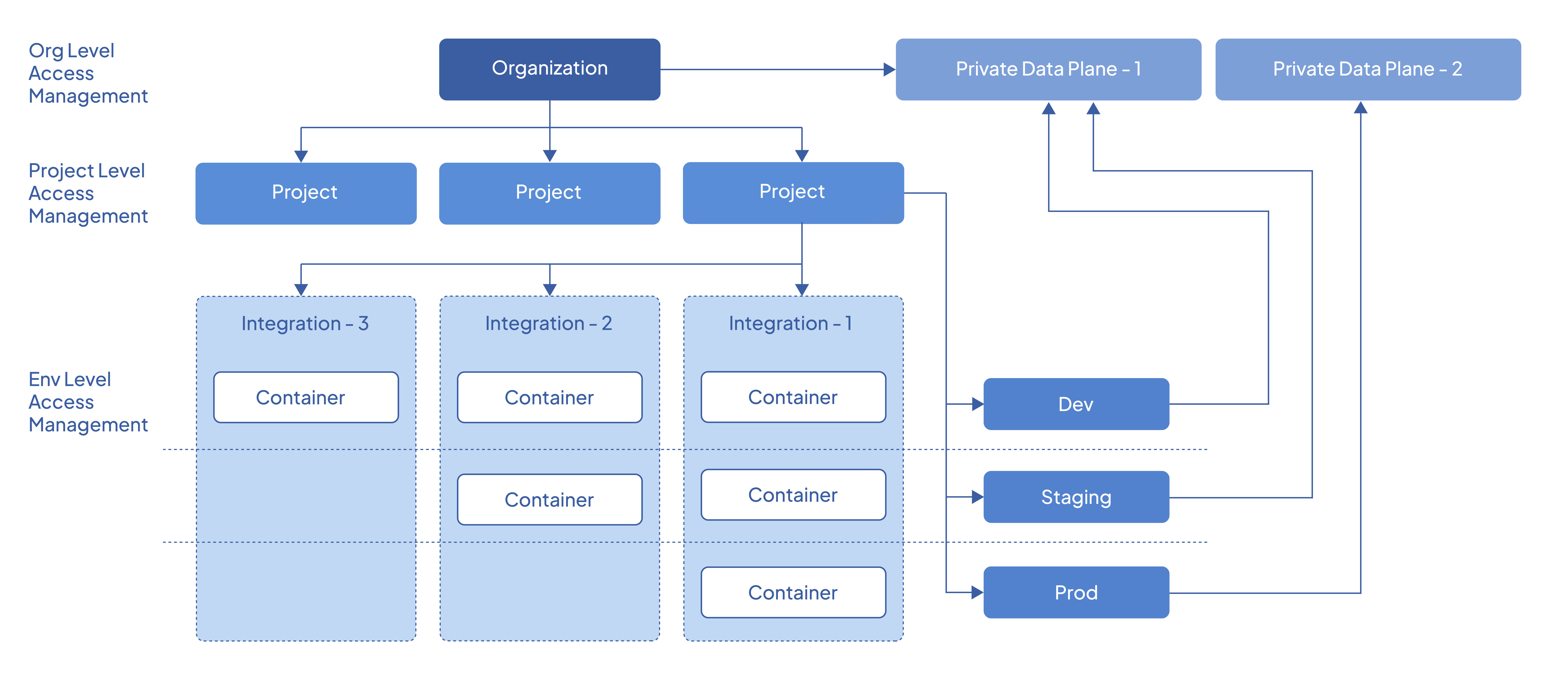
- Organizations and data planes. Data planes are connected to the organization and are available to every project within it. When you create an environment in a project, the data plane connected to the organization is linked with an automatically generated Kubernetes namespace.
- Integrations and environments. An integration belongs to a project, and environments are provisioned per project. When an integration is deployed, it is deployed as a container to the specified environment. From there, you can promote the container image across the other environments available in the project.
Environment
An environment is an isolated deployment area with restricted network and resource access. Integrations deployed in one environment cannot communicate with those in another.
Environments are provisioned per project, and each project is associated with one or more of the environments available in the organization. Two projects in the same organization can use different sets: one might use development, staging, and production, while another uses only development and production. The cloud data plane provides development and production by default; private data plane organizations can define additional environments as needed.
Environments and clusters
An environment can be associated with multiple Kubernetes clusters, which lets you build resilient, resource-efficient deployments. Integrations and workloads are synchronized between the clusters associated with an environment, so a multi-cluster deployment can be performed in a single action.
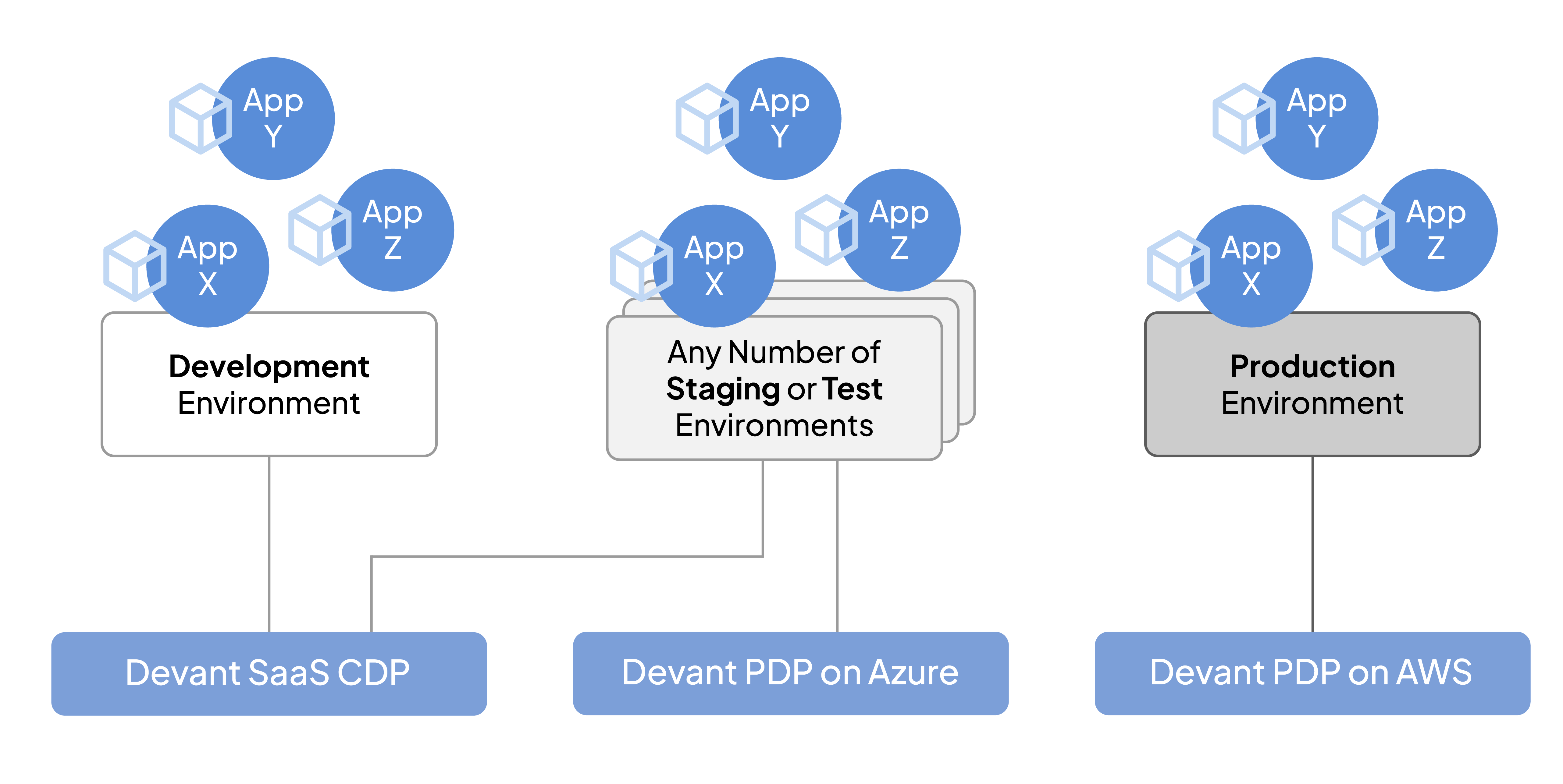
A separate cluster per environment is not required. Multiple environments can run on the same cluster. The arrangement that suits your integration architecture may differ from the example shown above.
Promotion
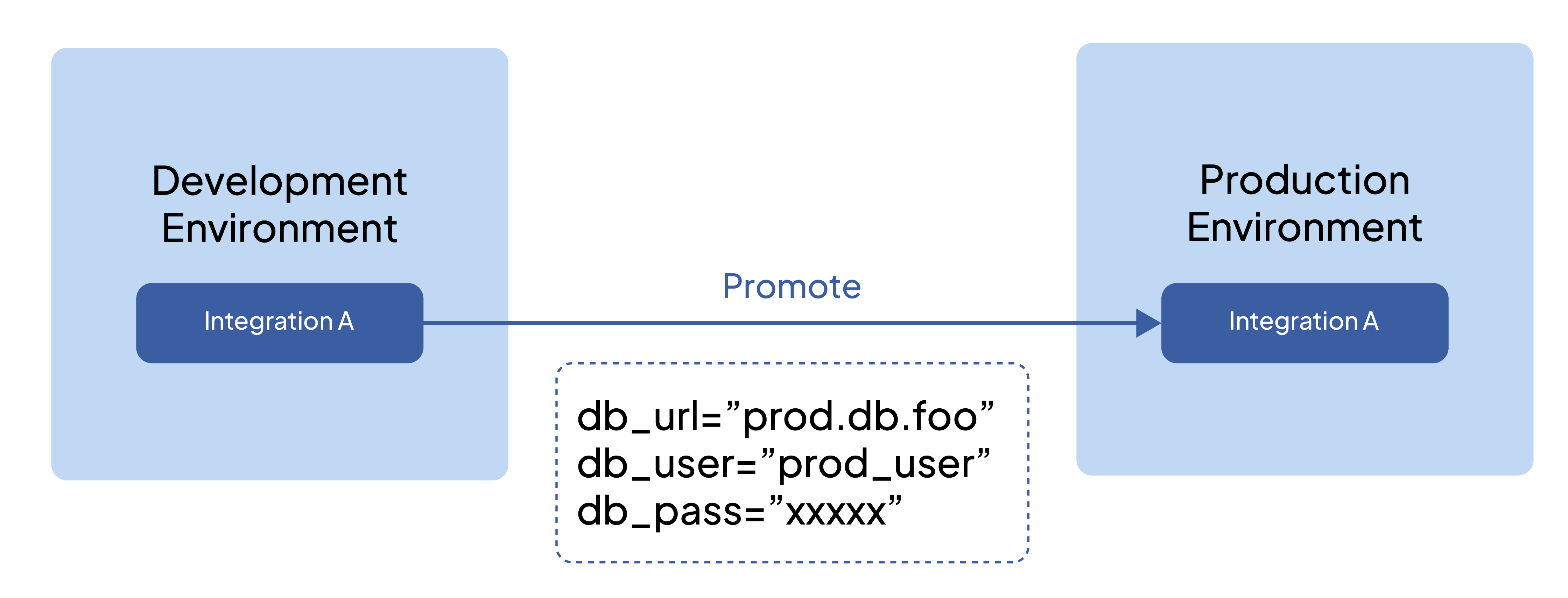
Promotion is the act of moving a built integration from one environment to the next, for example from development to staging to production.
The platform follows a build once, deploy many model: an artifact is built once per commit and then promoted to higher environments unchanged. This allows changes to be tested in lower, non-production environments before reaching production. Because configuration is injected at runtime rather than baked in, configuration values can be overridden per environment while the build artifact itself stays identical.
Configurations and secrets
Configurations and secrets are maintained at the environment level and injected into integrations at runtime, keeping environment-specific values strictly separate from source code. They include resource credentials for databases, caches, and other backing services, and credentials for external cloud services and APIs.
Two kinds exist:
- Environment-independent configurations apply across all environments.
- Environment-specific configurations apply to a single environment.
All configurations and secrets are encrypted at rest and in transit and stored in a secure vault. In a private data plane organization, they can be stored in your own infrastructure. Once an integration is deployed with a given set of configurations, those values become immutable; changing them produces a new deployment.
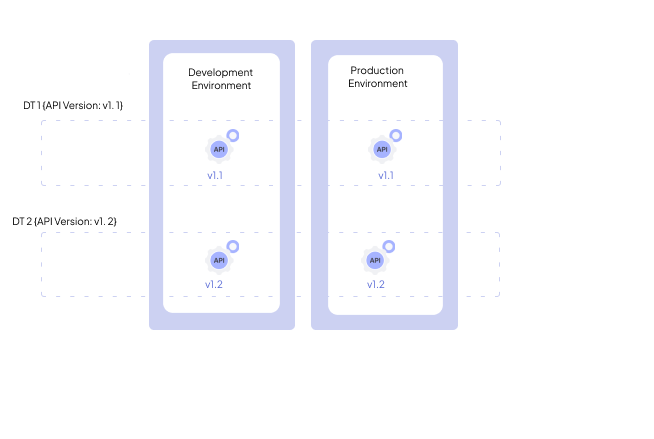
Deployment track
A deployment track is a structured pathway that links a Git branch to deployments across environments, functioning like a CI/CD pipeline. Merging a pull request automatically triggers a deployment to the development environment.
For Integration as APIs, a deployment track also carries the API version, following semantic versioning with major and minor versions prefixed by v, such as v1.2. Increment the major version for incompatible API changes, and the minor version for backward-compatible additions. Patch-level versioning, which consumers generally do not need to track, can be handled separately through Git tags or releases.
CI/CD
Continuous integration and continuous deployment automate building and shipping an integration across environments.
On WSO2 Integration Cloud, builds are automated per commit: a container image is built from source, security and vulnerability scans run where applicable, and the image is pushed to a container registry, either a WSO2-managed registry on the cloud data plane or your own registry in a private data plane organization. Builds are reproducible, so multiple builds from the same Git commit produce images with the same behavior. Deployments use rolling updates with health checks, so a new build is verified before traffic switches to it, giving zero downtime between deployments and promotions.
Private (cloud) hosting responsibility
Within the Private (cloud) deployment model, a private data plane can run on major cloud providers including Azure, AWS, and GCP, and is compatible with on-premises infrastructure. Its essential requirements are upstream-compatible Kubernetes clusters, a container registry, a key vault for secrets, and a logging service or log storage.
Three arrangements are available, covering different splits of infrastructure responsibility between WSO2 and your organization, all still managed through WSO2 Integration Cloud's control plane:
- WSO2 fully managed, with infrastructure and the private data plane in a WSO2 subscription
- WSO2 fully managed, with infrastructure and the private data plane in your own subscription
- Customer self-managed, where WSO2 provides the installation script and updates
For the full infrastructure requirements, system components, network connectivity, and security architecture of a private data plane, see Set up a Private Data Plane.
Manage and Observe
The concepts that apply once an integration is live and handling real traffic. These are covered in depth in Manage and Observe.
Integration Control Plane (ICP)
The Integration Control Plane (ICP) is the self-hosted control plane: a centralized server that handles deployment, management, and observability for self-hosted WSO2 Integrator deployments, filling the role WSO2 Integration Cloud's SaaS control plane plays for cloud deployments (see Control plane and data plane). It provides a web dashboard and APIs for real-time visibility into running integrations.
Alongside its deployment and operational controls, ICP surfaces health information, metrics, and aggregated logs, giving self-hosted teams a single place where centralized management and a first layer of observability data come together.
For deployments on WSO2 Integration Cloud, equivalent capabilities across all three actions are provided as part of the managed cloud experience.
Observability
Observability is how you understand an integration's runtime behavior, using logs, metrics, and distributed traces.
With a single integration, reviewing a log file may be sufficient. As the number of integrations in production grows, this becomes impractical: failures can appear disconnected from their actual cause when information is spread across many systems.
Two distinct activities sit under this heading, and it is worth keeping them apart:
- Monitoring answers "is it behaving as expected?" It watches known indicators and alerts when they fall outside expected ranges. Useful for problems you anticipated.
- Diagnosis answers "why is it behaving this way?" It uses logs, metrics, and distributed traces to explain what is actually happening inside a distributed system. Useful for problems you did not anticipate.
WSO2 Integration Platform emits telemetry through OpenTelemetry and integrates with established observability stacks rather than requiring a separate one, including Prometheus and Grafana for metrics, Jaeger and Zipkin for distributed tracing, Elastic Stack (ELK), OpenSearch, and Grafana Loki for logging, and Datadog, New Relic, and Moesif as full-stack platforms.
What's next
- Cloud setup: sign up for WSO2 Cloud and create your first project
- Build an automation: schedule tasks and run background jobs
- Build an Integration as API: expose an HTTP service and handle requests
- Deploy: deployment targets, CI/CD, and security