Overview
What is WSO2 Integration Platform?
WSO2 Integration Platform is a platform for building, running, and managing integrations that connect applications, APIs, data, events, and AI agents across cloud, on-premises, and hybrid environments. It is built on open-source foundations and open standards, and is available both as a fully managed service and as a self-hosted deployment.
It supports the integration lifecycle, from development and testing through deployment, management, and observability. Visual design, source code, AI assistance, and enterprise connectivity work together in a consistent development experience.
The platform separates how you develop an integration from where it runs and how it is operated, giving you flexibility to choose the deployment model that fits your organization.
What can you build?
WSO2 Integration Platform supports several integration styles using shared capabilities for connectivity, data transformation, orchestration, security, and error handling.
| Integration Style | What you can do |
|---|---|
| Integration APIs | Expose business capabilities as APIs and connect multiple backend systems behind a single service. |
| Automations | Run scheduled or triggered tasks, such as synchronizing data between SaaS applications. |
| Event-driven integrations | Publish, consume, and react to events and messages from applications and message brokers. |
| File-driven integrations | Receive, transform, and exchange files across systems. |
| Workflows | Coordinate multi-step business processes, including long-running processes that wait for events, timers, or human decisions. |
| AI Agents | Combine integration logic with AI reasoning, and enable agents to access enterprise data and take action through tools. |
| MCP servers | Expose integrations as Model Context Protocol (MCP) tools, so AI assistants and agents can discover and call your enterprise capabilities through a governed boundary. |
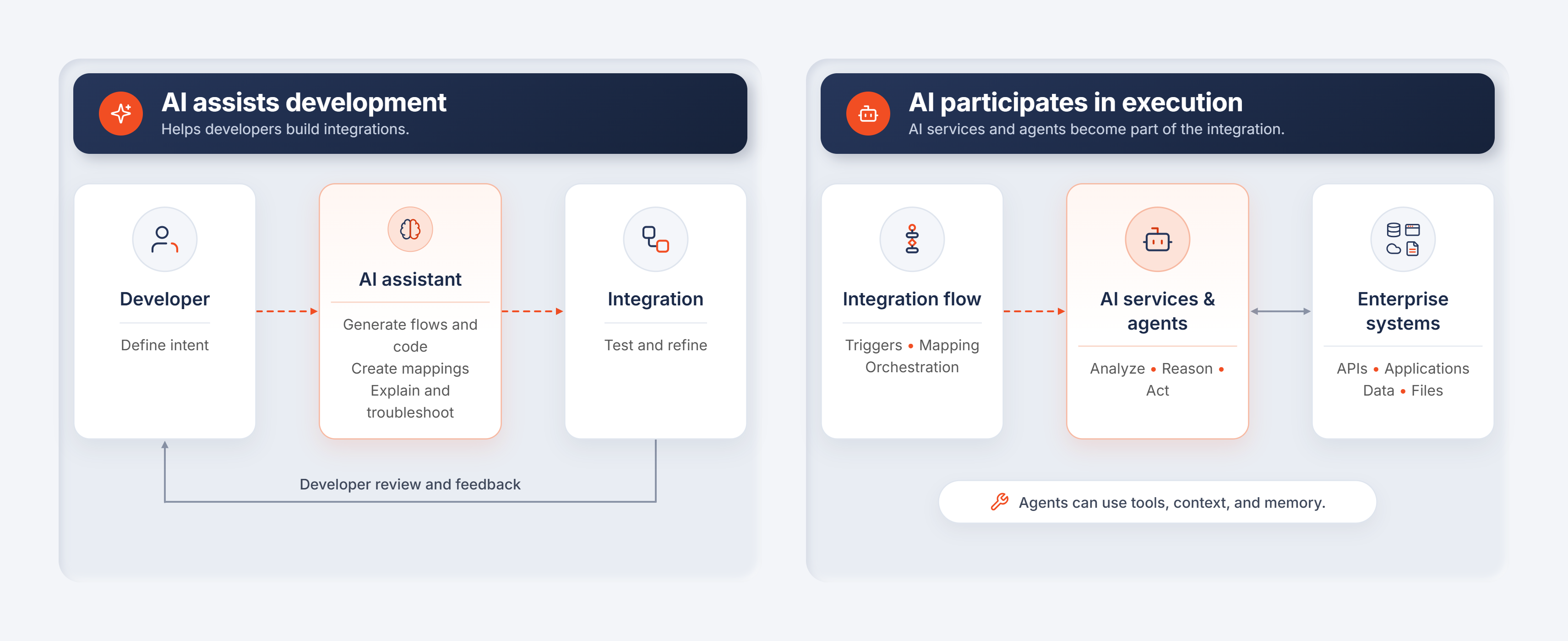
AI serves two roles in the platform: it assists developers in building integrations, and it can participate in execution through AI services and agents.
Platform components
The platform brings together following core components.
WSO2 Integrator
WSO2 Integrator is the editor where integrations are built and tested. It is available as an installable desktop application and a browser-based editor through WSO2 Integration Cloud.
It combines:
- Visual development to design and refine integration flows.
- AI assistance to generate integrations, create data mappings, and explain or troubleshoot integration logic.
- Source code editing for custom logic and precise control.
- Testing and debugging to validate behavior before deployment.
- Visual and code representations remain synchronized, allowing you to move between them as you develop.
WSO2 Integrator is powered by Ballerina, a programming language designed for integration. Prior knowledge of Ballerina is not required to begin: you can start with APIs, connectors, mappings, and workflows, then use the underlying code when needed.
WSO2 Integration Cloud (WSO2 iPaaS)
WSO2 Integration Cloud is a managed environment for building and running integrations. WSO2 operates the underlying infrastructure, allowing your team to focus on integration development.
You can develop in the cloud editor, import an existing integration from a source repository, or start with a pre-built sample. The managed service provides deployment, scaling, availability, management, and observability capabilities.
WSO2 Integration Control Plane (ICP)
WSO2 Integration Control Plane is a centralized place to manage self-hosted integrations.
It provides visibility across projects and environments, helping teams deploy integrations, check their status, and manage ongoing operations from one console.
ICP also surfaces health information, metrics, and aggregated logs. But for self-hosted deployments, you aren't limited to ICP, WSO2 Intgerator is designed to integrate seamlessly with your organization's existing observability stack.
Connectors
Connectors provide pre-built, typed connectivity to external systems, including SaaS applications, databases, APIs, cloud services, and message brokers.
They simplify authentication, requests, and data handling, reducing the need to implement connectivity from scratch. Typed operations and data models help you work with external services consistently within your integration.
You can choose connectors from the WSO2 Connector Store or generate connectors from API descriptions such as OpenAPI specifications and WSDL files.
Choose your deployment model
Integrations developed in WSO2 Integrator can run in managed or self-hosted environments. The development experience remains consistent; the deployment model determines where integrations execute and who operates the infrastructure.
| Deployment model | Where integrations run | Management and observability | Infrastructure responsibility |
|---|---|---|---|
| Fully managed iPaaS | WSO2-managed cloud infrastructure | Provided through WSO2 Integration Cloud | WSO2 operates the platform and runtime infrastructure. |
| Fully self-hosted | Your infrastructure, including Kubernetes, OpenShift, containers, virtual machines, bare metal, or public/private cloud | Your team operates ICP and the observability infrastructure | Your organization operates the entire environment. |
| Private or hybrid | A private data plane or dedicated infrastructure | WSO2 manages control and observability capabilities centrally | Runtime infrastructure responsibility depends on the selected arrangement. |
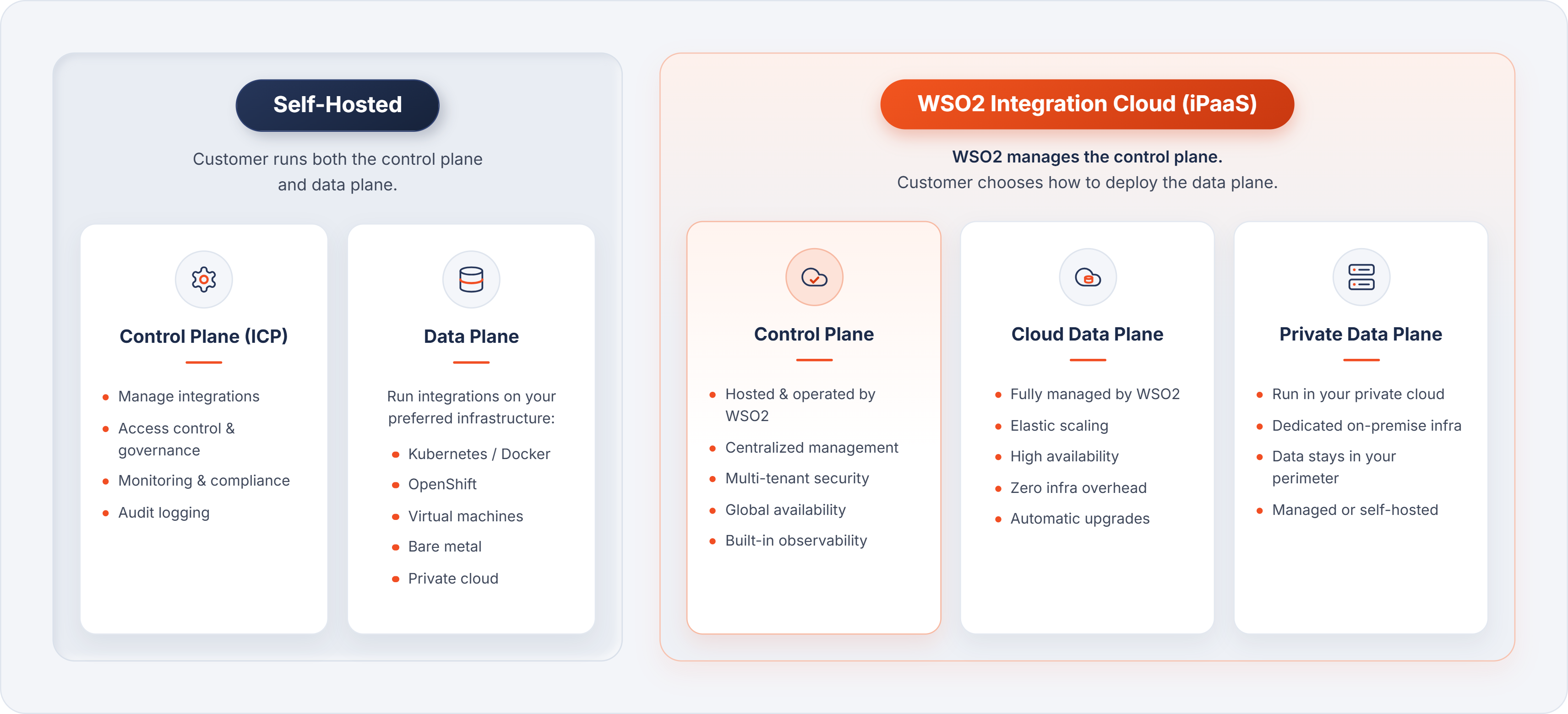
You can select a model based on your requirements for infrastructure control, data residency, operational ownership, and managed services.
From development to production
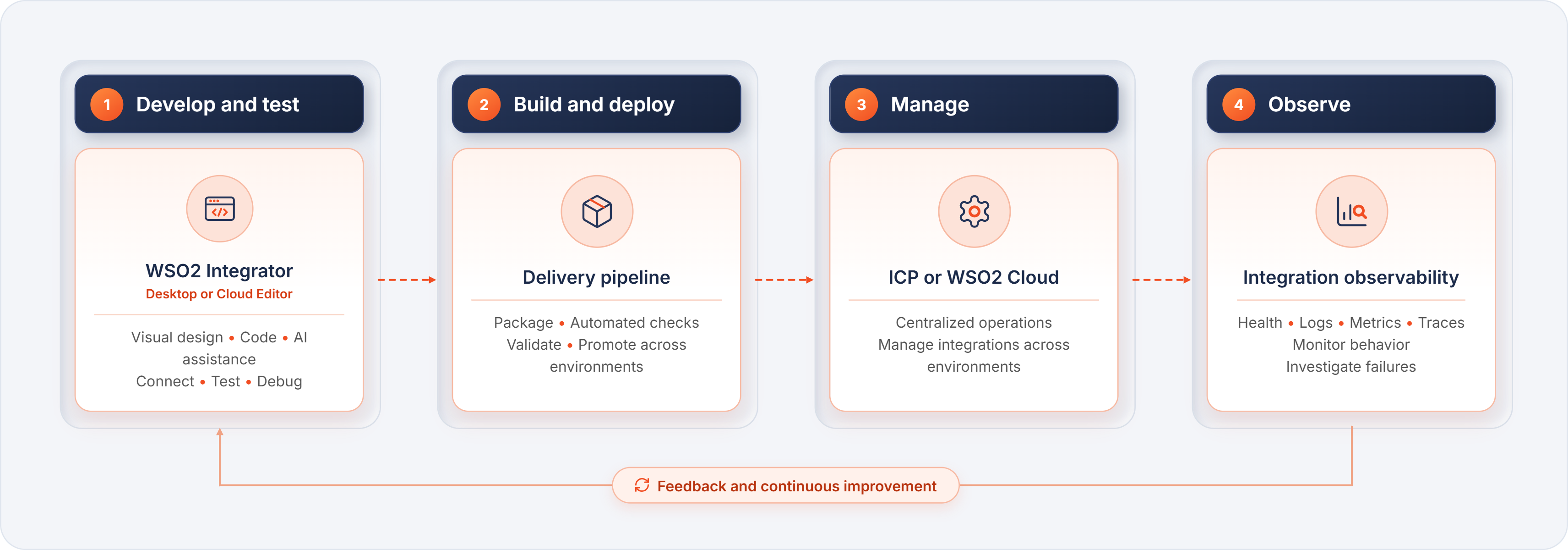
The platform supports a continuous integration lifecycle:
| Phase | What happens |
|---|---|
| Develop and test | Build integration logic in WSO2 Integrator using connectors, visual design, code, and AI assistance. Test and debug it before release. |
| Build and deploy | Package the integration, run automated checks, and deploy it through your delivery pipeline. Validate and promote it across environments. |
| Manage | Operate integrations centrally through ICP or the managed cloud experience. |
| Observe | Use health information, logs, metrics, and distributed traces to monitor behavior and investigate failures. |
How the platform fits together
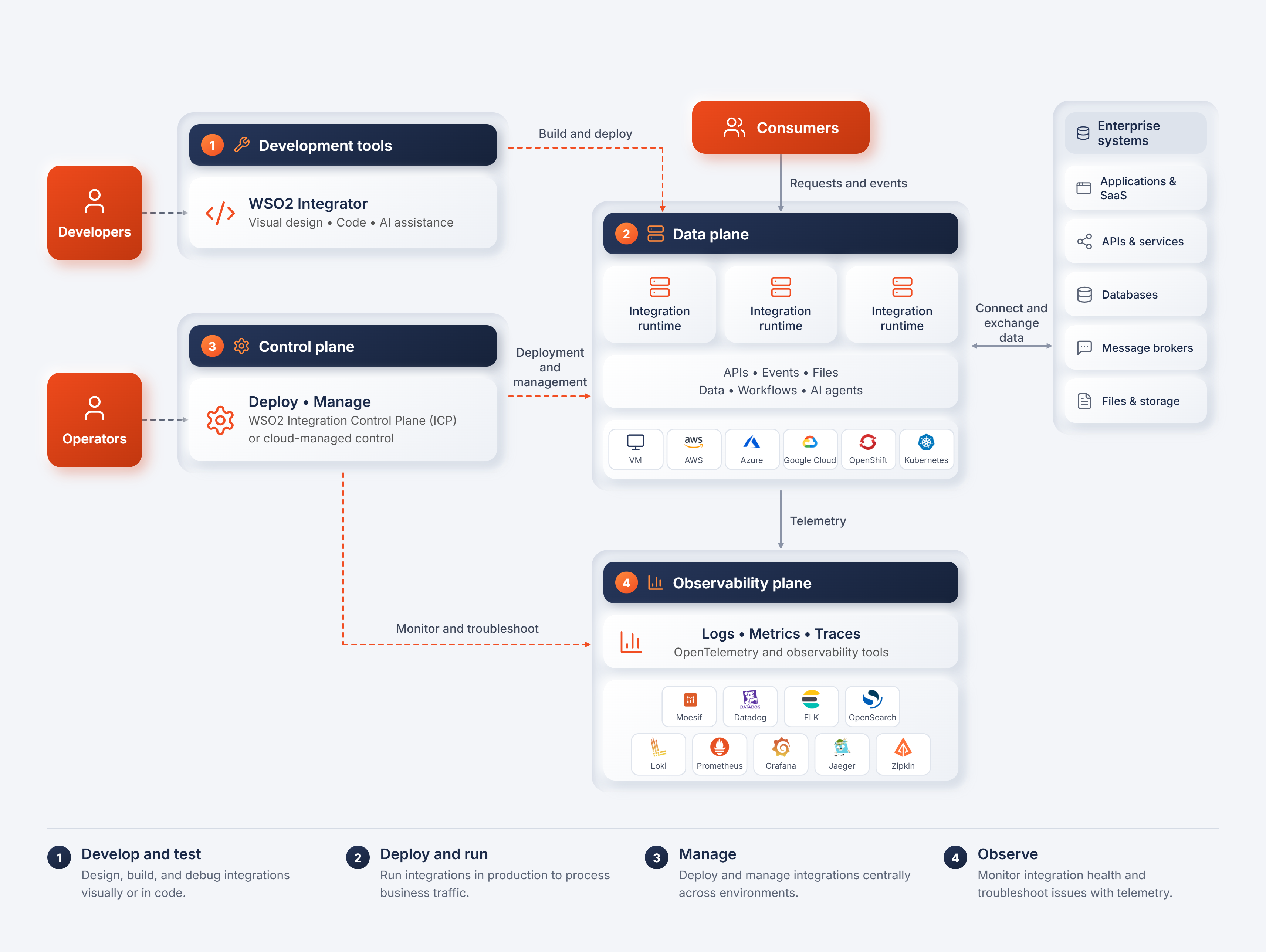
The architecture separates three responsibilities:
- Data plane: Executes integrations and processes requests, events, messages, and data.
- Control plane: Provides centralized deployment, management, and operational controls.
- Observability plane: Collects and presents information about integration health and runtime behavior.
In a managed deployment, WSO2 operates these capabilities as part of the service. In a self-hosted deployment, your organization operates them using ICP and your chosen infrastructure and observability tools.
The platform supports OpenTelemetry, allowing logs, metrics, and traces to feed into compatible observability systems.
Where to go next
- Concepts: Learn the vocabulary used across WSO2 Integration Platform, from organizations and projects to deployment and observability.
- Setup: Set up your development environment.
- Quickstarts: Build your first integration in under 10 minutes: an API, automation, AI agent, event-driven, or file-driven integration.