Version: 1.0-beta
How Knowledge Bases Work
A knowledge base grounds LLM responses in your own documents. Instead of relying solely on the model's training data, which can be outdated or incomplete, an agent retrieves relevant content from the knowledge base at query time and uses it to answer. This technique is called Retrieval-Augmented Generation (RAG).
Grounding responses in a knowledge base solves two common problems with direct LLM calls:
- Hallucinations — the model produces plausible-sounding but incorrect answers because it doesn't have access to your specific content.
- Stale knowledge — the model's training data has a cutoff and won't reflect your latest documentation or data.
How it works
A knowledge base is used in two stages:
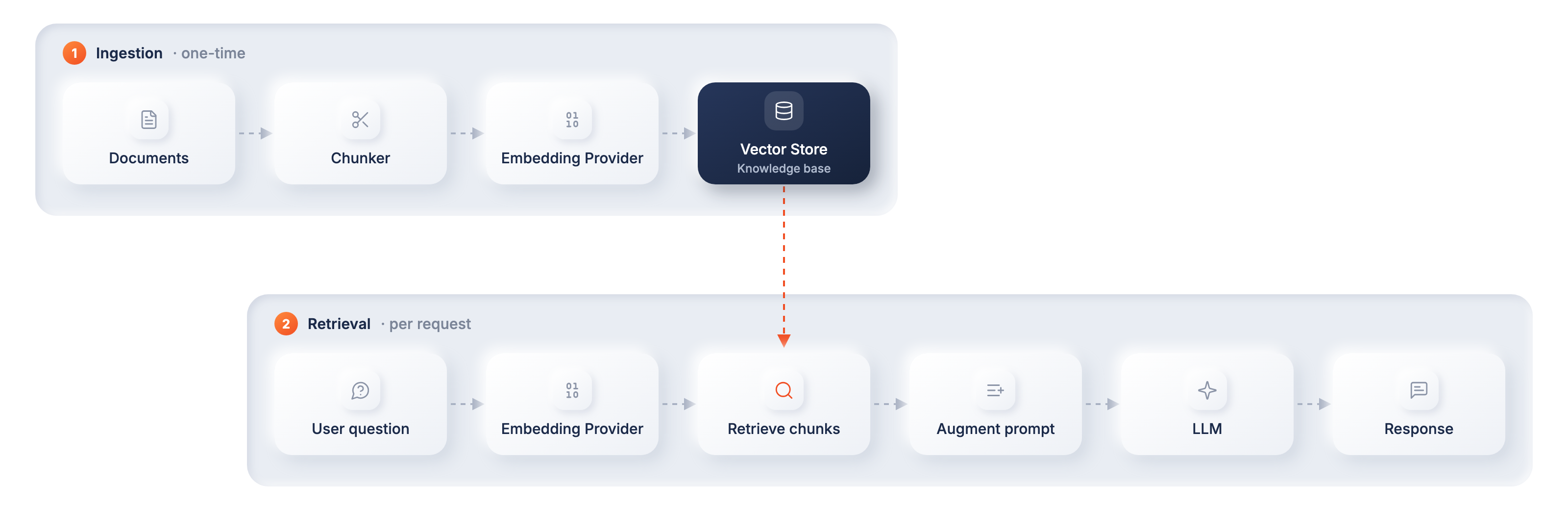
- Ingestion: Documents are split into chunks, converted into vector embeddings, and stored in the knowledge base.
- Retrieval: When a user asks a question, the most relevant chunks are retrieved by semantic similarity and injected into the prompt alongside the question. The model answers using only that retrieved context.
Knowledge bases in WSO2 Integrator
- Knowledge bases overview: Every supported provider, including the Vector, AWS Bedrock, Azure AI Search, and WSO2 Cloud knowledge bases.
- Use with an agent: Give an agent the knowledge base's Retrieve action as a tool so it can search indexed content and generate a grounded response.
- Ingest documents: Load your documents into the knowledge base before the agent uses it. Ingestion happens in WSO2 Cloud or with your knowledge base provider, not in the agent.