Retrieve from a Knowledge Base with an Agent
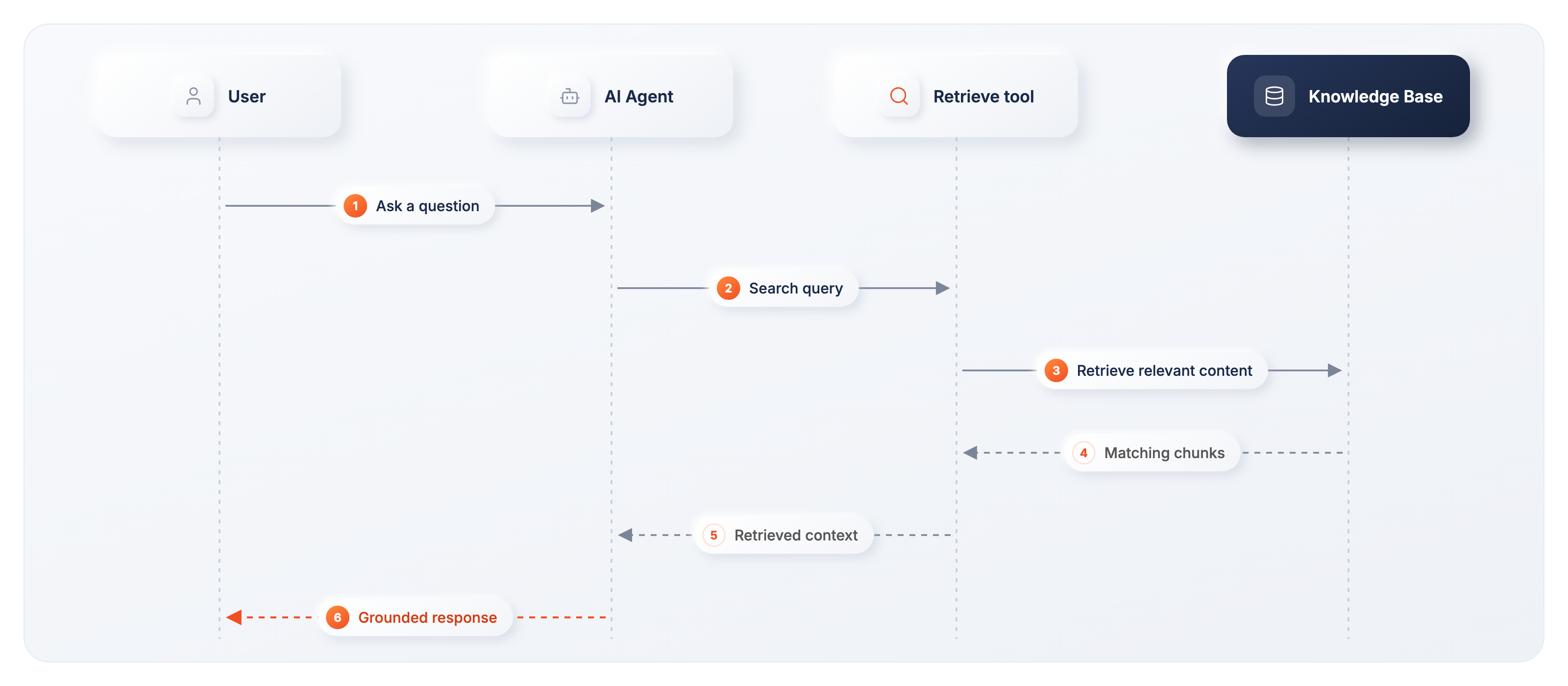
In WSO2 Agent Builder, give an AI agent access to a knowledge base by adding its Retrieve action as a tool. You can retrieve from any knowledge base in the supported providers list, including the Vector, AWS Bedrock, Azure AI Search, and WSO2 Cloud knowledge bases. When a user asks a relevant question, the agent decides to call the tool, searches the indexed content, and uses the retrieved chunks to produce a grounded response.
You do not need to build a separate flow with Retrieve, Augment Query, Generate, and Return nodes. The agent handles tool selection, query generation, and response generation as part of its reasoning loop.
This page uses a WSO2 Cloud Knowledge Base as the example. The steps are the same for other providers, except for the connection settings, which are described in Knowledge Bases.
For the WSO2 Cloud Knowledge Base example:
- Create a knowledge base and ingest documents in WSO2 Cloud. See Knowledge bases in WSO2 Cloud.
- Create an agent with an Agent Chat trigger, or open an existing AI agent.
- Sign in to the WSO2 Cloud organization that contains the knowledge base and select the correct project.
Add the knowledge base as an agent tool
-
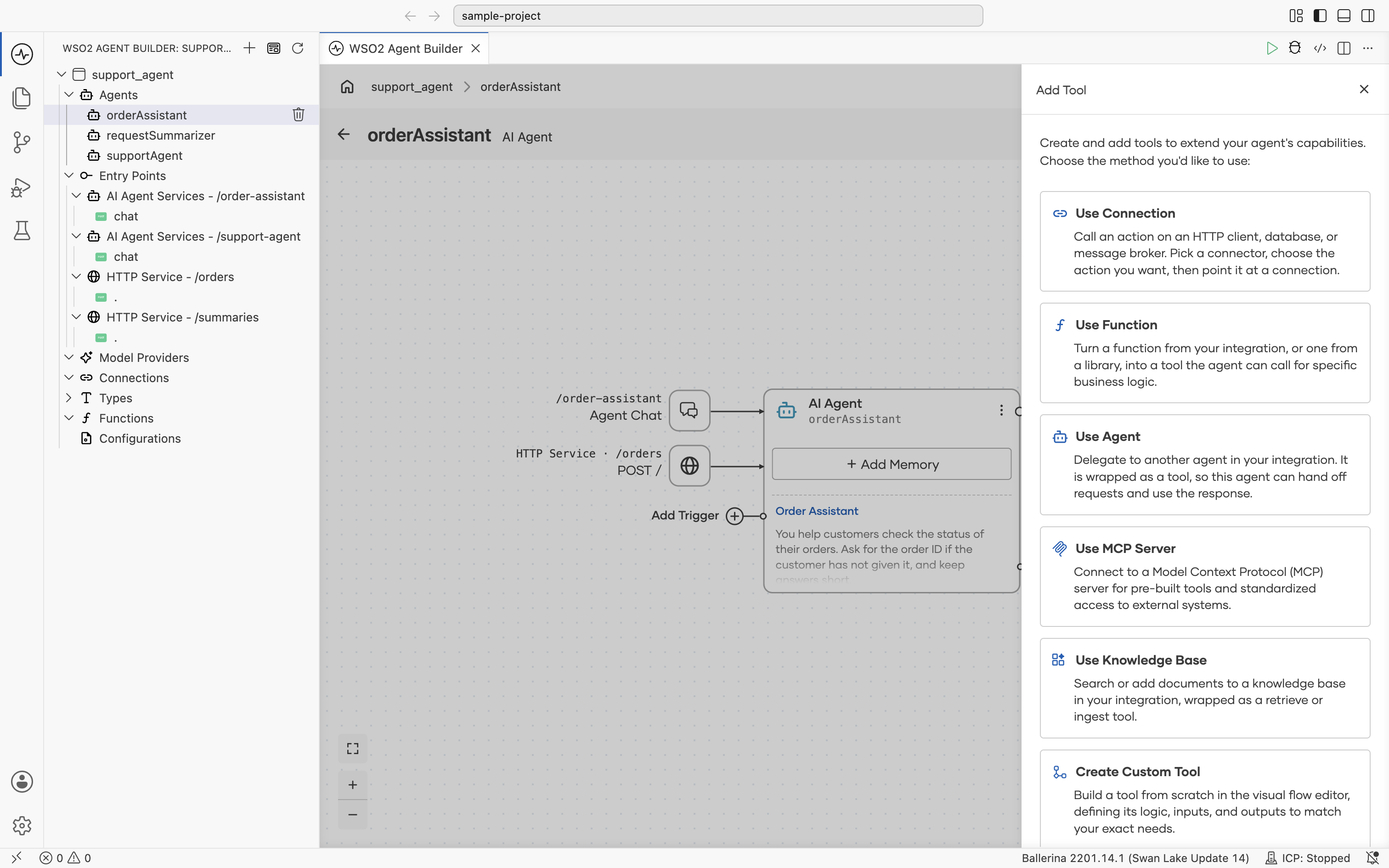
Open the agent canvas. On the AI Agent node, select + Add Tool.
-
In the Add Tool panel, select Use Knowledge Base.
-
Select WSO2 Cloud Knowledge Base.
-
Select the Retrieve action. This exposes knowledge-base retrieval to the agent as a tool.
-
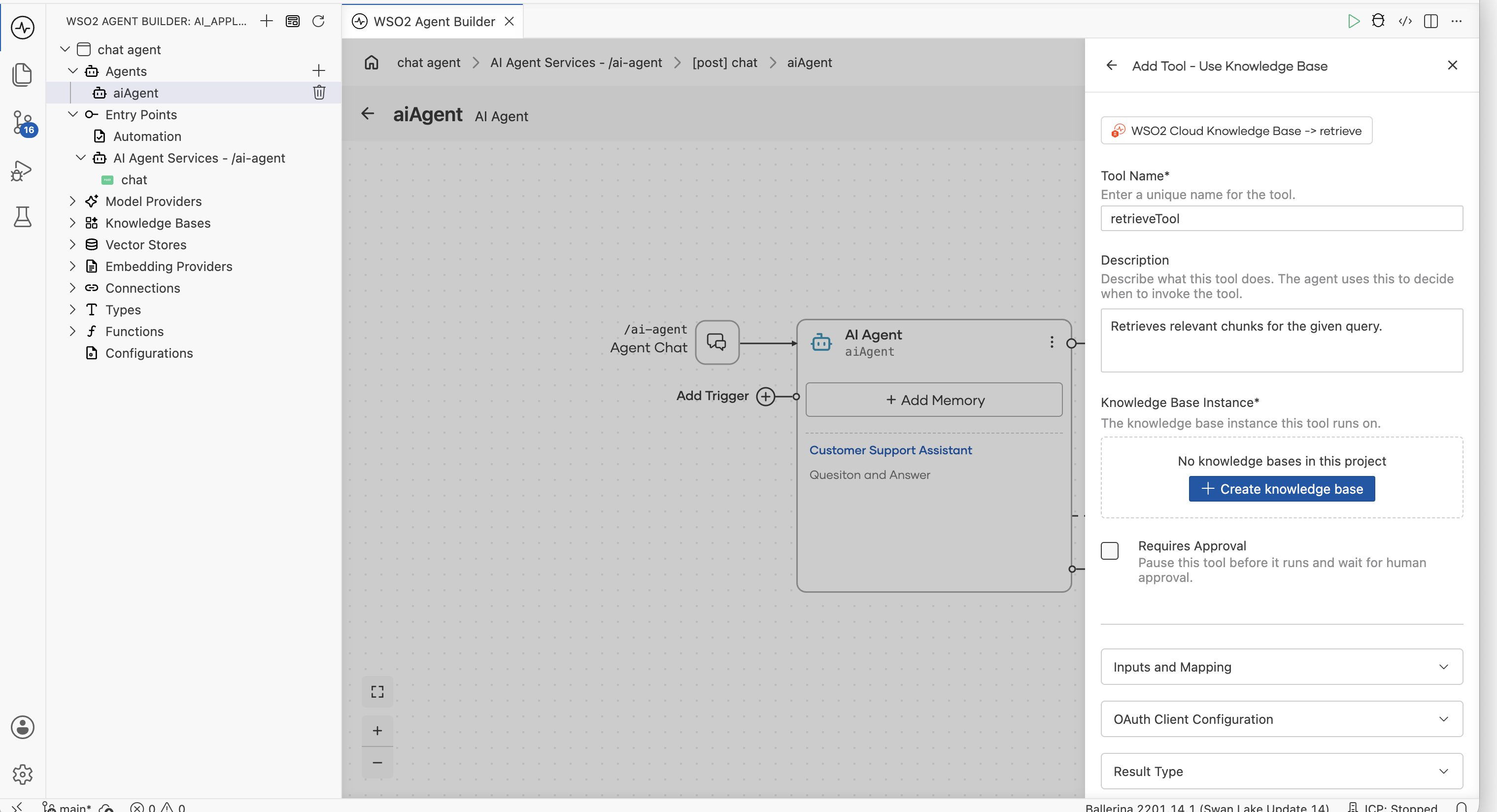
Under Knowledge Base Instance, select an existing WSO2 Cloud Knowledge Base connection. If the integration does not have one yet, select Create New Knowledge Base, then choose the knowledge base that you populated in WSO2 Cloud.
The service URL and authentication configuration are filled from the selected WSO2 Cloud Knowledge Base. Review the retrieval settings and save the connection.
-
Configure the tool:
Field Recommended value Tool Name Use a clear action name, such as searchKnowledgeBase.Description State what content the knowledge base contains and when the agent should search it. For example: Search the product documentation for information needed to answer the user's question.Knowledge Base Instance The WSO2 Cloud Knowledge Base connection created or selected above. Requires Approval Leave cleared for normal read-only retrieval. Inputs and Mapping Keep the query available as a tool input so the agent can generate the search text from the user's question. Configure optional retrieval inputs only when your use case requires them. -
Select Save Tool.
The Retrieve tool appears on the canvas, connected to the AI Agent node. The agent can now invoke it during its reasoning loop.
Guide the agent to use the knowledge base
The tool description and agent instructions determine when retrieval is used. Give the agent clear guidance about the knowledge base's scope and how to handle missing information.
For example, add instructions similar to the following to the agent:
Use the searchKnowledgeBase tool when the user asks about our product,
documentation, policies, or other information stored in the knowledge base.
Base the answer on the retrieved content. If the knowledge base does not
contain enough information, say that you could not find a supported answer
instead of inventing one.
The agent may answer general conversational questions without calling the tool. For questions covered by the knowledge base, it should retrieve first and use the tool result as context for its response.
Test the knowledge-base tool
- Select Run on the agent canvas.
- Open Chat and ask a question that can be answered from an ingested document.
- Confirm that the response uses information from the knowledge base.
- Open View Trace on the response to verify that the agent invoked the Retrieve tool and inspect the query and returned chunks.
For details about inspecting tool calls, see Agent observability.
Improve retrieval behavior
| What to tune | Where | Guidance |
|---|---|---|
| Tool selection | Tool Description | Name the subjects covered by the knowledge base and explain when the agent should search it. |
| Agent behavior | Agent Instructions | Require retrieval for knowledge-grounded questions and define what to do when no relevant content is found. |
| Result relevance | WSO2 Cloud Knowledge Base connection | Adjust Minimum Similarity Threshold and optional reranker settings. |
| Source quality | WSO2 Cloud ingestion | Update or re-ingest incomplete, outdated, or poorly structured source content. |
What's next
- Ingest documents — create and populate the knowledge base in WSO2 Cloud.
- Give tools to an agent — reference for configuring agent tools.
- WSO2 Cloud Knowledge Base — connection and retrieval configuration reference.
- Agent observability — inspect the Retrieve tool call and returned results.