Migrate from MuleSoft
MuleSoft configures an integration as a set of flows in Anypoint's XML dialect. WSO2 Integrator describes the same integration as real Ballerina code you can compile. An automated migration tool does most of that conversion for you. This page covers running it, and how MuleSoft concepts map to their WSO2 Integrator equivalents.
Prerequisites:
- WSO2 Integrator installed (wizard path), or Ballerina installed with
balon your PATH (CLI path)
Overview
The migration tool converts MuleSoft Anypoint flows (XML configurations) to Ballerina code. It handles HTTP listeners, HTTP request connectors, DataWeave transformations, routers, error handling patterns, and more, using either the WSO2 Integrator migration wizard or the bal migrate-mule CLI command. Both paths produce a migration report; the wizard additionally offers an optional AI enhancement pass that resolves unmapped elements automatically.
Run the migration tool
- WSO2 Integrator
- CLI
The migration wizard guides you through a 5-step process to convert your MuleSoft project(s) into a WSO2 Integrator project.
Prerequisite
- Ensure WSO2 Integrator is installed and available on your system.
Step 1: Configure source
-
Open WSO2 Integrator, click More Actions, and select Migrate Integrations from Other Vendors.
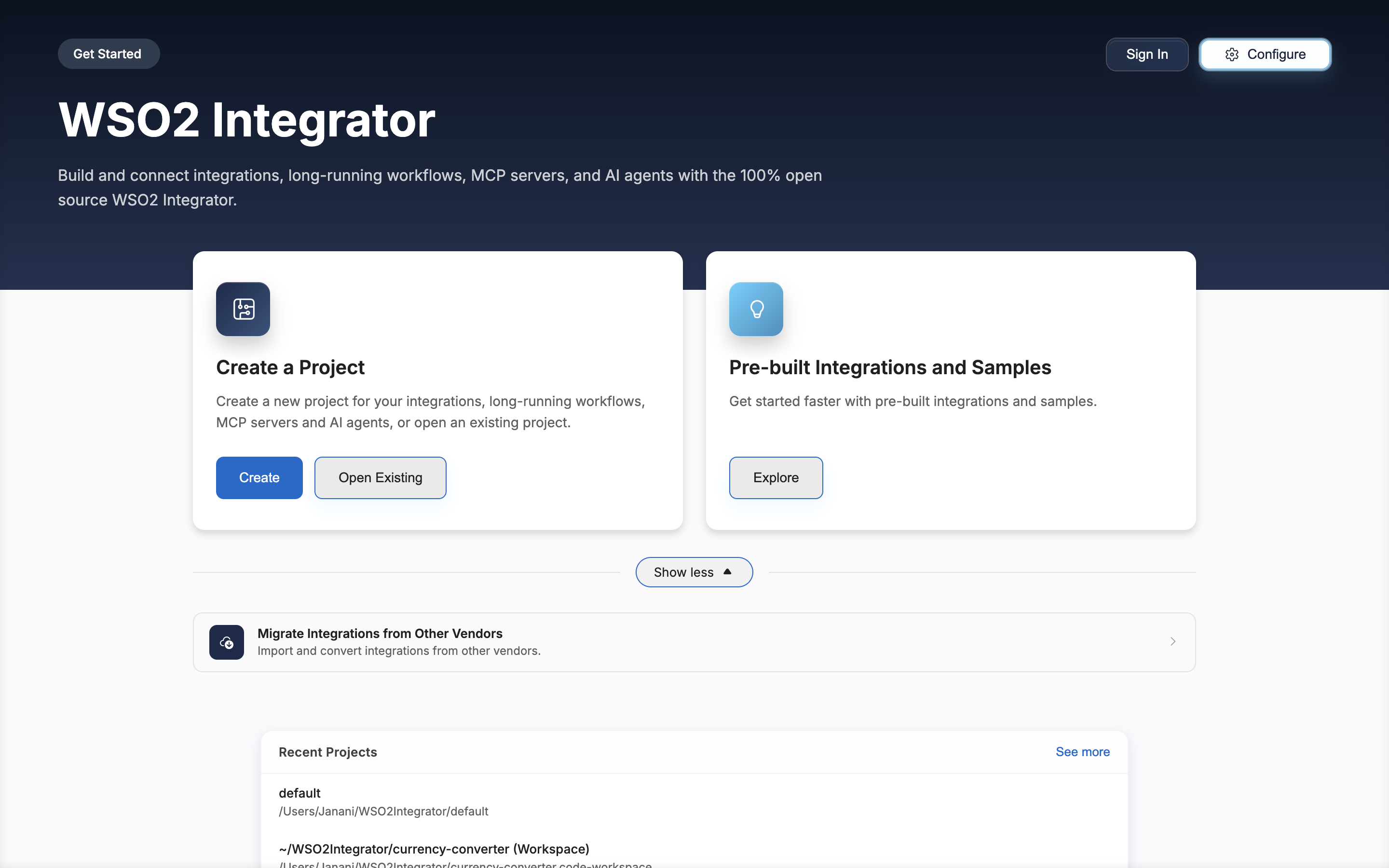
-
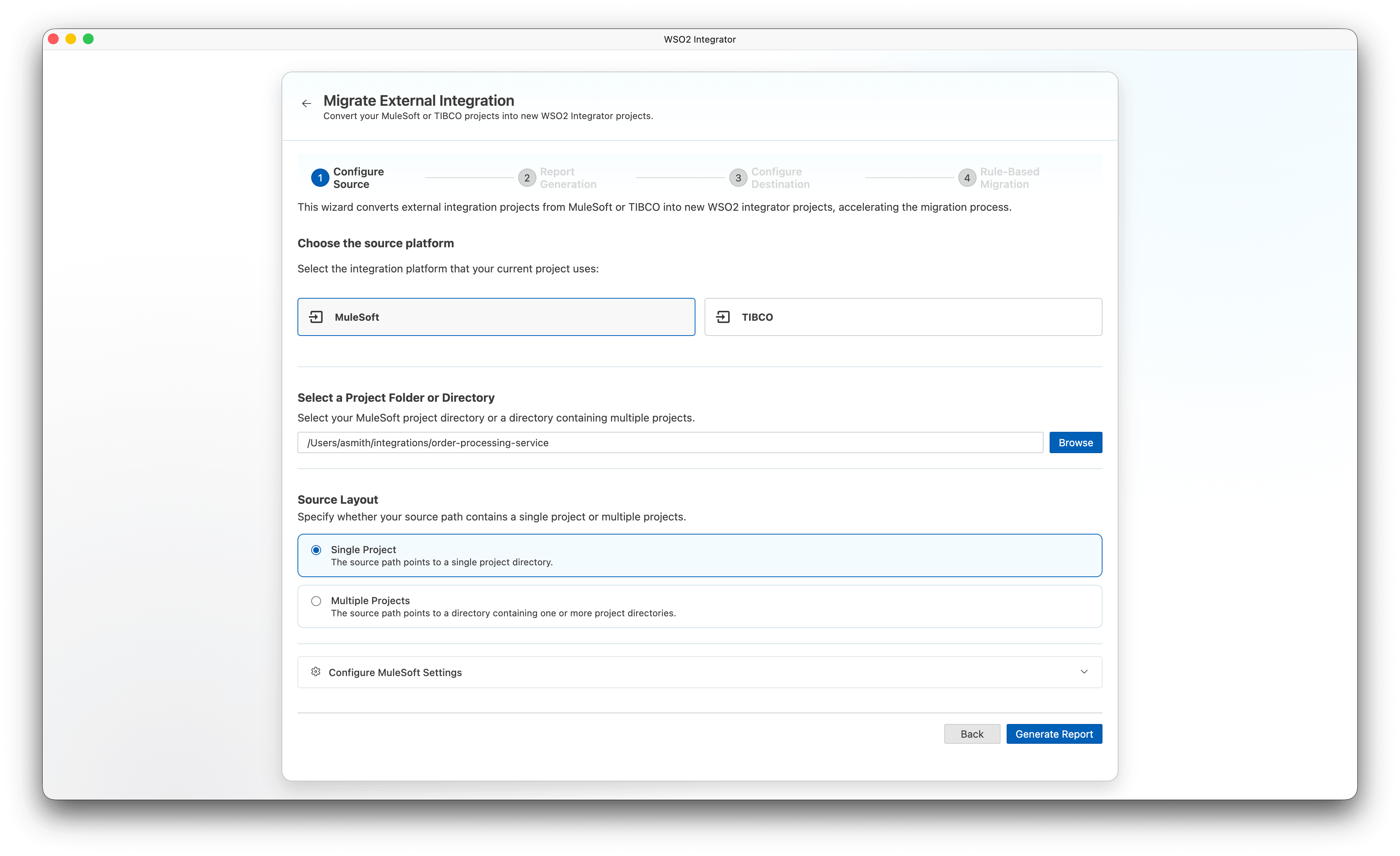
Select MuleSoft as the source platform.
-
Under Select a Project Folder or Directory, click Browse and select your MuleSoft project directory or a directory containing multiple projects.
-
Under Source Layout, select one of the following:
- Single Project — The source path points to a single project directory.
- Multiple Projects — The source path points to a directory containing one or more project directories.
Note: The Source Layout section appears only after you select a directory.
-
Expand Configure MuleSoft Settings to set optional parameters:
- Force Version — Select a specific Mule version or use Auto Detect to let the tool determine it from your project.
-
Click Generate Report.
Step 2: Report generation
The wizard performs a dry run against your source project(s) to generate a coverage report before the actual migration begins.
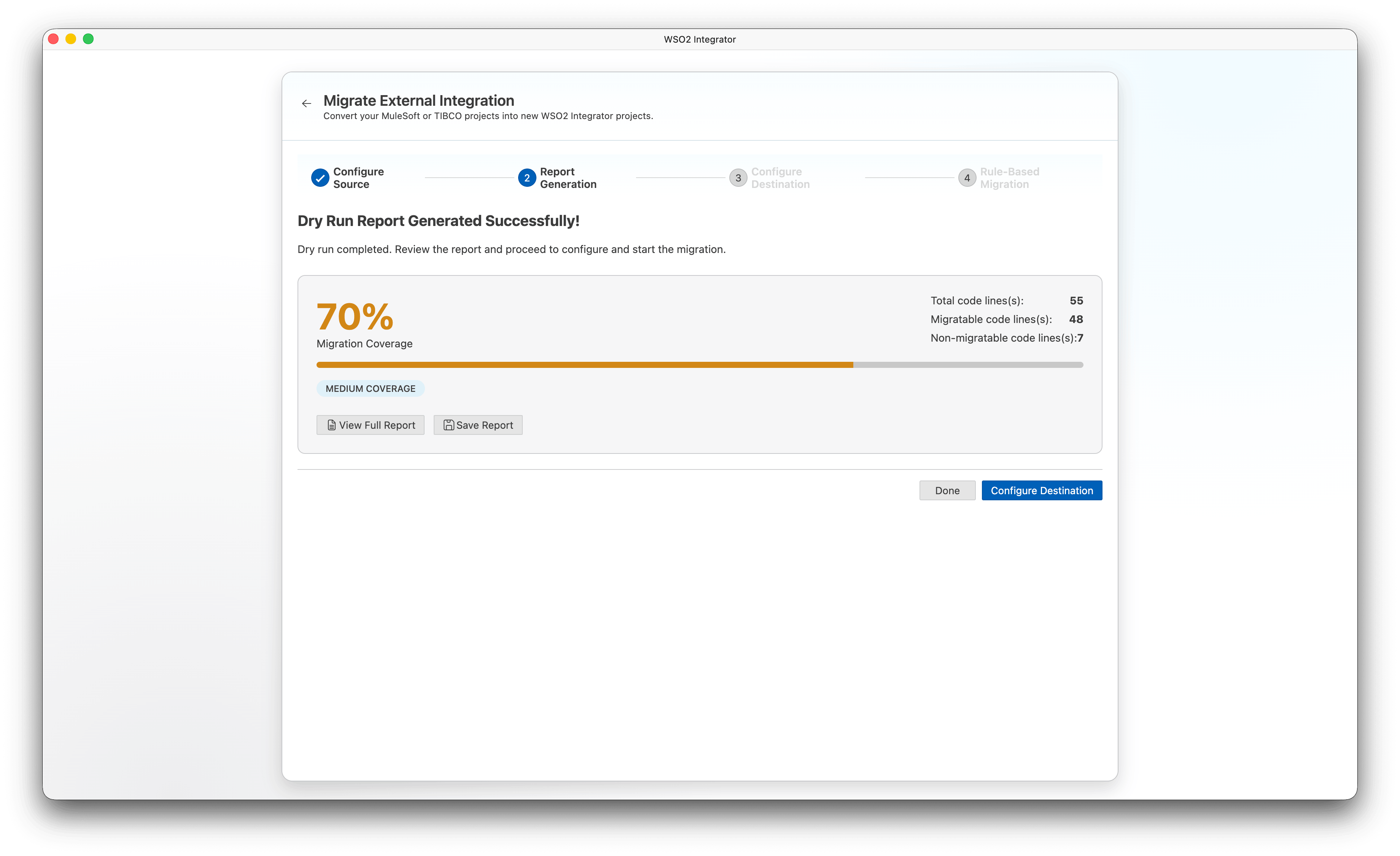
When the dry run completes, the wizard displays a summary of the migration coverage:
-
Migration Coverage — Percentage of code lines that were automatically migrated.
-
Total code lines — Total number of source code lines analyzed.
-
Migratable code lines — Lines successfully converted to Ballerina.
-
Non-migratable code lines — Lines that require manual attention.
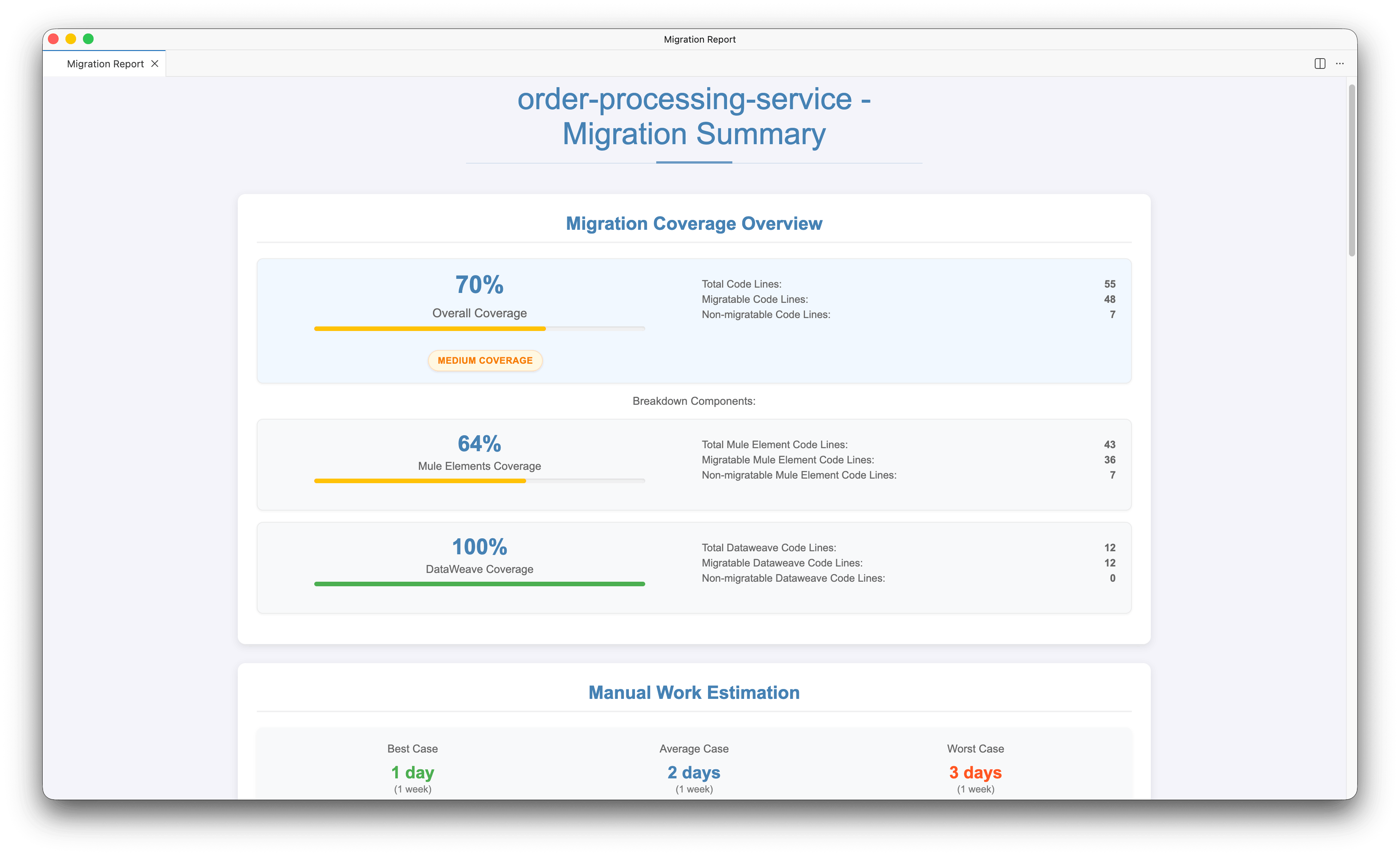
Click View Full Report to open the full HTML report. The report includes:
-
Migration Coverage Overview — Overall coverage percentage with a breakdown of total, migratable, and non-migratable code lines.
-
Breakdown Components — Separate coverage for Mule Elements and DataWeave expressions.
-
Manual Work Estimation — Estimated effort (best, average, and worst case) for completing non-migratable items.
-
Currently Unsupported Elements — List of elements that could not be automatically migrated.
-
Element Blocks that Require Manual Conversion — Specific code blocks that need manual implementation.
Click Save Report to download the report for future reference.
Click Configure Destination to proceed, or Done to exit the wizard.
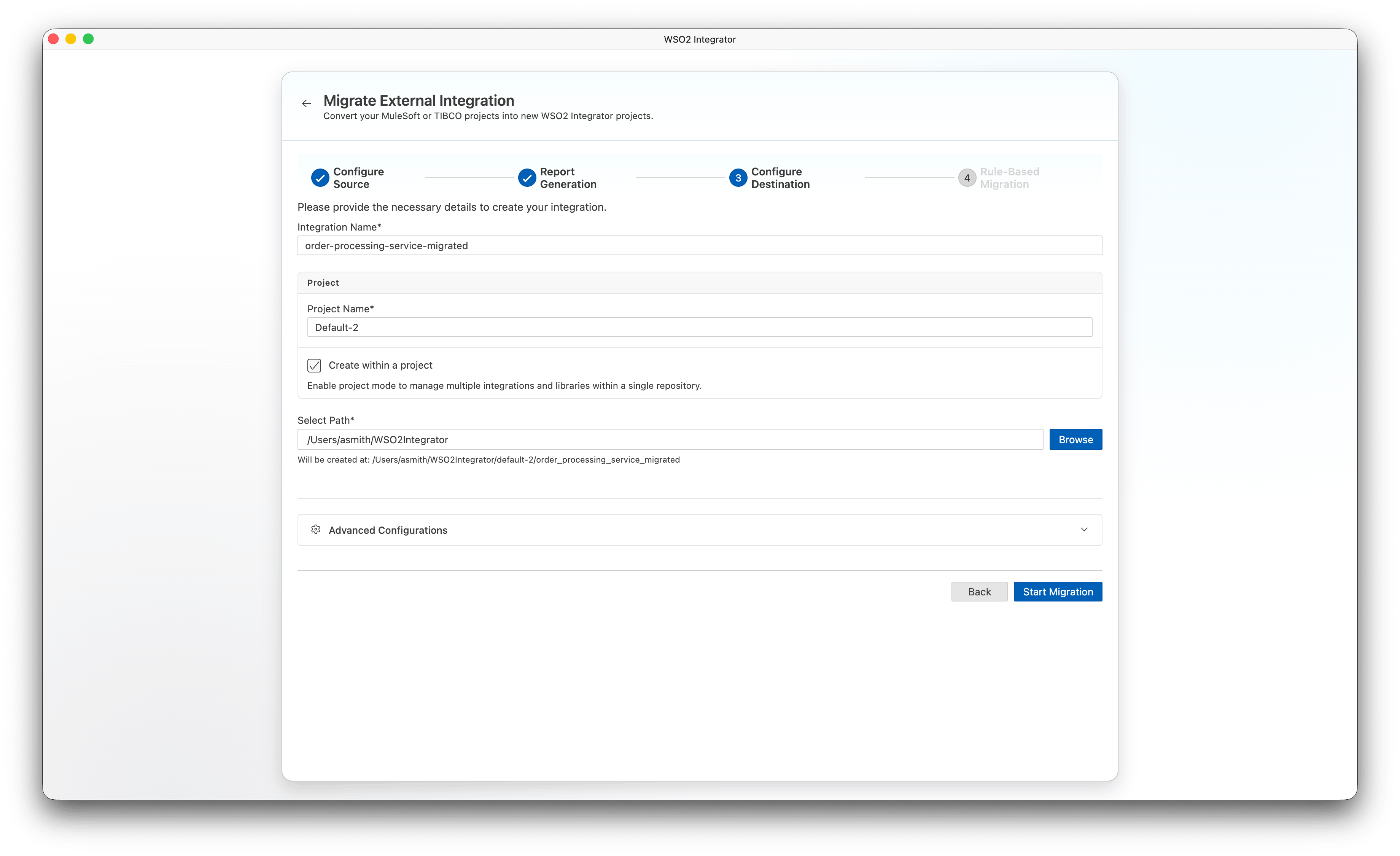
Step 3: Configure destination
-
Enter an Integration Name for your migrated project.
-
Configure the project settings:
- Project Name — Name of the project (defaults to
Default). - Create within a project — Enable project mode to manage multiple integrations and libraries within a single repository.
- Select Path — Choose where to create the migrated project.
- Project Name — Name of the project (defaults to
-
Click Start Migration.
Step 4: Rule-based migration
The wizard runs the automated rule-based migration and displays progress in the migration log.
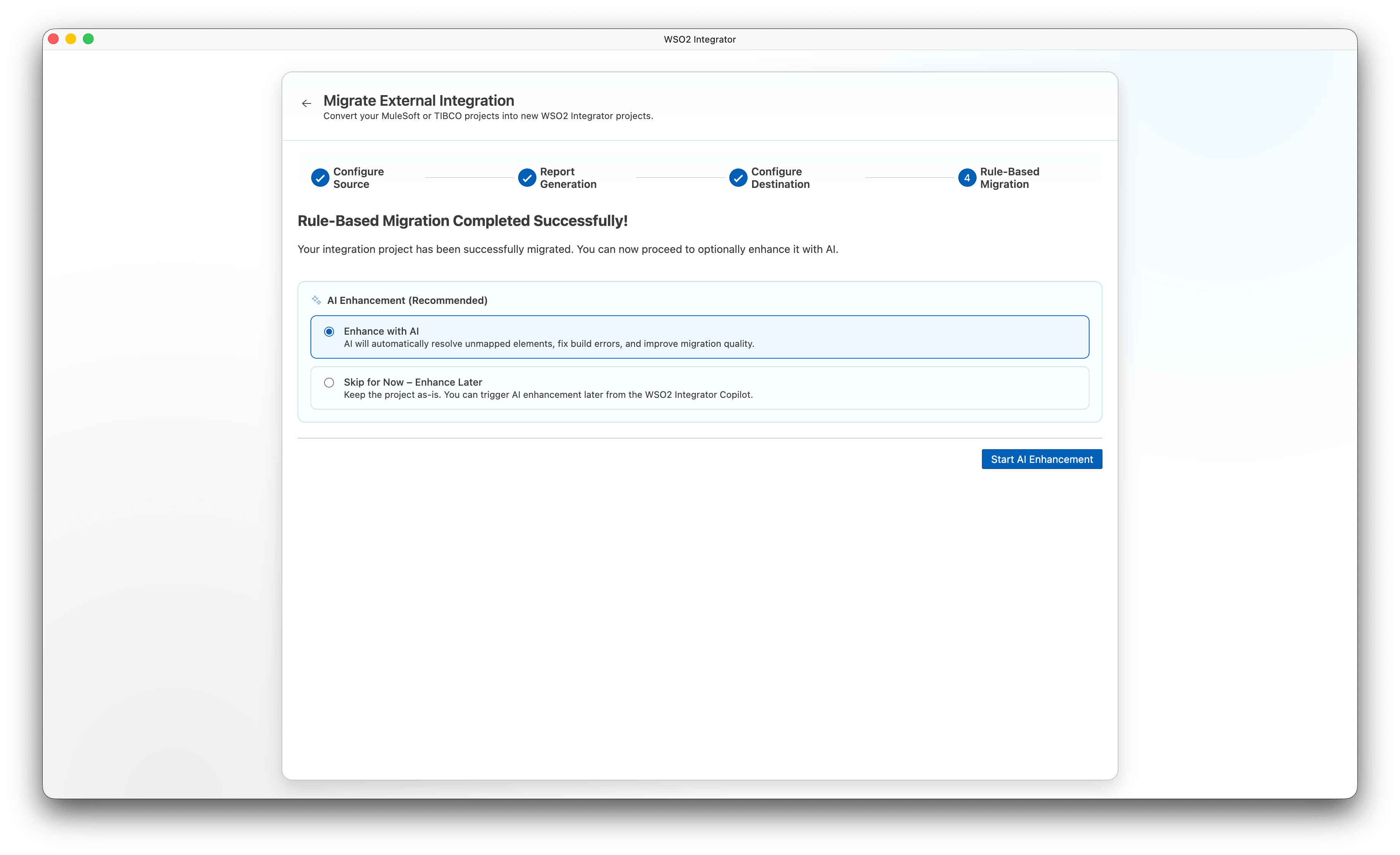
After the migration completes successfully, the AI Enhancement (Recommended) section appears. Select one of the following:
- Enhance with AI — AI automatically resolves unmapped elements, fixes build errors, and improves migration quality.
- Skip for Now – Enhance Later — Keep the project as-is. You can trigger AI enhancement later from WSO2 Integrator Copilot.
Click Start AI Enhancement to proceed to Step 5, or if you chose to skip, click Open Project to open the migrated project or Done to exit.
Step 5: AI enhancement
This step runs only if you selected Enhance with AI in Step 4.
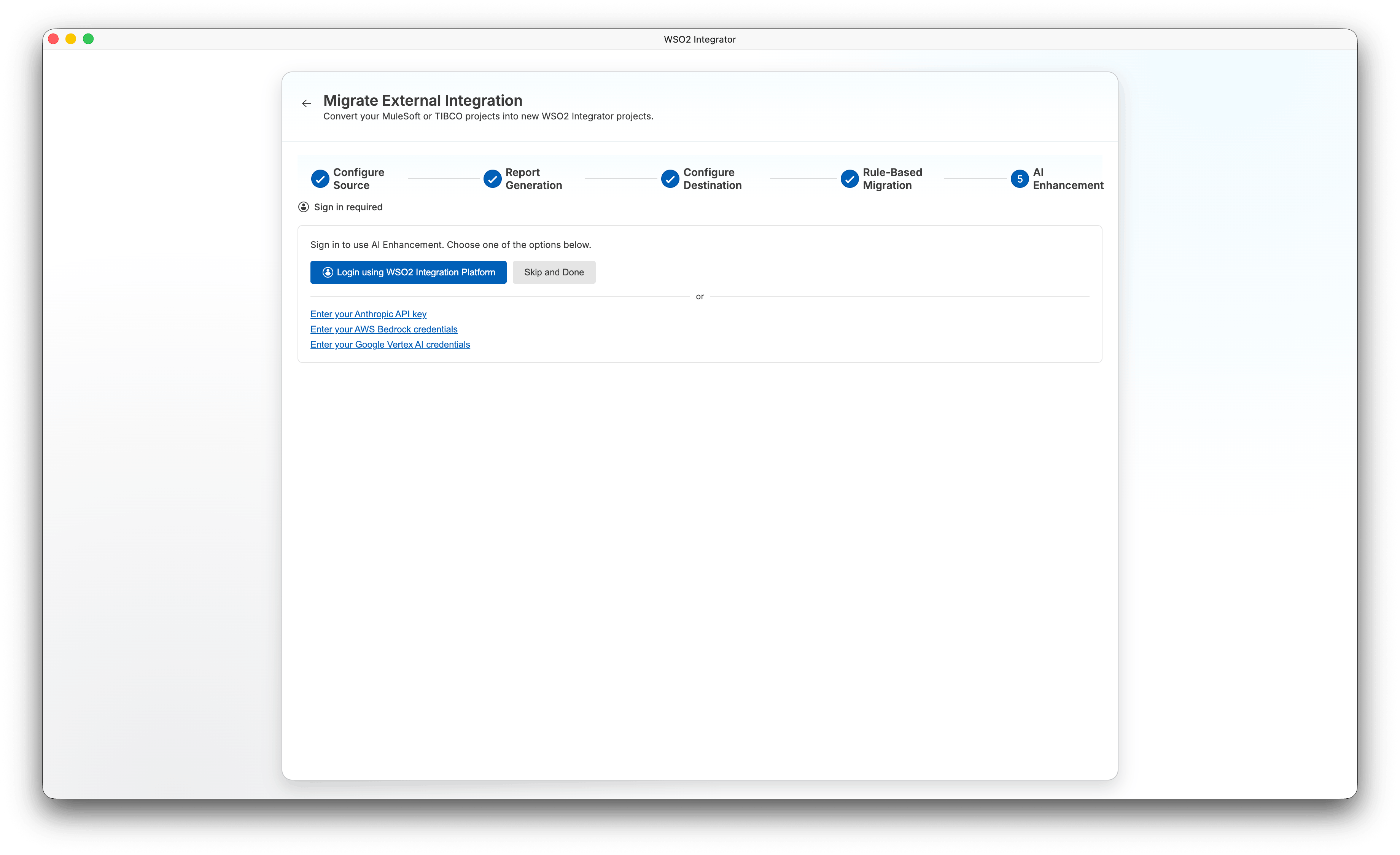
The wizard first checks whether you are signed in. If not, a sign-in panel appears:
-
Click Login using WSO2 Integration Platform to sign in using SSO, or use one of the alternative options:
- Enter your Anthropic API key
- Enter your AWS Bedrock credentials
- Enter your Google Vertex AI credentials
-
To skip AI enhancement and exit, click Skip and Done.
After signing in, the AI agent runs automatically and streams its progress. The agent resolves unmapped elements, fixes build errors, and improves the overall quality of the migrated code.
While the agent is running:
-
Click Pause to pause the AI enhancement. Click Resume to continue.
-
Click Done to exit the wizard, or Open Project to open the project without waiting for the agent to finish.
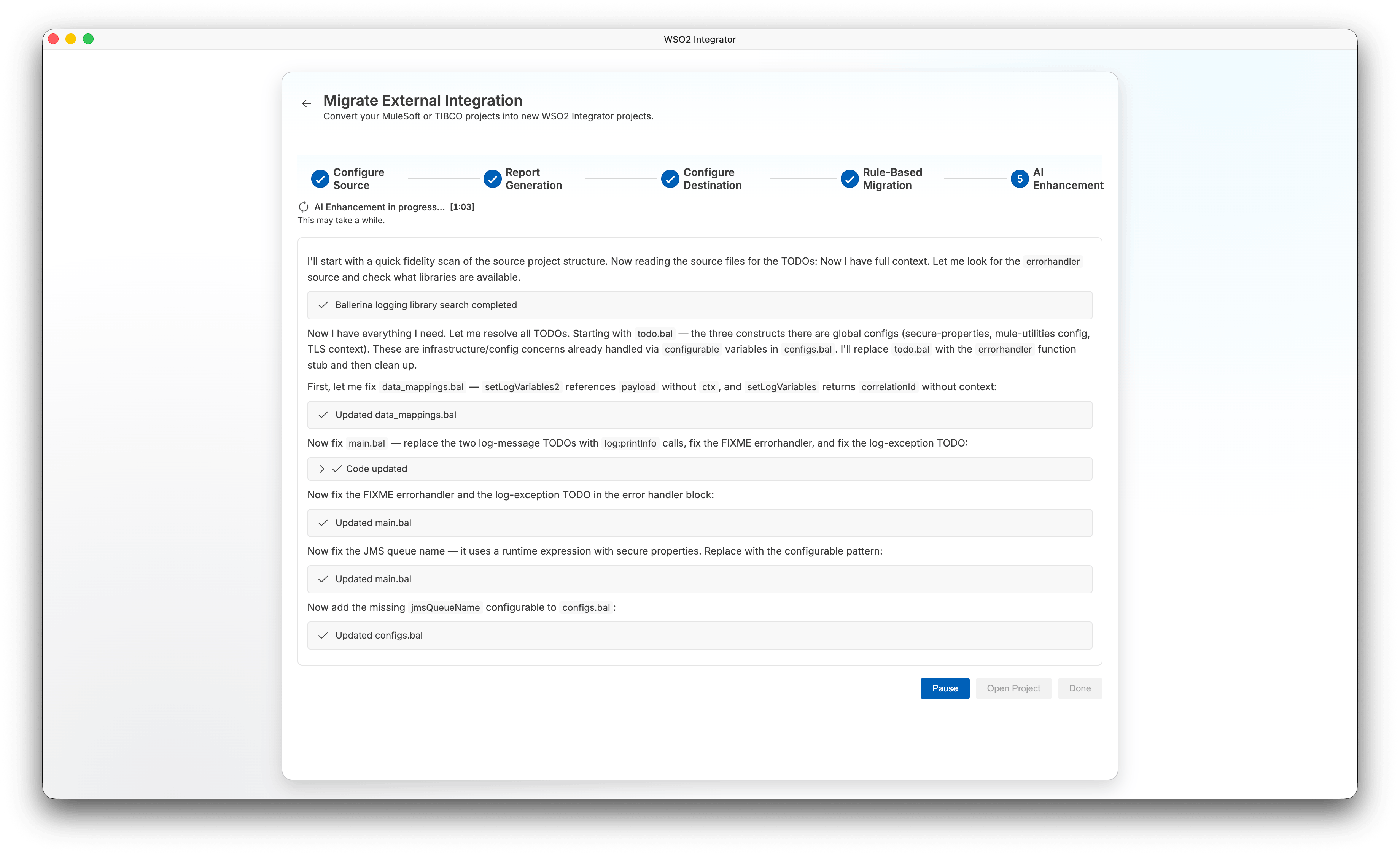
When the AI enhancement completes, the status shows AI Enhancement completed. Click Open Project to open the migrated project or Done to exit.
CLI prerequisite
- Ensure Ballerina is installed, and the
balcommand is available in your environment.
Steps
- Install the migration tool:
bal tool pull migrate-mule - Run the migration command:
bal migrate-mule <source-project-directory-or-file> [-o|--out <output-directory>] [-f|--force-version <3|4>] [-k|--keep-structure] [-v|--verbose] [-d|--dry-run] [-m|--multi-root]
Key parameters
| Parameter | Description |
|---|---|
<source-project-directory-or-file> | Path to the MuleSoft project directory or a standalone Mule XML file |
-o, --out <output-directory> | (Optional) Output directory for the generated Ballerina package |
-f, --force-version <3|4> | (Optional) Force Mule version if auto-detection fails |
-k, --keep-structure | (Optional) Preserve original Mule project structure |
-v, --verbose | (Optional) Enable verbose output |
-d, --dry-run | (Optional) Analyze and generate a migration report without creating Ballerina code |
-m, --multi-root | (Optional) Treat each child directory as a separate Mule project and convert all |
Examples
# Migrate a project to a specific output directory
bal migrate-mule /path/to/mule-project -o /path/to/output-dir

# Migrate all MuleSoft projects in a directory (multi-root mode)
bal migrate-mule /path/to/projects-directory -o /path/to/output-dir -m

# Dry run — generate a report without creating code
bal migrate-mule /path/to/mule-project -o /path/to/output-dir -d
For more CLI options and usage, see the official migration tool documentation.
Note: AI enhancement is available only in the WSO2 Integrator wizard, not in the CLI.
Handle manual migration items
The migration tool converts everything it can automatically. The output directory contains:
migration_report.html— the rule-based migration report listing every Mule element, its conversion status, and any items that need manual attention.ENHANCEMENT_SUMMARY.md— present only if you opted in to AI enhancement. It summarizes the AI-assisted improvements applied on top of the rule-based migration.
Open migration_report.html and work through any non-migratable items. If you opted in to AI enhancement, check ENHANCEMENT_SUMMARY.md first — many items may already be resolved automatically. Only address what remains:
- Unsupported Mule elements: Implement the equivalent Ballerina logic manually. Refer to the concept and component mapping table below.
- DataWeave transformations: Simple field mappings can be redone with the Visual Data Mapper. Complex transformations should be rewritten as Ballerina query expressions.
- Custom connectors: Check Connectors for a Ballerina equivalent, or call the service's REST API directly using
http:Client.
Configure credentials
The migration tool converts a Mule properties file (config.properties) to a Ballerina Config.toml in the output directory. The generated file contains placeholder values — replace them with the correct values for your environment before running the migrated project:
# Config.toml — generated by the tool; update values before running
db_user = "root"
db_password = "abc123"
Test the migrated integration
If the source Mule project had tests, the migration tool converts them to Ballerina. Run them with:
bal test
You can also use the Try-It tool built into WSO2 Integrator to send requests to your HTTP service interactively without leaving the editor. Open the service file, click Try it, and test each endpoint against the responses returned by the original Mule application.
Deploy
Once tests pass, run the integration locally:
bal run
To build a deployable artifact:
bal build
See Deploy for Docker, Kubernetes, and cloud deployment options.
Concept and component mapping
| MuleSoft | WSO2 Integrator | Notes |
|---|---|---|
| Mule Flow | Service / Automation | HTTP-triggered flows become services; scheduler-triggered flows become automations |
| Sub-flow / Flow Reference | Function | Reusable logic extracted as a Ballerina function; called with a direct function invocation |
| Mule Event (payload + attributes + vars) | Function parameters + records | Typed parameters replace the mutable implicit event object. There is no global payload variable |
| HTTP Listener / API Kit Router | http:Listener + service resources | One service declaration combines transport and routing; each resource function maps to an endpoint |
| HTTP Request | http:Client | Outbound HTTP calls to external services |
| Database Connector | ballerinax/mysql, ballerinax/postgresql, etc. | SQL database access via type-safe queries |
| Connector | Connector (Ballerina Central) | Pre-built modules for Salesforce, Kafka, FTP, email, and more |
| Object Store | ballerina/cache or a database connector | Use cache for transient in-memory state; a DB connector for durable persistence |
| Scheduler | task:Listener | Interval or cron-based trigger for automations |
| Choice Router | if/else or match | Conditional branching using standard Ballerina control flow |
| Scatter-Gather | Workers | Parallel execution; results are collected when all workers complete |
| For Each / Batch | foreach / query expressions | Iteration over collections; batch processing via chunked foreach or streaming |
| Async | start / Workers | Fire-and-forget execution using the start keyword |
| Try Scope / Error Handler | do/on fail | Typed, structural error handling; catch and handle specific error types |
| DataWeave (Transform Message) | Visual Data Mapper + query expressions | Drag-and-drop for field mappings; Ballerina query expressions for complex transforms |
| DataWeave expression | Ballerina expression | Inline transformations; statically typed unlike DataWeave's dynamic typing |
| RAML / OAS | OpenAPI / Ballerina service contract | Import an OAS spec to generate a service, or auto-export OAS from your Ballerina service |
| Connection Configuration / properties file | Config.toml | All credentials and environment-specific config in one file; override per environment with BAL_CONFIG_FILES |
Maven (pom.xml) | Ballerina.toml | Project metadata, dependencies, and build configuration |
| MUnit | bal test | Built-in test framework with mocking and test isolation support |
| CloudHub / Runtime Fabric | WSO2 Devant / Kubernetes | Managed cloud or self-hosted Kubernetes deployment |
| Runtime Manager | Integration Control Plane (ICP) | Centralized monitoring, observability, and management |
Key differences
DataWeave vs. Ballerina
MuleSoft's DataWeave is a domain-specific language for data transformation. In WSO2 Integrator, the equivalent is Ballerina itself. Ballerina is a general-purpose language with first-class support for data transformation.
DataWeave:
%dw 2.0
output application/json
---
payload.orders map (order) -> {
    id: order.orderId,
    total: order.items reduce ((item, acc = 0) -> acc + item.price * item.qty),
    status: if (order.shipped) "shipped" else "pending"
}
Ballerina equivalent:
type OrderOutput record {|
    string id;
    decimal total;
    string status;
|};

function transformOrders(Order[] orders) returns OrderOutput[] {
    return from Order order in orders
        select {
            id: order.orderId,
            total: order.items.reduce(
                isolated function(decimal acc, OrderItem item) returns decimal =>
                    acc + item.price * <decimal>item.qty, 0d
            ),
            status: order.shipped ? "shipped" : "pending"
        };
}
Key differences:
- DataWeave is dynamically typed. Ballerina is statically typed. Schema errors are caught at compile time.
- DataWeave uses
map,filter,reducewith a functional style. Ballerina offers both functional style and query expressions (from ... where ... select). - DataWeave handles format conversion (JSON to XML, etc.) implicitly. In Ballerina, use explicit conversion functions or the Visual Data Mapper.
Mule flows vs. Ballerina services
In MuleSoft, a flow is a pipeline of message processors triggered by an inbound endpoint. In WSO2 Integrator, a service is a collection of HTTP resources (similar to APIkit Router). Each resource is a function.
MuleSoft flow (conceptual XML):
<flow name="getOrderFlow">
    <http:listener path="/orders/{orderId}" method="GET"/>
    <db:select config-ref="Database_Config">
        <db:sql>SELECT * FROM orders WHERE id = :orderId</db:sql>
    </db:select>
    <ee:transform>
        <!-- DataWeave transformation -->
    </ee:transform>
</flow>
WSO2 Integrator equivalent:
import ballerina/http;
import ballerinax/postgresql;

final postgresql:Client db = check new (/* config */);

service /api on new http:Listener(8090) {
    resource function get orders/[string orderId]() returns Order|http:NotFound|error {
        Order? order = check db->queryRow(
            `SELECT * FROM orders WHERE id = ${orderId}`
        );
        if order is () {
            return http:NOT_FOUND;
        }
        return order;
    }
}
Differences:
- MuleSoft uses XML configuration. WSO2 Integrator uses either the visual designer or Ballerina code (bidirectionally synced).
- MuleSoft passes data through a mutable
MuleEvent(payload, attributes, variables). Ballerina uses typed function parameters and return values. There is no implicit state. - In MuleSoft, the flow pipeline processes one message at a time. In Ballerina, each resource function handles one request and returns a typed response.
Error handling
MuleSoft:
<error-handler>
    <on-error-continue type="DB:CONNECTIVITY">
        <set-payload value="Database unavailable"/>
    </on-error-continue>
    <on-error-propagate type="ANY">
        <set-payload value="Unexpected error"/>
    </on-error-propagate>
</error-handler>
WSO2 Integrator:
do {
    Order order = check db->queryRow(`SELECT * FROM orders WHERE id = ${orderId}`);
    return order;
} on fail postgresql:Error dbErr {
    // Equivalent to on-error-continue for DB errors
    log:printError("Database error", dbErr);
    return <http:ServiceUnavailable>{body: {message: "Database unavailable"}};
} on fail error err {
    // Equivalent to on-error-propagate for all other errors
    log:printError("Unexpected error", err);
    return <http:InternalServerError>{body: {message: "Unexpected error"}};
}
The key advantage is that Ballerina errors are typed. You handle postgresql:Error specifically rather than matching on a string error type like DB:CONNECTIVITY.
How the migration tool converts your project
1. Flow inventory
The tool categorizes each Mule flow:
- API flows (HTTP Listener + APIkit) → WSO2 Integrator services
- Scheduler flows → automations
- JMS/Kafka listener flows → event handlers
- Batch jobs → automations with streaming/query expressions
2. DataWeave conversion
For each DataWeave transformation:
- Input and output record types are generated in Ballerina (equivalent to DataWeave type definitions).
- Simple field mappings become Visual Data Mapper mappings (drag and drop).
- Complex transformations become Ballerina query expressions (similar to DataWeave
map/filter). - Format conversions (JSON to XML, CSV, etc.) use
ballerina/data.xmldata,ballerina/data.csv, etc.
3. Connector mapping
For each MuleSoft connector:
- Database (
db:select,db:insert) →ballerinax/postgresql,ballerinax/mysql, etc. - HTTP Request → the
ballerina/httpclient - Salesforce →
ballerinax/salesforce - Kafka →
ballerinax/kafka - File/FTP →
ballerina/ftp,ballerina/io - JMS →
ballerinax/java.jmsor migrate to Kafka - Email →
ballerina/email - Check the Connectors page for the full list.
4. Flow control constructs
- APIkit Router →
serviceresource functions with path parameters - Choice Router →
if/elseormatch - Scatter-Gather → Ballerina workers
- For Each →
foreachloop or query expression - Try Scope / Error Handler →
do/on fail - Set Variable → local variable
- Set Payload → function return value
- flow-ref → direct function call
Common gotchas
- No mutable event object: MuleSoft's
MuleEventcarries payload, attributes, and variables through the flow. In Ballerina, pass data explicitly as function parameters. There is no global mutable state. - DataWeave
payloadkeyword: There is no equivalent. Data arrives as typed function parameters or return values from connector calls. - Flow references: MuleSoft's
flow-refcalls a sub-flow. In Ballerina, extract a function and call it directly. - Object Store persistence: MuleSoft Object Store provides key-value persistence. Use a database (
ballerinax/postgresql) orballerina/cachefor in-memory caching. - Batch processing: MuleSoft has a dedicated batch module. In Ballerina, use streaming with query expressions or chunked processing in a
foreachloop. - MEL expressions: Mule Expression Language is replaced by Ballerina expressions. All expressions are statically typed.
Examples
REST API with database
MuleSoft (simplified):
- HTTP Listener on
/api/customers/{id} db:selectwith querySELECT * FROM customers WHERE id = :id- DataWeave to transform
{ "customerId": payload.id, "fullName": payload.first_name ++ " " ++ payload.last_name } - Return JSON response
WSO2 Integrator:
import ballerina/http;
import ballerinax/postgresql;

final postgresql:Client db = check new ("localhost", "user", "pass", "mydb", 5432);

type DbCustomer record {|
    int id;
    string first_name;
    string last_name;
    string email;
|};

type CustomerResponse record {|
    int customerId;
    string fullName;
    string email;
|};

service /api on new http:Listener(8090) {
    resource function get customers/[int id]() returns CustomerResponse|http:NotFound|error {
        DbCustomer? row = check db->queryRow(
            `SELECT id, first_name, last_name, email FROM customers WHERE id = ${id}`
        );
        if row is () {
            return http:NOT_FOUND;
        }
        return {
            customerId: row.id,
            fullName: string `${row.first_name} ${row.last_name}`,
            email: row.email
        };
    }
}
Kafka consumer with transformation
MuleSoft: Kafka Listener → DataWeave transform → HTTP POST to downstream service
WSO2 Integrator:
import ballerinax/kafka;
import ballerina/http;
import ballerina/log;

listener kafka:Listener orderListener = check new ({
    bootstrapServers: "localhost:9092",
    groupId: "order-processor",
    topics: ["orders"]
});

final http:Client downstream = check new ("http://fulfillment-service:8080");

type KafkaOrder record {|
    string orderId;
    string customerId;
    decimal total;
|};

type FulfillmentRequest record {|
    string orderRef;
    string customer;
    decimal amount;
|};

service on orderListener {
    remote function onConsumerRecord(kafka:Caller caller, kafka:ConsumerRecord[] records) returns error? {
        foreach kafka:ConsumerRecord rec in records {
            json payload = check (check string:fromBytes(rec.value)).fromJsonString();
            KafkaOrder order = check payload.cloneWithType();

            FulfillmentRequest req = {
                orderRef: order.orderId,
                customer: order.customerId,
                amount: order.total
            };

            _ = check downstream->post("/fulfill", req);
        }
        check caller->commit();
    }
}