Test Explorer
The Test Explorer is the built-in testing panel in WSO2 Integrator. It gives you a visual interface to create test cases, run them, and view results. Tests created here are backed by the Ballerina test framework and stored as standard .bal test files in your project.
Open Test Explorer
Select the Testing icon (beaker) in the activity bar on the left side of the IDE. The TEST EXPLORER panel opens and lists all test functions discovered in your project.
How tests are listed
Tests are organized under their integration. Each integration in the project appears as a top-level node, and its test functions are listed beneath it.
When a test belongs to one or more groups, it is nested under the group name rather than listed directly under the integration. This means the same test can appear under multiple group nodes if it was assigned to more than one group. Tests with no group assignment appear directly under the integration node.
Create a test
- Visual Designer
- Ballerina Code
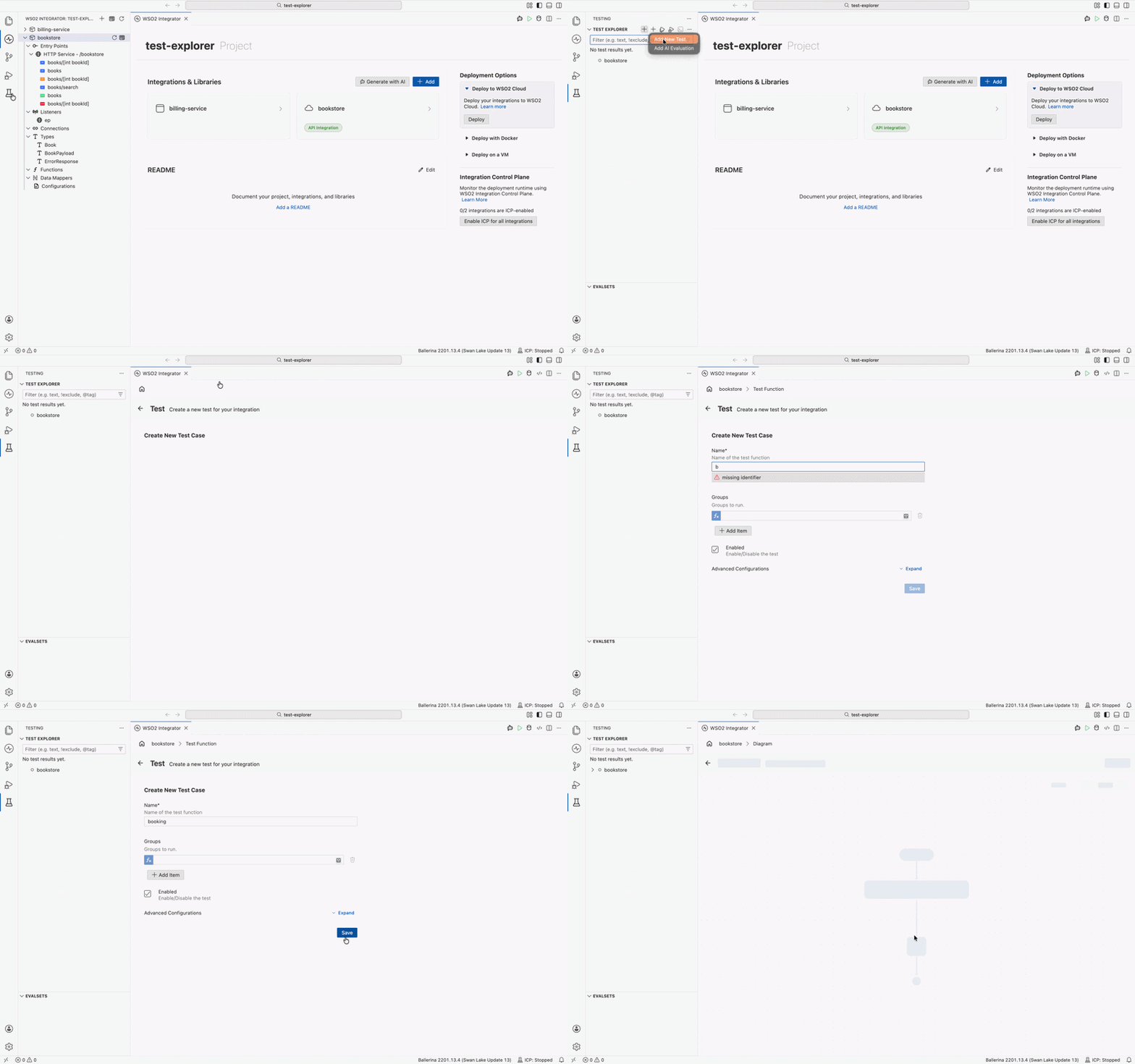
- Select the Testing icon (beaker) in the activity bar to open the TEST EXPLORER panel.
- Select + at the top of the panel and choose Add New Test.
- If the project contains multiple integrations, a quick pick appears. Select the integration you want to add the test to.
- The Create New Test Case form opens. Enter a name for the test function and fill in the fields described in the table below.
- Expand Advanced Configurations for additional settings, then select Save.
- Write the test logic in the flow diagram that opens.
| Field | Required | Description |
|---|---|---|
| Name | Yes | The name of the test function. Must be unique across the entire integration. No two test functions can share the same name. |
| Groups | No | One or more group names to assign this test to. Select + Add Item to add multiple groups. Groups let you run or exclude subsets of tests at execution time. |
| Enabled | No | When checked (default), the test runs normally. Uncheck to disable the test without deleting it. |
| Minimum Pass Rate (%) | No | The minimum percentage of assertions that must pass for the test to be considered successful. Defaults to 100%. Useful for data-driven tests where partial success is acceptable. |
| Depends On | No | List of test function names this test depends on. The framework runs the listed tests first. Select + Add Item to add multiple dependencies. |
| Before Function | No | A function to execute immediately before this test runs. Use it to set up state specific to this test case. |
| After Function | No | A function to execute immediately after this test runs. Use it to clean up state created during the test. |
| Runs | No | The number of times to execute this test function. Useful for stability checks or load-sensitive tests. |
| Data Provider | No | A function that supplies the data sets for this test. When set, the test runs once for each data set returned by the provider. |
WSO2 Integrator creates the test function in the tests/ directory.
The form fields map directly to the @test:Config annotation. The following example shows a fully configured test case using all available fields.
import ballerina/test;

// Function to execute before this specific test.
function setupOrderTest() {
    // set up test-specific state
}

// Function to execute after this specific test.
function teardownOrderTest() {
    // clean up test-specific state
}

@test:Config {
    groups: ["orders", "smoke"],
    enable: true,
    before: setupOrderTest,
    after: teardownOrderTest,
    dependsOn: [testCreateOrder],
    dataProvider: orderDataProvider
}
function testFulfillOrder(string orderId, string expectedStatus) returns error? {
    test:assertEquals(expectedStatus, "fulfilled");
}

function orderDataProvider() returns map<[string, string]> {
    return {
        "standard": ["ORD-001", "fulfilled"],
        "express":  ["ORD-002", "fulfilled"]
    };
}
Save the test file in the tests/ directory of your project, then run bal test from the project directory to execute.
| Attribute | Required | Description |
|---|---|---|
groups | No | One or more group names to tag this test with. Groups let you run or exclude subsets of tests at execution time. |
enable | No | Set to false to skip this test without deleting it. Defaults to true. |
minPassRate | No | The minimum percentage of assertions that must pass for the test to be considered successful. Defaults to 100%. Useful for data-driven tests where partial success is acceptable. |
dependsOn | No | List of test functions that must complete before this one starts. The order within the array does not matter. |
before | No | A function to execute immediately before this test runs. Use it to set up state specific to this test case. |
after | No | A function to execute immediately after this test runs. Use it to clean up state created during the test. |
runs | No | The number of times to execute this test function. Useful for stability checks or load-sensitive tests. |
dataProvider | No | A function that supplies the data sets for this test. The test runs once for each data set returned by the provider. |
Execute tests
Once test cases exist, run them from the TEST EXPLORER panel:
- Run all: select the run icon at the top of the TEST EXPLORER panel to execute every test in the project.
- Run a module: select the run icon next to an integration name to run all tests in that module.
- Run one test: select the run icon next to an individual test function.
Results appear inline in the panel. Passing tests show a green check mark. Failing tests show a red cross with the failure message. Select a failing test to jump to the assertion that failed.
Write test code
The Test Explorer creates and runs tests written with the Ballerina test framework. The pages below cover every aspect of writing, organizing, and running test code:
| Topic | Description |
|---|---|
| Write unit tests | Set up the test directory, write your first test, use @test:Config attributes, and assert values. |
| Configure test lifecycle | Set up and tear down state at suite, group, and per-test levels. Control execution order with dependsOn. |
| Test services and clients | Send requests to a running HTTP service from a test client. Mock client calls for external services you don't control. |
| Data-driven tests | Run the same test function against multiple data sets using a data provider function. |
| Test groups | Assign tests to named groups and run or exclude subsets with --groups and --disable-groups. |
| Mocking | Replace external clients and functions with controlled stubs. Mock objects, resources, and module-level functions. |
| Execute tests | Use the bal test CLI to run specific functions, rerun failures, and execute tests in parallel. |
| Code coverage and reports | Generate HTML test reports, measure code coverage, enforce minimum thresholds, and export JaCoCo XML. |
What's next
- Generate tests with AI — generate test scaffolding automatically using Copilot
- Configure test lifecycle — set up suite-level and group-level setup and teardown