Scan Tool
The scan tool performs static code analysis on Ballerina projects. It identifies code quality issues, potential bugs, security vulnerabilities, and integration anti-patterns using a configurable set of rules. Scan results can be output to the console or exported as structured reports.
Prerequisites
- Ensure the
balcommand is available in your environment.
Install the tool
Follow these steps to install and verify the scan tool:
- Pull the scan tool from Ballerina Central:
bal tool pull scan
- Verify the installation:
bal tool list
Ensure that the output includes a row for the scan tool, similar to:
|TOOL ID      |VERSION   |
|-------------|----------|
|scan         |x.x.x    |
Command syntax
bal scan [OPTIONS] [<package>|<source-file>]
Arguments
<package>— Analyzes all Ballerina files in the specified package (optional, defaults to the current directory).<source-file>— Analyzes a specific standalone Ballerina file (.balextension required).
Analyzing individual Ballerina files that are part of a package is not allowed. You must analyze the entire package or work with standalone files.
Options
| Option | Required | Default | Description |
|---|---|---|---|
--target-dir=<path> | No | target/report | Specify a custom target directory for analysis reports |
--scan-report | No | false | Generate an HTML report alongside the JSON result in target/report |
--format=<ballerina|sarif> | No | ballerina | Specify the report format (default: ballerina) |
--list-rules | No | false | Display all available analysis rules and exit |
--include-rules=<rule1,...> | No | All rules | Run analysis for specific rules only (comma-separated list) |
--exclude-rules=<rule1,...> | No | None | Exclude specific rules from analysis (comma-separated list) |
--custom-rules-path=<path> | No | — | Path to a directory containing custom rule packages |
--platforms=<platform1,...> | No | None | Define platforms for result reporting (e.g., sonarqube) |
--platform-triggered | No | false | Indicate that the scan was triggered by a platform (e.g., CI/CD) |
Running analysis
Analyze all Ballerina files in the current package by running the following command inside the package directory:
bal scan
This command will:
- Compile and analyze all
.balfiles in the current package - Print results to the console
- Save results in JSON format in the
target/reportdirectory
To analyze a specific package:
bal scan mypackage
To analyze a specific standalone Ballerina file:
bal scan myfile.bal
To store results in a specific location, use --target-dir:
bal scan --target-dir="path/to/your/target/directory"
Console output
Issues are printed to the console in the following format:
service.bal:15:5  WARNING  ballerina:101  Missing error handling for remote call
service.bal:23:9  ERROR    ballerina:201  Potential SQL injection vulnerability
service.bal:45:1  INFO     ballerina:302  Missing connection pool configuration

Scan Summary:
  Errors:   1
  Warnings: 1
  Info:     1
  Total:    3
HTML report generation
To generate a detailed HTML report of the analysis results, use the --scan-report option:
bal scan --scan-report
The HTML report and scan results in JSON format are saved in the target/report directory. The HTML report includes a summary of the number of code smells, bugs, and vulnerabilities found in each file.
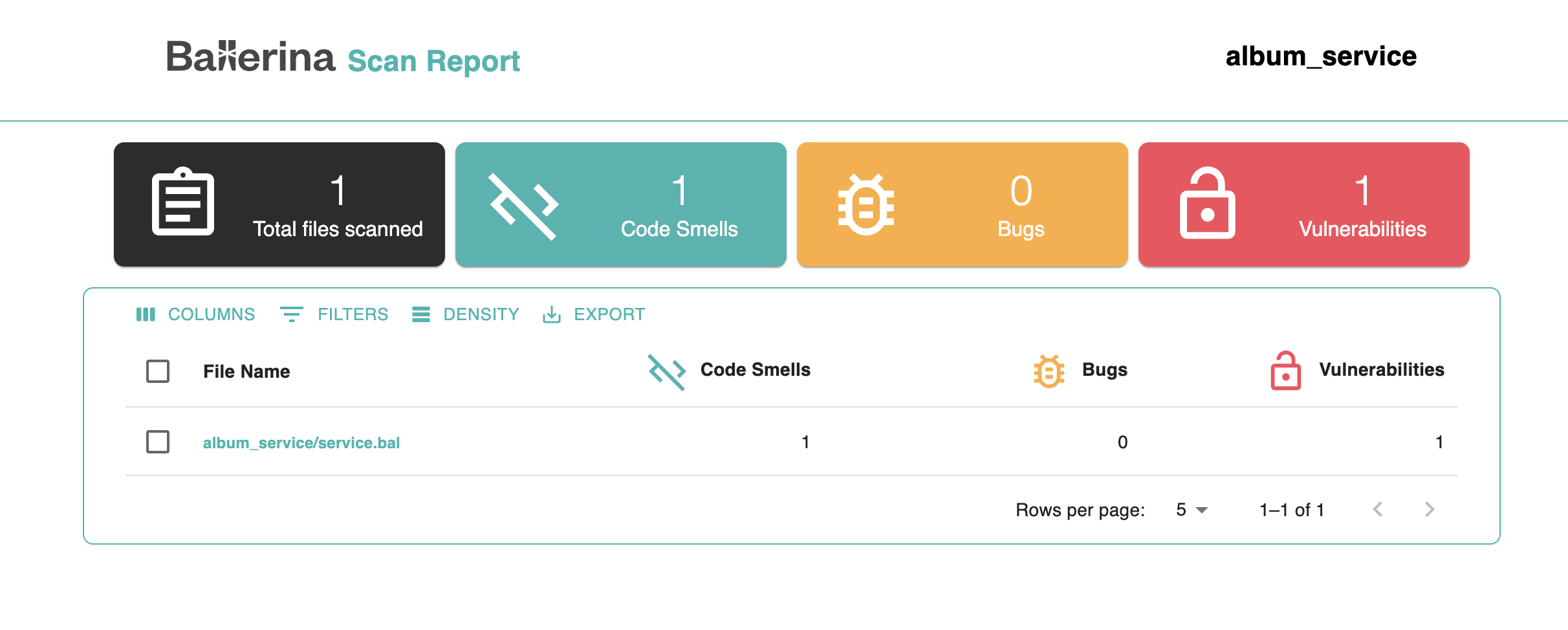
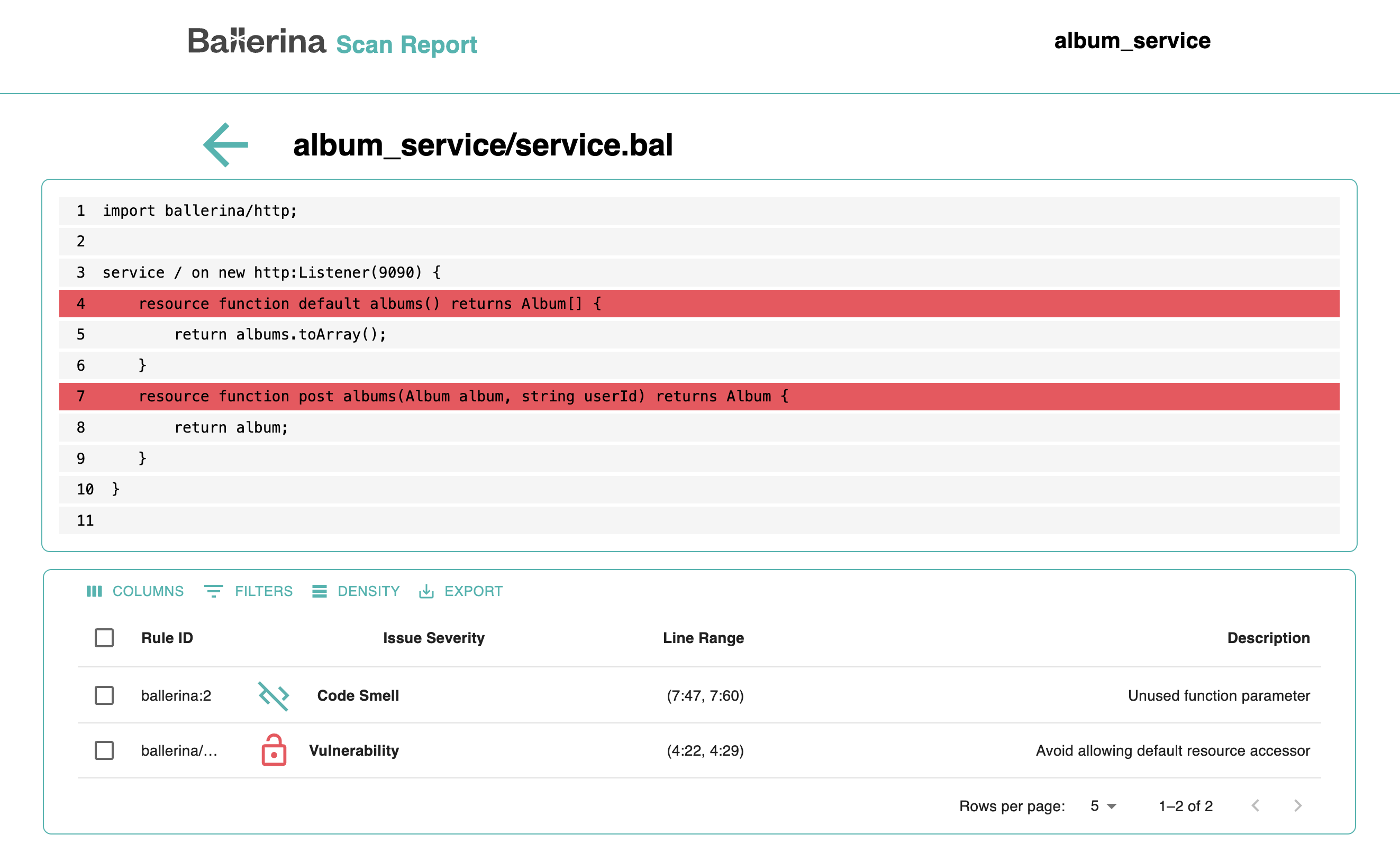
You can click on a file name to view a detailed breakdown of the issues. This view highlights the exact lines where problems were detected, along with a description and severity level.
Report formats
By default, the scan tool generates reports in ballerina (JSON) format. To generate a report in SARIF format (a standardized format for static analysis results):
bal scan --format=sarif
List available rules
To view all available rules for your project:
bal scan --list-rules
This displays a project-specific list of rules determined by your project's dependencies.
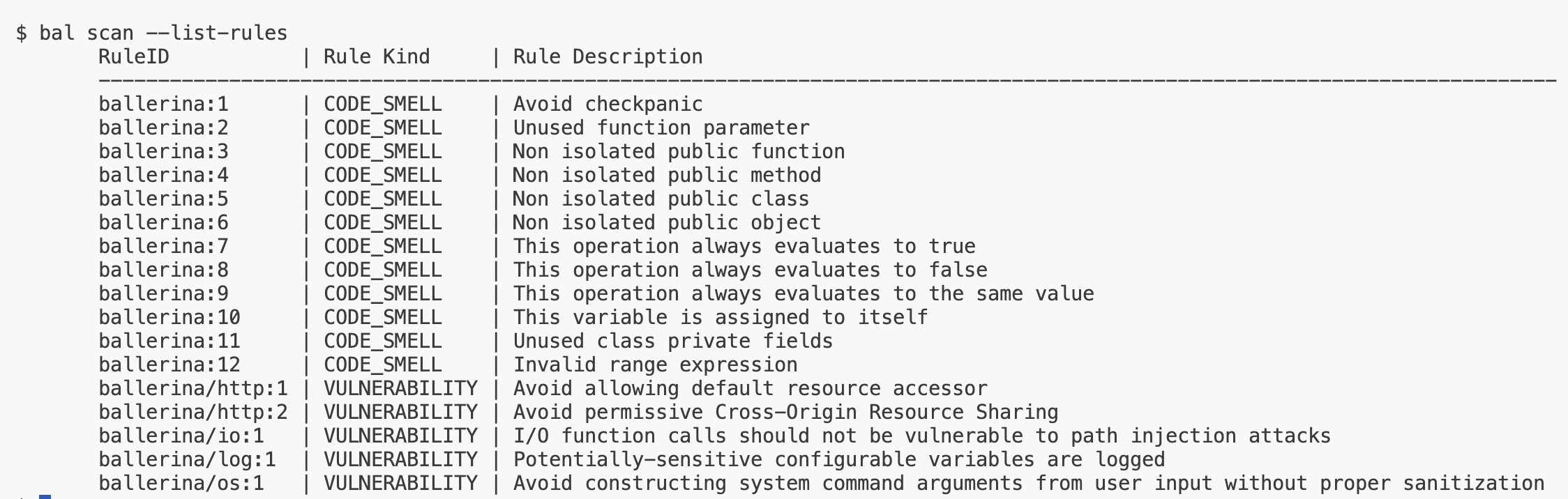
The displayed rules are project-specific and determined by your project's dependencies.
Include specific rules
Run the analysis for specific rules only using --include-rules:
bal scan --include-rules="ballerina:1"
Include multiple rules as a comma-separated string:
bal scan --include-rules="ballerina:1, ballerina/io:2"
Exclude specific rules
Exclude specific rules from the analysis using --exclude-rules:
bal scan --exclude-rules="ballerina:1"
Exclude multiple rules:
bal scan --exclude-rules="ballerina:1, ballerina/io:2"
Platform integration
The scan tool can publish analysis results directly to external code quality platforms such as SonarQube. Use the --platforms option to specify the target platform:
bal scan --platforms="sonarqube"
Specify more than one platform as a comma-separated list:
bal scan --platforms="sonarqube, semgrep, codeql"
Each platform requires additional configuration, such as authentication credentials and the report destination. For the full configuration reference, see Configuration for Platform Plugins.
Rule categories
| Category | Rule ID Range | Description |
|---|---|---|
| Code Quality | ballerina:1 - ballerina:99 | Unused variables, imports, parameters, dead code |
| Best Practice | ballerina:100 - ballerina:199 | Error handling, documentation, naming conventions |
| Security | ballerina:200 - ballerina:299 | Injection vulnerabilities, credential exposure, data leaks |
| Performance | ballerina:300 - ballerina:399 | Synchronous bottlenecks, resource management, connection pooling |
Rule severity levels
| Severity | Description | Exit code effect |
|---|---|---|
ERROR | Critical issue that should block deployment | Non-zero exit code |
WARNING | Issue that should be reviewed and addressed | Warning-only (configurable) |
INFO | Informational suggestion for improvement | No effect on exit code |
CI/CD integration
GitHub actions example
- name: Run Ballerina Scan
  run: bal scan --scan-report --platform-triggered

- name: Upload Scan Report
  if: always()
  uses: actions/upload-artifact@v4
  with:
    name: scan-report
    path: target/report/scan-results.html
Exit codes
| Exit Code | Meaning |
|---|---|
0 | No errors found (warnings and info may exist) |
1 | One or more ERROR-level issues found |
2 | Scan tool error (invalid configuration, file not found) |