OpenAPI Tool
The bal openapi tool bridges OpenAPI specifications and Ballerina code. It generates type-safe Ballerina service stubs and client connectors from OpenAPI (Swagger) YAML or JSON files, and can also export an OpenAPI specification from an existing Ballerina service. This ensures your integrations conform to API contracts and eliminates boilerplate.
Generating a Ballerina service from OpenAPI
Create a service skeleton that matches an OpenAPI specification. The generated code includes resource functions, request/response types, and validation constraints.
- Visual Designer
- Ballerina Code
-
Click the + Add Artifacts button in the canvas or click + next to Entry Points in the sidebar.
-
In the Artifacts panel, select HTTP Service under Integration as API.
-
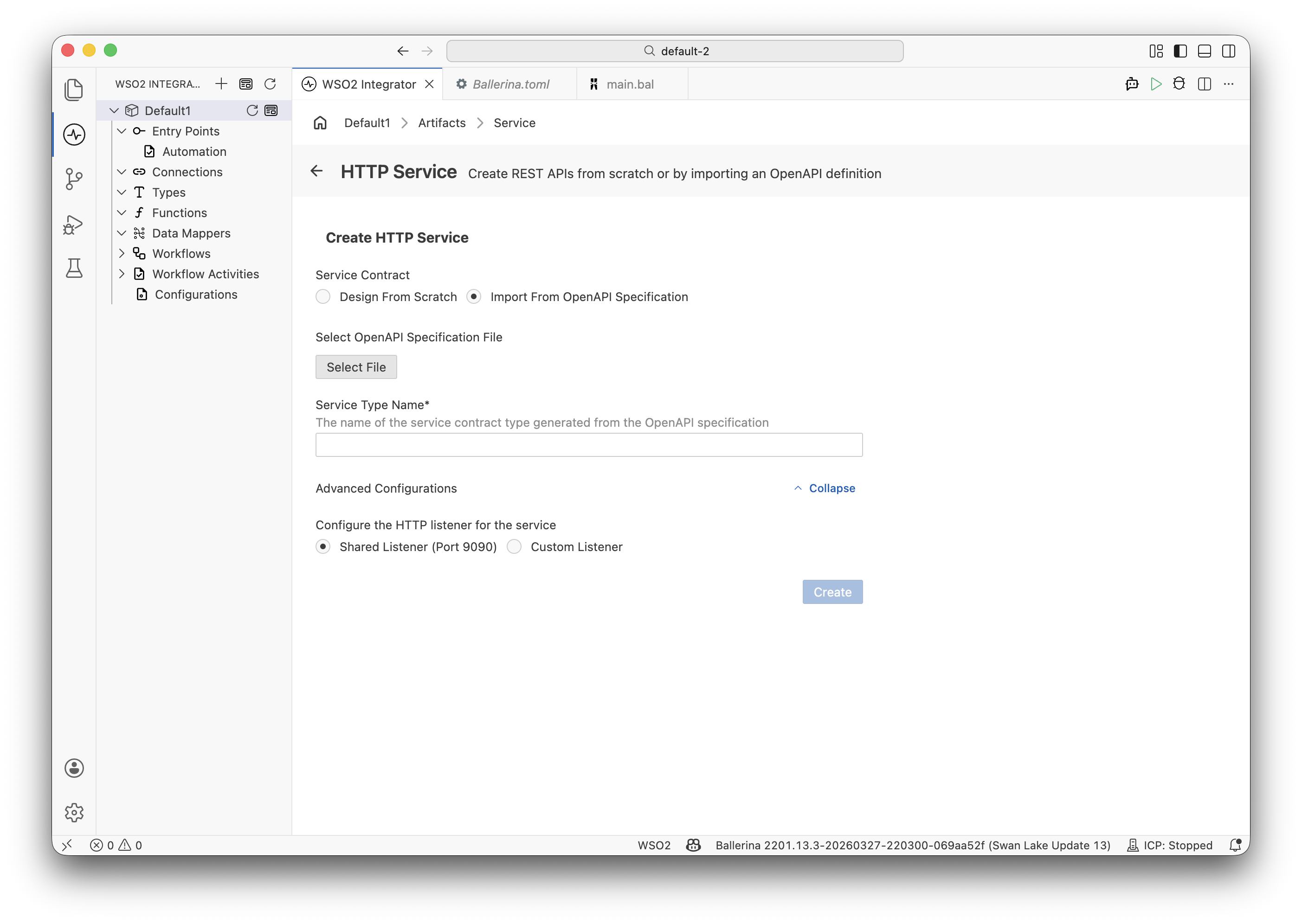
Select Import From OpenAPI Specification under Service Contract.
-
Browse or enter the path to your OpenAPI specification file (YAML or JSON).
-
Configure the Service Base Path and listener settings.
-
Click Create.
-
WSO2 Integrator generates the service with resource function stubs, request/response types, and validation constraints matching your OpenAPI specification.
Basic service generation
# Generate a service from an OpenAPI spec
bal openapi -i openapi.yaml --mode service

# Specify output directory
bal openapi -i openapi.yaml --mode service -o generated/
Generated service structure
For an OpenAPI spec defining a /orders resource, the tool generates:
generated/
├── openapi_service.bal     # Service with resource function stubs
├── types.bal               # Request/response record types
└── utils.bal               # Helper utilities
The generated service file includes empty resource functions matching each OpenAPI operation:
import ballerina/http;

listener http:Listener ep = new (8090);

service /api on ep {

    // GET /orders
    resource function get orders(string? status, int 'limit = 20)
            returns Order[]|http:InternalServerError {
        // TODO: Implement logic
    }

    // POST /orders
    resource function post orders(OrderRequest payload)
            returns http:Created|http:BadRequest {
        // TODO: Implement logic
    }

    // GET /orders/{orderId}
    resource function get orders/[string orderId]()
            returns Order|http:NotFound {
        // TODO: Implement logic
    }
}
The generated types file includes record definitions derived from the OpenAPI schemas:
// Auto-generated from OpenAPI schema definitions
type Order record {|
    string id;
    string customerId;
    LineItem[] items;
    decimal total;
    "PENDING"|"CONFIRMED"|"SHIPPED" status;
|};

type OrderRequest record {|
    string customerId;
    LineItem[] items;
|};

type LineItem record {|
    string productId;
    int quantity;
    decimal unitPrice;
|};
Generating a Ballerina client from OpenAPI
Create a type-safe HTTP client that wraps all API operations defined in the spec.
- Visual Designer
- Ballerina Code
-
Click the + Add Artifacts button in the canvas.
-
In the Artifacts panel, select Connection under Other Artifacts.
-
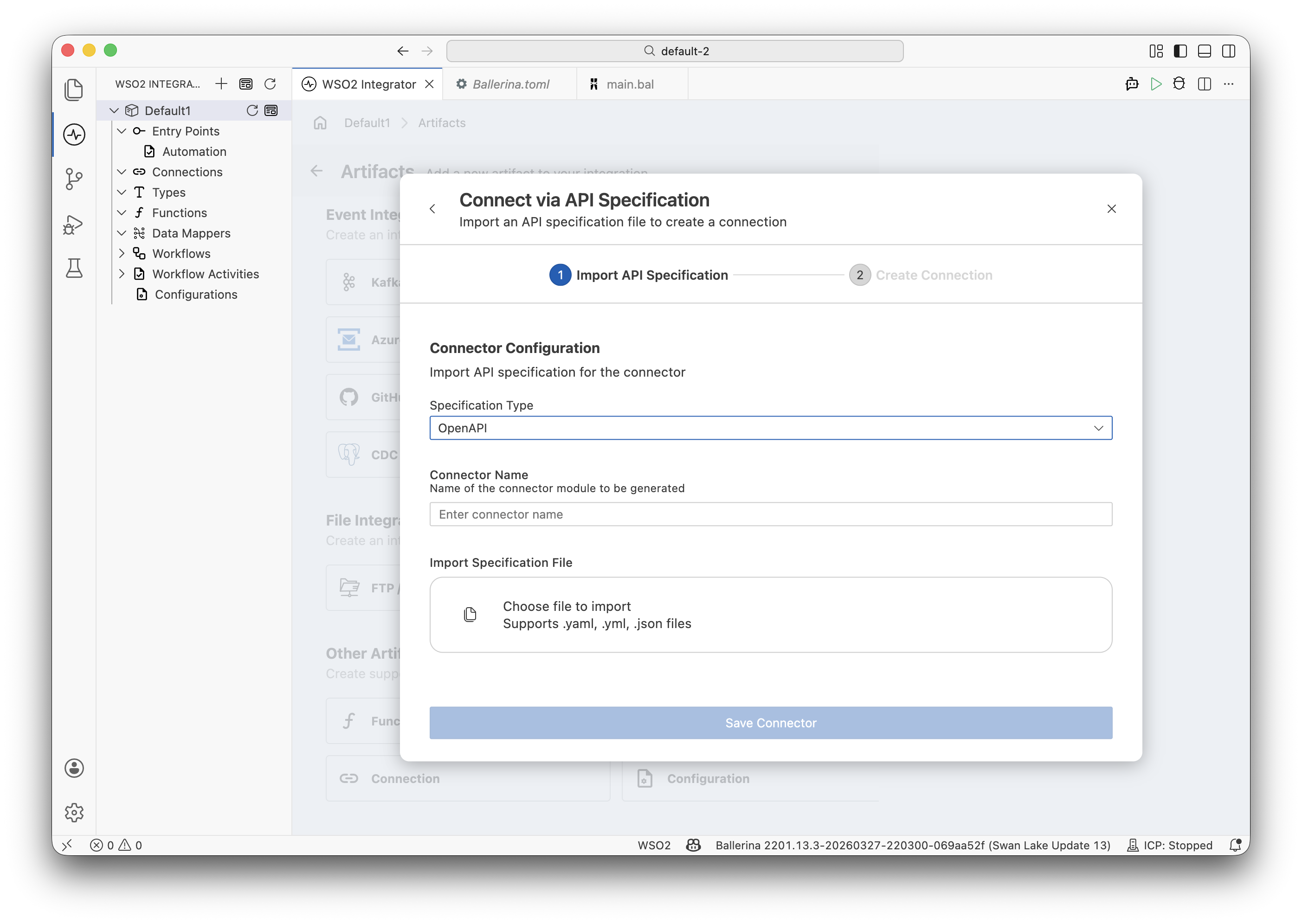
Select Connect Via API Specification and provide the OpenAPI spec file.
-
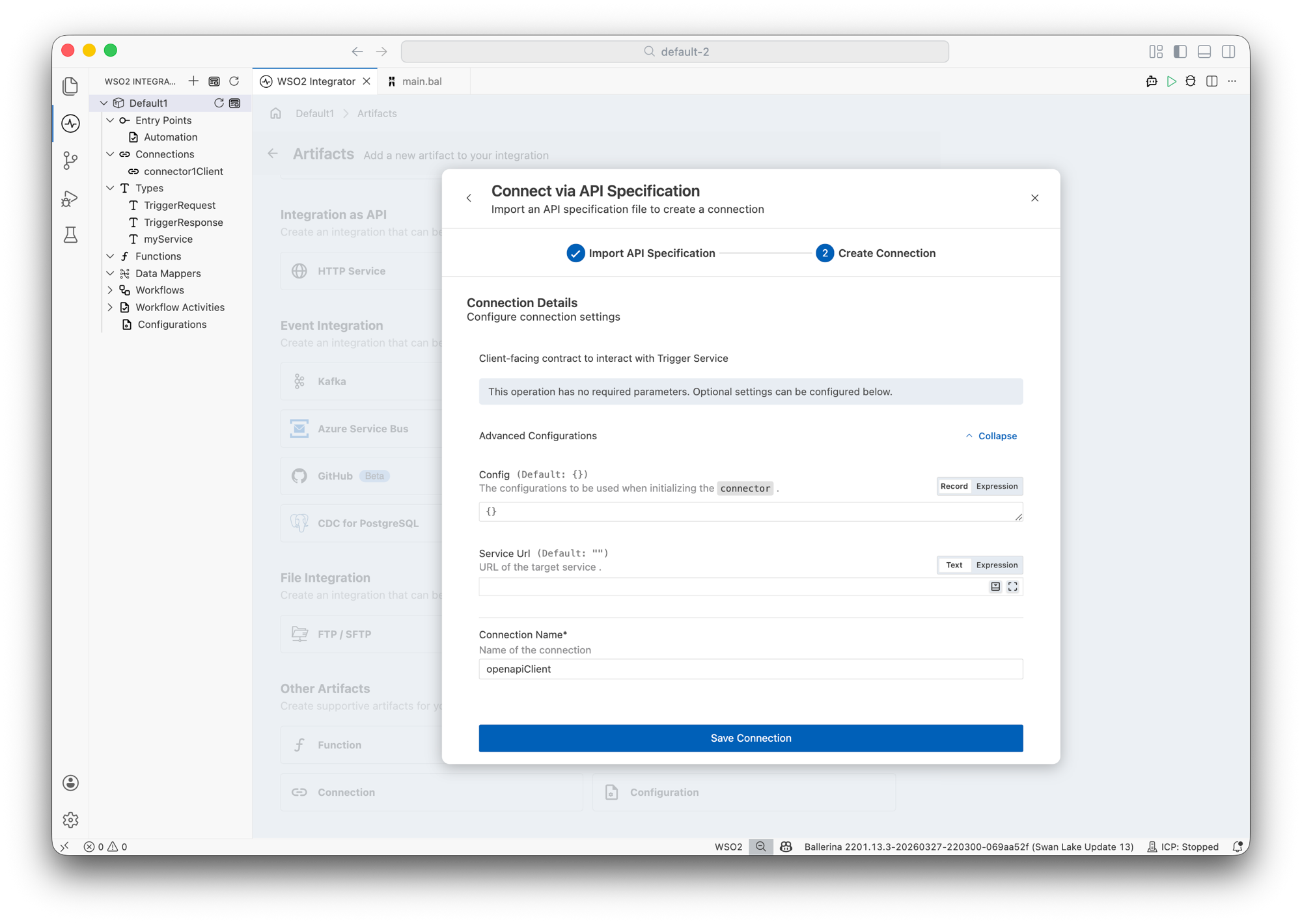
In the Create Connection step, configure the connection details. Expand Advanced Configurations to set the following optional fields:
- Config — The configurations to use when initializing the connector.
- Service Url — URL of the target service.
-
Enter a Connection Name for the generated client (for example,
openapiClient). -
Click Save Connection.
-
WSO2 Integrator generates a type-safe client connector with methods matching each API operation.
Basic client generation
# Generate a client connector
bal openapi -i openapi.yaml --mode client

# Generate client with remote methods
bal openapi -i openapi.yaml --mode client --client-methods remote
Using the generated client
import generated_client as api;

configurable string apiUrl = ?;
configurable string apiKey = ?;

final api:Client orderClient = check new (apiUrl, {
    httpVersion: http:HTTP_1_1,
    customHeaders: {"X-API-Key": apiKey}
});

function getOrders(string? status) returns api:Order[]|error {
    // The client method name matches the operationId from the spec
    return orderClient->getOrders(status = status);
}

function createOrder(api:OrderRequest req) returns api:Order|error {
    return orderClient->createOrder(req);
}
Generating both service and client
# Generate service and client together
bal openapi -i openapi.yaml

# This creates both:
#   openapi_service.bal  -- Service stub
#   client.bal           -- Client connector
#   types.bal            -- Shared types
Exporting OpenAPI from a Ballerina service
Generate an OpenAPI specification from an existing Ballerina HTTP service:
- Visual Designer
- Ballerina Code
-
Open the HTTP service in the Service Designer.
-
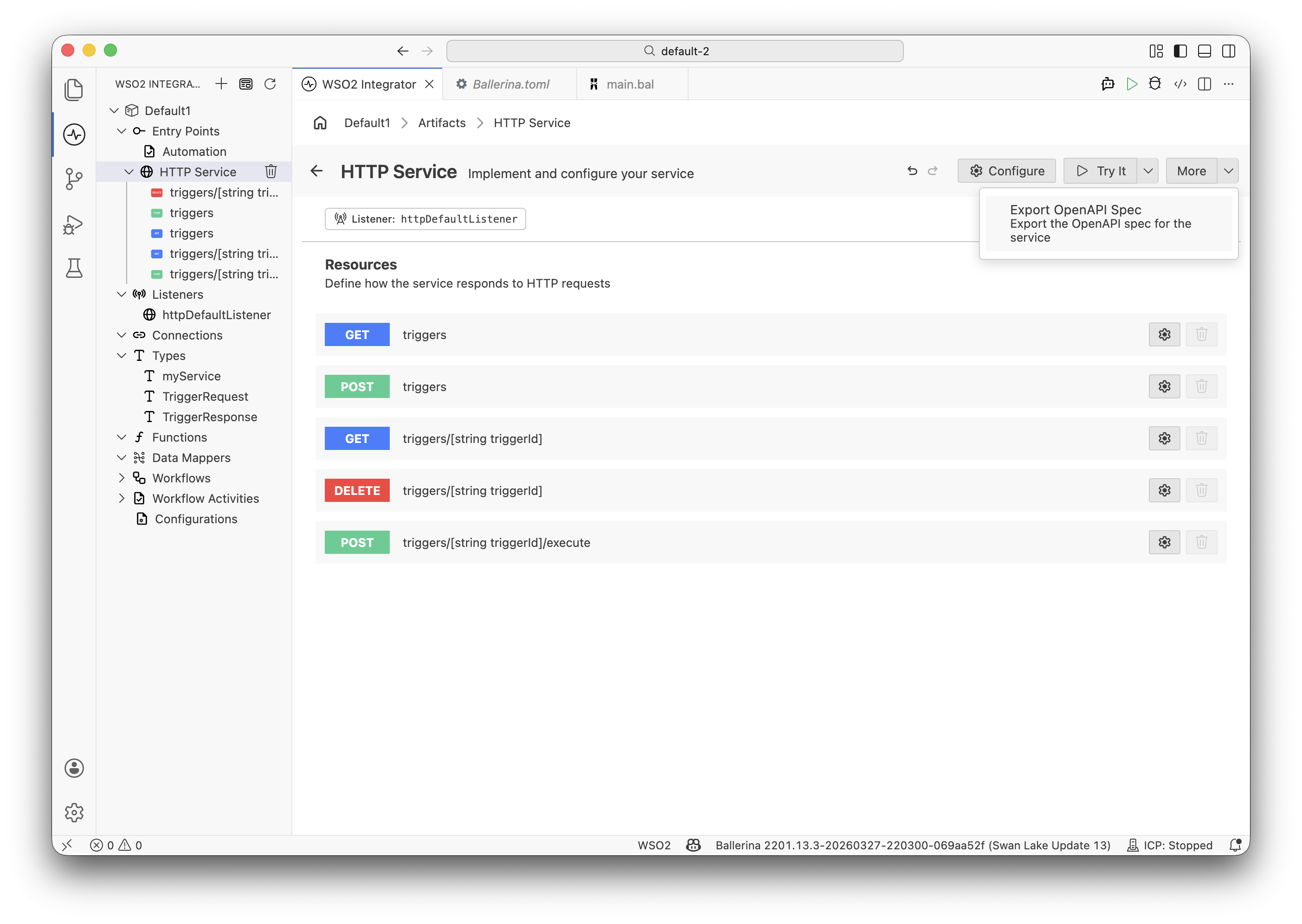
Click Export in the service header toolbar.
-
Select Export OpenAPI Specification.
-
Choose the output location.
-
Click Select OAS Save Location.
# Export OpenAPI spec from a Ballerina project
bal openapi -i service.bal

# Export as a JSON file
bal openapi -i service.bal --json

# Export to a specific file
bal openapi -i service.bal -o api-spec/
Given this service:
service /api on new http:Listener(8090) {
    resource function get orders() returns Order[]|error { ... }
    resource function post orders(OrderRequest req) returns Order|http:BadRequest|error { ... }
    resource function get orders/[string id]() returns Order|http:NotFound|error { ... }
}
The tool produces an OpenAPI YAML describing the paths, request/response schemas, and status codes.
Command reference
Generate flags
bal openapi -i <openapi-spec-path> [options]
| Flag | Alias | Required | Default | Description |
|---|---|---|---|---|
-i, --input | — | Yes | — | Path to the OpenAPI specification file (YAML or JSON) |
--mode | — | No | Both | Generation mode: client, service, or omit for both |
-o, --output | — | No | Current directory | Output directory for generated files |
--tags | — | No | All tags | Comma-separated list of tags to include |
--operations | — | No | All operations | Comma-separated list of operation IDs to include |
--nullable | — | No | false | Generate nullable types for optional fields |
--client-methods | — | No | resource | Client method type: resource or remote |
--with-tests | — | No | false | Generate test skeletons for the client or service |
--with-service-contract | — | No | false | Generate a service contract type for compile-time service validation |
--license | — | No | — | Path to a license header file to include in generated files |
--status-code-binding | — | No | false | Generate status-code-specific return types |
--single-file | — | No | false | Generate all types and client/service in a single file |
Export flags
bal openapi -i <ballerina-service-file> [options]
| Flag | Required | Default | Description |
|---|---|---|---|
-s, --service | No | All services | Base path of the service to export |
-o, --output | No | Current directory | Output directory for the specification file |
--json | No | false | Export in JSON format (default is YAML) |
Customizing generated code
Filtering by tags or operations
# Generate only order-related operations
bal openapi -i openapi.yaml --mode service --tags orders

# Generate specific operations
bal openapi -i openapi.yaml --mode client --operations getOrders,createOrder
Handling nullable fields
# Treat all optional fields as nullable
bal openapi -i openapi.yaml --nullable
Workflow examples
Connecting to an external API
If the API provider supplies an OpenAPI spec, generate a type-safe client from it — no need to manually configure endpoints, methods, or request/response types. Everything is inferred from the spec. Without this, you would fall back to a generic HTTP connector and handle all of that yourself.
- Obtain the OpenAPI spec from the API provider.
- Generate the client:
bal openapi -i partner-api.yaml --mode client - Use the generated client and types in your integration logic.
Contract-first service design
Design your API as an OpenAPI spec first, then generate service stubs from it. Fill in the implementation knowing you cannot drift from the agreed contract.
- Author your OpenAPI spec.
- Generate service stubs:
bal openapi -i my-api.yaml --mode service - Implement the generated resource functions.
Publishing your API
Once your service is built, export its OpenAPI specification and share it with consumers. They can then use it to generate their own type-safe clients, just as you would when connecting to an external API.
- Export the spec from your service:
bal openapi -i service.bal - Share the generated spec with your API consumers.
OpenAPI to Ballerina type mapping
| OpenAPI type | OpenAPI format | Ballerina type |
|---|---|---|
string | — | string |
string | date | string |
string | date-time | string |
string | byte | byte[] |
string | binary | byte[] |
integer | int32 | int |
integer | int64 | int |
number | float | float |
number | double | decimal |
boolean | — | boolean |
array | — | T[] |
object | — | record {} |
oneOf | — | Union type |
allOf | — | Intersection type |
What's next
- GraphQL Tool — Generate GraphQL services from SDL schemas
- gRPC Tool — Generate gRPC services from Protocol Buffer definitions
- Flow Diagram editor — Build logic visually on top of generated stubs