Sequential Agents
In a sequential system, agents run one after another in a fixed order. Each agent does one stage of the work and hands its result to the next, like stations on an assembly line. The flow sets the order, not an LLM: every request passes through every stage.
This page describes how to chain agents in a trigger's flow, how to pass one agent's result to the next, and how to test the chain end to end. To compare this with an orchestrator that decides which agents to call, see Multi-Agent Concepts.
The example on this page
The steps follow one customer support example in a support_reply agentic integration. Two agents, both created with Create Agent, split the work of answering a customer:
-
replyDrafterwrites a first draft. RoleSupport Reply Drafter, and these Instructions:Draft a reply to the customer's message. Answer every question they ask, acknowledge their problem, and suggest a next step. Write only the reply. -
replyReviewerchecks the draft against the support team's rules and returns the corrected reply. RoleSupport Reply Reviewer, and these Instructions:Review a draft reply to a customer and return the corrected reply. The reply must: not promise a refund, replacement, or delivery date; apologize at most once; stay under 120 words; and end with "The Support Team". Keep everything in the draft that meets these rules. Return only the final reply.
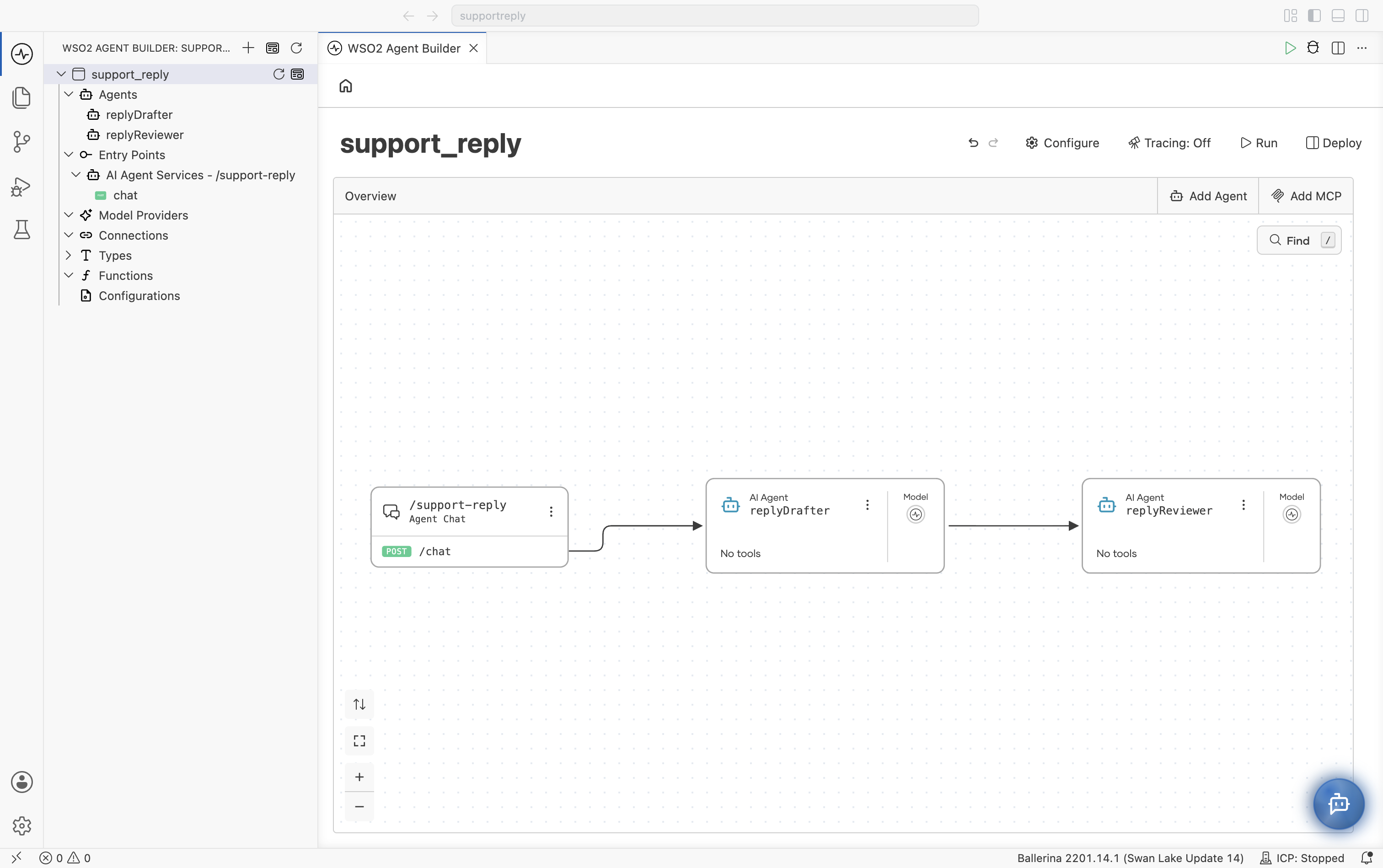
An Agent Chat trigger on /support-reply calls replyDrafter, passes the draft to replyReviewer, and returns the reviewed reply to the customer.
When you finish, the integration's Overview shows the chain: solid arrows run from the trigger through each agent, in the order the flow calls them.
To create the agents, see Create an Agent.
Call the first agent from a trigger
The chain starts in the flow of a trigger, so give the first agent a trigger.
- On the integration's Overview, click Add Trigger on the first agent's card. In the example, use the
replyDraftercard. - Under Chat Channels, select Agent Chat. Set Service Path to
/support-replyand click Create.
The trigger's flow now runs the first agent: Start, an agent : run node that stores the agent's answer in stringResult, and Return.
Add the next agent to the flow
Each further stage is another agent : run node in the same flow.
-
Open the trigger's flow. On the Overview, select the POST /chat resource on the trigger's card, or select chat under Entry Points in the project tree.
-
Hover over the connection between the
agent : runnode and Return, and click the + that appears. -
In the node panel, under AI, select Agent. The Agents panel lists the agents in the integration. Select the next agent,
replyReviewer.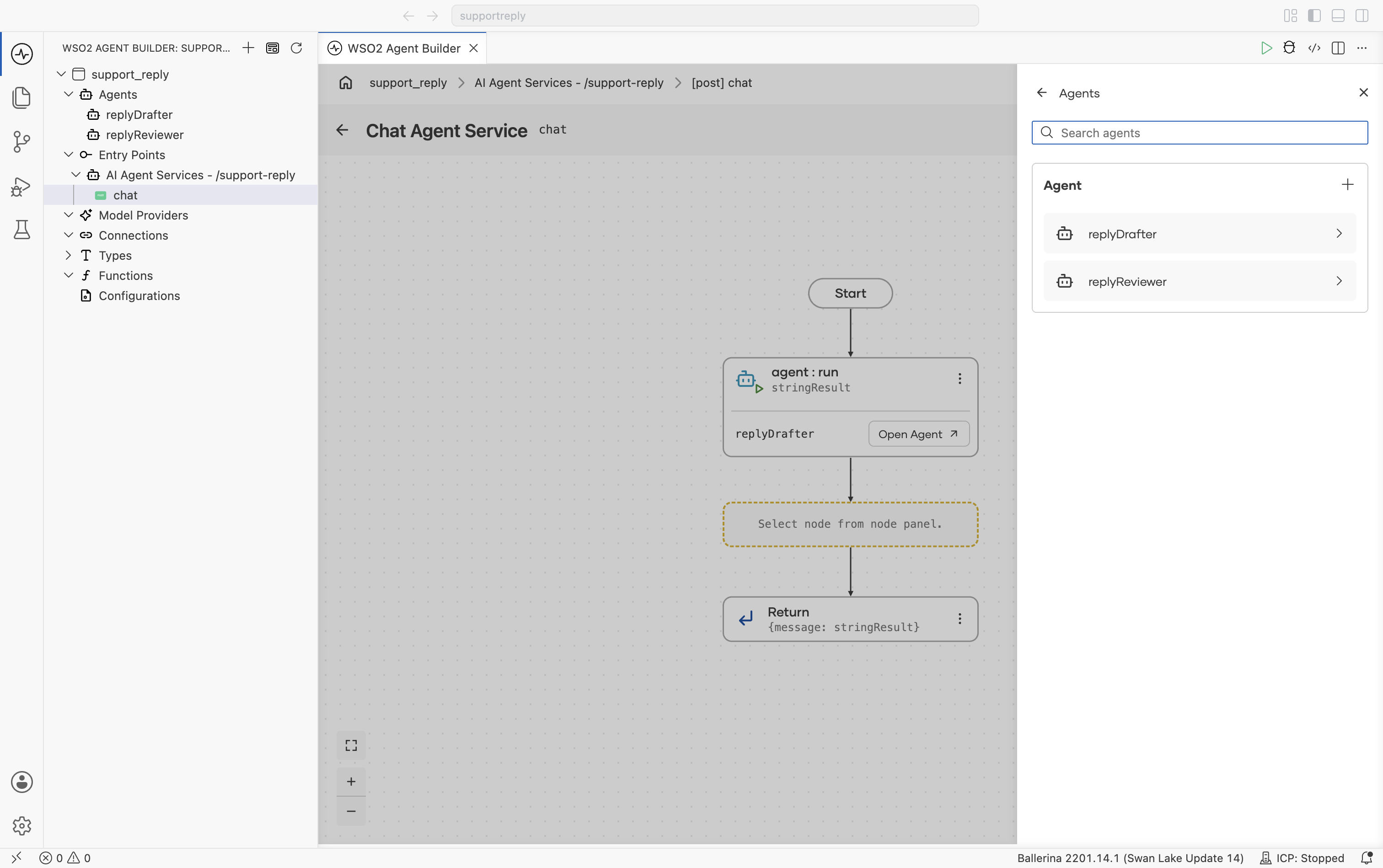
-
In the AI Agent panel, pass the previous agent's result to this one:
Field Set to Why Query Draft reply: ${stringResult}, in Prompt modestringResultholds the first agent's answer. Typing${stringResult}inserts it as a variable.Result finalReplyThe variable that holds this agent's answer. 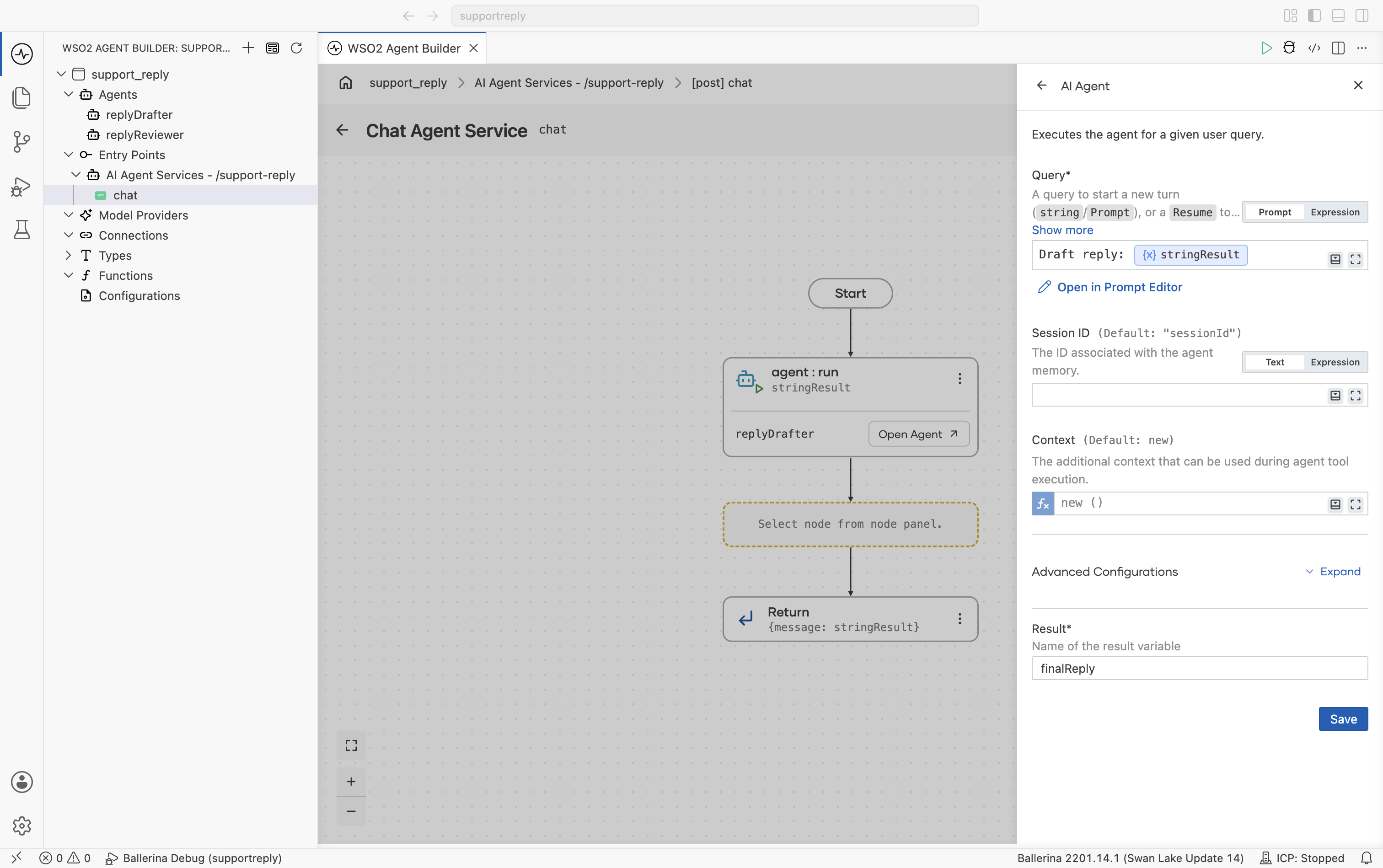
Click Save. For the other fields on the panel, see Call an agent inside a flow.
-
Select the Return node, set its value to
{message: finalReply}, and click Save. Without this, the trigger still returns the first agent's draft.
- Visual Designer
- Ballerina Code
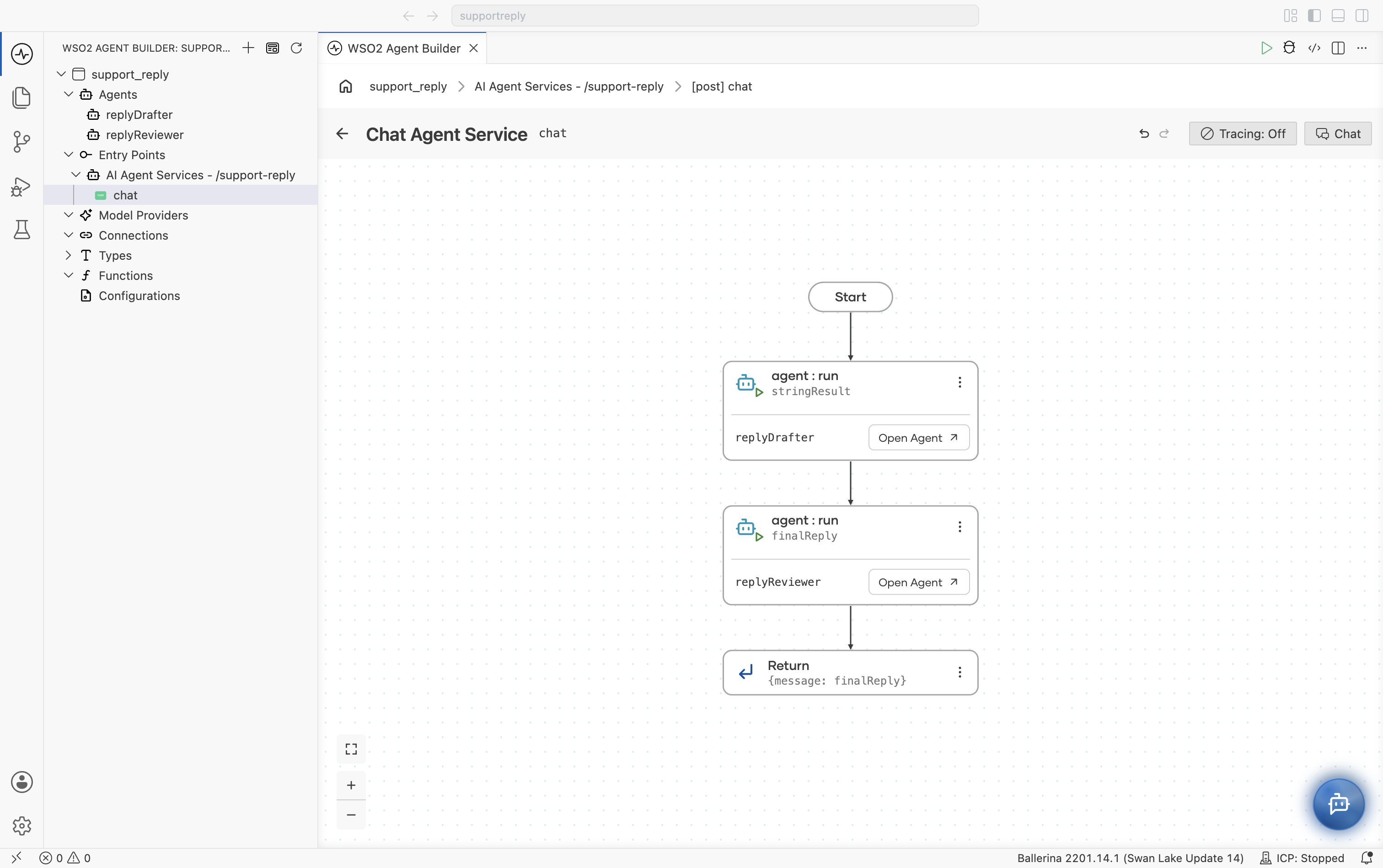
The flow now runs both agents in order and returns the second agent's answer.
service /support\-reply on agentChatListener {
    resource function post chat(@http:Payload ai:ChatReqMessage request)
            returns ai:ChatRespMessage|error {
        string stringResult = check replyDrafter.run(request.message, sessionId = request.sessionId);
        string finalReply = check replyReviewer.run(`Draft reply: ${stringResult}`);
        return {message: finalReply};
    }
}
The Overview now shows the chain, as at the start of this page.
To add more stages, repeat these steps below the last agent : run node, and point Return at the last result.
Pass everything the next agent needs
An agent in the chain sees only its own Query. It doesn't see the customer's message, the earlier agents' instructions, or anything else in the flow. In the example, replyReviewer receives the draft and nothing more, which is all its rules need. If a later stage needs the original message as well, include it in that stage's Query.
Test the chain
An Agent Chat trigger lets you try the chain from inside Agent Builder.
-
To see each stage, set Tracing to On before you run. If the integration is already running, restart it: tracing changes only apply to a new run.
-
Click Run on the integration's Overview. When the pop-up 1 service found in the integration. Test with Try It Client? appears, click Test. The Agent Chat panel opens beside the Overview. Send a message that tempts the first agent to break the rules, such as
My jacket from order 10423 arrived torn. Can you send a replacement before my trip on Friday? If not, I want my money back.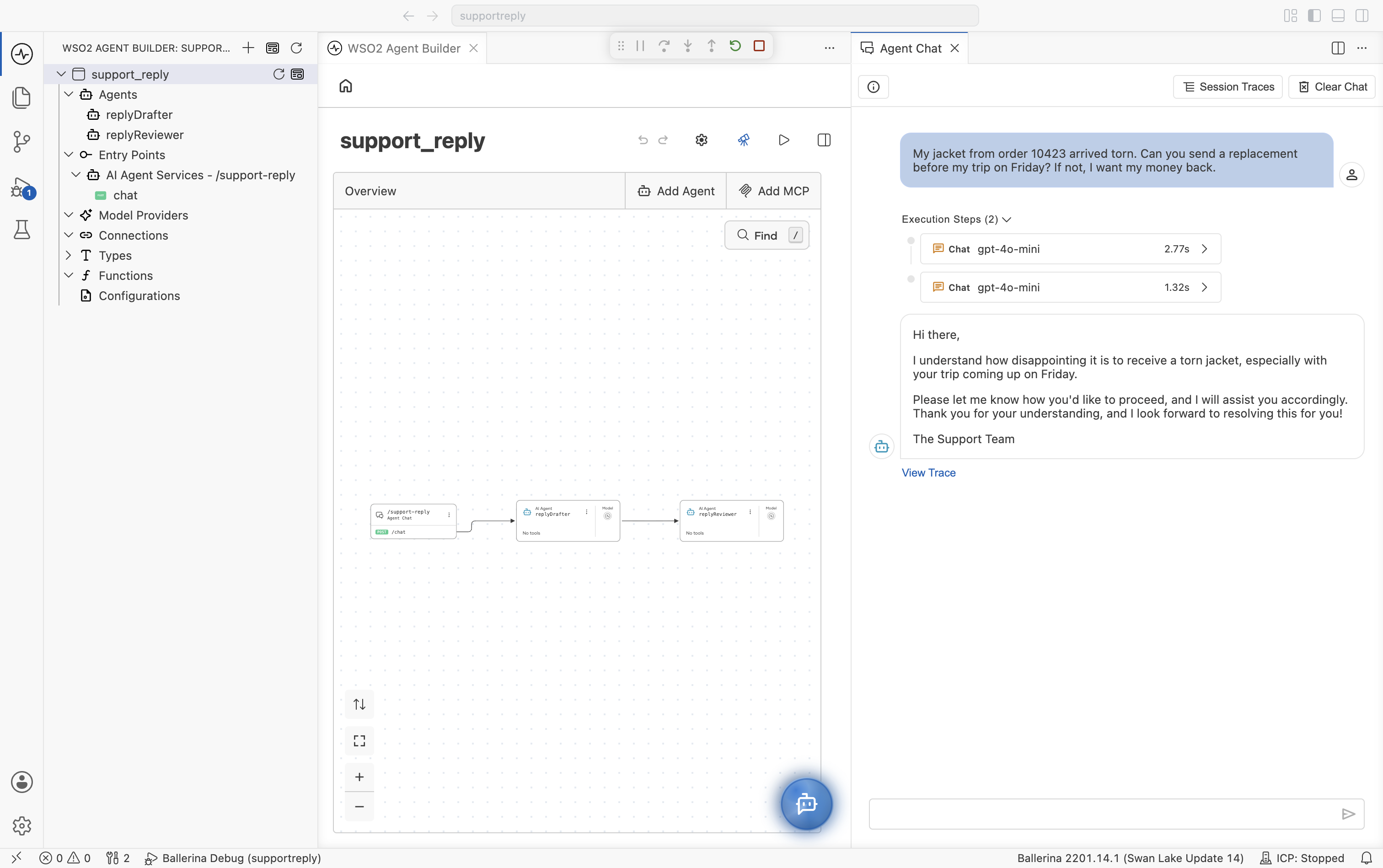
Execution Steps lists one Chat step for each agent, in the order they ran.
-
Click View Trace. Each agent's run is its own Invoke Agent span, one after the other rather than nested. Select the second agent's span to see the input it received.
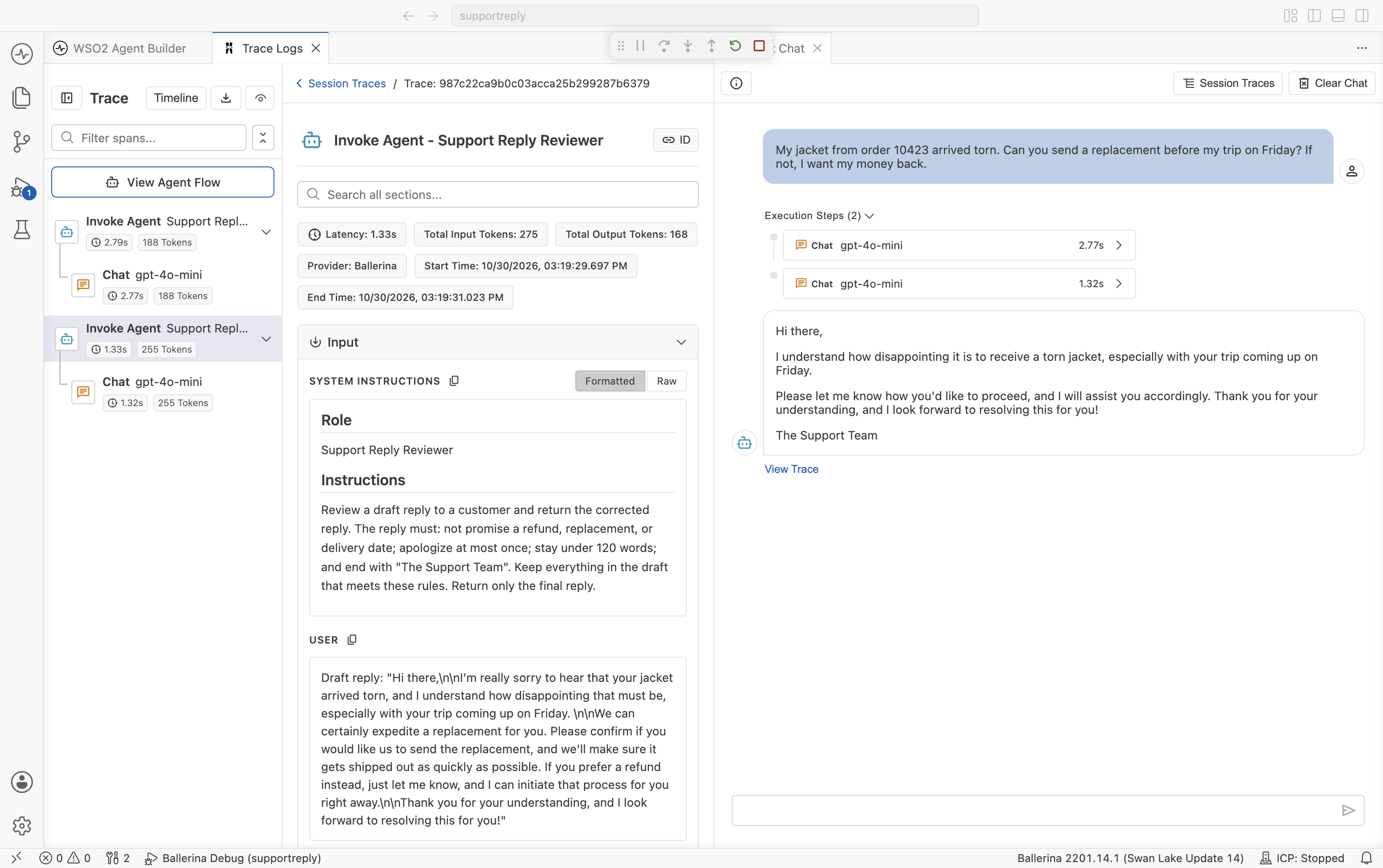
The reviewer's USER input is the drafter's output, prefixed with
Draft reply:. Compare it with the reviewer's output to see what the second stage changed. In the example, the draft offers to expedite a replacement and to start a refund. The reviewed reply drops both promises and ends withThe Support Team.
For the rest of the trace viewer, see Observability.
Execution behavior
Every request runs every stage. The flow calls each agent in turn, whatever the request. Cost and latency are the sum of the stages, which makes them predictable.
A failing stage ends the request. Each agent : run node fails the flow when its agent returns an error, so later stages don't run and the trigger returns the error.
Stages run one at a time. A stage starts only when the one before it has returned.
Common pitfalls
| Symptom | Likely cause | Fix |
|---|---|---|
| The chat shows the first agent's answer, not the last. | Return still returns the first result variable. | Set Return to the last agent's result, such as {message: finalReply}. |
| A later agent lacks information it needs. | It sees only its own Query. Check its USER input in the trace. | Add what it needs to the Query, such as the original message. |
A later agent wraps its answer in commentary, such as Here is the revised reply:. | Its instructions don't say to return only the result. | Tell it to return only the final output, because the next stage or the customer receives it as is. |
| Execution steps don't appear in the chat. | Tracing is off, or was turned on without restarting the integration. | Set Tracing to On and restart the integration. |
What's next
- Hierarchical Agents — Let an orchestrator decide which agents to call.
- Multi-Agent Concepts — When to use sequential or hierarchical agents.
- Create an Agent — Call an agent inside any flow.
- Observability — Trace each stage of the chain.