Version: 5.1
The Integration Workspace
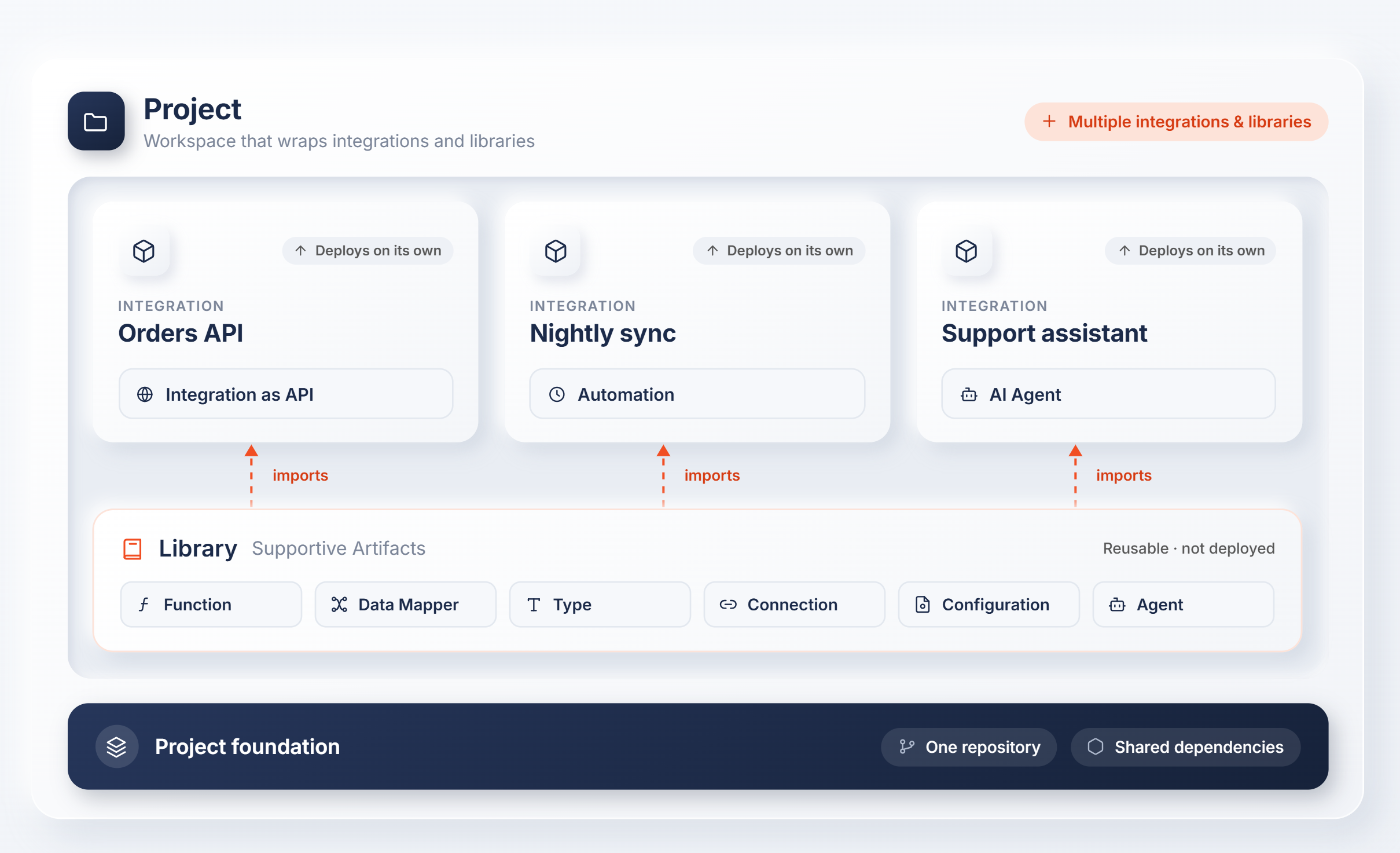
WSO2 Integrator organizes your work into three concepts that build on each other:
- Project — a workspace that groups multiple integrations and libraries together, sharing a single repository and dependencies.
- Integration — a deployable unit built from artifacts (services, automations, event handlers, and more) that can be built, tested, and deployed on its own.
- Library — a reusable package of shared logic (utility functions, type definitions, data mappers, connections) that one or more integrations import.
A project can hold any number of integrations and libraries side by side. You can also skip the project wrapper and create a standalone integration or library, then convert it into a project later once you need to add more alongside it.
Create Your Project
-
Create a project — Set up a new project workspace to hold multiple integrations and libraries.
- Create a new integration — Add a new integration to your project.
- Create a library — Add a library to your project to share common logic across its integrations.
-
Open a project — Open an existing project from your local filesystem, or clone one from WSO2 Cloud.
-
Explore sample integrations — Start from a curated, pre-built sample instead of a blank integration.
What's next
- Integration artifacts — Understand the artifact types you build inside an integration
- Project view — Manage, run, and debug a multi-package project