RAG Retrieval
Retrieval-augmented generation (RAG) retrieval searches a vector store for the most relevant information that answers a user query. Use it after ingestion to find supporting chunks for a response.
- You have already ingested files into a vector store. See RAG Ingestion.
- API credentials for the vector store and the embedding provider.
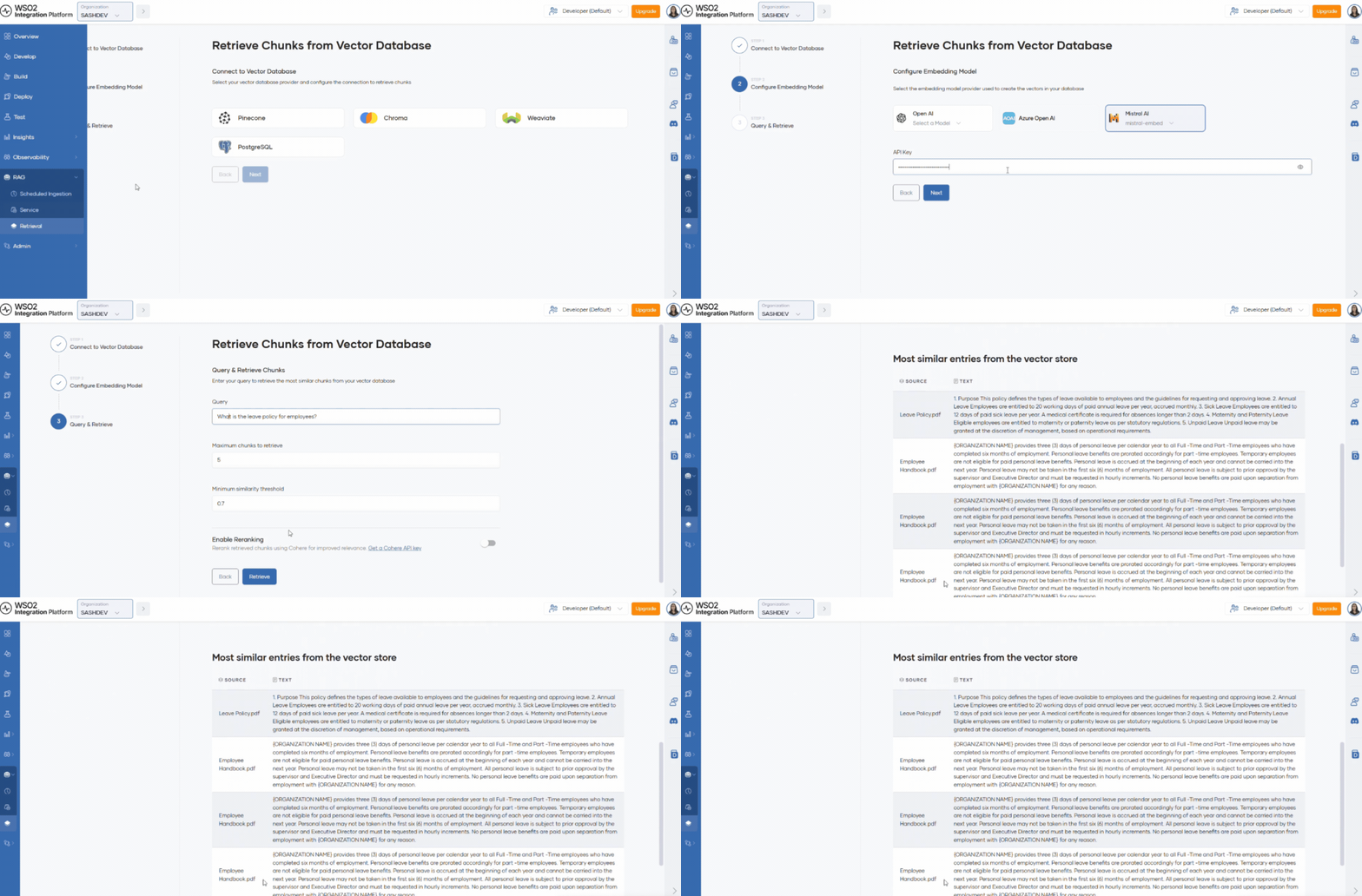
To retrieve chunks that have already been ingested, open your organization from the Organization dropdown in the console header. In the left navigation menu, click RAG, then select Retrieval.
Step 1: Initialize the vector store
- Select
Pineconeas the vector database. - Enter the key in API Key.
To create a key, see the Pinecone API key documentation.
- Enter the Collection name to retrieve from.
- Click Next.
Step 2: Configure the embedding model
- Select
text-embedding-ada-002from the OpenAI provider list. - Enter the key in Embedding model API key.
To create a key, see the OpenAI embeddings documentation.
- Click Next.
Step 3: Query and retrieve chunks
- Enter a query that matches the content of ingested files.
- Review Maximum chunks to retrieve and Minimum similarity threshold. Update if needed.
- Maximum chunks to retrieve sets how many matching chunks are returned.
- Minimum similarity threshold is a value between 0 and 1 that filters out low-similarity results (for example,
0.7).
- Click Retrieve. Results display matching chunks and their similarity scores.
WSO2 Cloud - Integration Platform's retrieval process can apply reranking models to return the most contextually relevant chunks.
Step 4: Enable reranking (optional)
Reranking reorders retrieved chunks by contextual relevance, improving the quality of results passed to your LLM. WSO2 Cloud supports reranking with Cohere.
To enable reranking:
- In the retrieval form, turn on the Reranking option.
- Enter your Cohere API key.
For more information, see the Cohere documentation.
What's next
- RAG ingestion — Configure scheduled ingestion for your vector store.
- RAG service — Use the service API to retrieve chunks programmatically.
- Managed PostgreSQL and vector databases — Provision the vector database used for retrieval.