RAG Service
WSO2 Cloud - Integration Platform exposes RESTful API endpoints to support RAG workflows. Use these endpoints to ingest files, parse and chunk content, and retrieve relevant chunks programmatically.
- Access to a paid WSO2 Cloud account with permission to create services.
- API keys for the vector store and embedding provider.
- A project in the platform where you can create the RAG service.
Create the service
Open your organization from the Organization dropdown in the console header. In the left navigation, click RAG, then Service.
Fill the Create RAG ingestion service form:
| Field | Value |
|---|---|
| Project | Select the target project. |
| Display name | Sample RAG Service |
| Name | sample-rag-service |
| Description (optional) | My rag service description |
Click Create service. The platform provisions the service and redirects you to the overview page.
- WSO2 Cloud increases container CPU and memory when the service is created to ensure stable operation.
Test endpoints
On the overview page, open the development environment card and click Test to open the OpenAPI console. From there you can try available endpoints.
- Expand an endpoint.
- Click Try it out.
- Provide parameter values and click Execute.
- Some parameters are prefilled with defaults. Adjust them as needed.
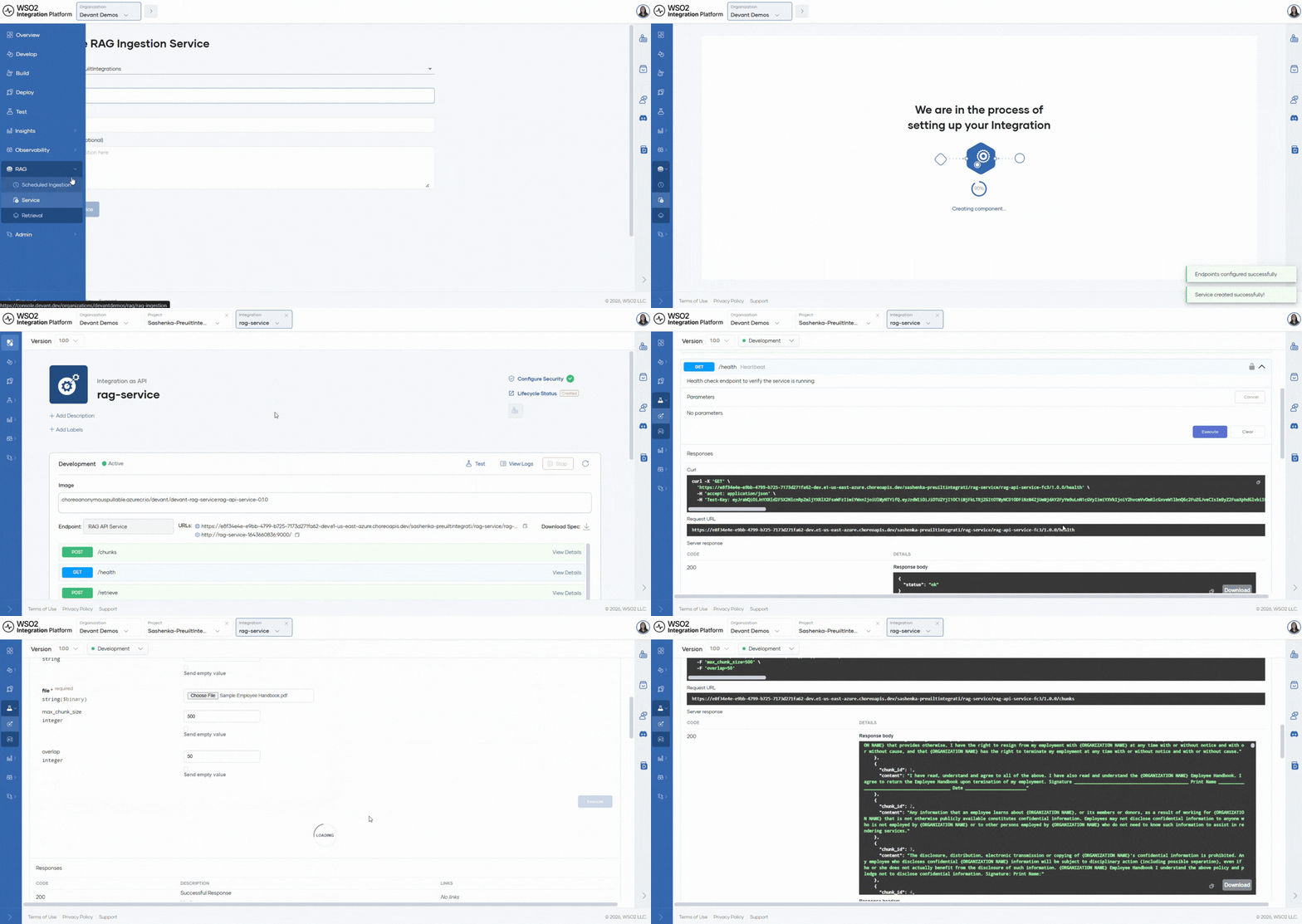
Available API endpoints
Below are the main endpoints exposed by the service.
POST /upload
Upload a file and ingest it into a vector store. Supported file types: PDF (including scanned PDFs), DOCX, PPTX, XLSX, CSV, HTML, Markdown, images, and audio (MP3, WAV, M4A, FLAC, OGG).
Required in the request:
- The file to upload.
- Vector DB provider and connection/API key.
- Collection name.
- Embedding model provider, model, and API key.
- Chunking strategy:
recursive,sentence, orcharacter. - Max segment size and max overlap size.
Expected response example:
{
  "message": "Added data to vector store successfully",
  "filename": "example.pdf",
  "file_type": "document"
}
POST /retrieve
Retrieve relevant chunks from a collection by query. Supports semantic search and optional reranking.
Required in the request:
- Vector DB provider and connection/API key.
- Collection name.
- Embedding model provider, model, and API key.
- User query.
- Max chunks to retrieve and minimum similarity threshold.
Optional:
- Cohere reranking model and API key.
To create a Cohere API key, see the Cohere documentation.
Expected response example:
{
  "query": "What is WSO2 Integration Platform?",
  "retrieved_chunks": [
    {
        "text": "WSO2 Integration Platform is...",
        "source": "example.pdf",
        "timestamp": "2026-02-16T12:02:25Z"
    },
    ...
  ]
}
POST /chunks
Parse and chunk an uploaded file and return chunks without storing them in a vector DB.
Required in the request:
- File to upload.
- Chunk type and chunking parameters.
Expected response example:
{
  "filename": "example.pdf",
  "chunks": [
     { "chunk_id": 0, "content": "First chunk..." } ,
     { "chunk_id": 1, "content": "Second chunk..." }
    ]
}
GET /health
Health-check endpoint. Returns the service status.
{ "status": "ok" }
For more information on ingestion and retrieval, see the RAG ingestion guide.
What's next
- RAG ingestion — Configure scheduled ingestion automations.
- RAG retrieval — Query a vector store and retrieve relevant chunks.
- Managed PostgreSQL and vector databases — Provision vector databases used by RAG.