Copilot Architecture and Data Handling
WSO2 Integrator provides an AI-powered Copilot to enhance developer productivity. This page explains how WSO2 Integrator Copilot works, how user data is handled, and what best practices organizations should follow when using AI features.
These guidelines are designed to ensure transparency, security, and compliance when using AI-powered assistance in enterprise environments.
Macro architecture
WSO2 Integrator Copilot is integrated into the WSO2 Integrator developer experience. It works as follows:
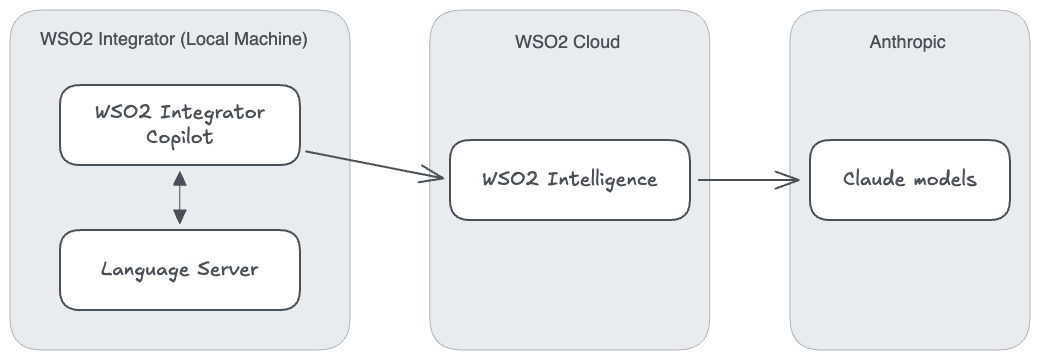
- WSO2 Integrator Copilot: Provides in-editor assistance such as code completion, explanations, and suggestions.
- Language Server: Powers intelligent features inside the editor, including syntax awareness and integration with Copilot services.
- WSO2 Intelligence endpoint: A lightweight intermediary service that connects the editor to Anthropic or Amazon Bedrock models. This service does not retain data.
- Anthropic or Amazon Bedrock integration: The endpoint forwards user prompts and context to the selected large language model (LLM) provider for processing.
Authentication
To maintain security, all WSO2 Integrator Copilot features require authentication:
- Users must sign in to enable Copilot functionality.
- Social sign-in options are supported for ease of use.
- Authentication and session management are handled by Asgardeo, the WSO2 identity provider.
This ensures that only authorized users in your organization can access Copilot features.
Access through the WSO2 Cloud sign-in is subject to a fair usage policy.
Data flow
The movement of data through Copilot is designed for zero retention at the intermediary layer:
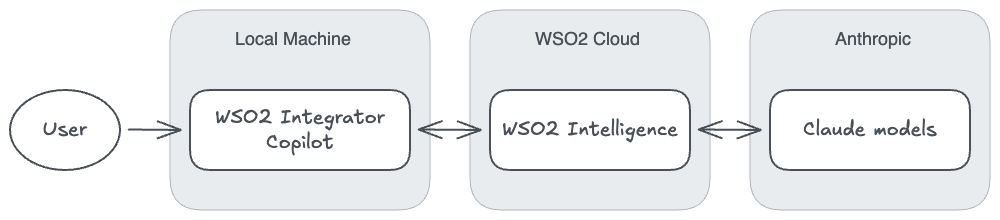
- Direct forwarding: WSO2 Intelligence forwards user data directly to Anthropic for processing.
- No local storage: WSO2 Intelligence does not store any user data locally.
- Real-time processing: All data handling occurs in real time, without persistent storage at the WSO2 Intelligence layer.
Where your requests go
- WSO2 Cloud sign-in: Requests go through WSO2 Intelligence, which runs in the US and in the EU. Copilot uses the region of your WSO2 Cloud account, so an account in the EU region is served from the EU. You don't need to set anything.
- Your own AI provider: Requests go directly from your machine to the provider you signed in with, and do not pass through WSO2 Intelligence. The
/askcommand is the exception: it sends your question to WSO2 Intelligence to look up the Ballerina documentation.
What Copilot sends to the AI model
To work on your integration, Copilot sends the following to the AI model:
- Your prompts, and any files or images you attach.
- The contents of the project files that Copilot reads while it works.
- The results of the tools Copilot runs, such as diagnostics, test results, logs from services it runs, and the responses to requests it sends to your services.
Copilot does not read your Config.toml file. When Copilot asks you for configuration values, it saves them to your project and does not send them to the AI model.
Copilot writes its changes directly into your project files.
Web access and MCP servers
- Web access: Web searches and page fetches are carried out by your AI provider, so your search terms and the content of the fetched pages pass through that provider.
- MCP servers: Copilot connects to the MCP servers you add directly from your machine, and sends each server the inputs for the tools it calls. What the tools return is sent to the AI model. Each server handles the data it receives under its own terms.
Data stored on your machine
Your chat sessions are saved on your machine. WSO2 does not store them.
Bring your own key (BYOK)
Organizations can configure Copilot to run using their own model provider accounts. This ensures enterprise-level control over data governance and billing. See WSO2 Integrator Copilot for the available sign-in options.
Anthropic deployment
- Copilot can connect directly to Anthropic's public deployments.
- Requires an Anthropic API key that you provide.
- This setup ensures that data flows directly between your environment and Anthropic without WSO2 retaining it.
Amazon Bedrock
- Copilot can also run using Claude models deployed on Amazon Bedrock.
- Requires an active Claude deployment in your Amazon Bedrock environment.
- Users must provide their own access keys for connectivity.
Google Vertex AI
- Copilot can also run using Claude models deployed on Google Vertex AI.
- Requires an active Anthropic Claude deployment in your Google Cloud project.
- Users must provide the GCP project ID, the location of the deployment, and the path to a service account JSON key file.
Open source
WSO2 Integrator Copilot is open source, enabling transparency and community contribution:
- The full source code is available for inspection, download, and modification.
- This allows organizations to validate the behavior of Copilot.
- Enterprises can also extend the code to adapt to custom compliance needs.
This openness ensures that security-conscious users can audit how prompts and data are handled.
Feedback data
To improve the Copilot experience, user feedback may be collected.
Retention period
- Feedback data (such as thumbs-up or thumbs-down ratings) is retained for one week only.
- After one week, feedback records are permanently deleted.
Collection scope
- Feedback is collected only when a user explicitly provides it.
- Feedback includes your rating, any comment you add, and the current conversation, as the feedback dialog states.
- No hidden or passive data collection is performed.
Transparency
- The feedback interface clearly explains what is being collected and why.
- Users always have control over whether to provide feedback.
Guidelines
When using AI features, organizations must apply standard security and compliance practices.
Data usage policies
- All operations are subject to the Anthropic Data Usage Policy or the chosen model provider's terms.
- WSO2 ensures that Copilot does not bypass these policies.
Organizational data storage
How long do we store your organization's data?
WSO2 follows a zero-retention policy at the WSO2 Intelligence level. Your organizational data is not stored by the intermediary service.
Best practices
To ensure maximum security and privacy, avoid sending organization-specific details such as:
- Customer personal information
- Passwords or authentication credentials
- Proprietary business data
- Sensitive internal communications
General Copilot best practices:
- Review all AI-generated code before implementation.
- Be mindful of what information you include in prompts.
- Use generic examples rather than real data when possible.
- Follow your organization's data governance policies.
Data retention summary
| Data type | Retention period | Notes |
|---|---|---|
| Code prompts and responses | Not stored by WSO2 Intelligence | Forwarded to your AI provider: through WSO2 Intelligence with the WSO2 Cloud sign-in, or directly with your own provider. |
| User feedback | One week | Retained only when explicitly provided by the user. Includes the current conversation. |
| Chat sessions | Not stored by WSO2 | Saved on your machine. |
| Authentication tokens | Session-based | Managed securely by Asgardeo. |
| Organizational data | Not stored | Zero-retention policy at WSO2 Intelligence. |
See also
- Built-in Capabilities — What Copilot can do.
- WSO2 Integrator Copilot — Sign in to Copilot.