Configure Agent Memory
Memory is the infrastructure enabling AI systems to store, recall, and utilize past interactions to deliver personalized, continuous, and context-aware experiences. It transforms stateless models into persistent, long-term assistants by managing short-term conversations and long-term user preferences.
Configure memory
Click + Add Memory on the AI Agent node. The Configure Memory panel opens on the right.
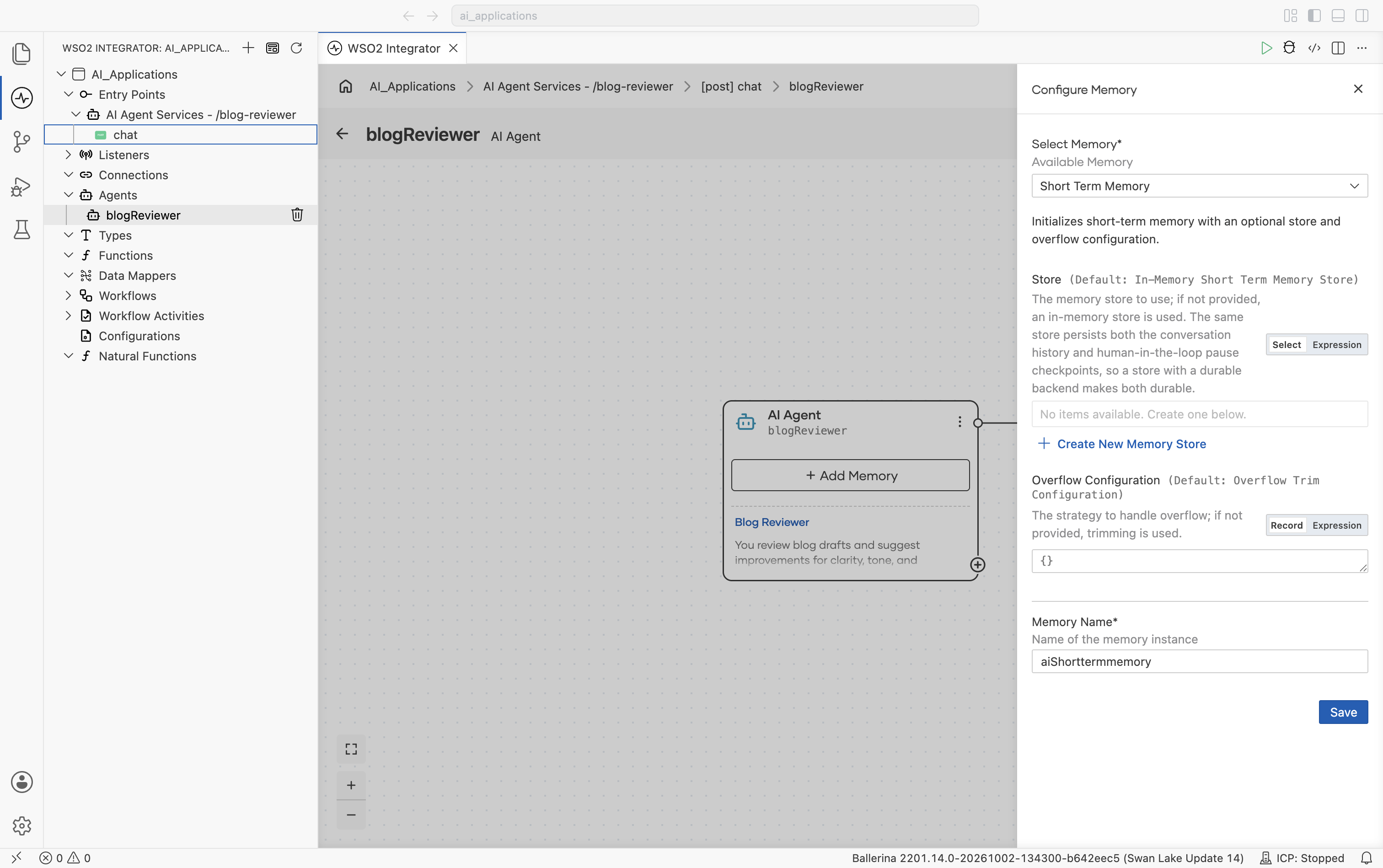
| Field | Required | Description |
|---|---|---|
| Select Memory* | Yes | Specifies the memory strategy used by the agent. Currently, the supported option is Short Term Memory. |
| Store | No | Defines where conversation memory is stored. Available options include In-Memory Short Term Memory Store and the database-backed MSSQL, Redis, PostgreSQL, SQLite, and Amazon DynamoDB short term memory stores. Click + Create New Memory Store to create one. |
| Overflow Configuration | No | Defines what happens when the memory window reaches its limit. The default option is Overflow Trim Configuration. |
| Memory Name* | Yes | The variable name used in the generated source code. The default value is aiShorttermmemory. |
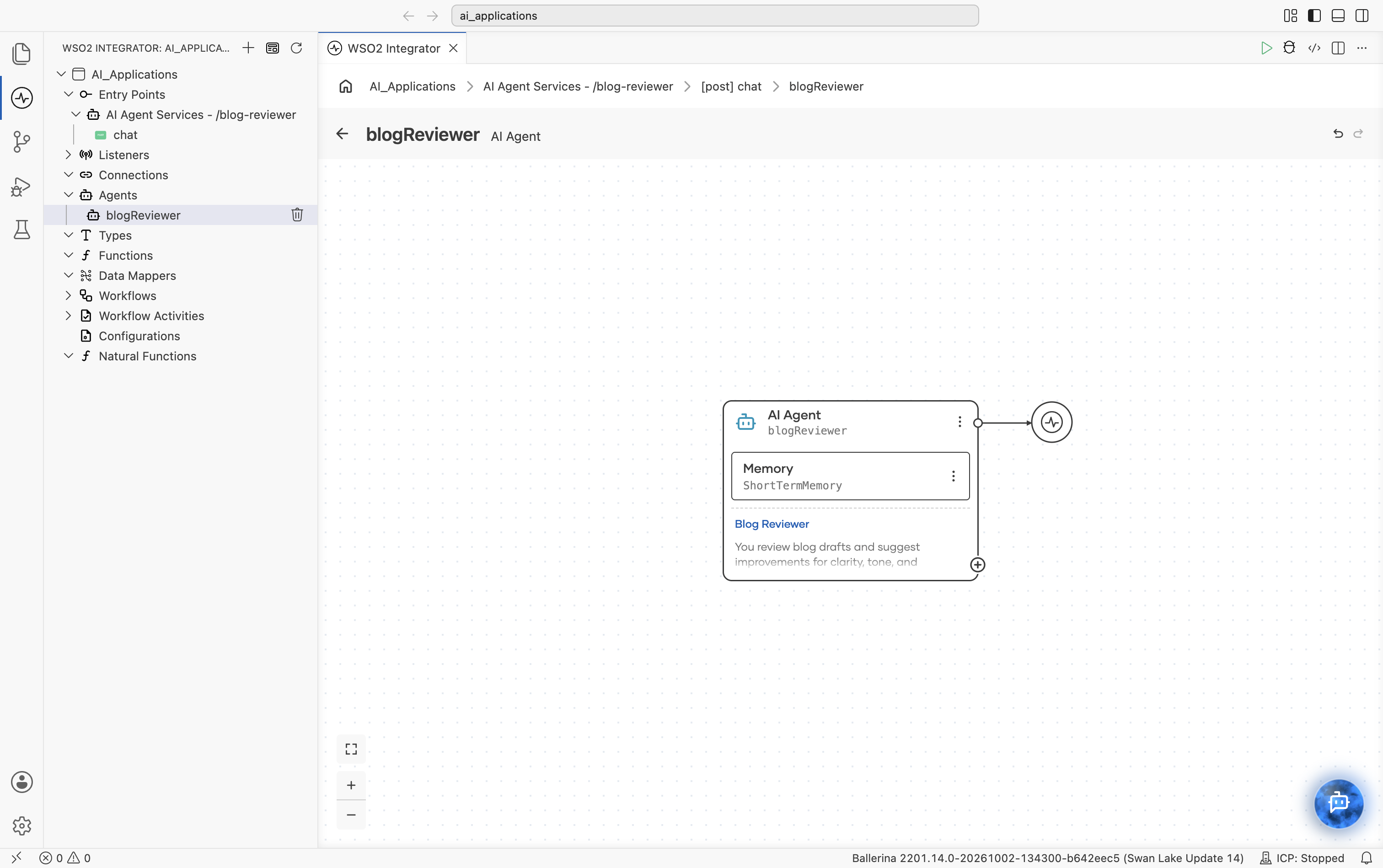
After saving, the AI Agent block on the canvas expands to include a Memory sub-block. See Agent after memory is attached.
Add memory store
The Store field determines where the conversation history is stored.
Click + Create New Memory Store to open the Select Memory Store picker.
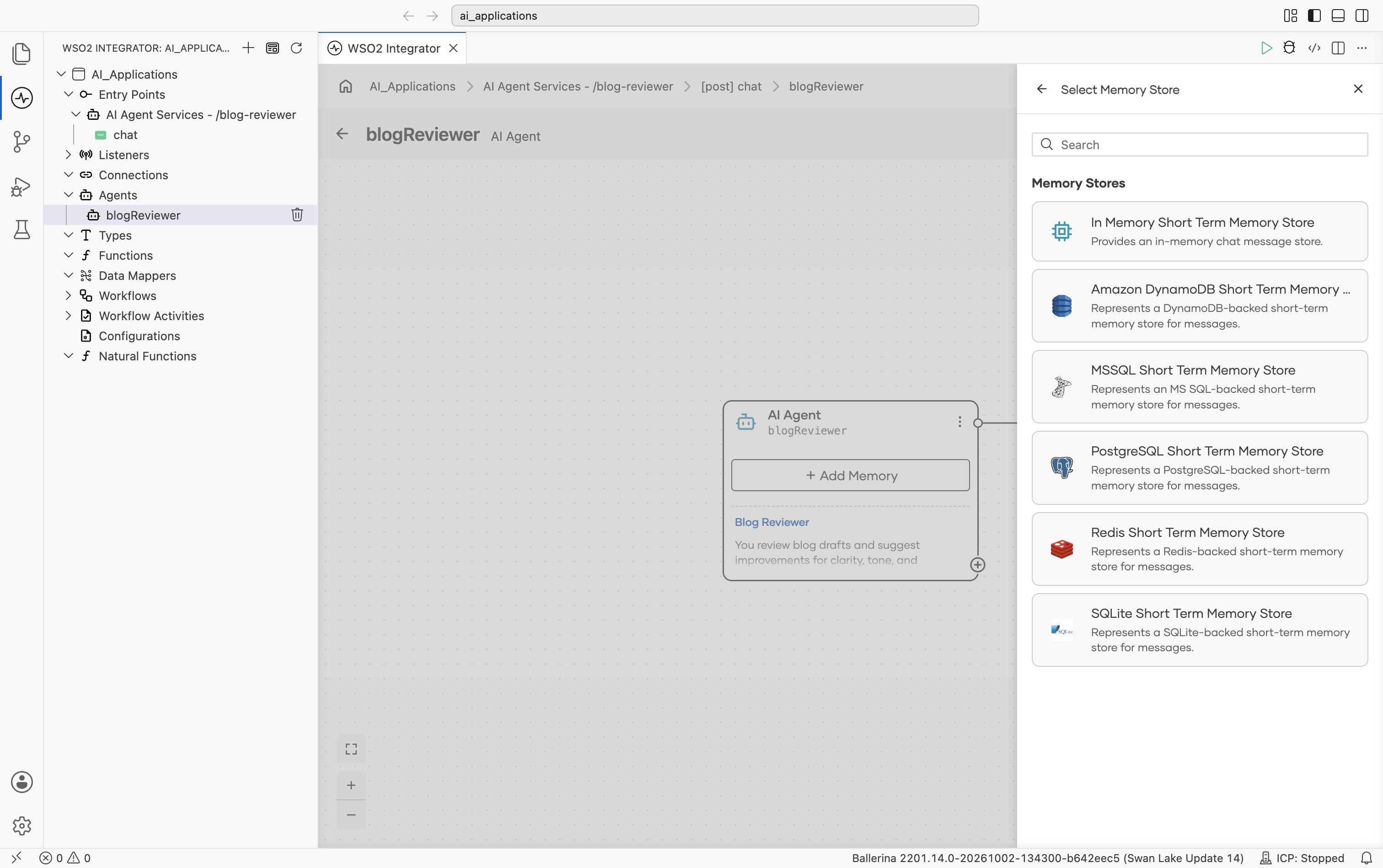
| Store | Module | Survives restart? | Recommended use |
|---|---|---|---|
| In Memory Short Term Memory Store | ballerina/ai | No. Data is stored only in process memory. | Suitable for most agents. Lightweight, fast, and requires no additional infrastructure. |
| MSSQL Short Term Memory Store | ballerinax/ai.memory.mssql | Yes. Backed by an MSSQL database. | Suitable for long-running conversations, audit/compliance requirements, and conversations that span multiple sessions. |
| Redis Short Term Memory Store | ballerinax/ai.memory.redis | Yes. Subject to your Redis persistence settings. | Suitable for low-latency shared memory, especially when several integration replicas serve the same sessions. |
| PostgreSQL Short Term Memory Store | ballerinax/ai.memory.postgresql | Yes. Backed by a PostgreSQL database. | Same use cases as MSSQL, for teams already running PostgreSQL. |
| SQLite Short Term Memory Store | ballerinax/ai.sqlite | Yes. Backed by a SQLite database file. | Suitable for durable single-node memory without running a database server; local development and lightweight deployments. |
| Amazon DynamoDB Short Term Memory Store | ballerinax/ai.aws.dynamodb | Yes. Backed by an Amazon DynamoDB table. | Suitable for serverless, AWS-native deployments with on-demand scaling. |
Additional database-backed stores can be added in the same way. The picker automatically expands as new stores become available.
For backends that are not available in the picker (for example, MySQL), implement the ai:Memory interface in a custom class. See Custom memory.
Creating an in-memory short-term memory store
Selecting In Memory Short Term Memory Store opens the configuration form for an in-memory memory store.
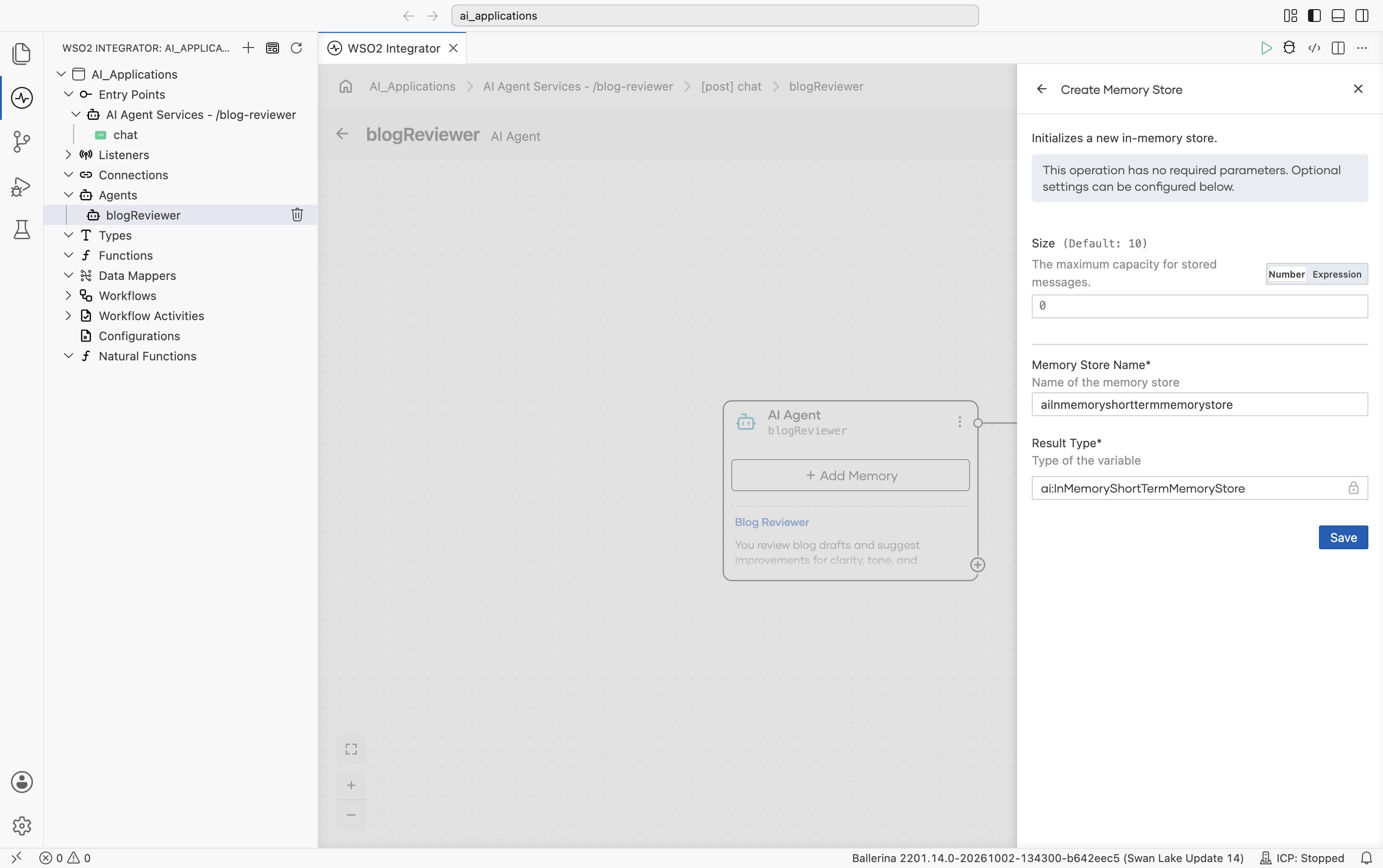
Configure the following settings and save the configuration.
| Field | Required | Description |
|---|---|---|
| Size | No | The maximum number of messages stored in memory. Default: 10. |
| Memory Store Name* | Yes | The variable name used for the generated memory store. Default: aiInmemoryshorttermmemorystore. |
| Result Type* | Yes | The generated result type. Default: ai:InMemoryShortTermMemoryStore. |
Creating an MSSQL short-term memory store
Selecting MSSQL Short Term Memory Store opens a configuration form for creating an MSSQL-backed memory store.
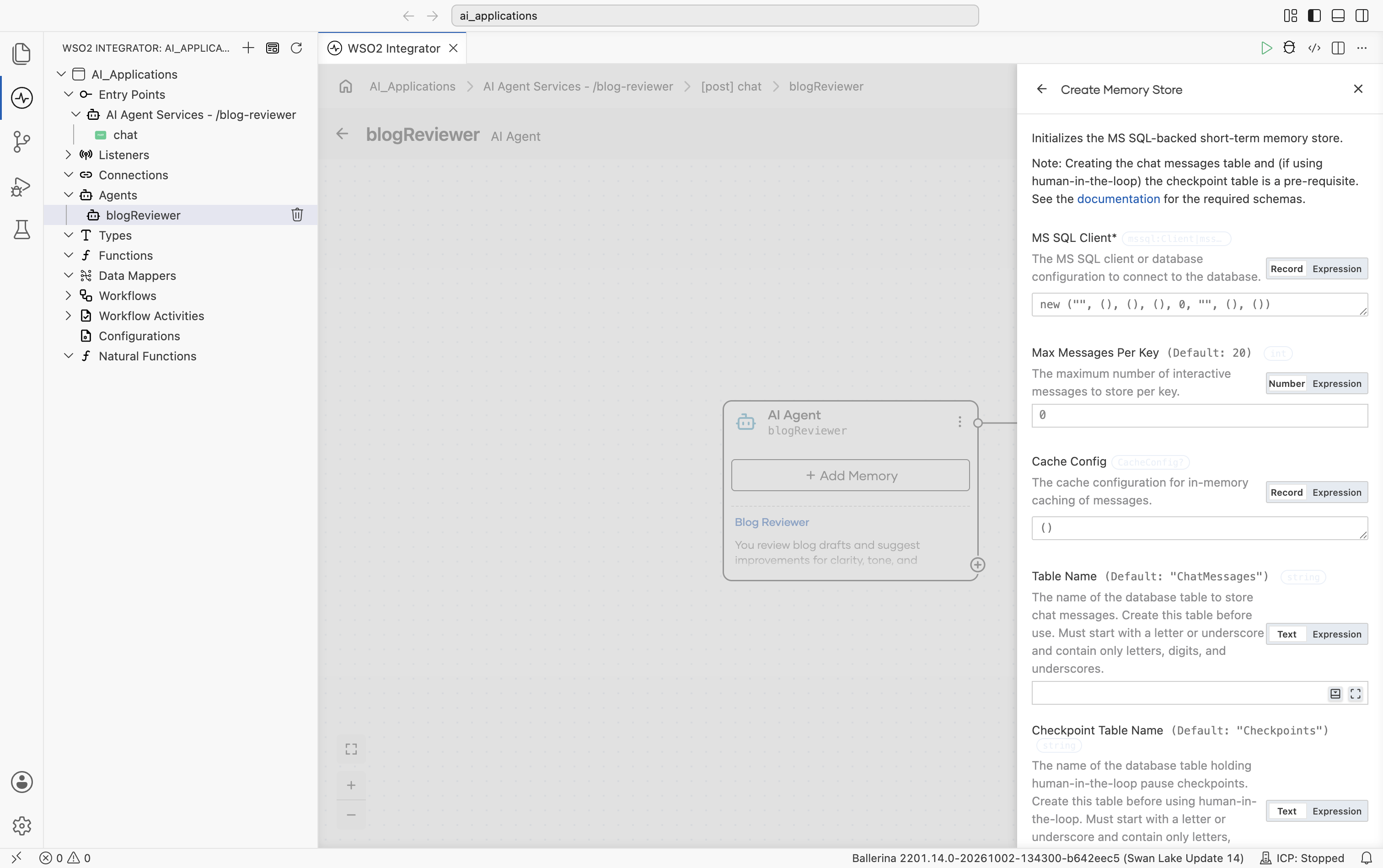
Scrolling further shows Memory Store Name, Result Type, and the Save button:
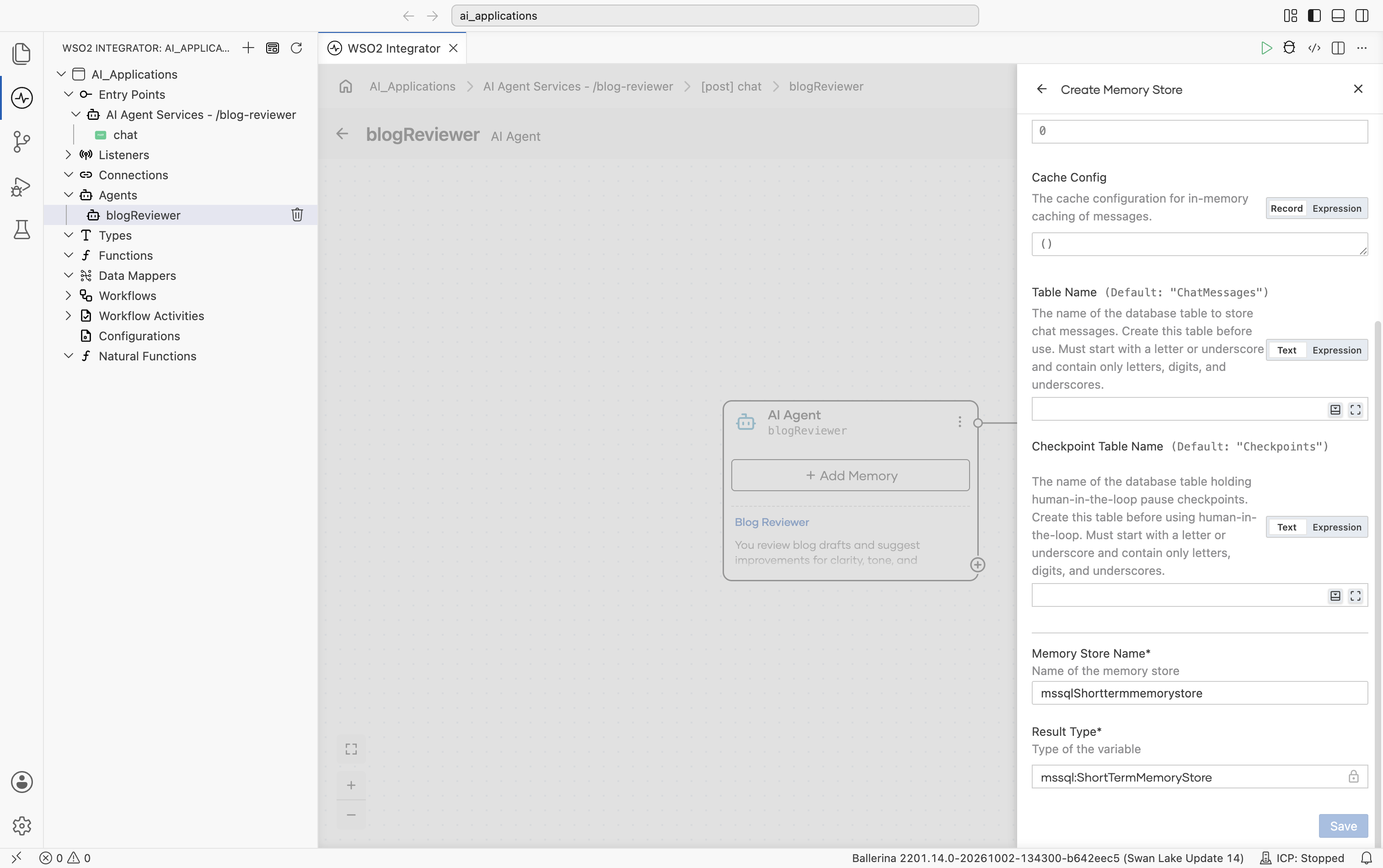
| Field | Required | Description |
|---|---|---|
| MS SQL Client* | Yes | Specifies the MSSQL client or database configuration used to connect to the database. Supports both Record and Expression modes. The default value initializes an mssql:Client: new ("", (), (), (), 0, "", (), ()). Configure the required connection details such as host, username, password, database name, and port. |
| Max Messages Per Key | No | Defines the maximum number of messages stored per session ID. Default: 20. When the limit is reached, the oldest messages are removed. |
| Cache Config | No | Configures the in-memory cache layer on top of the SQL store. Default: {}. This helps reduce database round-trips for frequently accessed sessions. |
| Table Name | No | Specifies the database table used to store chat messages. Default: "ChatMessages". If the table does not exist, it is created automatically. |
| Checkpoint Table Name | No | Specifies the database table used to store human-in-the-loop pause checkpoints. Default: "Checkpoints". Create this table before using human-in-the-loop; must be different from the chat messages table. |
| Memory Store Name* | Yes | The variable name used for the generated memory store. Default: mssqlShorttermmemorystore. |
| Result Type* | Yes | The generated result type. Default: mssql:ShortTermMemoryStore. |
In an agent hosted on ai:Listener, each chat request’s sessionId is used as the key for storing conversation messages in the database table. Inspecting this table directly can help debug and analyze conversations.
Creating a Redis short-term memory store
Selecting Redis Short Term Memory Store opens a configuration form for creating a Redis-backed memory store.
| Field | Required | Description |
|---|
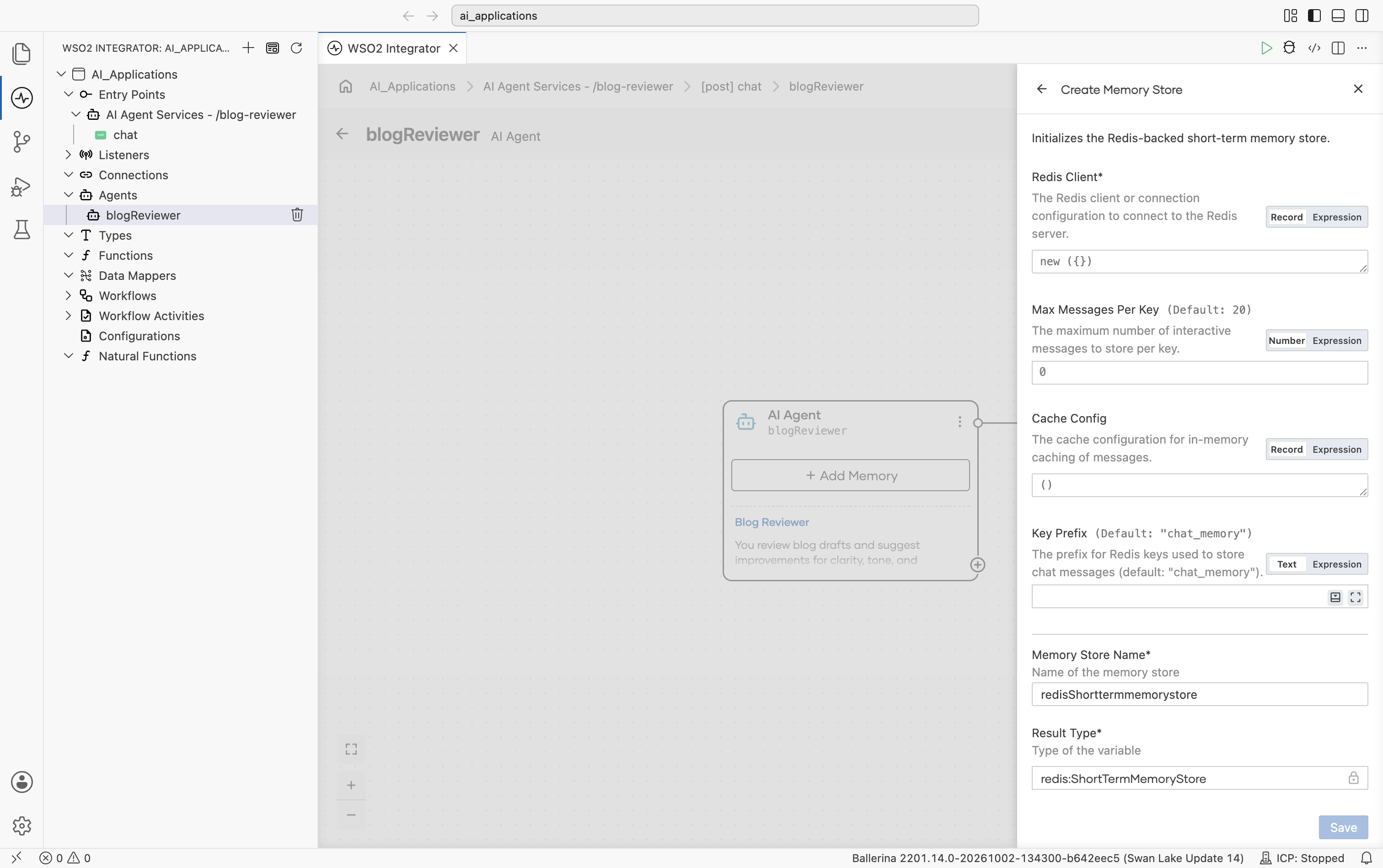
| Field | Required | Description |
|---|---|---|
| Redis Client* | Yes | Specifies the Redis client or connection configuration used to connect to the Redis server. Supports both Record and Expression modes. Provide a redis:ConnectionConfig record (connection URI or host/port with authentication, connection pooling, cluster mode, and TLS options) or an existing redis:Client. |
| Max Messages Per Key | No | Defines the maximum number of interactive messages stored per session ID. Default: 20. When the limit is reached, the oldest messages are removed. |
| Cache Config | No | Configures an optional in-memory cache layer on top of Redis. Default: (). This helps reduce Redis round-trips for frequently accessed sessions. |
| Key Prefix | No | The prefix for the Redis keys that store chat messages. Default: "chat_memory". A session's messages are stored under <prefix>:<sessionId>:system and <prefix>:<sessionId>:interactive. |
| Memory Store Name* | Yes | The variable name used for the generated memory store. Default: redisShorttermmemorystore. |
| Result Type* | Yes | The generated result type. Default: redis:ShortTermMemoryStore. |
Whether the conversation history survives a restart depends on your Redis persistence settings (RDB/AOF).
Creating a PostgreSQL short-term memory store
Selecting PostgreSQL Short Term Memory Store opens a configuration form for creating a PostgreSQL-backed memory store.
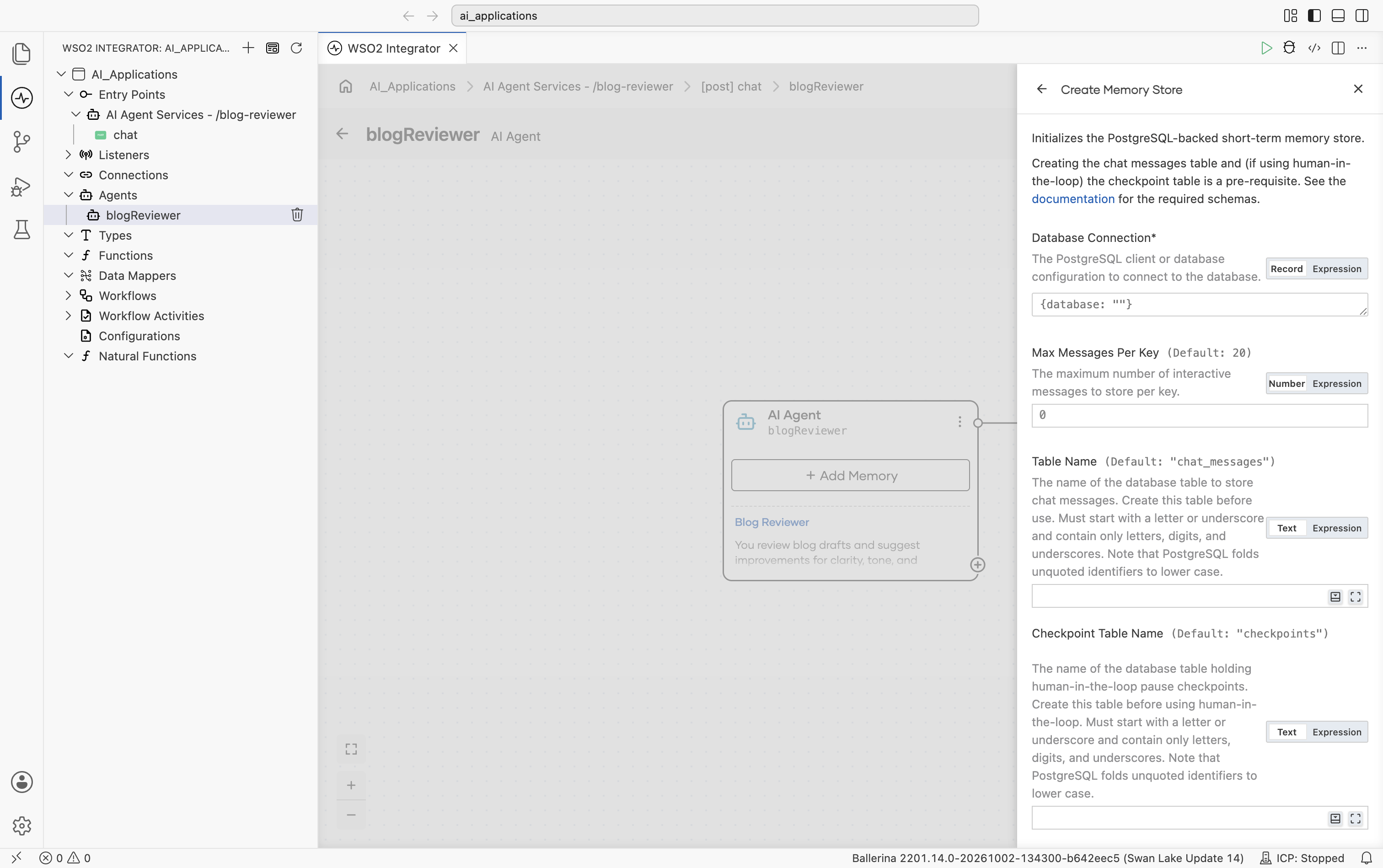
Scrolling further shows the end of Checkpoint Table Name, Memory Store Name, Result Type, and the Save button:
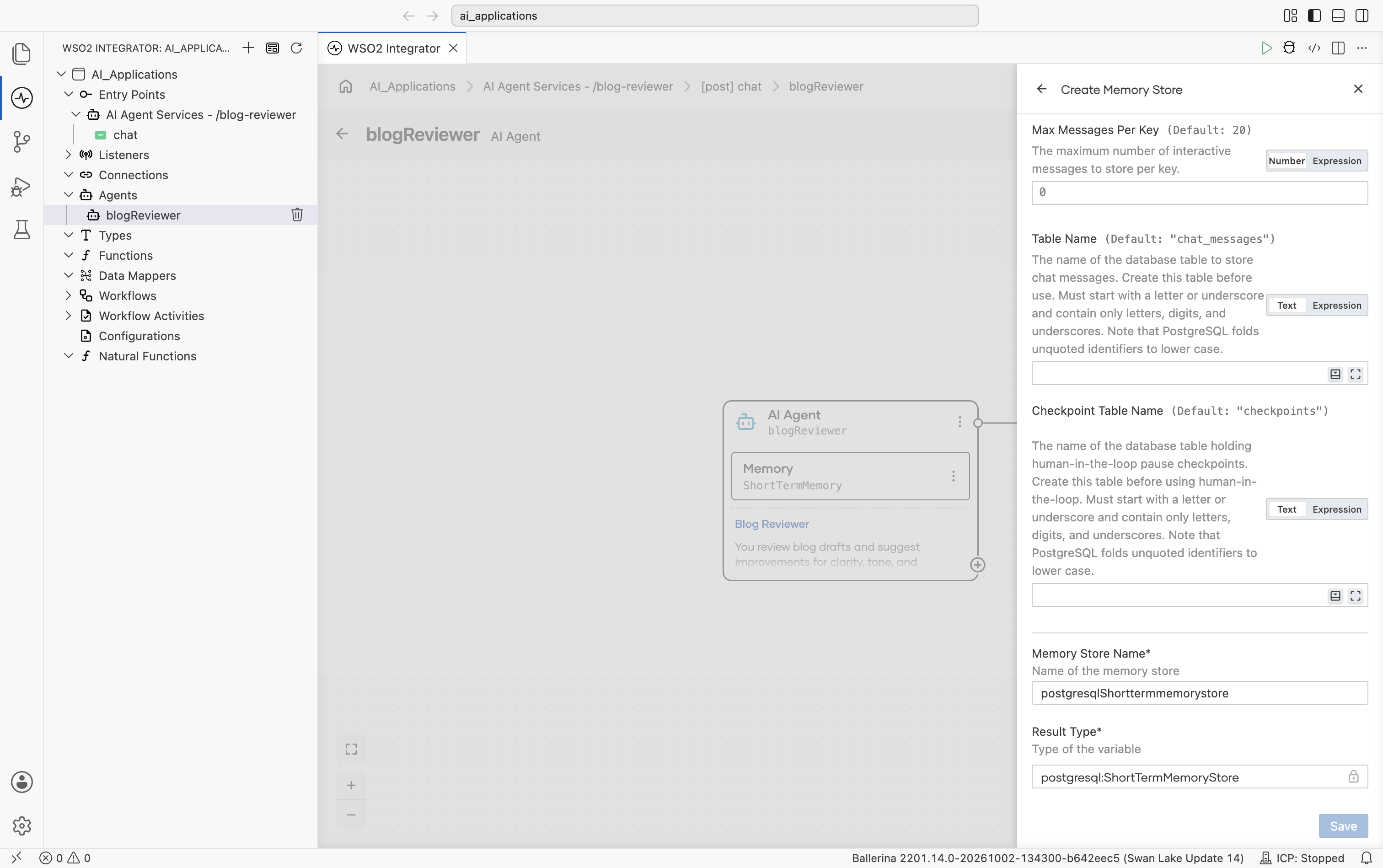
| Field | Required | Description |
|---|---|---|
| Database Connection* | Yes | Specifies the PostgreSQL client or database configuration used to connect to the database. Supports both Record and Expression modes. Provide a database configuration record with Host (default localhost), Username (default postgres), Password, Database Name, Port (default 5432), and optional client options and connection pool settings, or an existing postgresql:Client. |
| Max Messages Per Key | No | Defines the maximum number of interactive messages stored per session ID. Default: 20. When the limit is reached, the oldest messages are removed. |
| Table Name | No | Specifies the database table used to store chat messages. Default: "chat_messages". If the table does not exist, it is created automatically. Must start with a letter or underscore and contain only letters, digits, and underscores. Note that PostgreSQL folds unquoted identifiers to lower case. |
| Checkpoint Table Name | No | Specifies the database table used to store approval pause checkpoints. Default: "checkpoints". It is created lazily on first use and must be different from the chat messages table. The same identifier rules apply. |
| Memory Store Name* | Yes | The variable name used for the generated memory store. Default: postgresqlShorttermmemorystore. |
| Result Type* | Yes | The generated result type. Default: postgresql:ShortTermMemoryStore. |
Creating a SQLite short-term memory store
Selecting SQLite Short Term Memory Store opens a configuration form for creating a SQLite-backed memory store. SQLite provides durable, file-backed memory without running a separate database server.
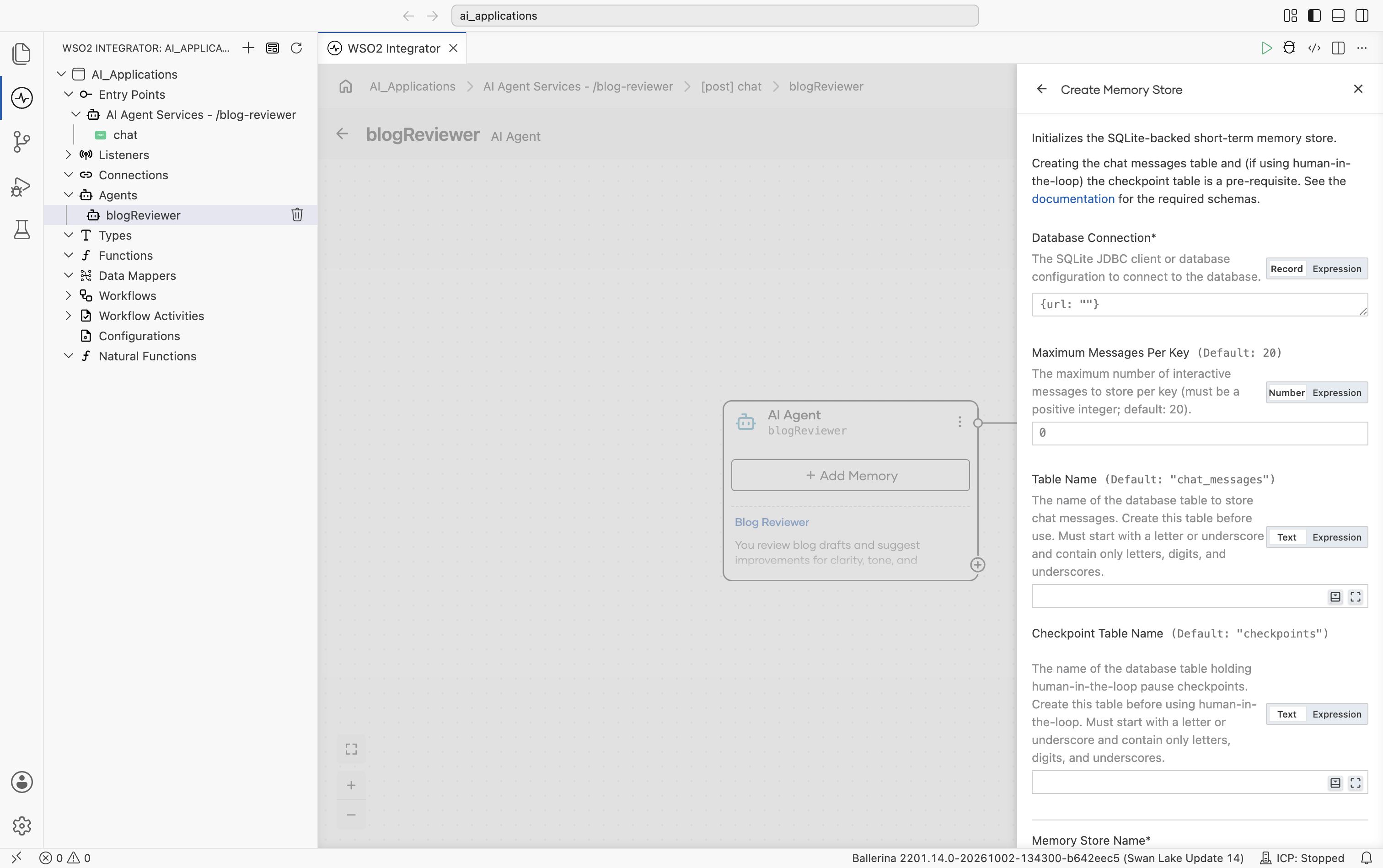
Scrolling further shows the end of Checkpoint Table Name, Memory Store Name, Result Type, and the Save button:
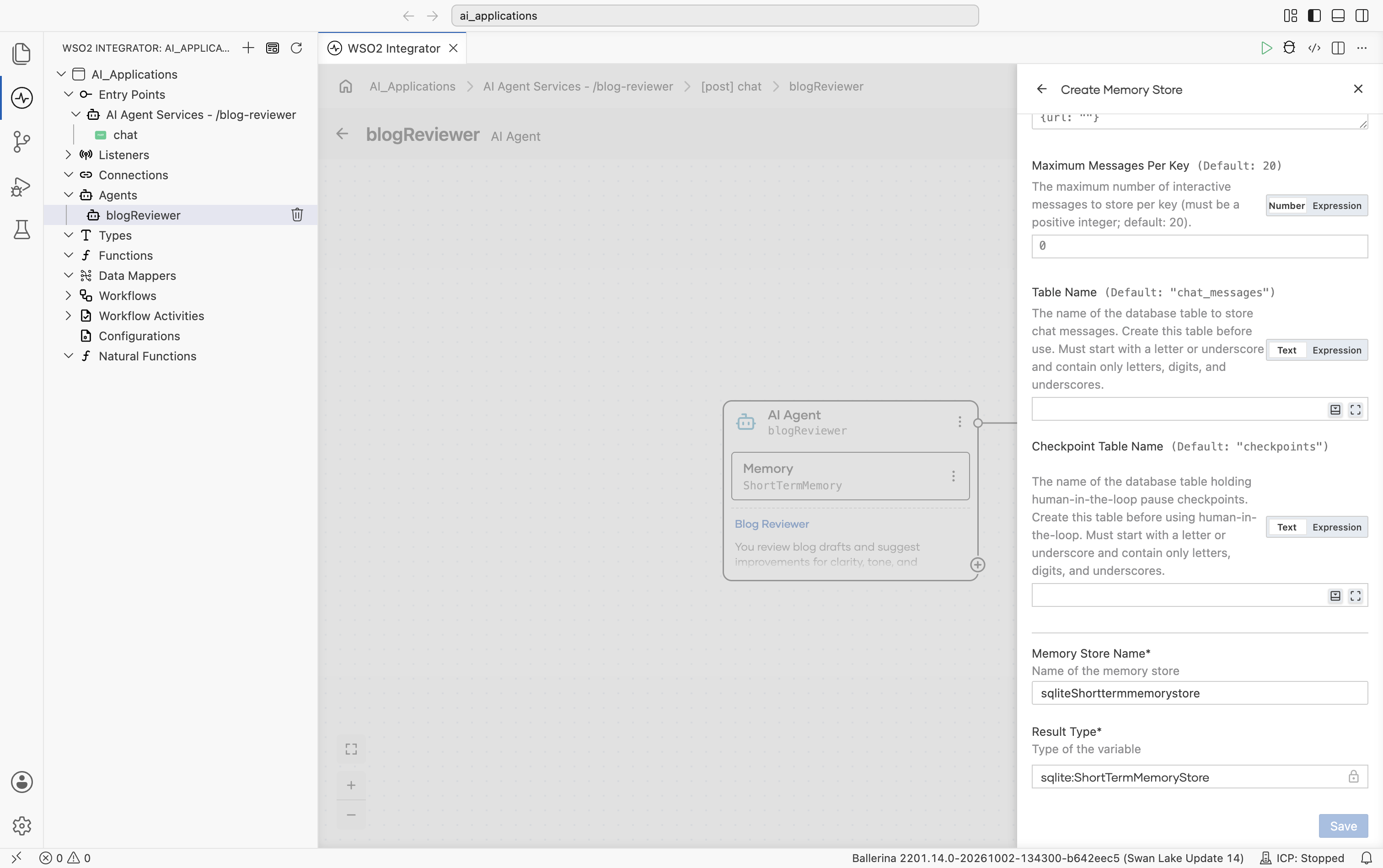
| Field | Required | Description |
|---|---|---|
| Database Connection* | Yes | Specifies the SQLite JDBC client or database configuration used to connect to the database. Supports both Record and Expression modes. Provide a database configuration record with a URL (must start with jdbc:sqlite:, for example jdbc:sqlite:./chat.db for a file-backed database or jdbc:sqlite::memory: for an in-process one), optional session Options (journal mode, busy timeout), and a Connection Timeout (default 30 seconds), or an existing jdbc:Client. |
| Maximum Messages Per Key | No | Defines the maximum number of interactive messages stored per session ID (must be a positive integer). Default: 20. When the limit is reached, the oldest messages are removed. |
| Table Name | No | Specifies the database table used to store chat messages. Default: "chat_messages". If the table does not exist, it is created automatically. Must start with a letter or underscore and contain only letters, digits, and underscores. |
| Checkpoint Table Name | No | Specifies the database table used to store approval pause checkpoints. Default: "checkpoints". It is created lazily on first use and must be different from the chat messages table. The same identifier rules apply. |
| Memory Store Name* | Yes | The variable name used for the generated memory store. Default: sqliteShorttermmemorystore. |
| Result Type* | Yes | The generated result type. Default: sqlite:ShortTermMemoryStore. |
SQLite is a single-writer database, so the store pins its connection pool to a single connection. A jdbc:sqlite::memory: database lives in the integration process and loses its data on shutdown; use a file-backed URL for memory that must survive restarts.
Creating an Amazon DynamoDB short-term memory store
Selecting Amazon DynamoDB Short Term Memory Store opens a configuration form for creating a DynamoDB-backed memory store.
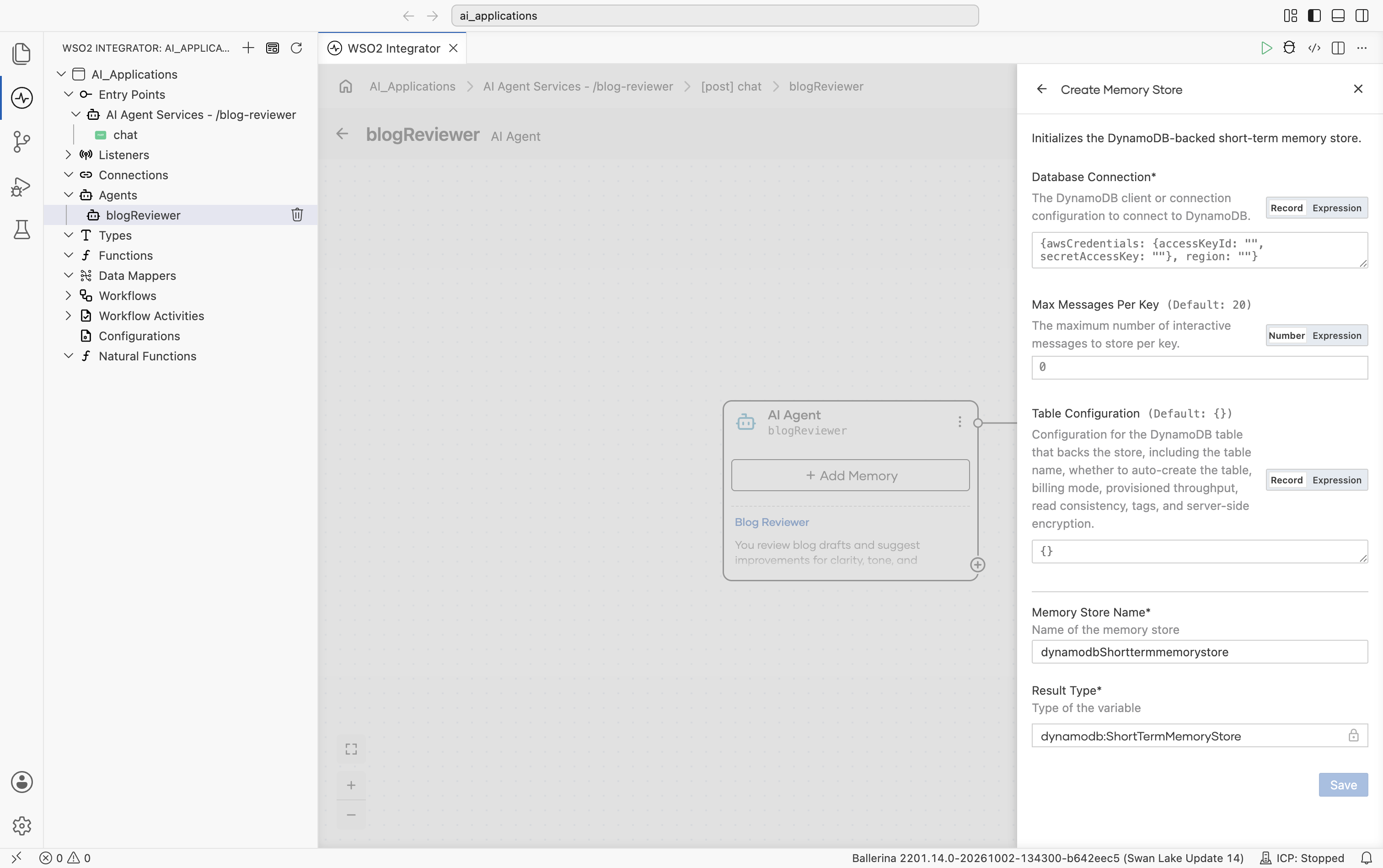
| Field | Required | Description |
|---|---|---|
| Database Connection* | Yes | Specifies the DynamoDB client or connection configuration used to connect to Amazon DynamoDB. Supports both Record and Expression modes. Provide a dynamodb:ConnectionConfig record (AWS region and credentials) or an existing dynamodb:Client. |
| Max Messages Per Key | No | Defines the maximum number of interactive messages stored per session ID. Default: 20. When the limit is reached, the oldest messages are removed. |
| Table Configuration | No | Configures the DynamoDB table that backs the store. Default: {}. See the table below. |
| Memory Store Name* | Yes | The variable name used for the generated memory store. Default: dynamodbShorttermmemorystore. |
| Result Type* | Yes | The generated result type. Default: dynamodb:ShortTermMemoryStore. |
The Table Configuration record contains the following fields:
| Field | Default | Description |
|---|---|---|
| Table Name | "chat_memory" | The DynamoDB table used to store chat messages. Must be 3–255 characters long and contain only letters, digits, underscores, dots, and hyphens. |
| Create Table If Not Exists | true | Whether the store creates the backing table when it does not already exist. Table creation requires the dynamodb:DescribeTable and dynamodb:CreateTable IAM permissions. Set to false when the table is provisioned out of band (for example, via IaC) and the runtime role is restricted to data-plane permissions. |
| Billing Mode | dynamodb:PAY_PER_REQUEST | The billing mode requested when the store creates the table. The default is on-demand, which differs from the AWS CreateTable default of PROVISIONED. Set to dynamodb:PROVISIONED (and provide the capacity units below) for provisioned-capacity tables. Ignored when the table already exists. |
| Read Capacity Units / Write Capacity Units | 5 / 5 | The throughput to provision when Billing Mode is dynamodb:PROVISIONED. |
| Consistent Reads | false | Whether reads use strongly consistent reads. Strongly consistent reads cost twice the read capacity units of eventually consistent reads; enable only when strong consistency is required. |
| Tags | () | Optional tags applied to the table when the store creates it. |
| Server-Side Encryption | () | Optional server-side encryption settings applied when the store creates the table. If omitted, the table uses the default AWS-owned encryption key. |
The store keys items by a MemoryKey partition key and a MessageId sort key. Session IDs beginning with checkpoint# are reserved for approval pause checkpoints and are rejected.
The same store also persists paused runs for tools that require approval before they run. A durable store lets a pending approval survive a restart or be resolved by a different replica. For details, see Gated Tools.
Overflow configuration
Memory works as a sliding window. When new conversation turns exceed the configured memory limit, the Overflow Configuration determines how older messages are handled.
| Strategy | Behavior | Configuration |
|---|---|---|
| Trim Overflow Handler Configuration (default) | Removes the oldest messages one at a time until the new message fits within the memory window. | Optional: trimCount |
| Model Assisted Overflow Handler | Uses a model-assisted strategy to manage memory overflow. | Optional: model and prompt |
The effective size of the memory window depends on the model’s context window, with additional space reserved for the system prompt and tool definitions. In most cases, no manual tuning is required.
Agent after memory is attached
After memory is configured, the AI Agent block on the canvas displays the attached memory configuration as a sub-block.
Sessions and isolation
Regardless of the configured memory store, each session ID maintains its own isolated conversation history. If multiple users interact with the same agent simultaneously, their conversations remain separate.
sessionId = "user-alice-1234"  ────►  Alice's history
sessionId = "user-bob-5678"    ────►  Bob's history
sessionId = "user-alice-9999"  ────►  Alice's other conversation
The session ID is included in every chat request through ai:ChatReqMessage.sessionId. The listener automatically reads and manages memory using this value.
Custom memory
For storage backends that are not available in the memory store picker, implement the ai:Memory interface in a custom class.
public type Memory distinct isolated object {
    function get(string key) returns ai:ChatMessage[]|ai:MemoryError;

    function update(
            string key,
            ai:ChatMessage|ai:ChatMessage[] message)
            returns ai:MemoryError?;

    function delete(string key) returns ai:MemoryError?;
};
A custom ai:ShortTermMemoryStore must additionally implement four checkpoint methods that persist paused runs awaiting approval: putCheckpoint, getCheckpoint, removeCheckpoint, and takeCheckpoint. See Gated Tools.
The following example shows a minimal PostgreSQL-backed implementation.
public isolated class PostgresMemory {
    *ai:Memory;

    private final postgresql:Client db;

    public isolated function init(postgresql:Client db) {
        self.db = db;
    }

    public isolated function get(string key)
            returns ai:ChatMessage[]|ai:MemoryError {
        // Load messages for `key` from the database and return them.
        return [];
    }

    public isolated function update(
            string key,
            ai:ChatMessage|ai:ChatMessage[] message)
            returns ai:MemoryError? {
        // Append messages.
    }

    public isolated function delete(string key)
            returns ai:MemoryError? {
        // Clear messages for the session.
    }
}
Editing memory after it is attached
To update the memory configuration after it has been created:
- Click the Memory sub-block inside the AI Agent block on the canvas.
- The Configure Memory panel opens with the existing configuration.
- Update the required settings and click Save.
To change the underlying memory store:
- Open Configure Memory → Advanced Configurations → Store.
- Select a different store or click + Create New Memory Store.
- Save the configuration.
Designing memory for your agent
The following table provides general recommendations for choosing a memory setup.
| Situation | Recommended setup |
|---|---|
| Getting started with a new chat agent | Use the default configuration: In-Memory Short-Term Memory with the default overflow configuration. |
| The agent needs to retain conversations across restarts | Configure Short Term Memory with a database-backed store: MSSQL, PostgreSQL, SQLite, Redis, or Amazon DynamoDB. |
| Several integration replicas must share session state with low latency | Configure Redis Short Term Memory Store. |
| Durable memory without running a database server | Configure SQLite Short Term Memory Store with a file-backed URL. |
| Serverless deployment on AWS | Configure Amazon DynamoDB Short Term Memory Store. |
| You want to use a backend that is not in the picker (for example, MySQL) | Implement a custom ai:Memory implementation. |
| You do not want conversation context to persist across requests | Use agent.run(input) without a session ID instead of using ai:Listener. |
| Multiple agents need to share the same conversation memory | Configure the same database-backed memory store for all related agents. |
What's next
- Identity & Access Management — Secure agents, tools, and integrations with identity and access control.
- Gated Tools — Pause the agent for approval before it runs a sensitive tool.
- Observability — See which tools the agent actually selects.
- Evaluations — Learn how to prevent regressions in AI agent quality.