GraphQL Tool
The bal graphql tool generates Ballerina service skeletons and client code from GraphQL Schema Definition Language (SDL) files. It creates type-safe resolver stubs, input/output types, and client operations that match your GraphQL schema, letting you focus on implementing business logic rather than writing boilerplate.
Generating a service from a GraphQL schema
- Visual Designer
- Ballerina Code
-
Click the + Add Artifacts button in the canvas or click + next to Entry Points in the sidebar.
-
In the Artifacts panel, select GraphQL Service under Integration as API.
-
Select Import From GraphQL Schema under Service Contract.
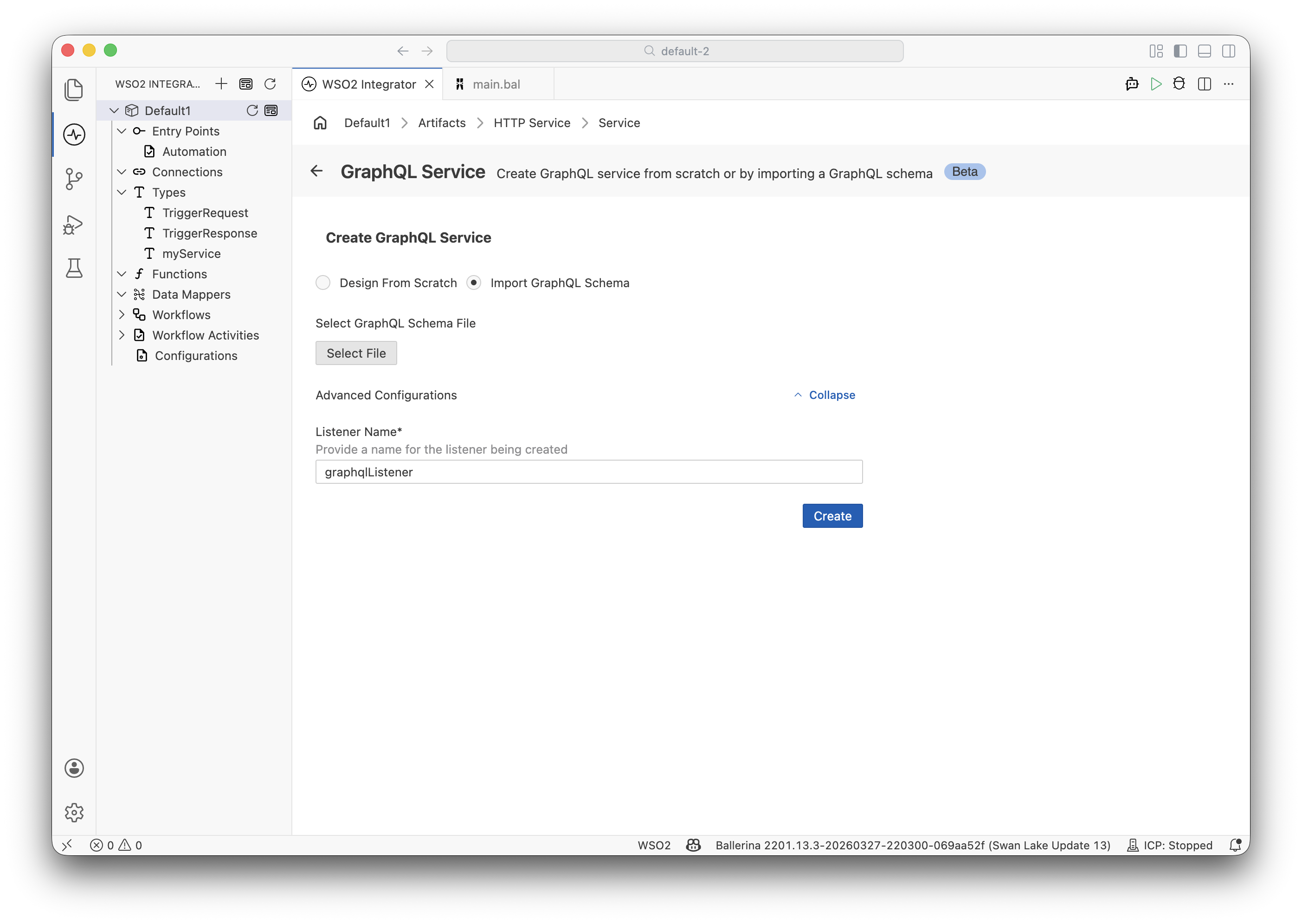
-
Browse or enter the path to your GraphQL SDL file.
-
Configure the Service Base Path and listener settings.
-
Click Create.
-
WSO2 Integrator generates the service with resolver stubs and record types matching your GraphQL schema.
Basic service generation
# Generate a Ballerina GraphQL service from an SDL file
bal graphql -i schema.graphql --mode service

# Specify output directory
bal graphql -i schema.graphql --mode service -o generated/
Example schema
Given the following schema.graphql:
type Query {
    customer(id: ID!): Customer
    orders(customerId: ID!, limit: Int = 10): [Order!]!
}

type Mutation {
    createOrder(input: OrderInput!): Order!
    updateOrderStatus(orderId: ID!, status: OrderStatus!): Order!
}

type Customer {
    id: ID!
    name: String!
    email: String!
    orders: [Order!]!
}

type Order {
    id: ID!
    customerId: ID!
    items: [LineItem!]!
    total: Float!
    status: OrderStatus!
}

type LineItem {
    productId: ID!
    quantity: Int!
    unitPrice: Float!
}

input OrderInput {
    customerId: ID!
    items: [LineItemInput!]!
}

input LineItemInput {
    productId: ID!
    quantity: Int!
}

enum OrderStatus {
    PENDING
    CONFIRMED
    SHIPPED
    DELIVERED
    CANCELLED
}
Generated service code
The tool generates a Ballerina service with resolver stubs:
import ballerina/graphql;

service /graphql on new graphql:Listener(9090) {

    // Query resolvers
    resource function get customer(string id) returns Customer?|error {
        // TODO: Implement resolver
    }

    resource function get orders(string customerId, int 'limit = 10)
            returns Order[]|error {
        // TODO: Implement resolver
    }

    // Mutation resolvers
    remote function createOrder(OrderInput input) returns Order|error {
        // TODO: Implement resolver
    }

    remote function updateOrderStatus(string orderId, OrderStatus status)
            returns Order|error {
        // TODO: Implement resolver
    }
}
And corresponding record types:
// Auto-generated from GraphQL schema
type Customer record {|
    string id;
    string name;
    string email;
    Order[] orders;
|};

type Order record {|
    string id;
    string customerId;
    LineItem[] items;
    float total;
    OrderStatus status;
|};

type LineItem record {|
    string productId;
    int quantity;
    float unitPrice;
|};

type OrderInput record {|
    string customerId;
    LineItemInput[] items;
|};

type LineItemInput record {|
    string productId;
    int quantity;
|};

enum OrderStatus {
    PENDING,
    CONFIRMED,
    SHIPPED,
    DELIVERED,
    CANCELLED
}
Exporting a GraphQL schema from an existing GraphQL service
Schema generation from GraphQL service is currently supported only through the Ballerina CLI (pro-code). Visual Designer support for GraphQL schema generation is not yet available.
Generate a GraphQL SDL file from an existing Ballerina GraphQL service:
 # Export SDL from a Ballerina service
 bal graphql -i service.bal --mode schema

 # Export to a specific directory
 bal graphql -i service.bal --mode schema -o schema/
Command usage for schema generation
 bal graphql [-i | --input] <ballerina-graphql-service-file-path>
              [-o | --output] <output-location>
              [-s | --service] <service-base-path>
Command options for schema generation
| Command option | Description | Mandatory/Optional |
|---|---|---|
-i, --input | The input command option specifies the path of the Ballerina GraphQL service file (e.g., service.bal). | Mandatory |
-o, --output | The output command option specifies the output location of the generated GraphQL schema files. If this command option is not specified, the schema files will be generated at the same location in which the bal graphql command is executed. | Optional |
-m, --mode | The mode parameter specifies the operation mode. It indicates the way to process the schema file. If the mode flag is not specified, the graphql tool will infer the mode from the input file extension. The mode should be schema for the schema generation. | Optional |
-s, --service | The service command option specifies the base path of the Ballerina GraphQL service of which the schema needs to be generated. If this command option is not specified, schemas will be generated for each of the GraphQL services in the given file. | Optional |
Generating a client from a GraphQL schema (experimental)
Client generation from GraphQL schemas is currently supported only through the Ballerina CLI (pro-code). Visual Designer support for GraphQL client generation is not yet available.
- Create a
queries.graphqlfile with the operations your client needs.
 query GetCustomer($id: ID!) {
     customer(id: $id) {
         id
         name
         email
     }
 }

 query GetOrders($customerId: ID!, $limit: Int) {
     orders(customerId: $customerId, limit: $limit) {
         id
         total
         status
     }
 }
- Create a
graphql.config.yamlconfiguration file that specifies the schema and query documents as follows.
 schema: schema.graphql
 documents:
   - queries.graphql
- Generate the client by running the following command.
bal graphql -i graphql.config.yaml
Command usage for client generation
 bal graphql [-i | --input] <graphql-configuration-file-path>
              [-o | --output] <output-location>
Command options for client generation
| Command option | Description | Mandatory/Optional |
|---|---|---|
-i, --input | The input command option specifies the path of the GraphQL config file (e.g., graphql.config.yaml) configured with GraphQL schemas specified by the Schema Definition Language and GraphQL documents. | Mandatory |
-o, --output | The output command option specifies the path of the output location of the generated files. If this command option is not specified, the Ballerina files will be generated at the same location in which the bal graphql command is executed. | Optional |
-m, --mode | The mode parameter specifies the operation mode. It indicates the way to process the schema file. If the mode flag is not specified, the graphql tool will infer the mode from the input file extension. The mode should be client for the client generation. | Optional |
What's next
- AsyncAPI Tool — Generate event-driven services from AsyncAPI specs
- OpenAPI Tool — Generate REST services and clients
- Flow Diagram Editor — Switch to pro-code to write advanced GraphQL resolver logic