WSDL Tool
The bal wsdl tool generates Ballerina client code from Web Services Description Language (WSDL) files. It creates type-safe SOAP client connectors, request/response record types, and XML serialization logic, enabling you to call legacy SOAP web services from your Ballerina integrations without manually constructing XML envelopes.
Prerequisites
The WSDL tool is included with the Ballerina distribution:
bal wsdl --help
Generating a client from WSDL
- Visual Designer
- Ballerina Code
-
Click the + Add Artifacts button in the canvas.
-
In the Artifacts panel, select Connection under Other Artifacts.
-
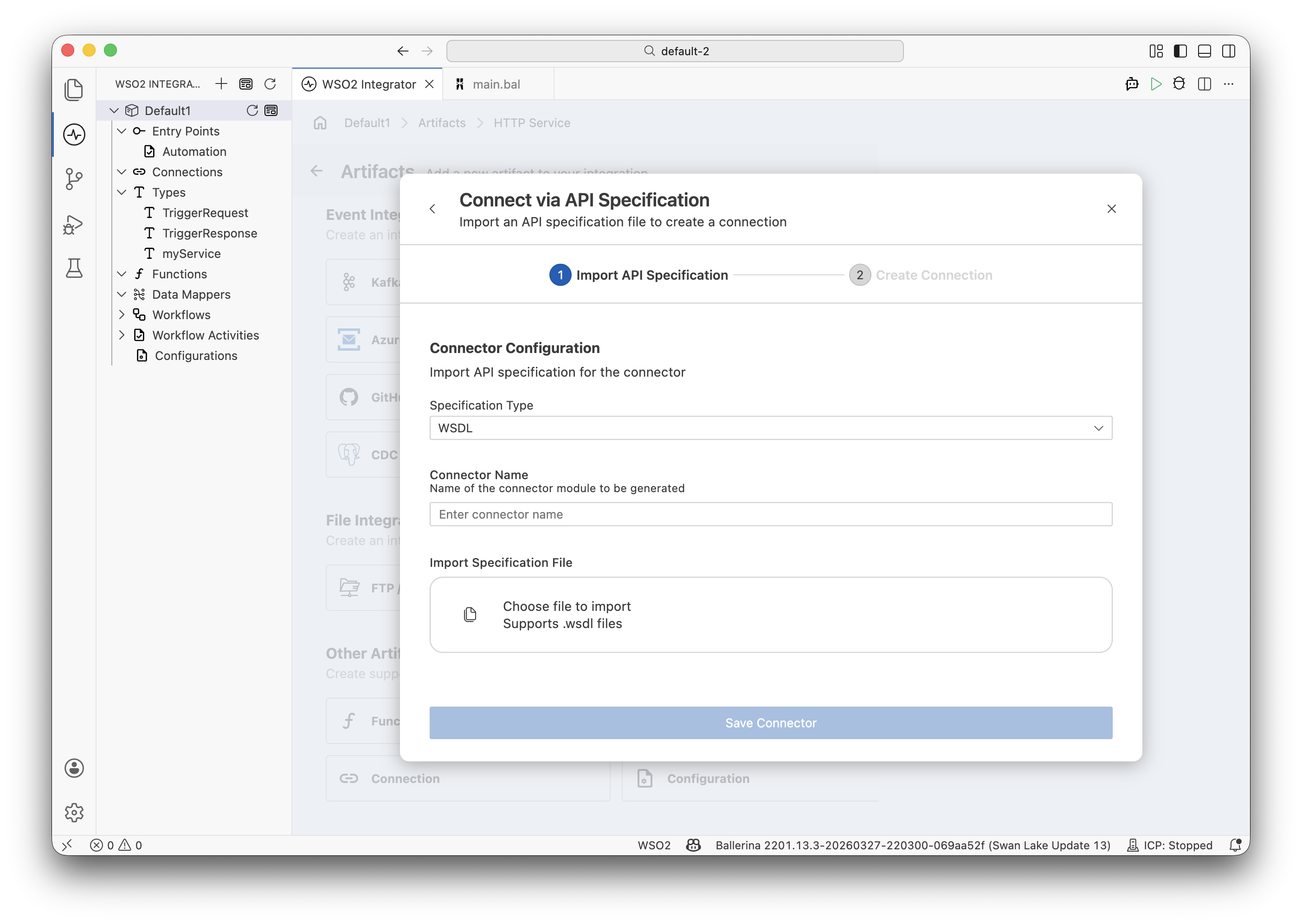
Select Connect Via API Specification and provide the WSDL file or URL.
-
Configure the Specification Type to WSDL and click Next.
-
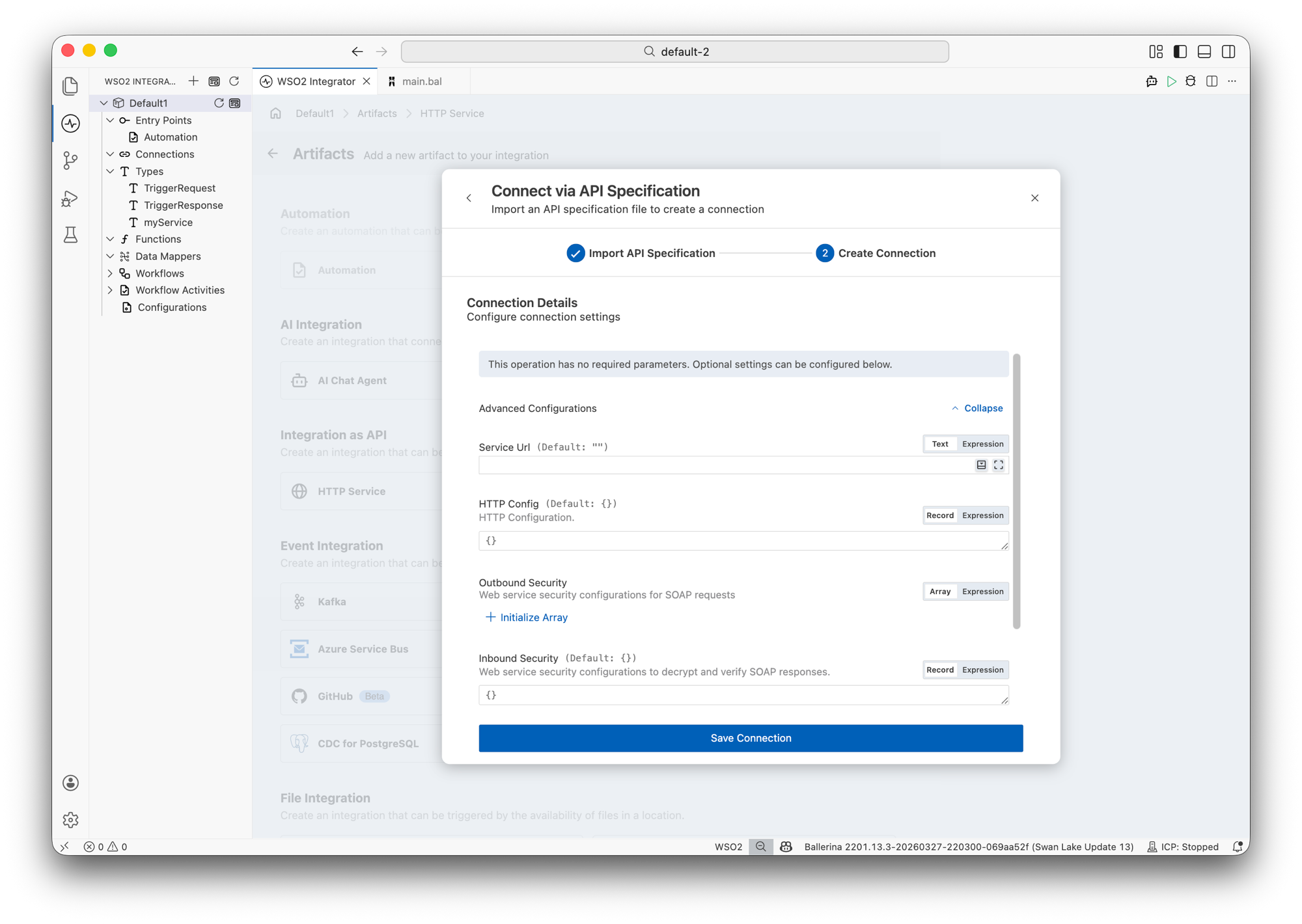
In the Create Connection step, configure the connection details. Expand Advanced Configurations to set the following optional fields:
- Service Url — Override the default endpoint URL defined in the WSDL.
- HTTP Config — HTTP configuration settings for the connection.
- Outbound Security — Web service security configurations for SOAP requests.
- Inbound Security — Web service security configurations to decrypt and verify SOAP responses.
-
Enter a Connection Name for the generated client (for example,
orderServiceClient). -
Click Save Connection.
-
WSO2 Integrator generates a type-safe SOAP client connector with methods for each WSDL operation, along with request/response record types.
Basic usage
# Generate a Ballerina SOAP client from a WSDL file
bal wsdl -i service.wsdl

# Generate from a remote WSDL URL
bal wsdl -i https://example.com/OrderService?wsdl

# Specify output directory
bal wsdl -i service.wsdl -o generated/
Example WSDL
For a WSDL that defines an OrderService with operations GetOrder, CreateOrder, and ListOrders, the tool generates the following structure:
generated/
├── client.bal         # SOAP client connector
├── types.bal          # Request/response record types
└── utils.bal          # XML serialization helpers
Generated client
import ballerina/soap;

public isolated client class OrderServiceClient {

    private final soap:Client soapClient;

    public function init(string url) returns error? {
        self.soapClient = check new (url);
    }

    remote function GetOrder(GetOrderRequest request)
            returns GetOrderResponse|error {
        xml payload = toGetOrderRequestXml(request);
        xml response = check self.soapClient->sendReceive(payload, "GetOrder");
        return fromGetOrderResponseXml(response);
    }

    remote function CreateOrder(CreateOrderRequest request)
            returns CreateOrderResponse|error {
        xml payload = toCreateOrderRequestXml(request);
        xml response = check self.soapClient->sendReceive(payload, "CreateOrder");
        return fromCreateOrderResponseXml(response);
    }

    remote function ListOrders(ListOrdersRequest request)
            returns ListOrdersResponse|error {
        xml payload = toListOrdersRequestXml(request);
        xml response = check self.soapClient->sendReceive(payload, "ListOrders");
        return fromListOrdersResponseXml(response);
    }
}
Generated types
// Auto-generated from WSDL schema types
type GetOrderRequest record {|
    string orderId;
|};

type GetOrderResponse record {|
    string orderId;
    string customerId;
    OrderItem[] items;
    decimal total;
    string status;
|};

type CreateOrderRequest record {|
    string customerId;
    OrderItem[] items;
|};

type CreateOrderResponse record {|
    string orderId;
    string status;
    string createdAt;
|};

type OrderItem record {|
    string productId;
    int quantity;
    decimal unitPrice;
|};

type ListOrdersRequest record {|
    string customerId;
    int maxResults = 50;
|};

type ListOrdersResponse record {|
    OrderSummary[] orders;
    int totalCount;
|};

type OrderSummary record {|
    string orderId;
    decimal total;
    string status;
    string createdAt;
|};
Using the generated client
Basic client usage
configurable string soapEndpoint = ?;

final OrderServiceClient orderService = check new (soapEndpoint);

function getOrder(string orderId) returns GetOrderResponse|error {
    GetOrderRequest request = {orderId: orderId};
    return check orderService->GetOrder(request);
}

function createOrder(string customerId, OrderItem[] items)
        returns CreateOrderResponse|error {
    CreateOrderRequest request = {customerId, items};
    return check orderService->CreateOrder(request);
}
Bridging SOAP to REST
A common integration pattern is exposing a SOAP service as a REST API:
import ballerina/http;

configurable string soapEndpoint = ?;
configurable int servicePort = 8090;

final OrderServiceClient soapClient = check new (soapEndpoint);

service /api on new http:Listener(servicePort) {

    resource function get orders/[string orderId]()
            returns json|http:NotFound|error {
        GetOrderRequest request = {orderId: orderId};
        GetOrderResponse|error result = soapClient->GetOrder(request);
        if result is error {
            return <http:NotFound>{body: {message: "Order not found"}};
        }
        return result.toJson();
    }

    resource function post orders(record {|string customerId; OrderItem[] items;|} req)
            returns json|error {
        CreateOrderRequest soapReq = {
            customerId: req.customerId,
            items: req.items
        };
        CreateOrderResponse response = check soapClient->CreateOrder(soapReq);
        return response.toJson();
    }
}
Authentication
WS-Security with username token
final OrderServiceClient secureClient = check new (soapEndpoint, {
    auth: {
        username: wsUsername,
        password: wsPassword
    }
});
Mutual TLS
final OrderServiceClient mtlsClient = check new (soapEndpoint, {
    secureSocket: {
        key: {
            certFile: "/certs/client.crt",
            keyFile: "/certs/client.key"
        },
        cert: "/certs/ca.crt"
    }
});
SOAP versions
The tool supports both SOAP 1.1 and SOAP 1.2:
# Default: auto-detect from WSDL binding
bal wsdl -i service.wsdl

# Force SOAP 1.1
bal wsdl -i service.wsdl --soap-version 1.1

# Force SOAP 1.2
bal wsdl -i service.wsdl --soap-version 1.2
Command reference
| Command | Description |
|---|---|
bal wsdl -i <file.wsdl> | Generate client from WSDL |
bal wsdl -i <url> | Generate client from remote WSDL |
-o <dir> | Output directory |
--soap-version <1.1|1.2> | Force SOAP version |
--operations <op1,op2> | Generate only specified operations |
What's next
- XSD Tool -- Generate record types from XML Schema definitions
- OpenAPI Tool -- Generate REST services and clients
- Configuration Management -- Manage SOAP endpoint configuration per environment