Persist Tool
The bal persist tool generates type-safe client APIs for data persistence across multiple data stores. You define your data model using Ballerina record types, and the tool generates the client code to perform CRUD operations without writing store-specific queries.
Supported data stores
| Data store | Module |
|---|---|
| In-memory tables | Built-in |
| MySQL | ballerinax/persist.sql |
| PostgreSQL | ballerinax/persist.sql |
| MSSQL | ballerinax/persist.sql |
| Google Sheets | ballerinax/persist.googlesheets |
| Redis | ballerinax/persist.redis |
Connect to a database
- Visual Designer
- Ballerina Code
The Visual Designer provides a guided wizard to connect to an existing database, introspect its tables, and generate a type-safe connection.
Step 1: Add a connection
-
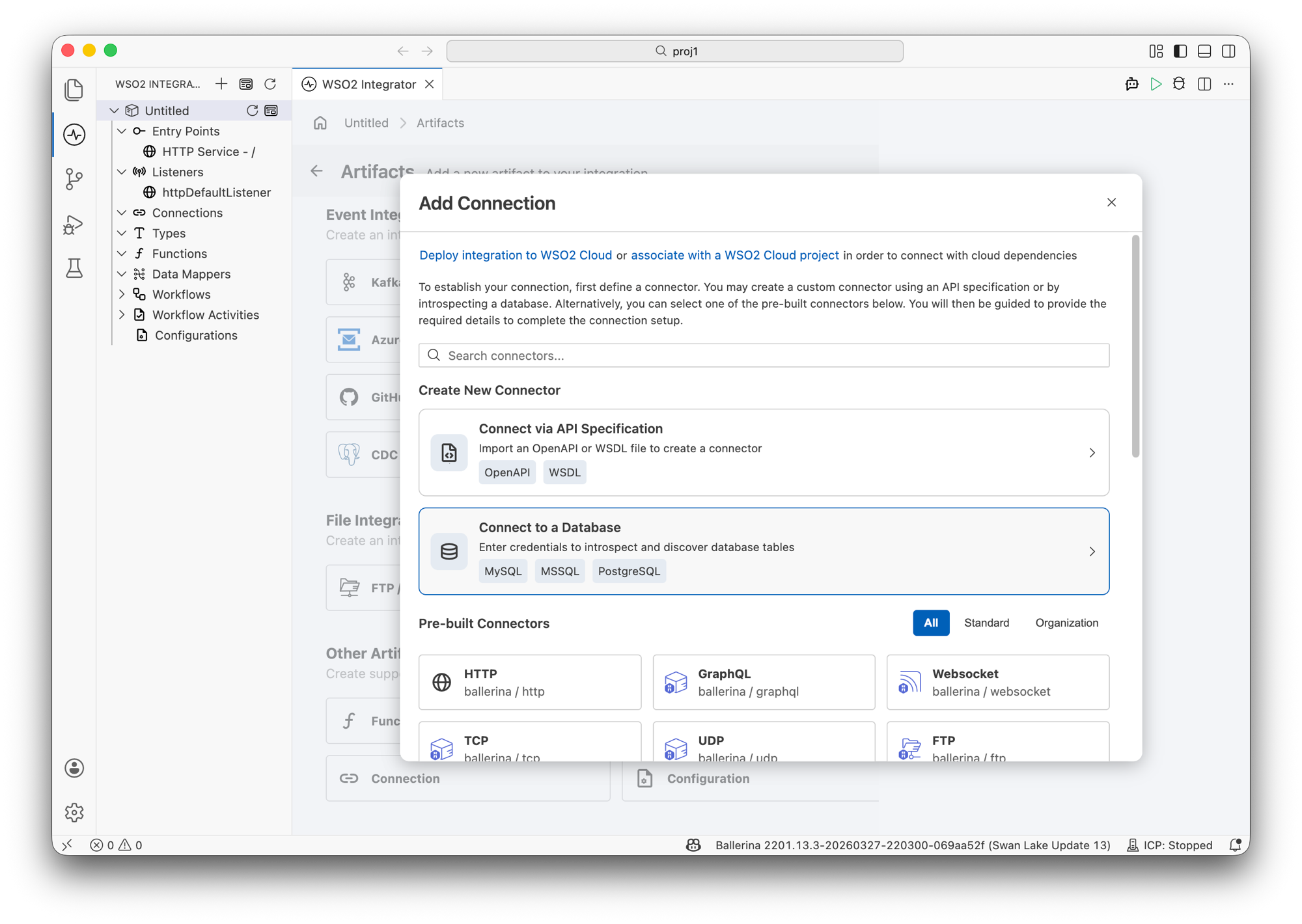
In the Artifacts page, click Connection under Other Artifacts.
-
In the Add Connection panel, select Connect to a Database. The supported database systems are MySQL, MSSQL, and PostgreSQL.
Step 2: Introspect database
-
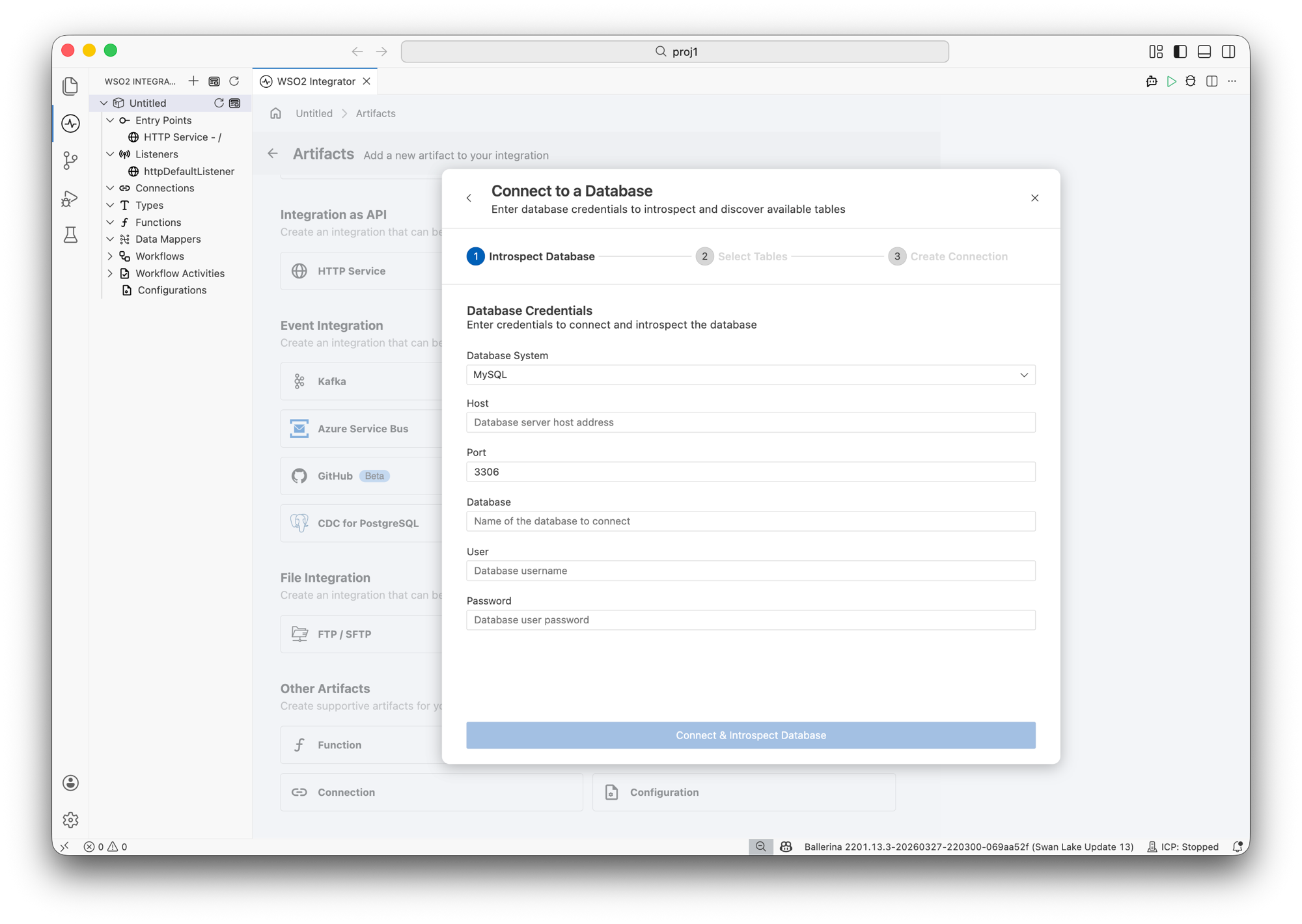
Select the Database System (MySQL, MSSQL, or PostgreSQL).
-
Enter the database credentials:
- Host — Database server host address.
- Port — Database server port (for example,
3306for MySQL). - Database — Name of the database to connect.
- User — Database username.
- Password — Database user password.
-
Click Connect & Introspect Database.
Step 3: Select tables
-
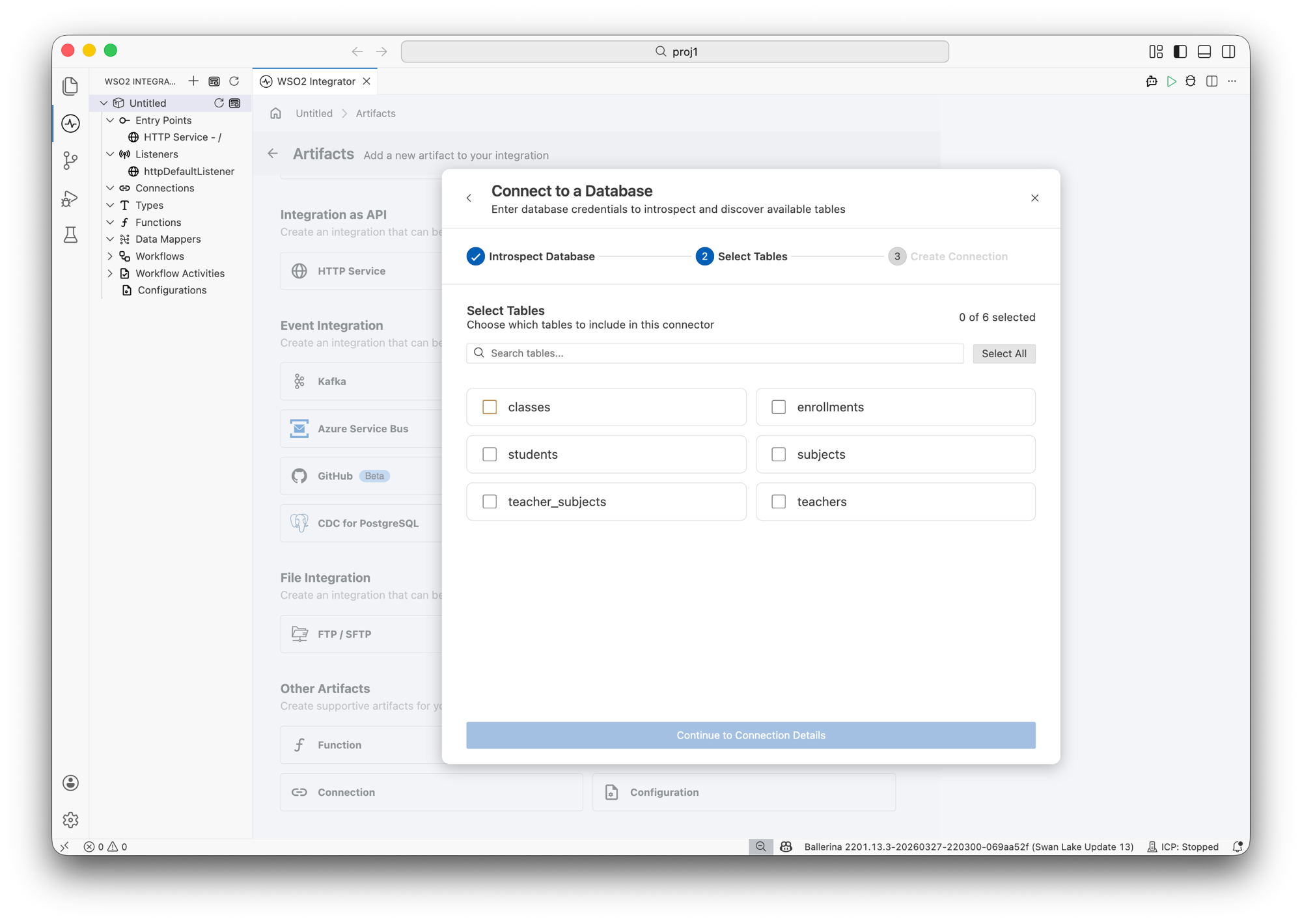
Choose which tables to include in this connector. You can search for tables or click Select All.
-
Click Continue to Connection Details.
Step 4: Create connection
-
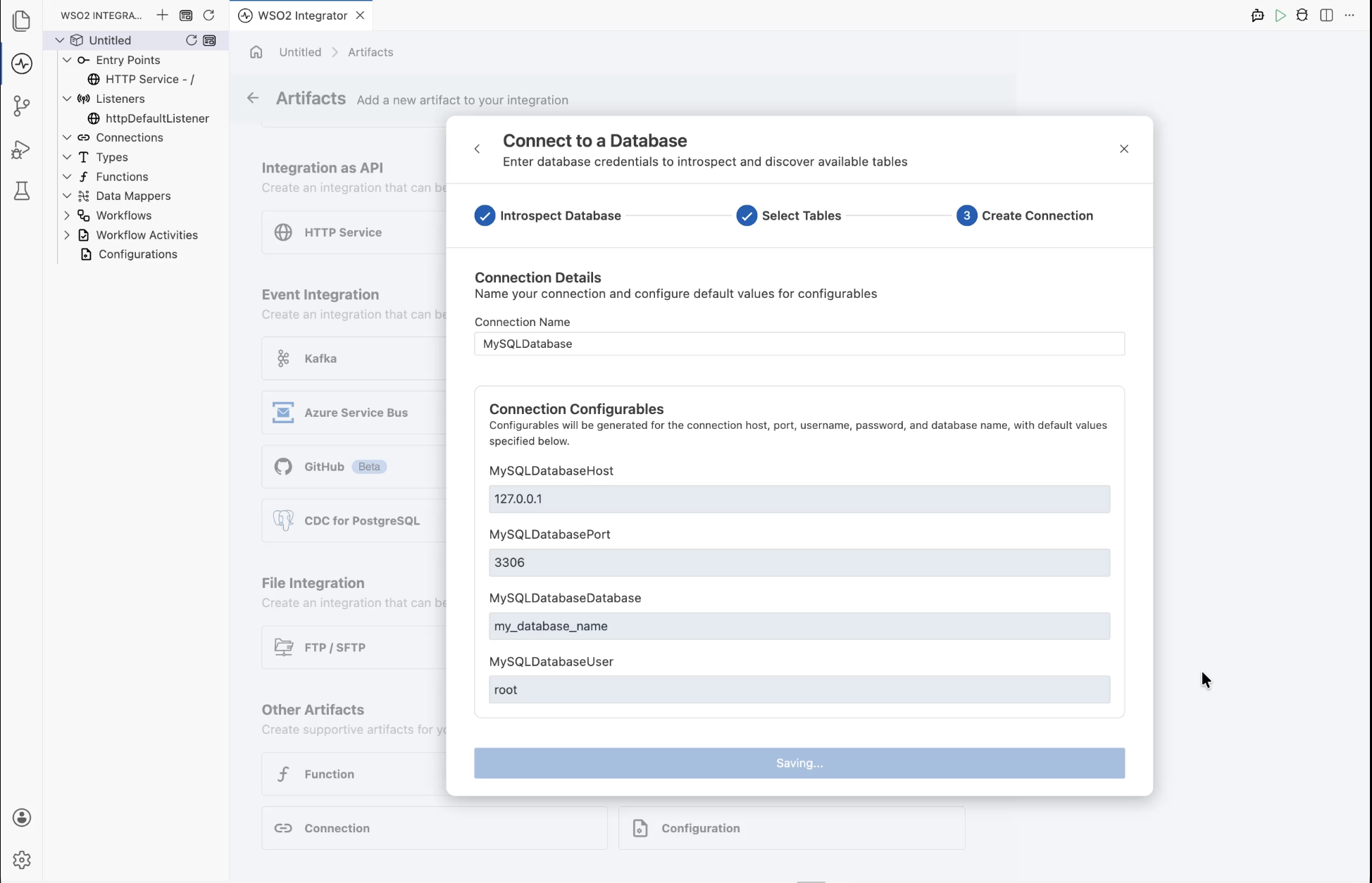
Enter a Connection Name (for example,
MySQLDatabase). -
Review the Connection Configurables — configurable variables are generated for the connection host, port, username, password, and database name with default values.
-
Click Save.
Working with the connection
Once the connection is saved, it appears in the design view as a connection artifact.
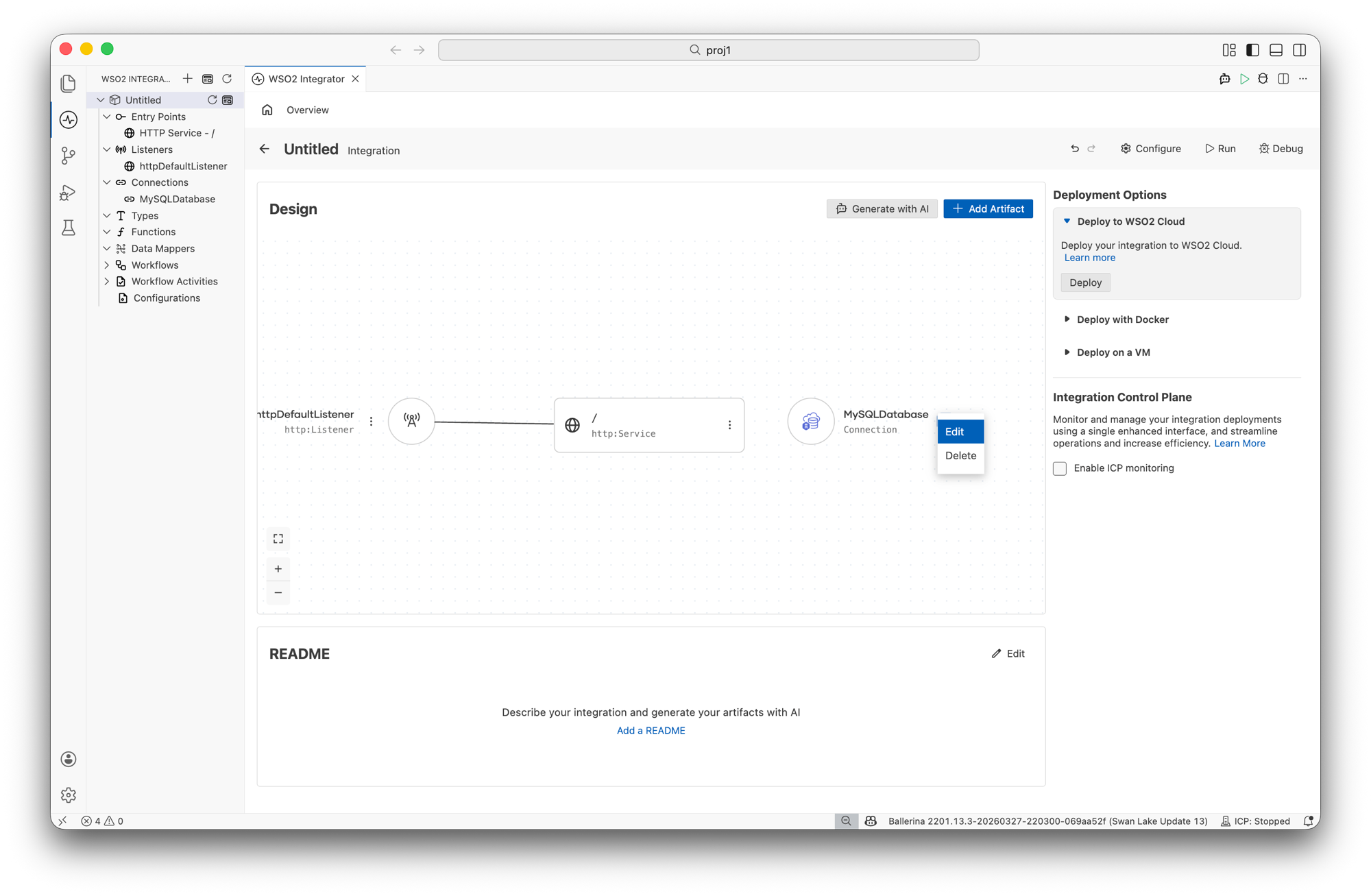
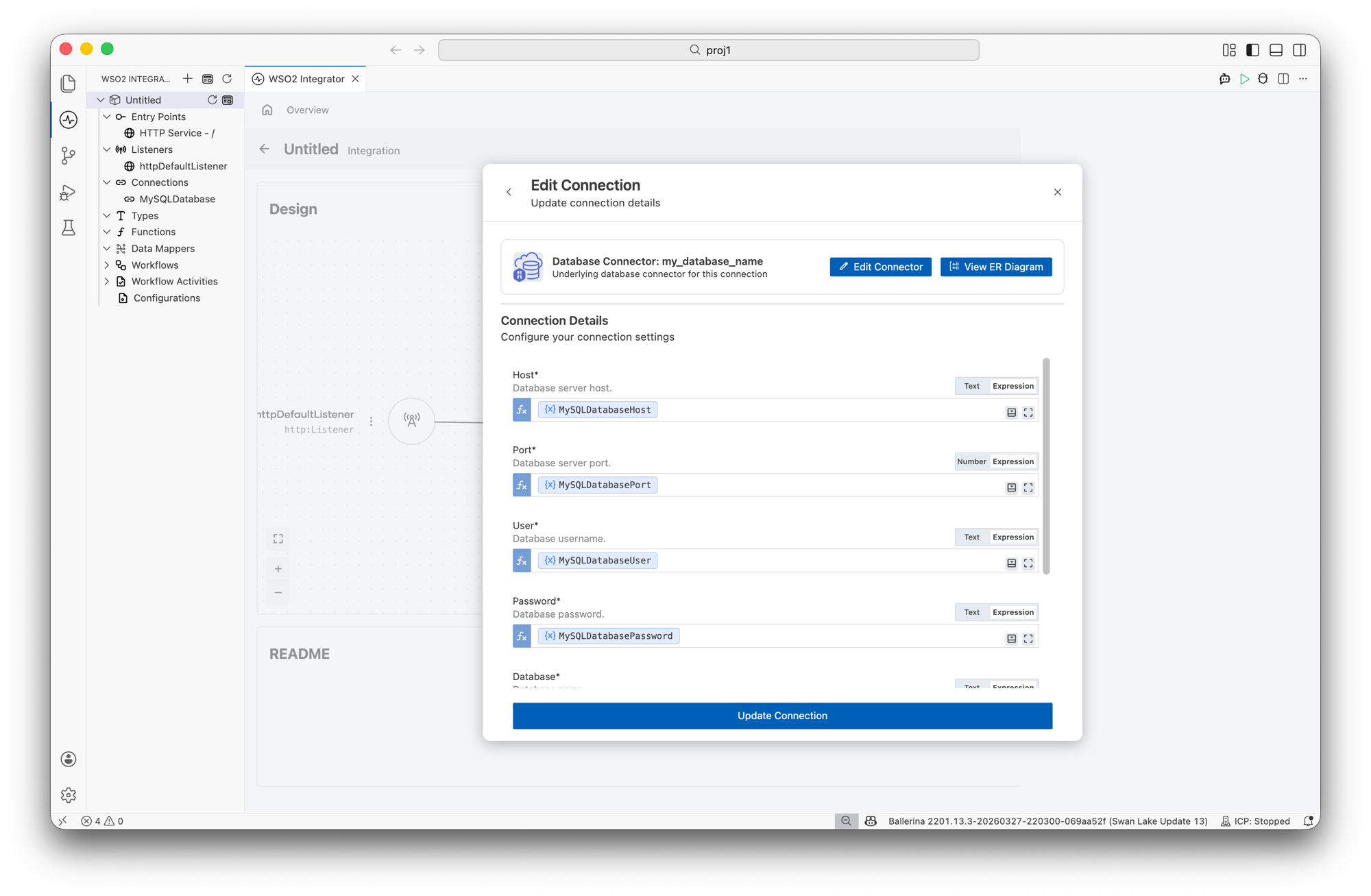
Click Edit on the connection to update connection details. From the edit panel, you can:
-
Click Edit Connector to modify the underlying database connector.
-
Click View ER Diagram to visualize the entity relationships between the selected tables.
-
Update connection settings such as Host, Port, User, Password, and Database.
Use connection functions in integration logic
When designing integration logic in the flow diagram, the connection functions appear in the Connections panel. These provide pre-built CRUD operations for each selected table, such as:
-
Get rows / Get row
-
Insert rows
-
Update row
-
Delete row
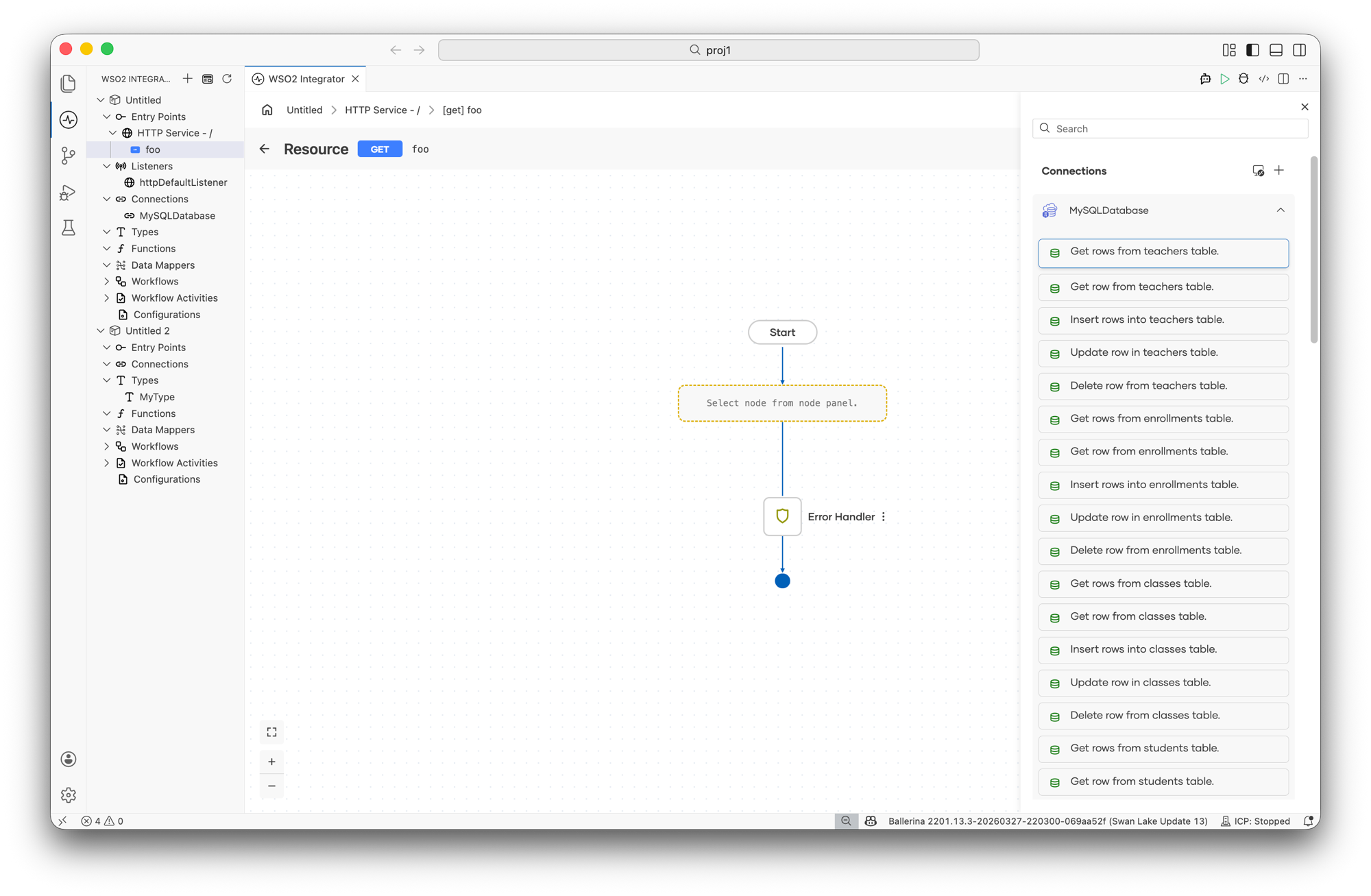
Each function provides advanced configuration options where you can set Where Clause, Order By Clause, Limit Clause, Result variable name, and Target Type to select specific fields from the table.
Initialize a persist project
# Add persist support to an existing project
bal persist add

# Initialize persist directory and model file
bal persist init
This creates a persist directory with a model.bal file where you define your data model.
Define a data model
Define entities as Ballerina record types in persist/model.bal. Mark primary key fields as readonly:
type Employee record {|
    readonly int id;
    string name;
    string department;
    decimal salary;
|};

type Department record {|
    readonly string code;
    string name;
    Employee[] employees;
|};
When you have an active database, you could use bal persist pull command to introspect the specific database and generate the required model file
Generate the client
# Generate client API (integrates with build)
bal persist generate --datastore mysql

# Introspect an existing database to generate the model
bal persist pull --datastore mysql --host localhost --port 3306 --user root --database mydb
Use the generated client
The generated client provides type-safe resource methods for CRUD operations:
import ballerina/persist;

final Client sClient = check new ();

// Create a record
int[]|error ids = sClient->/employees.post([{
    id: 1, name: "Alice", department: "Engineering", salary: 5000.0
}]);

// Read a record by key
Employee|error emp = sClient->/employees/1;

// Update a record
Employee|error updated = sClient->/employees/1.put({salary: 6000.0});

// Delete a record
Employee|error deleted = sClient->/employees/1.delete();

// List all records
stream<Employee, error?> employees = sClient->/employees;
Migrate the schema
Create database migration scripts based on changes to the data model. This command compares the current data model with the previous state and generates incremental migration scripts.
bal persist migrate --datastore <datastore> --module <module> <migration-label>
| Argument / Flag | Required | Default | Description |
|---|---|---|---|
migration-label | Yes | — | A descriptive label for the migration (for example, add_email_column) |
--datastore | Yes | — | Target data store: mysql, mssql, or postgresql |
--module | Yes | — | Name of the module containing the data model |
# Create a migration after modifying the data model
bal persist migrate --datastore mysql --module db add_phone_column
The command generates a timestamped migration directory under persist/migrations/:
persist/
  migrations/
    20240115120000_add_phone_column/
      script.sql     # Incremental SQL migration script
      model.bal      # Snapshot of the data model at this point
Push the schema
Pushes the current data model schema directly to the target data store. Useful for development and testing environments where migration tracking is not needed.
bal persist push --datastore <datastore> --module <module>
| Flag | Required | Default | Description |
|---|---|---|---|
--datastore | Yes | — | Target data store: mysql, mssql, postgresql, or sqlite |
--module | Yes | — | Name of the module containing the data model |
bal persist push drops and recreates tables. Use this only in development environments. For production, use bal persist migrate.
Command reference
bal persist init
bal persist init --datastore <datastore> --module <module>
| Flag | Required | Default | Description |
|---|---|---|---|
--datastore | No | inmemory | Target data store: mysql, mssql, postgresql, sqlite, googlesheets, redis, inmemory |
--module | No | — | Name of the submodule for persistence definitions |
bal persist generate
bal persist generate --datastore <datastore> --module <module>
| Flag | Required | Default | Description |
|---|---|---|---|
--datastore | Yes | — | Target data store: mysql, mssql, postgresql, sqlite, googlesheets, redis, inmemory |
--module | Yes | — | Name of the module containing the data model |
bal persist migrate
bal persist migrate --datastore <datastore> --module <module> <migration-label>
| Flag | Required | Default | Description |
|---|---|---|---|
--datastore | Yes | — | Target data store: mysql, mssql, or postgresql |
--module | Yes | — | Name of the module containing the data model |
migration-label | Yes | — | Descriptive label for the migration |
bal persist push
bal persist push --datastore <datastore> --module <module>
| Flag | Required | Default | Description |
|---|---|---|---|
--datastore | Yes | — | Target data store: mysql, mssql, postgresql, or sqlite |
--module | Yes | — | Name of the module containing the data model |
Data store migration support
| Data store | --datastore value | Migrations | Notes |
|---|---|---|---|
| MySQL | mysql | Yes | Full SQL support |
| Microsoft SQL Server | mssql | Yes | Full SQL support |
| PostgreSQL | postgresql | Yes | Full SQL support |
| SQLite | sqlite | No | File-based, no migration support |
| Google Sheets | googlesheets | No | Requires OAuth2 configuration |
| Redis | redis | No | Key-value store |
| In-memory | inmemory | No | For testing and prototyping |
What's next
- Scan Tool — Analyze Ballerina code for security and quality issues
- Configuration management — Manage data store credentials with configurable variables
- Connector catalog — Browse database connectors and other connectivity options