CSV & Flat File Processing
CSV and flat files are commonly used data exchange formats for spreadsheets, reports, batch-processing systems, legacy applications, and data integration workflows. Formats such as CSV, TSV, and fixed-width files are widely used to store and transfer structured tabular data between systems.
WSO2 Integrator provides built-in support for CSV and flat-file processing, enabling developers to read, parse, validate, transform, and generate delimited or fixed-width data without relying on external libraries. The ballerina/data.csv module offers type-safe APIs for handling tabular data and converting rows into structured records.
With native CSV and flat-file support, developers can efficiently process large datasets, transform file content, map records between formats, and integrate file-based systems with APIs, databases, and enterprise applications.
Reading CSV into records
Parse CSV content directly into typed Ballerina records using csv:parseString(). Define a record type whose fields match the CSV column headers.
- Visual Designer
- Ballerina Code
-
Define the record type — Navigate to Types in the sidebar and click + to add a new type. Select Create from scratch, set Kind to Record, and name it
Employee. Add fields using the + button:Field Type namestringdepartmentstringsalarydecimalyearsOfServiceintFor details on creating types, see Types.
-
Add a Variable step — In the flow designer, click + and select Statement → Declare Variable. Set the type to
stringand the name tocsvData. Switch the toggle from Record to Expression, then enter the CSV string value. -
Parse the CSV string — Click + and select Call Function. Search for
parseStringand select it under data.csv. Configure:- Csv String*:
csvData - Result*:
employees - T*:
Employee[]
- Csv String*:
-
Add a Foreach step — Click + and select Foreach under Control. Set:
- Collection:
employees - Variable Name*:
emp - Variable Type*:
Employee
- Collection:
-
Add println inside the loop — Inside the Foreach body, click + and select Call Function. Search under standard library → io → select
println. Use Add Item to add three items. For each, search variables, expandemp, and selectname,department, andsalaryrespectively.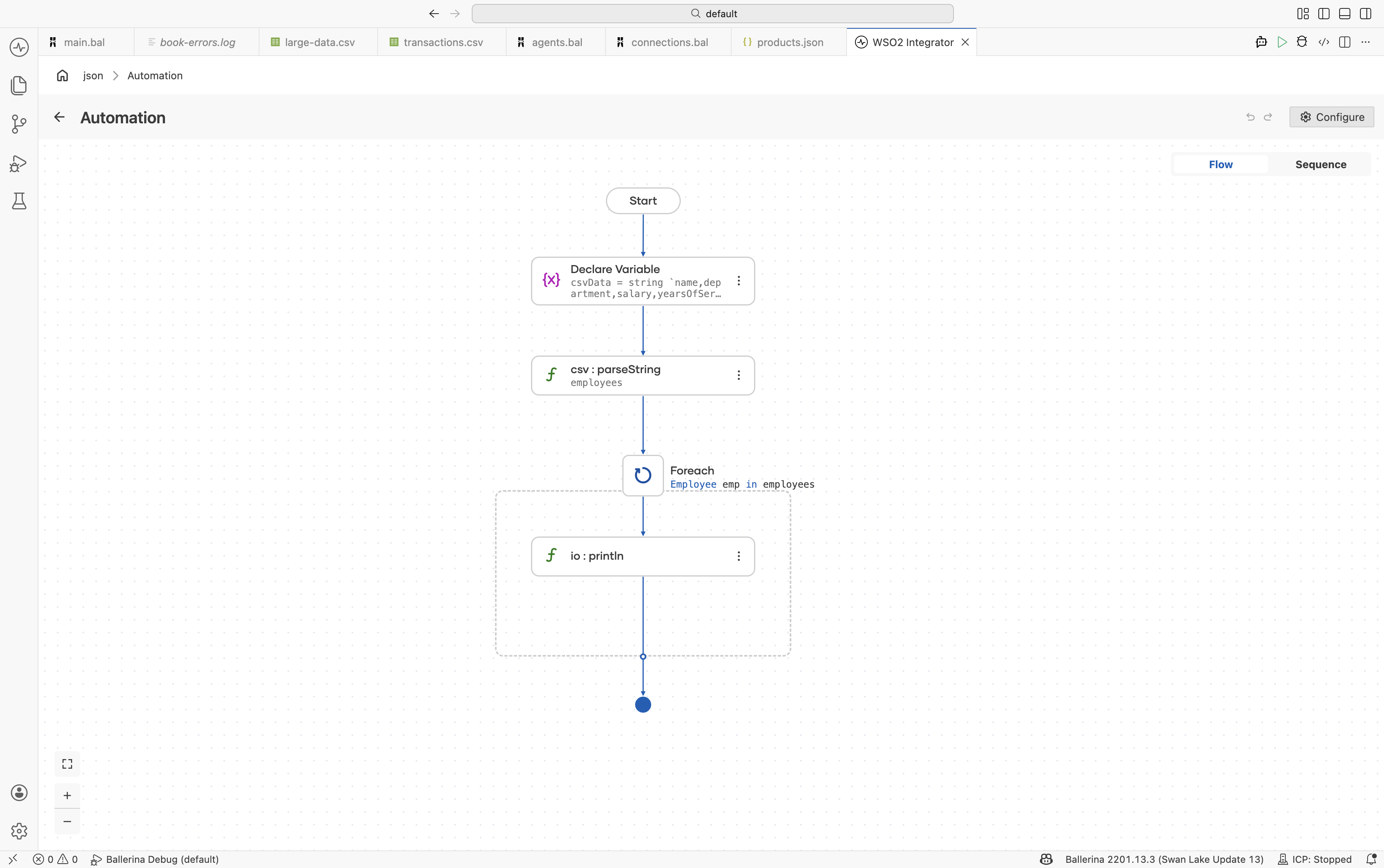
import ballerina/data.csv;
import ballerina/io;

type Employee record {|
    string name;
    string department;
    decimal salary;
    int yearsOfService;
|};

public function main() returns error? {
    string csvData = string `name,department,salary,yearsOfService
Alice,Engineering,95000.00,5
Bob,Sales,72000.00,3
Carol,Engineering,110000.00,8`;

    Employee[] employees = check csv:parseString(csvData);

    foreach Employee emp in employees {
        io:println(string `${emp.name} (${emp.department}): $${emp.salary}`);
    }
}
Reading CSV from files and streams
Use csv:parseBytes() for byte arrays or csv:parseStream() for streaming large CSV files without loading them entirely into memory.
- Visual Designer
- Ballerina Code
-
Define the record type — Navigate to Types and click +. Select Create from scratch, set Kind to Record, and name it
Transaction. Add fields:date(string),description(string),amount(decimal), andcategory(string). For details on creating types, see Types. -
Read the file as bytes — In the flow designer, click + and select Call Function. Search under io and select
fileReadBytes. Configure:- Path*:
transactions.csv - Result*:
content
- Path*:
-
Parse the bytes as CSV — Click + and select Call Function. Search for
parseBytesand select it under data.csv. Configure:- Csv Bytes*:
content - Result*:
transactions - T*:
Transaction[]
- Csv Bytes*:
-
(Optional) Stream large files — For memory-efficient processing of large files, use
io:fileReadBlocksAsStreamfollowed bycsv:parseStream.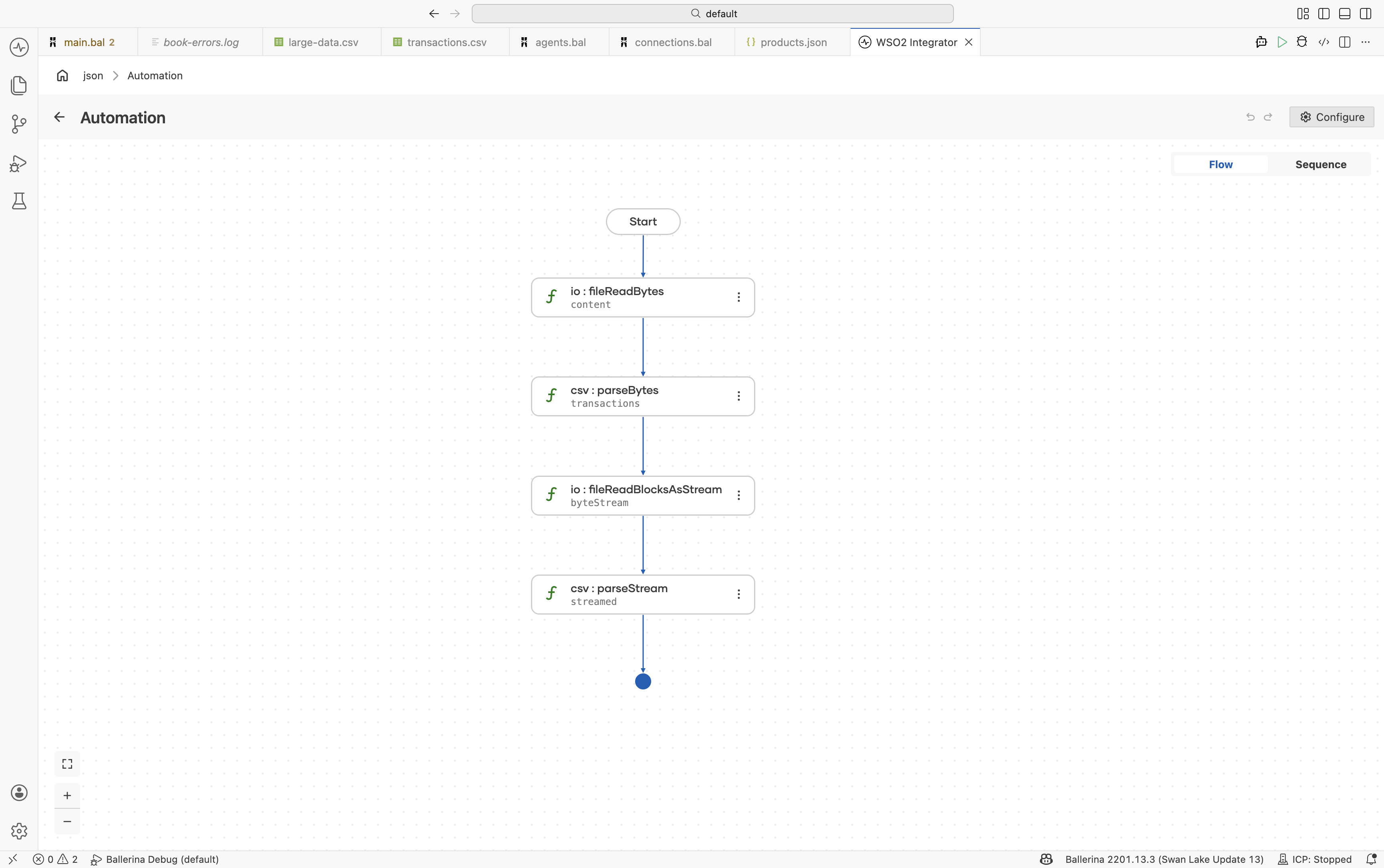
import ballerina/data.csv;
import ballerina/io;

type Transaction record {|
    string date;
    string description;
    decimal amount;
    string category;
|};

public function main() returns error? {
    byte[] content = check io:fileReadBytes("transactions.csv");
    Transaction[] transactions = check csv:parseBytes(content);

    stream<byte[], io:Error?> byteStream =
        check io:fileReadBlocksAsStream("large-data.csv");

    Transaction[] streamed = check csv:parseStream(byteStream);
}
Selective column projection
Use closed record types to extract only the columns you need. Columns not represented in the target record are automatically ignored.
- Visual Designer
- Ballerina Code
-
Define a subset record type — Navigate to Types and click +. Create a record named
EmployeeSummarywith only the required fields:name(string) andsalary(decimal). -
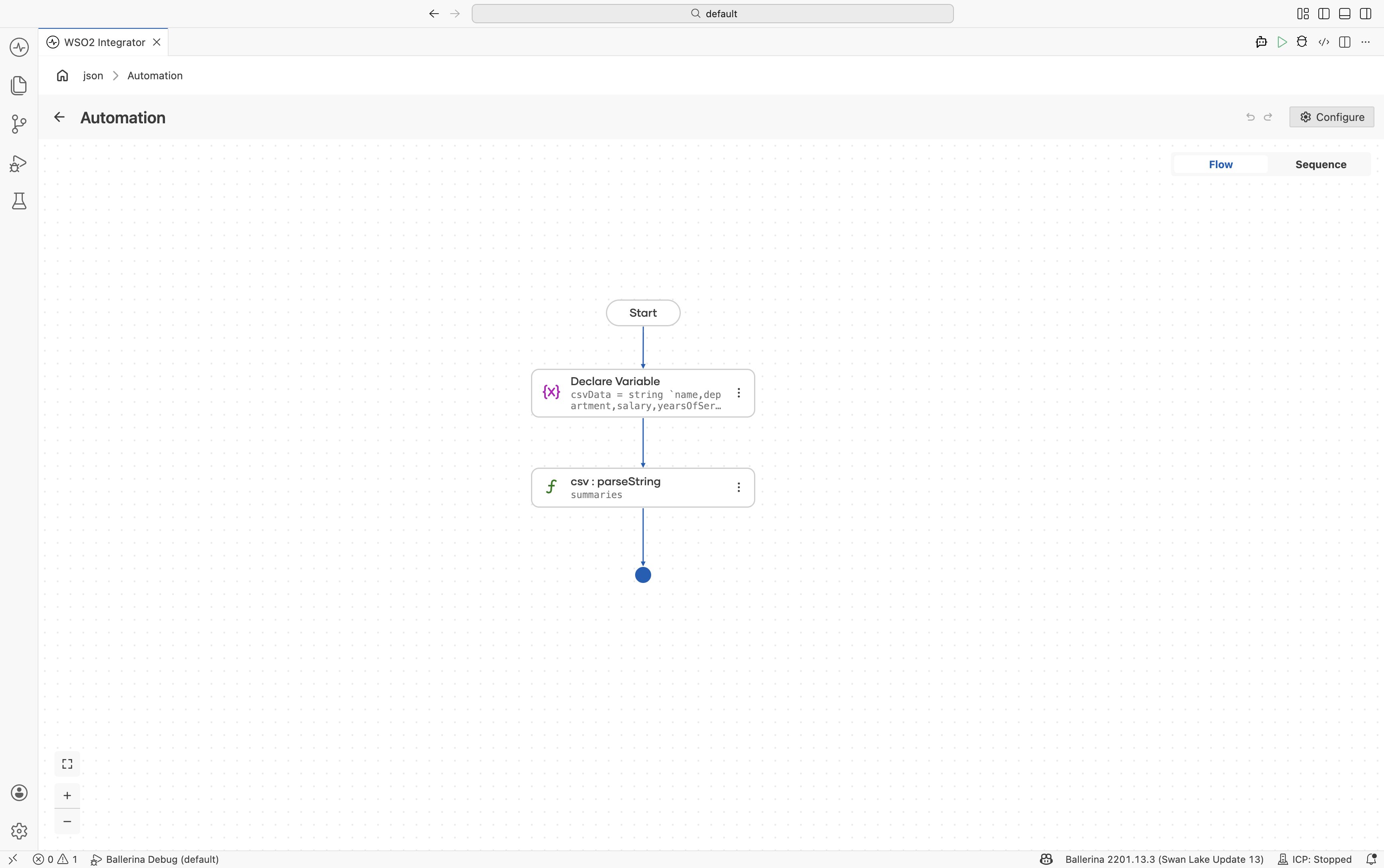
Add a Variable step — Add a Declare Variable step with the CSV string assigned to
csvData. -
Parse the CSV string — Use
csv:parseStringwith:- Csv String*:
csvData - Result*:
summaries - T*:
EmployeeSummary[]
- Csv String*:
import ballerina/data.csv;

type EmployeeSummary record {|
    string name;
    decimal salary;
|};

public function main() returns error? {
    string csvData = string `name,department,salary,yearsOfService,location
Alice,Engineering,95000.00,5,Seattle
Bob,Sales,72000.00,3,New York`;

    EmployeeSummary[] summaries = check csv:parseString(csvData);
}
Custom delimiters and options
Configure parsing behavior for TSV, pipe-delimited, or other non-standard file formats.
- Visual Designer
- Ballerina Code
-
Define the record type — Create a record named
LogEntrywith fields:timestamp(string)level(string)message(string)
-
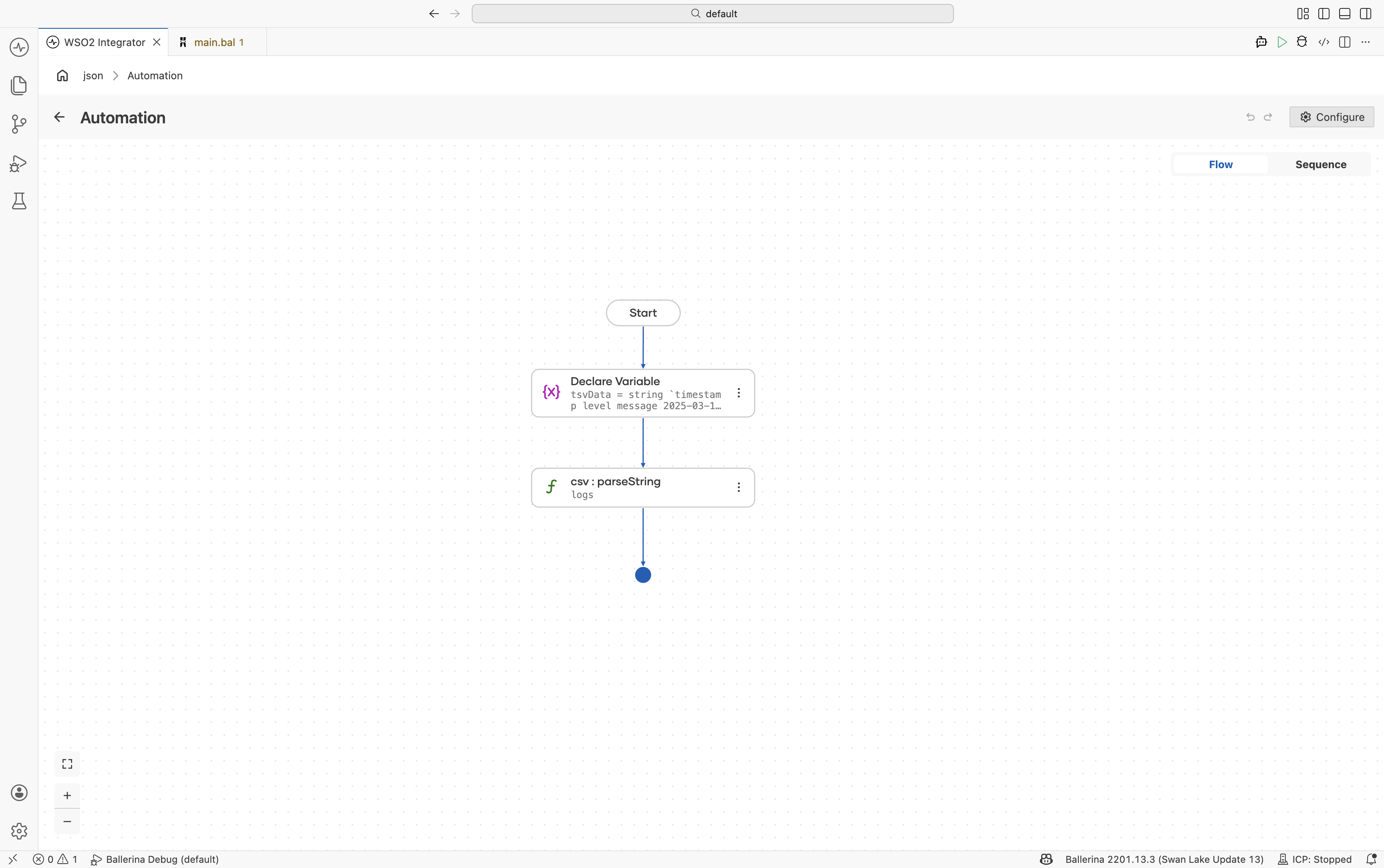
Add a Variable step — Add a Declare Variable step for
tsvDataand provide the tab-separated content. -
Parse with custom delimiter — Use
csv:parseStringand configure:- Csv String*:
tsvData - Result*:
logs - T*:
LogEntry[]
Under Advanced Configurations:
- Options:
{delimiter: "\t"}
- Csv String*:
import ballerina/data.csv;

type LogEntry record {|
    string timestamp;
    string level;
    string message;
|};

public function main() returns error? {
    string tsvData = string `timestamp	level	message
2025-03-15T10:00:00Z	INFO	Service started
2025-03-15T10:01:23Z	ERROR	Connection refused`;

    LogEntry[] logs = check csv:parseString(tsvData, {
        delimiter: "\t"
    });
}
Headerless CSV
Parse CSV files without header rows using {header: null}.
- Visual Designer
- Ballerina Code
-
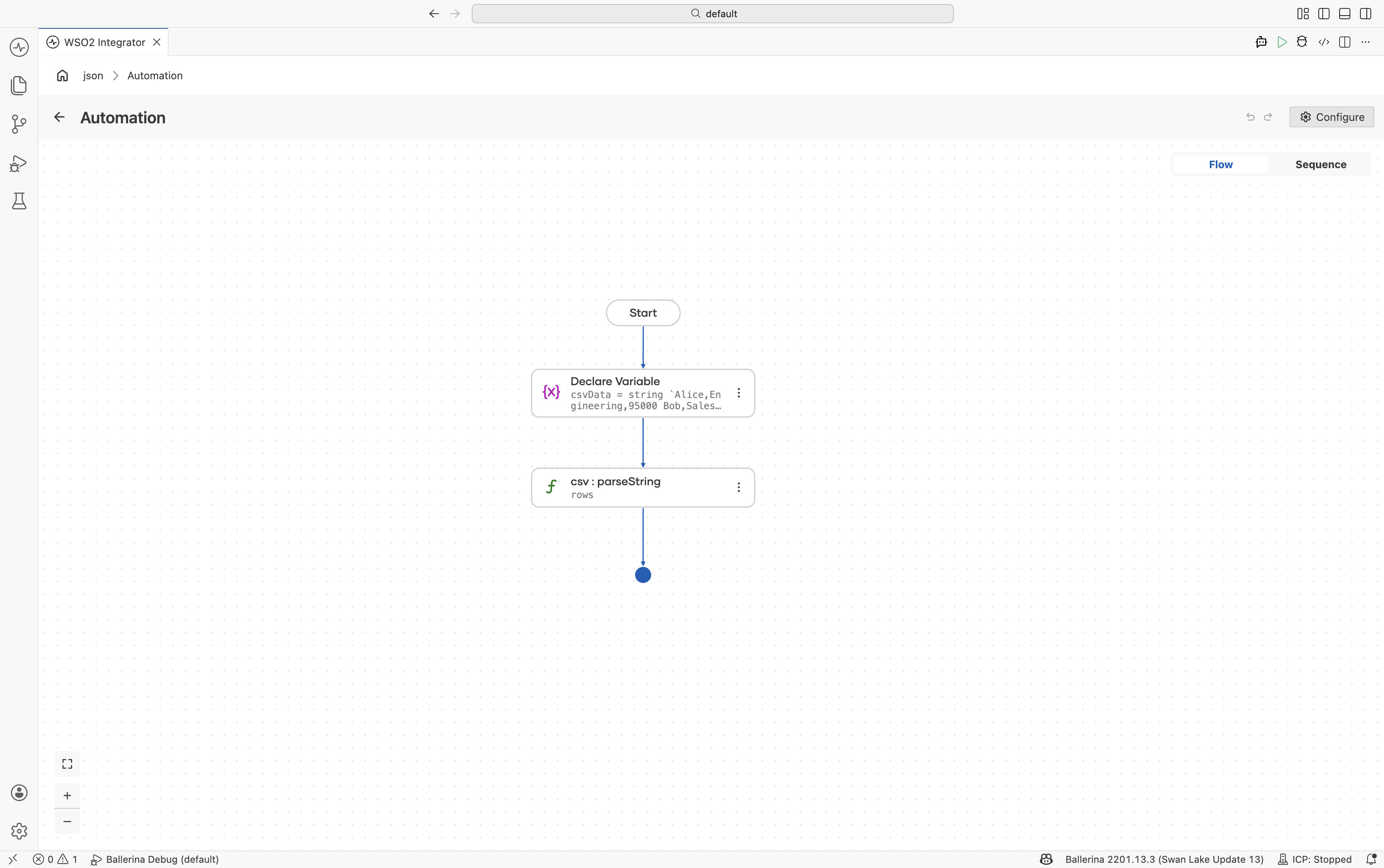
Declare the CSV data variable — Add a Declare Variable step with the headerless CSV content.
-
Parse as headerless CSV — Configure
csv:parseStringwith:- Csv String*:
csvData - Result*:
rows - T*:
string[][]
Under Advanced Configurations:
- Options:
{header: null}
- Csv String*:
import ballerina/data.csv;

public function main() returns error? {
    string csvData = string `Alice,Engineering,95000
Bob,Sales,72000`;

    string[][] rows = check csv:parseString(csvData, {
        header: null
    });
}
Writing CSV output
Write arrays of records directly to CSV files using io:fileWriteCsv().
- Visual Designer
- Ballerina Code
-
Define the record type — Create a record named
Productwith fields:sku(string)name(string)price(decimal)stock(int)
-
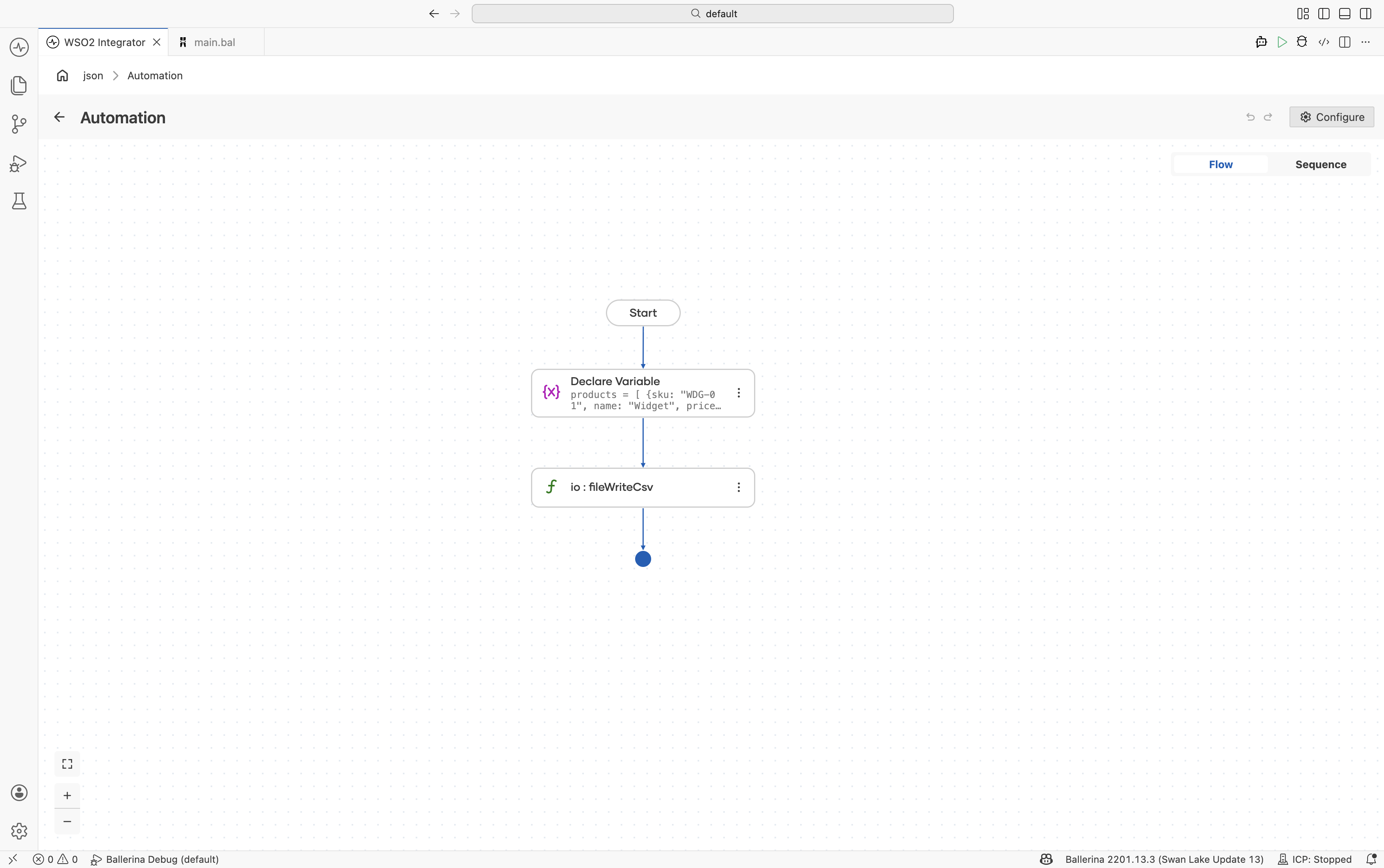
Add a Variable step — Create a variable named
productsof typeProduct[]. -
Write the CSV file — Use
io:fileWriteCsvwith:- Path*:
products.csv - Content*:
products
- Path*:
import ballerina/io;

type Product record {|
    string sku;
    string name;
    decimal price;
    int stock;
|};

public function main() returns error? {
    Product[] products = [
        {sku: "WDG-01", name: "Widget", price: 29.99, stock: 150},
        {sku: "GDG-02", name: "Gadget", price: 49.99, stock: 42},
        {sku: "GZM-03", name: "Gizmo", price: 19.99, stock: 0}
    ];

    check io:fileWriteCsv(
        path = "products.csv",
        content = products
    );
}
Transforming between record types
Transform CSV data from one record structure into another using query expressions.
- Visual Designer
- Ballerina Code
-
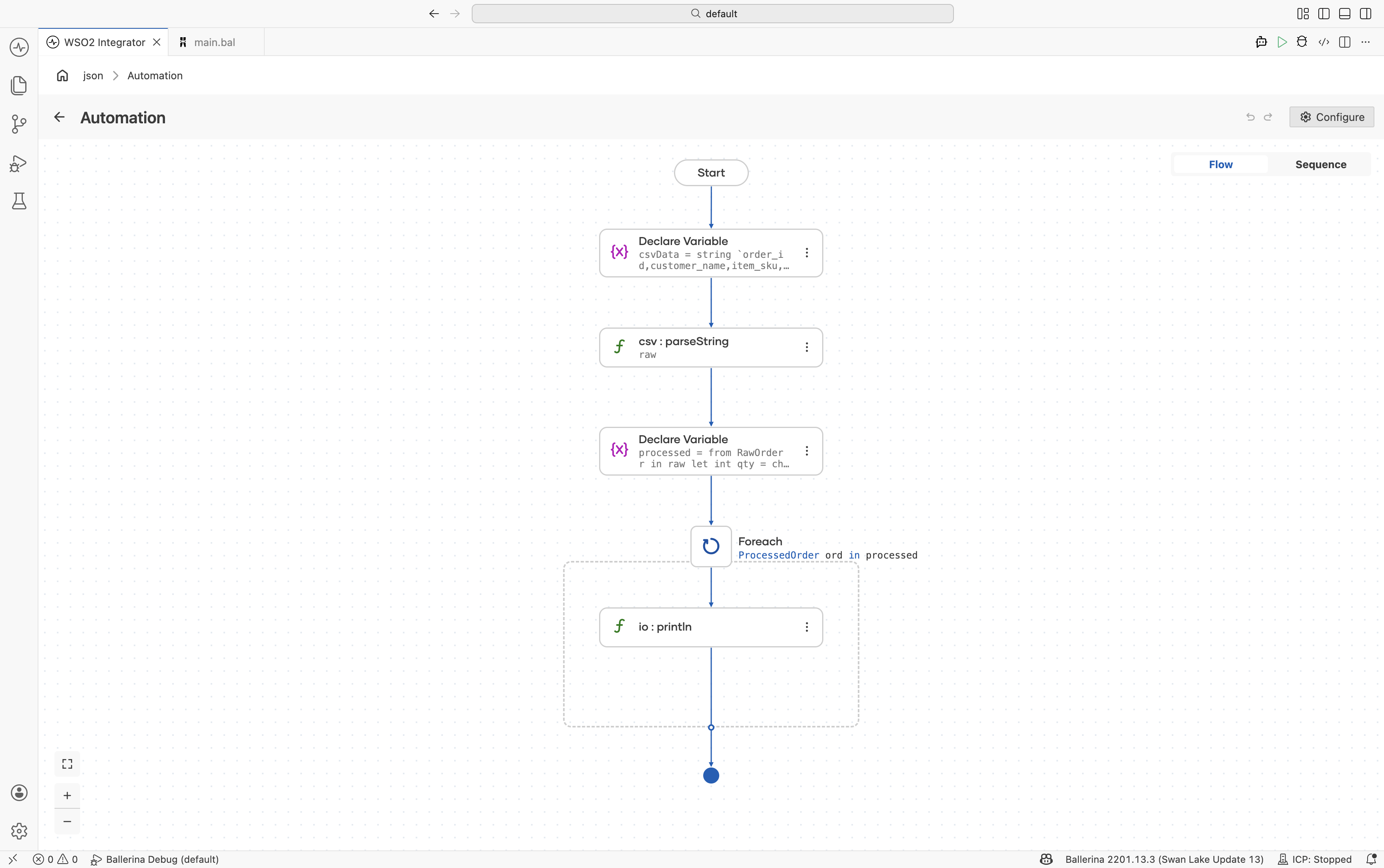
Define the source and target record types — Create:
RawOrderProcessedOrder
-
Parse the CSV string — Use
csv:parseStringto parse intoRawOrder[]. -
Transform the data — Add a Declare Variable step using a query expression to map and transform values.
-
Iterate and print results — Add a Foreach step to process transformed records.
import ballerina/data.csv;
import ballerina/io;

type RawOrder record {|
    string order_id;
    string customer_name;
    string item_sku;
    string quantity;
    string unit_price;
|};

type ProcessedOrder record {|
    string orderId;
    string customer;
    decimal total;
|};

public function main() returns error? {
    string csvData = string `order_id,customer_name,item_sku,quantity,unit_price
ORD-001,Acme Corp,WDG-01,5,29.99
ORD-002,Globex Inc,GDG-02,2,49.99`;

    RawOrder[] raw = check csv:parseString(csvData);

    ProcessedOrder[] processed = from RawOrder r in raw
        let int qty = check int:fromString(r.quantity)
        let decimal price = check decimal:fromString(r.unit_price)
        select {
            orderId: r.order_id,
            customer: r.customer_name,
            total: <decimal>qty * price
        };

    foreach ProcessedOrder ord in processed {
        io:println(string `${ord.orderId}: ${ord.customer} - $${ord.total}`);
    }
}
Fail-safe processing
Use the failSafe option to continue parsing even when invalid rows are encountered.
- Visual Designer
- Ballerina Code
-
Define the record type — Create a
Bookrecord with fields:nameauthorpricepublishDate
-
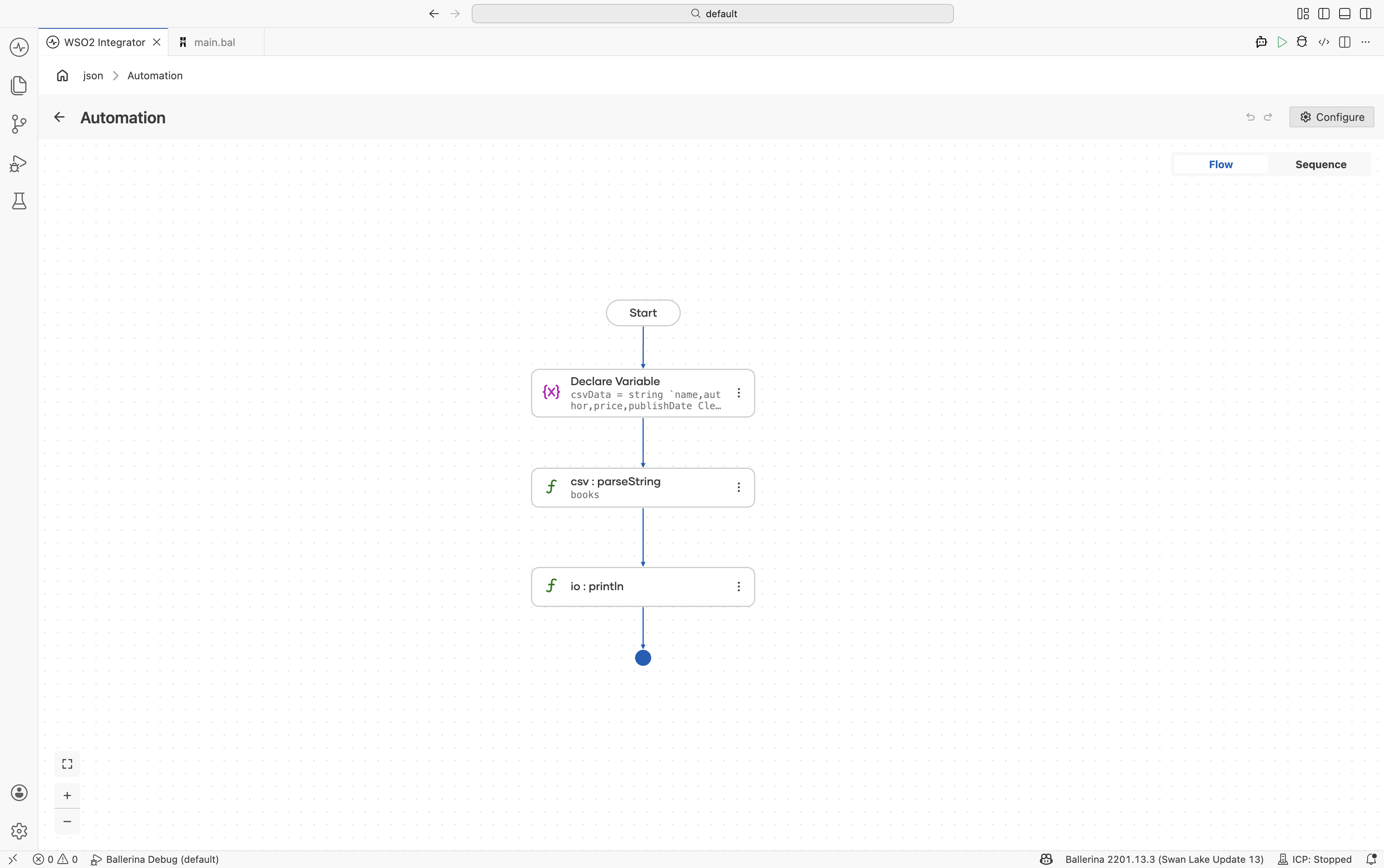
Add CSV input data — Include at least one invalid row to test fail-safe behavior.
-
Enable fail-safe options — Configure the parser with:
{
    "failSafe": {
        "enableConsoleLogs": true
    }
}
import ballerina/data.csv;
import ballerina/io;

type Book record {|
    string name;
    string author;
    decimal price;
    string publishDate;
|};

public function main() returns error? {
    string csvData = string `name,author,price,publishDate
Clean Code,Robert Martin,25.50,2008-08-01
Design Patterns,Gang of Four,INVALID,1994-10-31`;

    Book[] books = check csv:parseString(csvData, {
        failSafe: {
            enableConsoleLogs: true
        }
    });

    io:println(books);
}
The invalid row is skipped, the error is logged, and only valid rows are returned.
Edge cases
Quoted fields and special characters
The ballerina/data.csv module supports RFC 4180 compliant CSV, including quoted fields containing commas, newlines, and escaped quotes.
Encoding
Use byte arrays and proper encoding conversion when processing non-UTF-8 CSV files.
Large files
Use csv:parseStream() or csv:parseToStream() for memory-efficient streaming of large CSV files.
What's next
- EDI Processing — Process enterprise data interchange formats