Types
Type artifacts define the data structures used throughout your integration. They ensure type safety across services, event handlers, and transformations. Define named types once and reuse them across all artifacts in your project.
The visual designer exposes five type kinds: Record, Enum, Service Class, Union, and Array. Each kind maps to a Ballerina type definition in source.
Adding a type
- Visual Designer
- Ballerina Code
-
Open or create an integration/library in WSO2 Integrator.
-
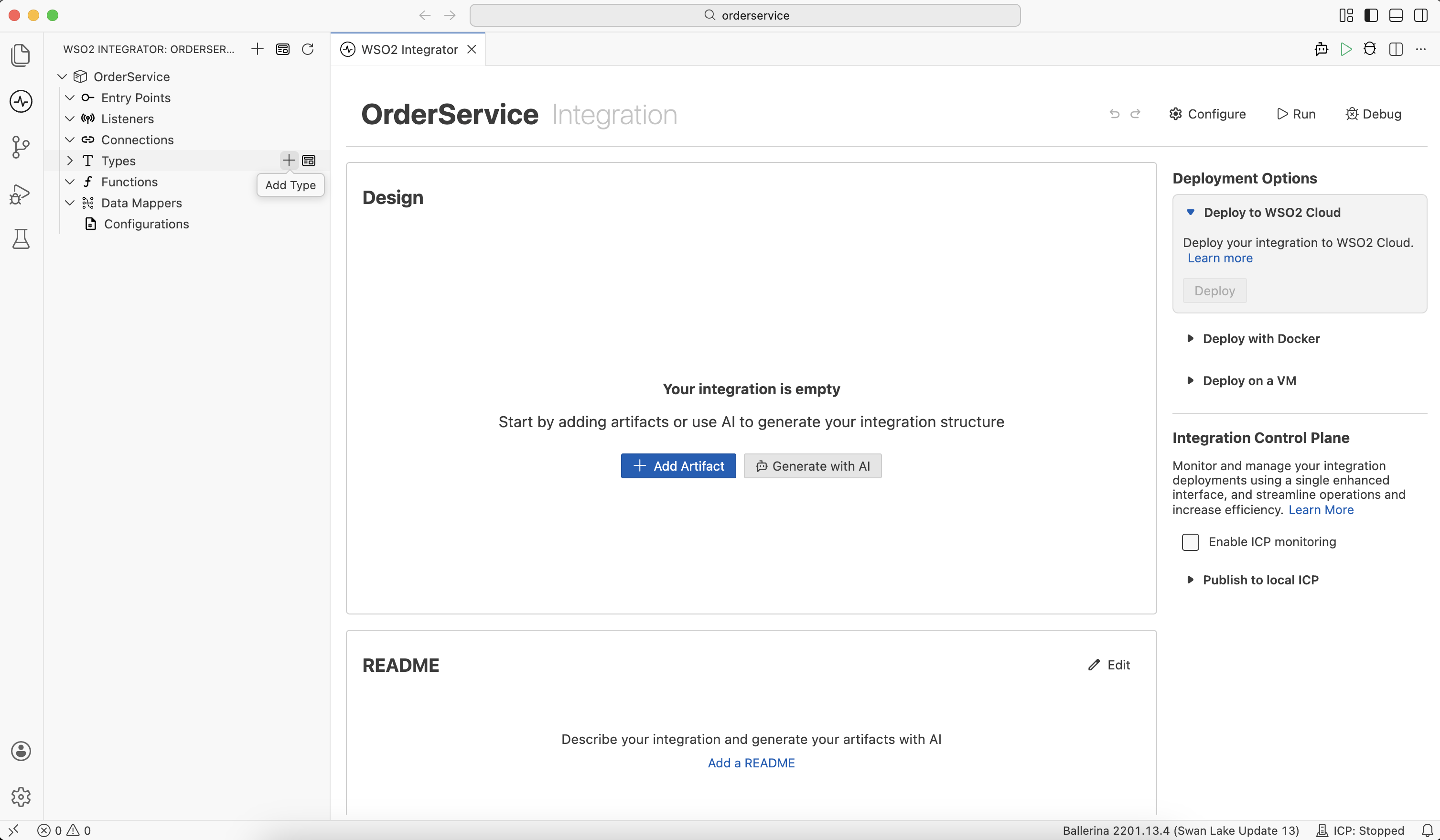
Click + next to Types in the sidebar (or click + Add Type from the Types canvas).
-
In the New Type panel, choose Create from scratch or Import to generate a type from sample JSON or XML.
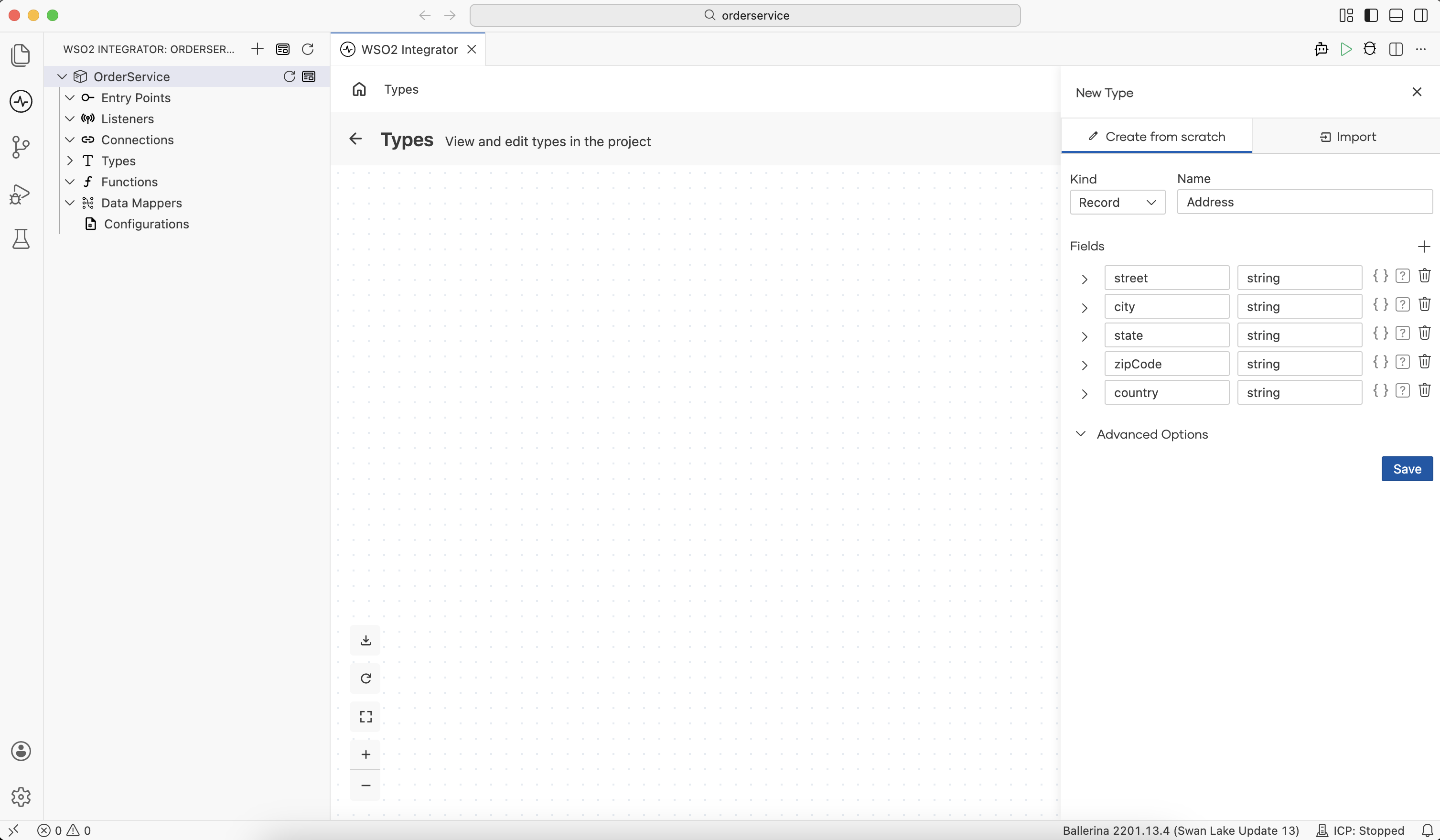
Field Description Kind The type kind: Record, Enum, Service Class, Union, or Array. Name A unique name for the type (for example, Address).Members / Fields / Resource Methods The structural members for the selected kind. The label changes to match the kind. Advanced Options Per-kind options such as Allow Additional Fields, Is Readonly Type, and Accessible by Other Integrations. -
Click Save. The type is added to your project and appears in the type diagram.
Alternatively, click + Add Artifact in the Design panel and click Type under Other Artifacts or Library Artifacts.
type Address record {|
    string street;
    string city;
    string state;
    string zipCode;
    string country;
|};
Type diagram
- Visual Designer
- Ballerina Code
Click View Type Diagram next to Types in the sidebar to open the visual type diagram. The canvas renders all types in your project as nodes, with arrows showing relationships between the types.
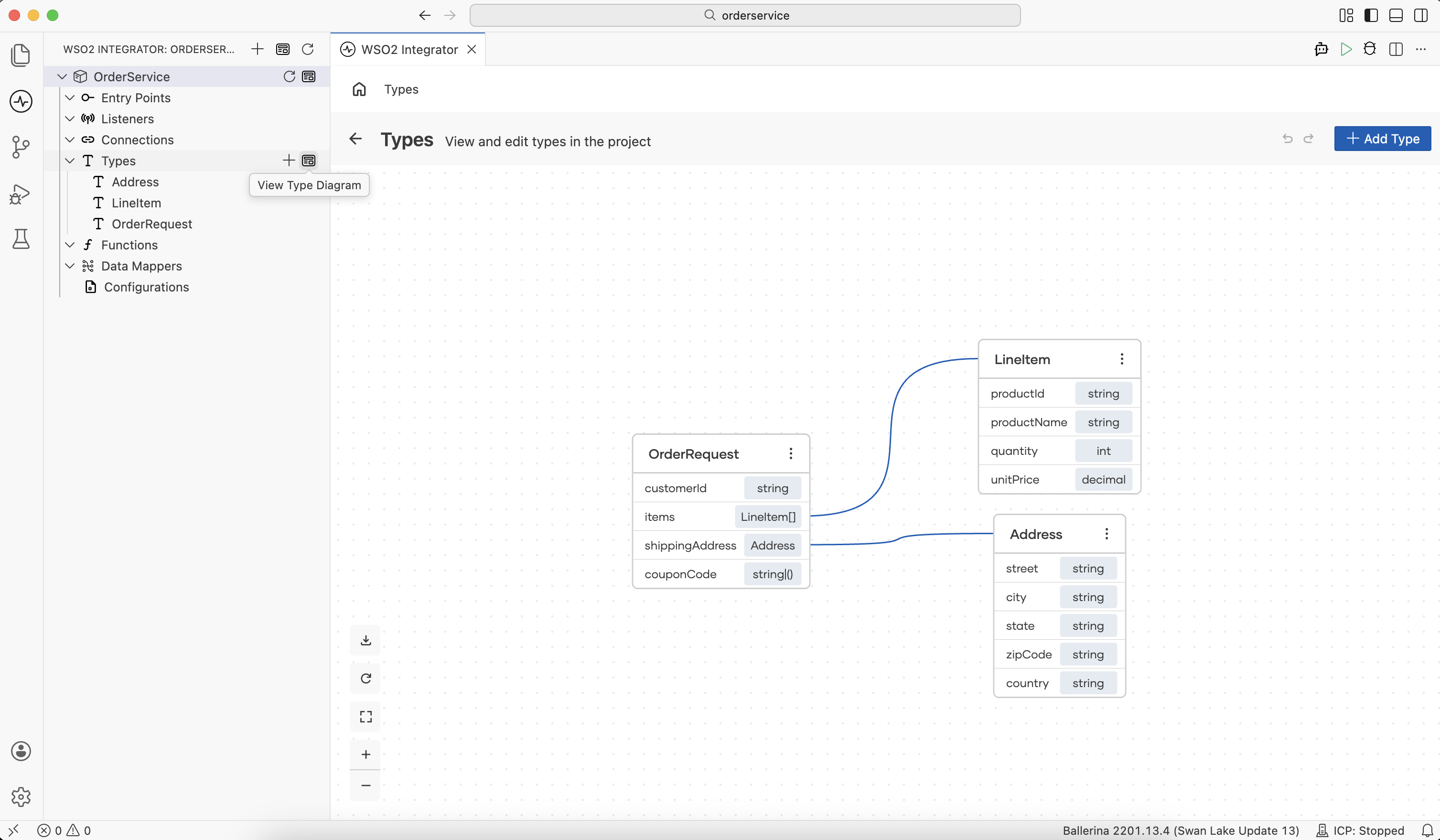
Use the toolbar buttons at the bottom left to zoom in, zoom out, fit the diagram to the screen, or export it as an image.
A record that contains a field of another user-defined record type creates an association in the diagram:
type Address record {|
    string street;
    string city;
    string state;
    string zipCode;
    string country;
|};

type LineItem record {|
    string productId;
    string productName;
    int quantity;
    decimal unitPrice;
|};

type OrderRequest record {|
    string customerId;
    LineItem[] items;      // references LineItem
    Address shippingAddress; // references Address
    string? couponCode;
|};
Type kinds
Record
A record defines a mapping type with named fields and specific types for each field.
- Visual Designer
- Ballerina Code
Select Record from the Kind dropdown, then add one row per field using +.
For each field:
| Control | Description |
|---|---|
| Name | The field name. |
| Type | The field type (built-in or user-defined). |
Inline record ({}) | Define a record-typed field's type as a nested record inline, instead of referencing an existing type. |
Optional (?) | Marks the field as optional. The field may be absent at runtime. |
| Delete (Trash) | Remove the field. |
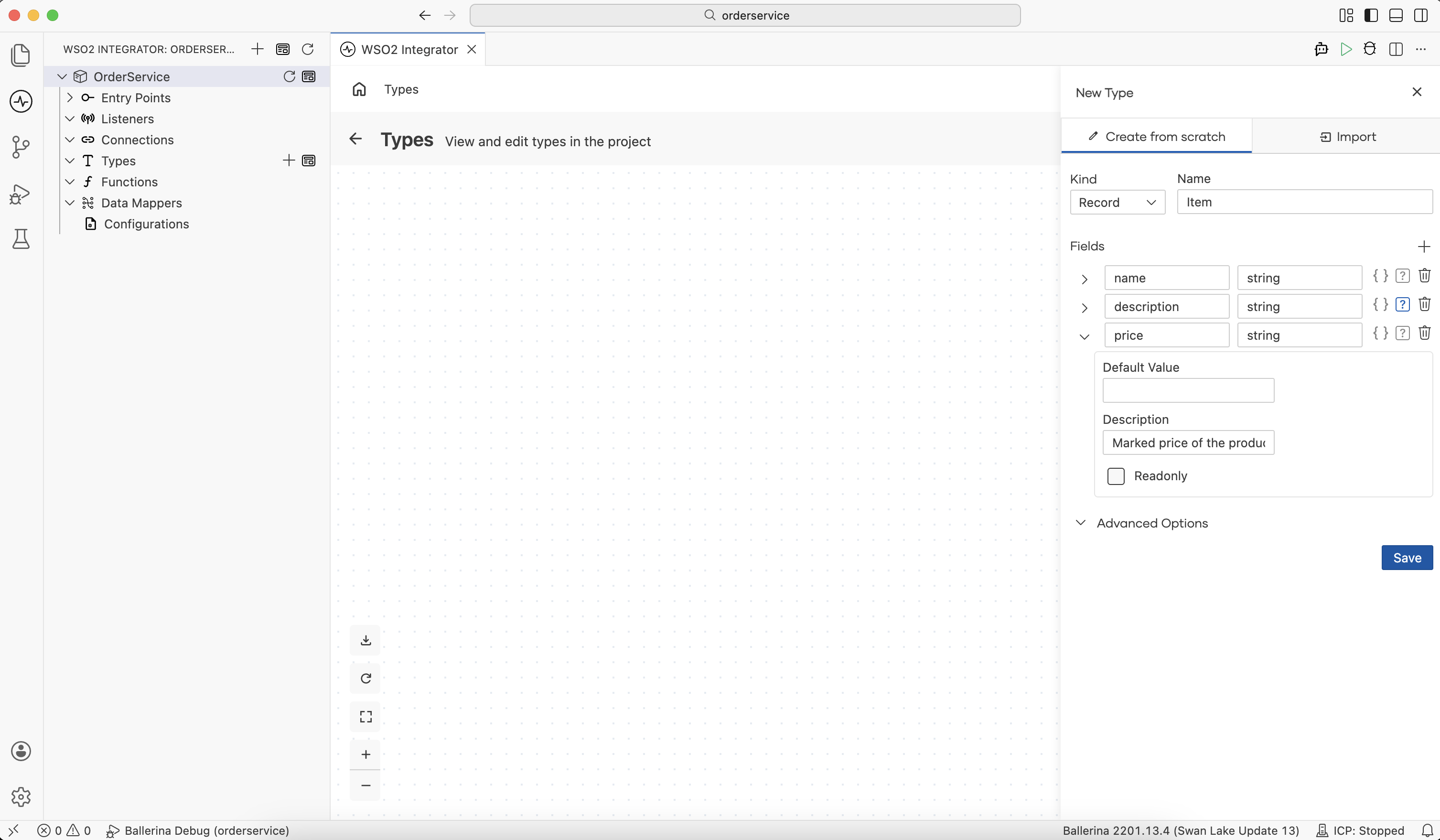
Expand a field row to set:
| Option | Description |
|---|---|
| Default Value | The default value to use for the field when a value is not specified explicitly. |
| Description | Documentation for the field. Added as Ballerina field documentation. |
| Readonly | Marks the field as immutable. The value set to the field must be immutable and the field cannot be assigned to once a value of this type is created. |
Advanced Options:
| Option | Description |
|---|---|
| Allow Additional Fields | Generates an open record that accepts fields that are not explicitly defined. Leave unchecked for a closed record that accepts only the defined fields. |
| Is Readonly Type | Marks the entire type as immutable. Fields cannot be assigned to once a record value is created, and the values set for all the fields must also be immutable. |
| Accessible by Other Integrations | Adds the public qualifier so the type can be imported from other packages. |
type Item record {|
    # Name of the item
    readonly string name;
    # Description of the item
    string description?;
    # Marked price of the item
    decimal price;
|};
Enum
An enum defines a fixed set of named string values.
- Visual Designer
- Ballerina Code
Select Enum from the Kind dropdown, then add each member using +.
For each member:
| Control | Description |
|---|---|
| Enum member name | The member identifier (for example, PENDING). |
| Constant Expression | The string value bound to the member. Leave empty to use the member name as the value. |
enum OrderStatus {
    PENDING,
    CONFIRMED = "confirmed",
    SHIPPED = "shipped",
    DELIVERED = "delivered",
    CANCELLED
}
Service class
A service class defines an object with resource and remote methods. It is commonly used to model GraphQL object types, where each resource method becomes a field resolver.
- Visual Designer
- Ballerina Code
Create a service class
Select Service Class from the Kind dropdown, then add one row per resource method using +.
For each resource method:
| Control | Description |
|---|---|
| Name | The resource path/name (for example, orders). |
| Type | The return type of the resource method. |
| + Add Parameter | Add an input parameter. Each parameter takes a Parameter Name, Parameter Type, and an optional Default Value. |
| Delete (Trash) | Remove the resource method. |
Edit the service class
The editing experience for a service class differs from other kinds. Click Edit on the type to open the Service Class Designer panel.
Click on Edit in the Service Class Designer panel to edit the name or the description of the class.
| Control | Description |
|---|---|
| Class Name | Rename the service class. |
| Description | Free-text documentation rendered as Ballerina documentation. |
Class Variables: Click + Variable to open the Add Variable panel.
| Control | Description |
|---|---|
| Variable Name | The variable identifier. |
| Variable Type | The variable type. |
| Default Value | The initial value assigned at construction. |
Methods: Click + Method to open the Add Method panel. Choose the method kind from the dropdown (resource or remote), then fill in:
| Control | Description |
|---|---|
| Resource Path/Function Name | The resource path (for resources) or method name (for remote methods). |
| Description | Documentation for the method. |
| Parameters | Use + Add Parameter to add inputs (name, type, optional default value). |
| Return Type | The method return type. |
Use the pencil and trash icons next to each existing method to edit or remove it.
Click on Constructor: init to modify the initializer method.
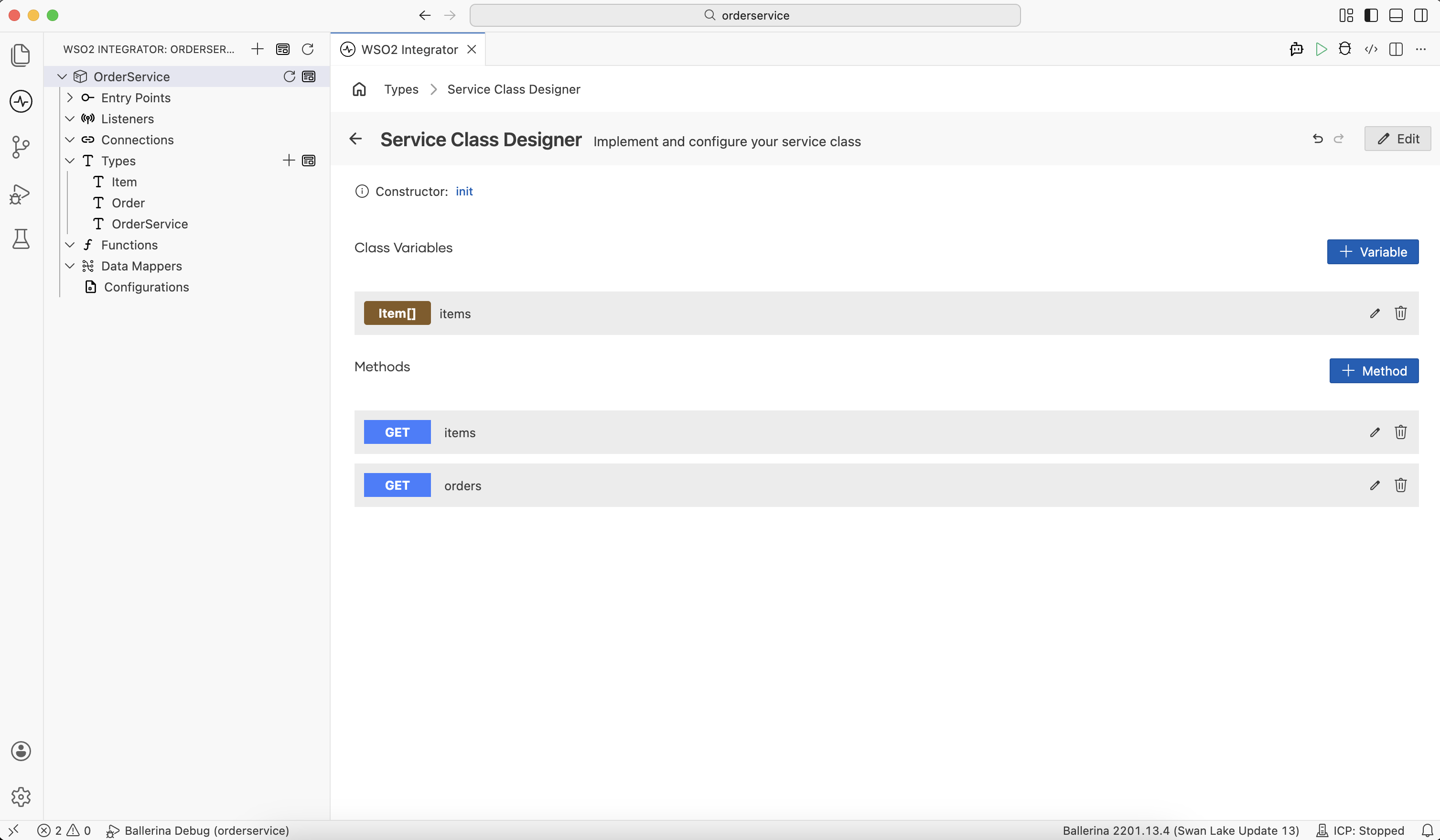
types.bal
type Item record {|
    # Name of the item
    readonly string name;
    # Description of the product
    string description?;
    # Marked price of the product
    string price;
    # Labels
    string[] labels;
|};

type Order record {|
    readonly string customerId;
    Item[] items;
|};

service class OrderService {

    private Item[] items = [];

    function init() {
    }

    resource function get items(string filterLabel) returns Item[] {
        return from Item item in self.items
            where item.labels.indexOf(filterLabel) is int
            select item;
    }

    resource function get orders(string customerId) returns Order[] {
        return [];
    }
}
functions.bal
function loadOrderData() returns Order[] {
    return [
        {
            customerId: "C001",
            items: [
                {name: "Laptop", description: "15-inch gaming laptop", price: "1299.99", labels: ["electronics", "computers"]},
                {name: "Mouse", description: "Wireless ergonomic mouse", price: "49.99", labels: ["electronics", "accessories"]}
            ]
        },
        {
            customerId: "C002",
            items: [
                {name: "Desk Chair", description: "Adjustable office chair", price: "349.99", labels: ["furniture", "office"]},
                {name: "Monitor", description: "27-inch 4K display", price: "599.99", labels: ["electronics", "computers"]},
                {name: "Keyboard", description: "Mechanical keyboard", price: "129.99", labels: ["electronics", "accessories"]}
            ]
        },
        {
            customerId: "C003",
            items: [
                {name: "Headphones", description: "Noise-cancelling over-ear headphones", price: "249.99", labels: ["electronics", "audio"]},
                {name: "Webcam", description: "1080p HD webcam", price: "89.99", labels: ["electronics", "accessories"]}
            ]
        }
    ];
}
Union
A union type lets a value take one (or more) of several member types. It is used to model alternatives, including error returns (T|error) or optional values.
- Visual Designer
- Ballerina Code
Select Union from the Kind dropdown, then add each member type using +. Members can be built-in types or other user-defined, named types.
Advanced Options:
| Option | Description |
|---|---|
| Is Readonly Type | Makes the type immutable. A value belongs to the union type only if it belongs to at least one member type and is immutable. |
| Accessible by Other Integrations | Adds the public qualifier so the type can be imported from other packages. |
public type PaymentMethod CreditCard|BankTransfer|DigitalWallet;

type CreditCard record {|
    string cardNumber;
    string expiryDate;
    string cvv;
|};

type BankTransfer record {|
    string bankName;
    string accountNumber;
    string routingNumber;
|};

type DigitalWallet record {|
    string provider;
    string walletId;
|};
Array
An array defines an ordered list of values of a single member type.
- Visual Designer
- Ballerina Code
Select Array from the Kind dropdown.
| Control | Description |
|---|---|
| Type of the Array | The member type (required). |
| Size of the Array | A fixed length. Leave empty for an unbounded array. |
Advanced Options:
| Option | Description |
|---|---|
| Is Readonly Type | Makes the array immutable. Any members specified when creating the array must also be immutable. |
| Accessible by Other Integrations | Adds the public qualifier so the type can be imported from other packages. |
// Unbounded array
public type LineItems string[];

// Fixed-length array
type Coordinates float[3];
Generate type from JSON or XML
Types can be generated from sample JSON or XML values instead of manually defining each field.
- Visual Designer
- Sample JSON
- Ballerina Code
-
In the New Type creation view, switch to the Import tab.
-
Specify the source data format and the name of the type to generate.
Field Description Format The source data format: JSON or XML. Name A unique name for the type (for example, Employees).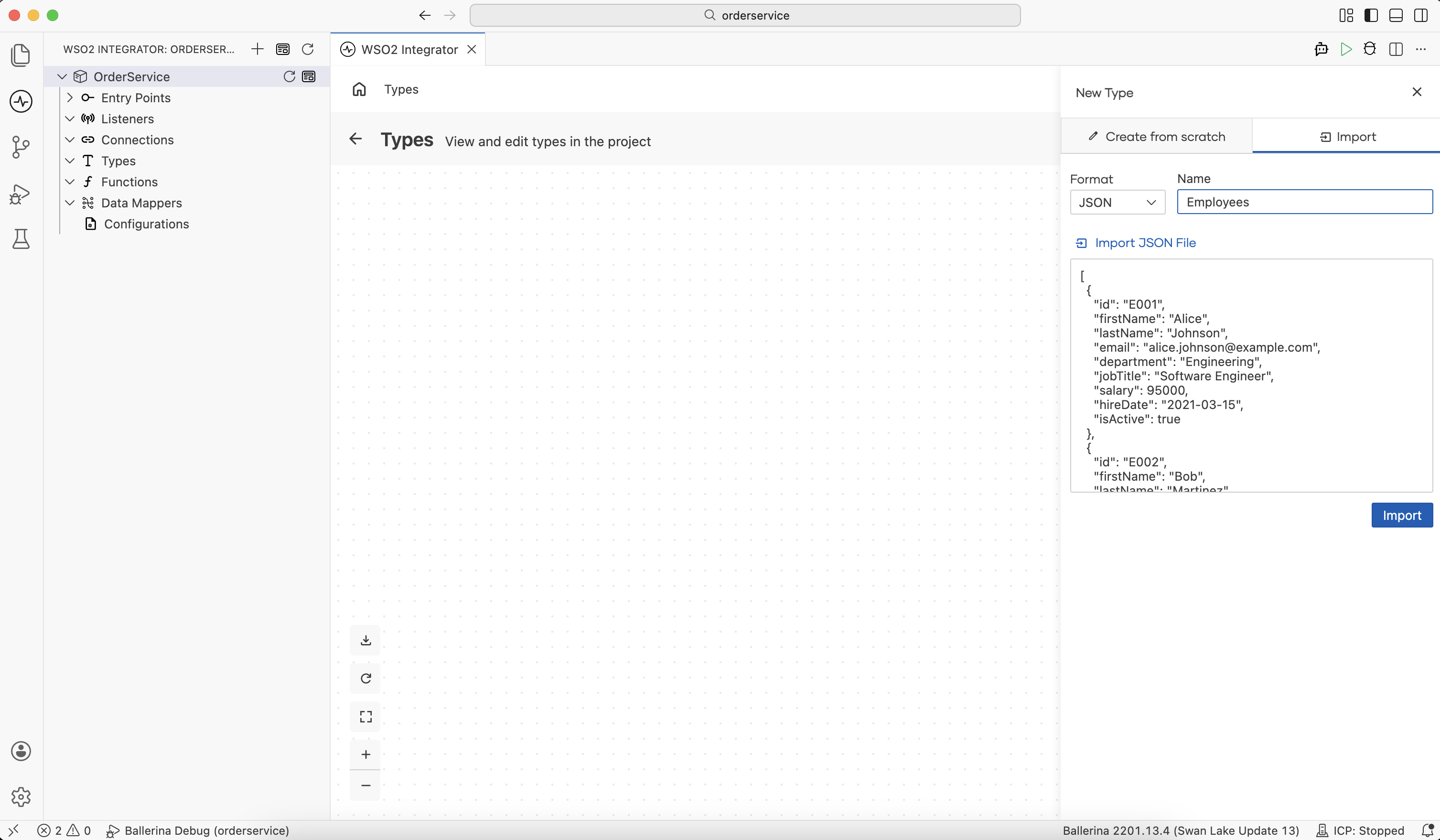
-
Click Save. The types are added to your project and appear in the type diagram.
[
  {
    "id": "E001",
    "firstName": "Alice",
    "lastName": "Johnson",
    "email": "[email protected]",
    "department": "Engineering",
    "jobTitle": "Software Engineer",
    "salary": 95000,
    "hireDate": "2021-03-15",
    "isActive": true
  },
  {
    "id": "E002",
    "firstName": "Bob",
    "lastName": "Martinez",
    "email": "[email protected]",
    "department": "Marketing",
    "jobTitle": "Marketing Manager",
    "salary": 85000,
    "hireDate": "2019-07-01",
    "isActive": true
  }
]
public type EmployeesItem record {|
    string id;
    string firstName;
    string lastName;
    string email;
    string department;
    string jobTitle;
    int salary;
    string hireDate;
    boolean isActive;
|};

public type Employees EmployeesItem[];
Map types
The visual designer does not expose Map as a Kind. To model dynamic key/value data, define a record instead:
- For a known set of keys, define the fields in a closed record (
record {| ... |}). - For arbitrary string keys and plain data values, use an open record with Allow Additional Fields enabled.
If you are editing source directly, the equivalent Ballerina form is map<T> or record {| T...; |}. For example, map<string> or record {| string...; |} is the equivalent for a string-valued map.
Best practices
| Practice | Description |
|---|---|
| Closed records | Leave Allow Additional Fields unchecked unless you actually need extra keys. |
| Reuse across artifacts | Define types once and reference them from services, event handlers, and functions. |
| Prefer Readonly over conventions | Mark fields or whole types Readonly for immutable data, instead of relying on convention. |
| Use records instead of maps | Where finer control is required over fields, use records instead of maps. |
What's next
- Connections — Define reusable connections to external systems.
- Configurations — Externalize values such as endpoints and credentials.
- Functions — Encapsulate reusable logic in Ballerina functions.
- Data mapper — Map between record types visually.