YAML & TOML Processing
Work with YAML and TOML configuration formats commonly used in cloud-native deployments, CI/CD pipelines, and application configuration management. Ballerina provides native support for reading, writing, and transforming both formats through dedicated library modules.
YAML processing
YAML is widely used for Kubernetes manifests, CI/CD configurations, and application settings. Ballerina's ballerina/data.yaml module handles parsing and serialization. File I/O is composed with ballerina/io (fileReadBytes / fileWriteString) because data.yaml operates on strings, byte arrays, and streams rather than on file paths directly.
Parsing YAML
Read YAML content and convert it into Ballerina values with type safety.
- Visual Designer
- Ballerina Code
-
Define the record types: Navigate to Types in the sidebar and click + to add a new type. Select Create from scratch, set Kind to Record, and name it
DatabaseConfig. Add fields using the + button:Field Type urlstringusernamestringpoolSizeintThen add a second record type named
ServerConfigwith fields:Field Type hoststringportintallowedOriginsstring[]databaseDatabaseConfigFor details on creating types, see Types.
-
Add a Function Call step to read the file as bytes: In the flow designer, click + and select Function Call. Search for
io:fileReadBytesin the library picker and select it (this adds theballerina/ioimport). Pass"config.yaml"as the path argument and assign the return value to a variable namedfileContent. The variable type is fixed atbyte[] & readonlyby the function's return signature. -
Add a Function Call step to parse into the typed record: Click + and select Function Call. Search for
yaml:parseBytesin the library picker and select it (this adds theballerina/data.yamlimport). PassfileContentas the argument and assign the return value to a variable namedconfigof typeServerConfig. The target type is inferred from the variable, so no separate type-conversion step is needed. -
Add a Function Call step to print the server info: Click + and select Function Call. Search for
io:println. The function accepts a list of values — add two arguments. Set the first argument to"Server: " + config.host + ":"(string concatenation works between strings) and the second argument toconfig.port(kept separate because+cannot mix a string with anint). -
Add a Function Call step to print the database pool size: Click + and select Function Call. Search for
io:printlnand add two arguments:"DB Pool Size: "andconfig.database.poolSize.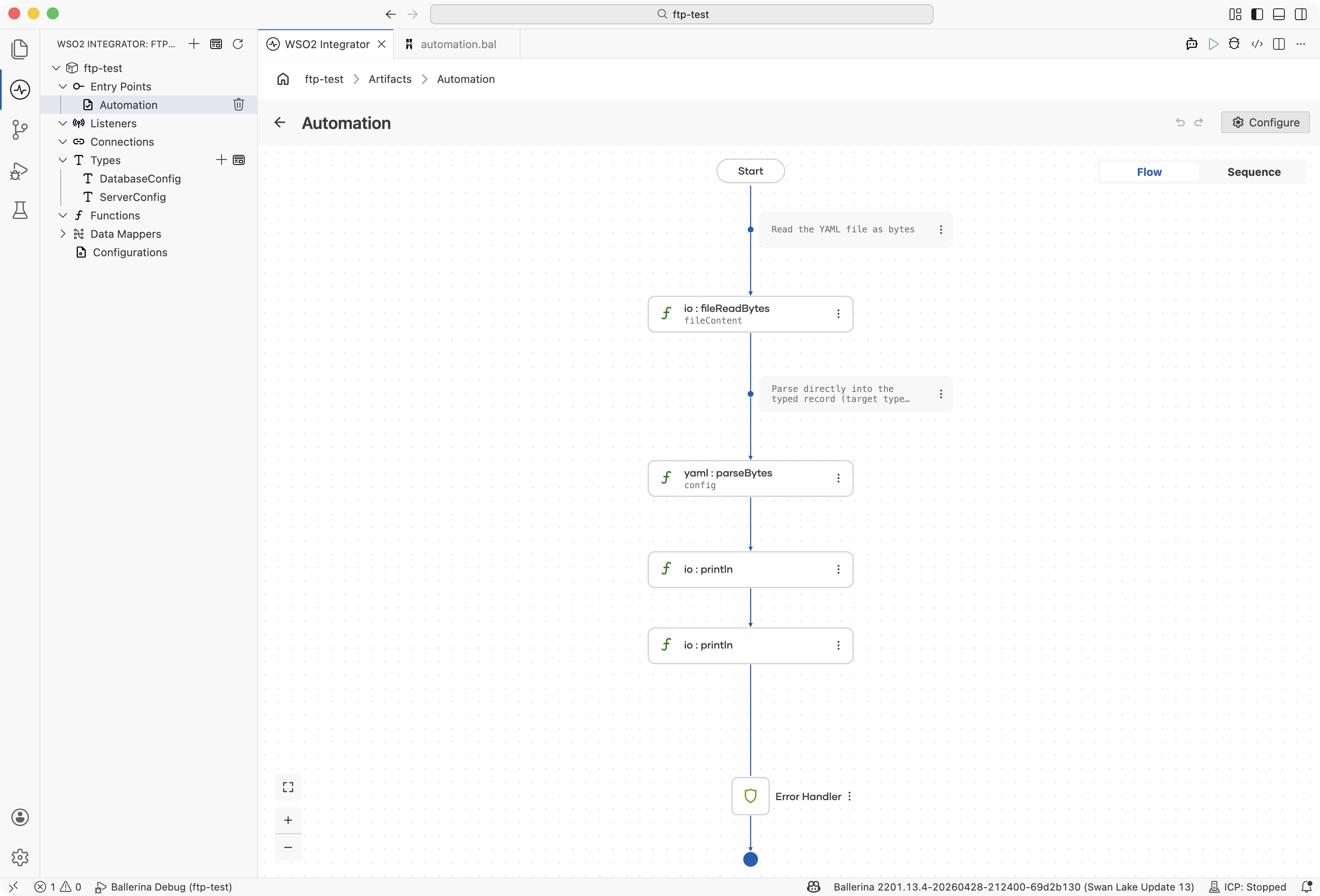
import ballerina/io;
import ballerina/data.yaml;

type DatabaseConfig record {|
    string url;
    string username;
    int poolSize;
|};

type ServerConfig record {|
    string host;
    int port;
    string[] allowedOrigins;
    DatabaseConfig database;
|};

public function main() returns error? {
    // Read the YAML file as bytes
    byte[] & readonly fileContent = check io:fileReadBytes("config.yaml");

    // Parse directly into the typed record (target type is inferred)
    ServerConfig config = check yaml:parseBytes(fileContent);

    io:println("Server: " + config.host + ":", config.port);
    io:println("DB Pool Size: ", config.database.poolSize);
}
Parsing YAML strings
Parse YAML content directly from a string value.
- Visual Designer
- Ballerina Code
-
Add a Variable step for the YAML content: In the flow designer, click + and select Declare Variable. Set the name to
yamlContent, the type tostring, and enter the following YAML as a multi-line string template in the expression field:name: order-service
version: 1.2.0
replicas: 3
env:
- name: DB_HOST
value: postgres.svc.local
- name: LOG_LEVEL
value: INFO -
Add a Function Call step for parsing: Click + and select Function Call. Search for
yaml:parseStringin the library picker and select it (this adds theballerina/data.yamlimport). PassyamlContentas the argument and assign the return value to a variable namedyamlValueof typejson. -
Add a Variable step for nested access: Click + and select Declare Variable. Set the name to
envVars, the type tojson, and the expression tocheck yamlValue.env. -
Add a Function Call step to print the env vars: Click + and select Function Call. Search for
io:printlnand add two arguments:"Env vars: "andenvVars(kept separate because+cannot mix a string with ajsonvalue).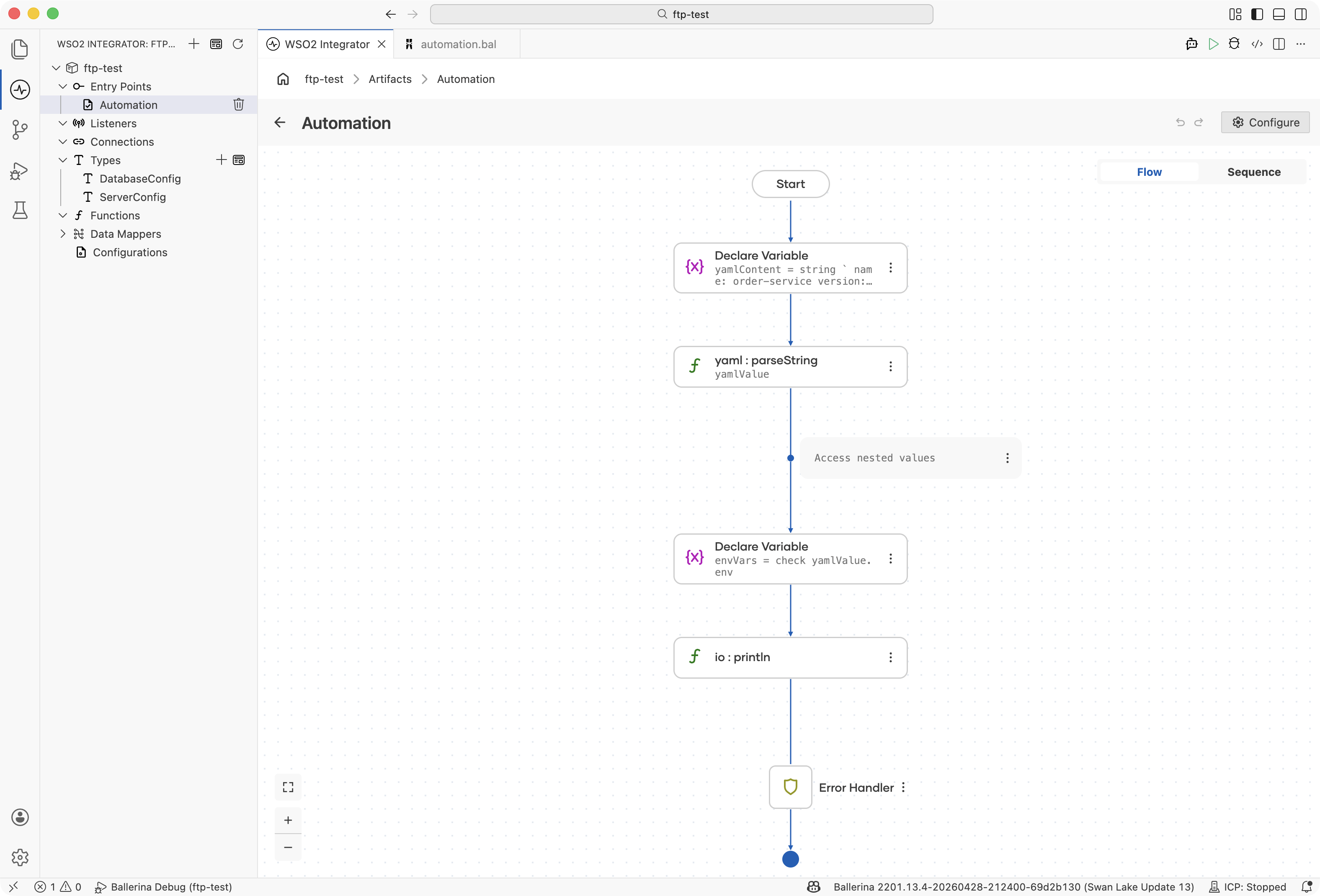
import ballerina/io;
import ballerina/data.yaml;
public function main() returns error? {
string yamlContent = string `
name: order-service
version: 1.2.0
replicas: 3
env:
  - name: DB_HOST
    value: postgres.svc.local
  - name: LOG_LEVEL
    value: INFO
`;
json yamlValue = check yaml:parseString(yamlContent);
// Access nested values
json envVars = check yamlValue.env;
io:println("Env vars: ", envVars);
}
Writing YAML
Serialize Ballerina values back to YAML format.
- Visual Designer
- Ballerina Code
-
Add a Variable step for the deployment object: In the flow designer, click + and select Declare Variable. Set the name to
deployment, the type tomap<json>, and enter the following as the expression:{
"apiVersion": "apps/v1",
"kind": "Deployment",
"metadata": {
"name": "integration-service",
"labels": {
"app": "integrator"
}
},
"spec": {
"replicas": 3
}
} -
Add a Function Call step to serialize to a YAML string: Click + and select Function Call. Search for
yaml:toYamlStringin the library picker and select it (this adds theballerina/data.yamlimport). Passdeploymentas the argument and assign the return value to a variable namedyamlStringof typestring. -
Add a Function Call step to write to a file: Click + and select Function Call. Search for
io:fileWriteStringin the library picker and select it (this adds theballerina/ioimport). Pass"deployment.yaml"as the path argument andyamlStringas the content argument. -
Add a Function Call step to print the YAML: Click + and select Function Call. Search for
io:printlnand passyamlStringas the argument.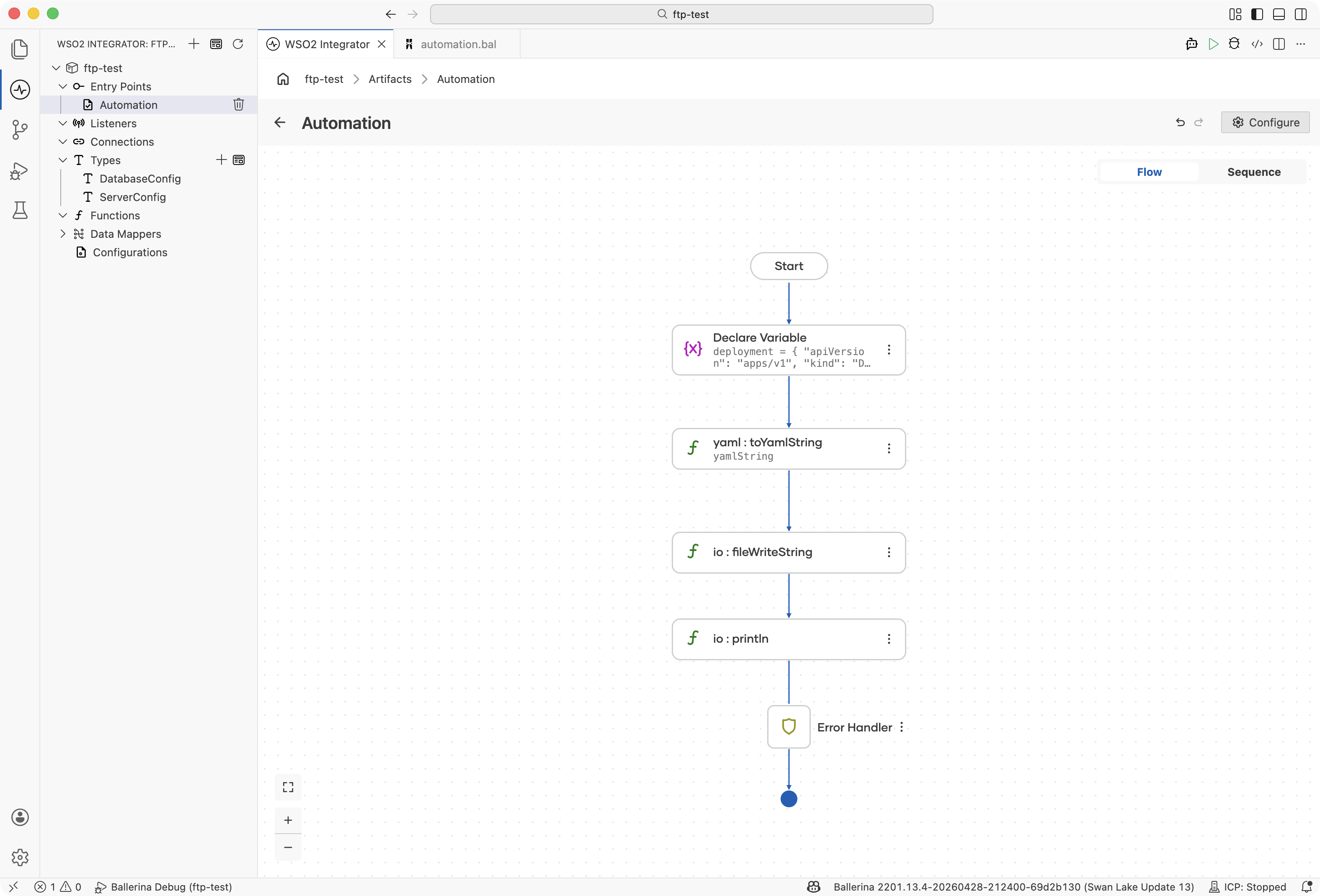
import ballerina/io;
import ballerina/data.yaml;

public function main() returns error? {
    map<json> deployment = {
        "apiVersion": "apps/v1",
        "kind": "Deployment",
        "metadata": {
            "name": "integration-service",
            "labels": {
                "app": "integrator"
            }
        },
        "spec": {
            "replicas": 3
        }
    };

    // Serialize the map to a YAML string
    string yamlString = check yaml:toYamlString(deployment);

    // Write the YAML string to a file
    check io:fileWriteString("deployment.yaml", yamlString);

    io:println(yamlString);
}
Multi-Document YAML
Handle YAML files with multiple documents separated by ---.
- Visual Designer
- Ballerina Code
-
Add a Function Call step to read the file as bytes: In the flow designer, click + and select Function Call. Search for
io:fileReadBytesin the library picker and select it (this adds theballerina/ioimport). Pass an appropriate YAML file path (such as"k8s-manifests.yaml") as the path argument and assign the return value to a variable namedfileContent. The variable type is fixed atbyte[] & readonlyby the function's return signature. -
Add a Function Call step to parse the documents: Click + and select Function Call. Search for
yaml:parseBytesin the library picker and select it (this adds theballerina/data.yamlimport). In the S (Source byte[] value) field, switch the input to expression mode and pickfileContentfrom the variable picker. Set Result* (the result variable name) todocumentsand T* (the target type) tojson[]. The function parses all----separated documents into the array automatically. -
Add a Foreach step: Click + and select Foreach under Control. Set the Collection to
documents, the Variable name todocument, and the Variable type tojson. -
Add a Variable step inside the loop for the document map: Click + inside the loop body and select Declare Variable. Set the name to
documentMap, the type tomap<json>, and the expression tocheck document.ensureType(). -
Add a Variable step inside the loop for the kind value: Click + and select Declare Variable. Set the name to
kindJson, the type tojson, and the expression todocumentMap["kind"]. -
Add a Variable step inside the loop to convert the kind to a string: Click + and select Declare Variable. Set the name to
kind, the type tostring, and the expression tokindJson.toString(). -
Add a Function Call step inside the loop to print the kind: Click + and select Function Call. Search for
io:printlnand add two arguments:"Processing: "andkind.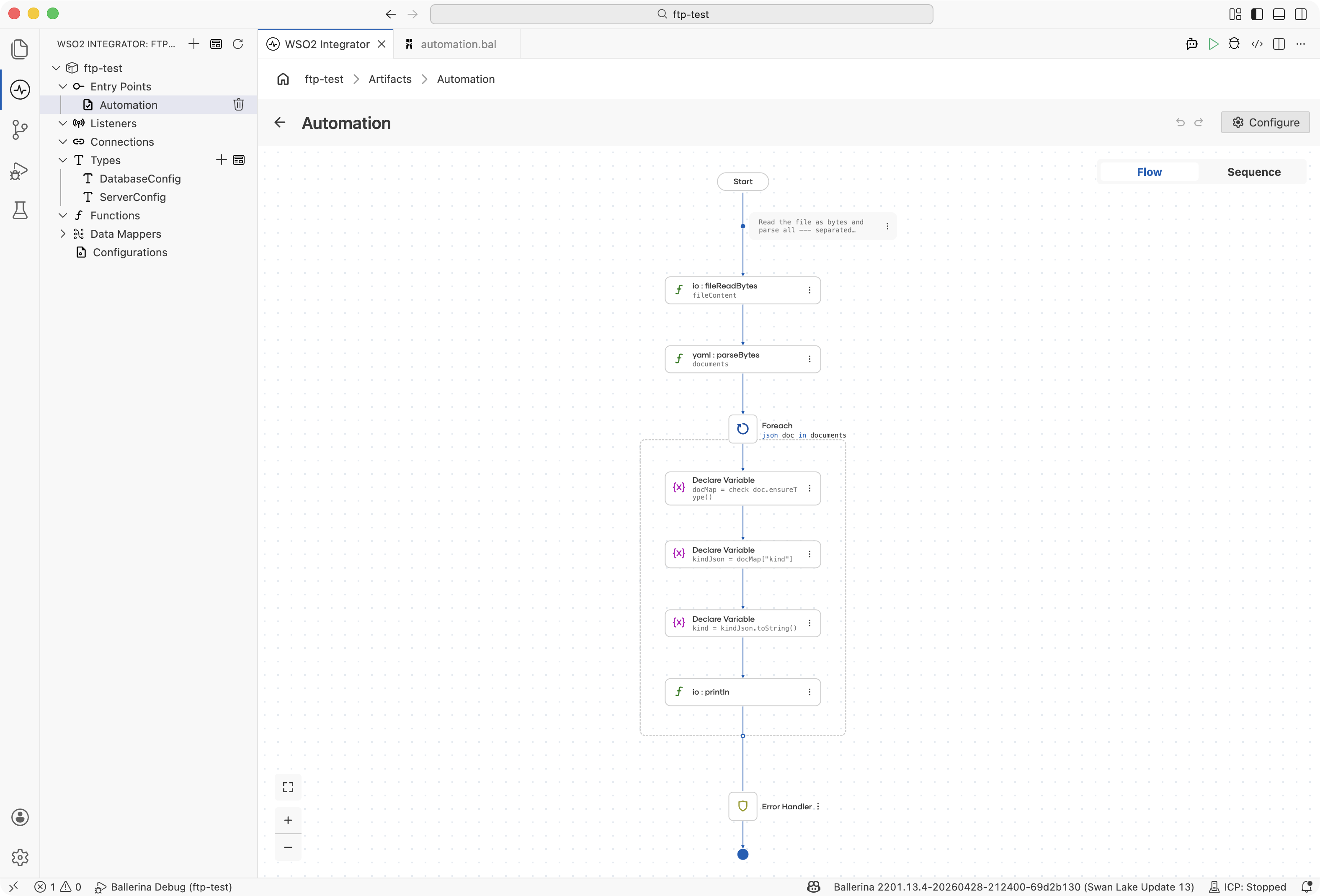
import ballerina/io;
import ballerina/data.yaml;

public function main() returns error? {
    // Read the file as bytes and parse all --- separated documents into a json array
    byte[] & readonly fileContent = check io:fileReadBytes("k8s-manifests.yaml");
    json[] documents = check yaml:parseBytes(fileContent);

    foreach json document in documents {
        map<json> documentMap = check document.ensureType();
        json kindJson = documentMap["kind"];
        string kind = kindJson.toString();
        io:println("Processing: ", kind);
    }
}
TOML processing
TOML is the standard configuration format for Ballerina projects (Ballerina.toml, Dependencies.toml) and many modern tools. The ballerina/toml module provides parsing and writing support.
Parsing TOML
Read TOML files into Ballerina maps and records.
- Visual Designer
- Ballerina Code
-
Define the record types: Navigate to Types in the sidebar and click + to add a new type. Select Create from scratch, set Kind to Record, and name it
BuildConfig. Add fields using the + button:Field Type observabilitybooleantargetstringThen add a second record type named
ProjectConfigwith fields:Field Type namestringversionstringdependenciesmap<string>buildBuildConfigFor details on creating types, see Types.
-
Add a Function Call step to read the file: In the flow designer, click + and select Function Call. Search for
toml:readFilein the library picker and select it (this adds theballerina/tomlimport). Pass"project.toml"as the path argument and assign the return value to a variable namedtomlDataof typemap<json>. -
Add a Function Call step to print the project name: Click + and select Function Call. Search for
io:printlnand add two arguments:"Project: "andtomlData["name"]. -
Add a Variable step for typed conversion: Click + and select Declare Variable. Set the name to
config, the type toProjectConfig, and the expression tocheck tomlData.ensureType(). -
Add a Function Call step to print the project version: Click + and select Function Call. Search for
io:printlnand add two arguments:"Version: "andconfig.version.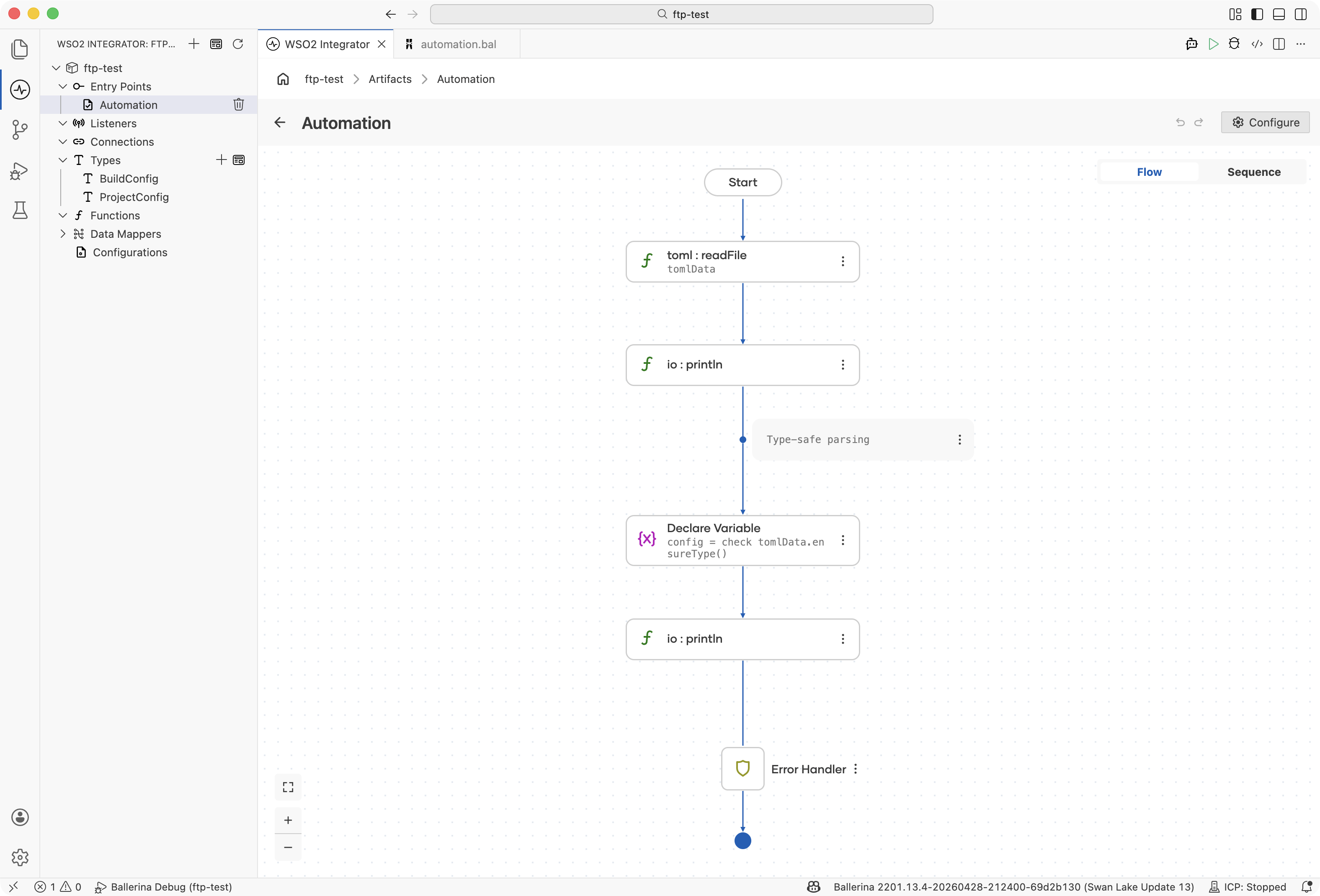
import ballerina/io;
import ballerina/toml;

type BuildConfig record {|
    boolean observability;
    string target;
|};

type ProjectConfig record {|
    string name;
    string version;
    map<string> dependencies;
    BuildConfig build;
|};

public function main() returns error? {
    // Parse a TOML file
    map<json> tomlData = check toml:readFile("project.toml");

    io:println("Project: ", tomlData["name"]);

    // Type-safe parsing
    ProjectConfig config = check tomlData.ensureType();
    io:println("Version: ", config.version);
}
Writing TOML
Generate TOML content from Ballerina data structures.
- Visual Designer
- Ballerina Code
-
Add a Variable step for the configuration object: In the flow designer, click + and select Declare Variable. Set the name to
config, the type tomap<json>, and enter your content (for example, the following) as an expression:{
"name": "data-pipeline",
"version": "2.0.0",
"dependencies": {
"ballerinax/kafka": "4.2.0",
"ballerinax/postgresql": "1.14.0"
},
"build": {
"observability": true,
"target": "cloud"
}
} -
Add a Function Call step to write the file: Click + and select Function Call. Search for
toml:writeFilein the library picker and select it (this adds theballerina/tomlimport). Pass"pipeline.toml"as the path argument. For the TOML structure field, switch the input to expression mode and pickconfigfrom the variable picker.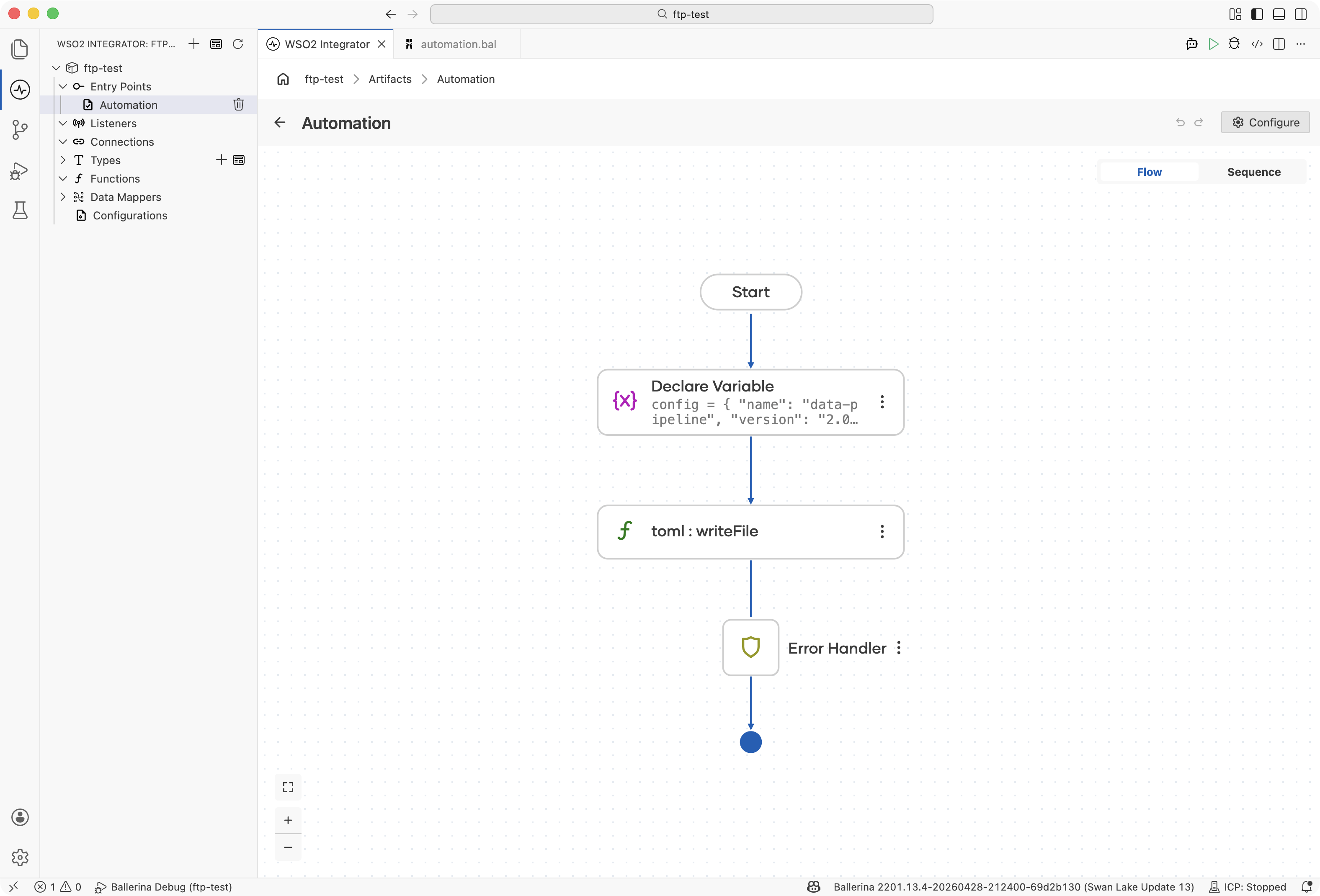
import ballerina/toml;

public function main() returns error? {
    map<json> config = {
        "name": "data-pipeline",
        "version": "2.0.0",
        "dependencies": {
            "ballerinax/kafka": "4.2.0",
            "ballerinax/postgresql": "1.14.0"
        },
        "build": {
            "observability": true,
            "target": "cloud"
        }
    };

    check toml:writeFile("pipeline.toml", config);
}
YAML-to-JSON and TOML-to-JSON conversion
Convert between configuration formats for systems that expect different inputs.
- Visual Designer
- Ballerina Code
Create both functions first via + on the Functions entry in the left sidebar: yamlToJson(string yamlFilePath) returns json|error and jsonToYaml(json data, string outputPath) returns error?. Then open each flow to add the steps below.
In the yamlToJson function flow:
-
Add a Function Call step to read the file as bytes: Click + and select Function Call. Search for
io:fileReadBytesin the library picker and select it (this adds theballerina/ioimport). PassyamlFilePathas the path argument and assign the return value to a variable namedfileContent. The variable type is fixed atbyte[] & readonly. -
Add a Function Call step to parse: Click + and select Function Call. Search for
yaml:parseBytesin the library picker and select it (this adds theballerina/data.yamlimport). In the S (Source byte[] value) field, switch the input to expression mode and pickfileContent. Set Result* toyamlDataand T* tojson. -
Add a Return step: Click + and select Return. Set the expression to
yamlData.
In the jsonToYaml function flow:
-
Add a Function Call step to serialize: Click + and select Function Call. Search for
yaml:toYamlStringin the library picker and select it. Passdataas the argument and assign the return value to a variable namedyamlStringof typestring. -
Add a Function Call step to write to the file: Click + and select Function Call. Search for
io:fileWriteStringin the library picker and select it. PassoutputPathas the path argument andyamlStringas the content argument.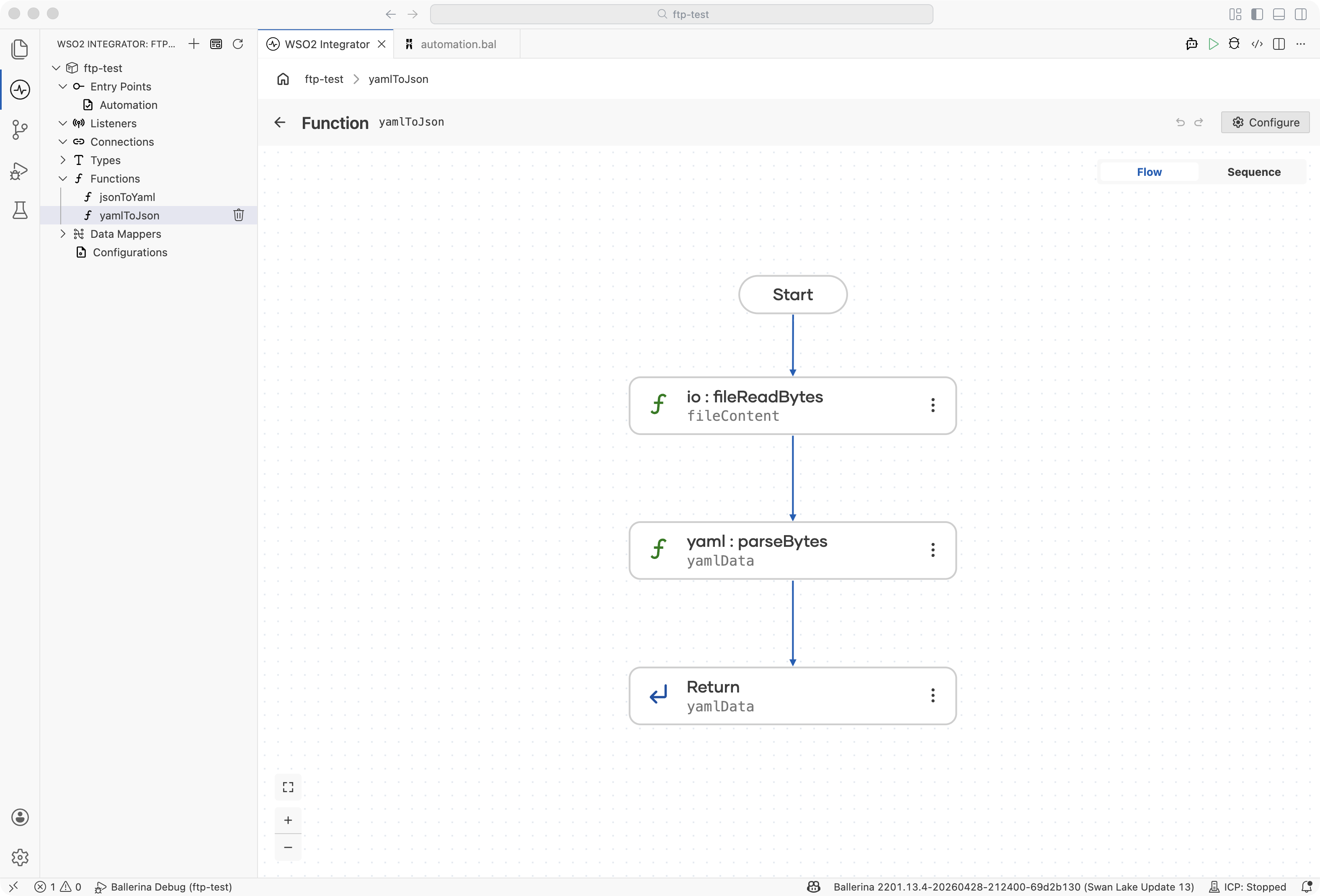
import ballerina/io;
import ballerina/data.yaml;

// Convert YAML configuration to JSON for API consumption
public function yamlToJson(string yamlFilePath) returns json|error {
    byte[] & readonly fileContent = check io:fileReadBytes(yamlFilePath);
    json yamlData = check yaml:parseBytes(fileContent);
    return yamlData;
}

// Convert JSON API response to YAML for config files
public function jsonToYaml(json data, string outputPath) returns error? {
    string yamlString = check yaml:toYamlString(data);
    check io:fileWriteString(outputPath, yamlString);
}
Integration example: Dynamic configuration loader
Build a configuration loader that reads from YAML or TOML based on file extension.
- Visual Designer
- Ballerina Code
-
Define the record type: Navigate to Types in the sidebar and click + to add a new type. Select Create from scratch, set Kind to Record, and name it
AppConfig. Add fields using the + button:Field Type appNamestringportintlogLevelstringfeaturesmap<string>For details on creating types, see Types.
-
Create the
loadConfigfunction: Click + on the Functions entry in the left sidebar and createloadConfig(string filePath) returns AppConfig|error. -
Find the position of the file extension: In the
loadConfigflow, click + and select Declare Variable. Set the name todotIndex, the type toint?, and the expression tofilePath.lastIndexOf("."). -
Add an If step for paths without an extension: Click + and select If under Control. Set the condition to
dotIndex is (). Inside the branch, add a Return step with expressionerror("Unsupported config format: " + filePath). -
Extract the extension: Click + and select Declare Variable. Set the name to
ext, the type tostring, and the expression tofilePath.substring(dotIndex + 1). -
Add an If step for the YAML branch: Click + and select If under Control. Set the condition to
ext == "yaml" || ext == "yml". Inside the branch:- Add a Function Call for
io:fileReadBytes. PassfilePathand assign the return value to a variable namedfileContent. The variable type is fixed atbyte[] & readonly. - Add a Function Call for
yaml:parseBytes(adds theballerina/data.yamlimport). In S, switch the input to expression mode and pickfileContent. Set Result* toappConfigand T* toAppConfig. - Add a Return step with expression
appConfig.
- Add a Function Call for
-
Add an Else If branch for TOML: From the If step, add an else if branch with condition
ext == "toml". Inside:- Add a Function Call for
toml:readFile(adds theballerina/tomlimport). PassfilePathand assign the return value totomlDataof typemap<json>. - Add a Declare Variable step. Set the name to
appConfig, type toAppConfig, and expression tocheck tomlData.ensureType(). - Add a Return step with expression
appConfig.
- Add a Function Call for
-
Add an Else branch for unsupported formats: Add a Return step with expression
error("Unsupported config format: " + ext). -
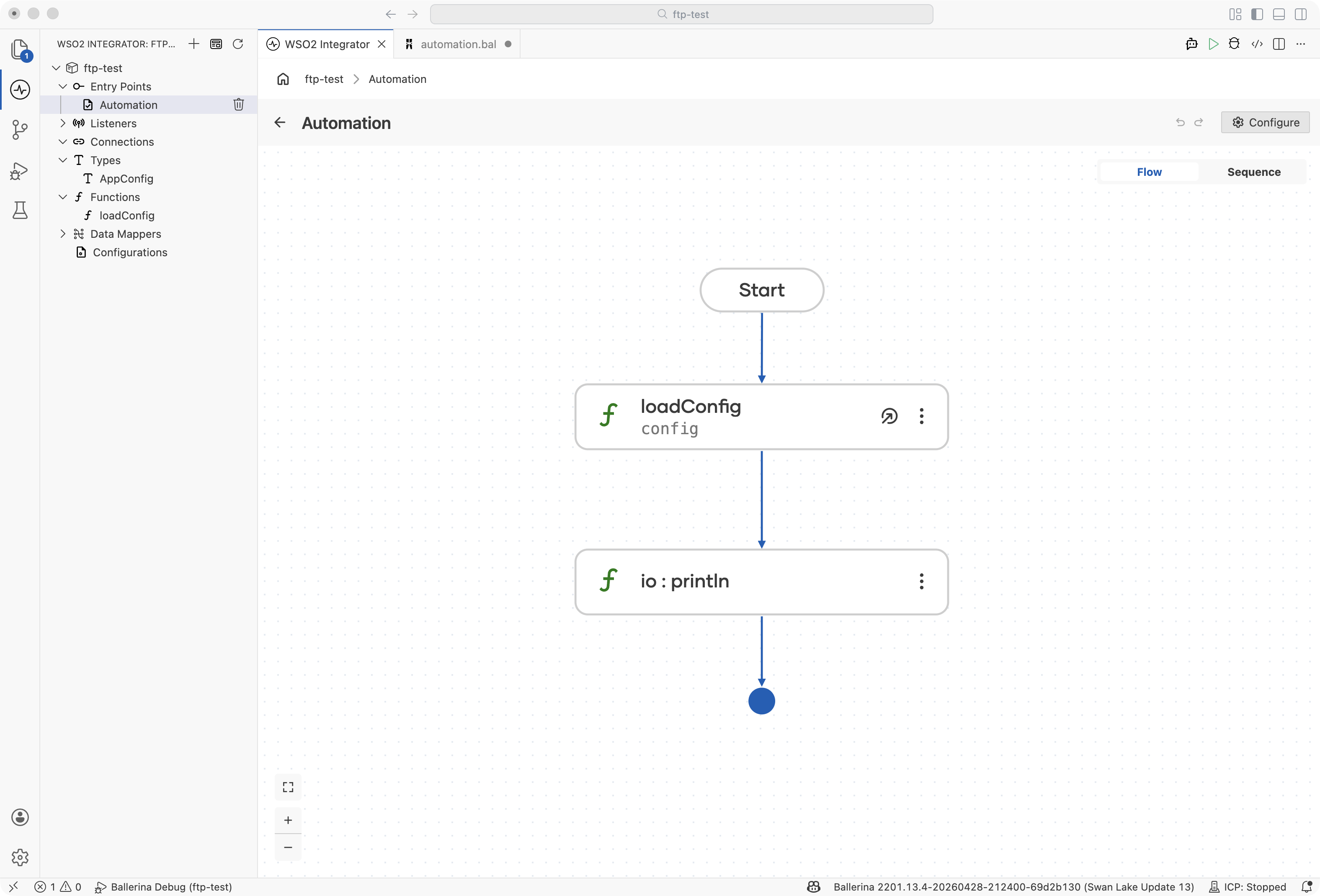
In the
mainfunction flow, callloadConfig: Add a Function Call step, search forloadConfig(it appears as a user-defined function), pass"app-config.yaml"as the file path, and assign the result value to a variable namedconfigof typeAppConfig. -
Add a Function Call to print the startup message: Click + and select Function Call. Search for
io:printlnand add two arguments:"Starting " + config.appName + " on port "(string concatenation between strings) andconfig.port.
import ballerina/io;
import ballerina/toml;
import ballerina/data.yaml;

type AppConfig record {|
    string appName;
    int port;
    string logLevel;
    map<string> features;
|};

public function loadConfig(string filePath) returns AppConfig|error {
    int? dotIndex = filePath.lastIndexOf(".");
    if dotIndex is () {
        return error("Unsupported config format: " + filePath);
    }
    string ext = filePath.substring(dotIndex + 1);

    if ext == "yaml" || ext == "yml" {
        byte[] & readonly fileContent = check io:fileReadBytes(filePath);
        AppConfig appConfig = check yaml:parseBytes(fileContent);
        return appConfig;
    } else if ext == "toml" {
        map<json> tomlData = check toml:readFile(filePath);
        AppConfig appConfig = check tomlData.ensureType();
        return appConfig;
    }
    return error("Unsupported config format: " + ext);
}

public function main() returns error? {
    AppConfig config = check loadConfig("app-config.yaml");
    io:println("Starting " + config.appName + " on port ", config.port);
}
Best practices
- Use typed records for parsing: define Ballerina record types that match your YAML/TOML structure for compile-time safety
- Validate early: parse configuration at startup and fail fast on missing or invalid values
- Handle multi-document YAML carefully: Kubernetes manifests often contain multiple documents in a single file
- Prefer TOML for Ballerina configs: TOML aligns with Ballerina's native configuration format (
Ballerina.toml)
What's next
- JSON Processing - Work with JSON data
- CSV & Flat File Processing - Handle tabular data formats