PII Redaction for LLMs: How to Do It Right
The moment a prompt leaves your application for a model provider, any personal data inside it leaves your control. If that prompt contains a customer's name, account number, or medical detail, that data has been sent to a third party, possibly into their logs or a future training set. PII redaction is the control that stops this: strip or mask the sensitive fields before the prompt crosses the boundary, and again on the way back. This guide covers what PII redaction for LLMs is, how detection and redaction work, where to enforce it, and how to run it at the gateway. It closes with a complete walkthrough using the WSO2 AI Gateway and AI Workspace.
What Is PII Redaction (for LLMs)?
PII redaction for LLMs is the process of detecting and removing or masking personally identifiable information in prompts before they reach a model, and in responses before they reach the user. The goal is that sensitive data (names, emails, phone numbers, government IDs, payment details, health information) never leaves the trust boundary in cleartext and never appears where it shouldn't.
It runs in two directions: egress filtering on prompts headed to the model, and ingress filtering on responses coming back, because a model can echo or infer sensitive data too.
Why Redact PII Before It Reaches the LLM
- Regulatory exposure. GDPR, HIPAA, and PCI DSS all constrain where personal, health, and cardholder data can go. Sending it unredacted to an external model can itself be a violation.
- Third-party retention. A provider's logging and retention practices are outside the sender's control. Redacting before egress means there's nothing sensitive for them to retain.
- Prompt and response leakage. The OWASP Top 10 for LLM Applications lists sensitive information disclosure as a core risk; redaction is a direct mitigation.
- Blast-radius reduction. If a prompt log is later breached, redacted logs limit what an attacker gains.
How PII Redaction Works
Detection (Regex + NER)
Detection combines two techniques. Regex catches structured, well-formed identifiers: emails, phone numbers, credit-card patterns, national IDs. Named Entity Recognition (NER) catches unstructured PII that has no fixed format, such as person names and locations, using an ML model. Open-source tools like Microsoft Presidio and LLM Guard combine both, and are common building blocks for redaction pipelines.
The WSO2 AI Gateway's built-in pii-masking-regex guardrail, used throughout this tutorial, is a regex-only detector with no NER component. It reliably catches a well-formed email or a correctly formatted phone number, but it does not catch a free-text mention such as "John Smith mentioned he lives on Maple Street." If free-text names or locations are part of the threat model, pair it with one of the gateway's own content-safety guardrails (covered under "PII Redaction at the Gateway with WSO2" below).
Redaction Approaches
Detected PII can be handled in several ways, and they aren't equivalent:
- Remove the token entirely (safest, but can break meaning).
- Mask it (
j***@***.com). - Hash it (deterministic, non-reversible).
- Reversible tokens / typed placeholders (
[PERSON_1],[EMAIL_1]) that preserve sentence structure so the model still reasons correctly, and can be re-inserted into the response. This is usually the best fit for LLMs because it keeps the prompt coherent.
The WSO2 policy implements two of these directly: permanent redaction (*****, irreversible) and reversible placeholder masking ([EMAIL_0000], restored on the way back to the original caller). It does not support hashing or full removal.
Egress (Prompts) and Ingress (Responses)
Redact on the way out so the provider never sees raw PII, and inspect on the way back so the model can't surface sensitive data to an unauthorized user. When reversible placeholders are used on egress, the ingress step decides whether to rehydrate them for the end user, based on that user's permissions.
Scope of the WSO2 policy covered in this tutorial.
pii-masking-regex's response-side handling is a restore step, not an independent scan. In mask mode, it looks for the exact placeholders it inserted on the way out and swaps them back to the original values; it does not re-scan the response for new PII the model generates on its own. In redact mode, it does nothing to the response at all. The tutorial section demonstrates this with a live test in Step 6. If the threat model includes the model spontaneously emitting someone else's PII, pair this policy with another WSO2 AI Gateway guardrail that scans the response directly, such as a content-safety integration or a custom-built policy.
Where to Redact: App, Gateway, or Collector?
Redaction can run in three places: in the application, in a telemetry collector, or at the gateway. In the application, there's maximum context, but every team ends up implementing the logic separately, and those implementations drift apart over time. In a telemetry collector, it's fine for logs but arrives too late to protect the live request. At the gateway, it's a single enforcement point that every application's traffic already passes through, applied consistently, with no per-app code. For a control that must be applied uniformly to satisfy an auditor, the gateway is the natural home, precisely because it can't be skipped.
Best Practices & Pitfalls
- Combine regex and NER. Regex alone misses names; NER alone misses formatted IDs. Both are needed. A single regex-only guardrail, like the one this tutorial uses, is not the full picture on its own.
- Prefer typed placeholders for LLM prompts. Removing text can break the model's understanding;
[PERSON_1]keeps the sentence intact. - Redact responses, not just prompts. Models echo and infer, so ingress filtering is not optional. Confirm what a specific gateway policy actually does on the response side (see the callout above) rather than assuming it's symmetric with the request side.
- Test recall with realistic data, not synthetic placeholders. A regex that looks correct can still miss real-format PII if the test data doesn't match the pattern it expects; a placeholder phone number is a common way this goes unnoticed. The parameter reference in the tutorial section documents the exact pattern this guardrail matches.
- Log the redaction, not the PII. An audit trail should prove redaction happened without itself storing the sensitive values.
PII Redaction at the Gateway with WSO2
On the WSO2 AI Gateway specifically, this control is pii-masking-regex, an LLM Gateway guardrail policy that masks or redacts sensitive information in request payloads. It runs inside the gateway's Policy Engine, before the request reaches the upstream model provider, alongside other guardrails such as JSON-schema validation, content-length and word-count checks, and content-safety integrations with Azure Content Safety and AWS Bedrock Guardrails.
With the concepts and trade-offs covered, the rest of this article puts pii-masking-regex into practice: attaching it to a live provider, configuring it, deploying it, and verifying it catches PII in both directions.
Tutorial: End-to-End PII Redaction in WSO2 AI Workspace
- What you will build: A Mistral LLM provider in WSO2 AI Workspace with the
pii-masking-regexguardrail attached, deployed to a gateway, and verified end-to-end for both prompt (egress) and response (ingress) redaction. - What you will learn: How to attach and configure the PII Masking Regex guardrail, point
jsonPathat the right field for a given provider's request shape, choose between permanent redaction and reversible masking, deploy the change, and verify the effect with direct requests against the gateway. - Prerequisites: Access to a running WSO2 AI Workspace and AI Gateway instance, an API key for an LLM provider (this tutorial uses Mistral), and
curl.
Step 1: Create the LLM Provider
-
In AI Workspace, go to LLM → LLM Providers.
-
Click Create Provider on the empty state, or + Add New Provider if at least one provider already exists.
-
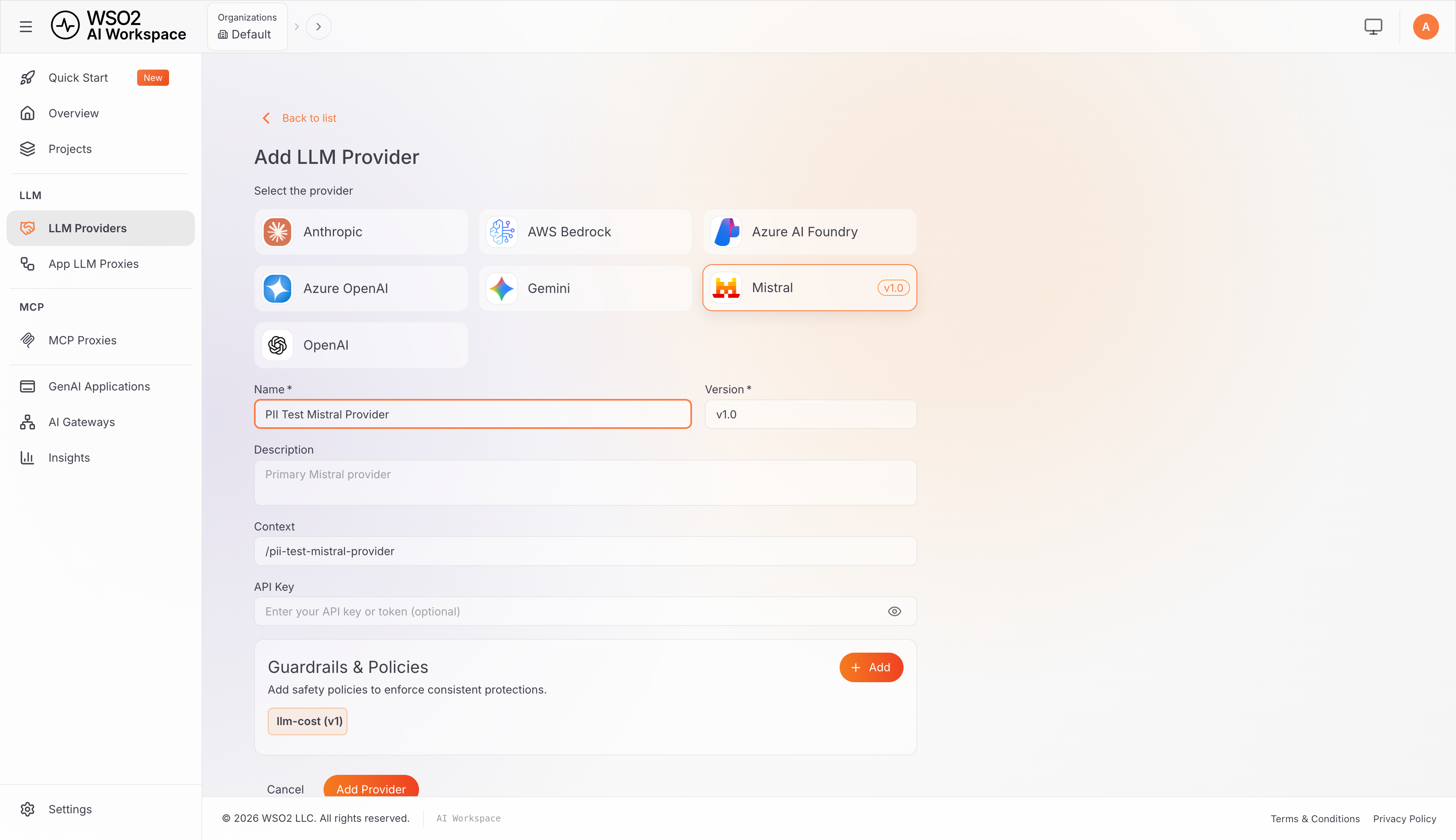
Select the Mistral template from the provider grid.
-
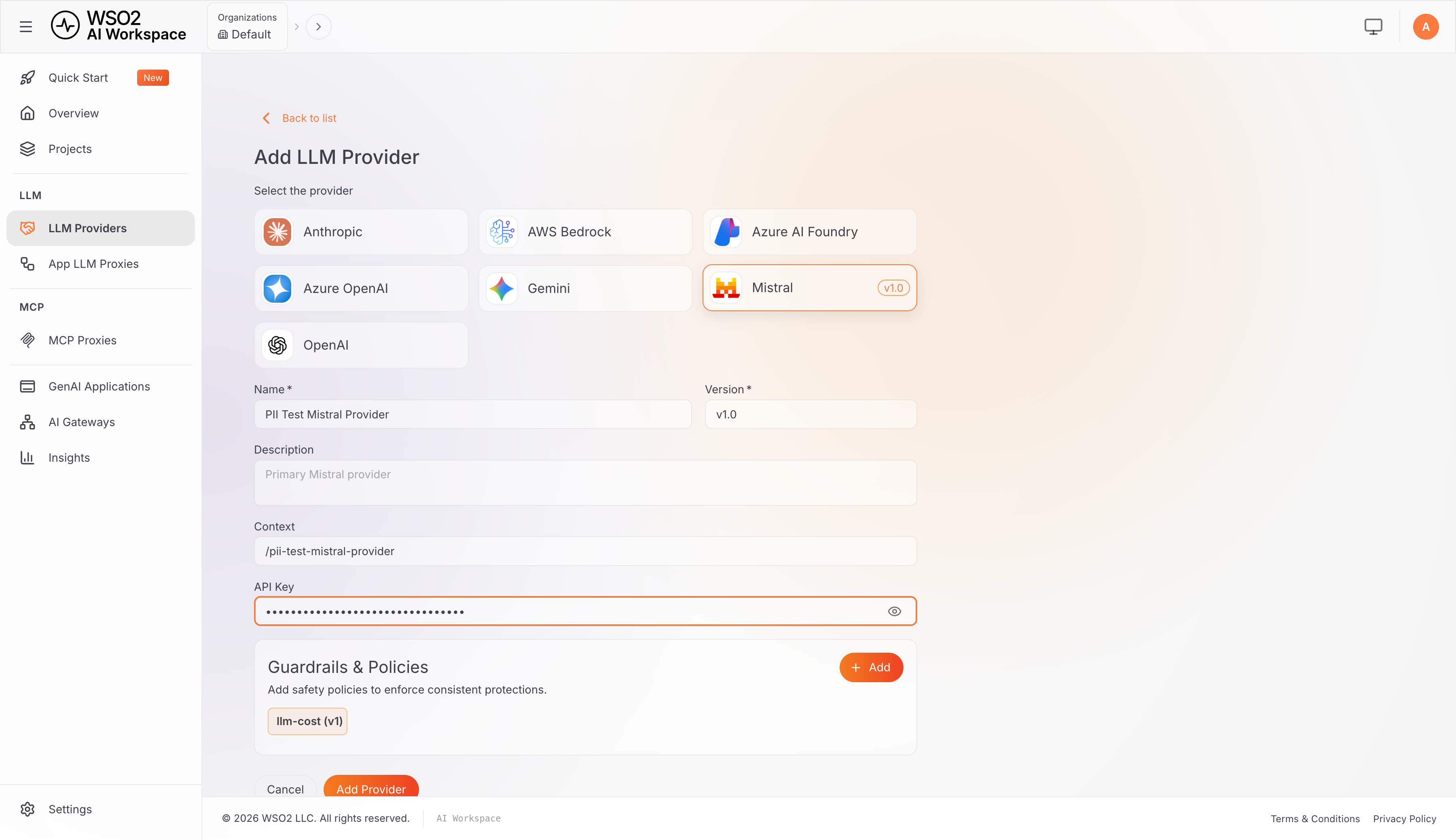
Fill in Name (for example
PII Test Mistral Provider) and leave Version atv1.0. The Context path is generated automatically from the name. -
Paste the Mistral API Key.
Step 2: Attach and Configure the PII Masking Regex Guardrail
-
In the Guardrails & Policies section of the provider form, click + Add.
-
Search for "PII" and select PII Masking Regex. The parameter form opens with its defaults:
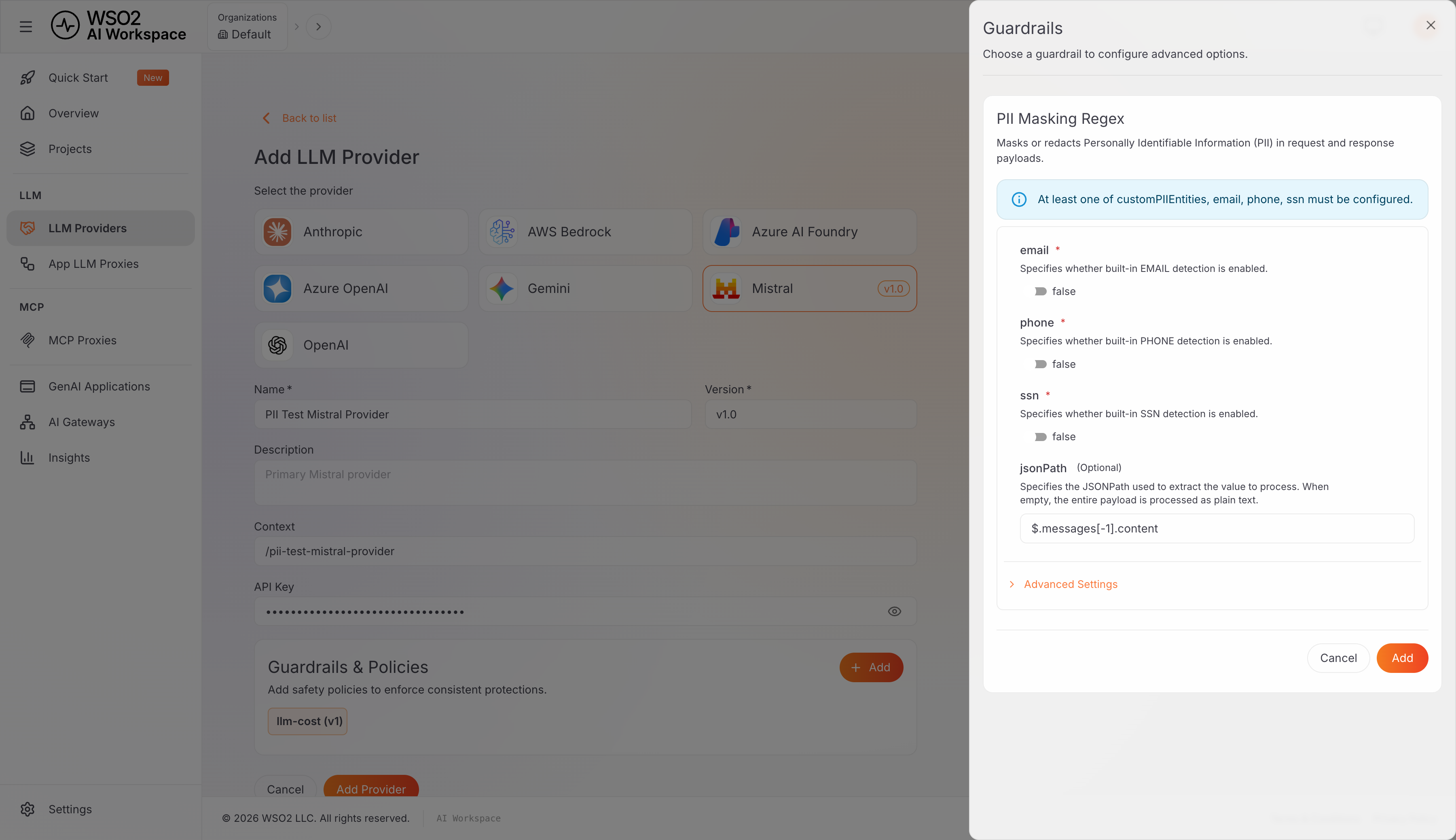
-
Toggle email and phone to
true.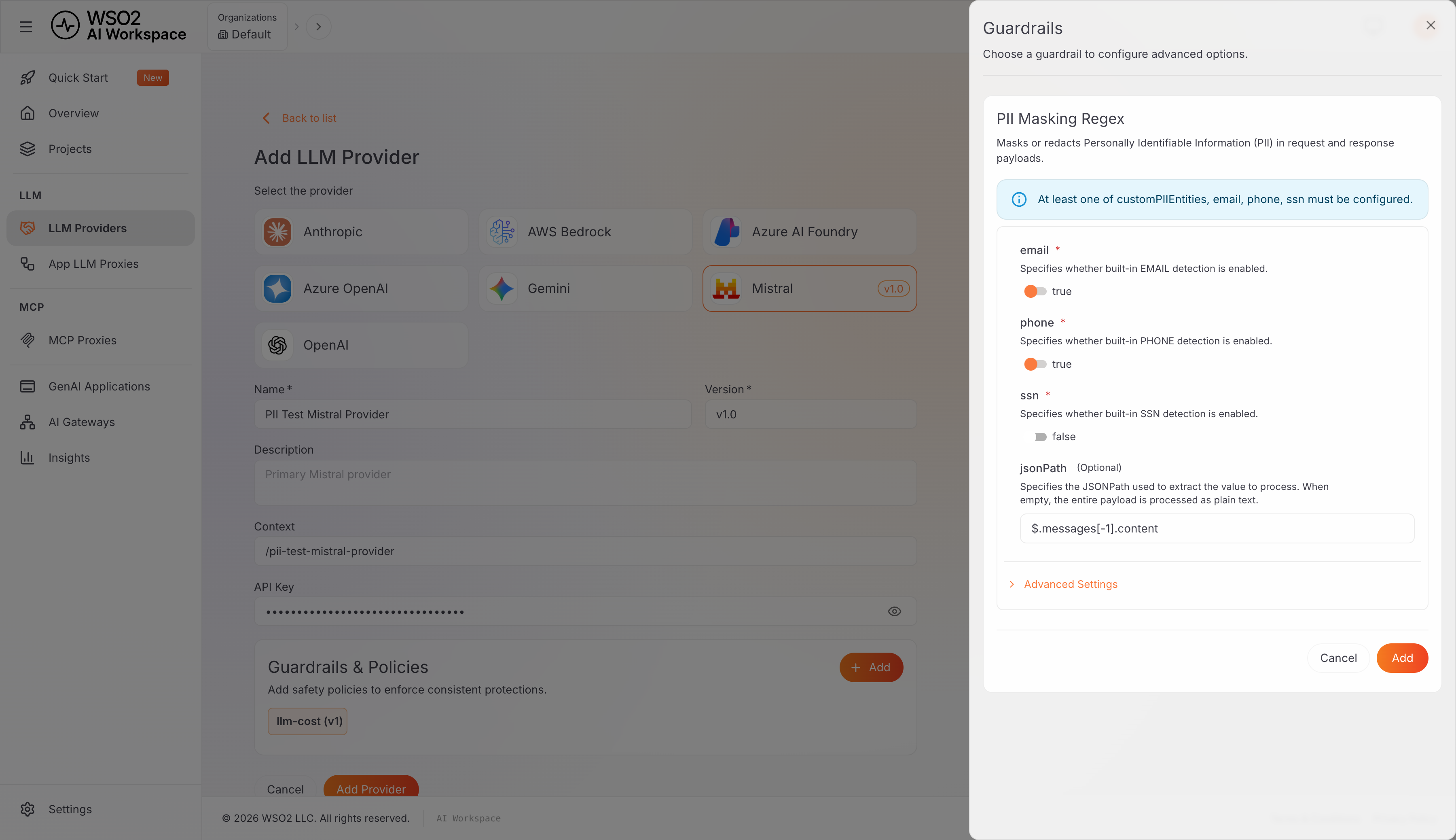
-
Leave jsonPath at its default,
$.messages[-1].content. This field tells the guardrail exactly where in the request body to find the text to scan, and the correct value always depends on the provider's own native request format. Two examples make the pattern concrete:Provider's native request shape Matching jsonPathvalue{"messages":[{"role":"user","content":"..."}]}, Mistral's format$.messages[-1].content(the form's default){"contents":[{"parts":[{"text":"..."}]}]}, Gemini's format$.contents[-1].parts[0].textMistral's native format happens to match the form's default, so no change is needed here; that's a property of Mistral's request shape, not a preference built into the guardrail. Other providers can differ more structurally, for example nesting the prompt under a single top-level field rather than an array of messages.
The same rule applies to any provider: confirm its actual request shape from its "Try it out" panel or its sample request under "Consume LLM Provider" (Step 4), then point
jsonPathat wherever the prompt text sits in that shape. -
Expand Advanced Settings and set redactPII to
true: permanent redaction, the simplest option to reason about and verify. The alternative,false, does reversible masking with restoration on the response, covered in "Verify Redaction on the Response" below.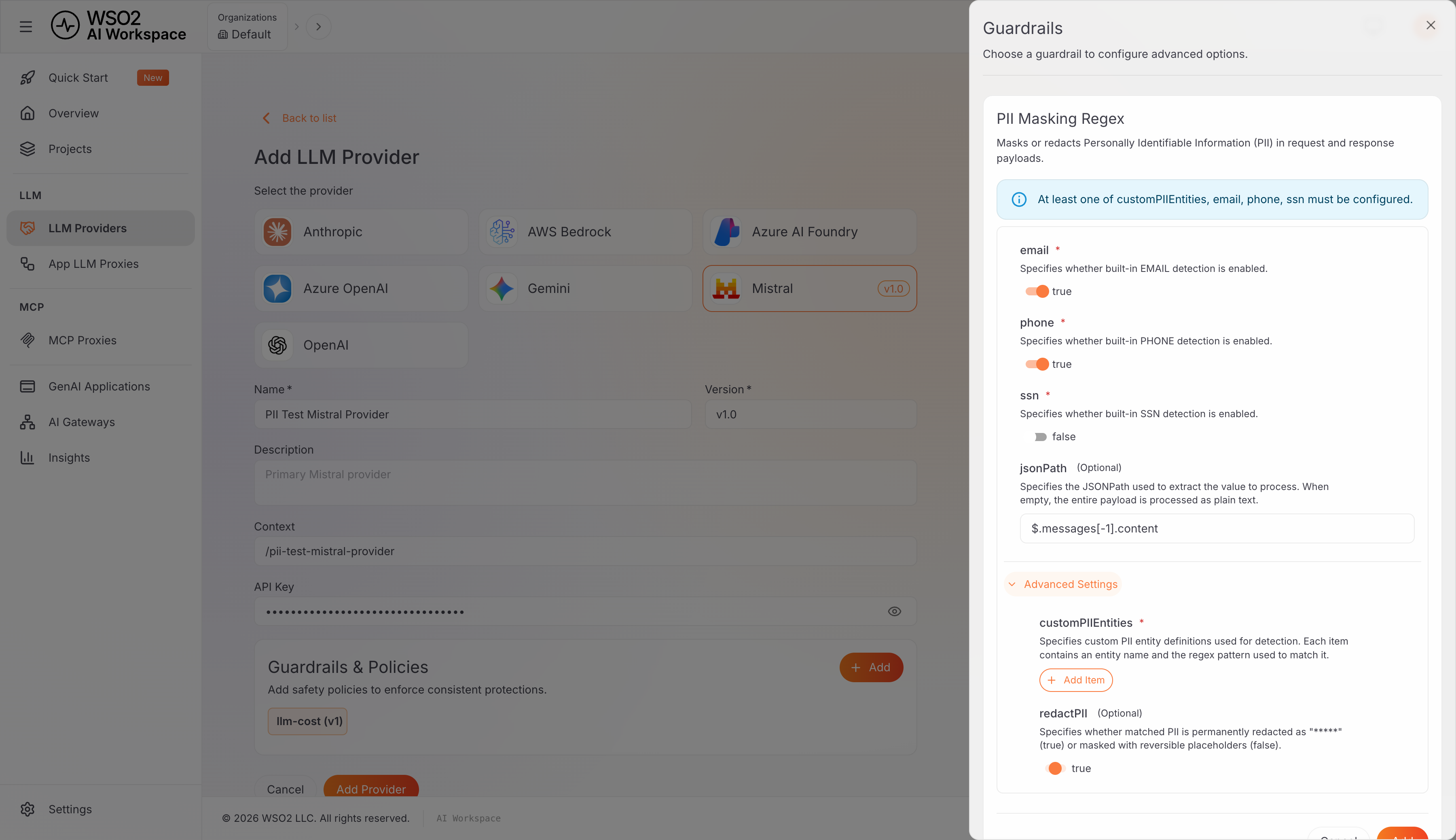
-
Click Add, then Add Provider (or Save, if editing an existing provider).
The full parameter reference, including how to match a custom PII pattern, is in the Guardrail Reference section after the tutorial.
Step 3: Deploy to the Gateway
-
Click Deploy to Gateway, select the target gateway, and click Deploy.
-
Confirm the status flips to Deployed, with a timestamped deployment ID.
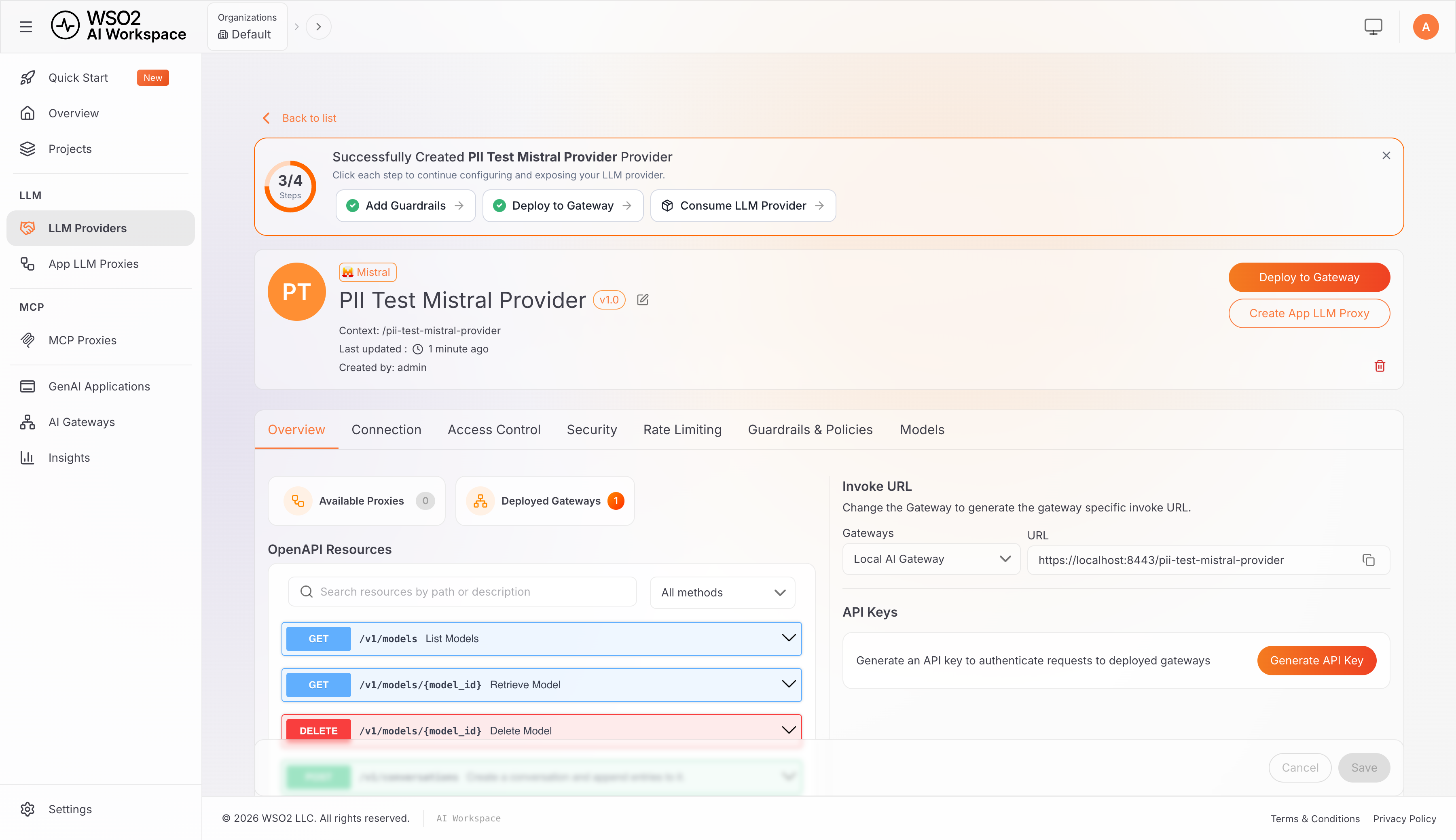
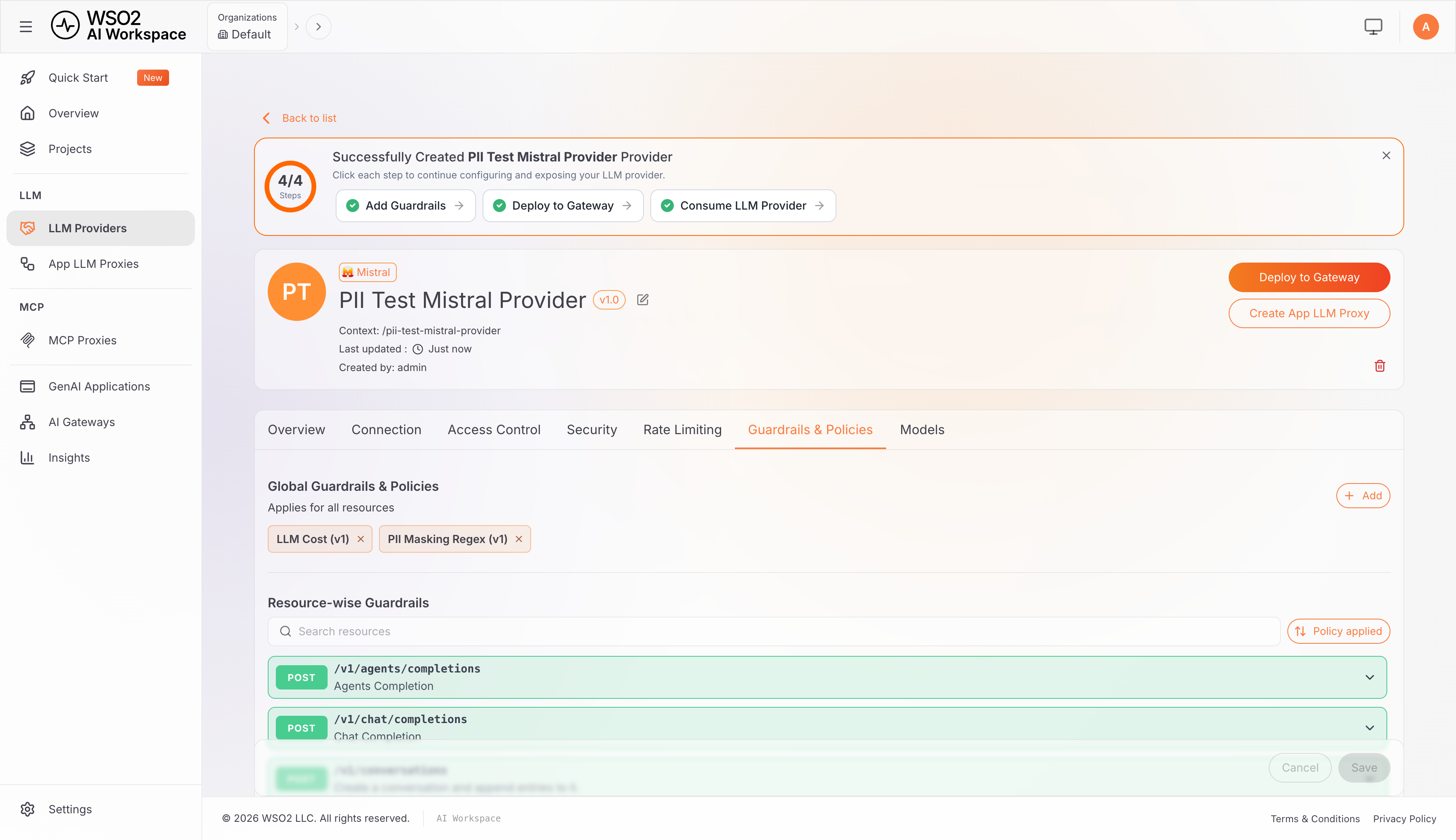
Any time a guardrail parameter changes, save the change and deploy again: policy changes are not live until redeployed.
The Guardrails & Policies tab confirms the attached guardrail at any time:
Step 4: Get an Invoke URL and API Key
On the provider's Overview tab (also reachable via Consume LLM Provider):
-
Note the Invoke URL shown for the provider. This is the base URL for reaching it through the gateway it was deployed to. For a locally run AI Gateway it typically looks like
https://localhost:8443/<context-path>, though the exact host and port depend on the specific gateway. The rest of this tutorial refers to this value as<YOUR_INVOKE_URL>. -
Click Generate API Key, name it, and copy the key. It is shown only once.
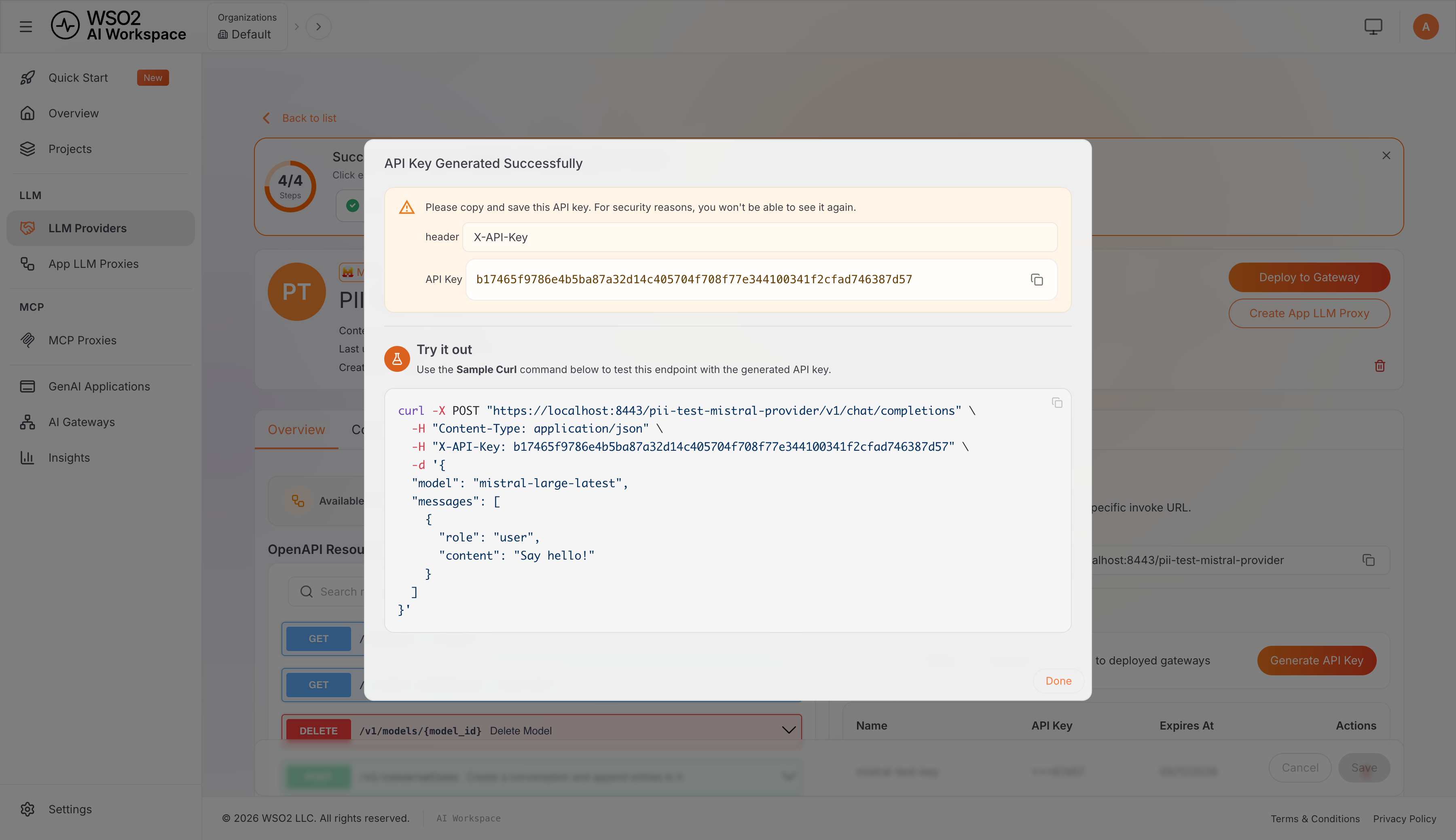
-
The provider's OpenAPI resource browser includes a "Try it out" panel per endpoint, Swagger-style, for confirming the exact request and response shape a provider expects without leaving the browser, in addition to
curl.
Step 5: Verify Redaction on the Request (Egress)
To make the guardrail's effect unambiguous, send the identical prompt twice: once against a provider with no guardrail attached, and once against the provider configured in Steps 2 to 4. The examples below include -k to skip TLS verification, which is only appropriate against a gateway using a self-signed certificate, such as a local development instance; omit it against a gateway with a certificate from a trusted authority.
curl -sk -X POST "<YOUR_INVOKE_URL>/v1/chat/completions" \
  -H "Content-Type: application/json" \
  -H "X-API-Key: <YOUR_API_KEY>" \
  -d '{
    "model": "mistral-large-latest",
    "messages": [
      { "role": "user", "content": "My name is Alex Carter, my email is [email protected] and my phone is +14155552671. Repeat this information back to me exactly, word for word." }
    ]
  }'
Without the guardrail attached, the model receives the real values and echoes them back:
"content": "Here is the information you provided, repeated back to you exactly, word for word:\n\n\"My name is Alex Carter, my email is [email protected] and my phone is +14155552671.\""
With the guardrail attached and configured as in Step 2 (redactPII: true), the same prompt produces this response instead:
"content": "Here is the information you provided, repeated back to you exactly, word for word:\n\n*\"My name is Alex Carter, my email is ***** and my phone is *****.\"*"
The email and phone number are ***** in the model's own answer, because they were already ***** in the request the guardrail forwarded; the model never saw the real values. The name, "Alex Carter," passes through untouched. That's expected: only the email and phone detectors are enabled here, and this policy has no NER component to catch free-text names (see "Detection" earlier).
Same input, only the guardrail present or absent, visibly different output. This is the clearest way to demonstrate the control to a reviewer or auditor.
Step 6: Verify Redaction on the Response (Ingress)
A separate question from egress filtering is whether this guardrail also catches PII the model generates on its own, for example a fictional email address it invents in its answer with no PII anywhere in the prompt. As established earlier, the policy's response handling is a restore operation keyed on placeholders it inserted during the request phase, not an independent scan, so the expected result is that such PII passes through unredacted. The following demonstrates that.
curl -sk -X POST "<YOUR_INVOKE_URL>/v1/chat/completions" \
  -H "Content-Type: application/json" \
  -H "X-API-Key: <YOUR_API_KEY>" \
  -d '{
    "model": "mistral-large-latest",
    "messages": [
      { "role": "user", "content": "Generate a sample customer support ticket with a fictional email address only. Keep it to one short sentence." }
    ]
  }'
With redactPII: true, the model's response comes back as:
"content": "**Subject:** Issue with Recent Order #12345\n\n**From:** [email protected]\n**Message:** My package hasn't arrived, and the tracking shows \"delivered\" even though I never received it."
The fictional email the model generated, [email protected], is not redacted. The same result holds with redactPII: false (mask and restore mode): the email passes through untouched there too.
This is because pii-masking-regex's response handling is a restore operation, not fresh detection: in mask mode, it looks for the specific placeholders (like [EMAIL_0000]) it inserted during the request phase and swaps them back to their original values, a reverse lookup keyed on values it already knows. In redact mode, the response handler is a no-op by design. Neither mode re-applies the regex detectors to catch new PII appearing only in the response.
If the threat model includes the model spontaneously leaking someone else's PII in a generated response (a legitimate concern; see the OWASP Top 10 for LLM Applications' sensitive-information-disclosure category), pair pii-masking-regex with another WSO2 AI Gateway guardrail that genuinely scans the response. The gateway ships content-safety guardrails backed by Azure Content Safety and AWS Bedrock Guardrails, and a custom-built policy can also be attached to explicitly re-apply detection to the response body.
Guardrail Reference
Parameter Reference
The full parameter set exposed by pii-masking-regex:
| Parameter | Type | Default | Notes |
|---|---|---|---|
email | boolean | false | Built-in EMAIL detection. |
phone | boolean | false | Built-in PHONE detection, matching North American Numbering Plan (NANP) format: the area code and exchange code each start with a digit from 2 to 9, for example +14155552671. For non-NANP or international numbers, use customPIIEntities with a pattern suited to that format. |
ssn | boolean | false | Built-in SSN detection. |
customPIIEntities | array | none | Custom entity definitions, each an object with piiEntity (a name) and piiRegex (the pattern). Advanced setting. |
jsonPath | string | $.messages[-1].content | The field to extract and process. Empty means the whole payload is treated as plain text. Set this to match the target provider's actual request shape, as described in Step 2. |
redactPII | boolean | false | true permanently redacts matches as *****. false masks with reversible placeholders. Advanced setting. |
At least one of customPIIEntities, email, phone, or ssn must be configured.
Matching a Custom PII Pattern
The built-in email, phone, and ssn toggles cover the common cases. Anything else, such as an internal account number format or a national ID the built-ins don't recognize, needs customPIIEntities. Each entry is an object with an entity name and the regex pattern that matches it:
[
  {
    "piiEntity": "EMAIL",
    "piiRegex": "[A-Za-z0-9._%+-]+@[A-Za-z0-9.-]+\\.[A-Za-z]{2,}"
  }
]
This is functionally equivalent to toggling the built-in email detector on, and serves as a template for defining a custom entity and regex pair whenever the built-ins fall short.
Frequently Asked Questions
What is PII redaction for LLMs? Detecting and masking or removing personal data in prompts before they reach a model, and in responses before they reach a user, with the goal that sensitive data never leaves the trust boundary in cleartext.
How is PII detected in prompts? Combine regex, for structured IDs like emails and card numbers, with Named Entity Recognition, for names and other unstructured PII. Tools like Presidio and LLM Guard do both. The WSO2 pii-masking-regex guardrail used in this tutorial is regex-only. Where free-text entities such as names and addresses are in scope, pair it with one of the gateway's own content-safety guardrails.
Should PII be removed or masked? For LLM prompts, reversible typed placeholders ([PERSON_1]) usually work best: they protect the data while keeping the prompt coherent so the model still reasons correctly. The WSO2 policy offers this as redactPII: false (mask and restore). Where the original value doesn't need to come back, redactPII: true (permanent *****) is simpler to verify and reason about.
Do responses need to be redacted too? Yes, in principle. Models can echo or infer sensitive data. But confirm what a specific policy actually does on the response side: WSO2's pii-masking-regex only restores previously masked placeholders and does not independently scan for new PII the model generates on its own (demonstrated in Step 6 of the tutorial section). Request- and response-side coverage should never be assumed symmetric without checking.
Where should redaction run? At the gateway, so it's enforced consistently on every application's traffic and can't be skipped, which is what an auditor wants to see.
Does jsonPath need to change for every provider? It needs to match whatever request shape that provider actually uses. $.messages[-1].content, the form's default, already matches Mistral's native request shape. A provider with a different native shape, such as Gemini ($.contents[-1].parts[0].text), needs the equivalent value for that shape (see Step 2 of the tutorial section).
Conclusion
PII redaction reduces how much customer data reaches a third-party model in cleartext — how close that gets to zero depends entirely on which detectors are actually enabled. Done right, it combines regex and NER detection, uses reversible placeholders to keep prompts coherent, and filters both directions. Enforcing it at the gateway makes it a single, auditable control instead of a policy each team implements differently.
The WSO2 AI Gateway's pii-masking-regex guardrail delivers solid egress (request-side) protection, as the tutorial section demonstrates end-to-end. On the response side it performs a targeted restore of the placeholders it masked on the way out, by design, rather than a second detection pass. Configure the jsonPath to match the provider's actual wire format, and pair this guardrail with one of the gateway's own content-safety guardrails to also cover PII the model generates on its own in a response.

