Govern write-capable MCP tools at the gateway in WSO2 API Platform
Model Context Protocol (MCP) gives AI agents a standard way to call tools, including tools that delete records, change permissions, or trigger deployments. The protocol lets a server hint at which tools are destructive, but a hint is only a declaration and not something a gateway can rely on. This article covers four independent mechanisms on the WSO2 API Platform: tool visibility, identity-based authorization, rate limiting, and real-time analytics through Moesif. Each governs a write-capable tool call regardless of what the server claims or why the agent decided to make it.
The problem with write-capable tools
A write-capable tool is any MCP tool whose invocation changes state somewhere, like modifying a database entry, triggering a deployment, and so on. The MCP specification treats this as significant enough to standardize: readOnlyHint and destructiveHint exist so a tool can declare which category it falls into, and the spec's own default is to treat an unannotated tool as potentially mutating. So from the protocol side of things, there’s the acknowledgement that this distinction is important.
A write-capable MCP tool gets called when a model decides, mid-conversation, that calling it serves the prompt currently in progress. That decision is downstream of inference over a context window that can include content the agent didn't generate and the operator never reviewed. If that content carries an instruction the model acts on, the resulting tools/call is a well-formed request from a validly authenticated agent. Nothing in the request itself distinguishes a call the operator intended from one a manipulated model was talked into making.
In this article, we will look at this from three fronts. First, assume that a write-capable tool exists next to several other read-only ones on the same backend. They are all reachable by default unless something downstream narrows it. Second, since intent can't be read from a request, a legitimate call and an injected one look identical, the only thing left to do is bound what any call is allowed to accomplish regardless of why the model made it: who it's allowed to come from, and how much of it is allowed to happen. Third, because the decision originated in model inference instead of a deliberate human action, we lack a log entry the way there would be for a user interaction like a sign up or button click, unless the platform manufactures one.
The model can't be made to never attempt a bad call. The MCP server can't be the only line of defense either, since it's frequently third-party code and a single enforcement point is a single point of failure. The gateway is the one place that sees every attempt from every agent against every server. So we will discuss these three gaps in order: narrowing reachability, bounding who and how much, and recording what happened regardless of cause.
Making destructive tools invisible
The MCP Access Control List policy filters tools/list responses at the gateway: a tool that doesn't pass the configured access rule never appears in the list an agent receives, and a direct tools/call against it is rejected anyway. If an agent cannot discover a tool, it cannot reasonably call the tool either; and the policy enforces both halves of that, list filtering and request-path rejection, with the same rule set.
The policy takes a mode and a list of exceptions; the two modes yield opposite results from the same shape of input:
policies:
  - name: mcp-acl-list
    version: v1
    params:
      tools:
        mode: allow
        exceptions:
          - delete-all
          - drop-database
When allowing, you permit every tool except the ones in the exceptions list. Through a configuration like this, you can block a small, known set of dangerous operations while leaving everything else on the server reachable, for example, when a backend exposes ten tools with two among them being destructive.
The following denies some tools:
policies:
  - name: mcp-acl-list
    version: v1
    params:
      tools:
        mode: deny
        exceptions:
          - list-files
          - read-file
Every tool is blocked here except the ones present in the exceptions list, essentially, a whitelist. This configuration serves the opposite purpose: a backend with a large or untrusted surface area, where only a small, pre-approved set of read-only tools should ever be reachable. If you omit mode entirely, it defaults to deny, so an empty or misconfigured ACL fails closed rather than open.
The same mode/exceptions shape applies independently to MCP resources and prompts. A single policy instance can mix modes across capability types: allow-with-exceptions for tools, deny-with-exceptions for prompts, in the same block.
Access control provides lucidity in that it knows nothing about the caller. It can't distinguish an admin from a guest; visibility and identity are different concerns. Let’s discuss how WSO2 API Platform lets you handle the latter case of identity.
Scope-gated access for sensitive operations
Whereas an access control policy decides what exists, the MCP Authorization policy decides who can reach it. It runs after MCP Authentication has validated a bearer token and extracted its claims. It then evaluates rules against the scopes and claims on that token before allowing a tools/call to proceed.
policies:
  - name: mcp-auth
    version: v1
    params:
      issuers:
        - PrimaryIDP
  - name: mcp-authz
    version: v1
    params:
      tools:
        - name: list\_files
          requiredScopes:
            - mcp:tool:read
        - name: create\_file
          requiredScopes:
            - mcp:tool:write
        - name: "\*"
          requiredScopes:
            - mcp:tool:execute
Authorization rules are per-tool, not per-proxy: list_files and create_file carry independent scope requirements here, and a wildcard rule (name: "*") sets a floor that applies to the remainder. An agent holding only mcp:tool:read can call list_files but gets a 403 on create_file; the gateway never forwards the request to the backend to find out whether the agent would have succeeded.
Authorization is hence complementary to access control rather than redundant with it. A tool can be completely visible: listed, documented, discoverable in the MCP Hub, while remaining unreachable to any identity that lacks the matching scope. That is really important in say, a regulated environment, where write tools must exist and their knowledge known, but invocation has to be earned per-identity as opposed to per-deployment.
The policy also supports rules scoped to the JSON-RPC method itself rather than a named tool:
     methods:
        - name: "tools/call"
          requiredScopes:
            - mcp:write
This method-level rule establishes control not in the tool being called but only makes sure that the operation is a tools/call at all. In combination with requiredClaims, rules can also key off arbitrary JWT claims, like department, role, and tenant, so a delete-all call can require both mcp:tool:execute:admin scope and a role: admin claim simultaneously, for example. When both requiredScopes and requiredClaims are present on a rule, both must pass.
Per-tool rate limiting
Access control and authorization both answer yes and no questions: can this identity see the tool, can this identity call it. Neither oversees volume. You might have an agent that has legitimately been issued a write scope. The agent can call a tool correctly on the allow list, but it can still call it 10,000 times in a minute; nothing in the first two policies will object. Using the MCP Rate Limit policy, you can control that behavior:
policies:
  - name: mcp-ratelimit
    version: v1
    params:
      tools:
        - name: delete-all
          limits:
            - limit: 5
              duration: 1h
          keyExtraction:
            - type: header
              key: x-agent-id
Limits are configured per tool (or per resource, prompt, or JSON-RPC method), by exact name or * wildcard, with one or more (limit, duration) pairs. The strictest matching limit wins when several apply. The keyExtraction block determines what the counter is scoped to: by default it falls back to the route name, but it can be tied to a header, a JWT claim using CEL expression, or the caller's IP, so as to enforce limits per-agent rather than a single shared bucket for the whole proxy. Enforcement is backed by either an in-memory counter for single-instance deployments or Redis for distributed ones.
How can we look at rate limiting alongside access control and authorization as another mean to solve the problem at hand? Its responsibility is not protecting the gateway from load. Rather, it allows you to treat call volume on a write-capable tool as a risk dimension independent of whether the call is authorized.
For example, let’s say your setup authorizes a delete-all tool invocation for cleanup. How about the same call fired five hundred times by a malfunctioning or compromised agent? The two possess different risk profiles despite both fairly passing the authorization rules. A breached limit returns an HTTP 429 by default, formatted as a JSON-RPC error envelope so MCP clients can parse it without special-casing the gateway.
In the next section, we discuss the role of Moesif as another enabler.
Leveraging Moesif for real-time observability
The WSO2 gateway publishes request and response metadata for every call asynchronously to Moesif, without adding to request latency. Every tools/list, tools/call, and other activity is captured and made available with details like the following:
- Method name
- Response status code
- Customer identifiers (like user ID and company ID)
- Request and response headers
The exact analytics types and granularity of their observation depend on whether you are using Moesif Basic with your current WSO2 subscription or an upgraded tier like Moesif Enterprise, the latter providing more fine-grained controls and assorted analytics.
The following illustrates some of the analytics available in Moesif Basic on MCP servers:
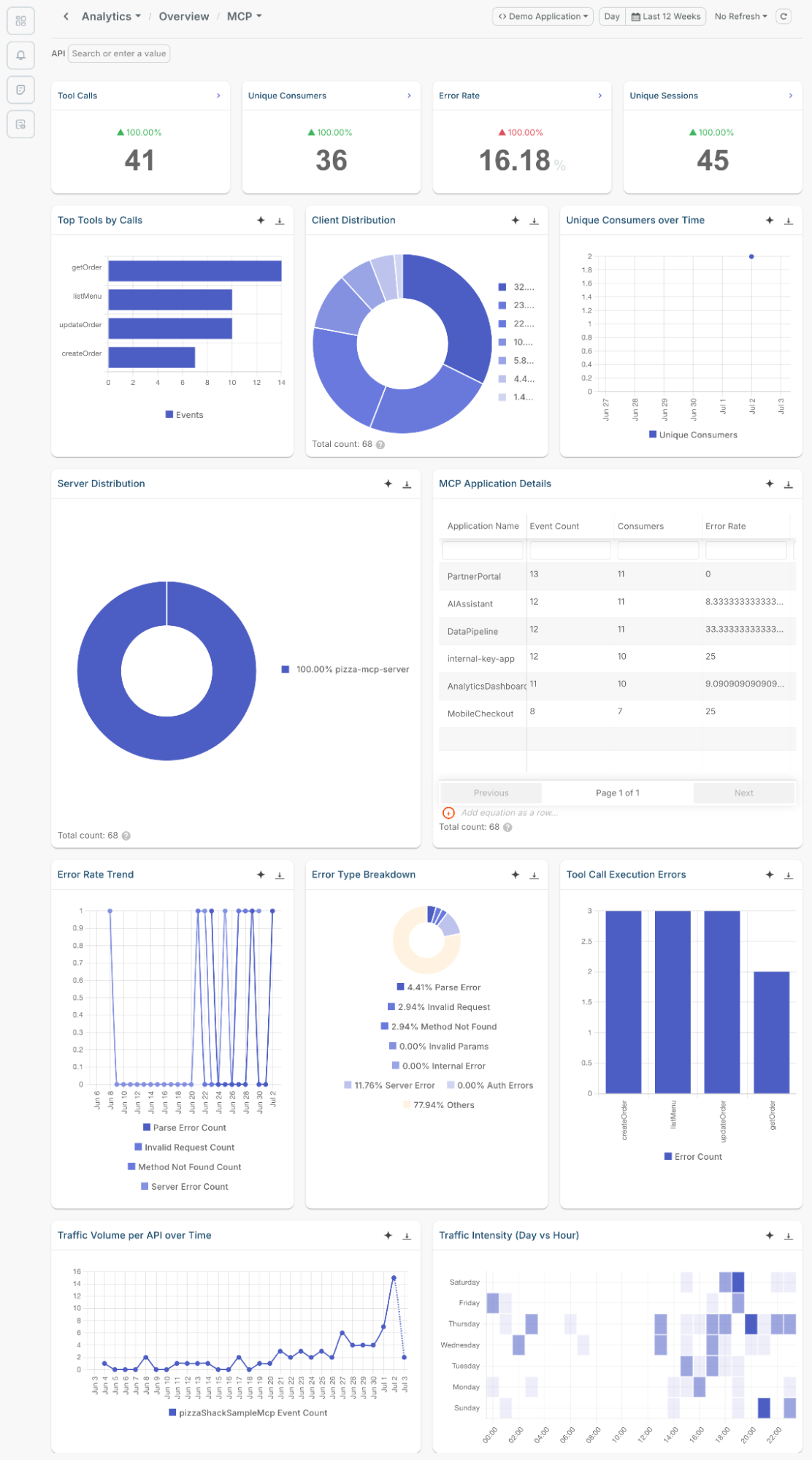
Observing real-time MCP traffic
You can observe in real time all MCP events through Live Event Log in Moesif.
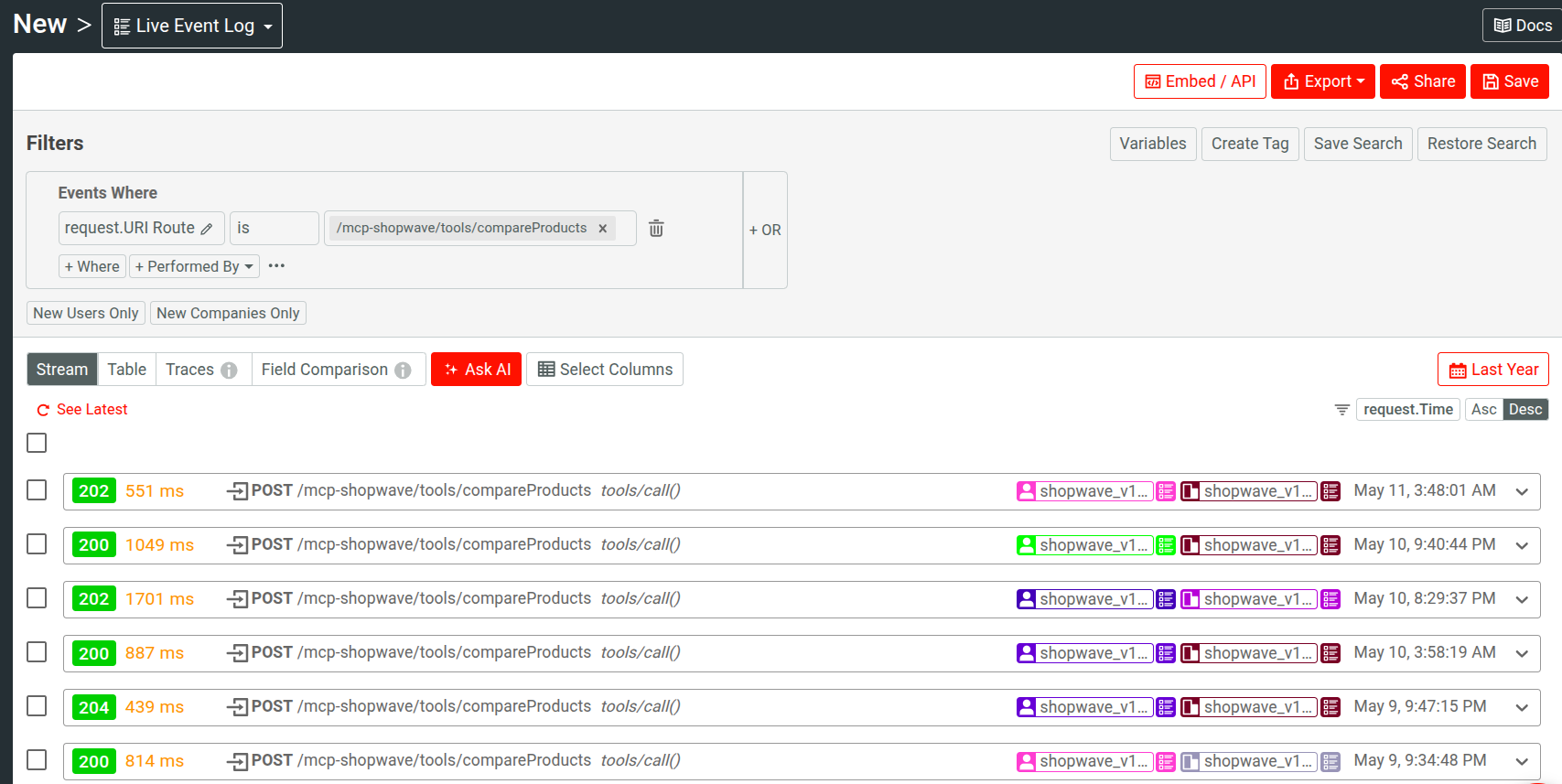
Here are some of the filters, mechanisms, and data relevant to help monitor write-capable tools:
- Filtering by HTTP response status code to pull every
403an Authorization rule produced or every429a rate limit returned - Elapsed duration for latency
- HTTP request method and URI route for observing the shape of the MCP traffic activity.
- You can filter by request and response payload fields, including nested fields, irrespective of their depth. Using such, you can observe the data an agent submits to the server. For example, here’s the payload for a tool call in an MCP server:
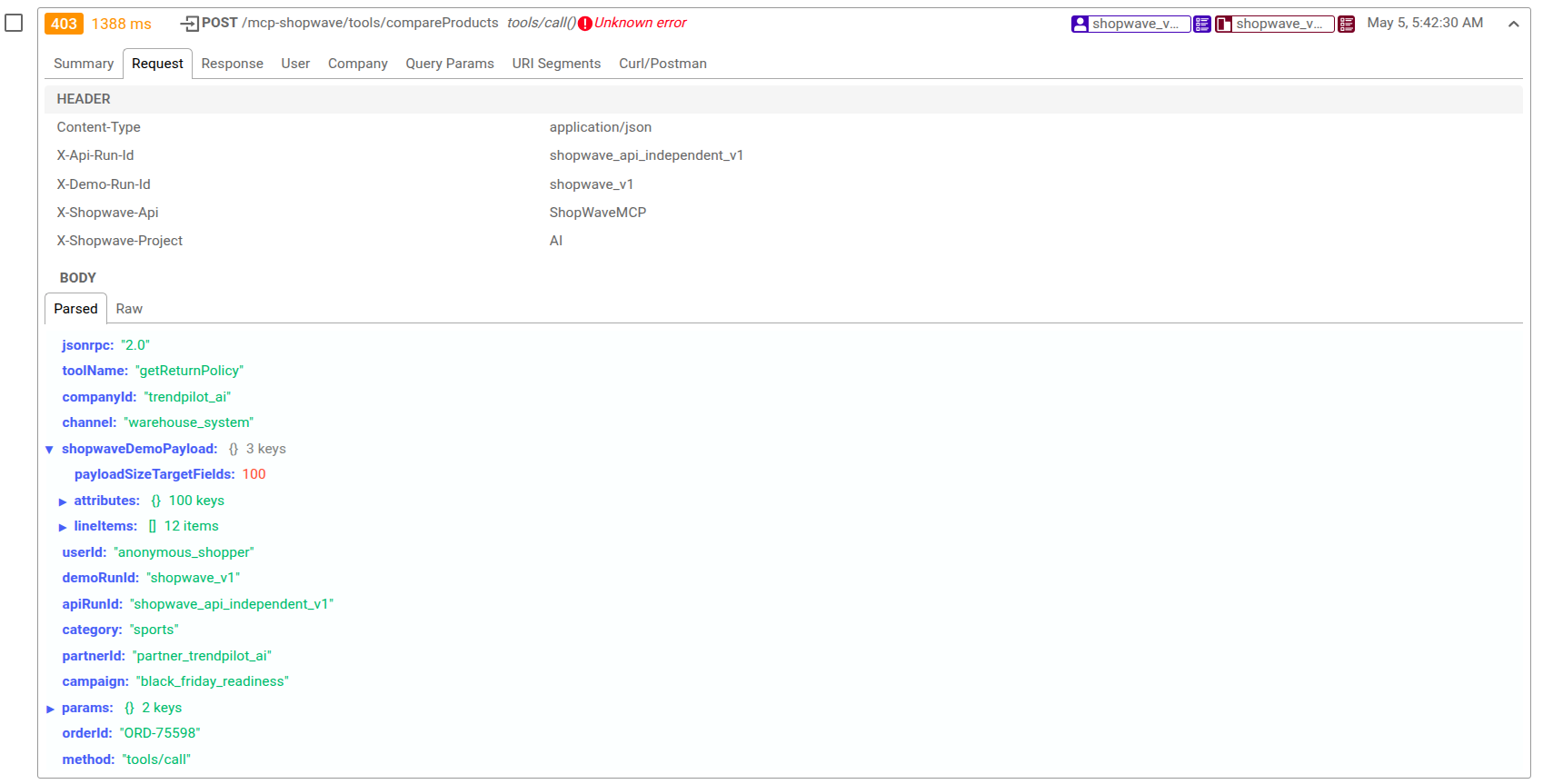
You can easily identify exactly what changed between a successful call and one that has deviated from expectations.
Tying activity to a specific agents and identities
Moesif can attribute each API activity to the agent or identity triggering it. It can obtain it automatically from a JWT field, a header, or request context. And in combination with access to payloads and headers, you can establish fine-grained filters to analyze MCP traffic.
Thus, by contextualizing and linking events by identifiers or custom fields like agent version or model, you can follow progressions of abuse and incidents.
Write-capable tool calls are more often than not high-cost activity, and hence monitoring them and diagnosing an associated behavior help establish safeguards and proactive measures.
Real-time monitoring and alerts
Moesif provides a flexible alerting and monitoring system supports both static thresholds and dynamic anomaly detection that learns each grouped value's own historical baseline, evaluated either as a real-time rolling window (every minute, for catching abrupt spikes) or a calendar-based window (daily/weekly, for slower trend drift).
You can monitor abrupt spikes in HTTP 403 or 429 responses on a write-capable tool, and group alerts by a dimension like an identified agent or a URI route.
In Moesif Basic, you can configure emails to route alert notifications to. An upgrade gives you access to channels like SMS, Slack, PagerDuty, or a webhook, allowing a spike in rejected write attempts to trigger an automated response. Each channel appeal to different ways you can react and benefit from the alert:
- Slack for real-time team visibility
- PagerDuty for incident response
- Email for security notifications or user audits
- Webhook endpoints for custom automations or throttling logic
Moesif alerts operate asynchronously and do not introduce latency into your MCP server flow. Since Moesif handles observability WSO2 gateway with lightweight, non-blocking instrumentation, alerting neither slows down your agent workflows nor impacts user experience.
Setting up alerts
Unlike traditional API rate-limiting tools, Moesif alerts have been designed to track semantic patterns across requests. You can enforce thresholds based on user attribution, patterns, and resulting system impact.
Here are some examples:
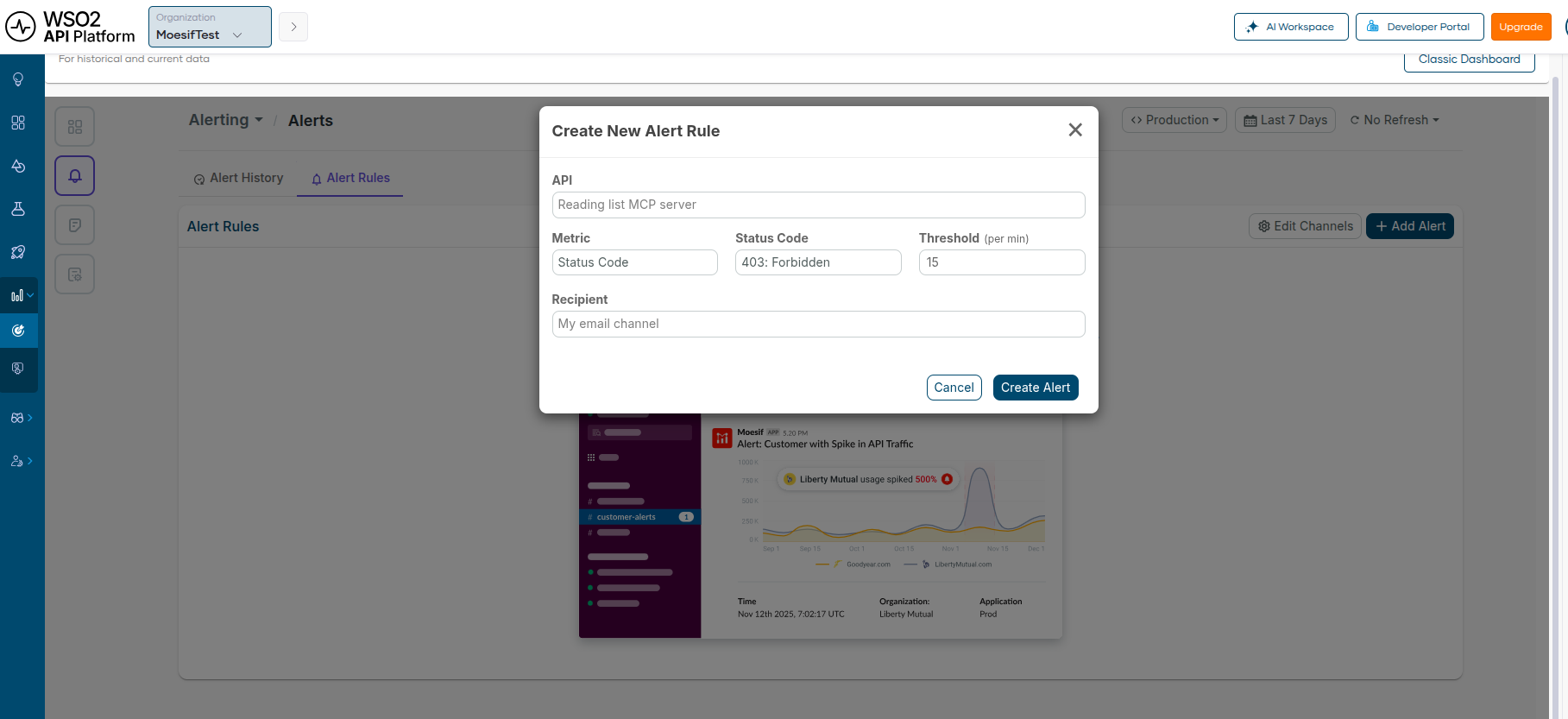
- The following creates an alert using Moesif Basic in API Insights from the API Platform Console that alerts when
403 Forbiddenrequests cross a specific threshold in an MCP server:
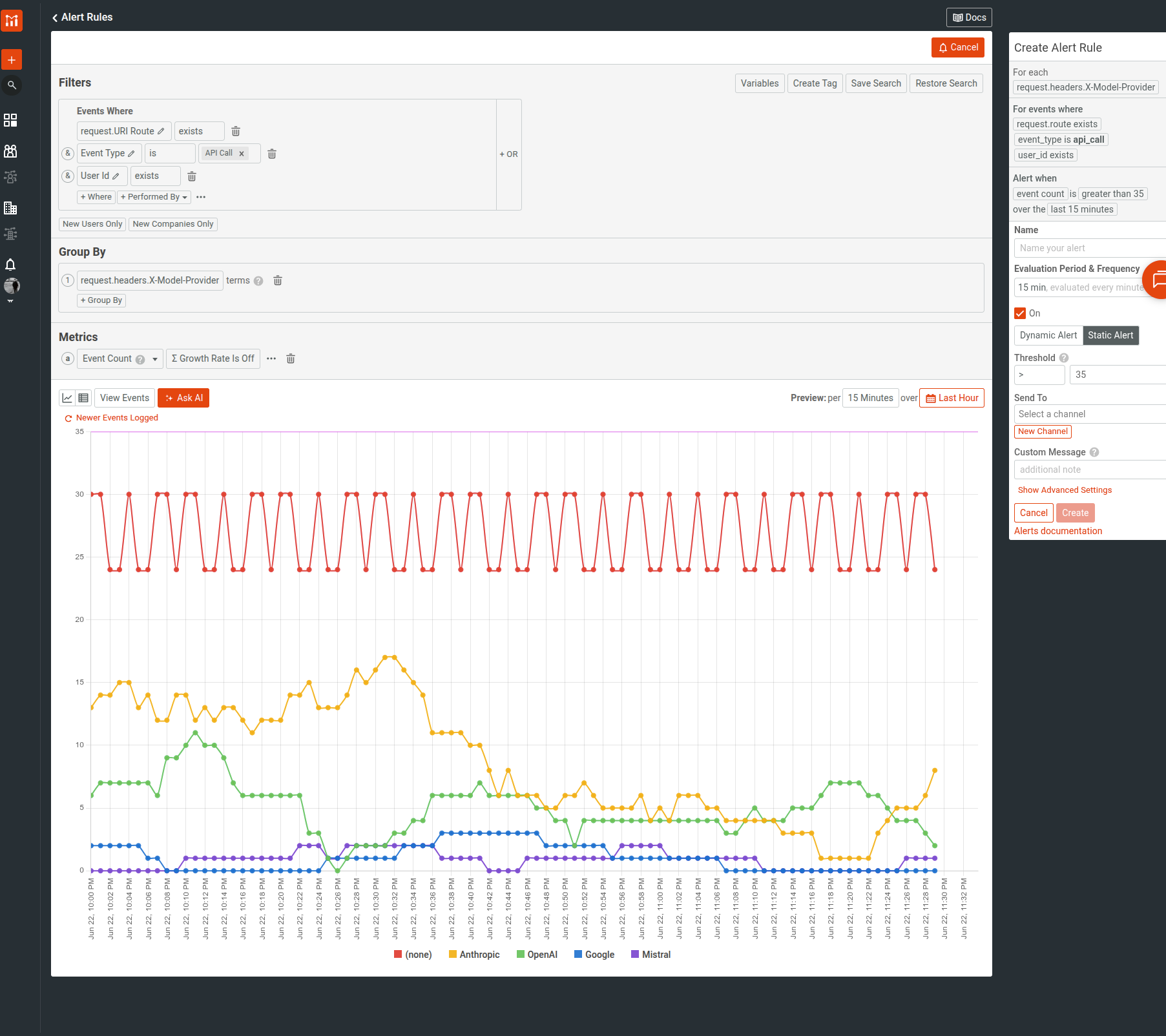
- If you are in Moesif Enterprise, you can create alerts with custom metrics like the following: getting alerted on privileged data access, defining a threshold of 35 requests per 15 minutes for each identified customer, while grouping the time series analysis by the underlying LLM provider.
- Response size anomalies, for example, responses larger than 1 MB.
- Payload shape, like unusually nested or large input payloads, using key count and count operators.
Conclusion
WSO2 API Platform applies four controls to MCP traffic, and each operates independently of what the upstream server declared about its tools. To close the loop, Moesif records and provides real-time visibility into the happenings in your MCP server. The MCP spec and annotations alone can’t give you governance; but now you know that can be achieved by coherently using the set of utilities WSO2 gives you.

