Controlling Claude Code AI Costs Across a Large Engineering Team with the AI Gateway and AI Workspace
Claude Code has become a daily companion for many engineering teams. It writes code, reviews pull requests, debugs failing tests, and spins up subagents to parallelize work. That productivity is real - but so is the bill that arrives at the end of the month.
When every developer runs Claude Code with their own API key, you get the worst possible cost posture: spend is distributed, invisible, and impossible to cap. There is no single place to see who is consuming the most tokens, no way to stop a runaway agent loop before it burns through your budget, and no mechanism to enforce fair usage across hundreds of engineers.
This guide walks you through routing all Claude Code traffic through a single centralized gateway - the WSO2 AI Gateway, governed from the AI Workspace - so you can track, throttle, and cap AI spend for your entire engineering organization from one dashboard.
- What you will build: A single, governed path for all Claude Code traffic, with token-based rate limits, cost caps, semantic caching, semantic tool filtering, prompt compression, and per-developer cost attribution.
- What you will learn: How to register a Claude provider in AI Workspace, apply cost-control policies on the AI Gateway, point Claude Code at the gateway, group all its traffic under a Gen AI Application, and monitor spend from the Insights menu.
- Prerequisites: Admin access to AI Workspace, a deployed WSO2 AI Gateway reachable from the machine running Claude Code, your org's Anthropic API credentials, and a recent version of Claude Code on developer machines.
Follow the parts in order. Each part lists what you need, the exact steps to perform, and how to verify the result before moving on.
What You Will Achieve
By the end of this guide you will have:
- A centralized AI Gateway that every developer's Claude Code instance talks to.
- Token-based rate limits and cost caps that prevent runaway spend.
- Semantic caching that cuts redundant calls and lowers the bill automatically.
- Semantic tool filtering that strips irrelevant tool definitions out of every request before it reaches the model.
- Prompt compression that shrinks prompt text to reduce the tokens billed on every call.
- A Gen AI Application in AI Workspace that groups all Claude Code traffic for scoped, per-developer cost visibility from the Insights menu.
Why This Matters
When every developer runs Claude Code with their own API key, spend is distributed, invisible, and impossible to cap. A typical "everyone for themselves" setup looks like this:
Developer 1 ──► api.anthropic.com
Developer 2 ──► api.anthropic.com
Developer 3 ──► api.anthropic.com
   ...
Developer N ──► api.anthropic.com
Each session authenticates directly against the model provider with its own key. The consequences for a large team are predictable:
| Pain point | Why it happens |
|---|---|
| No spend visibility | Usage data lives in N separate accounts, not one place. |
| No budget enforcement | There is no chokepoint where a limit can be applied. |
| Runaway agents | A misconfigured loop or aggressive subagent fan-out can spend hundreds of dollars before anyone notices. |
| No cost attribution | You cannot tell which team, project, or developer drove the spend. |
| No reuse | Two developers asking the model the same thing pay twice. |
The root cause is architectural: there is no point in the request path where you can observe and govern traffic. A centralized gateway gives you exactly that point. Two components do the work:
- AI Gateway - the runtime data plane. It sits between Claude Code and the LLM provider, enforcing token-aware rate limits, cost caps, semantic caching, and guardrails on every request.
- AI Workspace - the governance control plane. The dedicated portal where platform admins register LLM providers, define which endpoints are exposed, set cost caps, and watch usage roll in on a live dashboard.
Before You Begin
Make sure you have the following in place:
- Admin access to AI Workspace.
- A deployed WSO2 AI Gateway environment reachable from the machine running Claude Code. For local development, this can be a
localhostURL. - Your organization's Anthropic API credentials (a single org-level key, stored centrally).
- A recent version of Claude Code installed on developer machines.
Part 1: Register the Claude Provider in AI Workspace
Goal: Give the gateway something to route to by registering Anthropic and publishing an AI API in front of it.
Steps
- Open AI Workspace and go to LLM Providers.
- Add Anthropic as a provider and supply the organization's API credentials.
- The provider key is stored centrally - individual developers never see it or need their own.
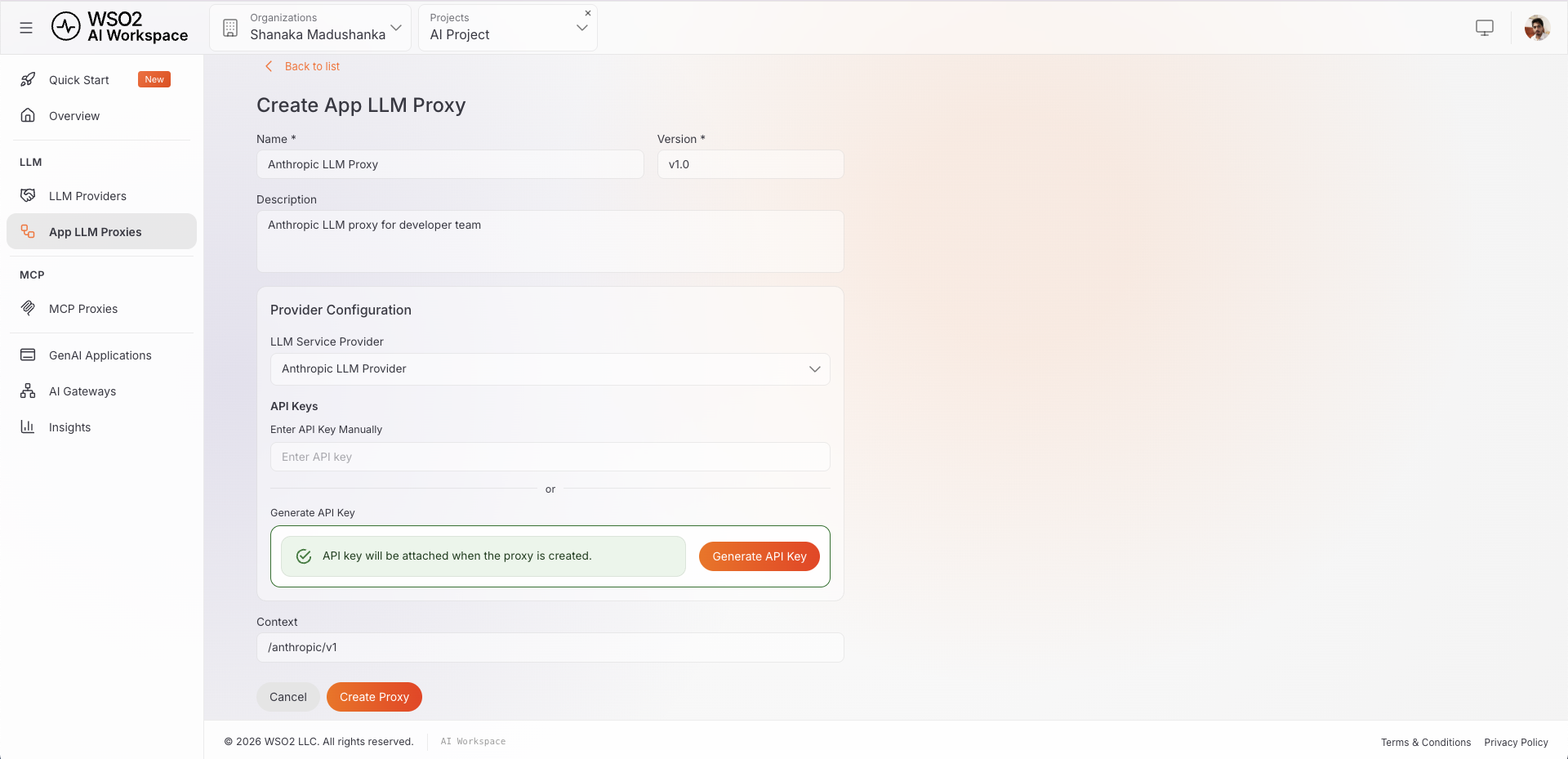
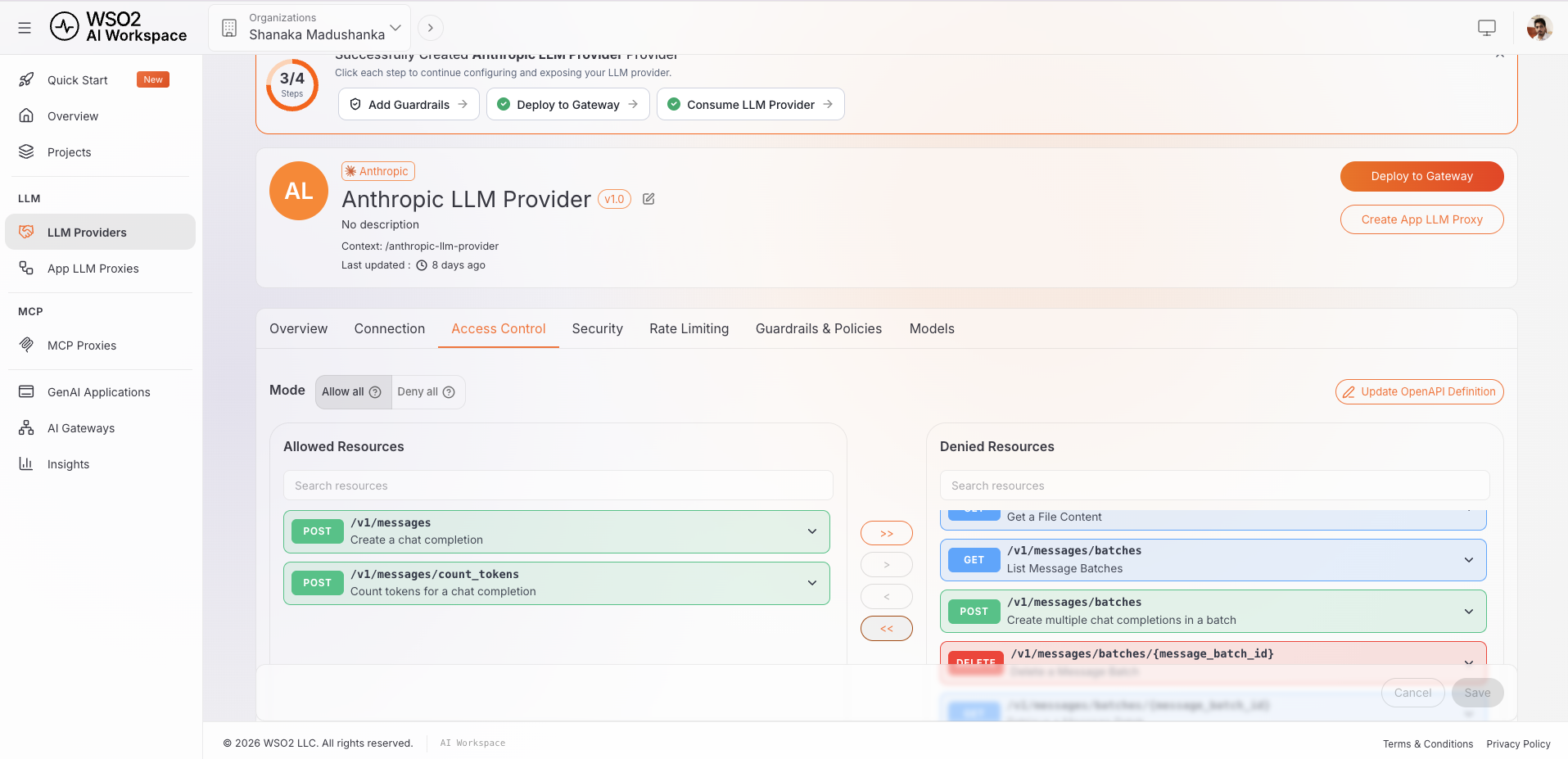 3. Create an LLM Proxy that exposes the Anthropic Messages endpoints through the gateway:
-
Configure the gateway to forward the
anthropic-betaandanthropic-versionrequest headers to the upstream. Claude Code relies on these to enable features correctly. -
Deploy the LLM Proxy to your gateway environment and note the gateway URL. In production this is usually a public or internal network URL (may be like below):
https://ai-gw.your-org.com/anthropic/v1For local development, use the local gateway address instead:
http://localhost:8443/anthropic/v1
Verify
- The AI API shows a Deployed status in AI Workspace.
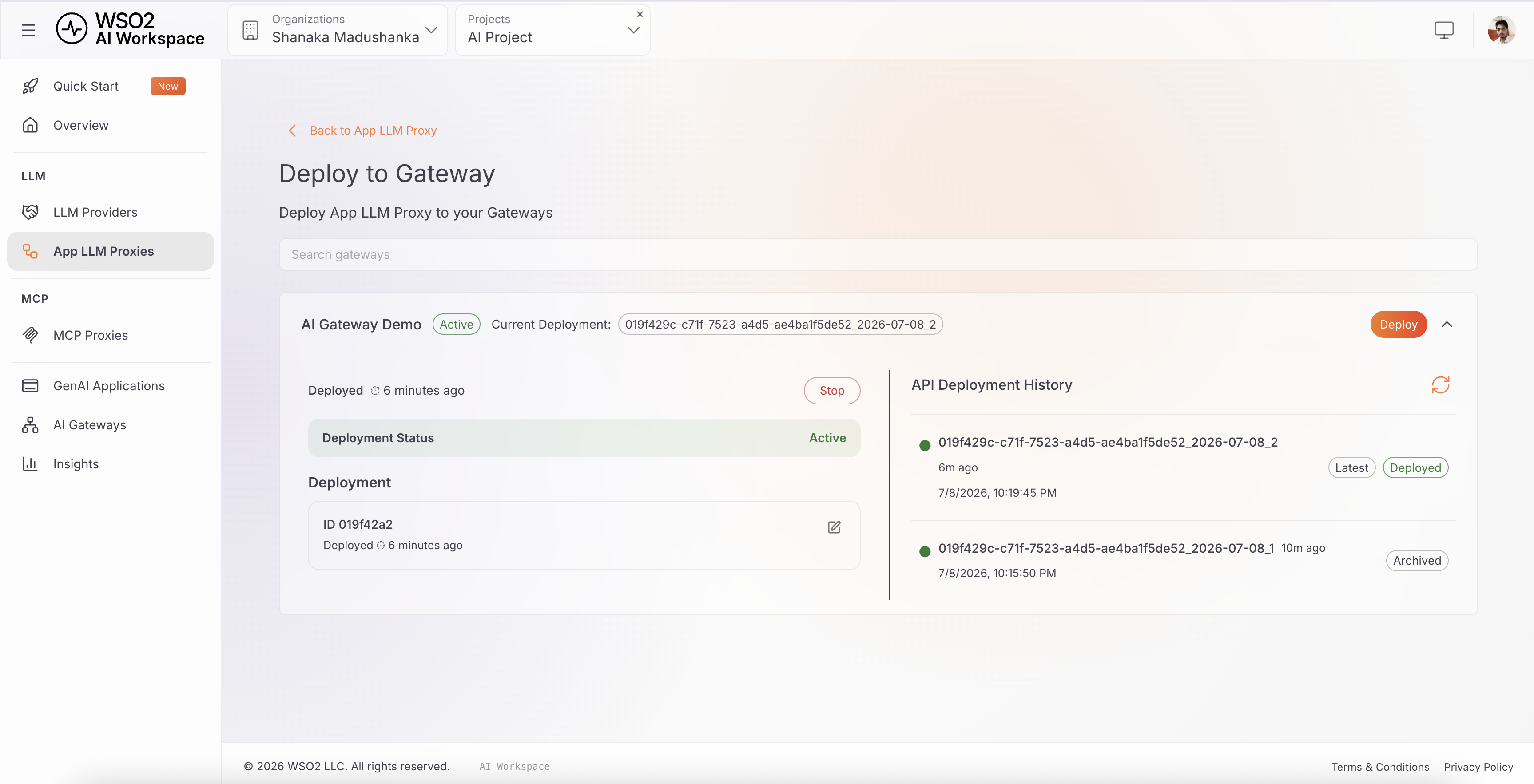
- A test request to your configured gateway URL reaches Anthropic and returns a valid response. For example, test
https://ai-gw.your-org.com/anthropic/v1/messagesin production orhttp://localhost:8443/anthropic/v1/messageslocally.
Result: This URL is what every developer's Claude Code will point to. Because the gateway speaks the native Anthropic Messages format, Claude Code talks to it exactly as if it were talking to the provider directly - no changes to how developers work.
Part 2: Apply Cost-Control Policies on the Gateway
Goal: Configure the policies that actually control cost. Apply these to the AI API from AI Workspace.
Step 1 - Enable Token-Based Rate Limiting
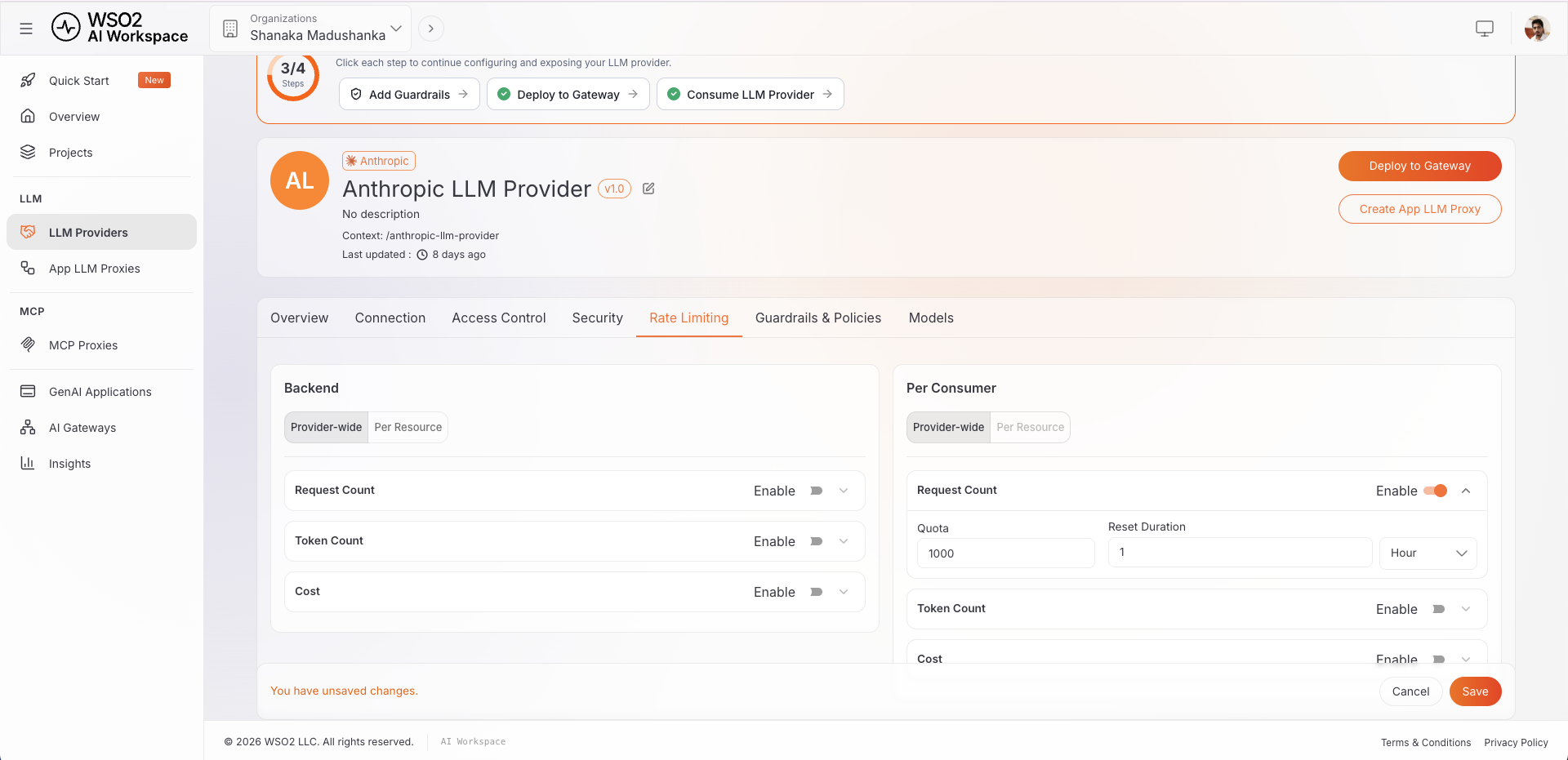
Standard request-per-minute limits are not enough for LLM traffic, because one request can consume a few hundred tokens or a few hundred thousand. The AI Gateway enforces token-aware throttling - limits based on token count, not just request count. Set thresholds such as:
- Per consumer: e.g. 1,000,000 tokens per developer per day.
- Backend-wide: a ceiling across the whole Anthropic backend to protect the global budget.
Token-aware limits are what stop a runaway agent loop from quietly spending your monthly budget in an afternoon.
Step 2 - Set Cost Caps and Quotas
Beyond raw token counts, AI Workspace lets admins set request count, token count, and cost caps per provider, applied either backend-wide or per consumer. This is the direct lever on spend:
- Cap estimated cost per team or per developer.
- Enforce fair usage so a few heavy users do not crowd out everyone else.
- Stop abuse before it reaches your budget rather than discovering it on the invoice.
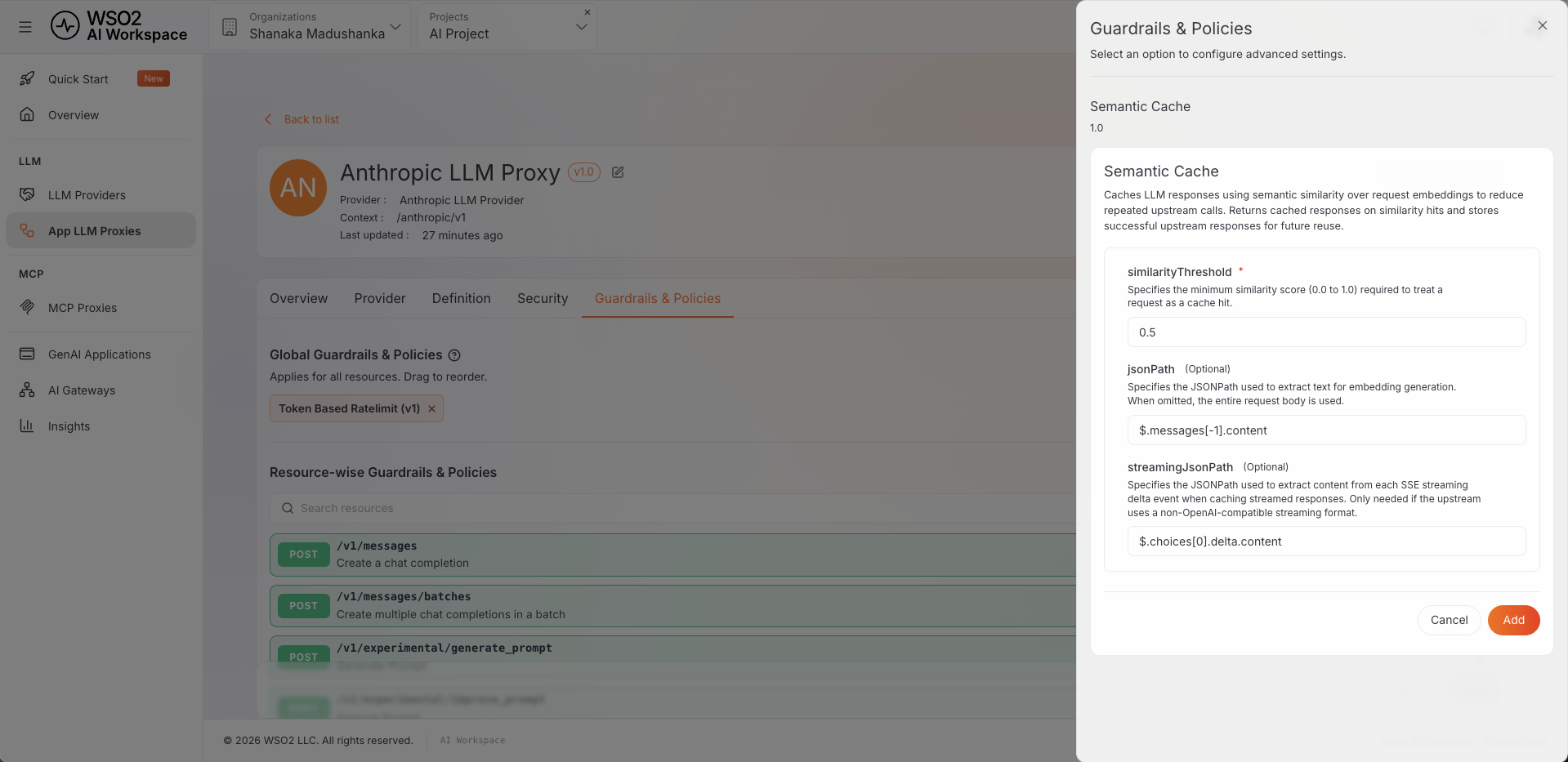
Step 3 - Turn On Semantic Caching
Engineers ask similar questions all day - "explain this stack trace", "write a unit test for this function". Semantic caching recognizes when a new request is semantically close to a previous one and serves the cached response instead of calling the model again.
- Enable it on the AI API.
- Tune the similarity threshold to balance freshness against savings.
The result is fewer upstream calls, faster responses, and a lower bill - with no change in developer behavior.
Step 4 - Add Guardrails (a cost lever too)
Guardrails such as prompt/response word and sentence limits, and JSON schema validation are usually framed as safety features - but limits on response length also bound token consumption, and therefore cost, on every call.
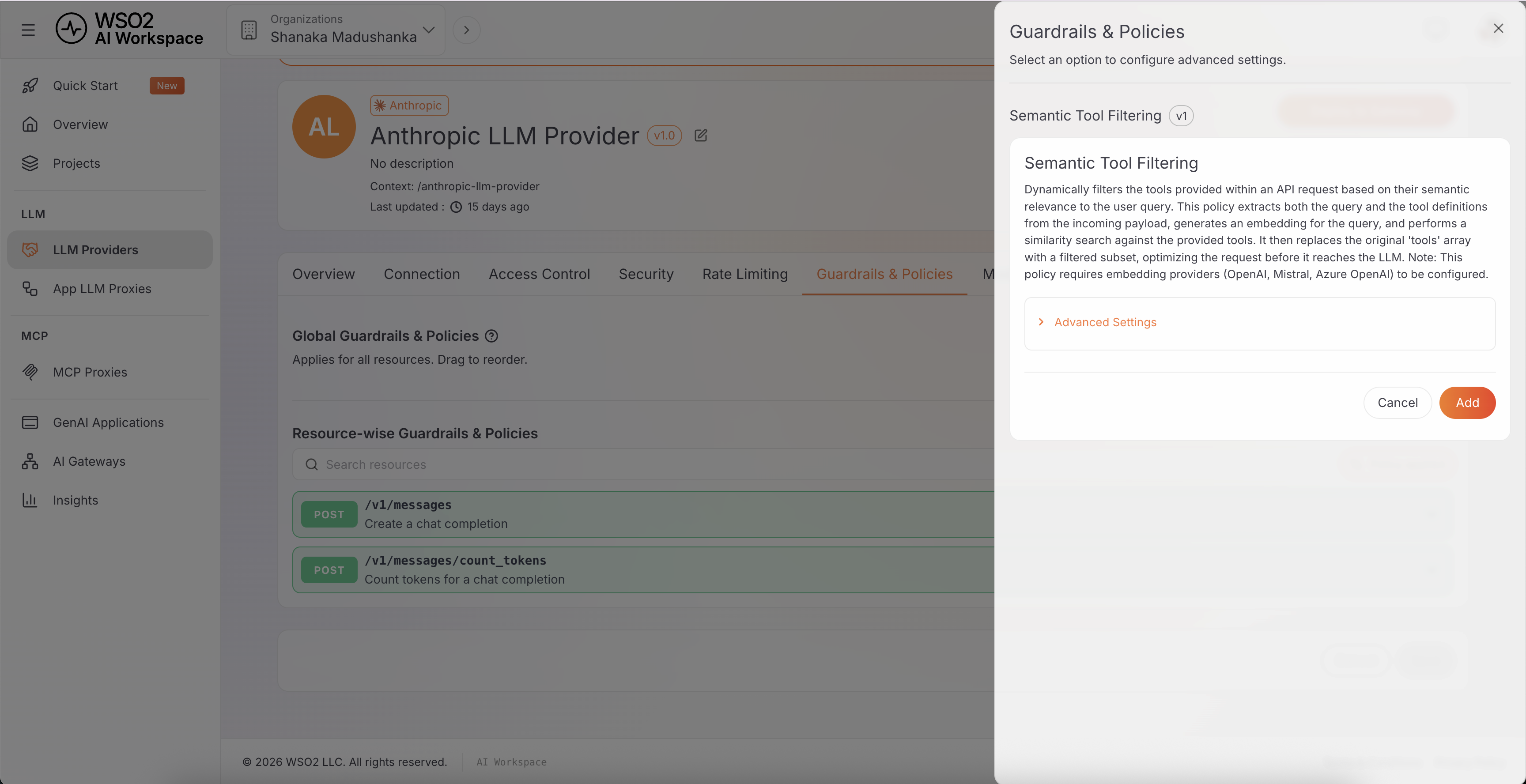
Step 5 - Filter Tools with Semantic Tool Filtering
Claude Code sends its full tool schema - Read, Edit, Bash, Grep, every MCP tool a developer has wired up - on every single request, whether or not that turn actually needs them. With a handful of MCP servers configured, that's thousands of tokens of tool definitions repeated on every call, most of which the model never touches.
The Semantic Tool Filtering policy embeds the user's query and each tool's description, ranks tools by similarity to the query, and rewrites the request to include only the relevant subset before it reaches the model:
- Choose a selection mode - By Rank keeps the top-K most relevant tools, By Threshold keeps every tool above a similarity score.
- Point it at the query and tools fields in the request body (Claude Code's Messages payload works out of the box).
Fewer tool definitions on the wire means fewer prompt tokens billed on every single request, not just the expensive ones.
Step 6 - Shrink Prompts with the Prompt Compressor
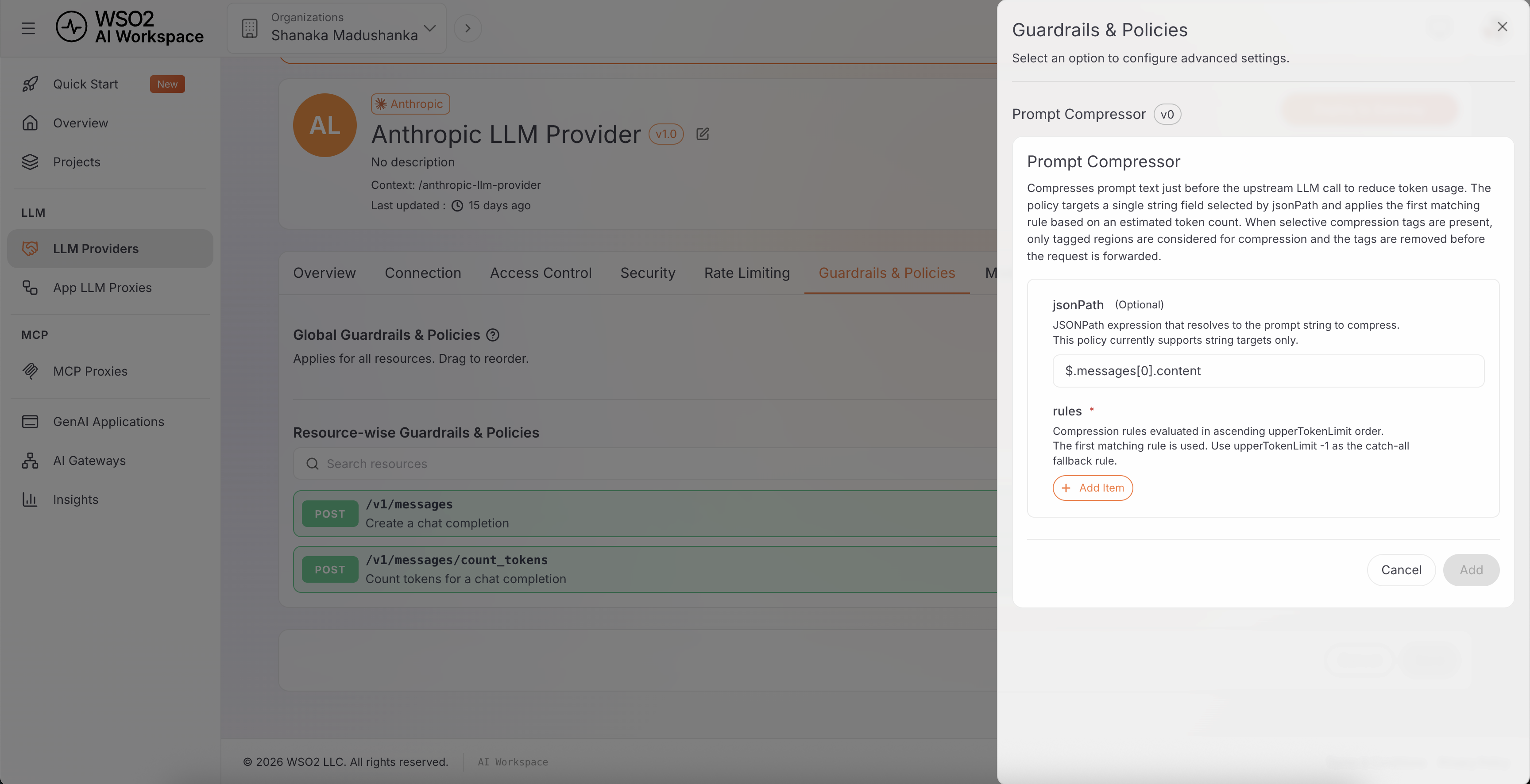
Long system prompts, CLAUDE.md project context, and multi-turn conversation history all count against the token bill on every call in a session, and that history only grows as a session goes on. The Prompt Compressor policy compresses prompt text at the gateway before it leaves for the model, cutting the tokens the upstream call is billed for without changing what the developer sees.
Apply it on the AI API alongside semantic caching and semantic tool filtering - the three compound, since a smaller, more relevant request is also more likely to hit the semantic cache on a repeat query.
Verify
- Send a burst of test requests and confirm the gateway throttles once a token threshold is crossed.
- Confirm a repeated, semantically similar prompt returns a cached response (lower latency, no upstream call).
- Send a request with a large tool list and confirm only the semantically relevant tools reach the upstream call.
- Compare prompt token counts before and after enabling the Prompt Compressor on the same request.
Part 3: Point Claude Code at the Gateway
Goal: Redirect Claude Code to the gateway. Claude Code reads a small set of environment variables (or equivalent settings.json keys) that control where requests go and how they authenticate.
Step 1 - Apply the Core Configuration
Set the base URL and API key. Using environment variables:
# Send all traffic to the AI Gateway instead of the provider directly
export ANTHROPIC_BASE_URL=https://ai-gw.your-org.com/anthropic/v1

# Authenticate to the gateway (sent as the x-api-key header)
export ANTHROPIC_API_KEY=<gateway-issued-key>
ANTHROPIC_BASE_URLis the key setting - it tells Claude Code to send every/v1/messagesrequest to your gateway.ANTHROPIC_API_KEYis the credential the gateway issues to the developer, sent on thex-api-keyheader. The gateway validates this key to authenticate the incoming request, then attaches the upstream provider credentials - which stay locked inside AI Workspace - before forwarding to the LLM.
For local development, point Claude Code at your local gateway instead:
# Skip TLS verification if your local gateway serves a self-signed certificate
export NODE_TLS_REJECT_UNAUTHORIZED=0
export ANTHROPIC_BASE_URL=https://localhost:8443/anthropic/v1
export ANTHROPIC_API_KEY=<gateway-issued-key>
If ANTHROPIC_API_KEY doesn't authenticate against your gateway, set the header directly with ANTHROPIC_CUSTOM_HEADERS instead:
export ANTHROPIC_CUSTOM_HEADERS="x-api-key: <gateway-issued-key>"
Or set the same values in Claude Code's settings.json, which is cleaner for a managed rollout:
{
  "env": {
    "ANTHROPIC_BASE_URL": "http://localhost:8443/anthropic/v1",
    "ANTHROPIC_API_KEY": "<gateway-issued-key>"
  }
}
or
{
  "env": {
    "ANTHROPIC_BASE_URL": "http://localhost:8443/anthropic/v1",
    "ANTHROPIC_CUSTOM_HEADERS": "x-api-key: <gateway-issued-key>"
  }
}
Step 2 - Issue Per-Developer API Keys
For a large team, do not hand out one shared key - that destroys per-developer attribution. Instead, generate a separate API key per developer (or per team) directly on the LLM Proxy's AI API page in AI Workspace.
- In AI Workspace, open the AI API backed by your LLM Proxy.
- Generate a new API key for the developer (or team). AI Workspace issues a unique, revocable key tied to that key's identity - there is no need to mint or sign anything yourself.
- Distribute the generated key to the developer, who sets it as
ANTHROPIC_API_KEY(orANTHROPIC_CUSTOM_HEADERS) exactly as shown in Step 1.
Because the key itself carries the developer's identity, every request already arrives at the gateway pre-attributed - no custom token-minting scheme is required. AI Workspace maps usage on that key straight to its owner in the dashboard, and you can revoke or regenerate one developer's key without touching anyone else's.
For teams that want each developer to pull their key from a central secrets manager instead of copy-pasting a static value, point Claude Code's apiKeyHelper at a script that fetches the already-issued key:
#!/bin/bash
# ~/bin/get-gw-key.sh
# Fetch this developer's AI Workspace-issued API key from the org vault
vault kv get -field=api_key secret/ai-gateway/${USER}
{
  "apiKeyHelper": "~/bin/get-gw-key.sh"
}
This only changes where the key is retrieved from on the developer's machine - the key itself is still the one AI Workspace issued to their application in step 3, not a token generated on the fly.
Verify
- Run Claude Code and confirm a request appears in the AI Workspace dashboard, tagged with the developer's identity.
- Confirm the request was served (or cached) through the gateway rather than going to the provider directly.
Part 4: Monitor the Cost and Usage from the AI Workspace Insights Menu
Goal: Group all Claude Code traffic under a single Gen AI Application in AI Workspace, map the per-developer API keys from Part 3 to it, and use the Insights menu as your single pane of glass for AI spend.
Step 1 - Create a Gen AI Application
A Gen AI Application is the entity AI Workspace uses to roll up usage analytics for a given piece of software - in this case, "Claude Code" itself, shared by every developer on the team.
- In AI Workspace, go to GenAI Applications and create a new application, e.g.
Claude Code - Engineering. - This does not replace the LLM Proxy you deployed in Part 1 - the proxy still does the routing to Anthropic. The Gen AI Application sits alongside it purely as the unit that keys and usage data are attributed to.
Step 2 - Attach the Per-Developer API Keys
Each key you generated per developer in Part 3, Step 2 can be associated with this application:
- Open the
Claude Code - EngineeringGen AI Application in AI Workspace. - Attach the existing per-developer API keys to it (or attach new ones as you generate them going forward).
Once attached, every request made with an associated key is automatically scoped to the application - no extra request tagging is required. Because each key is already unique per developer, attaching them all to one Gen AI Application gives you a single roll-up view for all of Claude Code's traffic, while preserving the per-developer breakdown underneath.
Step 3 - Monitor from the Insights Menu
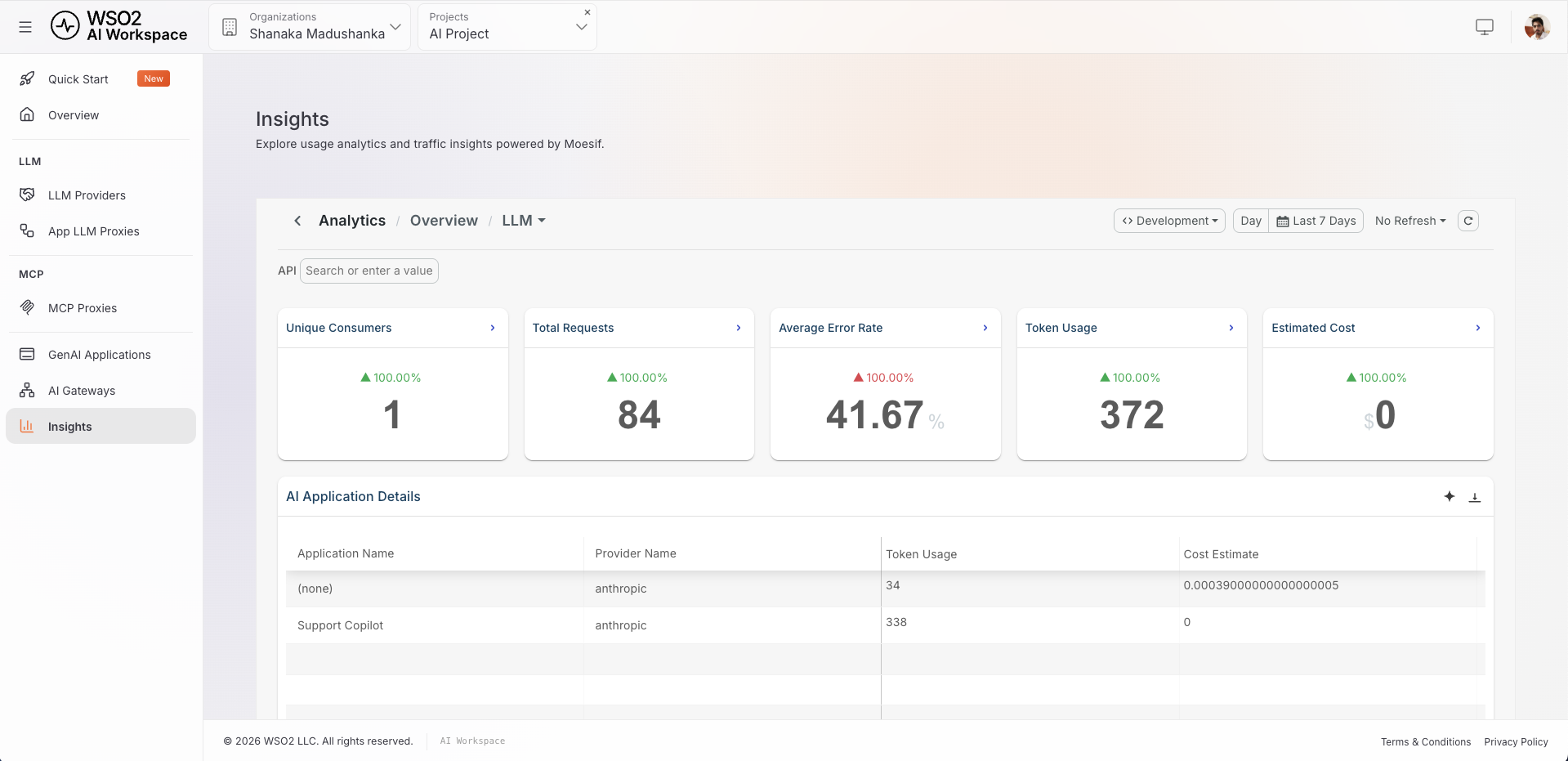
Open Insights in AI Workspace and select the Claude Code - Engineering Gen AI Application to see metrics scoped to just that application's traffic:
- Total requests and unique consumers (developers).
- Token usage, broken down into prompt vs. completion tokens.
- Estimated cost across LLM endpoints.
- Latency and error rates.
- Requests by provider and traffic by model.
- Guardrail triggers and error breakdowns.
Close the Loop
- Spot heavy consumers. Identify the teams or developers driving the most spend.
- Tighten the caps. Adjust token and cost caps where usage is disproportionate.
- Raise the cache hit rate. If many calls are repetitive, tune semantic caching to capture more of them.
- Forecast. Use the trend data to predict next month's bill and set budgets proactively.
This is the difference between reacting to an AI invoice and governing AI spend.
End-to-End Flow
Here is the full picture, from a developer running a command to the controlled, observable spend that results:
- A developer runs Claude Code, which is configured (via
settings.json) to send every request to the AI Gateway with a short-lived, per-developer token. - The AI Gateway checks the developer's token-based rate limit and cost cap, serves a semantically cached response if one exists, and otherwise filters out irrelevant tool definitions, compresses the prompt, and forwards the request — with provider credentials it holds centrally — to the Claude model.
- Every request is tagged with session and agent IDs, so cost is attributable down to the individual subagent.
- Because the developer's key is attached to the
Claude Code - EngineeringGen AI Application, AI Workspace rolls all of this up into the Insights menu, where admins monitor spend, enforce caps, and tune policy for the entire organization.
You started with N developers each spending invisibly against their own keys. You end with one governed, observable, capped, cache-optimized path for all AI traffic — without changing how a single engineer does their work.
Key Takeaways
- Centralize the path. Point every Claude Code instance at one gateway with
ANTHROPIC_BASE_URL; that chokepoint is where all cost control becomes possible. - Throttle on tokens, not just requests. LLM cost scales with tokens — use token-aware rate limiting and cost caps to stop runaway spend.
- Cache the repetitive. Semantic caching lowers the bill with zero change to developer behavior.
- Trim what you send. Semantic tool filtering strips irrelevant tool definitions and the Prompt Compressor shrinks prompt text, so every request carries fewer billable tokens.
- Attribute everything. Per-developer tokens plus Claude Code's session and agent headers give you cost visibility from org down to subagent.
- Group traffic under a Gen AI Application. Attaching every developer's key to one Gen AI Application rolls Claude Code's usage into a single, filterable entity in AI Workspace.
- Govern from one place. The AI Workspace Insights menu turns scattered, invisible spend into a single view you can monitor and tune.
Want to go deeper? Explore the WSO2 AI Gateway, the AI Workspace, and the Claude Code LLM gateway configuration docs - or try it all yourself on the WSO2 API Platform.

