Semantic Caching for LLMs: Cut Cost & Latency
Engineers trim prompts or switch models to reduce LLM bills. These changes save little. The largest expense comes from paying full price to answer duplicate questions. Support assistants, internal copilots, and RAG apps receive near-identical queries daily. A standard cache never catches them because the wording is never identical.
Semantic caching compares prompt embeddings to match user intent instead of exact text. This guide explains how it works and the vector similarity threshold mechanism. The guide also covers real-world accuracy trade-offs and shows how to run a semantic cache at the gateway in WSO2 API Platform.
What Is Semantic Caching (for LLMs)?
Semantic caching is a caching technique that reuses a stored LLM response when a new prompt is semantically similar to a previous one, rather than character-for-character identical. Semantic caching doesn’t hash the exact request string. Rather, the system converts an incoming prompt into a vector embedding. It searches a vector store for the nearest neighbor and returns the cached answer when similarity clears a threshold you’ve set.
That one change, matching on meaning instead of exact text, is what makes it useful for natural language. The prompts "What is your refund window?" and "How long do I have to send something back?" share no exact words, yet their vectors match.
Semantic Caching vs. Traditional (Exact-Match) Caching
Traditional caching keys on an exact match: same URL, same query string, same request body. It’s fast and deterministic, and it’s near-useless for prompts, because two users almost never phrase a question the same way. Hit rates on exact-match caching over conversational traffic are typically negligible.
| Aspect | Exact-match cache | Semantic cache |
|---|---|---|
| Match on | Identical request string / key | Vector similarity of meaning |
| Hit rate on NL prompts | Very low | Meaningfully higher |
| Lookup | Hash lookup | Embed + nearest-neighbor search |
| Main risk | Misses obvious paraphrases | False hit returns a subtly wrong answer |
| Infra | Key-value store | Embedding model + vector store |
This trade introduces a failure mode called a false hit. When two distinct questions generate similar embeddings, the cache returns a wrong answer. You trade high miss rates for subtle accuracy errors.
How Semantic Caching Works
Embedding, similarity search, hit or miss
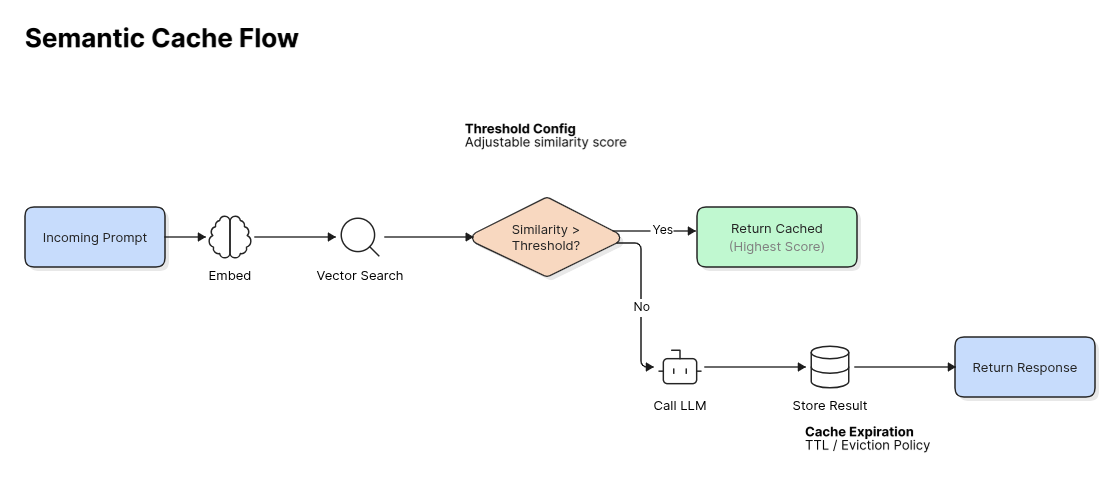
An incoming prompt passes through three steps:
- An embedding model converts the prompt into a vector.
- The cache runs a nearest-neighbor search against stored vectors.
- The system compares the top match score against your threshold.
Scores above the threshold return the cached response immediately. Scores below the threshold trigger an LLM call. The system then stores the new prompt vector and response for future queries.
Similarity thresholds
The similarity threshold controls cache accuracy. Set the threshold low at, for example 0.80, and unrelated prompts collide, returning incorrect cached answers. Set it too high at 0.99 and the system misses simple paraphrases, degrading into a standard key-value store.
Production systems generally require cosine-similarity thresholds between 0.85 and 0.95. Higher values protect applications that demand strict precision. Lower values increase hit rates for fault-tolerant applications like basic customer support.
Vector databases
Stored vectors live in a vector store optimized for nearest-neighbor search, such as Redis (vector search) or Qdrant. The embedding model and the vector store are the two moving parts an exact-match cache doesn’t need. An AI gateway can manage all that for you rather than having to build custom pipelines for every app.
Benefits (Cost, Latency, Efficiency)
Semantic caching lowers infrastructure costs and cuts response times. Every cache hit skips an external model request. Vector lookups return results in milliseconds, compared to more latency for an LLM generation.
Cache hits also protect your rate limits. Because cached responses bypass upstream providers, your application absorbs traffic spikes without hitting API quotas or throttling users. You pay only for unique queries.
Best Practices & Trade-offs
-
Start conservative on the threshold. Begin around 0.95 and loosen only after you measure false-hit rates on real traffic. A wrong cached answer destroys trust faster than a cache miss costs money.
-
Set a TTL. Set a strict time-to-live limit on every vector entry. Stale answers serve outdated prices and old policies to your users. Force the cache to expire entries so the model regenerates fresh responses.
-
Never cache personalized or real-time responses. If the answer depends on the specific user, their permissions, or live data, a semantic hit will leak or mislead. Scope caching to general, stable questions.
-
Watch for false hits. Log every cache hit with its similarity score. Sample low-confidence hits manually to verify response accuracy. When users receive answers to the wrong question, raise your threshold immediately.
-
Cache invalidation is the hard part. Plan how a content or policy change purges affected entries, not just TTL expiry.
Semantic Caching at the Gateway (WSO2)
Implementing semantic caching inside every application means each team stands up its own embedding model, vector store, and threshold logic, and tunes them separately. Doing it at the gateway means implementing it once.
The WSO2 AI Gateway provides semantic caching as a gateway policy: an embedding-based cache with configurable similarity thresholds and TTLs, applied to AI APIs without changing application code.
Let’s see how it works using AI Gateway and AI Workspace.
Before proceeding, make sure to meet the following prerequisites:
- You have signed in to AI Workspace.
- You have created an organization in the AI Workspace.
- You have created a project in the organization.
To add the semantic cache policy, you must configure its details in the following components:
- Configure embedding provider and vector database details in your gateway configuration file.
- Specify the similarity threshold in AI Workspace.
Follow these steps to set up an AI Gateway instance with these details and connect the instance to AI Workspace:
-
Go to the AI Gateways screen to add a new AI Gateway.
-
Enter your gateway details and then click Add Gateway.
-
The next screen shows a set of quickstart instructions for setting up the gateway runtime:
- Download the gateway and configure it.
- Open the
/configs/config.tomlfile and specify embedding provider and vector database details for semantic caching. Here’s a sample configuration that uses Redis:
vector_db_provider = "REDIS"
vector_db_provider_host = "redis"
vector_db_provider_port = 6379
vector_db_provider_database = "0"
vector_db_provider_username = "default"
vector_db_provider_password = "default"
vector_db_provider_ttl = 3600

embedding_provider = "OPENAI"
embedding_provider_endpoint = "https://api.openai.com/v1/embeddings"
embedding_provider_model = "text-embedding-3-small"
embedding_provider_dimension = 1536
embedding_provider_api_key = "YOUR_EMBEDDING_PROVIDER_API_KEY"
If you set up Redis as a vector database, make sure to use a compatible Redis version with the Redis Search module. Specify the vector database configurations at the top of the configuration file.
-
Start the gateway.
The AI Gateways screen shows your connected gateway and labels it as active.
Next, follow these instructions to configure an LLM Provider and deploy it to the AI Gateway instance.
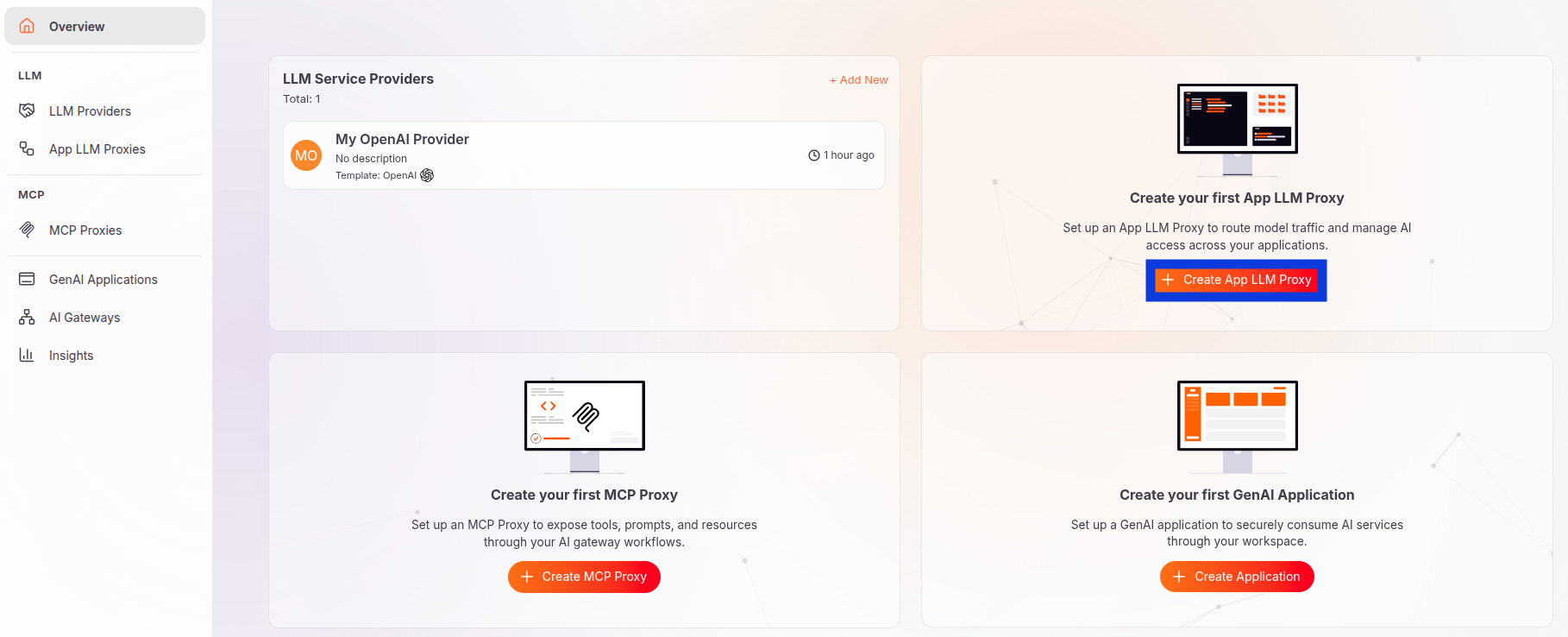
Next, create an App LLM Proxy:
- In your project overview screen, create a new App LLM Proxy
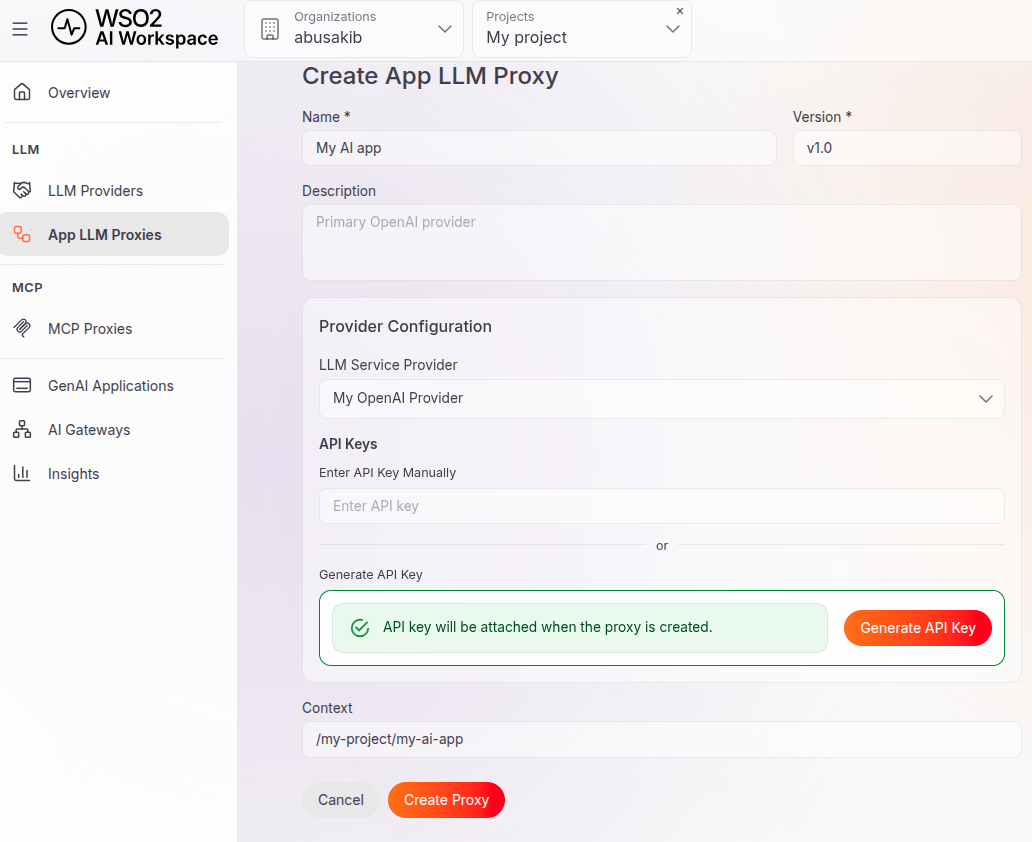
- Specify Proxy details:
- Enter the Proxy name.
- Specify the LLM Provider.
- Specify an API key or generate one and copy it to a safe location.
- Click Create Proxy.
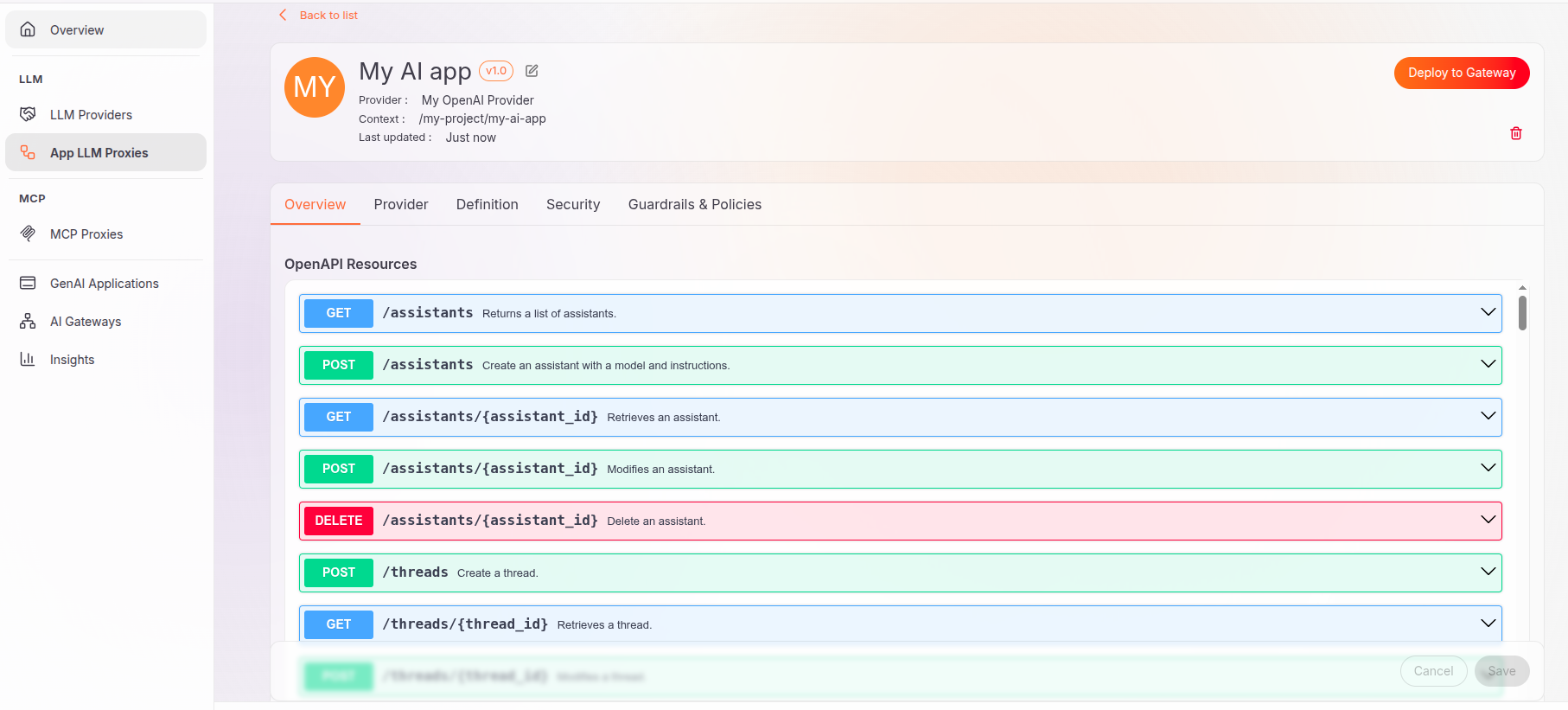
A successful creation places you in the overview screen of your App LLM Proxy:
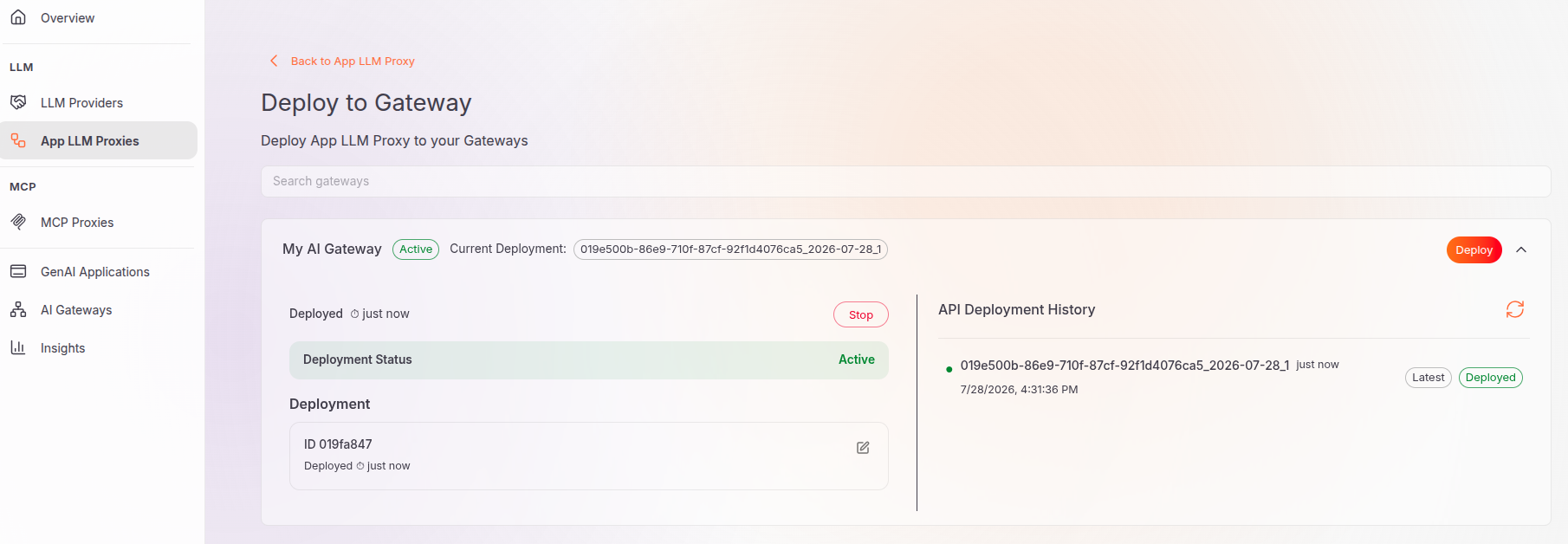
Now deploy the Proxy to the AI Gateway:
- Click Deploy to Gateway.
- Make sure to select the gateway instance you want to deploy the Proxy to. Then click Deploy.
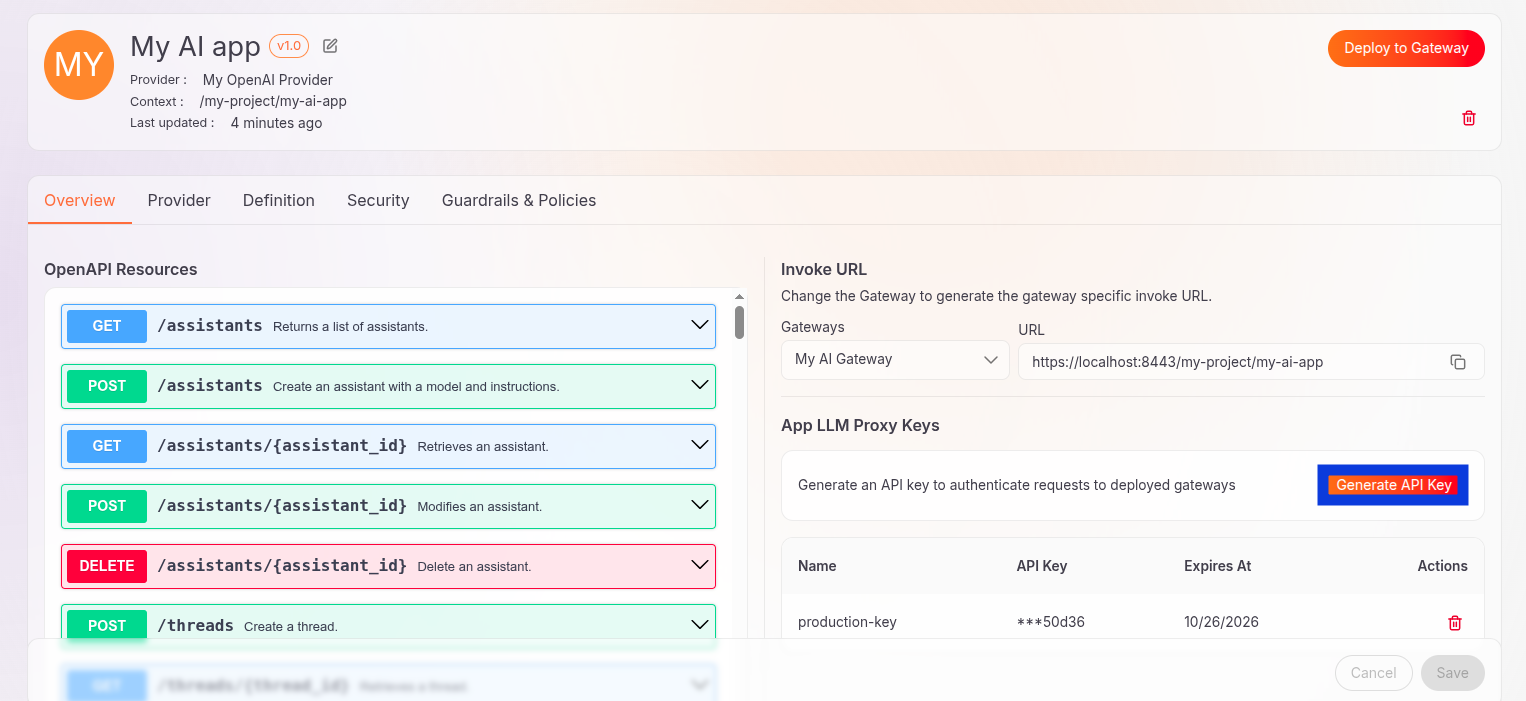
The Proxy screen shows a URL through which you can start making requests. But first, generate an API key to authenticate requests and copy it to a safe location:
Next, follow these steps from your App LLM Proxy screen to configure the rest of the semantic caching details:
- Go to the Guardrails & Policies tab.
- Click Add and choose the Semantic Cache policy.
- Set the similarity threshold, starting with
0.95for example. - Optionally set JSON paths. Set a JSON path. For example, the JSON path
$.messages[0].contentfilters the content of a message in the Chat Completions API. Specify a JSON path to avoid processing the entire request body. It also prevents false matches when distinct prompts share identical request fields. - Click Add.
- Deploy the Proxy to apply the changes.
Now test with paraphrased prompts by sending requests to your App LLM Proxy. For example:
{
  "model": "gpt-4o-mini",
  "messages": [
    {
      "role": "user",
      "content": "How do I reset my google account password?"
    }
  ]
}
The second prompt can look like this:
{
  "model": "gpt-4o-mini",
  "messages": [
    {
      "role": "user",
      "content": "What is the process for changing my google login password?"
    }
  ]
}
Verify the cache hit by observing the value of the response header x-cache-status. A cache hit sets the header value to HIT. For the first prompt, the header value is MISS.
Because it runs in the same control plane as token-based rate limiting, guardrails, and multi-provider routing, the cache is one policy among several the gateway already enforces, and its hits show up in the same observability view as the rest of your AI traffic.
For more information about cost control, see AI cost attribution and optimization for LLM consumption.
The following diagram illustrates how the semantic cache works:
Frequently Asked Questions
What is semantic caching in LLMs? It’s caching that reuses a stored response when a new prompt means the same thing as an earlier one, matched by embedding similarity rather than exact text.
How is it different from normal caching? Normal caching needs an identical key. Semantic caching embeds the prompt and matches on vector similarity, so it catches paraphrases that exact-match caching misses.
What similarity threshold should I use? Most teams operate between 0.85 and 0.95 cosine similarity. Start high (around 0.95) to minimize false hits, then tune against real traffic.
When should I not use semantic caching? Avoid it for personalized, permission-sensitive, or real-time responses, where a cached answer would be wrong or leak data.
Does semantic caching reduce cost? Yes. Every hit avoids a billable model call and cuts latency, which is why gateways offer it as a first-line cost control.
Conclusion
Semantic caching improves cost, latency, and resilience at the same time. It’s the only cache design that works on natural-language prompts. False hits are a downside. However, it poses no risk as long as you pay attention to the threshold, TTL, and never cache personalized data. Running semantic caching at the gateway turns all of this into one policy every application can inherit.
To see how caching fits with routing, guardrails, and cost control in one control plane, explore WSO2 AI Gateway.

