MCP Server Authentication: OAuth 2.1 Guide
When an MCP server ran only on your laptop over stdio, "authentication" meant "it’s my machine." The moment that server goes remote and an agent halfway across your network can invoke its tools, that assumption collapses. A remote MCP server is a networked entry point into whatever systems its tools touch, and without authentication, anyone who can reach it can drive those tools. This guide covers what MCP server authentication is, how the OAuth 2.1 flow works, the confused-deputy problem that trips teams up, and how to delegate the whole thing to an identity provider.
What Is MCP Server Authentication?
MCP server authentication is how a remote MCP server verifies the identity of the client (agent) calling it, and establishes what that caller is allowed to do. Since a major 2025 update, the Model Context Protocol defines an OAuth 2.1-based authorization framework for this, which is what made it safe to expose MCP servers beyond a single machine.
Under the current spec, the MCP server is purely an OAuth resource server. It validates tokens and serves protected content, but it never issues them; user authentication, consent, and token issuance all belong to a separate authorization server that the MCP server merely points to.
Authentication answers "who is calling." It’s the precondition for everything else, because you can’t enforce access rules on a caller you can’t identify.
Authentication vs.Authorization in MCP
The two are constantly conflated and they’re different jobs:
-
Authentication: verifying the caller’s identity (the token is valid and belongs to a known principal).
-
Authorization: deciding what that authenticated caller may do (which tools, which scopes, which data).
MCP’s OAuth 2.1 framework gives you authentication and the token machinery. It does not give you organizational authorization policy, which team's agent may hold which scopes, and therefore call which tool. That lives in your gateway or identity layer. This is the same "MCP provides connectivity, not governance" gap explained in what a gateway adds when governing MCP traffic.
How MCP Authentication Works (OAuth 2.1 Flow)
Remote servers (HTTP): OAuth 2.1 + PKCE
For remote servers over streamable HTTP, MCP uses OAuth 2.1 with PKCE (Proof Key for Code Exchange), which protects the authorization-code exchange against interception. When an unauthenticated client calls a protected server, the server responds with a 401 and points the client to authorization-server metadata (protected-resource metadata discovery), so the client can find where and how to get a token. The client runs the OAuth flow, obtains an access token, and retries the call with it.
Local servers (stdio): trust boundaries / API keys
For local stdio servers running on the same machine as the client, the trust boundary is the machine itself. OAuth's redirect-based flow doesn't fit process-to-process stdio, so the spec directs local servers to rely on the OS trust boundary and retrieve credentials from the environment rather than running a full OAuth exchange.
The OAuth Flow Step by Step
At a high level, protecting a remote MCP server with OAuth 2.1 looks like this:
-
Unauthenticated call → 401. The agent calls a tool. The server rejects it with a
WWW-Authenticateheader carrying aresource_metadataURL, which points at the server's own protected-resource metadata document. -
Discovery. The client fetches that document to learn which authorization server to use, then fetches the authorization server's metadata to find the token endpoint and supported scopes.
-
Registration. Before it can start the flow, the client needs a client ID. Current guidance is a Client ID Metadata Document, where the client ID is an HTTPS URL the authorization server fetches. Pre-registration also works. Dynamic Client Registration still functions but is deprecated.
-
Authorization with PKCE. The client obtains user consent and an authorization code, then exchanges the code (with its PKCE verifier) for an access token. It names the target server via the
resourceparameter so the token is minted for that audience. -
Authenticated call. The client retries the tool call with the access token in the request.
-
Token validation. The server validates the token - signature, issuer, audience, expiry, scopes, before executing the tool.
-
Scoped execution. The server executes only if the token's scopes permit that tool. If they don't, it returns 403 with an
insufficient_scopeerror naming the scopes required, and the client re-authorizes with the wider set rather than simply failing.
OAuth 2.1 flow diagram for a remote MCP server: agent makes an unauthenticated call, receives a 401 with metadata, runs the PKCE authorization-code flow against the authorization server, obtains an access token, and retries the tool call which the server validates before executing.
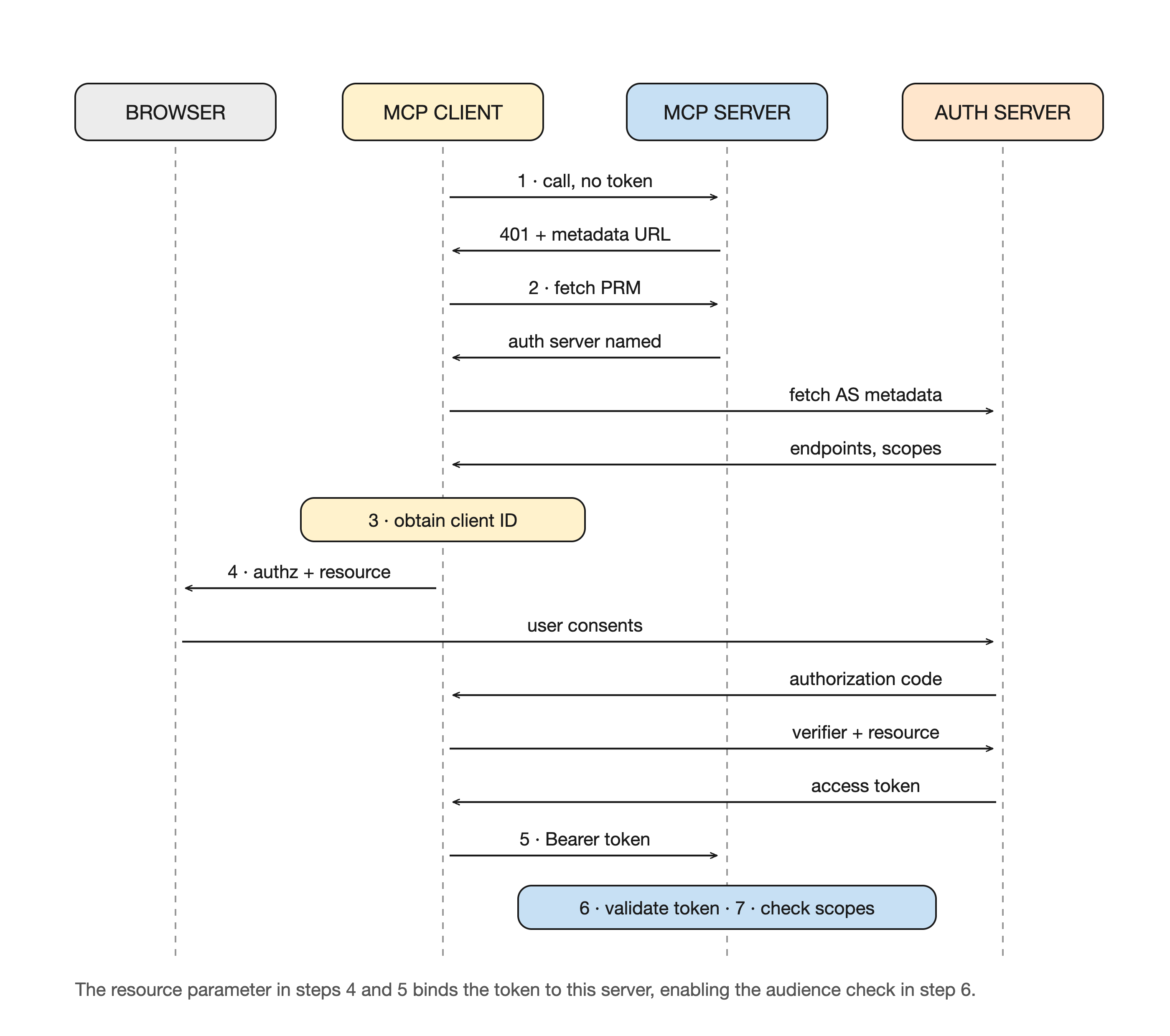
Figure 1: The 401 → discovery → registration → PKCE → validated call sequence.
MCP Authentication Best Practices & Pitfalls
-
Validate the token audience. A token minted for another service must be rejected. The
resourceparameter is what makes this possible: the client names the MCP server when requesting the token, and the server then checks that it is the intended audience. Without this check, a token issued for one service can be replayed against another. -
Watch for the confused-deputy trap in proxies. If your server proxies a third-party API using one static OAuth client ID for everyone, an attacker can exploit stored consent to have authorization codes redirected to themselves, with the consent screen skipped because the third party has seen that client ID before. Require per-client consent before forwarding any authorization request, validate redirect URIs exactly, and bind consent state to the specific client ID.
-
Use PKCE for every remote flow. It’s required by OAuth 2.1 and closes the code-interception gap.
-
Never let the agent hold downstream credentials. The agent presents a scoped token; the server (or gateway) exchanges it for the downstream API call. Raw backend credentials should never reach the model.
-
Scope narrowly. Issue the least privilege a tool needs. Broad scopes turn one leaked token into full access.
-
Short-lived tokens + rotation. Minimize the value of a stolen token.
-
Don’t reinvent it. Delegate to a real identity provider rather than hand-building token issuance and validation.
Delegating MCP Auth to an Identity Provider (How WSO2 Helps)
Let's see how WSO2 Identity Platform can handle MCP authentication for you, with per-tool access scopes enforced in VS Code.
Prerequisites
- WSO2 AI Gateway 1.2.0 or later, with an AI Workspace instance and at least one gateway showing Active.
- An organization in WSO2 Identity Platform.
- VS Code with GitHub Copilot signed in. MCP tools are only reachable through Chat's agent mode, so this is required to complete the walkthrough.
- A gateway URL that VS Code can reach over TLS. Unlike
curl -sk, VS Code verifies certificates. If your gateway serves a self-signed certificate, trust it in your OS store before starting. - An MCP server to protect. To follow along exactly:
npx -y @modelcontextprotocol/[email protected] streamableHttp
- An MCP Proxy already deployed in AI Workspace, pointing at that server, returning
200on an unauthenticatedinitializecall. Its gateway URL is the value used throughout:
GATEWAY=https://localhost:8443/default/mcp-servers-everything/mcp
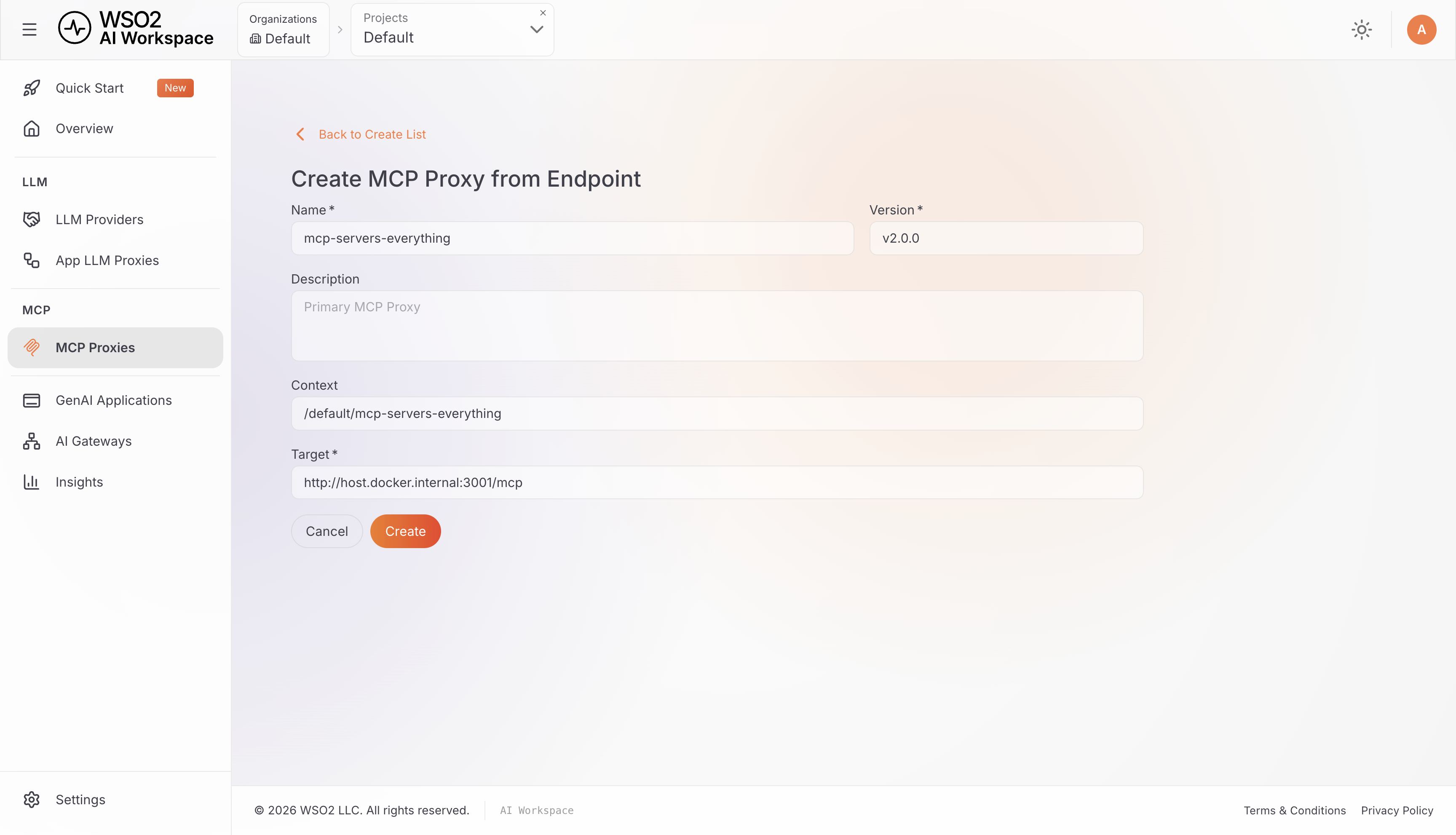
Deploy the MCP Proxy before starting Step 1. The identity provider needs the gateway URL as its resource identifier, and that URL does not exist until the proxy is live.
Step 1: Register the MCP server as a protected resource
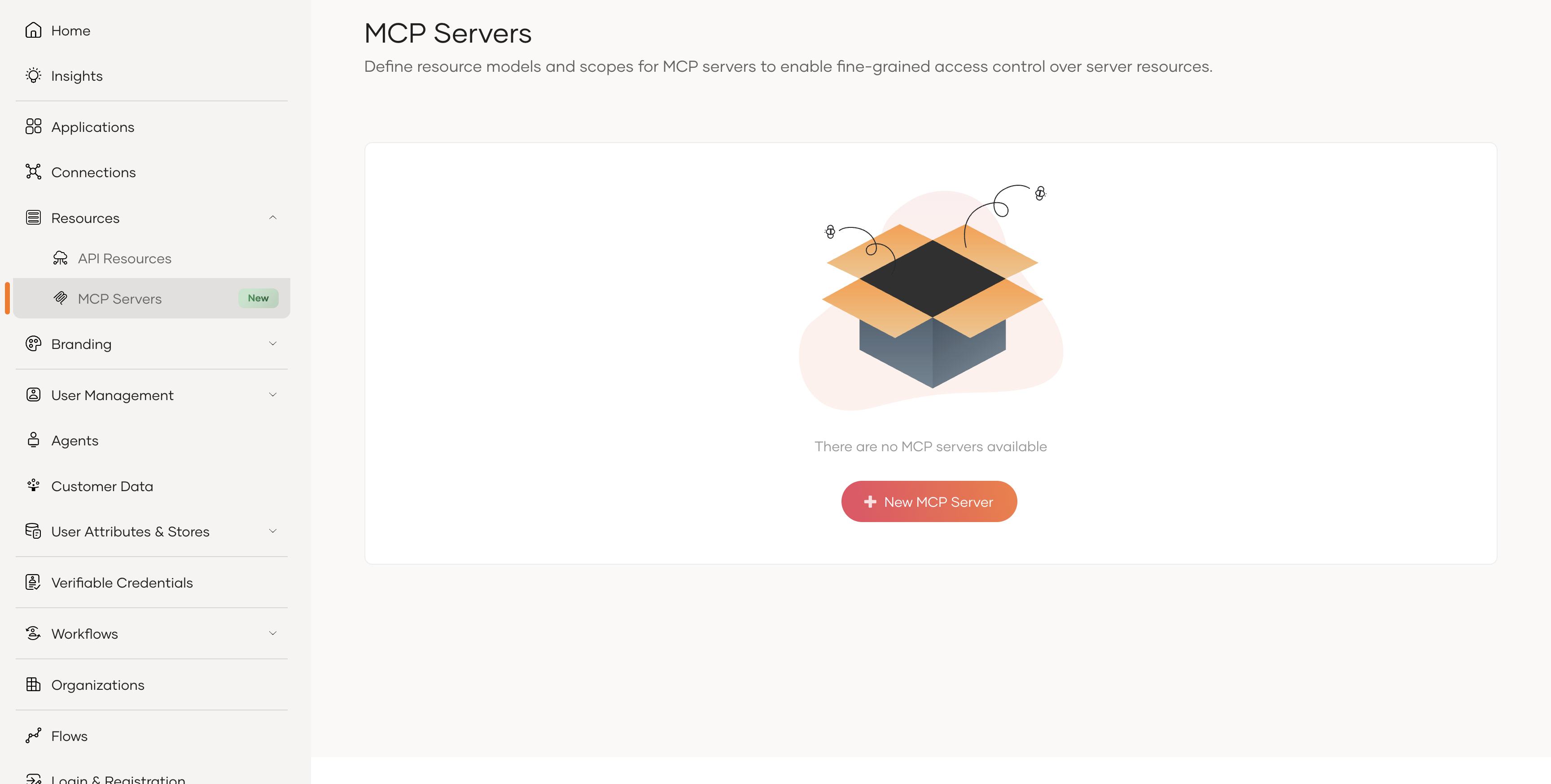
In the WSO2 Identity Platform console, go to Resources → MCP Servers → + New MCP Server.
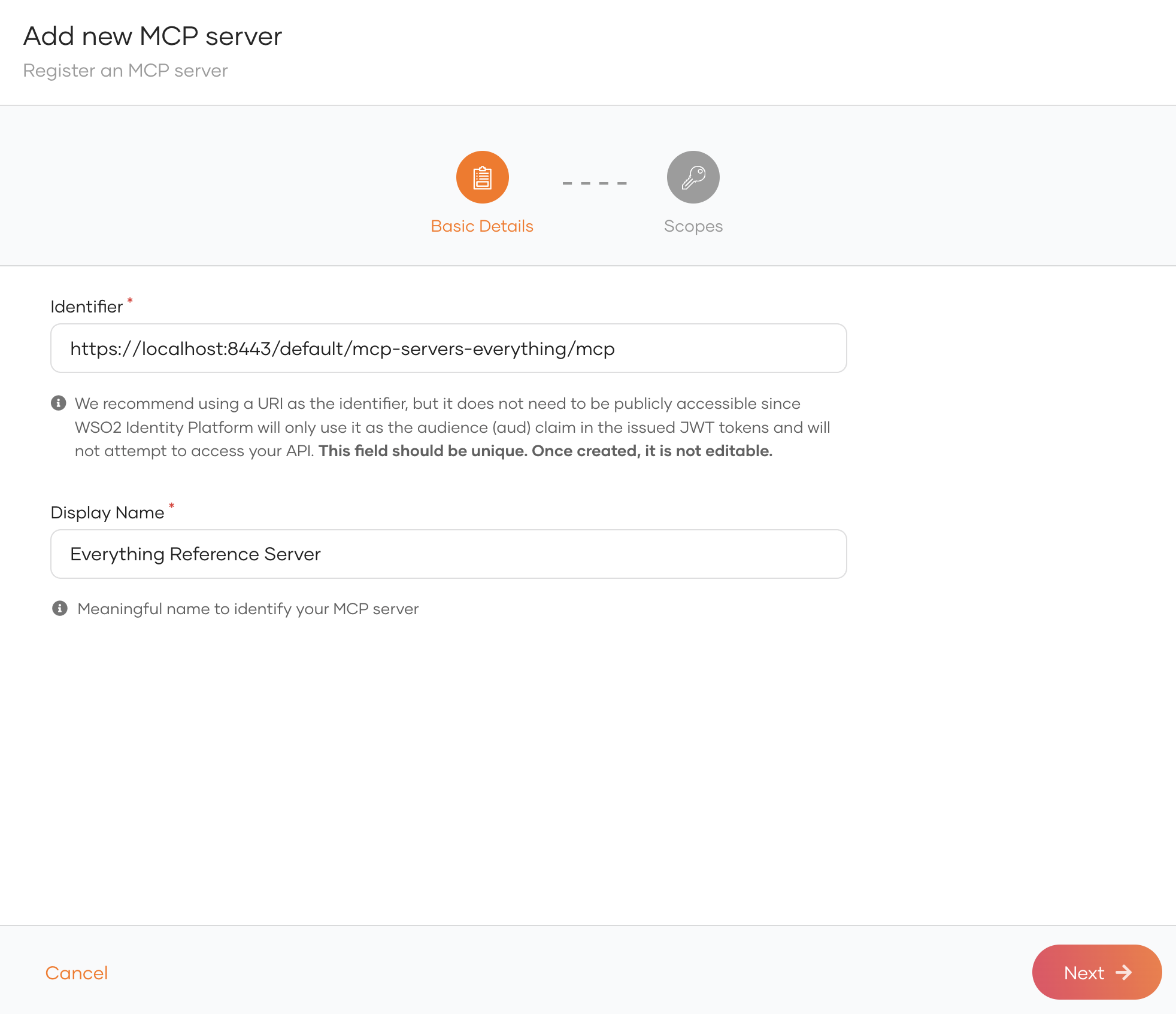
For the identifier, use the gateway URL. This value becomes the aud claim in every issued token and the resource field in the published metadata, so it must be the address clients actually call:
https://localhost:8443/default/mcp-servers-everything/mcp
Name the resource as Everything Reference Server.
On the Scopes tab, add one scope per tool you intend to expose, clicking Add Scope after each:
mcp:echo
mcp:get-sum
mcp:get-structured-content
mcp:get-annotated-message
mcp:get-tiny-image
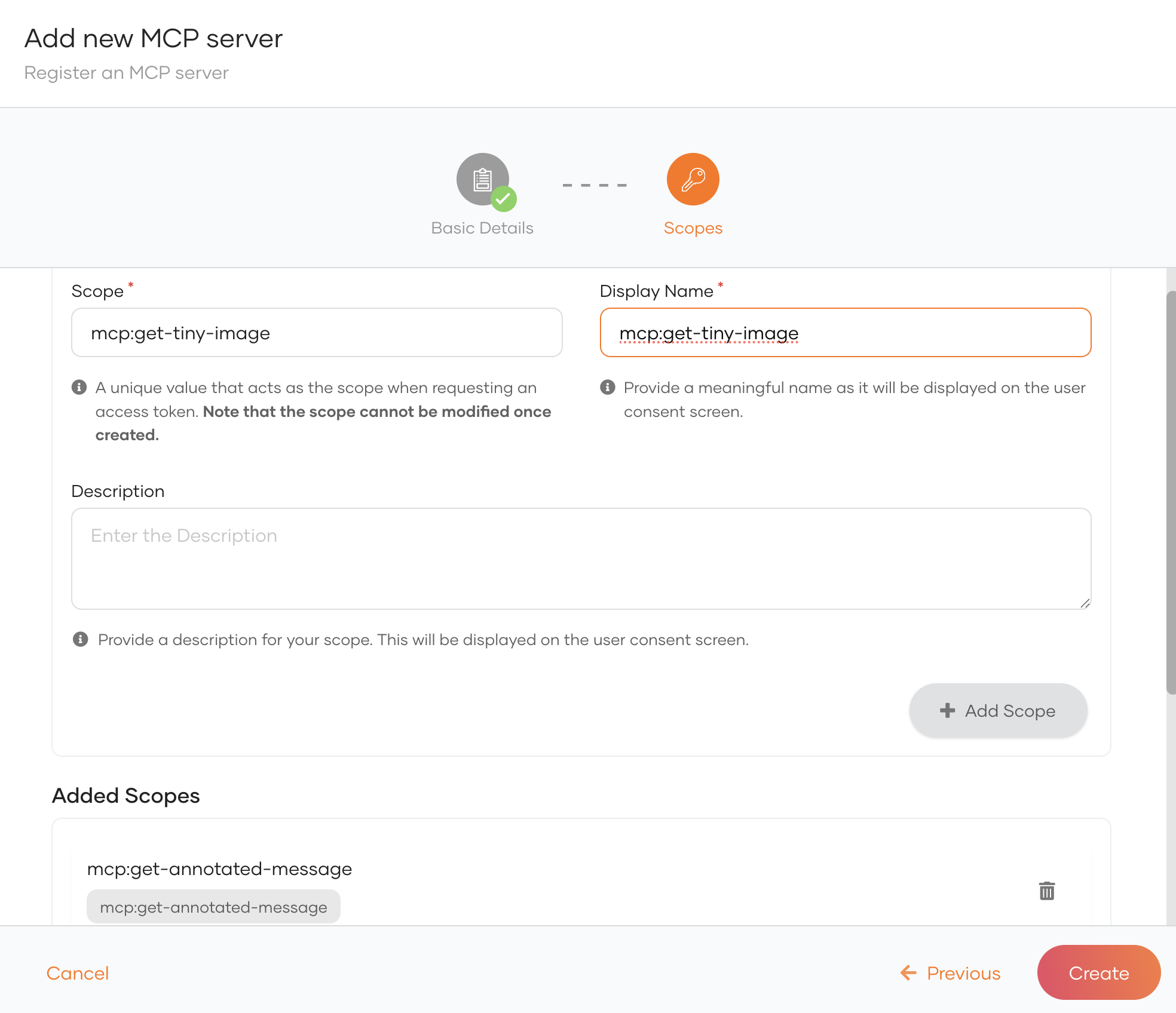
Click Create.
Step 2: Register the MCP client
Go to Applications → New Application and select MCP Client Application. Name the application VSCode.
Add the redirect URIs VS Code uses:
https://vscode.dev/redirect
http://127.0.0.1:33418/
Leave the public-client setting as the template sets it. VS Code runs on the user's machine and cannot keep a secret.
Then open the application's Authorization tab, click Authorize a resource, select Everything Reference Server, and click Select All for Authorized Scopes. Click Finish.
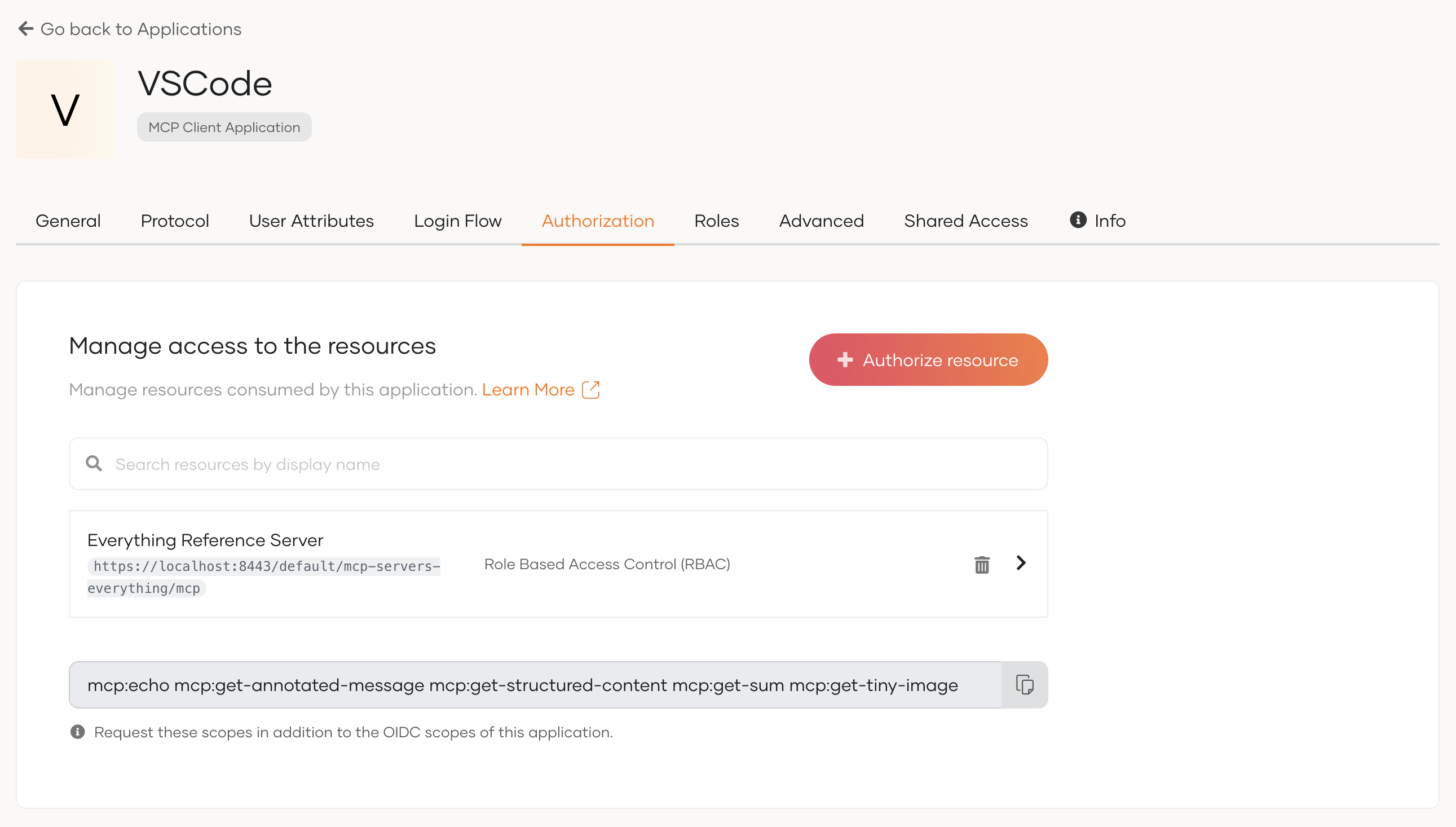
Collect the Client ID from the Protocol tab.
Step 3: Grant the user permission
First create a user to sign in as: User Management → Users → Add User. Give them a password.
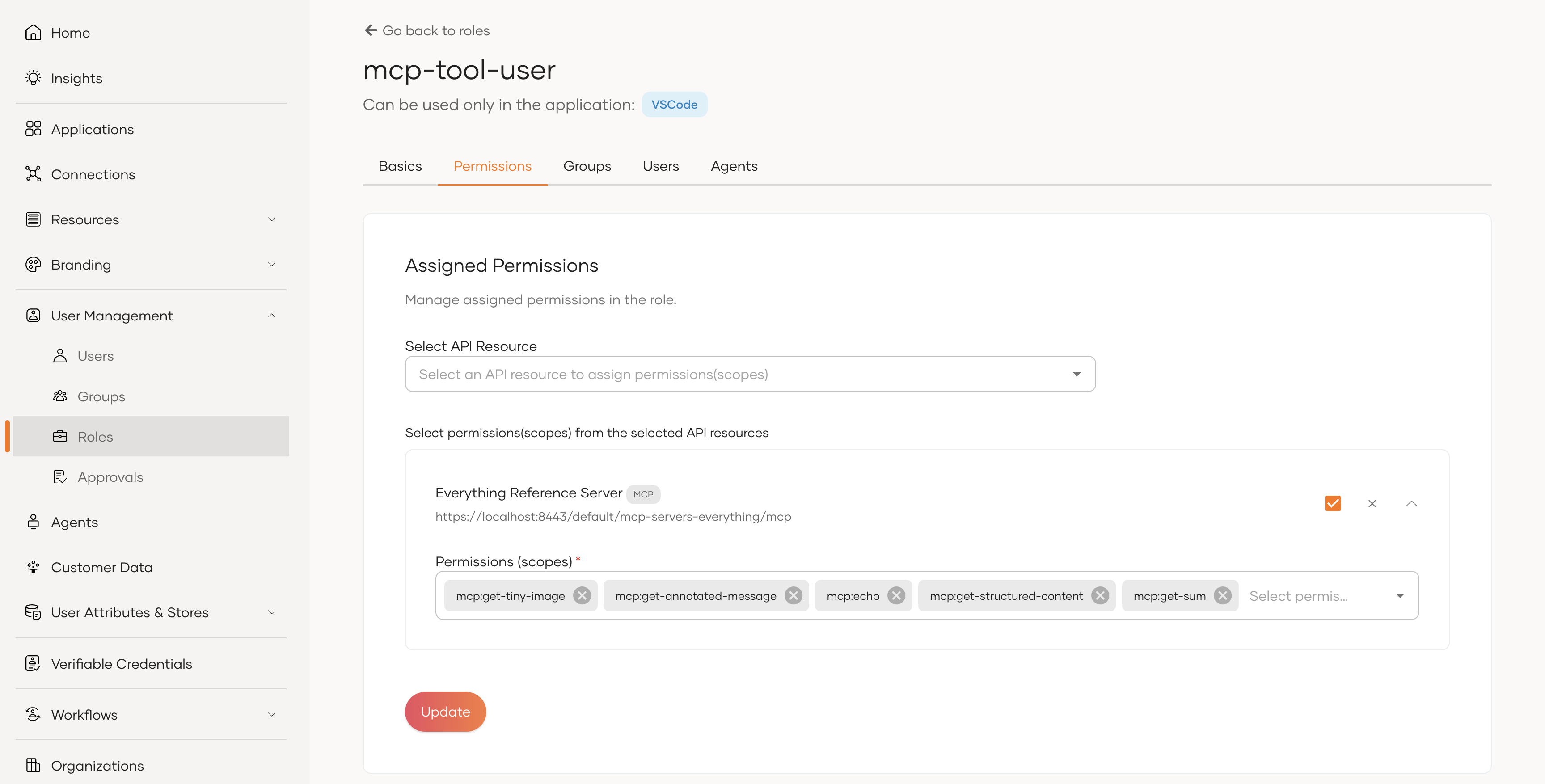
Then create a role, for example mcp-tool-user, with the audience set to Application and scoped to VSCode. Add the mcp: scopes from Everything Reference Server as its permissions, and assign your new user to it.
Step 4: Tell the gateway which identity provider to trust
The gateway validates token signatures against a configured key manager. Add the following configs to configs/config.toml in the gateway distribution directory.
[policy_configurations.mcpauth_v1]
gatewayhost = "localhost"

[policy_configurations.jwtauth_v1]
validateissuer = true

[[policy_configurations.jwtauth_v1.keymanagers]]
name = "IdentityPlatform"
issuer = "https://api.asgardeo.io/t/<your-org>/oauth2/token"

[policy_configurations.jwtauth_v1.keymanagers.jwks.remote]
uri = "https://api.asgardeo.io/t/<your-org>/oauth2/jwks"
skiptlsverify = false
Take issuer from the iss claim in the token you just decoded.
Restart the gateway runtime so the configuration is picked up:
docker compose restart gateway-runtime
Confirm it resolved by checking the logs for Policy chain update completed successfully with a non-zero route count.
Step 5: Attach the MCP Authentication policy
In AI Workspace, open the MCP Proxy, go to Policies → Add Policies, and choose MCP Authentication. Expand the Advanced Settings section.
Leave the fields empty. Clear the pre-filled values in userIdClaim and forwardedTokenHeader before saving.
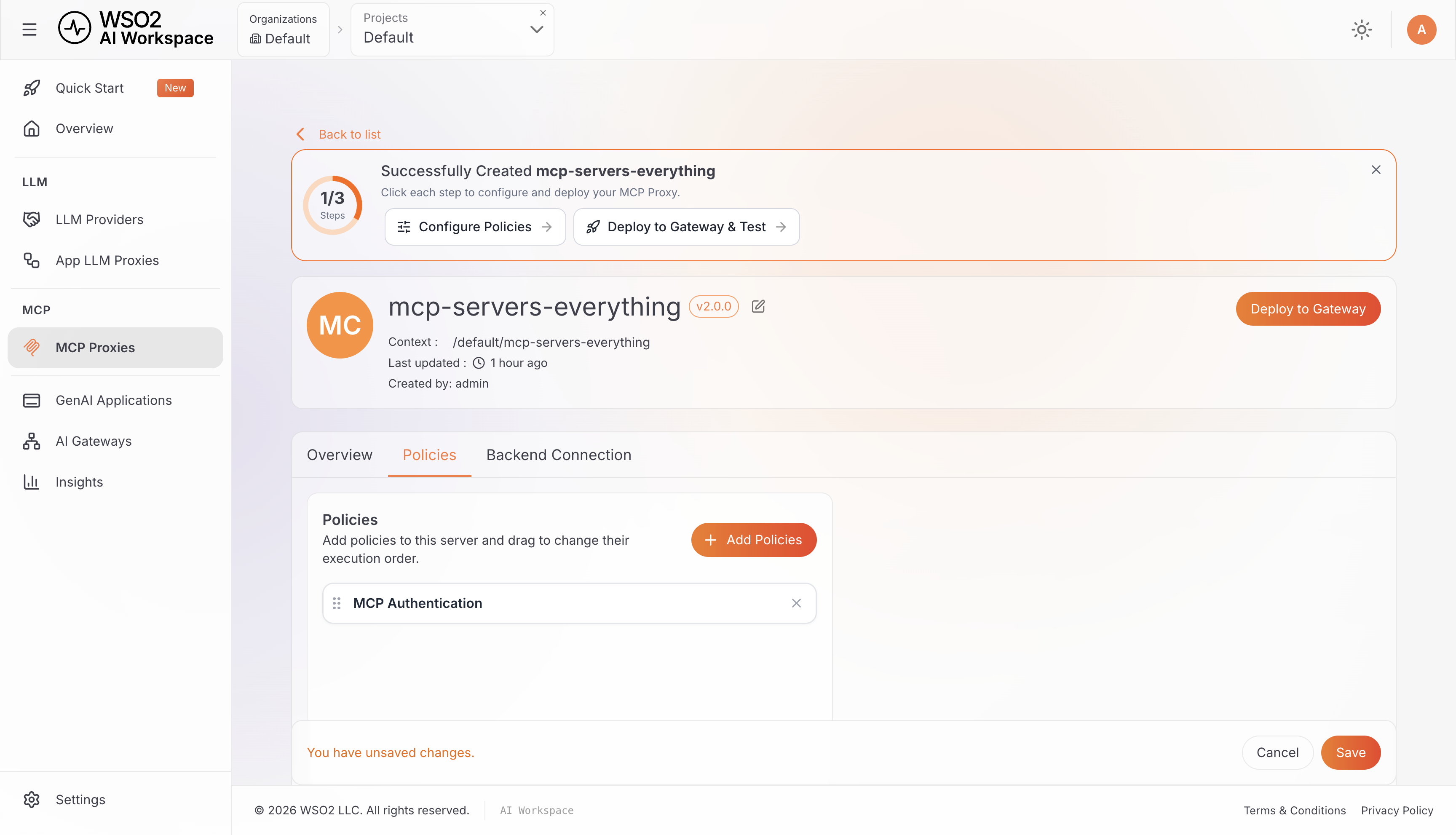
Click Add, then Save, and redeploy.
Step 6: Connect VS Code
6a. Add the server
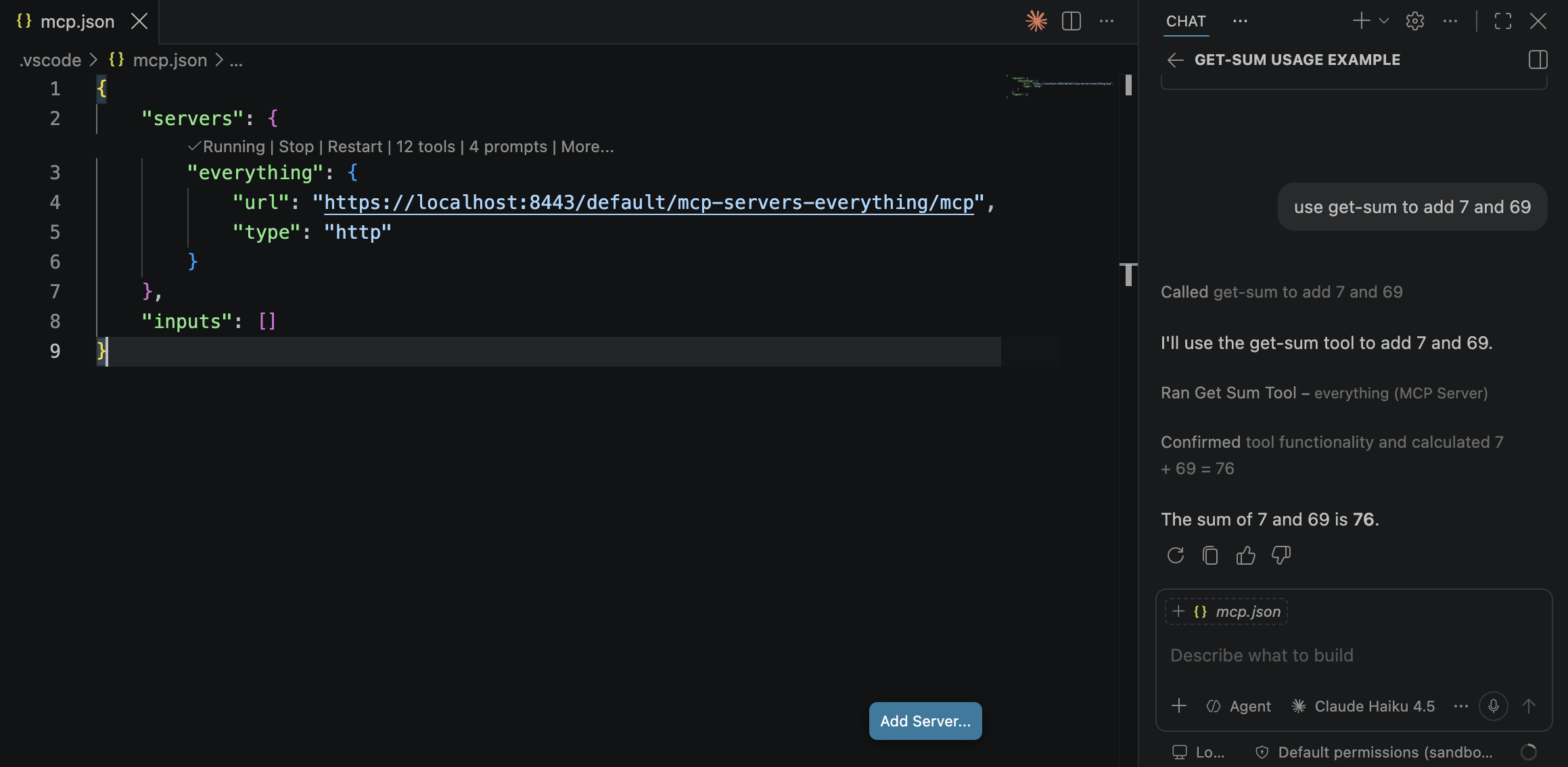
Create a new folder and open it in VS Code. Run MCP: Add Server from the VSCode Command Palette, choose HTTP, paste the gateway URL, name it everything, and choose Workspace. This creates the .vscode/mcp.json file at the root with the content below.
{
  "servers": {
    "everything": {
      "type": "http",
      "url": "https://localhost:8443/default/mcp-servers-everything/mcp"
    }
  }
}
6b. Start the server
With the above mcp.json open, click Start on the everything entry, or run MCP: List Servers from the Command Palette and start it there.
6c. Provide the client ID
VS Code attempts Dynamic Client Registration first, and Identity Platform does not expose anonymous registration, so you will see a popup titled ‘Dynamic Client Registration not supported’.
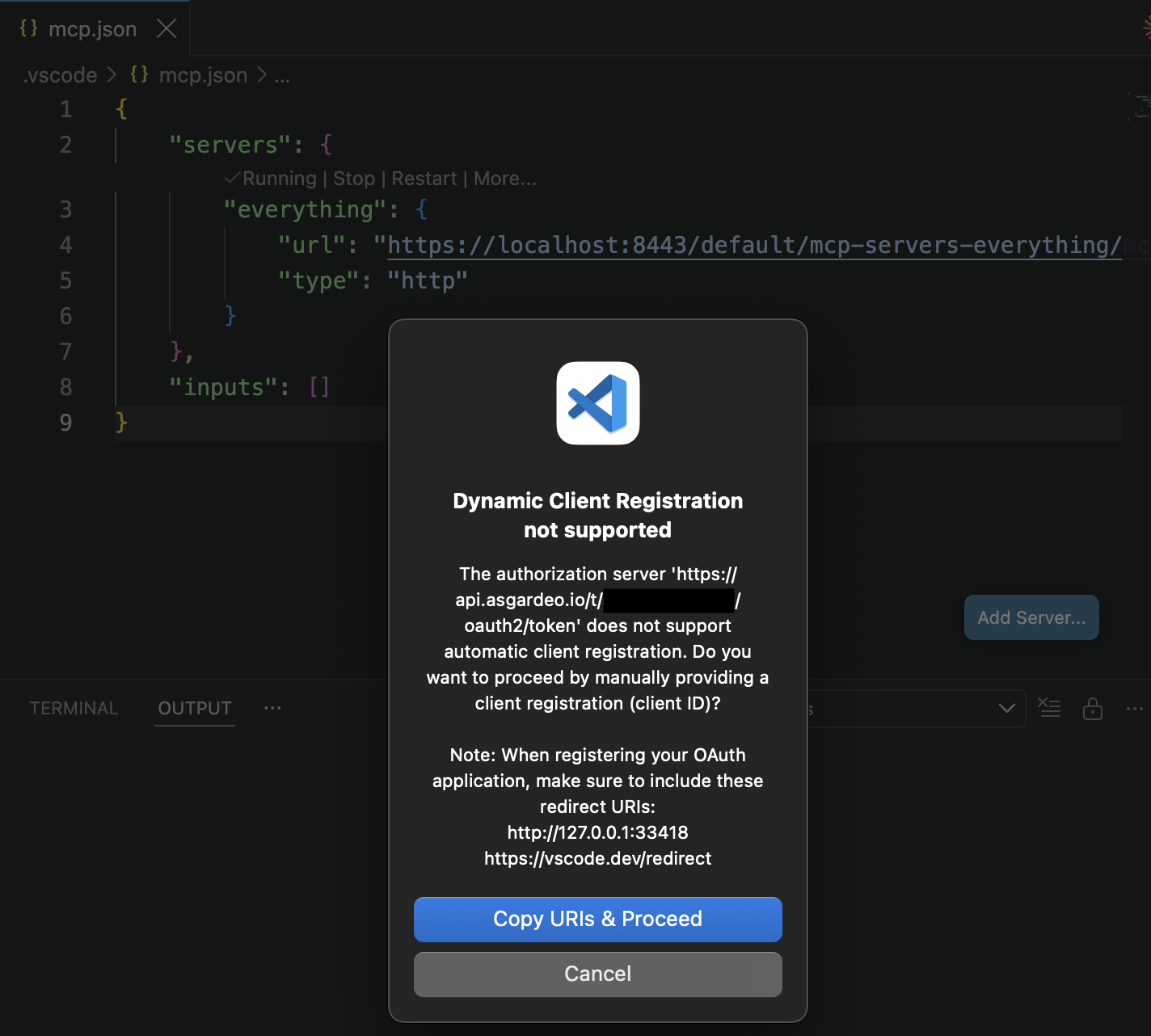
Click Copy URIs & Proceed. When prompted for Add Client Registration Details, paste the Client ID from Step 2 and press Enter.
6d. Sign in
A browser opens and Identity Platform asks for credentials. Sign in as the user you created in Step 3. Control returns to VS Code automatically.
6e. Call a tool
Open the Chat view (Chat: Focus on Chat View from the Command Palette) and set the mode selector at the bottom-left of the input to Agent.
Set the model selector to a specific model rather than leaving it on Auto. Auto may route to a model that cannot use the tools Copilot needs, producing an unrelated 400 error that looks like an authentication failure. Claude Haiku 4.5 works.
Then ask for something that uses a tool. VS Code renders get-sum as Get Sum Tool in the interface:
use get-sum to add 7 and 69
Called get-sum to add 7 and 69
Ran Get Sum Tool - everything (MCP Server)

The sum of 7 and 69 is 76.
Step 7: Enforce scopes per tool
Authentication establishes who is calling. Authorization decides what they may do, and that is a separate policy.
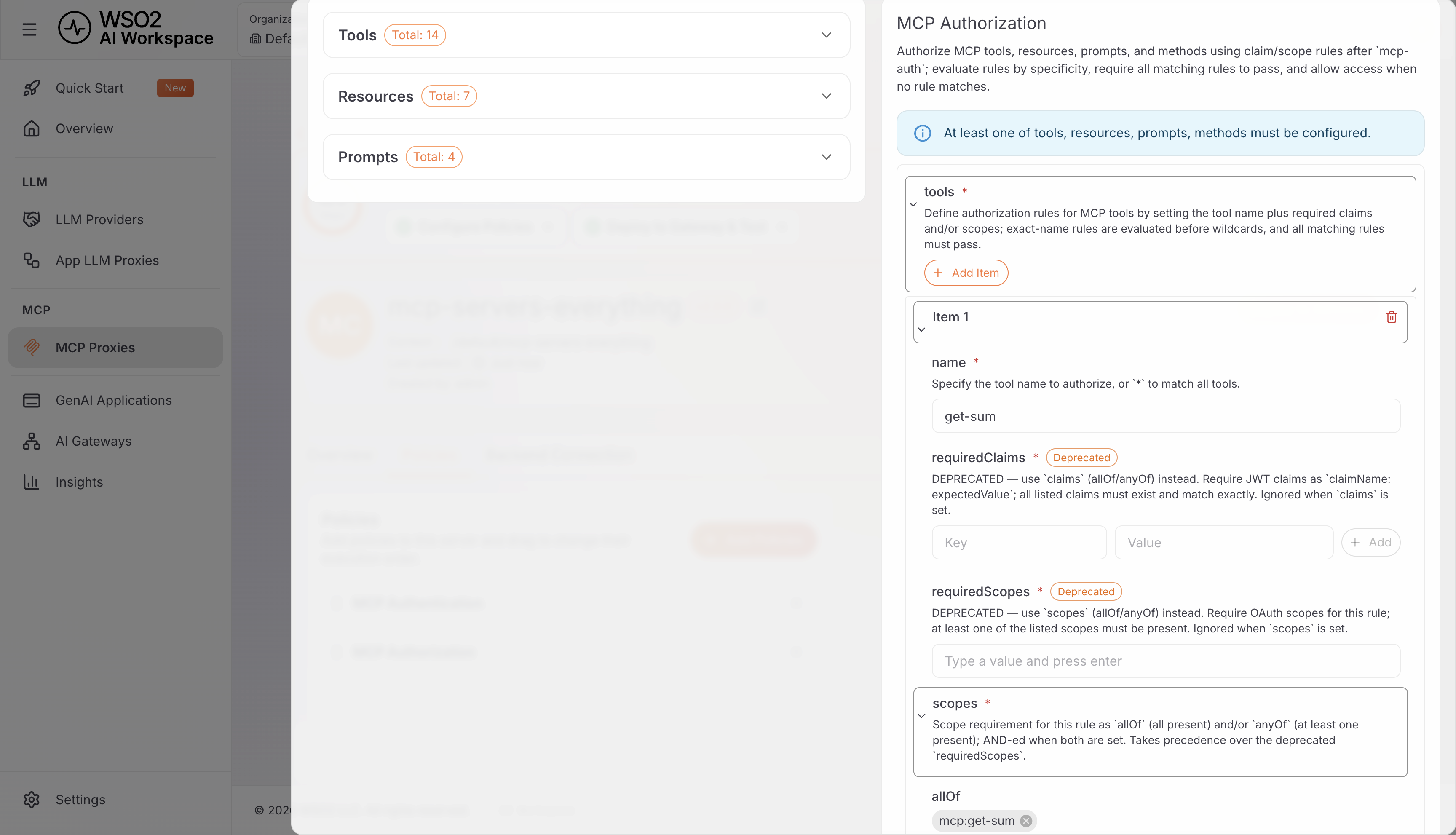
In AI Workspace, open the MCP Proxy, go to Policies → Add Policies, and choose MCP Authorization. Then add an item under tools. Set name to the tool, and under scopes → allOf, list the scope it requires:
name: get-sum
scopes.allOf: [ mcp:get-sum ]
Save and redeploy.
To see a refusal, in the Identity Platform console, remove mcp:get-sum from the VSCode application's authorized scopes.
Tokens are cached, and VS Code does not re-authenticate when authorization changes upstream, so you have to clear it by hand:
- Command Palette → Authentication: Remove Dynamic Authentication Providers, and select your client ID.
- Command Palette → Developer: Reload Window.
- Start the
everythingserver, re-enter the Client ID, and sign in again.
Then ask for get-sum. Open the server's output MCP: List Servers → everything → Show Output, and you will see this:
Found scope challenge in WWW-Authenticate header: mcp:get-sum
Scopes changed from undefined to ["mcp:get-sum"], updating
Received 403 status with Authorization header, retrying with new auth registration.
  Error details: {"error":"Forbidden","message":"Forbidden: insufficient permissions
  to access this MCP resource"}
The status is 403, not 401. The caller authenticated correctly; it simply lacks permission. A client that treats every rejection as an authentication failure will loop through sign-in and fail again, because signing in was never the problem.
Restore the scope grant in Identity Platform, clear the cached credentials again, and the same call succeeds.
Frequently Asked Questions
How does MCP server authentication work? Remote MCP servers use an OAuth 2.1 authorization framework. An unauthenticated call returns a 401 whose WWW-Authenticate header points to the server's protected-resource metadata, which in turn names the authorization server. The client obtains a client ID, runs a PKCE authorization-code flow, and names the target server via the resource parameter so the token is minted for it. The server then validates that token, including its audience, before executing a tool.
Does MCP require OAuth? MCP adopted OAuth 2.1 as its authorization framework for remote servers in 2025, though the spec frames conformance as a should rather than a must: authorization is optional, and HTTP-based transports should conform to it. Local stdio servers are directed not to follow the authorization spec at all, and to retrieve credentials from the environment instead.
What is the confused-deputy problem in MCP? It arises when an MCP server proxies a third-party API using a single static OAuth client ID for every caller. Because the third party has already recorded consent against that client ID, an attacker can register a client with a malicious redirect URI, have the consent screen skipped, and receive the authorization code. The defense is per-client consent before any authorization request is forwarded, together with exact redirect-URI validation and consent state bound to the specific client ID.
What is PKCE and why does MCP use it? PKCE (Proof Key for Code Exchange) protects the OAuth authorization-code exchange from interception. OAuth 2.1 requires it, so MCP's remote flow uses it. MCP requires the S256 challenge method specifically; the weaker plain method that OAuth 2.0 permitted is not accepted.
Should each MCP server implement its own auth? No, and the current spec assumes you won't. An MCP server is defined as an OAuth resource server: it validates tokens and serves protected content, while user authentication, consent, and token issuance belong to a separate authorization server it merely points to. Delegating to an identity provider or gateway follows the protocol's own division of labour and keeps security-critical code in one place.
Conclusion
MCP server authentication is what makes a remote MCP server safe to expose: OAuth 2.1 with PKCE for identity, strict token validation including the audience check, per-client consent in any server that proxies a third-party API, and least-privilege scopes.
The mechanics are standard OAuth, but the failure modes are unforgiving, which is why delegating to an identity provider or gateway beats hand-rolling it on every server.
See how WSO2 API Platform enforces OAuth2/JWT on MCP tools, or start with how a gateway governs MCP traffic.

