Multi-Step MCP Tools: How to Order API Calls with Arazzo
AI agents are good at choosing an outcome. They are less reliable at owning a fixed sequence of backend calls. A single task can require several API operations that must run in order, pass values from one step to the next, and sometimes stop early when a condition fails. If each operation is exposed as a separate tool, that orchestration is left to the model on every request.
This tutorial starts from that problem, explains why the sequence should be defined once as an explicit API workflow, shows how that workflow becomes one higher-level MCP tool, and then walks through generating and exposing the tool through the WSO2 AI Gateway on WSO2 AI Workspace.
Why multi-step API calls are hard for AI agents
Many agent tasks map cleanly to one operation: look up a customer, fetch a document, or list open tickets. Other tasks do not. Fulfillment, provisioning, approvals, and similar outcomes often need several backend calls before the work is complete. The straightforward approach is to wrap each API endpoint as its own tool. The agent sees a list of low-level operations, chooses which ones to call, and decides in which order to call them. That approach is manageable for a small API. It gets harder as the surface grows, and it falls short whenever the calls have a required sequence.
Two constraints show up again and again:
- Order matters. Some operations are only valid after earlier ones succeed.
- Data matters. A later call often needs an identifier or field returned by an earlier response.
When both constraints apply, the agent is no longer making one tool call. It is improvising a workflow.
Later in this tutorial, you will use a concrete place_an_order flow to make that pattern concrete:
Check stock
    ↓
Reserve stock
    ↓
Create order
You should not reserve stock you do not have. You should not create an order without a reservation. The create-order step also needs the reservation identifier from the previous call. The same shape appears in many domains: check, hold or prepare, then commit.
If the agent must discover and assemble that sequence itself, several issues appear:
- Ordering dependencies live only in the prompt or in the model's judgment. You cannot version, test, or review the sequence the way you would an API artifact.
- Passing data between calls becomes the agent's responsibility. It must remember which field from which response belongs in the next request.
- Conditional execution is fragile. If a prerequisite fails, the agent should stop. That rule is easy to miss when it is not encoded in one place.
- Growing numbers of tools fill the context window. Every tool schema is sent on every request, and similar tools compete, so the model may pick the wrong one or call them out of order.
- Partially completed workflows become operational debt. An early step can succeed, a later step can fail, and the system is left in an inconsistent state.
The agent should choose the outcome. The workflow should own the sequence.
Define the API workflow explicitly
Instead of exposing low-level API operations and expecting the agent to orchestrate them, define the sequence once as a reusable workflow. The agent then receives one higher-level capability that runs the whole sequence. An explicit workflow gives you deterministic execution order, explicit dependencies between steps, a reusable definition you can store with your API contracts, easier testing and versioning, and simpler tool selection for the agent. The agent asks to place an order. The workflow owns how that happens.
What is Arazzo?
Arazzo is an OpenAPI Initiative specification for multi-step API workflows. It does not replace your APIs. It describes how operations from one or more OpenAPI definitions run together: which call comes first, what counts as success, which values move from step to step, and when a later step should run at all.
OpenAPI and Arazzo play complementary roles:
| OpenAPI | Arazzo | |
|---|---|---|
| Describes | Individual API operations | How those operations combine into a workflow |
| Answers | What can I call? | In what order, with which data, under which conditions? |
| Typical artifact | Paths, methods, schemas | Steps, inputs, outputs, success criteria, branching |
A workflow also declares the information it accepts from the caller and the information it returns when it finishes. For placing an order, the inputs might be a product code (often called a SKU, or stock keeping unit), a quantity, and a customer identifier. The outputs might be an order identifier and a status. The caller does not need to know about intermediate reservation IDs unless the workflow chooses to expose them.
Arazzo uses runtime expressions to move values into and across steps. Two patterns matter most:
$inputs.sku
$steps.reserveStock.outputs.reservationId
$inputs.sku passes a caller-supplied value into a step. $steps.reserveStock.outputs.reservationId passes a value captured from an earlier step into a later one. That handoff is what the agent no longer has to track.
Workflows can also decide whether a later step runs. After a stock check, you can require that available quantity meets a threshold before the workflow continues to reserve and create. If stock is short, the sequence ends without reserving or ordering. The condition lives in the workflow, not in a prompt.
How an Arazzo workflow becomes an MCP tool
Model Context Protocol (MCP) is how many AI agents discover and invoke tools. An Arazzo workflow can be exposed as one higher-level MCP tool instead of exposing every underlying API operation separately. In practice, the workflow placeAnOrder becomes the MCP tool place_an_order.
What the agent sees:
- one tool name, such as
place_an_order - a description that explains when to use it
- an input schema such as product code (
sku),quantity, andcustomerId
What stays internal to the workflow:
- the stock check
- the reservation
- the order creation
- the reservation ID handoff
- the early exit when stock is short
The agent chooses the business outcome. The workflow executes the sequence.
Govern the MCP tool with the WSO2 AI Gateway
You can generate the workflow and MCP server independently. WSO2 AI Workspace then provides a governed path for AI applications to call that capability through the WSO2 AI Gateway.
In that setup, an agent does not call your backend APIs or the generated MCP server directly. It calls an MCP proxy that you create in WSO2 AI Workspace and deploy to the AI Gateway. The gateway is where authentication, policies, governance, and observability apply. Only after those checks does the request reach the generated MCP server, which runs the Arazzo workflow and invokes the inventory, reservation, and orders APIs in order.
Tutorial: Build an order-placing MCP tool from Arazzo
In this tutorial, you build one tool called place_an_order that checks stock for a product code (SKU), reserves the requested quantity when stock is available, creates an order using the reservation identifier, and returns the order identifier and status. The agent makes one call and never sees the three API operations underneath.
The steps below use this place-an-order flow as a worked example. This tutorial does not ship sample OpenAPI files or backend APIs. Bring your own OpenAPI definitions (and reachable APIs) for the operations your workflow calls, or adapt the example to a multi-step sequence from your own domain. Keep the same pattern: one Arazzo file, referenced OpenAPI sources, then generate and govern the MCP tool.
- What you will build: An Arazzo workflow for placing an order, an MCP server generated from that workflow, and a governed MCP proxy on WSO2 AI Gateway that exposes
place_an_order. - What you will learn: Why multi-step agent tasks need an explicit workflow, how Arazzo describes order and data flow, how one workflow becomes one MCP tool, and what the gateway adds for governance.
- Prerequisites: Your own OpenAPI definitions for the APIs the workflow calls (and APIs those definitions describe); Docker;
arazzo-mcp-gen; WSO2 AI Workspace access with the Admin or Developer role; running AI Gateway instance.
Step 1: Define the API workflow in Arazzo
Create a folder that holds your OpenAPI definitions and one Arazzo file (/order-workflow etc.). The YAML below is the example we use in this guide: it assumes three OpenAPI files (inventory-openapi.yaml, reservations-openapi.yaml, and orders-openapi.yaml) with operationIds such as checkStock, reserveStock, and createOrder. Replace those files, operation IDs, and inputs with your own APIs when you apply the same steps to a different workflow.
Point the workflow at your OpenAPI sources, declare the caller inputs, then list the ordered steps:
arazzo: "1.0.0"

info:
  title: Place an Order
  summary: Check stock, reserve it, and create the order.
  version: "1.0.0"

sourceDescriptions:
  - name: inventoryApi
    url: inventory-openapi.yaml
    type: openapi
  - name: reservationsApi
    url: reservations-openapi.yaml
    type: openapi
  - name: ordersApi
    url: orders-openapi.yaml
    type: openapi

workflows:
  - workflowId: placeAnOrder
    summary: Check stock for a SKU, reserve it, and create an order.
    description: >
      Use this when a customer wants to buy a product. Provide the SKU, the
      quantity, and the customer identifier. The workflow returns the order
      identifier and its status, or ends without ordering if stock is short.
    inputs:
      type: object
      required: [sku, quantity, customerId]
      properties:
        sku:
          type: string
          description: The product identifier to order.
        quantity:
          type: integer
          description: How many units the customer wants.
        customerId:
          type: string
          description: The customer placing the order.

    steps:
      - stepId: checkAvailability
        description: Check how many units are in stock.
        operationId: checkStock
        parameters:
          - name: sku
            in: path
            value: $inputs.sku
        successCriteria:
          - condition: $statusCode == 200
        outputs:
          available: $response.body#/available
        onSuccess:
          - name: enoughStockSoReserve
            type: goto
            stepId: reserveStock
            criteria:
              - context: $response.body
                condition: $.available >= 1
                type: jsonpath

      - stepId: reserveStock
        description: Reserve the requested quantity.
        operationId: reserveStock
        requestBody:
          contentType: application/json
          payload:
            sku: $inputs.sku
            quantity: $inputs.quantity
        successCriteria:
          - condition: $statusCode == 201
        outputs:
          reservationId: $response.body#/reservationId

      - stepId: createOrder
        description: Create the order against the reservation.
        operationId: createOrder
        requestBody:
          contentType: application/json
          payload:
            reservationId: $steps.reserveStock.outputs.reservationId
            customerId: $inputs.customerId
        successCriteria:
          - condition: $statusCode == 201
        outputs:
          orderId: $response.body#/orderId
          status: $response.body#/status

    outputs:
      orderId: $steps.createOrder.outputs.orderId
      status: $steps.createOrder.outputs.status
Write the workflow summary and description as guidance for a colleague. They become the tool description the model reads when it chooses a tool. The inputs block becomes the MCP tool schema. $inputs.sku passes the product code into steps, $steps.reserveStock.outputs.reservationId passes the reservation into order creation, and the onSuccess condition stops the sequence when stock is short.
Step 2: Install arazzo-mcp-gen
Arazzo mcp generator is the CLI that validates an Arazzo project and generates a Dockerized MCP server from it. Download the binary for your operating system from the releases page, follow the install steps for your platform, put the binary on your PATH, and confirm it runs with arazzo-mcp-gen --version. Full install details are in the arazzo-mcp-gen quick start.
Step 3: Validate the Arazzo workflow
arazzo-mcp-gen validate -f ./order-workflow
If validation reports an unresolved operation, an operationId in the workflow does not match the referenced OpenAPI definitions. Fix that before you generate the server.
Step 4: Generate the MCP server with arazzo-mcp-gen
arazzo-mcp-gen mcp-server generate -f ./order-workflow -p 5000 -o ./artifacts
This produces mcp_server.py, a Dockerfile, and a built Docker image. Each workflow becomes one tool, so placeAnOrder becomes place_an_order. The tool description and input schema come from the Arazzo workflow, not from a form you fill in later.
Step 5: Run and test the generated MCP server
docker run -d --name order-mcp -p 5000:5000 <image-name>
Confirm the server answers:
curl -X POST http://localhost:5000/mcp \
  -H 'Content-Type: application/json' \
  -H 'Accept: application/json, text/event-stream' \
  -d '{"jsonrpc":"2.0","id":1,"method":"initialize","params":{"protocolVersion":"2025-06-18","capabilities":{},"clientInfo":{"name":"probe","version":"1.0"}}}'
Verify the MCP server on its own before you put a gateway in front of it. For AI Workspace and the gateway, the server URL must be reachable over the network. A process that only listens on localhost is not enough. Deploy the image somewhere publicly reachable before you create the proxy.
Step 6: Expose the MCP server through WSO2 AI Workspace
- In AI Workspace, click MCP → MCP Proxies.
- Click Create MCP Proxy.
- Enter your MCP server URL, ending in
/mcp. Wait untilplace_an_orderappears in the fetched tool list.
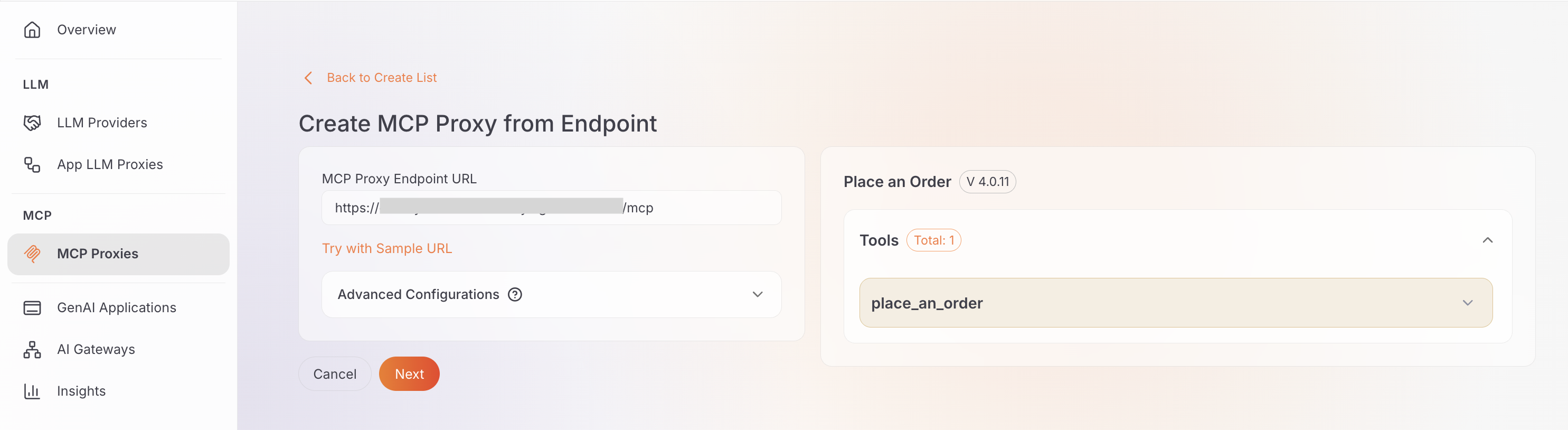
- If the server requires credentials, set them under Advanced Configurations before AI Workspace fetches tools.
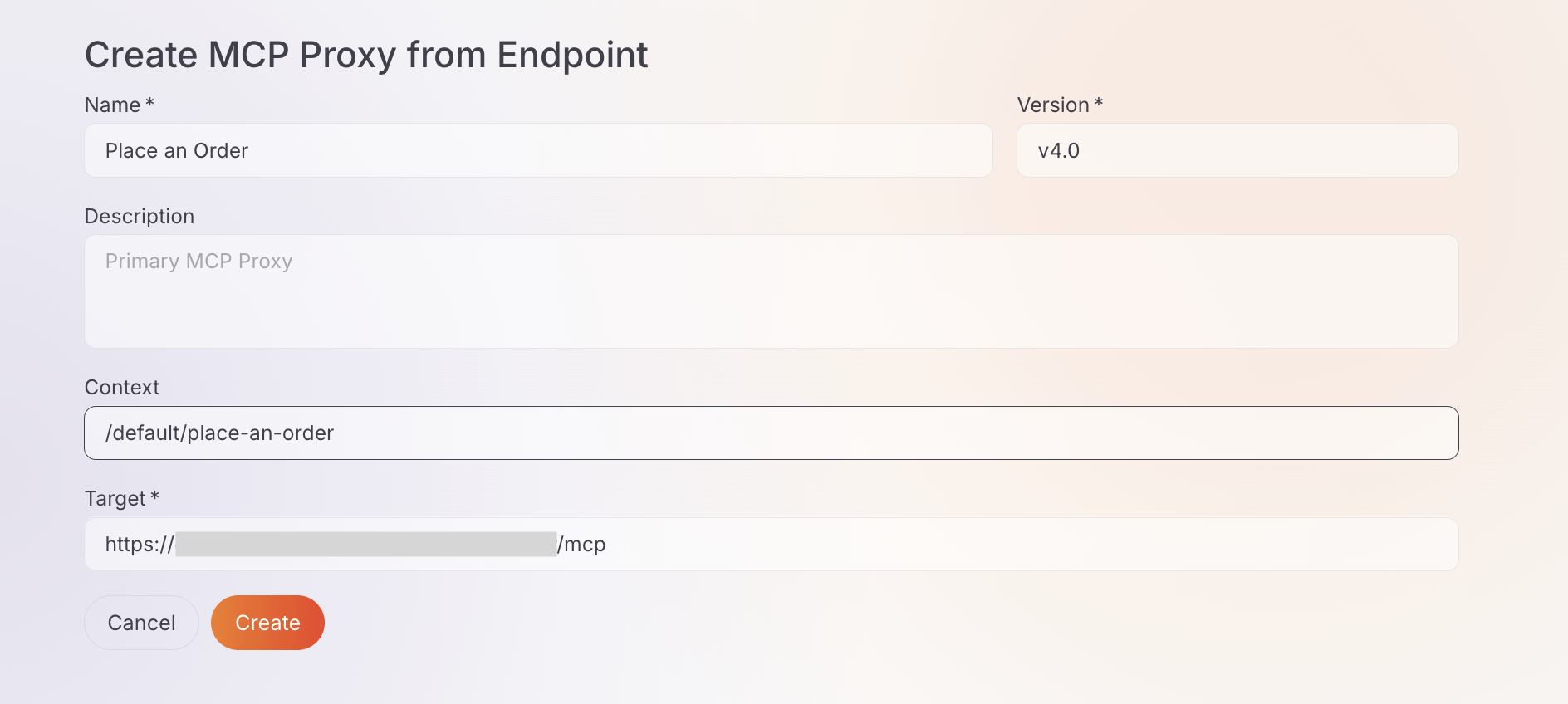
- Click Next, fill in name, version, description, and context, then click Create.
On the proxy Overview tab you should see one tool, place_an_order, with the description you wrote in the workflow. Click View Schema to confirm the inputs (sku, quantity, customerId) come from the Arazzo inputs block.
A proxy is not reachable until you deploy it:
- Click Deploy to Gateway on the proxy page.
- Choose your gateway and click Deploy.
- Expand the gateway card and confirm Deployment Status is Active.
The proxy endpoint looks like https://{gateway-host}/{proxy-context}/mcp.
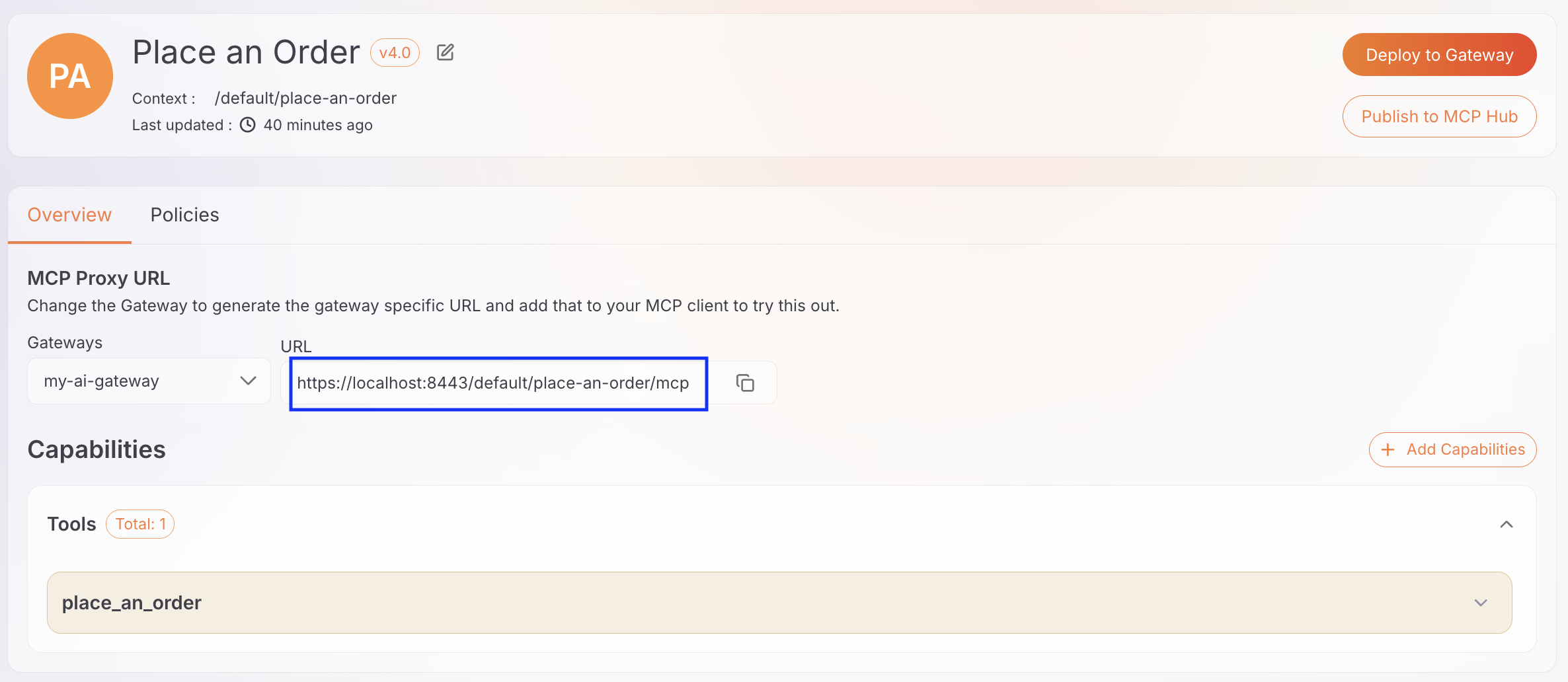
A newly created proxy accepts any caller until you add authentication. Use the Policies tab to apply authentication and access control before exposing it to real traffic.
Step 7: Invoke the MCP tool through the AI Gateway
Ask the gateway what tools it exposes:
curl -sk -X POST https://{gateway-host}/{proxy-context}/mcp \
  -H 'Content-Type: application/json' \
  -H 'Accept: application/json, text/event-stream' \
  -d '{"jsonrpc":"2.0","id":1,"method":"tools/list"}'
You should get one tool named place_an_order, with sku, quantity, and customerId as its required inputs. When an agent calls that tool, the workflow runs the API calls in the defined order: check stock, reserve, then create the order.
How the complete solution works
AI Agent
   ↓
AI Gateway
   ↓
MCP Proxy
   ↓
MCP Server
   ↓
Arazzo Workflow
   ↓
API 1 → API 2 → API 3
Putting the pieces together: the AI agent chooses the outcome and calls place_an_order. That call hits the AI Gateway, which applies authentication, policies, and observability, then forwards to the MCP proxy you created in WSO2 AI Workspace. The proxy targets the generated MCP server, which runs the Arazzo workflow. The workflow owns order, data handoff, and conditions, and only then calls the inventory, reservation, and orders backend APIs.
Frequently asked questions
What is the difference between OpenAPI and Arazzo? OpenAPI describes individual API operations. Arazzo describes how those operations combine into a workflow: order, data handoff, and conditions.
Why not expose every API endpoint as an MCP tool? That works for small APIs. For ordered tasks it leaves sequencing in the prompt, grows the tool list, and leaves partial failure handling to the agent.
Does the AI agent see the individual API calls? No. The agent sees place_an_order. The stock check, reservation, and order creation stay inside the workflow.
What role does WSO2 AI Gateway play? It is the governed path for agent calls: authentication, policies, and observability apply before the MCP server runs the workflow.
Conclusion
When an agent task is a sequence of API calls, encode that sequence once. Define the workflow explicitly, describe it with Arazzo, expose it as one MCP tool, and put a governed gateway in front of that tool. The agent calls place_an_order once. Stock check, reservation, order creation, data handoff, and early exit stay in the workflow where they belong.

