Managing API Breaking Changes: Detect, Version, Deprecate
Every API eventually needs a change that some consumer didn't plan for. The change itself is rarely the problem. The problem is shipping it without knowing it breaks the contract, or without giving consumers time to move.
In this guide, you'll use the Swagger Petstore API to recognize a breaking change, map it onto semantic versions, and catch it in CI with oasdiff. Then you'll announce the deprecation with the Deprecation and Sunset headers. Finally, you'll run the same flow in WSO2 API Platform, from creating a new version to retiring the old one.
What Counts as a Breaking Change?
A breaking change is any change to an API that forces existing consumers to modify their code to keep working correctly. Classic examples are removing or renaming a field or endpoint, changing a field's type, and tightening validation. Purely additive changes, such as a new optional field or a new endpoint, are typically not breaking.
Direction matters. An optional field added to a response is usually safe, as long as clients ignore fields they don't recognize. A required field added to a request breaks every client that doesn't send it yet. The same field can be safe or breaking depending on which side of the contract it sits on, so a tool that understands the spec beats a text search.
Breaking vs. Non-Breaking: A Practical Checklist
Every example in this guide uses Swagger Petstore 1.0.28, a sample API. The table shows how oasdiff v1.32.1, an open source OpenAPI diff tool, classified each change made to a copy of it. The detection section shows how to run these comparisons. The last column is oasdiff's rule ID.
| Change to Petstore | Verdict | oasdiff rule |
|---|---|---|
Remove GET /pet/findByTags | Breaking | api-path-removed-without-deprecation |
Change Category.id from integer to string | Breaking | response-property-type-changed, request-property-type-changed |
Rename Pet.photoUrls to photos | Breaking | response-required-property-removed, new-required-request-property, request-property-removed (warning) |
Add maxLength: 32 to Pet.name | Breaking | request-property-max-length-set |
Add an optional microchipId to Pet | Non-breaking | new-optional-request-property, response-optional-property-added |
Add an optional limit query parameter | Non-breaking | new-optional-request-parameter |
Add GET /pet/{petId}/vaccinations | Non-breaking | endpoint-added |
Some edits are safe in one direction and breaking in the other. Petstore's Order and Pet schemas appear in both requests and responses, so oasdiff v1.32.1 gave each of these four common edits two verdicts:
| Edit to a copy of the spec | Seen on a request | Seen on a response |
|---|---|---|
Order.quantity from int32 to int64 | info (request-property-type-generalized) | error (response-property-type-changed) |
Add reserved to the Pet.status enum | info (request-property-enum-value-added) | error (response-property-enum-value-added) |
Remove the optional Order.complete | warning (request-property-removed) | info (response-optional-property-removed) |
Make Order.id required | error (request-property-became-required) | info (response-property-became-required) |
For the enum case, the error message adds a hint: declare the enum with x-extensible-enum if the value set is meant to grow. Reasonable teams draw these lines differently. Agree on your policy up front, then encode it in the tool: oasdiff can override severities with a config file (--severity-levels).
Semantic Versioning for APIs
Semantic Versioning gives the three numbers a precise meaning. Increment the:
- MAJOR version "when you make incompatible API changes"
- MINOR version "when you add functionality in a backward compatible manner"
- PATCH version "when you make backward compatible bug fixes"
Mapped onto an HTTP API, that gives you a simple rule of thumb:
| Version bump | API change | Petstore example |
|---|---|---|
MAJOR (1.4.2 to 2.0.0) | Any change marked Breaking above | Remove GET /pet/findByTags |
MINOR (1.4.2 to 1.5.0) | Additive, backward compatible | Add an optional microchipId to Pet |
PATCH (1.4.2 to 1.4.3) | Fix with no contract change | Correct a wrong description or a server-side bug |
Semver tells you when to bump. It doesn't say where the version lives, and there are three common places:
| Location | Example | Trade-off |
|---|---|---|
| URL path | /v1/pet | Visible in logs and easy to route. Every URL changes on a major bump. |
| Request header | Api-Version: 2 | Clean URLs. Harder to try in a browser or share as a link, and caches need Vary: Api-Version. |
| Media type | Accept: application/vnd.example.v2+json | Versions individual representations. Client and tooling support is more involved. |
Whichever you pick, a common approach is to keep the full semver in the spec and expose only the major version to clients. Consumers need to know when to migrate, not when you fixed a typo:
info:
  version: 1.4.0
servers:
  - url: https://api.example.com/v1
A proxy version is MAJOR.MINOR (for example v1.0), and the gateway serves both the exact version and the major-only path. The platform walkthrough shows how the gateway answered requests to different version paths.
Detecting Breaking Changes with Diff Tooling
Rules of thumb don't scale across a hundred pull requests, but a diff tool does: it classifies every change between two versions of an OpenAPI description, which is what API compatibility checking comes down to. This section uses oasdiff, pinned to v1.32.1 so your output matches the examples:
curl -sSL -O https://github.com/oasdiff/oasdiff/releases/download/v1.32.1/oasdiff_1.32.1_linux_amd64.tar.gz
tar -xzf oasdiff_1.32.1_linux_amd64.tar.gz oasdiff
sudo mv oasdiff /usr/local/bin/
oasdiff --version
oasdiff version 1.32.1
Other platforms are on the releases page, and oasdiff breaking --help lists the full flag set. The examples below also use jq.
Download that same version of Petstore:
curl -sSL -o petstore-v1.yaml https://raw.githubusercontent.com/swagger-api/swagger-petstore/dfeaa1ce9572dca6bd8b413faba2b00e30f432e6/src/main/resources/openapi.yaml
A breaking change
petstore-v2.yaml is a copy of Petstore with several breaking edits: it removes GET /pet/findByTags, renames photoUrls to photos, changes Category.id to a string, widens Order.quantity to int64, adds reserved to Pet.status, and caps Pet.name at 32 characters. The version is 2.0.0. Here is the exact diff:
diff between petstore-v1.yaml and petstore-v2.yaml
--- petstore-v1.yaml
+++ petstore-v2.yaml
@@ -16,7 +16,7 @@
   license:
     name: Apache 2.0
     url: https://www.apache.org/licenses/LICENSE-2.0.html
-  version: 1.0.28
+  version: 2.0.0
 externalDocs:
   description: Find out more about Swagger
   url: https://swagger.io
@@ -153,45 +153,6 @@
                   $ref: '#/components/schemas/Pet'
         '400':
           description: Invalid status value
-        default:
-          description: Unexpected error
-      security:
-        - petstore_auth:
-            - write:pets
-            - read:pets
-  /pet/findByTags:
-    get:
-      tags:
-        - pet
-      summary: Finds Pets by tags.
-      description: Multiple tags can be provided with comma separated strings. Use tag1, tag2, tag3 for testing.
-      operationId: findPetsByTags
-      parameters:
-        - name: tags
-          in: query
-          description: Tags to filter by
-          required: true
-          explode: true
-          schema:
-            type: array
-            items:
-              type: string
-      responses:
-        '200':
-          description: successful operation
-          content:
-            application/json:
-              schema:
-                type: array
-                items:
-                  $ref: '#/components/schemas/Pet'
-            application/xml:
-              schema:
-                type: array
-                items:
-                  $ref: '#/components/schemas/Pet'
-        '400':
-          description: Invalid tag value
         default:
           description: Unexpected error
       security:
@@ -681,7 +642,7 @@
           example: 198772
         quantity:
           type: integer
-          format: int32
+          format: int64
           example: 7
         shipDate:
           type: string
@@ -703,8 +664,7 @@
       type: object
       properties:
         id:
-          type: integer
-          format: int64
+          type: string
           example: 1
         name:
           type: string
@@ -759,7 +719,7 @@
       x-swagger-router-model: io.swagger.petstore.model.Pet
       required:
         - name
-        - photoUrls
+        - photos
       type: object
       properties:
         id:
@@ -768,10 +728,11 @@
           example: 10
         name:
           type: string
+          maxLength: 32
           example: doggie
         category:
           $ref: '#/components/schemas/Category'
-        photoUrls:
+        photos:
           type: array
           xml:
             wrapped: true
@@ -792,6 +753,7 @@
             - available
             - pending
             - sold
+            - reserved
       xml:
         name: pet
     ApiResponse:
Run the comparison. Petstore's Pet schema is reused by many operations and media types, so a handful of edits fans out into dozens of findings. The first line summarizes them, and counting by rule ID shows the shape:
oasdiff breaking petstore-v1.yaml petstore-v2.yaml | head -1
oasdiff breaking petstore-v1.yaml petstore-v2.yaml --format json | jq -r '.[].id' | sort | uniq -c | sort -rn
54 changes: 48 error, 6 warning, 0 info
  13 response-property-type-changed
  10 response-required-property-removed
  10 response-property-enum-value-added
   6 request-property-removed
   6 request-property-max-length-set
   6 new-required-request-property
   2 request-property-type-changed
   1 api-path-removed-without-deprecation
To read a single finding in full, restrict the comparison to a path with -p:
oasdiff breaking petstore-v1.yaml petstore-v2.yaml -p '^/pet/findByTags$'
1 changes: 1 error, 0 warning, 0 info
error	[api-path-removed-without-deprecation] at petstore-v1.yaml
	in API GET /pet/findByTags
		api path removed without deprecation
The rename shows up three times: response-required-property-removed and request-property-removed (a warning) for the old name, and new-required-request-property (an error) for the new one. One more detail matters for CI: the command exits with 0 even though it found errors. To fail the build, add --fail-on ERR, which exits with 1 when the output contains an error (--fail-on WARN also fails on warnings):
oasdiff breaking petstore-v1.yaml petstore-v2.yaml > /dev/null
echo $?
oasdiff breaking petstore-v1.yaml petstore-v2.yaml --fail-on ERR > /dev/null
echo $?
0
1
A non-breaking change
petstore-v1.1.yaml adds an optional microchipId to Pet, an optional limit query parameter on GET /pet/findByStatus, and a new GET /pet/{petId}/vaccinations endpoint. The version is 1.1.0.
oasdiff breaking petstore-v1.yaml petstore-v1.1.yaml --fail-on ERR
No breaking changes to report, but the specs are different.
Run 'oasdiff diff' to see structural differences.
The exit code is 0. To see what changed instead of only what broke, use changelog:
oasdiff changelog petstore-v1.yaml petstore-v1.1.yaml | head -1
oasdiff changelog petstore-v1.yaml petstore-v1.1.yaml --format json | jq -r '.[].id' | sort | uniq -c
20 changes: 0 error, 0 warning, 20 info
   1 endpoint-added
   1 new-optional-request-parameter
   6 new-optional-request-property
  12 response-optional-property-added
changelog also flags a breaking change that isn't paired with a major version bump. With the breaking copy's version changed to 1.1.0, it adds an info finding:
sed 's/version: 2.0.0/version: 1.1.0/' petstore-v2.yaml > petstore-v2-minor.yaml
oasdiff changelog petstore-v1.yaml petstore-v2-minor.yaml --format singleline | grep api-major-version-not-bumped
info, in info a breaking change was detected but the major version did not increase, from `1.0.28` to `1.1.0` [api-major-version-not-bumped].
Because info is the default level for this rule, a missing major bump is reported but isn't an error by itself. To raise it, put the rule ID and a level in a file and pass the file with --severity-levels. For example, a file named oasdiff-levels.txt:
api-major-version-not-bumped err
oasdiff changelog petstore-v1.yaml petstore-v2-minor.yaml --severity-levels oasdiff-levels.txt --format singleline | grep api-major-version-not-bumped
error, in info a breaking change was detected but the major version did not increase, from `1.0.28` to `1.1.0` [api-major-version-not-bumped].
Make removals wait for the sunset
Some breaking changes can't be avoided, and removing an endpoint is the most common. oasdiff tells a planned removal from a surprise one by reading the operation's deprecated flag and an x-sunset date. x-sunset is a vendor extension that oasdiff reads, not part of the OpenAPI Specification. Deprecate GET /pet/findByTags first:
  /pet/findByTags:
    get:
      operationId: findPetsByTags
      deprecated: true
      x-sunset: "2027-03-31"
The OpenAPI Specification defines deprecated on an operation as declaring that "Consumers SHOULD refrain from usage of the declared operation." Save the result, with info.version set to 1.1.0, as petstore-deprecated.yaml. oasdiff changelog reports the deprecation as an info finding, endpoint-deprecated-with-sunset. Then delete the operation and save that as petstore-removed.yaml (version 2.0.0). Removing the endpoint before the sunset date is an error:
oasdiff changelog petstore-v1.yaml petstore-deprecated.yaml --format singleline
oasdiff breaking petstore-deprecated.yaml petstore-removed.yaml --format singleline --fail-on ERR
1 changes: 0 error, 0 warning, 1 info
info at petstore-deprecated.yaml, in API GET /pet/findByTags endpoint deprecated with sunset date `2027-03-31` [endpoint-deprecated-with-sunset].


1 changes: 1 error, 0 warning, 0 info
error at petstore-deprecated.yaml, in API GET /pet/findByTags api path removed before the sunset date `2027-03-31` [api-path-removed-before-sunset].
The second command exits with 1. oasdiff compares the sunset date to the current date, so the same removal passes once that date has passed.
The date is what makes the check work. Marking an operation deprecated is enough for oasdiff to accept its removal. Without an x-sunset date, removing the deprecated findByTags from petstore-nosunset.yaml produces no finding at all, so the endpoint could disappear in the next release.
Require a sunset date on every deprecation
If your policy is that every deprecation carries a removal date, put the rule where an API can't skip it. This Spectral rule (CLI 6.16.3) fails any operation that is deprecated without a YYYY-MM-DD x-sunset value, the same extension oasdiff reads. It is deliberately stricter than oasdiff, which also accepts full RFC 3339 timestamps. Save it as api-deprecation-rules.yaml:
rules:
  deprecated-operation-has-sunset:
    description: A deprecated operation must declare when it will be removed.
    message: "Deprecated operation needs an x-sunset date in YYYY-MM-DD format"
    given: "$.paths[*][get,put,post,delete,options,head,patch,trace]"
    severity: error
    then:
      function: schema
      functionOptions:
        schema:
          if:
            required: [deprecated]
            properties:
              deprecated:
                const: true
          then:
            required: [x-sunset]
            properties:
              x-sunset:
                type: string
                pattern: "^[0-9]{4}-[0-9]{2}-[0-9]{2}$"
Install the CLI with npm install --save-dev --save-exact @stoplight/[email protected], then lint the variant that has deprecated: true and no x-sunset:
npx spectral lint petstore-nosunset.yaml --ruleset api-deprecation-rules.yaml
 163:9  error  deprecated-operation-has-sunset  Deprecated operation needs an x-sunset date in YYYY-MM-DD format  paths./pet/findByTags.get
✖ 1 problem (1 error, 0 warnings, 0 infos, 0 hints)
The command exits with 1. Linting petstore-deprecated.yaml, which has the date, passes with exit 0. A date such as March 2027 is flagged too. The rule checks that the date is present and well formed, not that it's in the future. The pattern also accepts impossible dates such as 2027-13-45. To reject those in the CLI, replace pattern with format: date, which Spectral 6.16.3 checks against the calendar. For how to write, test, and run rulesets like this in CI, see Spectral API Linting: Custom Rules & CI Enforcement Guide.
Run the diff on every pull request
A check only helps if it runs before merge. This GitHub Actions workflow runs oasdiff to compare the spec on the pull request to the spec on the base branch. It downloads the pinned release and verifies its checksum first:
name: API breaking changes

on:
  pull_request:
    paths:
      - "openapi.yaml"

permissions:
  contents: read

jobs:
  oasdiff:
    runs-on: ubuntu-latest
    steps:
      - uses: actions/checkout@v7
        with:
          fetch-depth: 0

      - name: Install oasdiff
        run: |
          curl -sSL -O https://github.com/oasdiff/oasdiff/releases/download/v1.32.1/oasdiff_1.32.1_linux_amd64.tar.gz
          curl -sSL -O https://github.com/oasdiff/oasdiff/releases/download/v1.32.1/checksums.txt
          sha256sum --ignore-missing -c checksums.txt
          tar -xzf oasdiff_1.32.1_linux_amd64.tar.gz oasdiff
          sudo mv oasdiff /usr/local/bin/

      - name: Fail on breaking changes
        env:
          BASE_REF: ${{ github.base_ref }}
        run: oasdiff breaking "origin/${BASE_REF}:openapi.yaml" openapi.yaml --fail-on ERR --format githubactions
fetch-depth: 0 makes the base branch available, and oasdiff reads a git ref such as origin/main:openapi.yaml directly. --format githubactions prints each finding as an annotation. The last step's oasdiff command, run against a repository whose openapi.yaml was Petstore 1.0.28 on main, behaves like this: a branch with the breaking edits (petstore-v2.yaml) exits with 1 and prints 48 error annotations, for example:
::error title=new-required-request-property,file=openapi.yaml,line=735,col=9::in API POST /pet added the new required request property `photos` (media type: application/json)
A branch with only additive edits (petstore-v1.1.yaml) exits with 0 and prints none. If your spec lives elsewhere, change the path in both the paths filter and the oasdiff command. If it's split across files with $ref, add those files to the filter too. If you make the job a required status check so a failure blocks the merge, drop the filter instead. GitHub leaves the required check of a workflow skipped by a path filter in the Pending state, which blocks every pull request that doesn't touch the spec.
Watch for "Silent" Breaking Changes
A diff tool compares what the OpenAPI description says. It can't see behavior that the description doesn't capture. Suppose a release changes GET /pet/findByTags so that a pet must carry all the given tags instead of any of them. The request and response schemas are identical, so the only changes in the spec are a sentence in the description and the patch version. The edited copy is petstore-silent.yaml, and this is its diff:
--- petstore-v1.yaml
+++ petstore-silent.yaml
@@ -16,7 +16,7 @@
   license:
     name: Apache 2.0
     url: https://www.apache.org/licenses/LICENSE-2.0.html
-  version: 1.0.28
+  version: 1.0.29
 externalDocs:
   description: Find out more about Swagger
   url: https://swagger.io
@@ -164,7 +164,7 @@
       tags:
         - pet
       summary: Finds Pets by tags.
-      description: Multiple tags can be provided with comma separated strings. Use tag1, tag2, tag3 for testing.
+      description: Returns pets that have all of the given tags. Use tag1, tag2, tag3 for testing.
       operationId: findPetsByTags
       parameters:
         - name: tags
Diff the two:
oasdiff breaking petstore-v1.yaml petstore-silent.yaml --fail-on WARN
No breaking changes to report, but the specs are different.
Run 'oasdiff diff' to see structural differences.
For a consumer, the same request would quietly return fewer pets:
GET /pet/findByTags?tags=friendly&tags=vaccinated HTTP/1.1
Nothing in the contract moved, yet every consumer that relied on "any tag" is now losing results. Released as a patch, this change needed a major version. RPC-style endpoints hide the same problem. A single POST /pet/{petId}/actions that accepts {"action": "adopt"} or {"action": "quarantine"} has one request schema for many behaviors, so a change to what adopt does is invisible to a diff of the description.
Use the other tools you have:
- Write contract tests that assert behavior, not only shape, and run them against the deployed API. Schemathesis generates requests from your OpenAPI schema and checks the responses against it. For behavior such as tag matching, add a custom check.
- Treat a changed
descriptionon an existing operation as a review trigger.oasdiff changelogdoesn't list description changes, butoasdiff diffshows them. - Make behavior explicit in the schema, as shown in the design patterns below.
Communicating Breaking Changes: Deprecation Cadences
Detection tells you a break is coming. Communication gives consumers time to deal with it. A good deprecation notice answers five questions:
- What is changing, and for which endpoints or fields?
- Why is it changing?
- How do consumers migrate, ideally with a before and after request?
- When is the deprecation date, and when is the hard sunset date?
- Who can they ask?
Put it where consumers will actually see it: the changelog, your developer portal, a direct email to registered consumers, and the API responses themselves (next section). Pick the window by how quickly your slowest consumers can ship. There is no standard length. For some widely used APIs, it means six months or more. A timeline could look like this:
| When | What happens |
|---|---|
| 2026-09-30 | Deprecation date. Mark the operation deprecated: true with x-sunset: "2027-03-31", publish the migration guide, email consumers, and start sending the response headers. |
| Midpoint | Reminder to the consumers still calling the old version. Use whatever request logs or analytics you have to find them. |
| 2027-03-31 | Sunset date. Retire the old version. |
Each step has a home in WSO2 API Platform, and the platform walkthrough at the end covers all of them with Petstore:
| Step | Where in WSO2 API Platform |
|---|---|
| New contract | Create New Version, with an uploaded API definition |
| Require a sunset date on deprecated operations | A governance ruleset and policy |
| Written notice | Documents, with a Publish To Developer Portal action |
| Move the old version out | Manage > Lifecycle: Deprecate, then Retire |
| Machine-readable signal | The Set Header policy |
Using Sunset Headers to Signal Deprecation
Two HTTP response headers make different parts of the timeline machine-readable, so client tooling can flag a deprecated endpoint without anyone reading a changelog:
- RFC 9745 defines
Deprecation. It is a Standards Track document published in March 2025. The value is a Structured Field Date, written as@followed by Unix time in seconds. - RFC 8594 defines
Sunset. It is an Informational document from May 2019. The value is an HTTP-date.
The two headers use different date formats: RFC 9745 defines its value with HTTP Structured Fields (RFC 9651), while RFC 8594 predates them and uses an HTTP-date. This response says the resource's deprecation takes effect at 23:59:59 UTC on 30 September 2026 and that it is expected to stop responding at 23:59:59 GMT on 31 March 2027:
HTTP/1.1 200 OK
Content-Type: application/json
Deprecation: @1790812799
Sunset: Wed, 31 Mar 2027 23:59:59 GMT
Link: <https://developer.example.com/deprecation>; rel="deprecation"; type="text/html"
@1790812799 is a valid Structured Field Date for 2026-09-30T23:59:59Z, and 31 March 2027 is a Wednesday, so the day name in the Sunset value is correct. RFC 9745 requires that Sunset is not earlier than Deprecation. The HTTP Sunset header is separate from the x-sunset extension used earlier: x-sunset lives in the OpenAPI description for tools such as oasdiff, while the header travels in responses to clients, so set both. The Link header with rel="deprecation" follows the RFC's own example and points humans at the migration details.
Both headers are hints. RFC 9745 says deprecation doesn't change the resource's behavior, and RFC 8594 tells clients to treat Sunset as a hint. It doesn't say what a client will see after the date: client errors, redirects, or no response at all.
The headers don't appear on their own, so your backend or your gateway has to set them. In WSO2 API Platform, a Set Header policy does it, as shown in the platform walkthrough. On the client side, a few lines are enough to surface them. Save this Node.js 22 script as check-deprecation.mjs, since it uses top-level await. It logs a warning for any response that carries either header:
const res = await fetch(process.argv[2]);

const deprecation = res.headers.get("deprecation"); // e.g. "@1790812799"
const sunset = res.headers.get("sunset"); // e.g. "Wed, 31 Mar 2027 23:59:59 GMT"

if (deprecation) {
  const deprecatedAt = new Date(Number(deprecation.slice(1)) * 1000);
  console.warn(`Deprecated since ${deprecatedAt.toISOString()}`);
}
if (sunset) {
  console.warn(`Sunset on ${new Date(sunset).toISOString()}`);
}
Run it with node check-deprecation.mjs <url>. Against a local server that returns the response above, it prints:
Deprecated since 2026-09-30T23:59:59.000Z
Sunset on 2027-03-31T23:59:59.000Z
Design Patterns That Prevent Breaking Changes
The cheapest breaking change is the one you never have to make. A few habits keep most changes additive.
Never return a top-level array. A bare [...] has nowhere in the body to add pagination metadata later, so the first time you need a cursor in the response, you have to change its type. (Pagination can also go in headers such as Link.) Petstore's GET /pet/findByStatus returns a bare array, so it makes a good test. In petstore-wrapped.yaml (version 2.0.0), its JSON response becomes an object with an items array and a nextCursor:
oasdiff breaking petstore-v1.yaml petstore-wrapped.yaml --format singleline --fail-on ERR
1 changes: 1 error, 0 warning, 0 info
error at petstore-wrapped.yaml, in API GET /pet/findByStatus the response's body `type` changed from `array<object>` to `object` for status `200` (media type: application/json) [response-body-type-changed].
Starting with an object would have made nextCursor an additive change.
Prefer PATCH for partial updates. RFC 9110 says a PUT "requests that the state of the target resource be created or replaced" with the request content, and RFC 5789 defines PATCH "to apply partial modifications to a resource". Petstore's PUT /pet takes a whole Pet, so a client written before microchipId existed can unintentionally clear it. With PATCH, the request body is a patch document whose media type defines how it is applied, so clients can send only what they mean to change.
Make behavior explicit in the schema. The silent-change problem above disappears if the request states which behavior it wants. For example, a tag filter could carry its matching mode:
{"tags": ["friendly", "vaccinated"], "match": "all"}
The behavior is now part of the contract, so a different behavior needs a different value, and the value shows up in a diff.
Declare enums that will grow as extensible. Adding reserved to Pet.status is an error on responses, as the ambiguous-cases table above shows. Listing the values under the x-extensible-enum extension, in place of enum, tells oasdiff that the set is meant to grow:
status:
  type: string
  x-extensible-enum:
    - available
    - pending
    - sold
It is a vendor extension that oasdiff recognizes, not an OpenAPI keyword, so other tools see a plain string. With it, adding reserved produces no finding, and consumers are on notice that new values can appear. The extension only states the intent, so clients still have to handle values they don't recognize.
How API Lifecycle Management Ties It All Together
Everything so far can be done with a text editor and a CI job. What a platform adds is a place where the version, the deprecation notice, and the retirement live as state that it tracks, instead of a changelog someone has to remember to update. WSO2 API Platform does this with lifecycle states on each API proxy version. This section runs the Petstore flow in the console at console.bijira.dev and compares what the console does with what the documentation says.
Import Petstore as an API proxy
In a project, choose Import API Contract, then paste the pinned Petstore URL. The console fetches the contract and lists its operations before you continue. If the contract's scopes are already used by another API in your organization, the page also shows a Scope validation failed notice, as in the screenshot below, and says it will prefix the scopes with the API name you enter in the next step.
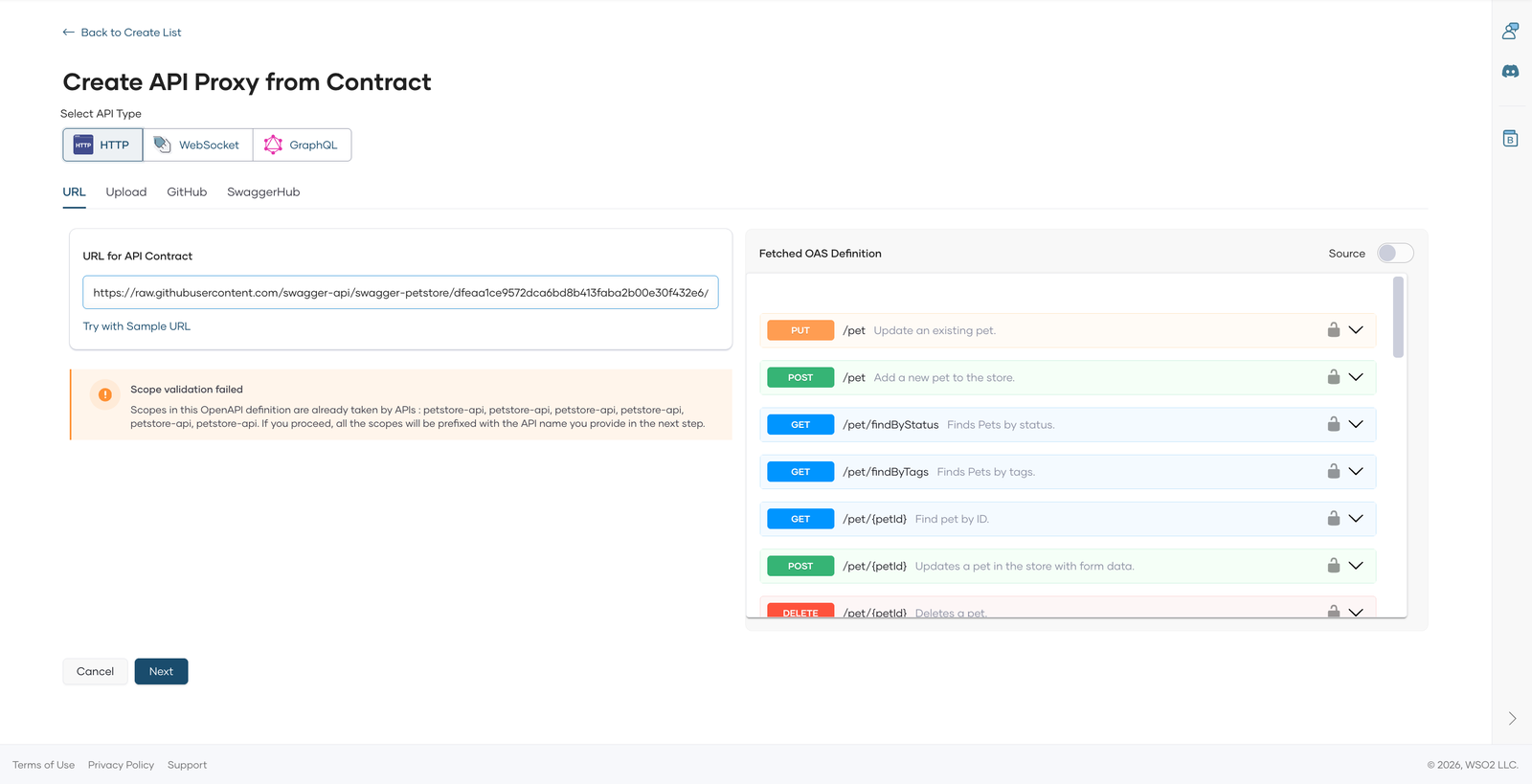
On the next page, name the proxy and pick a gateway. Name it Petstore API and choose the WSO2 Managed Gateway. The version field is two-part, MAJOR.MINOR, so a new proxy starts at 1.0, and the base path is derived from the project, the proxy identifier, and the version. The console derives the identifier from the name, so Petstore API becomes petstore-api. In a project named Petstore Lifecycle Demo, the base path is /petstore-lifecycle-demo/petstore-api/v1.0. The proxy targets the server URL from the contract, https://petstore3.swagger.io/api/v3.
Create version 2.0 from the changed contract
Each API proxy has a Version selector on its Overview page. Create New asks for a version number and an optional API definition (upload, URL, or SwaggerHub). Without one, the new version uses the current version's spec. Upload petstore-v2.yaml. The preview lists the operations of the uploaded contract, and GET /pet/findByTags is not among them.
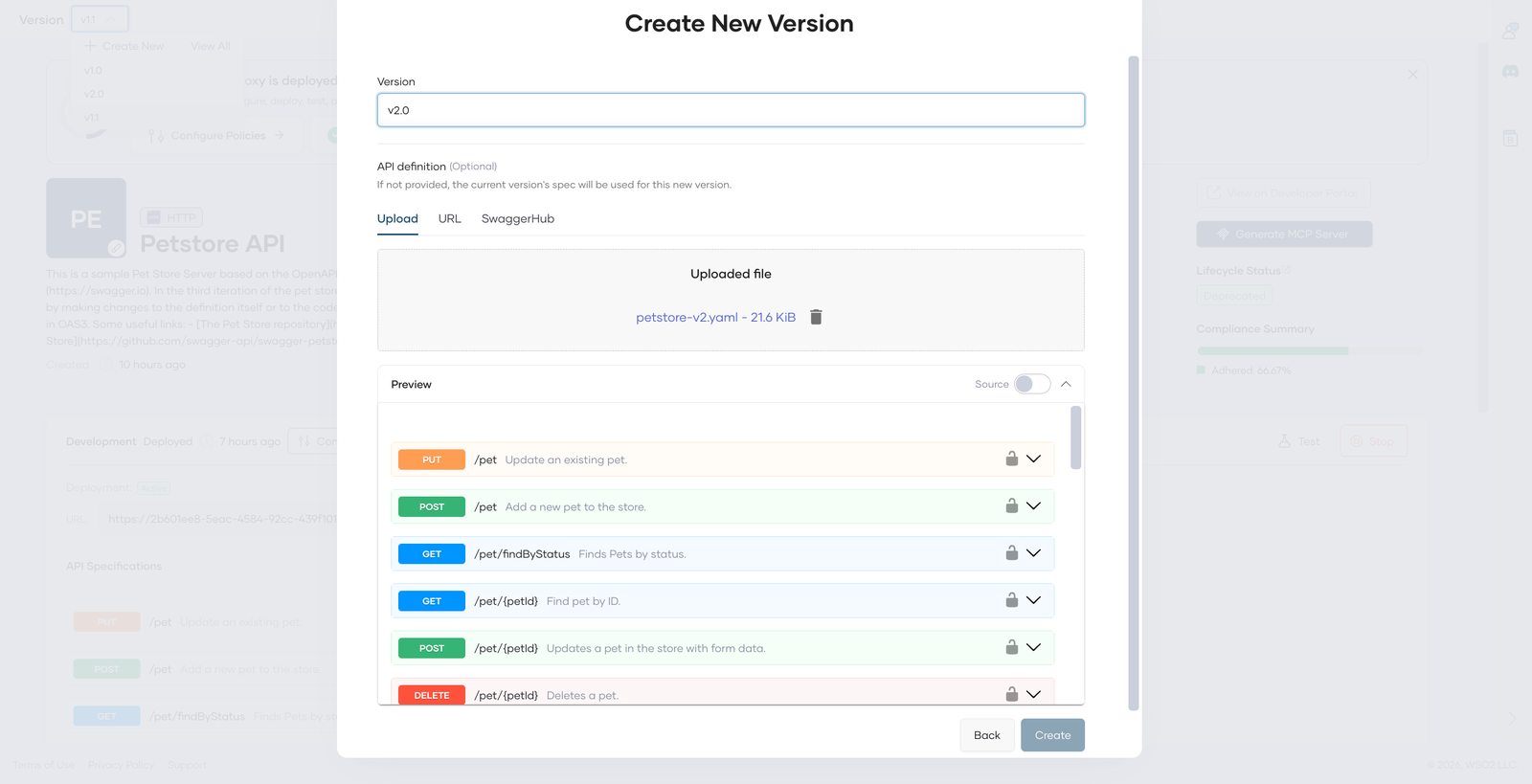
There is no patch segment, so track PATCH releases in your spec's info.version. Each version has its own deployments and its own lifecycle state. Create 1.1 the same way from an additive change (a new optional microchipId). The walkthrough uses it to show how the gateway routes versions.
Move a version through its lifecycle
The state lives under Manage > Lifecycle. In the console, a version must be deployed to at least one environment before its state can change, and the page notes that lifecycle changes apply to the API, not to an environment or a build. For this flow, deploy each version, publish 1.0 and 2.0, then deprecate 1.0. These are the states and the actions the console offers in each:
| State | Actions offered |
|---|---|
| Created | Pre-release, Publish |
| Pre-released | Publish, Demote to Created |
| Published | Pre-release, Demote to Created, Deprecate |
| Deprecated | Retire |
| Retired | None |
Publish asks for a display name and at least one endpoint URL for the Developer Portal. Deprecate and Retire each ask for confirmation and warn that the operation can't be undone. In the console, publishing 2.0 didn't change 1.0, which stayed Published until it was deprecated manually.
The screenshot shows version 1.1, deprecated in the same way.
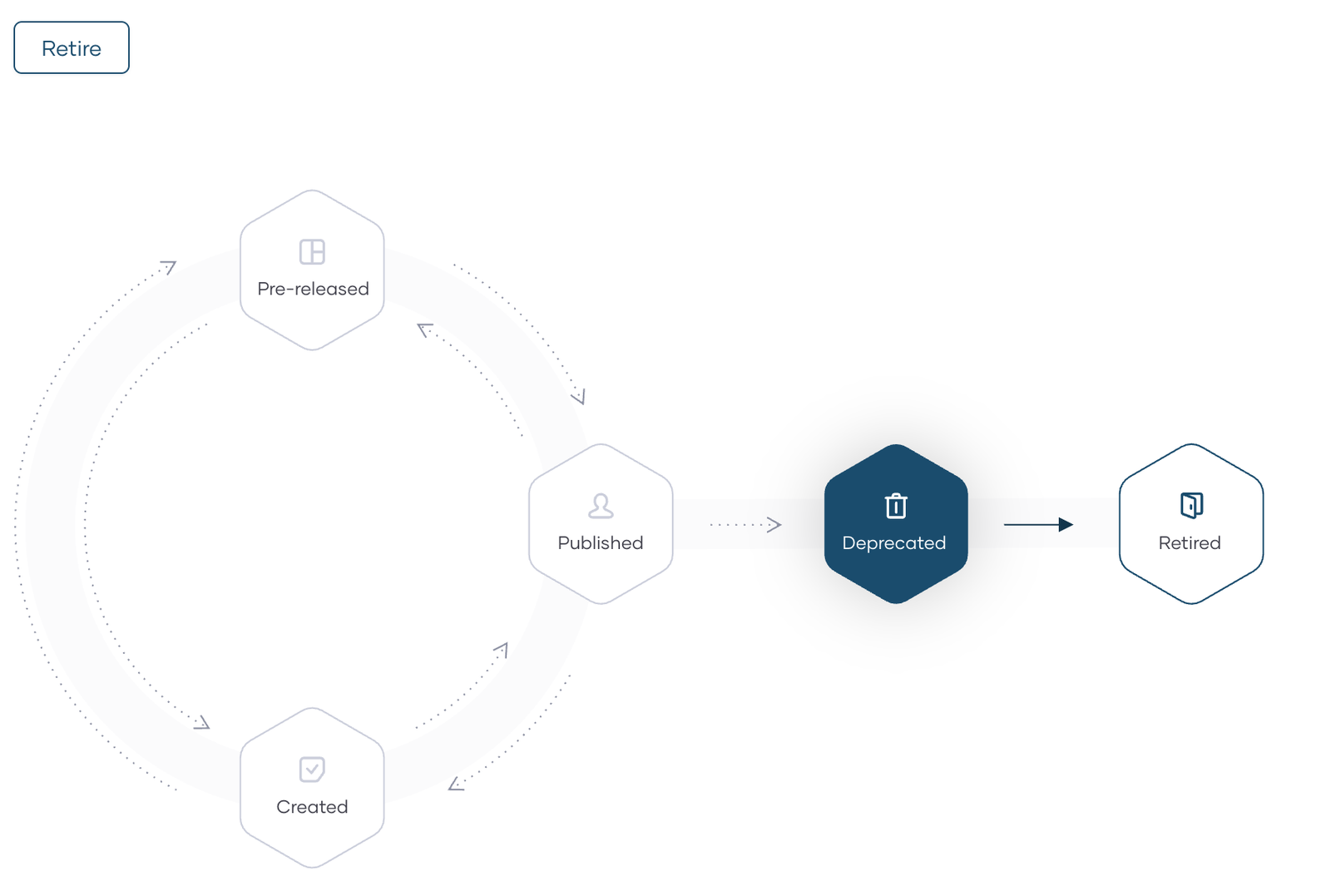
A History list on the same page records the changes, for example "Lifecycle state has changed from PUBLISHED to DEPRECATED". Admin > Audit Logs records them across the organization, with the user, the time, the version, the action (Publish, for example), and the state it started from.
The documentation says a Deprecated version stays available to existing subscribers. Here, an application, Petstore Client App, was subscribed to 1.0 in the Developer Portal, and its subscription stayed active on the portal's Subscriptions page after 1.0 was deprecated.
The documentation adds that new subscriptions are disabled for a Deprecated version, and that a Retired API is unpublished and deleted from the Developer Portal. This walkthrough doesn't exercise either of those behaviors.
Tell consumers
Under Develop > Documents, Create Document takes a name, a document type, and Markdown content, with a live preview. A How To document such as "Migrating from v1.0 to v2.0" can state the deprecation and sunset dates and list what changed. The page has a separate Publish To Developer Portal action for the documents.
Check how a document renders in the Developer Portal before you rely on it. The documentation describes documents as a place for usage guides and version history.
Send the Deprecation and Sunset headers
Deprecating a version in the console didn't add either header. Version 1.1, which had no Deprecation or Sunset policy, returned neither header before or after it was deprecated, and neither did 2.0.
The documented Set Header policy sets headers on a request or response, which is what this needs. In Develop > Policies, drag Set Header into a resource's Response Flow, then enter the header name and value. The Apply to all resources option copies the policy to every resource, and the console marked all 19 Petstore resources with the policy. Add it twice, once per header, with Apply to all resources ticked each time: Deprecation with @1790812799 and Sunset with Wed, 31 Mar 2027 23:59:59 GMT. The Response Flow of GET /user/logout then lists both policies:
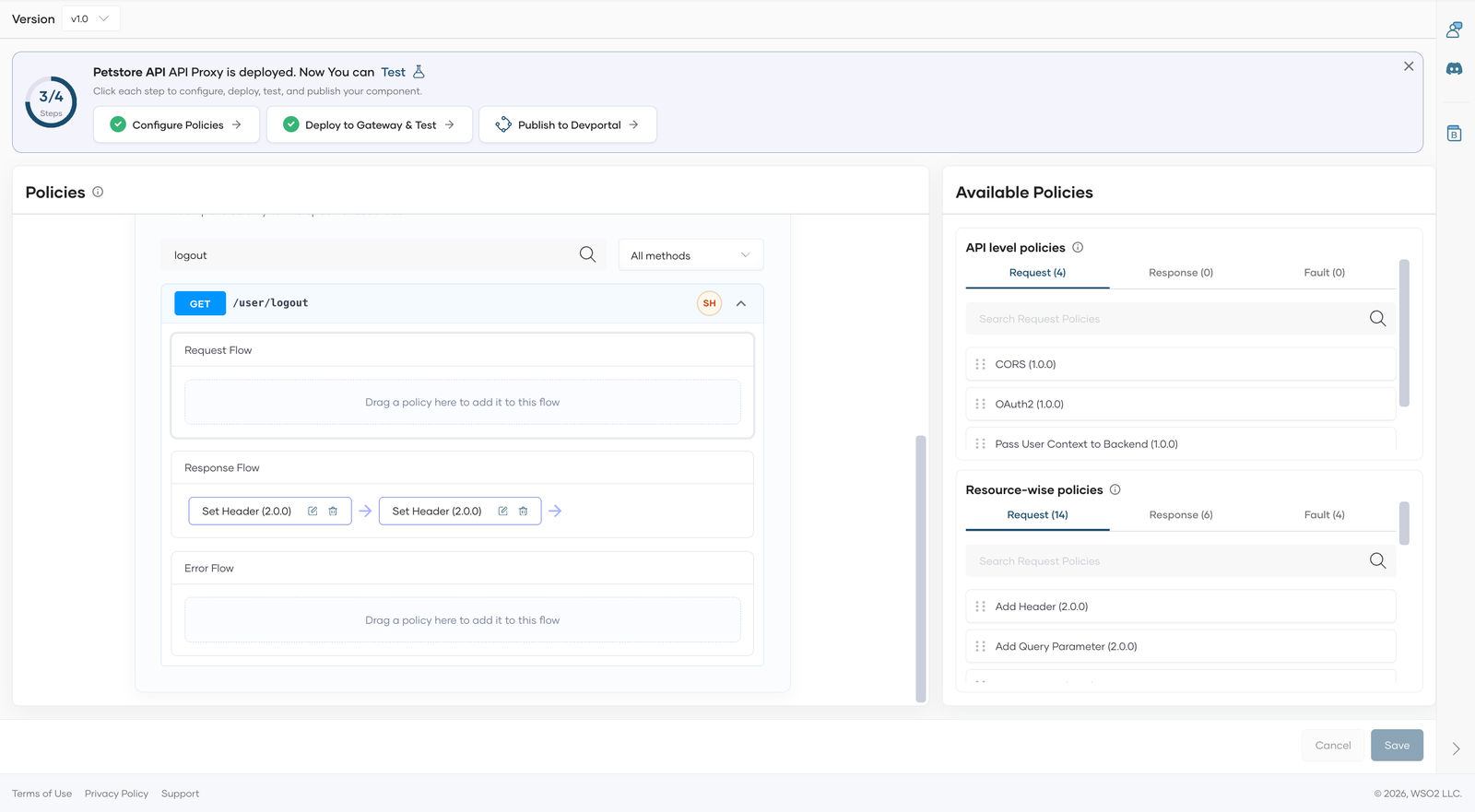
After Save and a redeploy of 1.0, the deprecated version's response carried both headers. In the commands below, BASE is the proxy's gateway URL without the version segment, for example https://<gateway-host>/petstore-lifecycle-demo/petstore-api. To send the requests anonymously, the API-level OAuth2 policy was removed from 1.0 and 1.1 (2.0 had none). Keep authentication on for a real API.
curl -s -D - -o /dev/null "$BASE/v1.0/pet/findByStatus?status=available" | grep -i -E "^HTTP|deprecation|sunset"
HTTP/1.1 200 OK
deprecation: @1790812799
sunset: Wed, 31 Mar 2027 23:59:59 GMT
The gateway lowercased the header names, which HTTP allows. Policies belong to a version and aren't copied to new versions: 1.1, created after 1.0 had its header policies, still started without them. Set the headers on each version you deprecate.
Check which version answers
With the versions deployed, request the same operation on different paths. A marker header, X-Api-Version: 1.1, set on 1.1 with the same Set Header policy, shows which version answered. The run below was captured while 1.0 was Deprecated with its header policies, 1.1 was deployed but not yet published, and 2.0 was Published. The grep filter shows only the Deprecation and X-Api-Version headers:
for v in v1 v1.0 v1.1 v2 v2.0 v1.5 v3; do printf "%-5s " $v; curl -s -D - -o /dev/null "$BASE/$v/user/logout" | tr -d '\r' | grep -i -E "^HTTP|^deprecation|^x-api-version" | tr '\n' ' '; echo; done
v1    HTTP/1.1 200 OK x-api-version: 1.1
v1.0  HTTP/1.1 200 OK deprecation: @1790812799
v1.1  HTTP/1.1 200 OK x-api-version: 1.1
v2    HTTP/1.1 200 OK
v2.0  HTTP/1.1 200 OK
v1.5  HTTP/1.1 404 Not Found
v3    HTTP/1.1 404 Not Found
The gateway serves each exact version and also the major-only path. /v1 was answered by 1.1, the latest minor in major 1, and it stayed with 1.1 after 1.1 was published and then deprecated. Paths for versions that don't exist returned 404. The documentation describes the same routing: the major-version URL goes to the latest minor version within that major version. A major bump gets its own path, which is what a breaking change needs.
Two practical consequences follow. Publishing makes a version visible in the Developer Portal, but the gateway answered a deployed version on its exact and major-only paths even though it wasn't published, as 1.1 did. And consumers on /v1 kept reaching 1.1 after it was deprecated, with no Deprecation header unless a policy adds one, so set the headers on every version a major-only path can reach. The major-only path follows the latest minor in that major, so clients on /v1 move to a newer minor without changing their URL. Use it for consumers who should pick up backward-compatible releases, and the exact path for consumers who need one specific version. This walkthrough doesn't cover what /v1 does once its latest minor is retired.
Detect missing sunset dates with governance
The Spectral rule from Require a sunset date on every deprecation also runs in the console. Under Admin > Governance (see the governance documentation), Add Ruleset takes a name, an optional description, the rule file, and a provider name. Add Policy attaches rulesets to a policy. For example, name them API Deprecation Rules and API Deprecation Policy. The policy's applicability is Global, and its action is Notify, which the documentation lists as the only action for now.
To test it, import petstore-nosunset.yaml as a new proxy, named Petstore Sandbox API in the screenshot. The compliance dashboard, under Insights > Compliance, reports the rule against the deprecated operation, and the violation doesn't stop the import. The dashboard lists every policy that applies in the organization, so other rulesets can appear next to this one, as in the screenshot.
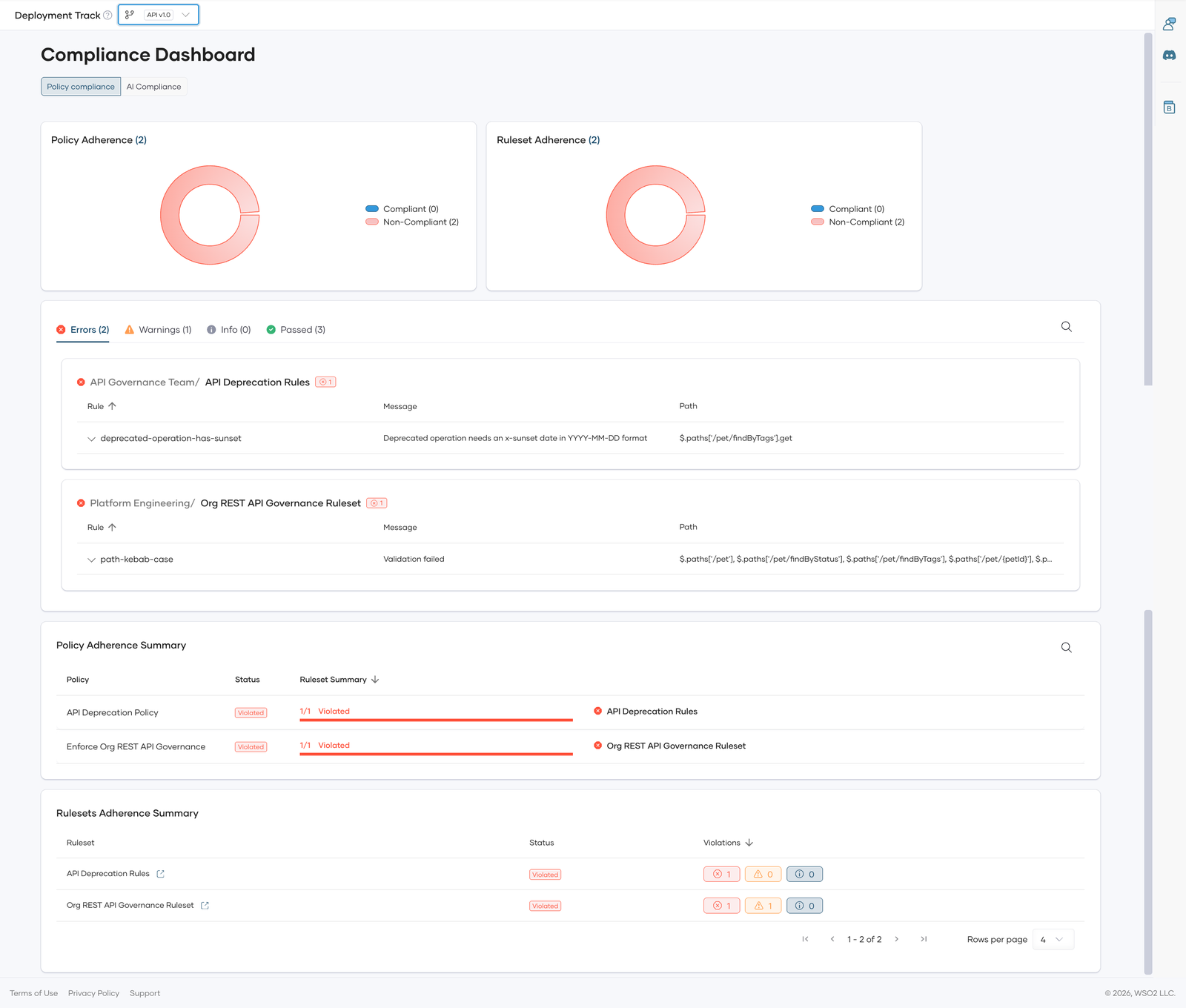
Creating a new version from petstore-deprecated.yaml, which has the x-sunset date, makes the dashboard mark the API Deprecation Policy as adhered, with no violations, so the extension survives import.
Retire the old version
With 2.0 published and the consumers migrated, retire 1.0. Retire was the only action offered on a Deprecated version, and Retired offers none. After retiring, the exact-version path stopped answering, while the other versions were unaffected. A client calling /v1.0 lost access, and one calling /v1 did not:
for v in v1.0 v1 v1.1 v2.0; do printf "%-5s " $v; curl -s -D - -o /dev/null "$BASE/$v/pet/findByStatus?status=available" | tr -d '\r' | grep -i -E "^HTTP|^deprecation|^x-api-version" | tr '\n' ' '; echo; done
v1.0  HTTP/1.1 404 Not Found
v1    HTTP/1.1 200 OK x-api-version: 1.1
v1.1  HTTP/1.1 200 OK x-api-version: 1.1
v2.0  HTTP/1.1 200 OK
A GET /user/logout gave the same results. 1.1 is still Deprecated at this point and still answers on /v1, so retire it on the same sunset date if you want the whole major-1 line to end.
Conclusion
You can't avoid breaking changes forever, but you can manage them. Catch them automatically with a diff in CI, minimize how often they're truly necessary with additive design patterns, and give consumers a dated runway when one is unavoidable, with the Deprecation and Sunset headers alongside a written notice.
Lifecycle management is where those decisions become state: a version is Published, then Deprecated, then Retired, and the platform records each step. Combined with a Set Header policy and a governance rule, it covers the notice, the signal, and the sunset-date rule. It doesn't detect a breaking change, so the diff check in CI and good API design still do that work. For the wider picture, see WSO2's overview of API governance. If you'd like to try that flow, WSO2 API Platform is a good place to start.
Frequently Asked Questions
What is considered a breaking change in an API?
Any change that requires consumers to modify their code to keep working correctly, such as removing a field or endpoint, changing a field's type, making an optional request field required, or tightening validation. Adding an optional field or a new endpoint is typically not breaking.
What does a breaking change mean?
Clients that worked before the change can fail after it, without any change on their side. That's why a breaking change usually needs a new major version and a deprecation period for the version it replaces.
Can a diff tool catch every breaking change?
No. It compares the OpenAPI description, so it can't see a change in behavior that the description doesn't capture, such as a GET that starts returning only pets with all the given tags instead of any. Pair it with contract tests.
How long should a deprecation period be?
Long enough for your slowest consumers to ship a migration. There's no standard number. For some widely used APIs that means six months or more.
Do the Deprecation and Sunset headers change how an API behaves?
No. They are hints. RFC 9745 says deprecation doesn't change the resource's behavior, and RFC 8594 says clients should treat Sunset as a hint. Clients and tooling have to read them and act.
Does WSO2 API Platform add the Deprecation and Sunset headers when I deprecate a version?
Not by itself. Deprecating a version leaves the responses unchanged. You can add the headers with the Set Header policy, or set them in your backend.
Can WSO2 API Platform detect breaking changes?
Lifecycle management tracks and communicates versions, deprecation, and retirement, but it doesn't compare contracts. Run a diff tool such as oasdiff in CI, and use governance rules for conventions such as a required sunset date.

